
Last updated: May 2026
DeepSeek for business is the use of DeepSeek AI models to improve company workflows such as customer support, sales research, marketing content, document analysis, software development, internal knowledge search, and business automation. Companies can use DeepSeek through its chat interface, API, or open-weight models, depending on their budget, technical maturity, and privacy requirements.
Interest in DeepSeek has grown because it offers business-friendly advantages: relatively low API costs, strong reasoning and coding capabilities, OpenAI/Anthropic-compatible API access, long-context support, and open-weight deployment options. DeepSeek’s current API documentation lists deepseek-v4-flash and deepseek-v4-pro as supported models, with 1M context length and support for features such as JSON output, tool calls, chat prefix completion, and FIM completion in non-thinking mode.
But DeepSeek business adoption should not be treated as a simple “copy and paste company data into a chatbot” decision. The right approach is to start with low-risk workflows, classify data sensitivity, add human review, secure API keys, and create clear AI usage rules before scaling across teams.
This guide explains how to use DeepSeek for business, where it fits best, how small businesses can benefit, what companies should know about the API, and which privacy, legal, and security risks must be managed.
What Is DeepSeek for Business?
DeepSeek for business refers to using DeepSeek AI models and tools inside business workflows. That can mean a founder using DeepSeek Chat to draft emails, a marketing team using it to turn product notes into landing page copy, a developer using the API for code review, or a company deploying open-weight DeepSeek models in a more controlled environment.
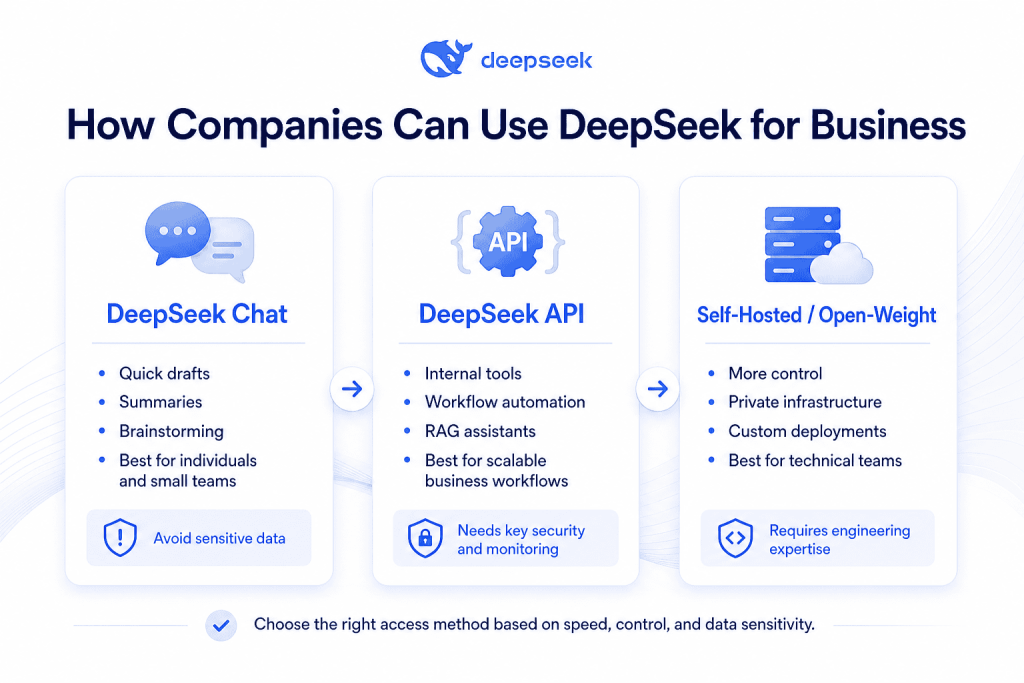
There are three common ways to use DeepSeek in a company:
| Access method | Best for | Typical user | Main caution |
|---|---|---|---|
| DeepSeek chat interface | Quick research, drafting, summarizing, brainstorming | Business users and small teams | Avoid sensitive company, customer, or regulated data |
| DeepSeek API | Product features, internal tools, workflow automation, RAG systems | Developers and technical teams | Requires key security, logging, monitoring, and governance |
| Open-weight/self-hosted deployment | Higher-control environments, private infrastructure, experimentation | CTOs, ML engineers, infrastructure teams | Requires technical skill, compute resources, and security management |
The phrase “DeepSeek business” usually does not mean a separate, mature enterprise suite like some business AI platforms. In many searches, it means using DeepSeek AI for business purposes: automation, analysis, customer support, software development, and productivity.
DeepSeek’s Open Platform Terms specifically apply to developers using its API and developer tools as individuals or on behalf of enterprise developers for internal organizational use or services for end users. The terms also make developers responsible for downstream systems, end-user management, data practices, and legal compliance.
Why Companies Are Considering DeepSeek AI for Business
Companies are evaluating DeepSeek AI for business because it combines model access, API flexibility, and cost efficiency in a way that can be attractive for experimentation and automation.
1. Cost efficiency
DeepSeek’s pricing page lists token-based pricing per 1M tokens and shows significantly different rates for cache hits, cache misses, and output tokens. As of the official pricing page viewed in May 2026, deepseek-v4-flash is listed at $0.14 per 1M cache-miss input tokens and $0.28 per 1M output tokens, while deepseek-v4-pro is listed with discounted pricing through May 31, 2026. DeepSeek also notes that prices may change and recommends checking the pricing page regularly.
For businesses, this matters because AI projects often fail to scale when inference costs become too high. Lower API costs can make it easier to test customer support automation, internal knowledge search, document summarization, and coding assistants before committing to a larger AI budget.
2. Reasoning and coding support
DeepSeek describes V4-Pro as focused on agentic capabilities, coding, world knowledge, and reasoning, while V4-Flash is positioned as a faster and more cost-effective option with reasoning capabilities that approach V4-Pro. The official V4 Preview release also states that both models are available through the API.
This makes DeepSeek useful for tasks such as debugging, writing SQL, reviewing code, producing technical documentation, generating test cases, and summarizing long technical discussions.
3. API compatibility
DeepSeek says its API uses a format compatible with OpenAI and Anthropic, meaning developers can often adapt existing SDK-based workflows by changing configuration such as the base URL, API key, and model name. The official API page lists deepseek-v4-flash and deepseek-v4-pro as current model options, while legacy deepseek-chat and deepseek-reasoner names are marked for deprecation on July 24, 2026.
This is important for companies that already have AI workflow prototypes built around OpenAI-style chat completions or Anthropic-style integrations.
4. Long-context capabilities
DeepSeek’s official V4 Preview release says 1M context is now the default across official DeepSeek services, and the pricing page lists 1M context length for the current V4 models.
For business use, long context can help with large documents, policy manuals, customer feedback exports, code repositories, legal drafts, technical specifications, and multi-step analysis. It does not remove the need for verification, but it can reduce the amount of manual document splitting required.
5. Open-weight options
DeepSeek V4-Pro and V4-Flash are available on Hugging Face, and the model cards state that the repositories and model weights are licensed under the MIT License.
For companies with technical teams, open-weight models can support internal testing, private deployments, fine-tuning experiments, and infrastructure-level control. However, self-hosting large models is not simple. It requires compute, security, monitoring, model serving expertise, and ongoing maintenance.
DeepSeek Business Use Cases by Department
| Department | Use case | Example workflow | Best access method | Risk level |
|---|---|---|---|---|
| Customer support | Draft support replies | Summarize a ticket and draft a response based on approved help docs | API with RAG or controlled chat | Medium |
| Sales | Lead research | Summarize public company information and draft outreach angles | Chat or API | Low |
| Marketing | Content production | Turn product notes into blog outlines, landing pages, and social posts | Chat or API | Low |
| Operations | SOP creation | Convert messy internal notes into standard operating procedures | Chat for low-risk data; API for controlled workflows | Medium |
| Finance | Report summarization | Summarize non-sensitive financial commentary or variance explanations | API with strict controls | High |
| HR | Job descriptions | Draft role descriptions, interview questions, and onboarding checklists | Chat or API | Medium |
| Legal/admin | Contract review support | Create a checklist of clauses for human legal review | Controlled API or avoid for sensitive contracts | High |
| Software development | Code review and debugging | Review code, generate tests, explain errors, draft documentation | API, coding tools, or self-hosted | Medium to High |
| Data analysis | Spreadsheet explanation | Summarize trends and generate analysis questions from anonymized data | Chat or API | Medium |
| Executive strategy | Decision briefs | Convert research and meeting notes into pros, cons, risks, and next steps | Chat or API | Medium |
The safest early use cases are usually low-risk and non-confidential: marketing drafts, public research summaries, internal templates, role descriptions, and generic SOPs. The riskiest use cases involve customer personal data, regulated records, confidential contracts, financial data, proprietary source code, or business strategy.
How to Use DeepSeek for Business: Step-by-Step
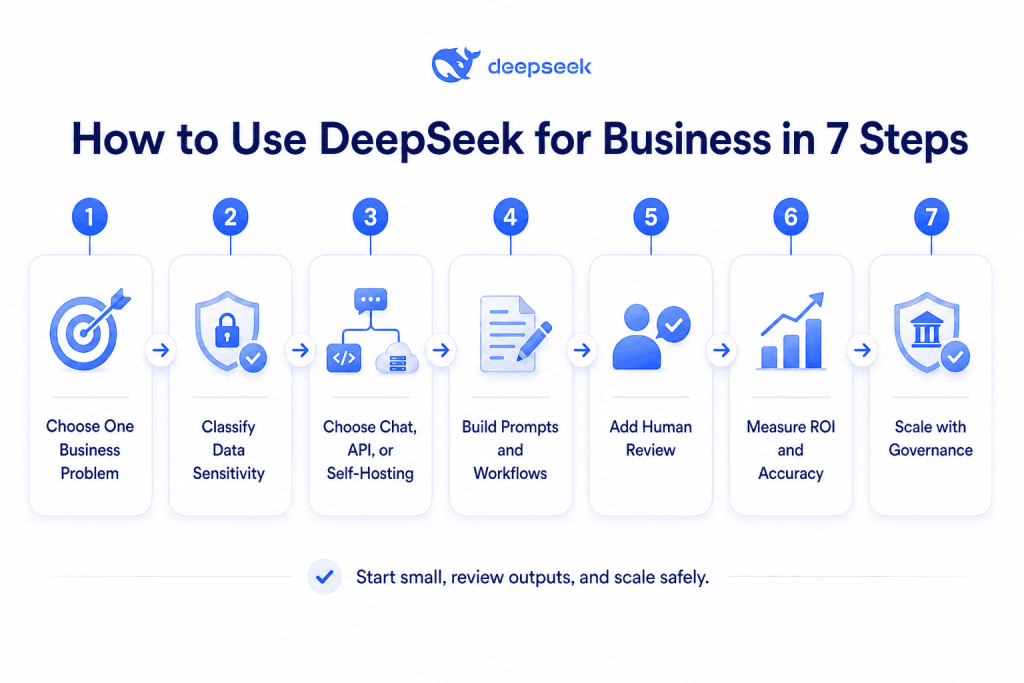
Step 1: Choose one business problem
Start with one specific workflow, not a company-wide AI rollout. Good first projects include:
- Drafting customer support replies from approved FAQs.
- Turning product notes into marketing drafts.
- Summarizing public competitor research.
- Creating SOPs from non-sensitive process notes.
- Helping developers explain errors or write tests.
Avoid starting with highly sensitive areas such as legal advice, medical data, customer financial records, or confidential M&A documents.
Step 2: Classify the data sensitivity
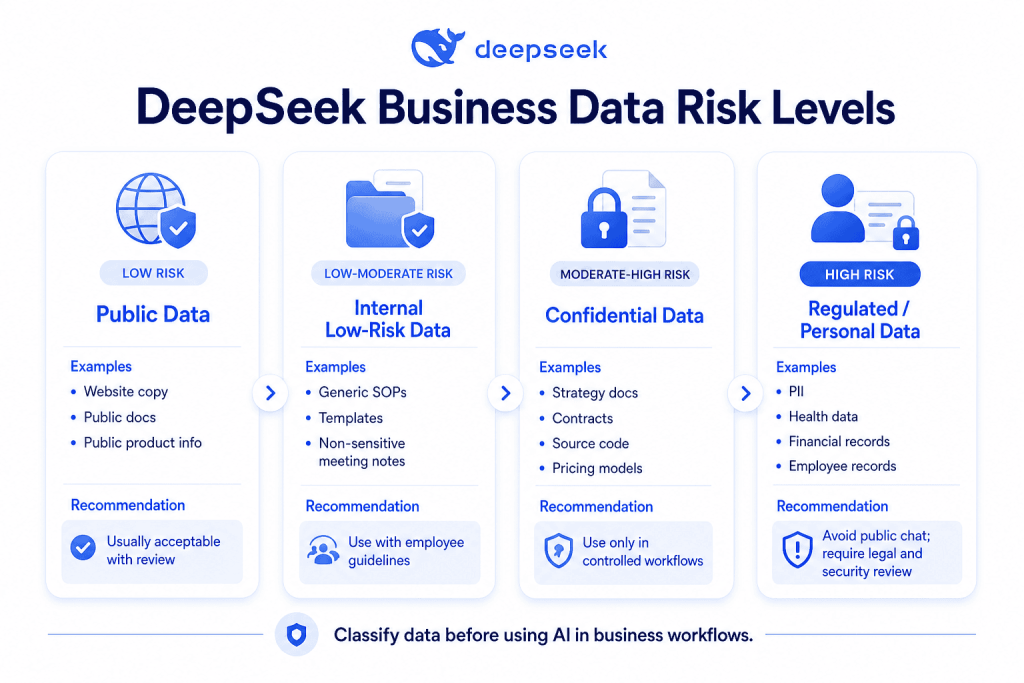
Before using DeepSeek for companies, decide what type of data the model will process.
| Data class | Examples | Recommended approach |
|---|---|---|
| Public | Website copy, public product pages, public competitor pages | Usually acceptable with basic review |
| Internal low-risk | Generic SOPs, templates, non-sensitive meeting notes | Use with caution and employee guidelines |
| Confidential | Strategy docs, source code, pricing models, contracts | Use only with controlled workflows and approvals |
| Regulated/personal | PII, health data, financial records, employee records | Avoid public chat; require legal/security review |
DeepSeek’s privacy policy states that personal data may include user inputs and that users have the right to opt out of using personal data for model training or technology optimization. It also states that personal data is processed and stored in the People’s Republic of China.
Step 3: Choose Chat, API, or self-hosting
Use the chat interface for simple, low-risk productivity tasks. Use the API when you need repeatable workflows, logs, redaction, user permissions, prompt templates, and integration with business systems. Consider self-hosting only if you have the infrastructure and security expertise to operate open-weight models safely.
Step 4: Build prompts and workflows
A business prompt should include the role, task, context, source material, output format, and quality rules. For example:
You are a customer support specialist. Draft a friendly reply to the customer using only the approved FAQ below. Do not invent policy details. If the FAQ does not answer the issue, say that the case should be escalated to a human agent. Output: subject line, short reply, and escalation note.
Step 5: Add human review and quality checks
DeepSeek’s Open Platform Terms state that AI-generated output may contain errors or omissions and should be treated as reference-only, especially for professional fields such as legal, medical, and financial matters.
For business use, that means employees should verify important outputs before sending them to customers, publishing them, making financial decisions, or relying on them in regulated contexts.
Step 6: Measure ROI and accuracy
Track practical KPIs:
| KPI | What it measures |
|---|---|
| Time saved | Minutes saved per task compared with manual work |
| Cost per task | API cost plus human review time |
| Response quality | Reviewer score or customer rating |
| Customer satisfaction | CSAT, NPS, or ticket resolution feedback |
| Error rate | Percentage of outputs requiring correction |
| Human review rate | Percentage of AI outputs reviewed before use |
Step 7: Scale with governance
After a pilot succeeds, create an AI usage policy, approved use cases, prohibited data rules, prompt templates, review workflows, API security controls, and monitoring dashboards.
DeepSeek for Small Business
DeepSeek for small business can be useful because many small companies need content, support, analysis, and planning help but do not have large teams. A small business owner can use DeepSeek to draft product descriptions, write customer emails, create social calendars, summarize feedback, build FAQs, analyze simple spreadsheets, and document repeatable processes.
The key is to keep sensitive data out of public chat tools and use DeepSeek as an assistant, not as an unchecked decision-maker.
Best DeepSeek Workflows for Small Businesses
| Workflow | Prompt example | Expected benefit | Risk warning |
|---|---|---|---|
| Product descriptions | “Write 5 product descriptions for this handmade candle using a warm, premium tone. Use only these features: [features].” | Faster ecommerce copy | Do not invent materials, certifications, or guarantees |
| Email drafting | “Draft a polite follow-up email for a customer who asked about delivery timing. Keep it under 120 words.” | Faster communication | Verify promises before sending |
| Social media calendar | “Create a 2-week Instagram content calendar for a local bakery promoting Ramadan desserts.” | More consistent marketing | Check cultural accuracy and brand tone |
| Customer feedback summary | “Summarize these anonymized reviews into top complaints, top praise, and action items.” | Faster insight extraction | Remove names, phone numbers, emails, and order IDs |
| FAQ creation | “Turn these support questions into an FAQ page with short answers.” | Reduces repetitive support | Verify policies and refund terms |
| Spreadsheet analysis | “Explain the trends in this anonymized monthly sales table and suggest 5 questions to investigate.” | Better business visibility | Do not upload raw customer or financial records |
| SOP drafting | “Create a step-by-step SOP for opening and closing a small retail store.” | Easier staff training | Customize for actual safety rules |
| Simple business plan | “Draft a one-page business plan for a mobile car wash in Cairo.” | Planning support | Validate market assumptions manually |
| Support scripts | “Write 3 phone support scripts for late delivery complaints.” | Better customer service consistency | Do not automate emotional or complex complaints fully |
For small businesses, the best rule is simple: use DeepSeek for drafts, structure, summaries, and ideas. Keep final judgment, customer promises, legal obligations, and financial decisions with a human.
DeepSeek for Companies: API, Integration, and Automation
Companies can use the DeepSeek API to integrate AI into internal systems, customer-facing tools, and employee workflows. The official API documentation says developers can obtain an API key, use OpenAI-format or Anthropic-format endpoints, and call models such as deepseek-v4-flash and deepseek-v4-pro.
API key basics
An API key is a secret credential that lets your application call DeepSeek. DeepSeek’s Open Platform Terms state that users must keep API keys secure, should not share or publicly disclose them, and should not expose keys in browser or client-side code.
Best practices:
- Store API keys in a secrets manager.
- Never commit keys to GitHub.
- Never put keys in frontend JavaScript.
- Rotate keys after employee departures or suspected exposure.
- Use separate keys for development and production.
- Monitor usage for abnormal spikes.
Model selection
Use deepseek-v4-flash for lower-cost, faster, high-volume tasks such as classification, extraction, summaries, and simple support drafts. Use deepseek-v4-pro for more complex reasoning, coding, planning, and high-value workflows where quality matters more than speed or cost.
Avoid legacy names in new builds. DeepSeek’s API documentation says deepseek-chat and deepseek-reasoner are scheduled for deprecation on July 24, 2026.
Context caching
DeepSeek’s documentation explains that context caching can reduce repeated-input costs and latency when duplicate prefixes appear in prompts, such as long system prompts, multi-turn conversations, recurring document analysis, and repeated code review contexts.
For businesses, this can be useful when the same knowledge base, policy text, or product documentation is repeatedly included in prompts.
Tool calls and structured output
DeepSeek’s pricing/model page lists JSON output and tool calls for current V4 models.
This is important for automation because business systems often need structured results such as:
{
  "customer_intent": "refund_request",
  "priority": "medium",
  "recommended_action": "send_refund_policy"
}
RAG and internal knowledge bases
For business use, a common architecture is retrieval-augmented generation, or RAG. Instead of asking the model to “know” your business, your system retrieves relevant approved documents first, then asks DeepSeek to answer using only those documents.
Simple architecture:
Business app → secure backend → document retrieval → DeepSeek API → human review/dashboard
This approach is useful for help desks, internal policy search, onboarding assistants, developer documentation, and sales enablement.
Logging and monitoring
A company using DeepSeek API should monitor:
- Prompt and response quality.
- API cost by team or workflow.
- Error rates.
- Hallucination reports.
- Security events.
- Repeated policy violations.
- User feedback.
Do not log sensitive prompts in plain text unless your legal and security teams approve the practice.
Prompt Examples for Business Teams
1. Customer support
Prompt:
You are a customer support specialist. Your task is to draft a helpful reply to a customer complaint. Context: use only the approved policy text below. Output format: subject line, reply, and escalation note. Quality constraints: do not invent refund terms, do not promise compensation, and escalate if the policy does not answer the issue.
2. Marketing
Prompt:
You are a B2B SaaS copywriter. Create a landing page outline for [product] targeting [audience]. Context: [features, benefits, objections]. Output format: headline, subheadline, sections, CTAs, and FAQ ideas. Quality constraints: avoid hype, avoid unsupported claims, and keep the tone professional.
3. Sales outreach
Prompt:
You are a sales development representative. Draft a personalized cold email to [buyer persona] at [company type]. Context: [public company notes] and [offer]. Output format: subject line plus email under 120 words. Quality constraints: no fake familiarity, no exaggerated ROI, and include one clear CTA.
4. Meeting summary
Prompt:
You are an executive assistant. Summarize these meeting notes into decisions, action items, owners, deadlines, risks, and unresolved questions. Output format: table. Quality constraints: do not add items that are not in the notes.
5. Spreadsheet analysis
Prompt:
You are a business analyst. Analyze this anonymized sales table. Identify trends, anomalies, and five follow-up questions. Output format: summary, observations, risks, and recommended next analysis. Quality constraints: do not infer customer identities or make unsupported financial forecasts.
6. Competitor research
Prompt:
You are a market research analyst. Compare these public competitor pages. Output format: positioning, pricing signals, messaging themes, strengths, weaknesses, and opportunities. Quality constraints: use only the provided source text and label assumptions clearly.
7. SOP creation
Prompt:
You are an operations manager. Turn these notes into a standard operating procedure. Output format: purpose, scope, tools needed, steps, quality checks, and escalation rules. Quality constraints: use plain English and flag missing information.
8. Code review
Prompt:
You are a senior software engineer. Review this code for readability, bugs, security risks, and test coverage. Output format: summary, issues by severity, suggested fixes, and test cases. Quality constraints: do not rewrite the entire file unless requested.
9. Executive decision brief
Prompt:
You are a strategy advisor. Create a one-page decision brief about [decision]. Context: [facts, constraints, options]. Output format: recommendation, options considered, pros, cons, risks, assumptions, and next steps. Quality constraints: separate facts from assumptions.
Benefits of DeepSeek AI for Business
Lower AI experimentation cost
DeepSeek’s pricing may make it easier to run controlled experiments without committing to high-volume enterprise contracts immediately. This is especially useful for startups and small businesses testing AI-assisted support, marketing, and operations.
Faster content and research workflows
Teams can use DeepSeek to create first drafts, summarize research, rewrite technical content for non-technical audiences, and turn unstructured notes into organized outputs.
Developer productivity
DeepSeek can help developers explain errors, generate tests, review code, write documentation, and create structured debugging plans. This does not replace secure code review, but it can speed up routine development tasks.
Automation potential
With API access, JSON output, tool calls, and workflow integrations, companies can build AI features into CRMs, help desks, dashboards, document systems, internal tools, and developer workflows.
Long-context document analysis
The official DeepSeek V4 documentation lists 1M context support, which can help with large document workflows when used carefully.
Open-weight flexibility
Open-weight availability gives technical teams more options for experimentation and deployment. The V4-Pro and V4-Flash Hugging Face model cards list MIT licensing for the repositories and weights.
Risks, Privacy, and Security Considerations
DeepSeek should be adopted with governance. The biggest business risks are not just model quality; they are data exposure, legal compliance, employee misuse, and overreliance on AI-generated outputs.
Sensitive data exposure
Employees may paste customer records, contracts, source code, financial data, or strategy documents into public chat tools. That creates confidentiality and compliance risk.
DeepSeek’s privacy policy says personal data may be used to improve and train its technology, and it gives users a right to opt out of using personal data for training or technology optimization. It also states that personal data is processed and stored in China.
Regulatory and government scrutiny
DeepSeek has faced regulatory and government scrutiny in multiple jurisdictions. Reuters reported that Australia banned DeepSeek from government devices, the Czech Republic banned it in public administration, Germany asked Apple and Google to remove DeepSeek from app stores over data-safety concerns, and Italy previously blocked the app over privacy-policy concerns.
Private companies do not need to copy government bans automatically, but regulated industries should pay close attention to data residency, vendor risk, employee access, and legal requirements.
Security incidents
In January 2025, Wiz Research reported that it found a publicly accessible DeepSeek database containing chat history, secret keys, backend details, and other sensitive information, and said DeepSeek secured the exposure after responsible disclosure.
This does not prove every DeepSeek deployment is unsafe, but it reinforces the need for vendor risk assessment, API key controls, and cautious data handling.
Hallucinations and inaccurate outputs
AI models can produce confident but incorrect responses. DeepSeek’s privacy policy itself warns that the most likely next words may not be factually accurate and says users should not rely on the factual accuracy of model output.
For business, this means every high-impact output should be reviewed.
What businesses should never paste into a public AI chatbot
Avoid entering:
- Customer PII such as names, phone numbers, emails, addresses, ID numbers, and payment details.
- Confidential contracts.
- Passwords, credentials, private keys, and API keys.
- Raw financial records.
- Source code containing secrets.
- Medical, legal, insurance, or regulated data.
- Employee records.
- Confidential strategy documents.
- Unreleased product plans.
- M&A, investor, or board materials.
When not to use DeepSeek
A company should avoid or delay DeepSeek adoption when:
- It has no AI usage policy.
- Employees are likely to paste sensitive data into public chat.
- The workflow requires strict data residency that DeepSeek cannot satisfy.
- Outputs will be used as professional legal, medical, or financial advice without expert review.
- The company cannot monitor API usage or secure keys.
- The task involves regulated personal data and legal review has not approved the workflow.
DeepSeek vs ChatGPT vs Claude vs Gemini for Business
| Tool | Best for | Strengths | Limitations | Business fit |
|---|---|---|---|---|
| DeepSeek | Cost-sensitive AI workflows, coding, API experimentation, open-weight flexibility | Competitive pricing, API compatibility, long context, open-weight options | Data residency and regulatory concerns may be blockers; governance needed | May fit technical teams and cost-sensitive companies with strong controls |
| ChatGPT | General business productivity, enterprise AI workspaces, broad tool ecosystem | Mature business plans, admin controls, broad user adoption | Cost and vendor dependency may be concerns | Strong fit for organizations wanting managed business AI; OpenAI says business data is not used for training by default |
| Claude | Writing, analysis, coding, document-heavy workflows, risk-sensitive teams | Strong business writing and analysis; Anthropic says commercial inputs/outputs are not used for training by default | Availability and plan features vary by region and product | Strong fit for teams prioritizing careful writing, analysis, and commercial data commitments |
| Gemini | Google Workspace-connected productivity and enterprise search | Deep Workspace integration, admin controls, Google ecosystem | Best value often depends on existing Google adoption | Strong fit for organizations already using Google Workspace; Google says Workspace Gemini content is not used for model training outside the domain without permission |
The best choice depends on business requirements, not model popularity. A startup may choose DeepSeek for low-cost API experimentation. A regulated enterprise may prefer a vendor with stronger contractual data controls. A Google-heavy organization may prefer Gemini. A writing-heavy team may prefer Claude. Many companies will use more than one model with different rules for different workflows.
Implementation Checklist
Use this checklist before scaling DeepSeek for business:
- Define approved use cases.
- Define prohibited use cases.
- Create an AI usage policy.
- Train employees on safe prompting.
- Redact sensitive data before using AI tools.
- Use API-based workflows instead of public chat for controlled use cases.
- Secure API keys in a secrets manager.
- Keep API keys out of client-side code.
- Add human review for customer-facing or high-impact outputs.
- Monitor cost, quality, and error rates.
- Review legal, privacy, and compliance requirements.
- Evaluate data residency implications.
- Maintain prompt templates and approved knowledge sources.
- Review outputs for hallucinations.
- Update workflows as DeepSeek models, pricing, and terms change.
FAQs
What is DeepSeek for business?
DeepSeek for business means using DeepSeek AI models to support business tasks such as customer support, marketing, sales, coding, document summarization, operations, and internal automation. Companies can use it through chat, API integrations, or open-weight deployments.
Can companies use DeepSeek?
Yes, companies can use DeepSeek, especially through its Open Platform and API. DeepSeek’s Open Platform Terms apply to developers using API services on behalf of enterprise developers for internal organizational use or end users.
How can I use DeepSeek for business?
Start with one low-risk workflow, remove sensitive data, choose chat or API access, create structured prompts, review outputs manually, measure quality and time saved, then scale only after creating governance rules.
Is DeepSeek good for small business?
DeepSeek can be useful for small businesses that need help with product descriptions, emails, social media calendars, customer FAQs, SOPs, and simple business planning. Small businesses should avoid pasting customer data, financial records, or confidential documents into public chat tools.
Is DeepSeek safe for business data?
DeepSeek can be used safely only with appropriate controls. Businesses should review its privacy policy, data residency, terms, API security, and regulatory requirements. DeepSeek’s privacy policy states that personal data is processed and stored in China, which may be unacceptable for some organizations.
Does DeepSeek have an API for companies?
Yes. DeepSeek provides API access and documents OpenAI-format and Anthropic-format compatibility. The current API docs list deepseek-v4-flash and deepseek-v4-pro as supported models.
Is DeepSeek free for business use?
DeepSeek chat access and open-weight models may be usable at low or no direct software cost depending on the access method, but API usage is token-priced. Self-hosting open weights also involves infrastructure, engineering, and maintenance costs.
Can DeepSeek replace employees?
DeepSeek should not be viewed as a full employee replacement. It is better used as an assistant for drafting, summarizing, analysis, coding support, and workflow automation. Humans should still review important outputs and handle judgment-heavy work.
What are the best DeepSeek business use cases?
The best use cases are repetitive, text-heavy, and reviewable: support drafts, marketing outlines, sales research, meeting summaries, SOPs, code review, internal knowledge search, and document summarization.
How does DeepSeek compare with ChatGPT for business?
DeepSeek may be attractive for cost-sensitive API workflows and open-weight flexibility. ChatGPT may be better suited for organizations that want a managed business AI workspace, admin controls, and OpenAI’s business data commitments. The right choice depends on privacy, budget, workflow, and compliance requirements.
Can DeepSeek analyze business documents?
Yes, DeepSeek can summarize and analyze business documents, especially with long-context support. However, companies should avoid uploading sensitive contracts, customer data, financial records, or regulated documents unless the workflow has been approved by legal and security teams.
Should regulated companies use DeepSeek?
Regulated companies should be cautious. They should review DeepSeek’s privacy policy, data residency, terms, security controls, and applicable laws before using it. Public chat should generally be avoided for regulated or confidential data.
Conclusion
DeepSeek for business can be valuable for companies that want affordable AI experimentation, coding assistance, document workflows, content production, customer support drafting, and API-based automation. It is especially interesting for technical teams and small businesses that want to test AI workflows without immediately committing to expensive infrastructure.
The safest way to adopt DeepSeek is to start small: choose low-risk workflows, avoid sensitive data, use structured prompts, require human review, secure API keys, and measure results. Companies with strict privacy, legal, or regulatory requirements should perform vendor risk review before using DeepSeek with business data.
DeepSeek for business is not about replacing teams with AI. It is about giving teams a practical assistant while protecting customers, confidential information, and business judgment.