
DeepSeek Use Cases include software development, data analysis, customer support, internal knowledge search, document review, marketing, sales research, workflow automation, education, and technical reasoning. The best way to use DeepSeek depends on whether you are using the web app, API, thinking mode, non-thinking mode, or an open-weight/self-hosted model.
As of 2026, DeepSeek is not just a chatbot for answering questions. It is also a practical AI platform for developers and teams that need reasoning, coding support, structured outputs, tool calls, long-context workflows, and cost-conscious automation. The official DeepSeek API documentation currently lists deepseek-v4-flash and deepseek-v4-pro, while legacy API names deepseek-chat and deepseek-reasoner are scheduled for retirement on July 24, 2026. DeepSeek’s API also supports OpenAI-compatible and Anthropic-compatible formats, which makes it easier to connect to existing AI tools and software workflows.
This guide explains the most useful DeepSeek AI use cases, where DeepSeek is a strong fit, where it is not, and how to choose the right setup for business, development, research, and automation.
What Are the Best DeepSeek Use Cases?
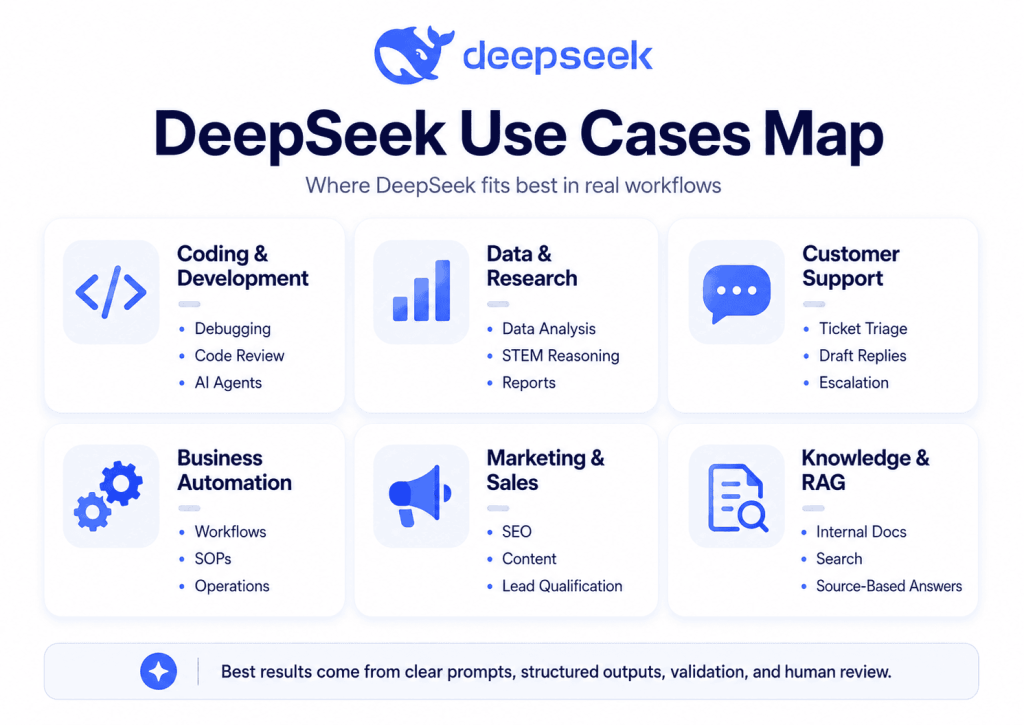
The best DeepSeek Use Cases are:
- Software development, coding, debugging, and code review
- Data analysis, data cleaning, and spreadsheet insights
- Customer support automation and ticket triage
- Internal knowledge search and RAG assistants
- Document summarization and contract or policy review support
- Marketing, SEO, and content workflows
- Sales research, lead qualification, and CRM enrichment
- Business operations and workflow automation
- Finance, forecasting support, and risk analysis
- Education, tutoring, and training content
- Research, STEM reasoning, and technical problem solving
- Product management and requirements analysis
- HR, recruiting, and internal communications
- Developer tools and AI agents
DeepSeek is especially useful when a task needs structured thinking, code generation, repeatable workflows, or API integration. It should still be used with human review, especially in regulated, confidential, legal, medical, financial, or security-sensitive contexts.
DeepSeek Use Cases at a Glance
| Use Case | Best For | Why DeepSeek Helps | Recommended Setup | Risk Level / Human Review Needed |
|---|---|---|---|---|
| Coding and debugging | Developers, engineering teams | Explains code, finds bugs, drafts functions | API, web app, thinking mode | Medium; senior review for production |
| Data analysis | Analysts, operators, founders | Summarizes patterns, cleans data, explains metrics | Web app, API, JSON Output | Medium; validate calculations |
| Customer support | Support teams | Triage, classify, draft replies | API, JSON Output, Tool Calls | Medium; review escalations |
| Internal knowledge search | Teams with docs | Answers from company knowledge | RAG, API, long context | Medium-high; source citations required |
| Document review | Legal, compliance, HR | Summarizes policies and risks | Long context, thinking mode | High; expert review required |
| Marketing and SEO | Marketers, agencies | Briefs, outlines, content refreshes | Web app, API | Low-medium; editorial review |
| Sales research | Sales and RevOps | Lead scoring, account summaries | API, Tool Calls, CRM workflow | Medium; verify data |
| Operations automation | Ops, finance, admin | SOPs, routing, reporting | API, Tool Calls | Medium-high; approvals needed |
| Finance analysis | Finance teams | Scenario analysis and summaries | Thinking mode, JSON Output | High; not final advice |
| Education | Teachers, trainers | Lesson plans, quizzes, explanations | Web app, thinking mode | Medium; check accuracy |
| Research and STEM | Researchers, students | Reasoning, math, technical explanation | Thinking mode | Medium-high; verify sources |
| Product management | PMs, founders | Requirements, PRDs, user story mapping | Web app, API | Medium; stakeholder review |
| HR and recruiting | HR teams | Job descriptions, interview kits | Web app, structured prompts | Medium-high; bias review |
| AI agents | Developers, automation teams | Tool-connected workflows | API, Tool Calls, guardrails | High; monitoring required |
What Makes DeepSeek Useful for These Use Cases?
DeepSeek is useful because it combines general language understanding with reasoning, coding support, structured outputs, tool use, and long-context workflows.
As of May 2026, official DeepSeek model documentation lists deepseek-v4-flash and deepseek-v4-pro, both with support for thinking and non-thinking modes, JSON Output, Tool Calls, and a 1M context length.
Reasoning / Thinking Mode helps with tasks that require multi-step analysis, such as debugging, policy review, forecasting assumptions, technical planning, and STEM problem solving. DeepSeek’s documentation describes Thinking Mode as a mode where the model produces intermediate reasoning before the final answer, with effort controls available in the API.
JSON Output makes DeepSeek more useful in business software because the model can return structured data that can be parsed by apps, dashboards, CRMs, ticketing systems, and internal tools. DeepSeek’s JSON guide says users should set response_format to {"type":"json_object"} and include clear JSON instructions in the prompt.
Tool Calls allow DeepSeek to request external functions, such as looking up a customer record, checking inventory, retrieving weather, querying a database, or creating a ticket. The model does not execute tools by itself; your application provides the function and returns the result.
Context Caching is useful for repeated long-input workflows, such as asking multiple questions about the same policy, financial report, knowledge base, or technical document. DeepSeek says Context Caching is enabled by default and can reuse overlapping prefixes from previous requests on a best-effort basis.
These capabilities make DeepSeek suitable for practical business and developer workflows, not only one-off chat prompts.
1. DeepSeek for Software Development, Coding, Debugging, and Code Review
One of the strongest DeepSeek use cases is software development. Developers can use DeepSeek for coding, bug fixing, refactoring, test generation, documentation, and code review.
Example workflow:
A developer pastes a failing function, the error message, and the expected behavior. DeepSeek explains the likely cause, proposes a fix, and writes unit tests. For larger codebases, the API can be connected to developer tools or internal code review workflows.
Sample prompt:
“Review this Python function for bugs, edge cases, and performance issues. Explain the problem, rewrite the function, and suggest three unit tests. Do not change the public interface.”
Best setup:
Use Thinking Mode for complex debugging, non-thinking mode for simple code snippets, and API integration for coding assistants. DeepSeek’s official docs also mention support for agent and coding-assistant integrations such as Claude Code, GitHub Copilot, and OpenCode through compatible configurations.
Risks and limitations:
DeepSeek can produce plausible but incorrect code. Developers should run tests, check security implications, and review production changes manually.
Use another tool when:
You need guaranteed framework-specific accuracy, real-time repository indexing, licensed code compliance checks, or deep IDE-native debugging.
2. DeepSeek for Data Analysis, Data Cleaning, and Spreadsheet Insights
DeepSeek for data analysis works well when teams need help interpreting CSV files, spreadsheets, metrics, reports, or business data.
Example workflow:
An analyst uploads or pastes anonymized data, asks DeepSeek to identify missing values, outliers, trends, and possible explanations, then requests a clean summary for leadership.
Sample prompt:
“Analyze this anonymized sales table. Identify trends, unusual values, and possible causes. Return a concise executive summary and a JSON object with key metrics, risks, and follow-up questions.”
Best setup:
Use JSON Output for structured analysis, long-context workflows for larger reports, and Context Caching when asking repeated questions about the same dataset.
Risks and limitations:
AI can misread columns, invent explanations, or make calculation errors. Always verify calculations in Excel, Python, BI tools, or your database.
Use another tool when:
You need statistical modeling, live BI dashboards, database-level accuracy, or audited financial analysis.
3. DeepSeek for Customer Support Automation and Ticket Triage
DeepSeek business use cases often start with customer support because support workflows are repetitive, text-heavy, and easy to structure.
Example workflow:
A support ticket arrives. DeepSeek classifies the topic, urgency, customer sentiment, refund risk, and recommended next action. If confidence is high, it drafts a reply. If confidence is low, it escalates to a human.
Sample prompt:
“Classify this support ticket into category, urgency, sentiment, refund risk, and next action. Return valid JSON only. Do not resolve legal, billing, or account-security issues without escalation.”
Best setup:
Use API + JSON Output for classification and Tool Calls for pulling order status, subscription tier, or customer history.
Risks and limitations:
Support automation can frustrate users if it gives generic replies or mishandles sensitive issues. Add escalation rules for refunds, legal threats, medical claims, payment problems, and account security.
Use another tool when:
You need full omnichannel support software, sentiment analytics at scale, or regulated customer communications with strict approval workflows.
4. DeepSeek for Internal Knowledge Search and RAG Assistants
A high-value DeepSeek API use case is building an internal knowledge assistant connected to company documents, SOPs, help center articles, engineering docs, or policies.
Example workflow:
Employees ask questions such as “What is our refund policy for annual plans?” The system retrieves relevant internal documents, sends them to DeepSeek, and asks for an answer with citations.
Sample prompt:
“Answer the employee’s question using only the retrieved documents below. Cite the document title and section. If the answer is not in the documents, say you do not have enough information.”
Best setup:
Use RAG, API integration, long-context prompts, and Context Caching for repeated questions over the same document set.
Risks and limitations:
RAG systems can retrieve the wrong document, miss updates, or summarize outdated policy. Require source citations and give users a way to report incorrect answers.
Use another tool when:
You need enterprise search with permissions, document-level access control, audit logging, and compliance-grade governance.
5. DeepSeek for Document Summarization and Contract or Policy Review Support
DeepSeek can summarize long documents, compare clauses, identify obligations, and turn dense text into checklists. This is useful for contracts, HR policies, vendor documents, internal memos, and compliance drafts.
Example workflow:
A procurement team sends a vendor contract to DeepSeek and asks for a plain-English summary, unusual clauses, renewal terms, termination rights, and questions for legal counsel.
Sample prompt:
“Summarize this contract for a business reviewer. Identify parties, term, renewal, payment obligations, termination, confidentiality, liability, and unusual clauses. Do not provide legal advice. Flag items for lawyer review.”
Best setup:
Use long-context input, Thinking Mode for complex comparison, and structured output for risk registers.
Risks and limitations:
DeepSeek should not be treated as a lawyer. It can assist review but should not replace legal, compliance, or procurement experts.
Use another tool when:
You need legal research, jurisdiction-specific advice, contract lifecycle management, e-signature workflows, or binding legal interpretation.
6. DeepSeek for Marketing, SEO, and Content Workflows
DeepSeek can help marketers create briefs, outlines, landing page copy, ad concepts, email drafts, content refresh plans, keyword clusters, and content QA checklists.
Example workflow:
A marketing team asks DeepSeek to turn a target keyword into a search-intent analysis, outline, FAQ section, meta description, and internal linking plan.
Sample prompt:
“Create an SEO content brief for the keyword ‘DeepSeek Use Cases’. Include search intent, audience, article structure, related keywords, FAQ ideas, and a practical angle that avoids generic AI hype.”
Best setup:
Use the web app for brainstorming and API workflows for repeatable content operations, such as generating briefs from keyword lists.
Risks and limitations:
AI-generated content can be generic, inaccurate, or too similar to competing pages. Human editors should add expertise, examples, brand voice, and fact-checking.
Use another tool when:
You need live SERP data, keyword volumes, backlink analysis, or crawl diagnostics.
7. DeepSeek for Sales Research, Lead Qualification, and CRM Enrichment
Sales teams can use DeepSeek to summarize accounts, classify leads, draft outreach, and extract structured information from call notes or forms.
Example workflow:
A lead submits a form. DeepSeek scores the lead against your qualification rules, drafts a personalized email, and suggests the best sales motion.
Sample prompt:
“Score this lead using our qualification criteria. Return JSON with fit_score, company_size, pain_points, objections, recommended_next_step, and personalized_email_draft.”
Best setup:
Use API + JSON Output for lead scoring and Tool Calls to retrieve CRM records, website data, or previous interactions.
Risks and limitations:
Sales research can be wrong if source data is outdated. Never invent company facts, funding details, or buyer intent.
Use another tool when:
You need verified business databases, enrichment APIs, sales engagement platforms, or real-time account intelligence.
8. DeepSeek for Business Operations and Workflow Automation
DeepSeek automation can reduce manual work in operations, admin, finance operations, procurement, and internal reporting.
Example workflow:
An operations team sends recurring requests to DeepSeek: summarize weekly updates, classify issues by department, identify blocked tasks, and draft follow-up messages.
Sample prompt:
“Review these weekly team updates. Identify blockers, owners, deadlines, dependency risks, and recommended follow-ups. Return a management summary plus a JSON task list.”
Best setup:
Use API workflows, Tool Calls, and human approval steps. For repeated long status documents, Context Caching can help.
Risks and limitations:
Automation can create errors at scale. Add approval gates before sending messages, changing records, approving purchases, or updating customer data.
Use another tool when:
You need robotic process automation, ERP integrations, audit trails, or workflow systems with strict permissions.
9. DeepSeek for Finance, Forecasting Support, and Risk Analysis
Finance teams can use DeepSeek to explain reports, summarize variance notes, draft forecasting assumptions, and create scenario-analysis narratives.
Example workflow:
A finance analyst provides anonymized monthly performance data and asks DeepSeek to generate a variance summary, possible drivers, and questions for department owners.
Sample prompt:
“Analyze this anonymized monthly finance report. Summarize major variances, possible explanations, risks, and questions for review. Do not provide investment, tax, or accounting advice.”
Best setup:
Use Thinking Mode for scenario reasoning, JSON Output for structured risk registers, and Context Caching for repeated analysis of the same report.
Risks and limitations:
DeepSeek should not be used as the sole source for accounting, tax, investment, lending, or audit decisions. Human finance professionals must validate outputs.
Use another tool when:
You need audited financial statements, forecasting software, tax advice, investment research, or regulated financial recommendations.
10. DeepSeek for Education, Tutoring, and Training Content
DeepSeek can help create lesson plans, quizzes, explanations, study guides, role-play exercises, and internal training materials.
Example workflow:
A trainer asks DeepSeek to turn a company policy into a short training module with learning objectives, examples, quiz questions, and a manager checklist.
Sample prompt:
“Create a 30-minute training module from this policy. Include learning objectives, simple explanations, two workplace examples, a five-question quiz, and a facilitator script.”
Best setup:
Use the web app for lesson planning and Thinking Mode for complex topics.
Risks and limitations:
AI can oversimplify or hallucinate facts. Teachers and subject-matter experts should review content before students or employees use it.
Use another tool when:
You need a learning management system, assessment analytics, plagiarism detection, or certified instructional design review.
11. DeepSeek for Research, STEM Reasoning, and Technical Problem Solving
DeepSeek R1 use cases helped popularize DeepSeek as a reasoning-focused model family. DeepSeek announced DeepSeek-R1 in January 2025, describing it as an open-source reasoning model with released code and models under the MIT License, and the technical report describes R1 and R1-Zero as reasoning models trained with reinforcement learning methods.
Example workflow:
A researcher asks DeepSeek to explain a paper, derive an equation, compare approaches, or identify weaknesses in an experimental design.
Sample prompt:
“Explain this technical section step by step for a graduate student. Identify assumptions, missing definitions, possible limitations, and three questions to ask the authors.”
Best setup:
Use Thinking Mode for math, logic, code, and technical reasoning. Use source-grounded prompts when summarizing papers.
Risks and limitations:
DeepSeek can sound confident even when wrong. Research outputs should be checked against primary sources, calculations, and expert judgment.
Use another tool when:
You need literature search, citation databases, symbolic math, formal verification, or peer-reviewed conclusions.
12. DeepSeek for Product Management and Requirements Analysis
Product managers can use DeepSeek to turn customer feedback, sales notes, support tickets, and stakeholder requests into product requirements.
Example workflow:
A PM uploads anonymized feedback and asks DeepSeek to cluster themes, identify feature requests, write user stories, and separate “must-have” from “nice-to-have.”
Sample prompt:
“Analyze these product feedback notes. Cluster themes, identify user pain points, write user stories, suggest success metrics, and flag unclear requirements.”
Best setup:
Use long-context prompts for large feedback sets and JSON Output for structured product backlogs.
Risks and limitations:
AI may over-prioritize loud feedback or miss strategic context. PMs should validate with customer evidence and business goals.
Use another tool when:
You need product analytics, roadmap software, user research platforms, or prioritization frameworks tied to live metrics.
13. DeepSeek for HR, Recruiting, and Internal Communications
DeepSeek can support HR by drafting job descriptions, interview questions, onboarding checklists, training materials, internal announcements, and policy summaries.
Example workflow:
An HR team asks DeepSeek to rewrite a job description for clarity, remove biased language, and generate structured interview questions.
Sample prompt:
“Improve this job description for clarity and inclusiveness. Remove unnecessary requirements, suggest interview questions tied to competencies, and flag language that may create bias.”
Best setup:
Use the web app for drafting and API workflows for standardized internal templates.
Risks and limitations:
HR workflows can involve sensitive personal data and bias risk. Do not upload confidential employee information without legal, privacy, and security review.
Use another tool when:
You need applicant tracking systems, legally reviewed HR policies, background checks, compensation benchmarking, or compliance workflows.
14. DeepSeek for Developer Tools and AI Agents
DeepSeek API use cases are especially relevant for developers building internal AI tools, coding assistants, workflow agents, and structured automation.
Example workflow:
A developer builds an AI agent that receives a user request, decides whether it needs external data, calls a tool, validates the result, and returns a structured answer.
Sample prompt:
“You are an internal operations agent. Decide whether the user request requires a tool call. If yes, call the correct function. If no, answer directly. Never perform destructive actions without approval.”
Best setup:
Use API + Tool Calls + JSON Output + guardrails. Use Thinking Mode for harder planning tasks and non-thinking mode for fast classification.
Risks and limitations:
Agents can make wrong tool choices, follow malicious instructions, or take unintended actions. Add permission checks, audit logs, rate limits, sandboxing, and human approval.
Use another tool when:
You need mature agent orchestration, enterprise identity, workflow approvals, or advanced security controls.
DeepSeek API Use Cases
DeepSeek API use cases are best when you need repeatable, structured, software-connected workflows rather than one-off chat responses.
1. Structured Ticket Triage with JSON Output
A support system can send each ticket to DeepSeek and request structured fields:
Input: customer ticket
DeepSeek output:
{
  "category": "billing",
  "urgency": "medium",
  "sentiment": "frustrated",
  "refund_risk": true,
  "recommended_action": "escalate_to_billing_specialist"
}
This works well because JSON Output can make model responses easier to parse in downstream systems.
2. Coding Assistant Inside Developer Tools
DeepSeek can be integrated into coding workflows to explain errors, generate tests, review diffs, or propose refactors. Because the API supports OpenAI-compatible and Anthropic-compatible formats, teams may be able to adapt existing AI tooling with less migration effort.
3. RAG Chatbot Connected to Company Docs
A RAG assistant can retrieve relevant documents from your knowledge base, then ask DeepSeek to answer using only those documents.
User question
→ Search internal docs
→ Retrieve top relevant passages
→ Send passages + user question to DeepSeek
→ Return answer with document citations
→ Log confidence and feedback
4. Report Generation from Repeated Long Documents
For long documents such as monthly reports, board packs, policies, or technical manuals, Context Caching can be useful when asking multiple follow-up questions about the same source material.
5. Tool-Calling Workflow
User asks: "Can this customer upgrade?"
→ DeepSeek decides it needs account data
→ Calls get_customer_plan(customer_id)
→ Calls get_billing_status(customer_id)
→ Receives tool results
→ Returns recommendation
→ If action required, asks human for approval
Tool Calls are useful because the model can request external functions, but your application remains responsible for executing the function and enforcing permissions.
DeepSeek Use Cases by Industry
| Industry | Practical DeepSeek Use Case | Example | Human Review Requirement |
|---|---|---|---|
| SaaS | Support triage and product feedback analysis | Classify tickets and summarize feature requests | Review escalations and roadmap impact |
| E-commerce | Product content and support automation | Draft product FAQs and classify return requests | Review policy-sensitive replies |
| Finance | Variance summaries and risk registers | Summarize monthly performance drivers | Finance expert required |
| Healthcare | Admin summaries and training materials | Summarize non-sensitive policy documents | Clinical/legal review required |
| Education | Tutoring and curriculum support | Generate quizzes and lesson plans | Teacher review required |
| Legal | Contract summary support | Flag clauses for lawyer review | Lawyer review required |
| Real estate | Listing descriptions and lead follow-up | Draft property copy and buyer FAQs | Agent/broker review required |
| Manufacturing | SOP summaries and maintenance notes | Turn procedures into checklists | Operations review required |
| Customer service | Ticket routing and draft replies | Classify urgency and recommend next action | Human review for sensitive cases |
| Marketing agencies | SEO briefs and campaign drafts | Generate content outlines and ad variations | Editorial review required |
When DeepSeek Is a Good Fit — and When It Is Not
DeepSeek is a good fit for coding, reasoning, structured outputs, cost-conscious AI workflows, internal tools, long-context document work, and API-connected automation.
It is especially useful when the output can be checked, validated, or routed through a workflow. For example, code can be tested, JSON can be validated, customer support responses can be reviewed, and financial summaries can be checked by analysts.
DeepSeek is not ideal for highly regulated confidential workflows without security review, final legal/medical/financial advice, tasks requiring guaranteed factual accuracy, unsupported multimodal claims unless verified, or production agents without guardrails.
Privacy and security review is particularly important. DeepSeek’s privacy policy says it may collect user inputs, uploaded files, chat history, device and network data, and other personal data. It also says personal data may be directly collected, processed, and stored in the People’s Republic of China.
Government and regulatory scrutiny has also affected DeepSeek adoption. Reuters reported that Australia banned DeepSeek from government devices, the Czech government banned its use in public administration, and France’s privacy watchdog had questioned the company about privacy risks.
For business use, the safest rule is simple: do not send sensitive personal, legal, medical, financial, government, source-code, security, or confidential company data to any AI system unless your organization has approved that workflow.
DeepSeek vs ChatGPT for Use Cases
DeepSeek vs ChatGPT use cases should be compared by workflow, not brand preference.
| Category | DeepSeek May Fit Better When… | ChatGPT May Fit Better When… |
|---|---|---|
| Coding | You want API-compatible coding workflows and cost-conscious experimentation | You want a broader mainstream business workspace and OpenAI-native tools |
| Reasoning | You want thinking-mode workflows and technical problem solving | You want OpenAI’s latest reasoning and workspace features in ChatGPT plans |
| API workflows | You want OpenAI/Anthropic-compatible API access with DeepSeek models | Your stack is already built on OpenAI APIs and enterprise controls |
| Business adoption | You are building internal tools with strict validation | You need mature business workspace, admin, and enterprise adoption features |
| Privacy/compliance | You can approve DeepSeek under your data policy | You require OpenAI’s published enterprise privacy commitments |
| Ecosystem | You want DeepSeek as a backend model for compatible tools | You want a broad app, connector, and workspace ecosystem |
| Cost | You are optimizing token-heavy workflows | You prioritize governance, ecosystem, or existing vendor agreements |
OpenAI says its business offerings do not use ChatGPT Enterprise, ChatGPT Business, ChatGPT Edu, ChatGPT for Healthcare, ChatGPT for Teachers, or API platform inputs and outputs to train models by default, and it describes ownership, retention controls, encryption, and SOC 2 controls for enterprise privacy.
That does not automatically mean ChatGPT is better for every use case. It means the right choice depends on your data policy, integration needs, budget, model performance, compliance requirements, and internal approval process.
How to Choose the Right DeepSeek Setup
| Setup | Choose This When | Avoid This When |
|---|---|---|
| Web app | You need brainstorming, drafting, summaries, and ad hoc analysis | You need automation, audit logs, or structured integrations |
| API | You need repeatable workflows inside software | You lack engineering resources or security review |
| Thinking Mode | You need reasoning, debugging, analysis, or planning | You need very fast simple classification |
| Non-thinking mode | You need speed for simple tasks | The task requires complex reasoning |
| JSON Output | You need structured fields for apps or dashboards | The answer should be natural, exploratory, or creative |
| Tool Calls | The model needs external data or actions | You cannot enforce permissions and approvals |
| Context Caching | You repeatedly ask about long shared inputs | Inputs change constantly or caching is not useful |
| Self-hosted/open-weight model | You need more deployment control and can manage infrastructure | You lack MLOps, security, and model governance resources |
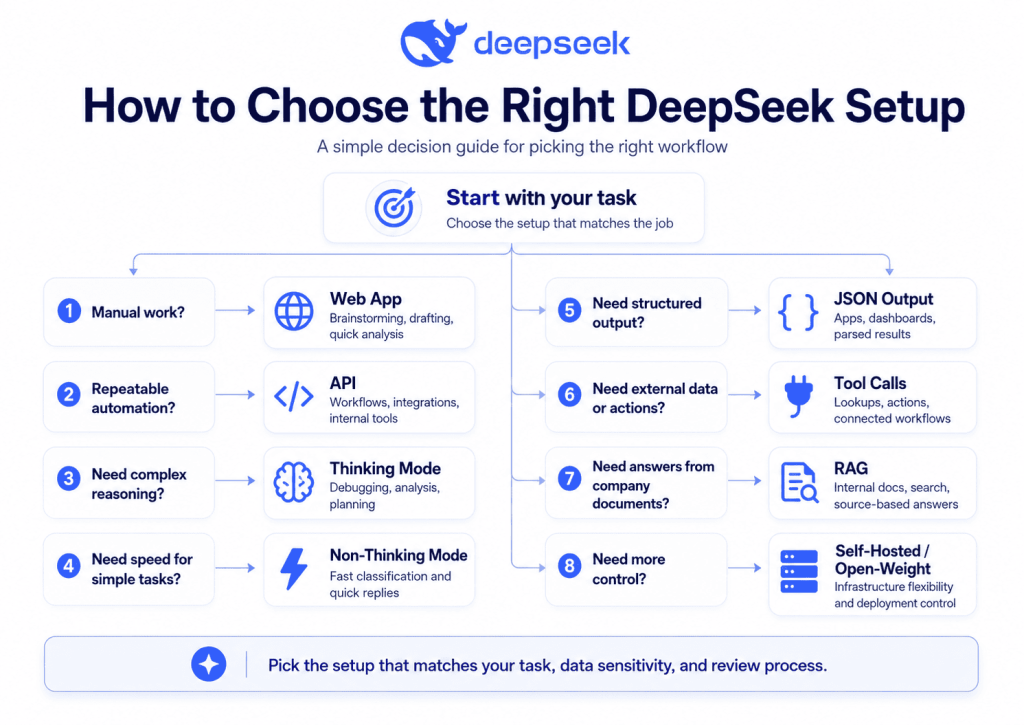
A practical selection rule:
- Use the web app for early exploration.
- Use the API for repeatable business workflows.
- Use Thinking Mode for hard reasoning.
- Use JSON Output when software must parse the result.
- Use Tool Calls when DeepSeek needs external data.
- Use RAG when answers must come from internal documents.
- Use self-hosted/open-weight models only when your team can manage infrastructure, security, evaluation, and compliance.
Best Practices for Using DeepSeek Safely
To use DeepSeek safely in business workflows:
- Remove sensitive data before prompting.
- Do not upload confidential company, legal, medical, financial, government, or personal data without approval.
- Validate outputs before using them in production.
- Use human-in-the-loop approval for customer, legal, HR, finance, and security workflows.
- Log and monitor API workflows.
- Add guardrails for agents and tool calls.
- Test prompts before production deployment.
- Use JSON validation when relying on structured outputs.
- Require citations for internal knowledge and RAG answers.
- Keep model names, pricing, API behavior, and privacy terms under review because AI platforms change quickly.
For healthcare, finance, legal, security, and compliance tasks, DeepSeek can assist analysis, summarization, and drafting, but it should not replace qualified professional review.
FAQ: DeepSeek Use Cases
What is DeepSeek used for?
DeepSeek is used for coding, debugging, data analysis, content drafting, customer support, document summarization, research, internal knowledge search, and workflow automation. Developers can also use DeepSeek through the API for structured outputs, tool calls, RAG systems, and AI agents.
What are the best DeepSeek use cases for business?
The best DeepSeek business use cases include customer support triage, internal knowledge assistants, document review support, sales research, marketing workflows, reporting automation, and operations support. The safest business use cases are those where outputs are reviewed before action.
Is DeepSeek good for coding?
Yes, DeepSeek can be useful for coding, debugging, refactoring, test generation, and code explanation. However, developers should test the output, review security implications, and avoid sending proprietary code unless the workflow has been approved.
Can DeepSeek analyze data?
DeepSeek can help analyze data by summarizing tables, identifying trends, cleaning text fields, explaining metrics, and generating structured insights. It should not replace statistical tools, BI dashboards, or human validation for important calculations.
Can DeepSeek be used for customer support?
Yes, DeepSeek can be used for customer support classification, sentiment analysis, ticket routing, reply drafting, and escalation recommendations. It works best when connected to clear policies, structured outputs, and human review for sensitive cases.
What are DeepSeek API use cases?
DeepSeek API use cases include structured ticket triage, coding assistants, RAG chatbots, report generation, CRM workflows, internal automation, JSON extraction, and tool-calling agents. The API is useful when DeepSeek needs to work inside existing software.
Is DeepSeek safe for business use?
DeepSeek may be suitable for some business workflows, but companies should review privacy, security, data residency, and regulatory requirements first. Avoid sending sensitive or confidential data unless your organization has formally approved the use case.
What is the difference between DeepSeek web app and API use cases?
The web app is better for manual tasks such as drafting, brainstorming, summarizing, and exploration. The API is better for repeatable workflows such as support automation, lead scoring, internal tools, document processing, and AI agents.
Is DeepSeek better than ChatGPT for business use cases?
DeepSeek may be better for some cost-conscious, developer-focused, or API-compatible workflows. ChatGPT may be better for organizations that prioritize OpenAI’s business workspace, enterprise privacy controls, app ecosystem, and existing vendor governance. The right choice depends on workflow, data sensitivity, budget, and compliance needs.
Can DeepSeek be used for legal, medical, or financial tasks?
DeepSeek can help summarize documents, draft questions, organize information, and identify issues for review. It should not provide final legal, medical, financial, tax, investment, or compliance advice. A qualified expert should review all high-stakes outputs.
Conclusion
The most valuable DeepSeek Use Cases are practical, structured, and reviewable. DeepSeek can help with coding, data analysis, customer support, internal knowledge search, document review, marketing, sales, operations, finance support, education, research, product management, HR, and AI agents.
Its strongest applications are not generic chatbot conversations. They are clear workflows where the model receives good context, returns structured outputs, uses tools when needed, and stays inside human-approved boundaries.
For businesses, the winning approach is to start small: choose one workflow, remove sensitive data, test prompts, validate outputs, add human review, and only then scale through the API. DeepSeek can be powerful, but it works best as part of a controlled workflow, not as an unchecked replacement for expert judgment.