
DeepSeek V4 is a family of AI models for conversation, coding, reasoning, and working with long documents. The current hosted choices are V4-Pro-0813 and V4.1-Flash, which replaced the original V4-Flash service. Both offer a 1M-token context window and up to 384K output tokens; Flash also accepts images and has lower API prices.
For a new project, V4.1-Flash is the practical starting point when cost or image input matters. Pro remains available for text tasks where its answers suit your needs better. The name alone does not establish which model will perform better: DeepSeek’s own published results show different strengths across tasks.
This guide explains the current options, what the specifications mean, and how to use V4 through the official chat, API, or downloadable weights. Chat-Deep.ai is an independent guide to DeepSeek, not the official provider.
Table of Contents
DeepSeek V4 Pro vs Flash: which model should you use?
The official model catalog lists two current API identifiers. Use these names when configuring an application, even when a model’s full release name is longer.
| Feature | V4-Pro-0813 | V4.1-Flash |
|---|---|---|
| API model ID | deepseek-v4-pro | deepseek-flash |
| Input and output | Text input and text output | Text or image input; text output |
| Context window | 1M tokens | 1M tokens |
| Maximum output | 384K tokens | 384K tokens |
| Reasoning modes | Thinking and non-thinking; low, high, or max effort | Thinking and non-thinking; low, high, or max effort |
| Structured workflows | JSON output and tool calls | JSON output and tool calls |
| Documented concurrency limit | 500 simultaneous requests | 2,500 simultaneous requests |
| API cost | Higher token rates | Lower token rates |
Choose Flash first for an image-aware assistant, a high-volume text workflow, or an application where API cost is a major constraint. It provides the same published context and output ceilings as Pro at lower token rates. The dedicated V4.1-Flash guide covers that model in more detail.
Choose Pro when you have a reason to prefer its text responses. That might be a demanding reasoning task or an existing application whose behavior you have already validated with Pro. Keep the prompt and reasoning settings consistent when comparing answers. Switching models and effort levels together makes it harder to tell what caused a difference.
The older deepseek-v4-flash and deepseek-v4-flash-vision-exp identifiers are compatibility aliases. DeepSeek now routes them to V4.1-Flash and bills them at current Flash rates. An old model name in a successful request therefore does not prove that you are still using the July Flash checkpoint.
What do the official benchmarks tell us?
DeepSeek’s V4.1-Flash model card compares the current Flash release with Pro-0813. It reports Flash ahead on Terminal-Bench 2.1, at 90.6 versus Pro’s 87.9, while Pro leads on GPQA Diamond, at 92.4 versus Flash’s 90.9. Those examples are enough to rule out a blanket “Pro always wins” recommendation.
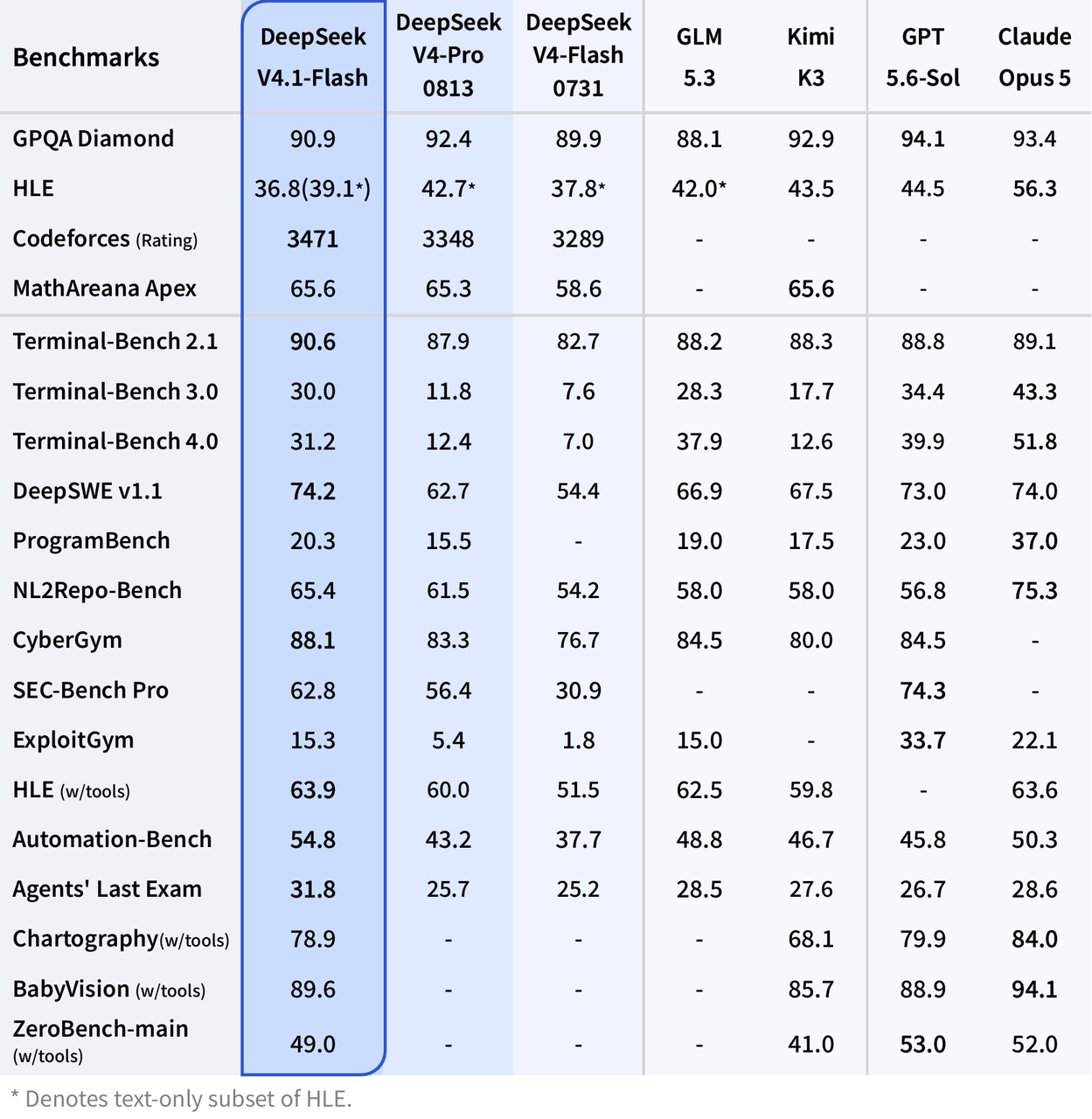
These are provider-reported results under the model card’s evaluation settings, including maximum reasoning effort. Agent results also depend on the surrounding software: DeepSeek uses its Harness Minimal setup for Terminal-Bench. A score from that environment is not a promise about an ordinary chat response or your own coding agent.
Use the results to identify a model worth considering, then judge the output against your task. For a coding workflow, a useful answer should preserve the project’s requirements and explain a workable change; for document analysis, it should support its conclusions with the passages you supplied. A high benchmark score does not remove that need for review.
What can DeepSeek V4 do?
V4’s main appeal is the combination of long context, configurable reasoning, and programmatic access. That gives it several useful roles, but the surrounding application determines whether it can merely suggest an action or actually carry it out.
Coding and multi-step work
You can ask the models to explain unfamiliar code, draft a function, investigate an error, or propose changes across several supplied files. Give the model the relevant code, the expected behavior, and the actual error instead of asking it to guess your environment. A request such as “find why this parser drops empty fields and preserve the existing return type” gives it a clearer job than “fix my code.”
Both current API models support tool calls, which let an application connect the model to functions such as file search or a test runner. The model proposes the call; your application executes it and returns the result. A chat completion by itself does not gain access to your repository, terminal, or production system.
Long documents and conversations
A 1M-token context window provides room for substantial source material, instructions, and conversation history in one request. For example, you could supply several policy documents and ask for conflicting renewal terms, with a quotation and document name for each finding. Keeping that source context together can make the task easier to express.
The limit is a shared working budget, not 1M input tokens plus another 384K for the answer. The Chat Completions reference requires input and generated tokens to fit within the context window. Longer prompts also cost more, and a large context does not guarantee that every detail will be used correctly. Remove irrelevant material and ask for evidence when a conclusion depends on a particular passage.
Images, screenshots, and diagrams
Use V4.1-Flash for visual input. It supports JPEG, PNG, GIF, and WebP images, so you can ask it to explain a screenshot, read a chart, or relate a diagram to accompanying text. Pro’s current API remains text-only.
DeepSeek’s Vision documentation describes image resizing and a ceiling of 1,024 input tokens per image. Small labels can become harder to read after resizing, so a focused crop can be more useful than a large screenshot containing several unrelated panels. These models return text; image understanding is not image generation.
Thinking mode and “Pro Max”
Thinking is enabled by default, with high effort as the default setting. Both models also support low and max effort, or non-thinking mode for tasks that do not need extended reasoning. For a short rewrite or straightforward extraction, non-thinking mode is a sensible starting point. Reserve higher effort for work where the extra reasoning is useful.
“Pro Max” refers to Pro running with maximum reasoning effort, not a third API model or a separate consumer subscription. Keep model="deepseek-v4-pro" and use reasoning_effort="max" with thinking enabled. The official Thinking Mode guide documents the settings and separates reasoning_content from the final answer in content.
Reasoning also uses generated tokens. The 384K output figure is a ceiling, not the default for every request or a promise of that much visible answer text. Set an output budget suited to the job; if the response ends with finish_reason="length", check the budget and available context before assuming the answer is complete.
How large is DeepSeek V4, and why does its architecture matter?
The original V4 family uses a mixture-of-experts, or MoE, architecture. It contains many parameters but activates only a subset for each token. This reduces the computation used per token compared with activating the entire model. It does not make the full checkpoint small enough to fit wherever the active portion would fit.
The original V4 model card describes Pro as having 1.6 trillion total parameters and 49 billion active parameters. The original Flash has 284 billion total and 13 billion active parameters. These are architecture figures for those releases, not universal sizes for anything carrying a V4 label.
The current Pro-0813 repository builds on Pro’s architecture and includes a DSpark speculative-decoding module. Its Hugging Face inventory is displayed as 1.7T parameters. The repository total and the backbone’s parameter count describe different scopes; they are not competing estimates of the same thing.
V4.1-Flash is a further architectural change. Its official card describes a 552B-parameter backbone plus a 196B Engram module, with 8B active parameters during input processing and 16B during generation. Do not carry the original Flash’s 284B/13B description forward to the current Flash model.
Long-context efficiency is another part of the design. The original V4 combines Compressed Sparse Attention and Heavily Compressed Attention to reduce the work and memory associated with attending over long inputs. That helps explain the million-token context offering, but it is not a hardware specification for your own deployment. Actual memory needs depend on the exact weights, their precision, the runtime, and the context and concurrency you plan to serve.
How to use DeepSeek V4
Start with the official chat or app
For ordinary conversation, open DeepSeek’s official chat or follow the app links from DeepSeek’s website. You do not need to download model weights or configure an API key just to use the hosted assistant.
Sign in if prompted, check the modes offered in the interface, and start with a clear task and the material needed to answer it. Interface labels can change independently of API model names. If you need an exact programmatic model selection, use the API rather than relying on a chatbot’s claim about its own identity.
The official DeepSeek app listing describes the assistant as free. That does not make developer API requests free or promise unlimited availability in every interface. Chat access, API billing, and running weights yourself are separate arrangements.
Make a first API request
DeepSeek’s API quick start uses the OpenAI-compatible base URL https://api.deepseek.com. Create a key in the official API platform linked there and make sure the account has API credit. Store the key on your server or in a local environment variable, never in a public webpage or a mobile app bundle.
Install the Python client with python -m pip install openai. Set DEEPSEEK_API_KEY in the terminal where you will run the script. On macOS or Linux, use export DEEPSEEK_API_KEY="YOUR_KEY"; in PowerShell, use $env:DEEPSEEK_API_KEY="YOUR_KEY". Replace the placeholder with your own key and do not share the resulting command.
Save the following as v4_example.py, then run python v4_example.py. It makes one billable Pro request with non-thinking mode and a 1,024-token output cap. The prompt is an illustrative task, not a claimed test result.
import os
from openai import OpenAI, OpenAIError

api_key = os.getenv("DEEPSEEK_API_KEY")
if not api_key:
    raise SystemExit("Set DEEPSEEK_API_KEY before running this script.")

client = OpenAI(api_key=api_key, base_url="https://api.deepseek.com")

try:
    response = client.chat.completions.create(
        model="deepseek-v4-pro",
        messages=[{
            "role": "user",
            "content": "Explain context length versus output length in 100 words."
        }],
        max_tokens=1024,
        extra_body={"thinking": {"type": "disabled"}},
    )
except OpenAIError as exc:
    raise SystemExit(f"API request failed: {exc}") from exc

choice = response.choices[0]
print(choice.message.content or "No final answer returned.")
print("Finish reason:", choice.finish_reason)
print("Token usage:", response.usage)
You should receive an explanation followed by the finish reason and token usage. The wording will vary. To use the current Flash model, change only the model value to deepseek-flash. To enable thinking, change the thinking type to enabled, add a supported reasoning_effort, and allow an output budget that covers reasoning as well as the final answer.
If authentication fails, check that the variable is set in the same terminal session and that it contains a DeepSeek API key. For a model-name error, use one of the current identifiers in the comparison table. An insufficient-balance response requires API credit; signing in to the free chat does not provide it. The DeepSeek API guide explains account setup and common request problems in more depth.
Both current models also support the Responses API and Anthropic-compatible requests. The Anthropic base URL is https://api.deepseek.com/anthropic; use that interface’s documented request format rather than copying a Chat Completions body into it. For an existing integration, check structured output, tools, and conversation handling when switching models, even if the new model accepts the same request format.
DeepSeek V4 API pricing in USD
DeepSeek charges separately for cached input, uncached input, and generated output. The following rates are from its official pricing page, checked on October 8, 2026. All amounts are US dollars per 1 million tokens.
| Model and period | Input: cache hit | Input: cache miss | Output |
|---|---|---|---|
| V4.1-Flash, off-peak | $0.003 | $0.15 | $0.60 |
| V4.1-Flash, peak | $0.006 | $0.30 | $1.20 |
| V4-Pro, off-peak | $0.022 | $0.66 | $1.98 |
| V4-Pro, peak | $0.044 | $1.32 | $3.96 |
Peak hours are 01:00–04:00 and 06:00–10:00 UTC, Monday through Friday, excluding Chinese public holidays. Other hours, weekends, and those holidays use off-peak rates. Convert the UTC windows to your scheduling timezone; they are not local clock times for every reader.
For a simple planning example, suppose a batch of requests uses 10M uncached input tokens and 2M output tokens, all billed in one pricing period. At off-peak rates, Flash costs $2.70: $1.50 for input plus $1.20 for output. Pro costs $10.56: $6.60 plus $3.96. At peak rates, the same token quantities cost $5.40 and $21.12 respectively.
This is an illustrative batch total, not a single request or a measured monthly bill. Actual token quantities can differ between models, especially when reasoning effort changes. If a batch spans pricing periods, split its usage accordingly rather than applying one rate to everything.
Cache hits can reduce the input portion of the bill, but they do not make output free. Use the reported cache-hit, cache-miss, and output counts instead of assuming an entire repeated prompt qualifies for the cached rate. For each category, divide tokens by 1 million and multiply by the applicable USD rate, then add the three amounts. Our DeepSeek pricing guide explains the distinction between chat access and developer charges.
Can you download and run DeepSeek V4 locally?
Yes. DeepSeek publishes weights for specific V4 releases, including V4-Pro-0813, the earlier V4-Flash-0731, and V4.1-Flash. Their official model cards identify MIT licensing. Check the exact release before downloading: an older checkpoint’s continued availability does not mean the hosted API still serves it.
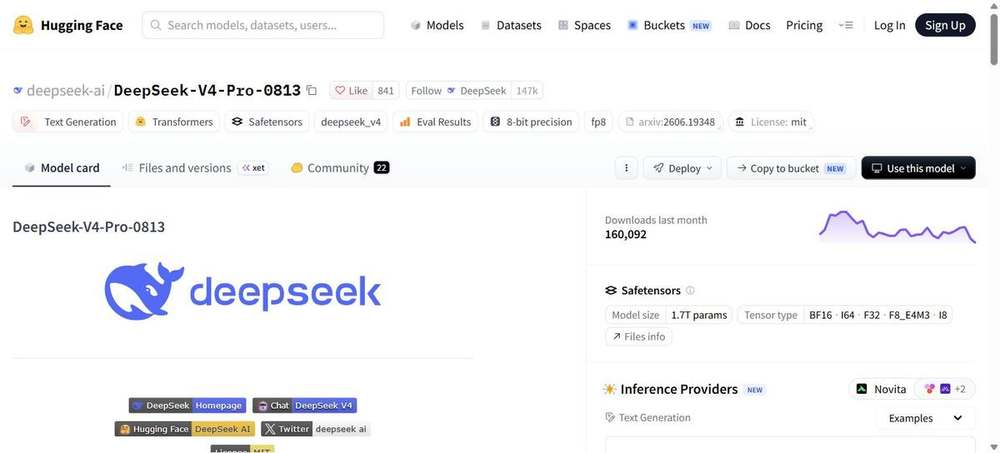
These are large deployments. The Pro-0813 card includes a vLLM serving example on a node with four NVIDIA GB300 GPUs. That is a documented example, not a universal minimum specification or a promise that a different four-GPU machine will work. “Flash” also does not mean the full model is a small laptop download.
Before choosing hardware, read the release-specific file list and serving instructions, then account for weight precision, runtime support, context length, and concurrent requests. A quantized community file may have different memory needs and behavior from the official checkpoint. The DeepSeek system requirements guide explains how to assess those choices.
For an official deployment, follow the repository’s encoding and inference instructions. The Pro-0813 card supplies dedicated encoding files rather than a standard Hugging Face Jinja chat template. Using a familiar template from a different DeepSeek release can produce incorrect input formatting even when the weights load.
Downloading model weights is different from installing the DeepSeek chat app. The app connects you to a hosted service; self-hosting means supplying the compute and maintaining the runtime yourself. The MIT license does not pay for that infrastructure or remove its operational requirements.
V4 release dates and what changed
The official change log is the best way to distinguish preview comparisons from the models served today:
- April 24, 2026: V4 preview introduced the Pro and Flash family.
- July 31, 2026: V4-Flash-0731 updated the original Flash release, including its agent-oriented post-training.
- August 13, 2026: V4-Pro-0813 became the current Pro release under the existing
deepseek-v4-proidentifier. - August 21, 2026: V4-Flash Vision Exp introduced an experimental image-input option.
- September 10, 2026: V4.1-Flash replaced the original Flash and Vision Exp hosted models. Older Flash identifiers now route to it.
What happened to Vision Exp and the planned Pro retirement?
Vision Exp is no longer a separate current hosted choice. Send new image-input requests to deepseek-flash, which serves V4.1-Flash with native vision support.
Pro’s story is different. DeepSeek initially announced that Pro traffic would move to V4.1-Flash from September 14, then reversed that plan. The amended change log states that Pro API service continues with billing unchanged. Treat September 14 as a canceled routing deadline, not a completed shutdown, and use the corrected notice when an older announcement conflicts with it.
Does V4 have a published knowledge cutoff?
The official model cards and API documentation reviewed for this guide do not specify a V4 knowledge-cutoff date. Neither the April preview date nor an 0813 release suffix establishes when its training data ends.
Asking the model when it was trained does not settle the question. A correct answer about a recent event could come from supplied material, search, or other context. For work that depends on current facts, provide dated primary sources and ask the model to support its answer from them.
Frequently asked questions
Is DeepSeek V4 available now?
Yes. V4 first appeared as a preview on April 24, 2026. The current API offers V4-Pro-0813 and V4.1-Flash. The original Flash hosted release has been replaced, although its published checkpoint remains available separately.
Is DeepSeek V4 free?
DeepSeek’s official consumer assistant is offered as a free app, while API usage is billed by tokens. Published MIT-licensed weights can be downloaded, but running them requires your own or rented hardware. Free chat access does not include free API credit.
Is V4 open source?
DeepSeek publishes the named Pro-0813, Flash-0731, and V4.1-Flash releases with open weights under MIT licensing. Check the specific repository for its files and license. Downloadable weights should not be taken to mean that every training dataset or every component of the hosted chat service has been published.
Is V4 the same as DeepSeek R1?
No. R1 is a different model family. V4 supports thinking within its current models, but that does not make it an R1 checkpoint. For DeepSeek’s current hosted API, use the listed V4 identifiers; for local R1 work, choose the exact R1 repository and its deployment instructions.
Can I still use V4-Flash-0731?
You can obtain its published weights from the official repository. You cannot select that retired hosted checkpoint by sending deepseek-v4-flash to the current API: the identifier now routes to V4.1-Flash. Choose self-hosting or a provider that explicitly identifies the checkpoint if you need the July release.
Has V4 Pro been discontinued?
No. The current official catalog lists deepseek-v4-pro, serving Pro-0813. DeepSeek canceled the previously announced September 14 transition to Flash, so older retirement notices should not guide a new integration.
Can I run the full V4 model on a normal laptop?
The official full-size checkpoints are large server-class models. Their active parameter counts do not represent all the weights you need to store. For a laptop, use the hosted chat or API unless you have verified a suitable local model and runtime; a smaller distillation or a different checkpoint should be identified by its own name.
Choose the access route before the model
For a conversation, start with the official assistant. For an application, begin with deepseek-flash when its lower price and image support match the job, and consider Pro for text tasks where its responses justify the extra cost. For a local deployment, choose the exact checkpoint and verify the serving requirements before committing to hardware. That sequence turns “which V4?” into a concrete choice you can use and maintain.