
Dify is an open-source platform for building AI applications. Where tools like n8n and Zapier automate workflows between apps, Dify focuses specifically on building AI-powered products — chatbots, RAG systems, autonomous agents, and multi-step AI workflows. It combines a visual drag-and-drop builder with production-grade features like knowledge bases, monitoring dashboards, API publishing, and multi-model management.
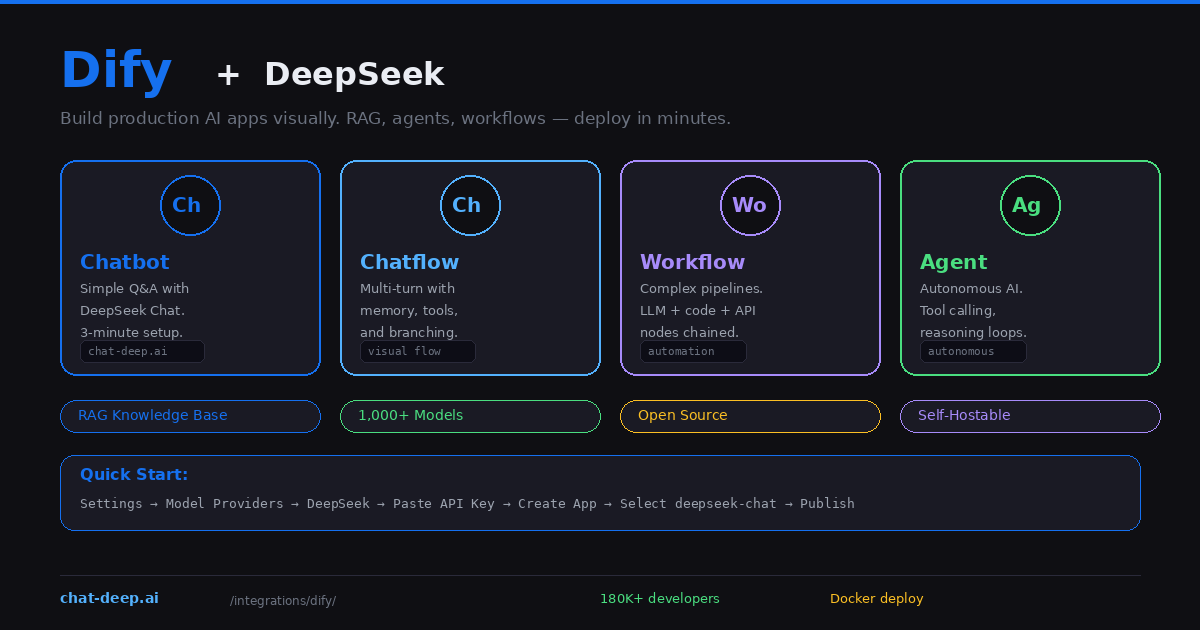
Dify has native DeepSeek support in its Model Providers. Add your API key, select deepseek-chat or deepseek-reasoner, and you have a functional AI application in under three minutes. But the real value is what comes next: connecting a knowledge base for RAG, building multi-step chatflows with branching logic, or deploying autonomous agents that use tools and maintain conversation memory.
This guide covers setting up DeepSeek in Dify, building four types of applications, configuring RAG knowledge bases, and deploying to production. If you need background on the DeepSeek API, our API documentation covers the technical details. For understanding the models, visit our models hub.
Connecting DeepSeek to Dify
You need a Dify instance and a DeepSeek API key. Dify offers a free cloud version at cloud.dify.ai, or you can self-host with Docker (covered below).
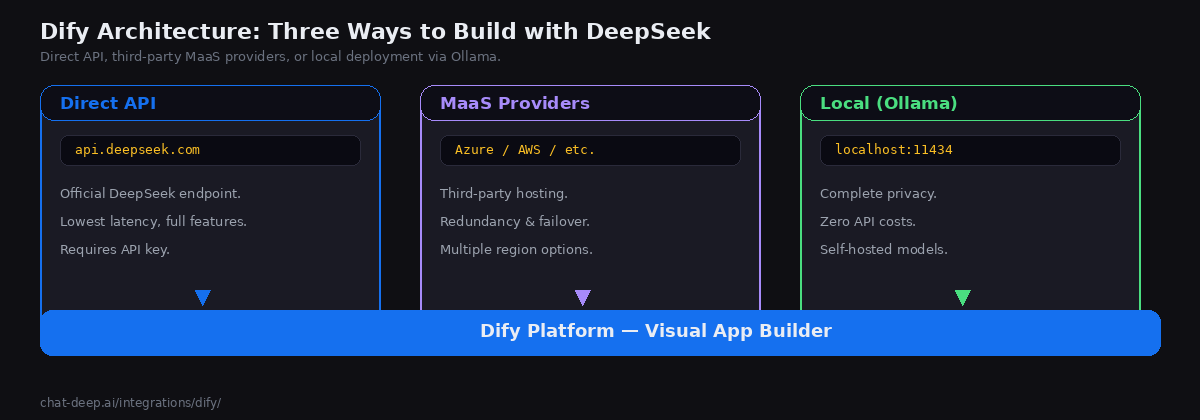
Navigate to Settings → Model Providers in the Dify dashboard. Find DeepSeek in the provider list, paste your API key, and click Save. Once validated, DeepSeek models become available across all your applications. Get your API key from the DeepSeek platform — our login guide covers the setup.
You can also connect DeepSeek through alternative providers for redundancy. Dify supports DeepSeek models through Azure AI Studio, AWS Bedrock, and other MaaS (Model-as-a-Service) platforms. If the official DeepSeek API is experiencing high load, these alternatives keep your applications running. And for complete privacy, you can connect to a local DeepSeek instance running via Ollama or vLLM — just point the Ollama model provider to your local endpoint.
Building a Chatbot (3-Minute Setup)
The simplest application type in Dify is a chatbot. Click “Create Blank App”, select “Chatbot”, and give it a name. In the model selector, choose deepseek-chat under the DeepSeek provider. Write a system prompt that defines the chatbot’s behavior — for example, “You are a customer support agent for a SaaS product. Be helpful, concise, and reference the documentation when possible.”
Type a test message in the preview panel on the right side. If DeepSeek responds correctly, click “Publish” to get a shareable link or an embeddable widget for your website. You can also access the chatbot through Dify’s REST API for integration into existing applications. The entire process takes about three minutes from start to live deployment.
Adding a Knowledge Base for RAG
The real power of Dify emerges when you connect a knowledge base. Navigate to the Knowledge section, create a new knowledge base, and upload your documents — PDFs, Word files, text documents, or web pages. Dify automatically chunks, embeds, and indexes the content.
For best results with document retrieval, use the “Parent-Child Segmentation” mode, which preserves document hierarchy and maintains paragraph-level context. This means DeepSeek receives not just the matching chunk but also its surrounding context from the parent section, leading to more accurate and fully grounded responses.
In your chatbot or chatflow, add the knowledge base under “Context.” When users ask questions, Dify first searches the knowledge base for relevant chunks, then injects them into the DeepSeek prompt as context. The LLM generates answers grounded in your actual data instead of its training knowledge. This RAG pattern is essential for enterprise use cases where accuracy matters more than creativity — support bots, documentation assistants, internal Q&A systems.
Building a Chatflow (Multi-Turn with Logic)
A chatflow is a visual conversation flow with branching logic. Unlike a simple chatbot that sends every message to DeepSeek the same way, a chatflow lets you route messages through different paths based on conditions.
Create a new app and select “Chatflow.” The visual editor shows connected nodes. Add an LLM node with DeepSeek, connect it to a knowledge retrieval node, add conditional branches based on the AI’s classification, and chain multiple LLM calls for multi-step processing. For example, first classify the user’s intent, then route to different response generation prompts based on whether they are asking about pricing, features, or support.
Chatflows support memory nodes that maintain conversation context across turns, making them suitable for complex multi-turn interactions. DeepSeek’s 128K context window means these conversations can be long without losing earlier context.
Building a Workflow (Automation Pipelines)
Workflows in Dify are non-conversational processing pipelines. They run from start to end without user interaction, making them ideal for batch processing, document analysis, and automated content generation.
A workflow connects nodes visually: start → input → LLM → code → output. You can chain DeepSeek calls with code nodes (JavaScript or Python), HTTP request nodes for calling external APIs, conditional nodes for branching logic, and iteration nodes for processing lists of items. For example, a translation workflow might take a document, split it into paragraphs, translate each one with DeepSeek using a carefully crafted prompt, reassemble the translated sections, and output the final document — all without a single line of application code.
Dify’s template marketplace includes pre-built workflows like DeepResearch (automated multi-step research) that you can import and customize. Workflows are accessible via API, so they integrate into existing systems as backend processing services.
Building an AI Agent
In Dify, agent behavior depends on the selected Agent Strategy and on how your Dify version handles that model path. If you want the simplest, most predictable tool-using setup today, start with deepseek-chat, because Dify’s Function Calling strategy expects a model path that cleanly supports tool invocation in the current runtime. Do not describe deepseek-reasoner as lacking tool calling at the DeepSeek model level: DeepSeek’s current hosted API documents Tool Calls for both deepseek-chat and deepseek-reasoner. If you encounter failures with deep-thinking models inside Agent mode, frame them as Dify Agent/runtime compatibility or version-specific behavior, and verify them in your deployment.
Self-Hosting Dify
Dify is fully open source and runs on Docker. Self-hosting gives you complete control over data, unlimited applications, and the ability to connect to local DeepSeek models.
git clone https://github.com/langgenius/dify.git
cd dify/docker
cp .env.example .env
docker compose up -d
Access the dashboard at http://localhost and create your admin account. Add DeepSeek in Model Providers. For a fully private stack, run Ollama alongside Dify on the same server and connect them via the Ollama model provider. Every prompt and response stays on your infrastructure — no data leaves the machine. This setup is ideal for regulated industries where data sovereignty is non-negotiable.
Plugin Ecosystem
Dify v1.0 introduced a plugin ecosystem that extends the platform’s capabilities. Plugins add new model providers, tools, and workflow nodes without modifying Dify’s core code. The plugin marketplace includes tools for web search, code execution, document processing, image generation, and dozens of third-party service integrations.
For DeepSeek users, relevant plugins include web search tools (letting DeepSeek answer questions about current events by searching the internet first), document extractors (for processing PDFs and other file types in workflows), and API connector plugins for integrating with your existing business systems. You can also build custom plugins if your use case requires specialized tools that the marketplace does not cover.
One particularly powerful plugin pattern is packaging a Dify application as an OpenAI-compatible API endpoint. This means you can build a complex DeepSeek-powered chatflow in Dify’s visual editor, then expose it as an API that any OpenAI SDK-compatible client can call — effectively turning Dify into a middleware layer between your frontend and DeepSeek.
When to Use Dify vs. Other Platforms
Dify occupies a unique position in the AI tooling landscape. It is not a general workflow automation platform like n8n or Zapier — those tools connect apps to apps. Dify is specifically designed for building AI applications. If your goal is “build a chatbot with a knowledge base and deploy it via API,” Dify is the most direct path.
Compared to Flowise (another visual AI builder), Dify offers a more polished production experience with built-in monitoring, team collaboration, and enterprise features. Compared to building with LangChain or LlamaIndex in code, Dify trades flexibility for speed — you sacrifice fine-grained control but gain visual debugging, one-click publishing, and a built-in analytics dashboard.
The self-hosting option also differentiates Dify from cloud-only platforms. Organizations that cannot use SaaS tools due to compliance requirements can run the entire Dify stack — including DeepSeek via Ollama — on their own infrastructure. The combination of open-source, self-hostable, and visually accessible makes Dify particularly popular in enterprise environments where IT governance is strict but teams still want to build AI applications quickly.
Monitoring and Analytics
Dify includes built-in monitoring for all your AI applications. The dashboard tracks total conversations, active users, token usage, response latency, and user satisfaction ratings. You can see which prompts produce the best results and identify where users drop off in conversation flows. For deeper observability, Dify integrates with external monitoring platforms like Arize Phoenix and LangSmith. This production-grade visibility is what separates Dify from simple API wrappers — you can iterate on your AI applications based on real usage data, optimize prompts systematically, and catch quality regressions before users notice them.
Production Tips
Use model load balancing. Dify supports load balancing across multiple model providers. Configure the official DeepSeek API as primary and an Azure-hosted DeepSeek or local Ollama instance as fallback. If the primary fails, Dify automatically routes to the backup without user impact. Check our status page for current DeepSeek API availability.
Optimize your knowledge base. Upload focused, well-structured documents rather than dumping entire databases. Use the parent-child segmentation mode for hierarchical content. Test retrieval quality by asking questions and checking which chunks are returned — Dify shows the retrieved context in the debug panel.
Publish via API for integration. Every Dify application can be accessed as a REST API with automatic authentication, rate limiting, and conversation state management. This means you can build the AI logic entirely in Dify’s visual editor and consume it from your existing frontend — a React app, a mobile application, or a backend microservice — through standard HTTP calls. The API follows a consistent format across all application types, so switching from a chatbot to a chatflow does not require changing your frontend code.
Use model switching for cost optimization. Since Dify supports 1,000+ models, you can test your application with DeepSeek’s cost-effective API, then compare results with other providers without rebuilding anything. Switch models with a single dropdown change. This model-agnostic approach protects you from vendor lock-in and lets you benchmark performance across providers. For current DeepSeek pricing, check our pricing page. Use Dify’s built-in token tracking to forecast monthly spending across all your applications.
Conclusion
Dify bridges the gap between a raw API and a production AI application. It gives you a visual builder for the AI logic, a knowledge base for RAG, monitoring for production visibility, a plugin ecosystem for extensibility, and API publishing for integration — all in one open-source platform that you can self-host for complete data control.
DeepSeek provides the intelligence at a fraction of the cost of proprietary models, and Dify provides the infrastructure to turn that intelligence into a real product that serves users, tracks metrics, and scales reliably. The combination is especially compelling for teams that want to move quickly from raw API experimentation to fully deployed AI products without building custom infrastructure from scratch.
Start with a simple chatbot connected to a knowledge base — it takes roughly three minutes to go from zero to a live deployment. Expand to chatflows when you need branching logic and multi-turn memory. Build workflows for batch processing and automation. Deploy agents when you need autonomous tool use. For complementary approaches, see our Flowise guide for another visual AI builder, our n8n guide for workflow automation, and browse the full integrations section for more ways to use DeepSeek across your stack.