Last verified: September 19, 2026 (Hugging Face model cards and file sizes, Ollama tags and hardware documentation, llama.cpp and vLLM install documentation) and September 24, 2026 (DeepSeek API catalog). Hands-on Windows test: July 29, 2026.
You can run DeepSeek on your own computer, but only some of it. The small distilled DeepSeek-R1 models (1.5B to 70B) run on ordinary PCs, NVIDIA RTX cards and Apple Silicon Macs with Ollama, llama.cpp or LM Studio. The current flagship releases, DeepSeek-V4.1-Flash and DeepSeek-V4-Pro, are 500 GB to 900 GB of weights and are multi-GPU server workloads, not desktop ones. This guide covers what each open-weight release needs, which GPU or Mac fits which model, and how to install and verify a local setup step by step.
If you only want to use DeepSeek, you need none of this: the web chat, the mobile app and the API run on DeepSeek’s servers and work on any modern device. Those requirements are at the end of this page.
Quick answer: what you need to run DeepSeek locally
| Your hardware | Realistic DeepSeek model | How | What to expect |
|---|---|---|---|
| 8 GB RAM, no GPU | R1 Distill 1.5B (Q4) | Ollama or llama.cpp on CPU | Works for tests; weak reasoning |
| 16 GB RAM, or an 8 GB GPU, or a 16 GB Apple Silicon Mac | R1-0528-Qwen3-8B or R1 Distill 7B/8B (Q4) | ollama run deepseek-r1:8b | The best starting point for most people |
| 12–16 GB VRAM, or a 24–32 GB Mac | R1 Distill 14B (Q4) | Ollama, LM Studio or llama.cpp | Better answers; keep context modest on 12 GB |
| 24–32 GB VRAM (RTX 3090, 4090, 5090), or a 48–64 GB Mac | R1 Distill 32B (Q4) | Ollama or llama.cpp; vLLM on Linux | Serious local reasoning and coding; about 20 GB of weights |
| 48–96 GB VRAM, or a 96–128 GB Mac | R1 Distill 70B (Q4) | llama.cpp, Ollama or vLLM | Workstation class; about 43 GB of weights |
| Anything sold as a consumer PC | Not DeepSeek-V4.1-Flash, V4-Pro, V3.x or full R1 | — | Impractical: 160 GB to 890 GB of weights before any context. Use the API instead |
These are practical planning figures from Chat-Deep.ai, not official minimums. DeepSeek publishes model sizes and licenses, not a “minimum PC”. Real needs change with the exact checkpoint, quantization, context length, runtime and how many layers sit on the GPU.
Requirements for every open-weight DeepSeek release
The table lists the open-weight releases in DeepSeek’s official Hugging Face organization that people most often try to run, with the size of the published weight files as reported by Hugging Face on September 19, 2026. “Weights on disk” is the official repository at its released precision. Memory for a usable deployment is always higher, because the runtime also needs room for the KV cache, activations and buffers.
| Release | Parameters | Official weights on disk | License | Quantized option for home hardware | Realistic memory to run it | Verdict on consumer hardware |
|---|---|---|---|---|---|---|
| DeepSeek-V4.1-Flash | 552B backbone per the model card (MoE, 8B or 16B activated); text and images | 510 GB, already in mixed FP8 and 4-bit expert precision | MIT | None that fits a desktop. The release is already low precision, so re-quantizing saves little | A multi-GPU server. DeepSeek’s own reference code shards it across 8 GPUs | Impractical. Use the API (deepseek-flash) |
| DeepSeek-V4-Pro-0813 and DeepSeek-V4-Pro | 1.6T total, 49B activated (MoE) | 893 GB (0813) and 865 GB | MIT | None that fits a desktop | A multi-GPU node. The model card’s vLLM example uses a single 4×GB300 node | Impractical. Use the API (deepseek-v4-pro) |
| DeepSeek-V4-Flash-0731, DeepSeek-V4-Flash, DeepSeek-V4-Flash-Vision-Exp | 284B total, 13B activated (MoE) | 160–168 GB | MIT | Community quantizations exist; they are still far above any single consumer GPU | About 200 GB or more of combined GPU memory, or a very large unified-memory machine with slow output | Impractical for a normal PC; a multi-GPU workstation project. Retired from the API on September 10, 2026, weights remain available |
| DeepSeek-V3.2, DeepSeek-V3.1, DeepSeek-V3-0324, DeepSeek-R1, DeepSeek-R1-0528 | 671B total, 37B activated (MoE); Hugging Face reports about 685B tensors | 689 GB | MIT | Ollama lists deepseek-r1:671b at 404 GB (Q4) | 400 GB or more of combined memory even at 4-bit | Impractical. Server or multi-GPU only |
| DeepSeek-R1-Distill-Llama-70B | 70B dense | 141 GB (BF16) | MIT; built on Llama, so check the base-model terms on the card | Q4_K_M, about 43 GB (deepseek-r1:70b) | 64–80 GB VRAM for full GPU loading, or 64–128 GB RAM with offload | Workstation or high-memory Mac |
| DeepSeek-R1-Distill-Qwen-32B | 32B dense | 65.5 GB (BF16) | MIT | Q4_K_M, about 20 GB (deepseek-r1:32b) | 24 GB VRAM at modest context, 32 GB for headroom; or 32–64 GB RAM with offload | Practical on an RTX 3090, 4090 or 5090 |
| DeepSeek-R1-Distill-Qwen-14B | 14B dense | 29.5 GB (BF16) | MIT | Q4_K_M, about 9.0 GB (deepseek-r1:14b) | 12–16 GB VRAM, or 24–32 GB RAM | Practical on mid-range GPUs |
| DeepSeek-R1-0528-Qwen3-8B | 8.19B dense | 16.4 GB (BF16) | MIT | Q4_K_M, about 5.2 GB (deepseek-r1:8b) | 8 GB VRAM or 16 GB RAM | Best starting point |
| DeepSeek-R1-Distill-Llama-8B and DeepSeek-R1-Distill-Qwen-7B | 8B and 7B dense | 16.1 GB and 15.2 GB (BF16) | MIT; the Llama build also carries base-model terms | Q4_K_M, about 4.7–4.9 GB (deepseek-r1:7b) | 8 GB VRAM or 16 GB RAM | Practical on most recent PCs |
| DeepSeek-R1-Distill-Qwen-1.5B | 1.78B dense | 3.6 GB (BF16) | MIT | Q4_K_M, about 1.1 GB (deepseek-r1:1.5b) | 8 GB RAM, no GPU needed | Runs almost anywhere; limited quality |
| DeepSeek-Coder-V2-Lite-Instruct | 15.7B total, 2.4B activated (MoE) | 31.4 GB (BF16) | DeepSeek model license (listed as “other”), not MIT | Q4 builds of about 9–10 GB (deepseek-coder-v2:16b) | 12–16 GB VRAM or 24–32 GB RAM | Practical; an older coding model |
| DeepSeek-OCR-2 | 3.39B | 6.8 GB (BF16) | Apache-2.0 | Usually run at released precision | 8–12 GB VRAM | Practical; a document OCR model, not a chat model |
The organization also publishes Base checkpoints, the V4 DSpark speculative-decoding variants, V3.2-Speciale and V3.2-Exp, V3.1-Terminus, the Prover and Math models, and the Janus and VL2 multimodal models. None of the large ones changes the picture above: anything in the V3, V4 or full R1 class is a server workload.
Which releases are impractical on consumer hardware
To be plain about it: DeepSeek-V4.1-Flash, DeepSeek-V4-Pro, DeepSeek-V4-Flash, DeepSeek-V3.x and the full DeepSeek-R1 cannot be run usefully on a gaming PC, a laptop or a single RTX card, including an RTX 5090 with 32 GB. In a Mixture-of-Experts model the “activated” parameter count describes the compute per token, not the memory: all experts must still be stored and reachable. A 13B-activated model with 284B total parameters still needs room for 284B parameters. A video titled “V4 on a 5090” is either a small third-party distillation, an extreme quantization with most of the model paged from disk, or a cloud model behind a local-looking command.
That last case is worth knowing. Ollama lists deepseek-v4.1-flash, deepseek-v4-flash and deepseek-v4-pro, but as cloud models: the command runs on your machine while the model runs on Ollama’s servers. It is a convenient way to use them, but it is not local inference, and your prompts leave your computer.
Local deployment is different from using DeepSeek through the web, mobile app, or API. A local runtime must load the exact checkpoint, allocate memory for the KV cache and runtime buffers, and decide whether layers stay on the GPU or are offloaded to system RAM. That is why there is no single official “minimum PC” for every DeepSeek model.
How to read the estimates below: They are independent planning estimates from Chat-Deep.ai, not official DeepSeek or NVIDIA minimum requirements and not benchmark results. Unless a row says otherwise, assume one user, a current Ollama release, a Q4_K_M DeepSeek-R1 Distill package, a short-to-moderate context, no batching, and either full GPU loading or the offload mode stated. Exact results change with the checkpoint, quantization, runtime version, context, batch/concurrency, and GPU layers.
Do not treat “model file size” as “required VRAM.” A package also needs runtime buffers and KV-cache memory, while some runtimes can split the model between VRAM and system RAM. A configuration can therefore download successfully but fail to load, or load only after slower CPU offload.
| Factor | Why it changes the result |
|---|---|
| Exact checkpoint and tag | Two models with the same parameter count can use different formats and package sizes. |
| Quantization | Q4 usually needs less weight storage than Q8 or FP16, but metadata, scales and higher-precision tensors add overhead. |
| Context length | More tokens require a larger KV cache. |
| Runtime and version | Ollama, llama.cpp, LM Studio, MLX, vLLM and SGLang have different backends and memory behavior. |
| GPU offload | Partial offload can make a larger model load, but it normally adds latency and reduces throughput compared with full GPU offload on the same system. |
| Batch and concurrency | Parallel requests require more memory than one interactive session. |
Why parameter math does not give you the memory figure
The V4 family is a different hardware class from R1 Distill 7B–70B. The official V4 model card describes V4-Flash as a 284B total-parameter / 13B activated-parameter MoE model and V4-Pro as a 1.6T / 49B activated model, with a one-million-token maximum context. The released instruct checkpoints use mixed precision rather than a simple uniform “four bits per parameter” format.
For that reason, multiplying parameter count by 0.5 bytes is only naïve nominal weight-payload arithmetic; it is not the checkpoint size and not runnable-memory guidance. Full V4-Flash or V4-Pro deployment remains a specialist multi-GPU or server project. An RTX 5090 or RTX PRO 6000 can run many smaller DeepSeek workloads, but neither turns a single desktop GPU into a complete full-V4 system. DeepSeek-V4.1-Flash, at 552B backbone parameters and about 510 GB on disk, is larger again than V4-Flash. If you use DeepSeek through the hosted web app or API, your local device does not need to hold those weights.
DeepSeek R1 Package Sizes and Practical Starting Points
The official DeepSeek-R1 model card lists the full 671B MoE model and distilled checkpoints at 1.5B, 7B, 8B, 14B, 32B and 70B. The table below uses the current Ollama DeepSeek-R1 tags as concrete examples. Their listed sizes are download/model-package sizes—not a guarantee that the same amount of VRAM is sufficient at every context.
| Example Q4_K_M tag | Listed package size | Practical starting point | Important limit |
|---|---|---|---|
| 1.5B | About 1.1GB | 8GB system RAM can be enough for a constrained CPU test; 16GB is easier to work with. | Small footprint does not guarantee useful quality or speed for your task. |
| 7B | About 4.7GB | 16GB system RAM; an 8GB RTX GPU is a reasonable candidate for full GPU loading at modest context. | Leave memory for the KV cache and runtime. |
| 8B | About 4.9–5.2GB, depending on the tag | 16GB system RAM; 8GB VRAM is a practical test target at modest context. | Q8 variants are materially larger than these Q4 examples. |
| 14B | About 9.0GB | 24–32GB system RAM; 12GB VRAM may work with limited context, while 16GB gives more margin. | A 12GB card is not a universal guarantee; verify the exact tag and context. |
| 32B | About 20GB | 32GB RAM is experimental for offload; 64GB is safer. A 24GB GPU is plausible at modest context, while 32GB leaves more headroom. | Twenty gigabytes of weights leave little room on a 24GB card for KV cache and runtime buffers. |
| 70B | About 43GB | 64GB RAM may load a constrained CPU/offload setup; 128GB is safer. For mostly/full GPU loading, 64–80GB+ VRAM provides more practical margin than 48GB. | On 48GB VRAM, the listed weights leave only about 5GB before context and runtime overhead. |
These rows describe fit, not performance. Chat-Deep.ai has not benchmarked every GPU/checkpoint combination in this table, so terms such as “fast,” “comfortable,” or “best GPU” would be misleading without a reproducible test. A publishable speed claim needs the exact GPU SKU, driver, runtime version, model digest/tag, quantization, context and prompt length, batch size, GPU-layer split, power limit, prompt-evaluation speed and decode speed.
DeepSeek-R1 vs R1-0528: the naming trap
The original official DeepSeek-R1 repository lists the full model at 671B total parameters, 37B activated parameters, and a 128K context length. The official Hugging Face page currently reports the full DeepSeek-R1-0528 checkpoint as 685B parameters and describes it as a minor R1 upgrade. These are not consumer-laptop models.
Ollama’s deepseek-r1:8b currently points to DeepSeek-R1-0528-Qwen3-8B, a compact distillation of R1-0528 reasoning into a Qwen3 8B architecture. It is practical locally, but it is not equivalent to running the full R1-0528 checkpoint. For architecture and licensing, see our DeepSeek-R1 guide; for the updated checkpoint and its Qwen3-8B distill, see DeepSeek R1-0528. Check ollama show deepseek-r1:8b and the Ollama tag page because aliases can change.
DeepSeek RAM and Storage Requirements
| Local target | System RAM planning range | Why |
|---|---|---|
| 1.5B Q4 | 8GB constrained; 16GB preferred | Leaves room for the OS and runtime. |
| 7B/8B Q4 | 16GB starting point; 32GB if using CPU offload or other tools | The package is roughly 4.7–5.2GB, but the whole system needs more. |
| 14B Q4 | 24–32GB | The 9GB package plus OS, cache and runtime makes 16GB tight. |
| 32B Q4 | 32GB experimental; 64GB safer for CPU/partial offload | The package itself is about 20GB. |
| 70B Q4 | 64GB constrained; 128GB gives more realistic margin | The package is about 43GB before context and runtime overhead. |
Keep SSD space for the selected model, a second version during updates, temporary downloads and normal free-space headroom. Do not infer storage from parameter count alone; check the exact published files or runtime tag. SSD storage is strongly preferred when loading or offloading large models.
Run DeepSeek on NVIDIA RTX GPUs: compatibility by VRAM
NVIDIA’s published specifications confirm the VRAM shown below: the RTX 3060 is sold with 8GB or 12GB, the RTX 3090 has 24GB, the RTX 4090 has 24GB, the RTX 5090 has 32GB, and the RTX PRO 6000 Blackwell family has 96GB. Partner cards and laptop GPUs can differ, so verify the exact product you own.
| Exact GPU | Published VRAM | Q4 candidate to test | Expected fit mode and limit |
|---|---|---|---|
| RTX 3060 | 8GB or 12GB | 7B/8B on 8GB; 8B and possibly 14B on 12GB | Use modest context. The 14B package is about 9GB, so a 12GB card can be tight after overhead; 32B does not fit fully. |
| RTX 3090 | 24GB | 14B; 32B is plausible | A 20GB 32B package leaves limited VRAM for KV cache and buffers. Verify the exact context; do not assume every 32B build fits. |
| RTX 4090 | 24GB | 14B; 32B is plausible | The fit constraint is similar to the RTX 3090 because both have 24GB. We make no unmeasured speed claim. |
| RTX 5090 | 32GB | 32B with more headroom | The 70B Q4 package is about 43GB, so it cannot fit fully in 32GB; it needs CPU/RAM offload or a smaller/lower-bit build. Full V4-Flash/Pro is not a one-card workload. |
| RTX PRO 6000 Blackwell | 96GB | 70B Q4 is a practical candidate | More VRAM leaves room for weights, context and runtime buffers, but full V4 still requires specialist infrastructure. Validate the exact workstation/server edition and software stack. |
On an NVIDIA card the limit is VRAM, not CUDA cores. CUDA makes inference fast; VRAM decides whether the weights, the KV cache and the runtime buffers fit at all. Once they do not, the runtime moves layers to system RAM and speed drops sharply. Most RTX owners should therefore ignore the full DeepSeek-R1 and the V4 family and pick a distilled model by VRAM class.
DeepSeek VRAM requirements by RTX class
| RTX GPU class | Practical DeepSeek target | Reality |
|---|---|---|
| 4GB–6GB VRAM | 1.5B / very small quantized models | Suitable for light experiments only |
| 8GB VRAM | 7B/8B quantized | A good starting point, but large context will pressure memory |
| 12GB VRAM | 8B and 14B are usually better targets than 32B | Very practical for RTX 3060 12GB or RTX 4070-class cards |
| 16GB VRAM | 14B and 32B quantized | A good developer sweet spot with context management |
| 24GB VRAM | 32B strongly, 70B as an experiment/offload | RTX 3090/4090 are excellent for serious local testing |
| 32GB VRAM | 32B comfortably; 70B only as an offload/low-context experiment | RTX 5090 is powerful, but it is not a “full V4 solution” |
| 48GB+ VRAM | 70B/workstation workloads | Better for teams, researchers, and heavier inference |
| Multi-GPU/server | Full R1 / V4-class workloads | Advanced project, not a single RTX card scenario |
Best DeepSeek target for popular RTX cards
| GPU | VRAM | Best practical DeepSeek target | Notes |
|---|---|---|---|
| RTX 3060 8GB | 8GB | 7B/8B quantized | Good entry point; avoid large context and high precision |
| RTX 3060 12GB | 12GB | 7B/8B, some 14B quantized | Strong budget choice because of 12GB VRAM |
| RTX 3070 / 3070 Ti 8GB | 8GB | 7B/8B quantized | Faster than RTX 3060, but VRAM-limited |
| RTX 3080 10GB/12GB | 10GB/12GB | 8B or 14B quantized | 12GB versions have more breathing room |
| RTX 3090 24GB | 24GB | 32B quantized | Excellent used-market option for local AI |
| RTX 4070 / 4070 SUPER 12GB | 12GB | 8B/14B quantized | Efficient, but 32B is not the ideal target |
| RTX 4070 Ti SUPER 16GB | 16GB | 14B, careful 32B quantized | Good developer-class balance |
| RTX 4080 / 4080 SUPER 16GB | 16GB | 14B, careful 32B quantized | Fast, but still below 24GB cards for bigger models |
| RTX 4090 24GB | 24GB | 32B quantized | One of the best consumer GPUs for serious local inference |
| RTX 5080 16GB | 16GB | 14B, careful 32B quantized | Strong compute, but 16GB limits large models |
| RTX 5090 32GB | 32GB | 32B comfortably; 70B experiments only with aggressive quantization, CPU/RAM offload, reduced context, or specialized runtimes | High-end consumer option, not a full V4 server |
| RTX 6000 Ada / RTX PRO 6000-class 48GB+ | 48GB+ | 70B and workstation workloads | Better for teams, researchers, and production-like testing |
NVIDIA lists the RTX 3060 family with 8GB and 12GB configurations, the RTX 4090 with 24GB GDDR6X, and the RTX 5090 with 32GB GDDR7. NVIDIA also lists RTX 6000 Ada at 48GB ECC memory and RTX PRO 6000 Blackwell at 96GB GDDR7 ECC, which is why workstation cards sit in a different category from consumer RTX cards.
Can an RTX 3060 run DeepSeek?
Yes, for smaller distilled and quantized models. An RTX 3060 8GB is a sensible candidate for R1 Distill 7B/8B Q4 at modest context. The 12GB version has more margin and may load the 14B Q4 example, but the 9GB package plus KV cache and runtime overhead can still make it tight. It is not a full-GPU target for the 20GB 32B package.
Can an RTX 4090 run DeepSeek locally?
Yes. Its 24GB VRAM makes 14B Q4 straightforward to test and 32B Q4 plausible at modest context. Because the example 32B package is about 20GB, do not promise that every runtime, context or concurrent workload will remain fully on the GPU. Use ollama ps or the equivalent runtime log to confirm the actual processor split.
Can an RTX 5090 run DeepSeek V4 or V4 Flash?
An RTX 5090 can run smaller DeepSeek models and gives a 32B Q4 workload more memory margin than a 24GB card. It cannot hold the listed 43GB R1 70B Q4 package entirely in its 32GB VRAM, and it is not a single-GPU solution for the full official DeepSeek V4-Flash or V4-Pro checkpoints. Results advertised as “V4 on a 5090” must name the exact derivative, quantization, runtime and offload configuration; they should not be generalized to the full official model.
Can an RTX PRO 6000 run DeepSeek?
The 96GB RTX PRO 6000 Blackwell has enough published VRAM to be a credible candidate for a 70B Q4 workload with room beyond the listed 43GB package size. That does not make it a complete one-card V4 workstation. Context, runtime buffers, concurrency and checkpoint precision still matter, and multi-GPU/server infrastructure remains the realistic class for full V4 deployment.
What are the DeepSeek R1 32B VRAM requirements?
For R1 Distill 32B at Q4, 24 GB of VRAM is the practical target, because the package alone is about 20 GB. Some 16 GB setups load it with a lower-bit quantization, a small context or partial offload, at a clear cost in speed. A fast 14B that stays on the GPU is often more useful than a 32B that spills into system RAM.
Best NVIDIA GPU for DeepSeek
- Budget: RTX 3060 12GB, for 7B/8B and careful 14B tests.
- Developer sweet spot: a 16 GB card (RTX 4070 Ti SUPER, 4080, 5080) for 14B, with 32B only at low context or with offload.
- Serious local inference: RTX 3090 or RTX 4090 with 24 GB, for 32B.
- High-end consumer: RTX 5090 with 32 GB, for 32B with headroom. It is still not a V4 machine.
- Team, research or workstation: RTX 6000 Ada with 48 GB, RTX PRO 6000 Blackwell with 96 GB, or multi-GPU servers, for 70B and above.
The best answer is rarely “buy the fastest GPU”. It is “buy enough VRAM for the model size you actually plan to use”, then check system RAM, SSD speed, cooling and power draw.
Drivers, CUDA and checking that the GPU is really used
According to Ollama’s current hardware-support page, NVIDIA support requires compute capability 5.0 or newer and driver 550 or newer; GPUs with compute capability 5.0 through 6.2 require driver 570 or newer. The RTX 30, 40 and 50 series and RTX PRO 6000 Blackwell are listed as supported NVIDIA families. Check the live documentation when you install because driver requirements can change.
The tested install steps are below. After starting a model, verify offload instead of assuming that visible VRAM usage proves full acceleration:
# Confirm the NVIDIA driver and GPU
nvidia-smi

# Start a concrete smaller model
ollama run deepseek-r1:8b

# Check the PROCESSOR and CONTEXT columns
ollama ps
In ollama ps, the PROCESSOR column shows whether the model is on the GPU, CPU, or split between them. For continuous NVIDIA monitoring, Windows users can run nvidia-smi -l 1; a Linux shell can use watch -n 1 nvidia-smi. Monitoring alone does not replace the runtime’s offload report.
DeepSeek models do not strictly need CUDA: llama.cpp and Ollama also run on CPU, Apple Metal, AMD ROCm and Vulkan. On an RTX card, though, CUDA acceleration is what makes local inference practical.
Common mistakes on RTX GPUs
- Choosing a model too large for VRAM, then living with constant CPU offload.
- Ignoring context length: a model that fits at 4K may not fit at 32K.
- Assuming 70B is always better than a responsive 32B.
- Confusing the full DeepSeek-R1 with the R1 Distill models, or a V4-class model with a small local checkpoint.
- Expecting an RTX 5090 to replace a server.
- Ignoring system RAM, SSD speed, cooling and power draw.
- Assuming local deployment automatically solves privacy compliance.
Run DeepSeek on Apple Silicon Macs
Apple Silicon Macs suit local models because the CPU and GPU share one pool of unified memory, so a Mac with 64 GB can hold a model that would need a 48 GB workstation GPU on a PC. Not all of that memory is available to the GPU, and macOS and your apps need their share, so plan on a model using no more than roughly two thirds to three quarters of the total. Intel Macs are not a sensible target: LM Studio does not support them, and they have no comparable GPU memory.
| Unified memory | Realistic DeepSeek model (Q4) | Notes |
|---|---|---|
| 8 GB | R1 Distill 1.5B; 7B/8B only at small context | Tight. Close other apps. |
| 16 GB | R1-0528-Qwen3-8B, R1 Distill 7B/8B | The practical entry point. |
| 24–32 GB | R1 Distill 14B | 32B does not fit comfortably in 32 GB once macOS and context are counted. |
| 48–64 GB | R1 Distill 32B | About 20 GB of weights plus context. |
| 96–128 GB | R1 Distill 70B | About 43 GB of weights. Usable, not fast. |
| 192–512 GB (Mac Studio class) | Experiments with heavily quantized V3/R1-class or V4-Flash community builds | An enthusiast project with slow prompt processing; not something we have tested, and not a substitute for the API. |
Three runtimes work well on a Mac. Ollama uses Metal automatically and is the shortest path. LM Studio requires macOS 14 or later on Apple Silicon, recommends 16 GB of RAM, and can load both GGUF and MLX builds; MLX builds are made for Apple’s own framework and are often the faster choice. llama.cpp installs with Homebrew and also uses Metal. vLLM is mainly a Linux and NVIDIA tool; its documentation points Mac users to a separate vLLM-Metal path, which we have not tested.
Memory size decides what loads; memory bandwidth decides how fast it answers. Base M-series chips have much lower bandwidth than Max and Ultra chips, so the same model can be several times slower on a MacBook Air than on a Mac Studio with the same amount of memory. We have not benchmarked DeepSeek models on Macs, so this page gives fit guidance only, not tokens per second.
Run DeepSeek on CPU only, without a GPU
Yes, but it depends on what you mean by “run DeepSeek.”
You can use DeepSeek web, mobile app, and API without a local GPU because the model runs on remote infrastructure. You can also run small quantized local models on CPU-only hardware, especially 1.5B, 7B, or 8B distilled models, but generation may be slow.
For full DeepSeek-R1, full DeepSeek-V3-class models, or DeepSeek V4-Pro/V4-Flash, CPU-only local deployment is not realistic for normal users at useful speed. Even if a heavily quantized model can technically load with offloading, the experience may be too slow for daily use.
For CPU-only inference, three things matter. RAM must hold the quantized model plus context: 8 GB for 1.5B, 16 GB for 7B/8B, 24–32 GB for 14B, 32–64 GB for 32B. Memory bandwidth sets the speed, so dual-channel (or better) memory helps more than extra cores. Instruction support matters too: LM Studio requires AVX2 on Windows x64, and llama.cpp runs best on CPUs with AVX2 or AVX-512.
Expect a 1.5B model to feel quick, a 7B/8B model to be readable but slow, and anything from 14B up to be something you wait for. In Ollama, ollama ps shows 100% CPU when no GPU is in use. With llama.cpp, set the thread count to your physical cores (-t 8) and keep the context small (-c 4096). If the machine has any supported GPU, even a partial offload of layers usually helps.
How to install DeepSeek locally
Pick the runtime by what you need. Ollama is the shortest path and the one we tested. llama.cpp gives manual control over GGUF files, quantization and CPU/GPU split. vLLM is for serving many requests on Linux GPU servers. None of them needs a DeepSeek account or API key, and none sends prompts to DeepSeek once the model is downloaded.
Fastest path: to install DeepSeek locally and run it on Windows, macOS, or Linux, install Ollama, open a terminal, and run:
ollama run deepseek-r1:8bThe first run downloads about 5.2GB for Ollama’s current Q4 8B tag, then opens a local chat. No DeepSeek account or API key is required. After the model is downloaded, it can answer without sending prompts to DeepSeek’s hosted service.
Best starting model: use deepseek-r1:8b if your computer has at least 16GB of memory. Use deepseek-r1:1.5b for a low-memory laptop. The 8B tag is a smaller DeepSeek-R1-0528-Qwen3 distilled model—not the full DeepSeek-R1 or R1-0528 checkpoint.
Install DeepSeek locally with Ollama (Windows, macOS, Linux)
Step 1: Install Ollama
Use the official Ollama installer for your operating system. Avoid third-party installers.
Windows 10 22H2 or later
Open PowerShell and use Ollama’s official install command:
irm https://ollama.com/install.ps1 | iexAlternatively, download the signed installer from Ollama for Windows.
macOS 14 Sonoma or later
curl -fsSL https://ollama.com/install.sh | shYou can also use the official macOS download.
Linux
curl -fsSL https://ollama.com/install.sh | shThe official Linux download page also links to the script source and manual instructions, so you can inspect the installer first.
Step 2: Confirm the installation
ollama --versionIf the command is not recognized, close and reopen the terminal. If it still fails, restart the Ollama application or reinstall it from the official download page.
Step 3: Download and run DeepSeek-R1 8B
ollama run deepseek-r1:8bWait for the pull to finish, then enter a test prompt such as:
Explain in three bullets how local LLM inference differs from a hosted API.Type /bye to leave the interactive chat. The model stays installed for later use.
Step 4: Verify whether Ollama is using the CPU or GPU
Keep the model running, open a second terminal, and enter:
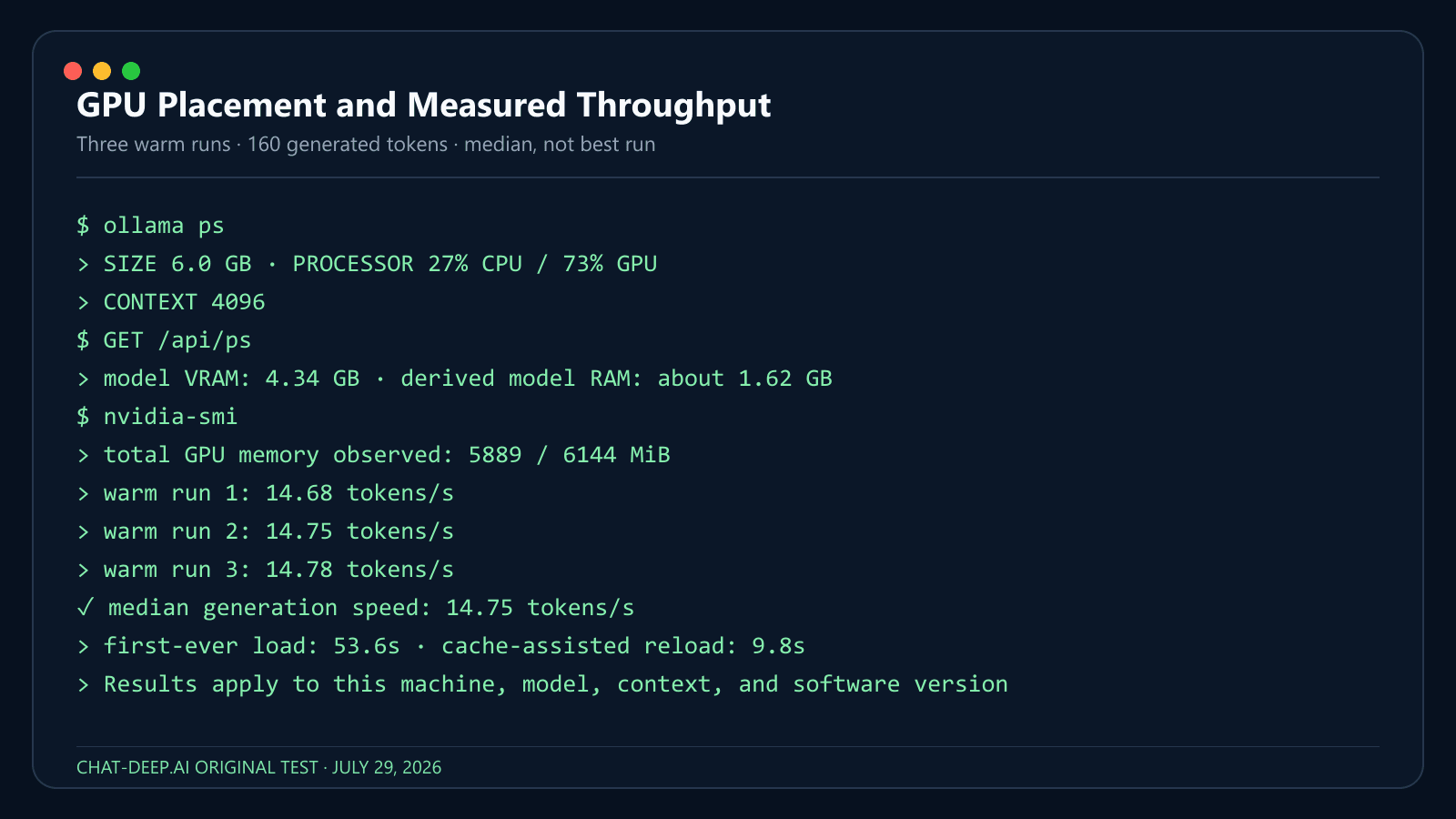
ollama psThe PROCESSOR column reports placement such as 100% GPU, 100% CPU, or a CPU/GPU split. This is more reliable than assuming that a detected GPU is actually carrying the model.
Step 5: Confirm the model can run offline
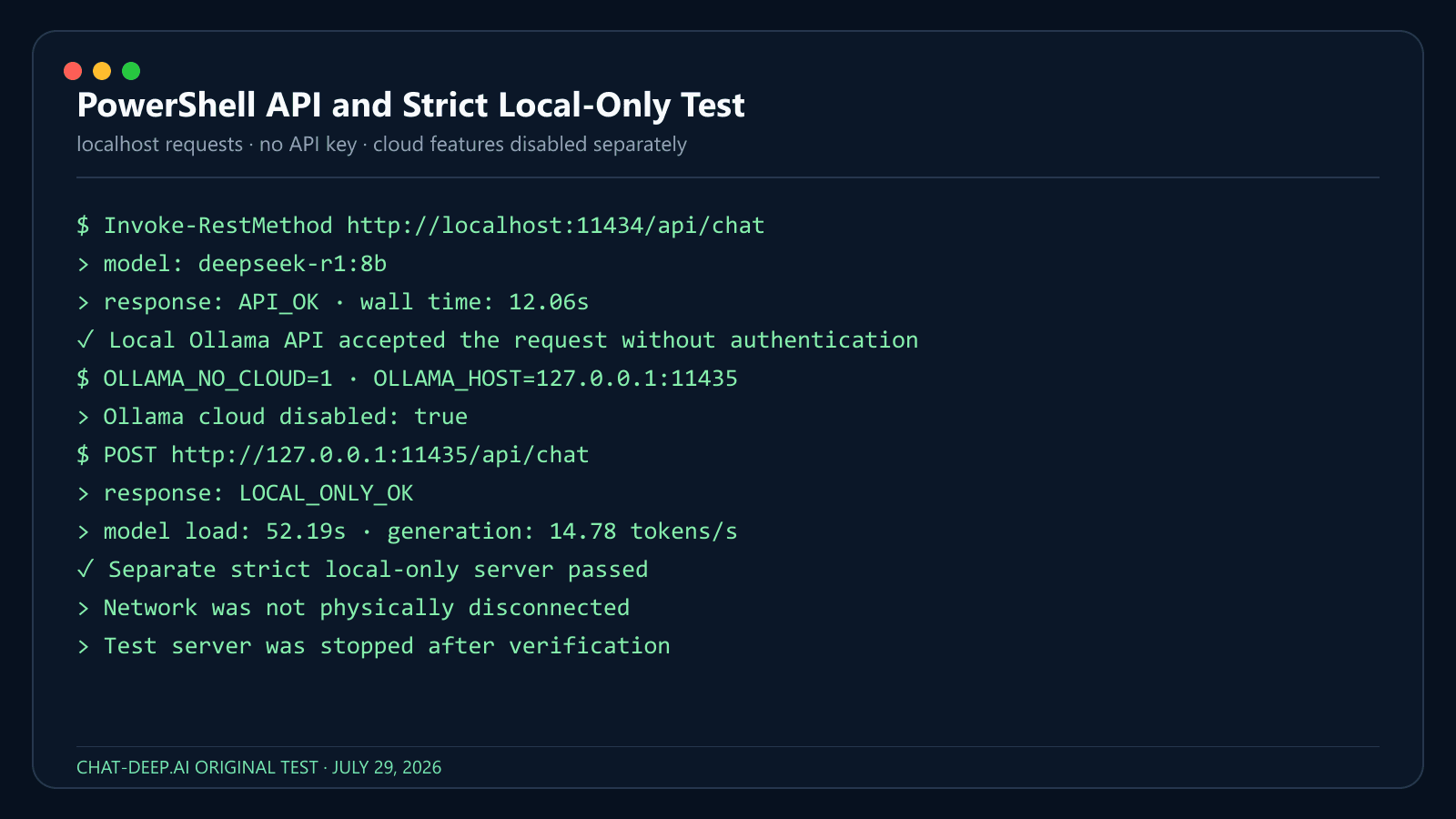
After the pull completes, you can physically disconnect a test computer and run the same command again, or launch Ollama with OLLAMA_NO_CLOUD=1 to disable cloud features. A downloaded local model should still load and answer; reconnect or re-enable cloud access before downloading updates or another model. In our reproducible test, a separate Ollama server with OLLAMA_NO_CLOUD=1 returned LOCAL_ONLY_OK and logged Ollama cloud disabled: true.
Privacy boundary: this result applies to a downloaded model on the local localhost endpoint. We did not physically disconnect the network, so the test proves Ollama’s strict local-only configuration—not an air-gapped system. Confirm the exact model and endpoint before handling sensitive material.
Install DeepSeek with llama.cpp
llama.cpp runs GGUF model files on CPU, NVIDIA CUDA, Apple Metal, AMD and Vulkan, and gives you direct control over quantization and how many layers go to the GPU. Its install documentation lists prebuilt packages for Winget (Windows), Homebrew (macOS and Linux), conda-forge, MacPorts and Nix, plus release binaries and Docker images.
# Windows
winget install llama.cpp

# macOS or Linux
brew install llama.cpp
Then download and run a GGUF build straight from Hugging Face. DeepSeek does not publish GGUF files itself, so these come from community publishers; the examples below use widely used repositories that existed when we checked on September 19, 2026. Verify the publisher and the base model on the model page before you download.
# Chat in the terminal with the 8B R1-0528 distill (Q4_K_M)
llama-cli -hf unsloth/DeepSeek-R1-0528-Qwen3-8B-GGUF:Q4_K_M -c 8192 -ngl 99

# Or start a local OpenAI-compatible server with a web UI on port 8080
llama-server -hf unsloth/DeepSeek-R1-0528-Qwen3-8B-GGUF:Q4_K_M -c 8192 -ngl 99 --port 8080
-ngl 99offloads all layers to the GPU. Lower the number if you run out of VRAM; use-ngl 0for CPU only.-c 8192sets the context. Start small and raise it while watching memory.-t 8sets CPU threads for CPU-only runs.- Current llama.cpp builds also ship a unified
llamacommand, sollama cli -hf …andllama serve -hf …do the same job. Older installs only havellama-cliandllama-server. - For 14B or 32B, swap in a matching repository such as
bartowski/DeepSeek-R1-Distill-Qwen-14B-GGUForunsloth/DeepSeek-R1-Distill-Qwen-32B-GGUF.
File formats and what the quantization labels mean are covered in GGUF vs Safetensors.
Install DeepSeek with vLLM
vLLM is a serving engine for Linux GPU servers. It loads the official safetensors weights rather than GGUF, batches many requests, and exposes an OpenAI-compatible API. Its quick start lists Linux and Python 3.10–3.13 as prerequisites and recommends installing with uv. Use it when you need throughput for a team or an application, not for a first local chat.
uv venv --python 3.12 --seed
source .venv/bin/activate
uv pip install vllm --torch-backend=auto

# Serve a distill that fits one 24 GB GPU (BF16 weights are about 15 GB)
vllm serve deepseek-ai/DeepSeek-R1-Distill-Qwen-7B --max-model-len 16384

# Larger distills: split across GPUs
vllm serve deepseek-ai/DeepSeek-R1-Distill-Qwen-32B --tensor-parallel-size 2 --max-model-len 16384
The server listens on port 8000. Test it with curl http://localhost:8000/v1/models, then point any OpenAI-compatible client at http://localhost:8000/v1. Because vLLM loads unquantized weights by default, plan VRAM from the BF16 sizes in the table above: 32B needs about 66 GB for weights alone, which is why it takes two 48 GB cards or more.
For the V4 family, DeepSeek’s model cards link to the official vLLM recipe and the SGLang cookbook, and their examples target multi-GPU data-center nodes (the V4-Pro card shows a single 4×GB300 node). DeepSeek-V4.1-Flash ships its own reference inference code, which converts the checkpoint for 8-way tensor parallelism. Our DeepSeek with vLLM guide covers the server side in more depth.
Our Local DeepSeek Test
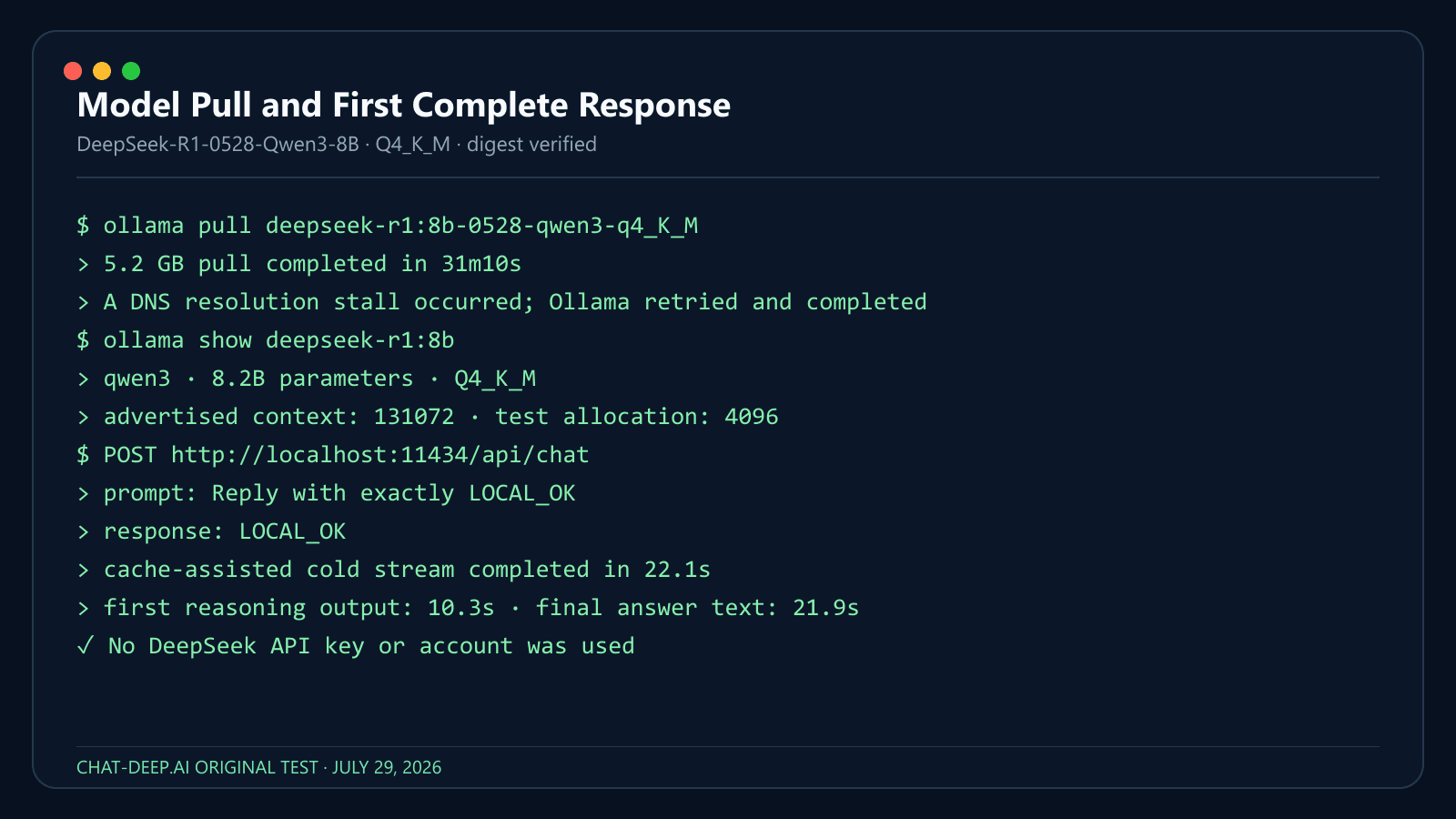
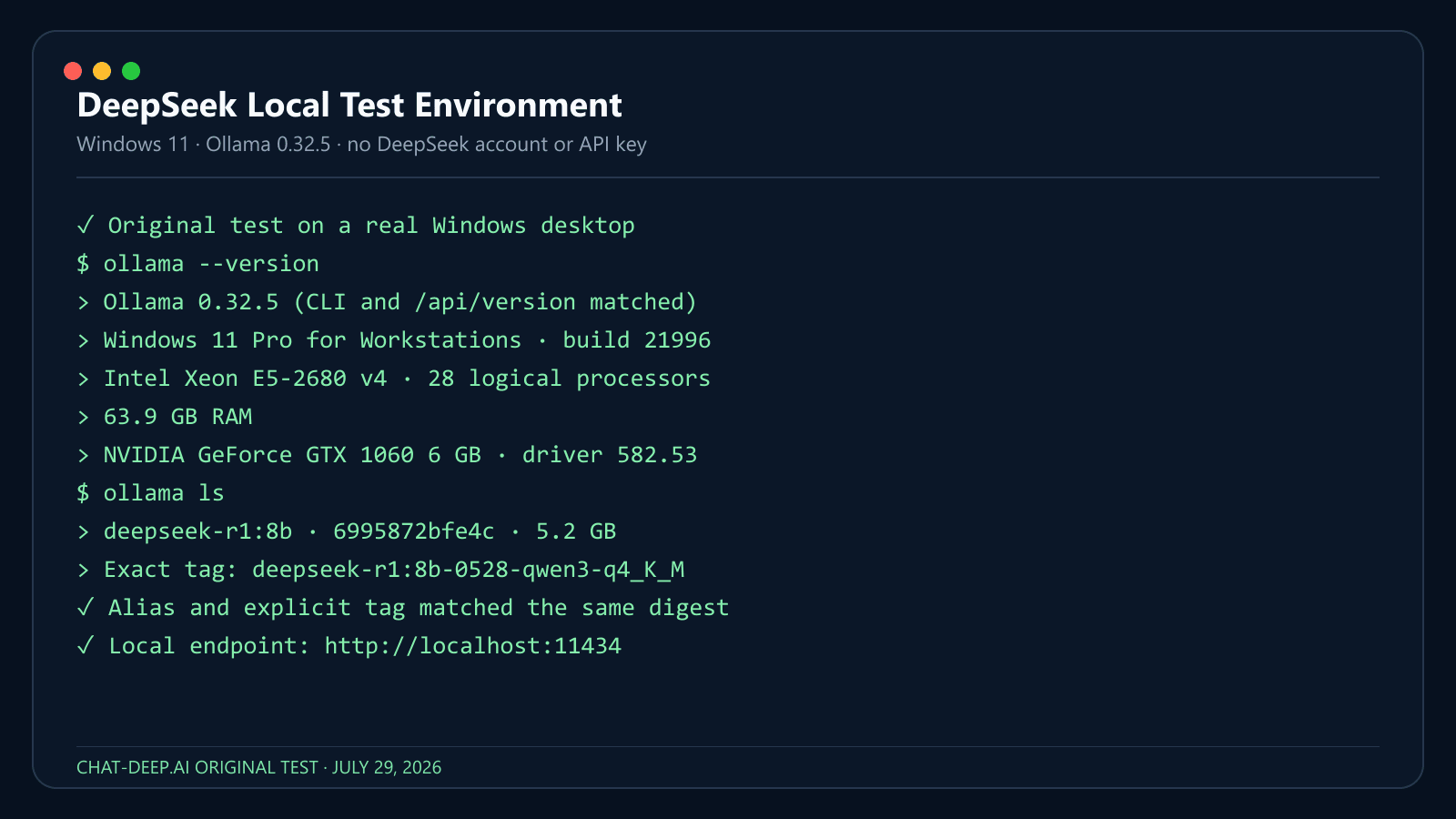
We installed Ollama and ran the current deepseek-r1:8b alias on a real Windows computer. We verified that it resolved to the same digest as the explicit deepseek-r1:8b-0528-qwen3-q4_K_M tag, then measured the pull, model placement, context, first complete API response, PowerShell request, and a separate strict local-only server. These observations describe this machine and software version; performance will vary with hardware, quantization, context, file cache, and background load.
| Test detail | Observed result |
|---|---|
| Test date | July 29, 2026 |
| Computer / CPU / GPU | Intel Xeon E5-2680 v4 (28 logical processors); NVIDIA GeForce GTX 1060 6GB |
| Installed RAM / VRAM | 63.9GB RAM; 6GB VRAM |
| Windows version | Windows 11 Pro for Workstations (build 21996) |
| Ollama version | 0.32.5 (CLI and local /api/version matched) |
| Model tag and digest | deepseek-r1:8b-0528-qwen3-q4_K_M; alias deepseek-r1:8b matched digest 6995872bfe4c |
| Reported download / loaded size | 5.2GB downloaded; 6.0GB loaded |
Processor placement from ollama ps | 27% CPU / 73% GPU; local API reported 4.34GB of model VRAM |
| Context used in test | 4,096 tokens |
| Cold-load time / time to first visible output | First-ever load: 53.6s. Cache-assisted reload after unload: 9.8s; first reasoning output at 10.3s and final answer text at 21.9s |
| Generation speed | 14.75 tokens/s median across three warm 160-token runs (14.68, 14.75, 14.78) |
| Peak Ollama RAM / VRAM observed | 4.34GB model VRAM; about 1.62GB of the loaded model remained in system RAM. Total GPU use observed: 5,889MiB of 6,144MiB |
| PowerShell API request | Passed: PowerShell Invoke-RestMethod returned API_OK from localhost:11434 in 12.06s, with no API key |
| Offline rerun after download | Passed in strict local-only mode: OLLAMA_NO_CLOUD=1, log confirmed cloud disabled, response LOCAL_ONLY_OK. Network was not physically disconnected |
What the numbers mean: the 8B Q4 model was usable on this older 6GB GPU, but it was not a comfortable all-GPU fit. Ollama offloaded 73% to the GPU and left 27% on the CPU, while total GPU use reached 5,889MiB of 6,144MiB. The first-ever load was much slower than the cache-assisted reload, and the 31m10s pull included a DNS-related stall; neither result should be treated as a universal benchmark.
Context length, KV cache and offload
The current DeepSeek-R1 distill tags on Ollama advertise support for up to 128K context. Ollama’s current context-length documentation chooses the runtime default by VRAM: 4K below 24GiB, 32K from 24–48GiB, and 256K at 48GiB or more. Cloud models use their maximum by default. The model’s advertised maximum and the context actually allocated by your local runtime are different numbers; our 6GB-VRAM test therefore used 4,096 tokens.
Inside an ollama run session, you can set an 8K context for that session with:
/set parameter num_ctx 8192Use the smallest context that fits the task. Increasing context can substantially increase memory use and may reduce speed or force more CPU offload. Do not jump directly to 128K on a 16GB laptop.
A model fitting at 4K context does not prove that it fits at 32K, 64K or its theoretical maximum. Ollama currently defaults context by available VRAM: under 24GiB uses 4K, 24–48GiB uses 32K, and 48GiB or more uses 256K. Ollama also states that increasing context increases memory use and recommends checking both context and processor split with ollama ps.
Use the shortest context that actually supports the task, then increase it while watching memory and offload. If a configuration fails, use a smaller model, use a lower-bit quantization (for example Q4 instead of Q8), reduce context, reduce concurrency, or deliberately move some layers to system RAM. Record the exact configuration so the result can be reproduced.
Call DeepSeek Locally from PowerShell
Ollama serves its local API at http://localhost:11434/api. On Windows, this PowerShell example avoids quoting problems that occur when a Bash-style curl command is pasted into Windows PowerShell:
$body = @{
    model = "deepseek-r1:8b"
    messages = @(
        @{
            role = "user"
            content = "Give three practical benefits of local inference."
        }
    )
    stream = $false
} | ConvertTo-Json -Depth 5

$response = Invoke-RestMethod `
    -Uri "http://localhost:11434/api/chat" `
    -Method Post `
    -ContentType "application/json" `
    -Body $body

$response.message.content
The response should print the assistant’s text. Ollama’s chat endpoint streams by default; stream = $false returns one JSON response and is simpler for a first test.
macOS and Linux curl example
curl http://localhost:11434/api/chat -d '{
  "model": "deepseek-r1:8b",
  "messages": [
    {
      "role": "user",
      "content": "Give three practical benefits of local inference."
    }
  ],
  "stream": false
}'
Keep the Local API Private
Ollama’s local API does not require authentication on localhost:11434. Cloud models, private-model downloads, and publishing do require authentication. No-auth local access is convenient on one computer, but it becomes a security risk if you expose port 11434 to a LAN or the public internet.
- Keep the service bound to
127.0.0.1unless remote access is intentional. - For strict local-only operation, disable Ollama cloud features in
~/.ollama/server.jsonor setOLLAMA_NO_CLOUD=1, then restart Ollama and confirm its log says cloud is disabled. - Do not set
OLLAMA_HOST=0.0.0.0:11434and open the firewall as a shortcut. - If remote access is necessary, put Ollama behind an authenticated gateway or reverse proxy with TLS, rate limits, and network restrictions.
- Do not expose Open WebUI, LM Studio’s server, llama.cpp, vLLM, or SGLang publicly without equivalent controls.
- Only download models from publishers and repositories you trust.
For container and network patterns, see our DeepSeek Docker deployment guide.
Useful Ollama Commands
| Task | Command |
|---|---|
| List installed models | ollama ls (ollama list also worked in our 0.32.5 test) |
| Inspect the selected tag and template | ollama show deepseek-r1:8b |
| See loaded models and CPU/GPU placement | ollama ps |
| Pull the current tag again | ollama pull deepseek-r1:8b |
| Unload the model from memory | ollama stop deepseek-r1:8b |
| Remove the downloaded model | ollama rm deepseek-r1:8b |
When Ollama Is Not the Right Tool
Ollama is the main path in this guide because it minimizes setup. Choose another runtime only when you have a specific reason:
| Need | Better option | Dedicated guide |
|---|---|---|
| A desktop interface for browsing and chatting with local models | LM Studio | Run DeepSeek in LM Studio |
| A self-hosted browser chat connected to Ollama | Open WebUI | DeepSeek Docker deployment |
| Manual GGUF selection, quantization, and CPU/GPU tuning | llama.cpp | GGUF vs Safetensors |
| High-throughput serving on GPU infrastructure | vLLM or SGLang | DeepSeek with vLLM |
LM Studio supports GGUF on Windows/Linux and GGUF or MLX workflows on compatible Macs, but format and runtime support are not interchangeable. Its current requirements specify macOS 14+ on Apple Silicon (Intel Macs are not supported), AVX2 for Windows x64, and 16GB RAM recommended; Windows ARM and Linux x64/ARM64 are also supported under the documented conditions. Open WebUI is an interface, not the model engine; it still needs Ollama or another compatible backend. llama.cpp offers more control but requires more decisions about model files, builds, and offload settings.
Windows, macOS and Linux Requirements
Windows
For Windows, a modern 64-bit PC is recommended. Local tools such as Ollama, LM Studio, Jan, llama.cpp builds, and vLLM-based setups can be used depending on your model and hardware. For consumer Windows systems, DeepSeek PC requirements usually come down to RAM, GPU VRAM, CPU instruction support, and drivers.
LM Studio requirements checked July 28, 2026: LM Studio’s current documentation supports Apple Silicon Macs running macOS 14 or later and recommends at least 16 GB RAM; Intel Macs are not supported. Windows x64 requires AVX2, Windows x64 and ARM are supported, and at least 16 GB RAM plus 4 GB dedicated VRAM are recommended. Linux supports x64 and ARM64, with Ubuntu 20.04 or later documented. These are LM Studio application requirements, not universal requirements for every DeepSeek checkpoint.
macOS
For DeepSeek Mac requirements, Apple Silicon is the most important factor. Apple’s unified memory architecture can be useful for local LLMs because CPU and GPU share a large memory pool. LM Studio’s docs list Apple Silicon M1/M2/M3/M4, macOS 14.0 or newer, and 16GB+ RAM recommended; they also note that 8GB Macs may work with smaller models and modest context sizes.
For local DeepSeek on Mac, small R1 distilled models are the realistic starting point. Larger 32B or 70B models require much more unified memory and patience. MLX-based builds can be helpful on Apple Silicon, but exact performance depends on the model format and runtime.
Linux
Linux is usually the best operating system for advanced DeepSeek GPU deployment, especially if you are using server GPUs, CUDA, ROCm, vLLM, SGLang, Docker, or multi-GPU inference. For simple local chat, Linux can run smaller quantized models just like Windows and macOS. For production workloads, Linux offers the strongest tooling around drivers, inference servers, observability, and automation.
Can you run DeepSeek V4 or V4.1 locally?
Technically yes—but not on a normal laptop. DeepSeek has published open DeepSeek-V4 weights, but full V4 is a workstation or server path. The official model card lists DeepSeek-V4-Flash at 284B total parameters with 13B activated and V4-Pro at 1.6T total parameters with 49B activated; both support up to a 1M-token context in the model specification. Even the smaller V4-Flash checkpoint is about 160 GB on disk, and its successor DeepSeek-V4.1-Flash, released on September 10, 2026 with image input, is about 510 GB.
The command ollama run deepseek-r1:8b does not install DeepSeek V4. Running V4 locally requires an exact compatible checkpoint or quantization, a runtime that supports the V4 architecture, and substantial storage and memory planning. Context support also does not mean you can allocate 1M tokens on consumer hardware.
Start with the 8B R1-0528 distill to learn the workflow. If full V4 is a hard requirement, review the official model card and our DeepSeek V4 guide, then plan workstation or server resources. Be cautious with unofficial “V4 8B” downloads: verify the publisher, base model, model card, and whether it is truly a DeepSeek checkpoint or a third-party distillation.
Local DeepSeek for privacy and data residency
Running DeepSeek locally for US businesses can be attractive because prompts, source code, customer records, and internal documents can remain inside the company network instead of being sent to an external API.
For EU teams, DeepSeek local deployment for EU data privacy can reduce some cross-border transfer concerns because inference can happen on controlled infrastructure. However, local inference is not automatic GDPR compliance. The European Commission explains that GDPR protections continue to apply when personal data is transferred outside the EU, and the EDPB notes that transfers outside the EEA must meet Chapter V conditions.
For Canadian organizations, DeepSeek local AI Canada data residency can help keep sensitive data in a chosen environment. Canada’s privacy commissioner guidance says organizations remain accountable for personal information even when processing is outsourced, and they should understand where data resides and what laws may apply.
Local deployment gives more control over:
- prompt retention
- access control
- logs
- encryption
- data location
- model governance
- internal review
But it does not remove the need for privacy policies, security controls, DLP, audit logging, legal review, retention rules, and AI risk management. NIST’s AI Risk Management Framework is designed to help organizations manage AI risks, while the FTC’s privacy and security guidance emphasizes appropriate safeguards for sensitive information.
This is not legal advice. Regulated teams should involve privacy, security, and legal stakeholders before deploying local AI on sensitive data.
Which DeepSeek Model Should You Choose?
Choose the model based on your goal, not just the largest number.
| User Type | Best Choice |
|---|---|
| Casual users | DeepSeek web or mobile app |
| Students and writers | Web/app, or API if building tools |
| Developers | DeepSeek API: deepseek-flash for text and images, deepseek-v4-pro for text |
| Local beginners | R1 Distill 7B or 8B |
| Low-end local testing | R1 Distill 1.5B |
| Better local reasoning | R1 Distill 14B or 32B if hardware allows |
| Heavy local users | R1 Distill 70B with workstation hardware |
| Enterprise/local lab | Full R1/V3/V4-class models only with proper server infrastructure |
For most readers, the best recommendation is: use DeepSeek online or through the API unless you specifically need local inference. If you do need local inference, start with a small distilled R1 model before attempting larger models.
A good order of work: install Ollama, start with deepseek-r1:8b, compare 14B, and move to 32B only if your VRAM and patience allow. Start with the smallest model that solves the task. If you are still deciding whether local inference is right for you, compare privacy, cost, quality, maintenance and scaling in DeepSeek Local vs API, and see what the hosted route costs on our DeepSeek pricing page.
Troubleshooting a local DeepSeek install
| Problem | Likely Cause | Fix |
|---|---|---|
| Out of memory | Model too large, context too long, not enough RAM/VRAM | Use a smaller model, use a lower-bit quantization (for example Q4 instead of Q8), or reduce context |
| Model loads slowly | Large file, slow disk, CPU loading | Use SSD, smaller quantized model, GPU offload |
| Very slow generation | CPU-only inference or too much offloading | Use GPU acceleration or smaller model |
| Context too large | KV cache exceeds memory | Lower context length |
| GPU not detected | Driver/runtime mismatch | Update CUDA/ROCm/Metal/Vulkan drivers and tool versions |
| App/API confusion | User expects local model but uses hosted app | Explain web/app/API do not require local GPU |
| Using old model names | deepseek-chat or deepseek-reasoner still in code | This only concerns the hosted API. Use deepseek-flash (text and images) or deepseek-v4-pro (text); local model tags such as deepseek-r1:8b are unrelated |
| Storage fills up | Multiple model files and quantizations | Delete unused variants and keep free SSD space |
ollama is not recognized
Reopen the terminal, confirm the Ollama app is installed and running, then try ollama --version. On Windows, restart the computer if the command is still missing from the path.
The download is slow or fails
Confirm there is enough free disk space, use a stable connection, and retry ollama pull deepseek-r1:8b. If you only need to verify the setup, start with the 1.1GB tag: ollama run deepseek-r1:1.5b.
Out-of-memory error or system freezing
Stop the current model, choose a smaller tag, close memory-heavy applications, and lower the context. A 128K-capable model can still fail when the runtime allocates more context than the machine can hold.
The model runs entirely on CPU
Use ollama ps to confirm placement. Update Ollama and GPU drivers, then check whether Ollama supports your GPU and operating system. CPU inference is valid, but it is usually slower.
The API connection is refused
Make sure the Ollama application or service is running. Test ollama ls, then retry http://localhost:11434/api/chat. Do not open the firewall broadly to solve a localhost configuration problem.
The answer quality is poor
Confirm the tag with ollama show deepseek-r1:8b, use a clear prompt, and try 8B or 14B instead of 1.5B. DeepSeek’s R1-0528 evaluation used temperature 0.6 and top-p 0.95, but those benchmark settings are a starting point—not a guarantee for every task.
If the problem is with DeepSeek’s own chat, app or API rather than a local model, see DeepSeek not working: fixes that work.
DeepSeek system requirements for the web, app and API
1. DeepSeek Web Requirements
The web version has the lightest DeepSeek hardware requirements. You do not need to install model files, buy a GPU, or configure a local inference server. The model runs on DeepSeek’s infrastructure, while your device only needs to handle the browser interface.
For DeepSeek web chat, you generally need:
| Requirement | Practical Recommendation |
|---|---|
| Browser | Latest Chrome, Edge, Safari, Firefox, or another modern browser |
| Internet | Stable connection; faster is better for long responses and file uploads |
| CPU/RAM | Any modern laptop, desktop, tablet, or phone that can browse comfortably |
| GPU | Not required |
| Storage | Minimal, mostly browser cache |
| Account | May be required depending on region, feature, and availability |
DeepSeek’s homepage links straight to the official chat at chat.deepseek.com, which is used with a free account.
For most users searching for DeepSeek system requirements, the answer is simple: if you are using DeepSeek online, your computer does not run the model locally. Your device only needs to run the website smoothly.
2. DeepSeek Mobile App Requirements
DeepSeek also has an official mobile app. The current App Store listing requires iOS 15.0 or later for iPhone and iPod touch, and iPadOS 15.0 or later for iPad. App size changes between releases, so check the live listing for the current download size before installation.
| Platform | Official / Practical Requirement |
|---|---|
| iPhone | iOS 15.0 or later |
| iPad | iPadOS 15.0 or later |
| iPod touch | iOS 15.0 or later |
| Android | Use the official Google Play listing and check compatibility on your device |
| Internet | Required for normal app usage |
| Storage | Enough free space for the app and updates |
For Android, use the official Google Play listing and run its compatibility check on the target device. Android requirements and release dates can change by device, region, and app version, so this guide does not freeze a minimum Android version or store-update date.
The key point is that DeepSeek app requirements are light compared with local deployment. Your phone is not loading a 7B, 70B, or 671B parameter model into memory; it is connecting to DeepSeek’s hosted service.
3. DeepSeek API Requirements
DeepSeek API requirements are also much lighter than local model requirements. You do not need a local GPU because inference happens through DeepSeek’s API infrastructure. Developers need an API key, an application or server environment, a secure HTTPS client, logging, and token usage controls.
DeepSeek’s current Models & Pricing table lists two models: deepseek-flash, which serves DeepSeek-V4.1-Flash and accepts text and images, and deepseek-v4-pro, which serves DeepSeek-V4-Pro-0813 and is text only. Both support thinking and non-thinking modes, a 1M-token context window, up to 384K output tokens, JSON Output, Tool Calls, the Responses API, Anthropic-compatible Messages and Chat Prefix Completion. FIM Completion is listed for both in non-thinking mode only. Rechecked September 24, 2026.
| API Requirement | Recommendation |
|---|---|
| API key | Use the official DeepSeek platform |
| Model names | Use deepseek-flash for text and images, or deepseek-v4-pro for text |
| Network | Reliable outbound HTTPS access |
| Runtime | Node.js, Python, Go, Java, PHP, or any HTTPS-capable stack |
| Monitoring | Track input/output tokens, latency, and costs |
| Security | Do not expose API keys in frontend code |
| Budgeting | Add rate limits, alerts, and usage caps |
On September 10, 2026 DeepSeek retired the V4 Flash and V4 Flash Vision Exp API models. Their old names are temporarily routed to DeepSeek-V4.1-Flash, and the much older deepseek-chat and deepseek-reasoner names passed their announced cutoff on July 24, 2026. New code should send deepseek-flash or deepseek-v4-pro. Setup is covered in our DeepSeek API guide and costs on the pricing page.
For developers, the API is usually the best balance of performance, scale, and simplicity. You avoid local GPU setup while still gaining access to DeepSeek’s current model lineup.
Final Verdict
The DeepSeek system requirements are light if you use DeepSeek online through the web app, mobile app, or API. In those cases, you do not need a high-end PC, large RAM, or a dedicated GPU. You only need a compatible device, internet access, and, for API use, a proper developer setup.
Local DeepSeek requirements scale dramatically. Small distilled R1 models can run on ordinary PCs and laptops, especially in quantized form. The 7B and 8B models are the best entry point for most local users. The 14B and 32B models benefit from stronger GPUs or Apple Silicon unified memory. The 70B model is workstation-class. Full DeepSeek V4.1-Flash, V4, R1, V3, V3.1 or V3.2-class models are not realistic for normal consumer laptops and should be treated as advanced workstation, server, or data-center workloads.
Run DeepSeek locally: FAQ
What are the minimum system requirements to run DeepSeek locally?
About 8 GB of RAM runs the 1.5B distilled model on CPU. The practical starting point is 16 GB of RAM, an 8 GB GPU or a 16 GB Apple Silicon Mac, which runs the 8B distill (deepseek-r1:8b, about 5.2 GB). Requirements rise sharply from there: about 9 GB of weights for 14B, 20 GB for 32B and 43 GB for 70B at Q4.
Can I run DeepSeek-V4.1-Flash or V4-Pro on my PC?
No, not usefully. DeepSeek-V4.1-Flash is about 510 GB of weights and DeepSeek-V4-Pro about 865–893 GB on Hugging Face, and DeepSeek’s own examples run them across eight GPUs or a multi-GPU data-center node. Use the API for these models, and run a distilled R1 model locally.
Do I need a GPU to use DeepSeek?
No. The web chat, mobile app and API run on DeepSeek’s servers. Locally, small quantized models (1.5B, 7B, 8B) run on CPU only, just slowly. A GPU or Apple Silicon is what makes 14B and larger practical.
How much VRAM does DeepSeek need?
It depends on the model. At Q4, plan about 8 GB for 7B/8B, 12–16 GB for 14B, 24–32 GB for 32B and 48–80 GB for 70B, with more for long context. The V4, V3 and full R1 releases need hundreds of gigabytes.
Can an RTX 3060, 4090 or 5090 run DeepSeek?
Yes, the distilled models. An RTX 3060 12GB suits 7B/8B and careful 14B tests; an RTX 4090 with 24 GB runs 14B easily and 32B at modest context; an RTX 5090 with 32 GB gives 32B more headroom. None of them can hold the 43 GB 70B package entirely in VRAM, and none runs the full V4 family.
Can DeepSeek run on a Mac?
Yes. Apple Silicon Macs run the distilled models well because of unified memory: 16 GB for 8B, 24–32 GB for 14B, 48–64 GB for 32B and 96–128 GB for 70B. Use Ollama, LM Studio (macOS 14 or later, MLX or GGUF) or llama.cpp. Intel Macs are not a practical target.
Can I run DeepSeek on 8 GB of RAM?
In limited cases. An 8 GB machine can run the 1.5B distill and sometimes a 7B model at small context, slowly. 16 GB or more is a much better experience.
Is it free to run DeepSeek locally, and do I need an account or API key?
The runtimes are free and the weights have no per-token charge; most DeepSeek releases use the MIT license, though Coder-V2 uses DeepSeek’s own model license and the Llama-based distills carry base-model terms. You need no DeepSeek account or API key. You do supply the computer, storage, electricity and download bandwidth.
Is deepseek-r1:8b the full DeepSeek-R1 model?
No. Ollama’s 8B tag is DeepSeek-R1-0528-Qwen3-8B, a small distilled model. The full DeepSeek-R1 is a 671B-parameter Mixture-of-Experts model of about 689 GB.
Can DeepSeek run offline?
Yes, local open-weight models run offline once the runtime and the model are downloaded. The web chat, the app, the API and Ollama’s cloud models do not.
Why does Ollama show 128K context but use less?
128K is the model’s advertised maximum. Ollama picks the default by VRAM: 4K under 24 GiB, 32K from 24 to 48 GiB, and 256K at 48 GiB or more. Raising the context raises memory use, so increase it gradually and check ollama ps.
Should I use Ollama, llama.cpp, LM Studio or vLLM?
Ollama for the quickest setup and a local API. LM Studio for a desktop app. llama.cpp for manual control of GGUF files, quantization and offload. vLLM for serving many users on Linux GPU servers.
Is the DeepSeek API better than running locally?
For most developers, yes. The API gives access to the current V4.1-Flash and V4-Pro models, which cannot run on consumer hardware, with no drivers or downloads. Local inference is better when you need offline use, control over data location or experimentation with open weights.
Is local DeepSeek better for data privacy?
It can help, because prompts and outputs stay on infrastructure you control. It is not automatic compliance: you still need access control, logging, retention rules, security and legal review.
Sources and Test Scope
- Ollama downloads — current Windows, macOS, and Linux installation methods.
- Ollama DeepSeek-R1 tags — tag identity, Q4 file sizes, and advertised model context.
- Ollama FAQ — privacy and local-only mode; context length — VRAM-based defaults and
ollama psverification. - Ollama API introduction and chat endpoint — local base URL and request format.
- Official DeepSeek-R1 repository — original R1 and distilled model identities.
- Official DeepSeek-R1-0528 model card — current update, model metadata, and usage recommendations.
- Official DeepSeek-V4 model card — V4 Flash/Pro sizes and context specification.
Tested: Windows 11, Ollama 0.32.5 installation and version endpoints, ls/list/show/ps, the 8B alias and digest, a 5.2GB pull, local chat API, PowerShell API, CPU/GPU placement, context, warm throughput, and strict local-only configuration. Not tested: the interactive ollama run chat inside our non-interactive automation harness, macOS, Linux, LM Studio, Open WebUI, llama.cpp, the full R1/R1-0528 checkpoints, DeepSeek V4, and a physically disconnected network; those instructions and model facts were checked against official documentation. Hands-on test: July 29, 2026. Facts and sizes re-verified: September 19, 2026.
- DeepSeek on Hugging Face — model cards, licenses and weight sizes for every release in the requirements table.
- Ollama hardware support — NVIDIA compute capability and driver versions.
- llama.cpp install documentation and vLLM quick start — install commands and prerequisites.
- NVIDIA product pages, linked in the RTX section, for VRAM figures.
Hardware figures on this page are practical estimates, not fixed official minimums; they vary with model size, quantization, runtime, context length, batch size and offload. Chat-Deep.ai is an independent DeepSeek resource and is not affiliated with DeepSeek, NVIDIA, Ollama, llama.cpp or vLLM. See our editorial policy for how we test and update technical guides.