
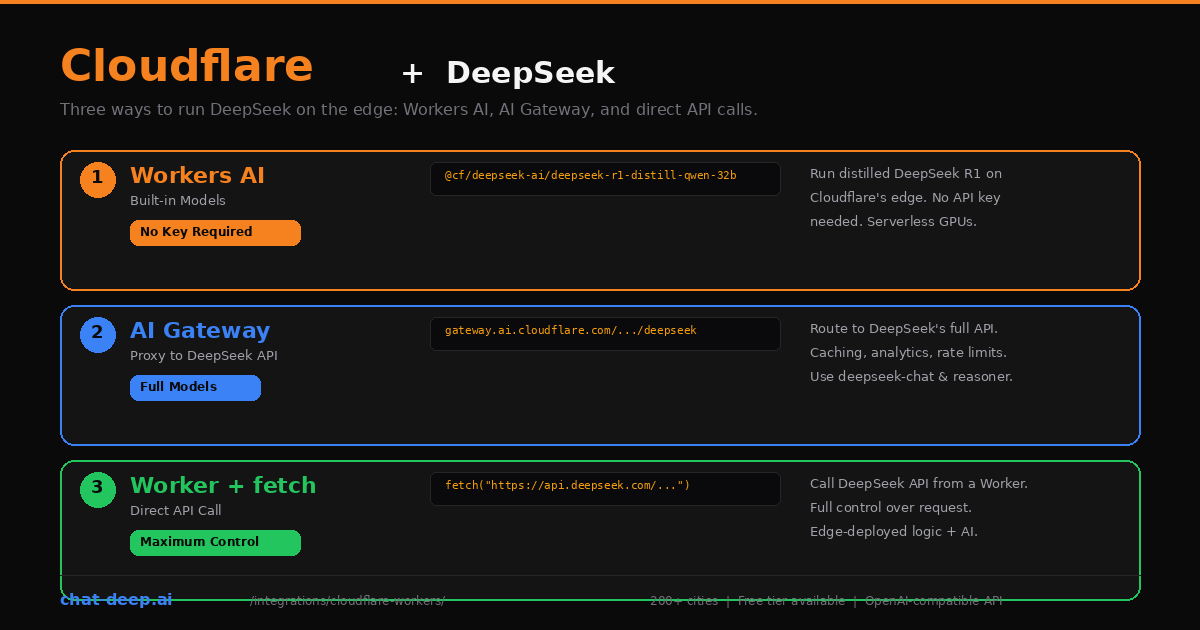
Cloudflare gives you three distinct ways to use DeepSeek, and each one solves a different problem. You can run distilled DeepSeek models directly on Cloudflare’s edge network using Workers AI — no API key needed. You can proxy requests to DeepSeek’s full API through AI Gateway and get caching, analytics, and rate limiting for free. Or you can write a Cloudflare Worker that calls DeepSeek’s API directly, giving you full control over the request while running your logic at the edge.
This guide covers all three approaches with working code, trade-offs, and guidance on when to use each one. The key distinction: Workers AI runs a smaller, distilled DeepSeek R1 model on Cloudflare’s own GPUs, while AI Gateway and direct calls access DeepSeek’s full V3.2 models (deepseek-chat and deepseek-reasoner) with the complete 128K context window. Your choice depends on whether you need the full model or value the simplicity of zero-key deployment.
Approach 1: Workers AI (Built-in DeepSeek Models)
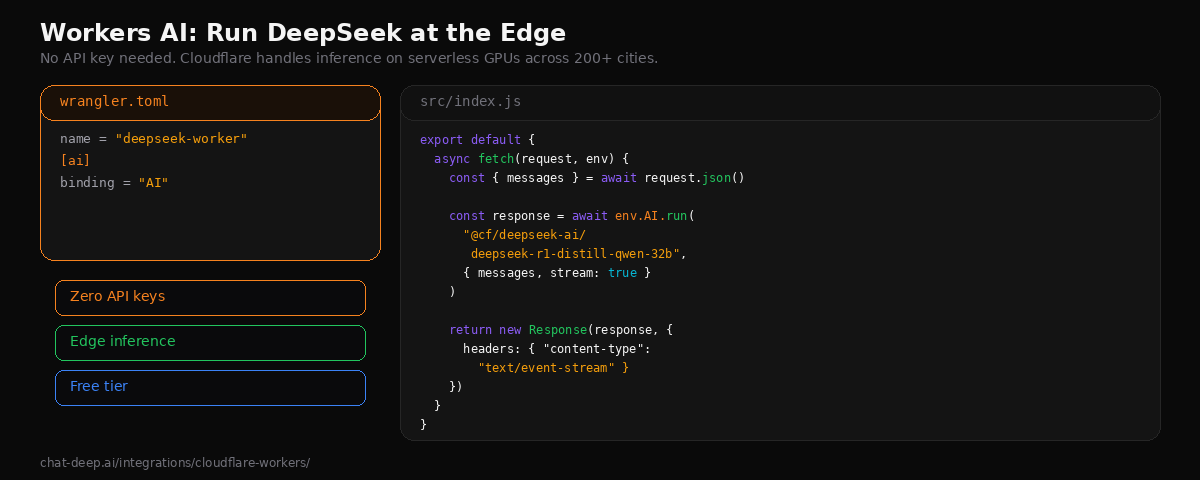
Workers AI lets you run AI models directly on Cloudflare’s serverless GPU infrastructure across 200+ cities. No external API key is required — Cloudflare handles the inference. The available DeepSeek model is @cf/deepseek-ai/deepseek-r1-distill-qwen-32b, a 32-billion parameter model distilled from DeepSeek-R1 based on Qwen2.5. It performs well on reasoning, math, and coding tasks, outperforming OpenAI’s o1-mini on several benchmarks.
Create a new Worker project:
npm create cloudflare@latest deepseek-worker
cd deepseek-worker
Add the AI binding to your wrangler.toml:
name = "deepseek-worker"

[ai]
binding = "AI"
Write the Worker that handles chat requests:
// src/index.js
export default {
  async fetch(request, env) {
    const { messages } = await request.json();

    const response = await env.AI.run(
      "@cf/deepseek-ai/deepseek-r1-distill-qwen-32b",
      { messages, stream: true }
    );

    return new Response(response, {
      headers: { "content-type": "text/event-stream" },
    });
  },
};
Deploy with npx wrangler deploy. Your DeepSeek-powered endpoint is now live on Cloudflare’s edge network. Test it with curl:
curl -X POST https://deepseek-worker.your-subdomain.workers.dev \
  -H "Content-Type: application/json" \
  -d '{
    "messages": [{"role": "user", "content": "Explain edge computing in two sentences."}]
  }'
Workers AI also supports OpenAI-compatible endpoints, which means you can use the OpenAI SDK or any OpenAI-compatible client to interact with it. This is useful if you have existing code that expects the OpenAI format.
Workers AI Pricing and Limits
Workers AI uses a unit called “Neurons” for billing. The free tier includes 10,000 Neurons per day. Beyond that, pricing is $0.011 per 1,000 Neurons on the Workers Paid plan ($5/month base). The exact Neuron cost per token varies by model, but the distilled DeepSeek R1 model is competitive with other 32B-parameter models on the platform. Check the Workers AI pricing page for current rates.
What You Get and What You Don’t
Workers AI exposes a Cloudflare-hosted DeepSeek distill model, not the official hosted deepseek-chat / deepseek-reasoner aliases or their 128K API surface. Treat it as a separate deployment target with different model parity. Avoid blanket claims that this route has “no JSON mode” or “no function calling”: Cloudflare documents JSON Mode and function-calling features for Workers AI, and its docs use the DeepSeek distill model in examples. If you need the official DeepSeek hosted aliases and their documented feature set, use AI Gateway or direct calls to api.deepseek.com.
If you need those capabilities, use Approach 2 or 3 below. For understanding the full DeepSeek model lineup, see our DeepSeek models hub.
Approach 2: AI Gateway (Proxy to DeepSeek’s Full API)
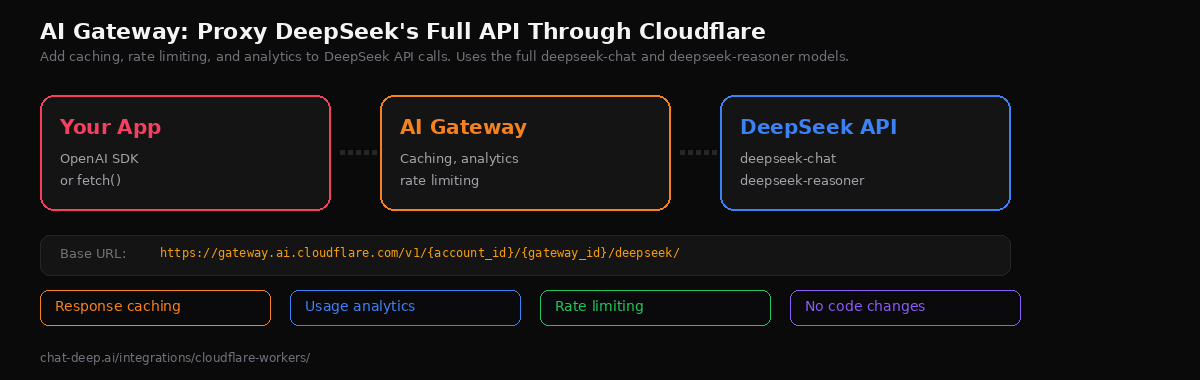
Cloudflare AI Gateway acts as a proxy between your application and DeepSeek’s API. It does not run the model — it forwards your requests to api.deepseek.com while adding caching, rate limiting, usage analytics, and logging. This gives you access to DeepSeek’s full models (deepseek-chat and deepseek-reasoner) with the complete 128K context window and all API features.
Set up a gateway in the Cloudflare dashboard under AI > AI Gateway. Once created, your new base URL is:
https://gateway.ai.cloudflare.com/v1/{account_id}/{gateway_id}/deepseek/Use it with the OpenAI SDK by swapping the base URL:
import OpenAI from "openai";

const client = new OpenAI({
  apiKey: process.env.DEEPSEEK_API_KEY,
  baseURL: "https://gateway.ai.cloudflare.com/v1/YOUR_ACCOUNT/YOUR_GATEWAY/deepseek",
});

const response = await client.chat.completions.create({
  model: "deepseek-chat",
  messages: [{ role: "user", content: "Explain caching strategies." }],
});

console.log(response.choices[0].message.content);
The gateway is transparent to your application. You send the exact same requests you would send to DeepSeek directly — same authentication, same model names, same parameters. The gateway adds a layer of infrastructure features without changing your code logic.
What AI Gateway Adds
Response caching. Identical requests return cached responses instantly, saving both latency and token costs. Configure cache TTL per gateway. This is especially effective for applications that repeatedly send the same prompts, like FAQ bots or classification endpoints.
Usage analytics. The dashboard shows request counts, token usage, latency, and costs per model. You can track usage over time and set alerts. This is observability you get without installing any third-party monitoring tool.
Rate limiting. Protect against runaway costs or abuse by setting request limits per time window. The gateway enforces limits before requests reach DeepSeek, so you never get a surprise bill from an errant script.
Fallback routing. AI Gateway supports routing across multiple providers. If DeepSeek is unavailable, the gateway can automatically fall back to another provider. Check our DeepSeek status page to monitor availability.
Approach 3: Direct API Call from a Worker
The third approach is the most flexible. You write a Cloudflare Worker that calls DeepSeek’s API directly using fetch(). The Worker runs at the edge, handling your business logic — authentication, input validation, prompt construction, response transformation — before and after the DeepSeek call.
// src/index.js
export default {
  async fetch(request, env) {
    const { message, systemPrompt } = await request.json();

    const response = await fetch("https://api.deepseek.com/chat/completions", {
      method: "POST",
      headers: {
        "Content-Type": "application/json",
        Authorization: `Bearer ${env.DEEPSEEK_API_KEY}`,
      },
      body: JSON.stringify({
        model: "deepseek-chat",
        messages: [
          { role: "system", content: systemPrompt || "You are a helpful assistant." },
          { role: "user", content: message },
        ],
        stream: true,
      }),
    });

    return new Response(response.body, {
      headers: {
        "content-type": "text/event-stream",
        "Access-Control-Allow-Origin": "*",
      },
    });
  },
};
Store your API key as a Worker secret:
npx wrangler secret put DEEPSEEK_API_KEYThis pattern gives you full control: you can transform the request, validate inputs, add custom headers, inject context from KV or D1, combine DeepSeek with other APIs, and format the response however your frontend expects. The Worker acts as a lightweight API layer that runs in Cloudflare’s network close to your users.
You can also combine this approach with AI Gateway by pointing your fetch() call at the gateway URL instead of api.deepseek.com — getting edge logic and gateway features together. For background on the DeepSeek API format, see our API documentation.
Which Approach to Choose
| Criteria | Workers AI | AI Gateway | Worker + fetch |
|---|---|---|---|
| DeepSeek model | R1 Distill (e.g. 32B) | All (deepseek-chat, deepseek-reasoner) | All (deepseek-chat, deepseek-reasoner) |
| Context window | Model-dependent (typically smaller than 128K) | 128K | 128K |
| API key needed | No (Cloudflare-managed) | Yes (DeepSeek API key) | Yes (DeepSeek API key) |
| Tool / function calling | Limited / model-dependent | Yes | Yes |
| Context caching | No | Gateway-level caching & observability | Manual (handled in your app) |
| Analytics | Basic | Detailed (logs, tracing, metrics) | None (build your own) |
| Best for | Prototyping, edge experiments | Production, monitoring, scaling | Full control, custom architectures |
Use Workers AI when you want to get started quickly without managing API keys — ideal for prototyping, demos, and reasoning tasks where the distilled 32B model is sufficient. Use AI Gateway when you need DeepSeek’s full models with production-grade monitoring and caching. Use a Worker with direct fetch() when you need custom business logic at the edge alongside DeepSeek calls.
In practice, many production setups combine these approaches. A Worker handles request routing and business logic, calls DeepSeek through AI Gateway for monitoring, and uses Workers AI for lightweight tasks that do not need the full model.
Handling Errors
Each approach has different error patterns. Workers AI errors come from Cloudflare’s infrastructure — typically 429 errors when you exceed your Neuron budget. AI Gateway errors can come from either the gateway layer (rate limits, configuration issues) or from DeepSeek itself (auth failures, model errors). Direct API calls expose DeepSeek’s raw error responses.
Here is a robust error handler for the direct API approach:
export default {
  async fetch(request, env) {
    try {
      const { message } = await request.json();

      const response = await fetch("https://api.deepseek.com/chat/completions", {
        method: "POST",
        headers: {
          "Content-Type": "application/json",
          Authorization: `Bearer ${env.DEEPSEEK_API_KEY}`,
        },
        body: JSON.stringify({
          model: "deepseek-chat",
          messages: [{ role: "user", content: message }],
        }),
      });

      if (!response.ok) {
        const error = await response.json().catch(() => ({}));
        return Response.json(
          { error: error.error?.message || "DeepSeek API error" },
          { status: response.status }
        );
      }

      return new Response(response.body, {
        headers: response.headers,
      });
    } catch (err) {
      return Response.json(
        { error: "Internal server error" },
        { status: 500 }
      );
    }
  },
};
For Workers AI, wrap the env.AI.run() call in a try/catch and check for the InferenceUpstreamError that indicates the GPU backend is overloaded. When this happens, consider falling back to a direct API call to DeepSeek instead. For a full reference of DeepSeek API error codes (401, 402, 429, 500, 503), see our API documentation.
Non-Streaming Example with Workers AI
Not every use case needs streaming. For background processing, webhook handlers, or simple request-response patterns, use the non-streaming mode:
export default {
  async fetch(request, env) {
    const { prompt } = await request.json();

    const response = await env.AI.run(
      "@cf/deepseek-ai/deepseek-r1-distill-qwen-32b",
      {
        messages: [
          { role: "system", content: "You are a JSON generator. Return only valid JSON." },
          { role: "user", content: prompt },
        ],
      }
    );

    return Response.json({ result: response.response });
  },
};
The non-streaming response returns a JSON object with the full generated text. This is simpler to handle on the client side and works well when the response is short or when you need to process the entire output before returning it — for example, parsing JSON, extracting data, or validating the response against a schema.
Using with Cloudflare Agents
Cloudflare’s Agents framework lets you build stateful AI agents that run on Workers. Agents can call Workers AI models, maintain conversation state with Durable Objects, and handle long-running requests. The framework integrates with the Vercel AI SDK through the workers-ai-provider package, giving you type-safe model access and streaming within the agent context. This is the right choice when your application needs persistent state, multi-turn conversations, or autonomous tool-calling workflows at the edge.
CORS for Frontend Access
If your Worker serves a frontend application on a different origin, you need to handle CORS. The cleanest approach is to add headers in your Worker response and handle the preflight OPTIONS request:
const corsHeaders = {
  "Access-Control-Allow-Origin": "https://your-frontend.com",
  "Access-Control-Allow-Methods": "POST, OPTIONS",
  "Access-Control-Allow-Headers": "Content-Type",
};

export default {
  async fetch(request, env) {
    if (request.method === "OPTIONS") {
      return new Response(null, { headers: corsHeaders });
    }

    // ... your DeepSeek logic here ...

    return new Response(response.body, {
      headers: { ...corsHeaders, "content-type": "text/event-stream" },
    });
  },
};
Replace the origin with your actual frontend URL. For development, you can use "*" but always lock it down to specific origins in production. If your frontend is a Next.js app, it can call the Worker endpoint directly from a client component using fetch().
Production Tips
Never hardcode API keys. Use wrangler secret put to store your DeepSeek API key as an encrypted secret. Access it via env.DEEPSEEK_API_KEY in your Worker. Never put keys in wrangler.toml or source code.
Use streaming for chat features. Both Workers AI and direct API calls support streaming. Streaming avoids Cloudflare’s CPU time limits on the Workers Free plan by keeping the connection alive while DeepSeek generates tokens.
Consider the Workers Paid plan for production. The Free plan has limits on CPU time (10ms per request) and daily requests (100K). The Paid plan ($5/month) lifts these significantly and is required for heavy Workers AI usage. See the Workers pricing page for details.
Monitor token costs. When using DeepSeek’s full API (approaches 2 and 3), you pay DeepSeek’s rates: $0.28/M input tokens and $0.42/M output tokens. With context caching, repeated inputs drop to $0.028/M. Check our pricing page for the latest numbers. For more complex infrastructure setups, see our cloud platforms guide.
Conclusion
Cloudflare offers the most versatile set of integration options for running DeepSeek at the edge. Workers AI gives you zero-setup inference with no API key. AI Gateway gives you production monitoring and caching on top of DeepSeek’s full API. And Workers give you a programmable edge layer to build custom AI-powered endpoints. Mix and match based on your needs.
Start with Workers AI to test the distilled R1 model for free. When you need the full deepseek-chat or deepseek-reasoner models, add AI Gateway for monitoring or call the API directly from a Worker. For more DeepSeek integrations, explore our Next.js guide, FastAPI guide, or browse the full integrations section.