
Every request to DeepSeek’s hosted API crosses a network boundary. For teams that need data privacy, compliance with data residency requirements, predictable latency, or want to eliminate per-token costs entirely, self-hosting is the answer. Docker makes this practical by packaging the inference engine, model weights, and GPU drivers into reproducible containers that work the same way on a developer laptop and a production GPU server.
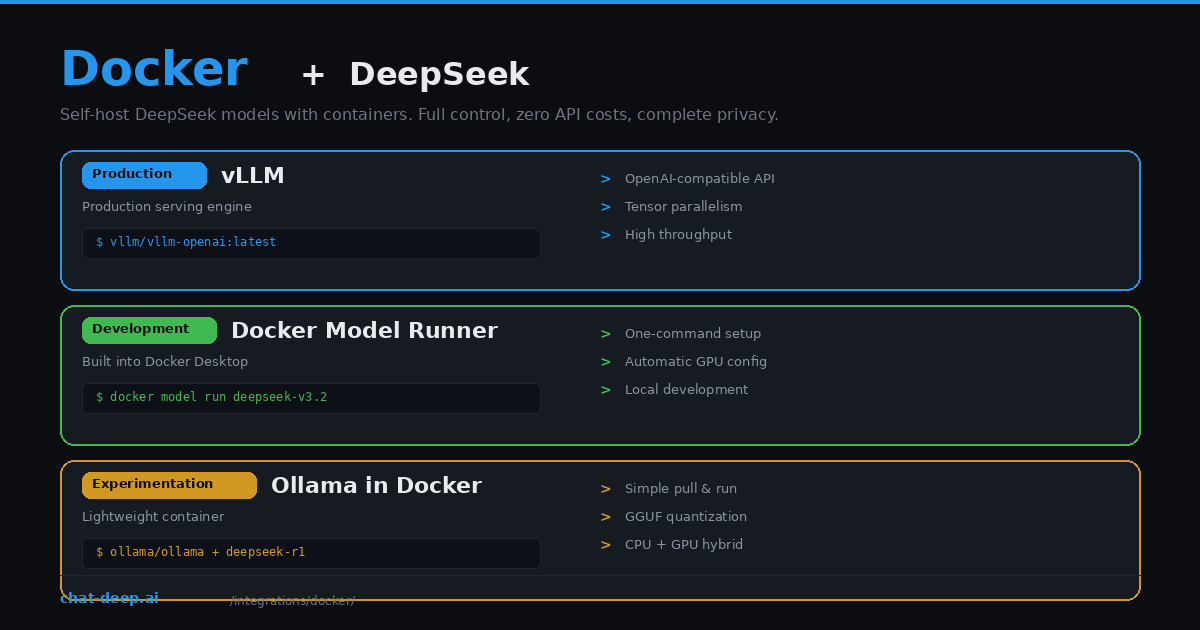
This guide covers three Docker-based approaches to running DeepSeek locally. vLLM is the production standard — high throughput, OpenAI-compatible API, tensor parallelism across GPUs. Docker Model Runner is Docker’s built-in model serving feature for quick local development. And Ollama in a container is the simplest path for experimentation. Each approach fits a different stage of your workflow.
If you prefer using DeepSeek’s hosted API instead of self-hosting, our API documentation covers that path. For understanding the full model lineup available for local deployment, see the DeepSeek models hub.
Hardware Requirements
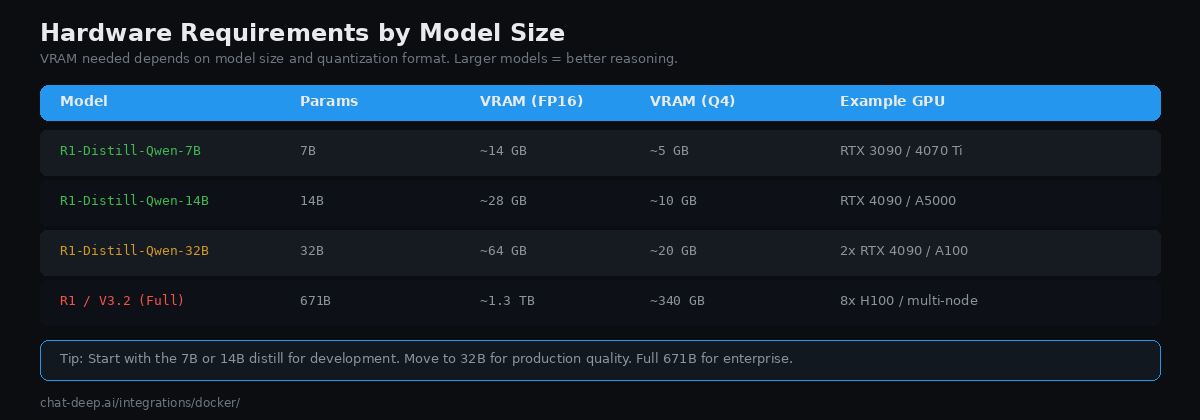
The first decision is which model size to run. DeepSeek publishes the full 671B-parameter models (R1 and V3.2) alongside distilled versions at 7B, 14B, and 32B parameters. Bigger models produce better results but need more GPU memory.
At FP16 precision, the 7B model needs about 14 GB of VRAM — a single RTX 3090 or RTX 4070 Ti handles it comfortably. The 14B model needs roughly 28 GB, fitting on an RTX 4090 or A5000. The 32B model requires about 64 GB at full precision, meaning you need two RTX 4090s or a single A100 80GB. The full 671B model requires approximately 1.3 TB of VRAM at FP16, which means eight H100 GPUs or a multi-node setup.
Quantization reduces memory requirements significantly. At 4-bit quantization (Q4_K_M for GGUF, or AWQ for vLLM), the 32B model fits in about 20 GB — a single RTX 4090. The trade-off is some quality degradation, particularly in long reasoning chains. For most use cases, the 14B or 32B distills with 4-bit quantization deliver the best balance of quality and hardware cost.
Prerequisites
All GPU-based approaches require the NVIDIA Container Toolkit. Install it to enable GPU passthrough from the host into Docker containers:
# Ubuntu/Debian
curl -fsSL https://nvidia.github.io/libnvidia-container/gpgkey | sudo gpg --dearmor -o /usr/share/keyrings/nvidia-container-toolkit-keyring.gpg
curl -s -L https://nvidia.github.io/libnvidia-container/stable/deb/nvidia-container-toolkit.list | \
  sed 's#deb https://#deb [signed-by=/usr/share/keyrings/nvidia-container-toolkit-keyring.gpg] https://#g' | \
  sudo tee /etc/apt/sources.list.d/nvidia-container-toolkit.list
sudo apt-get update && sudo apt-get install -y nvidia-container-toolkit
sudo nvidia-ctk runtime configure --runtime=docker
sudo systemctl restart docker
Verify GPU access inside Docker with docker run --rm --gpus all nvidia/cuda:12.4.0-base-ubuntu22.04 nvidia-smi. You should see your GPU listed with driver version and VRAM.
Approach 1: vLLM (Production)
vLLM is the standard inference engine for self-hosting LLMs in production. It provides an OpenAI-compatible API, PagedAttention for efficient memory management, continuous batching for high throughput, and tensor parallelism for multi-GPU setups. The official Docker image makes deployment straightforward.
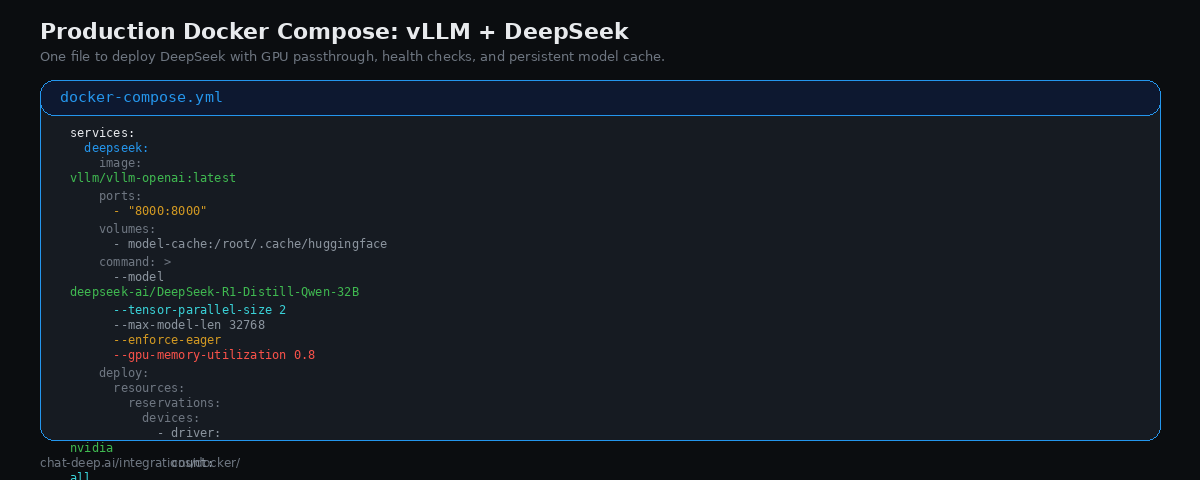
Create a docker-compose.yml:
services:
  deepseek:
    image: vllm/vllm-openai:latest
    ports:
      - "8000:8000"
    volumes:
      - model-cache:/root/.cache/huggingface
    environment:
      - HUGGING_FACE_HUB_TOKEN=${HF_TOKEN}
    ipc: host
    command: >
      --model deepseek-ai/DeepSeek-R1-Distill-Qwen-32B
      --tensor-parallel-size 2
      --max-model-len 32768
      --enforce-eager
      --gpu-memory-utilization 0.8
    deploy:
      resources:
        reservations:
          devices:
            - driver: nvidia
              count: all
              capabilities: [gpu]
    healthcheck:
      test: ["CMD", "curl", "-f", "http://localhost:8000/health"]
      interval: 30s
      start_period: 120s

volumes:
  model-cache:
Start with docker compose up -d. The first run downloads the model weights (can take 10-30 minutes depending on your connection). Subsequent starts use the cached volume and load much faster.
Two flags deserve explanation. --enforce-eager disables CUDA graph compilation, which avoids startup bugs that have been reported with DeepSeek models. --gpu-memory-utilization 0.8 reserves 80% of VRAM for the model, leaving headroom to prevent out-of-memory crashes — the default of 0.9 has caused OOM errors for multiple teams. Adjust based on whether your GPU is shared with other workloads.
Once running, the API is available at http://localhost:8000 with full OpenAI compatibility:
curl http://localhost:8000/v1/chat/completions \
  -H "Content-Type: application/json" \
  -d '{
    "model": "deepseek-ai/DeepSeek-R1-Distill-Qwen-32B",
    "messages": [{"role": "user", "content": "Explain Docker networking."}],
    "stream": true
  }'
Any OpenAI-compatible client — the OpenAI SDK, LangChain, LiteLLM — works by pointing base_url to http://localhost:8000/v1.
Approach 2: Docker Model Runner (Development)
Docker Model Runner is a feature built into Docker Desktop that lets you run AI models with a single command. It handles GPU configuration, model downloads, and provides an OpenAI-compatible endpoint automatically. As of 2026, it supports DeepSeek-V3.2 and other popular models.
# Pull and run DeepSeek
docker model run ai/deepseek-r1-distill-qwen-32b

# Or interact via the OpenAI-compatible API
curl http://localhost:12434/engines/ai/deepseek-r1-distill-qwen-32b/v1/chat/completions \
  -d '{"messages": [{"role": "user", "content": "Hello"}]}'
Docker Model Runner is ideal for local development because it eliminates the setup complexity of NVIDIA Container Toolkit and Docker Compose configuration. However, it offers less control over inference parameters than vLLM. Use it for rapid prototyping and switch to vLLM when you need production-grade serving.
Approach 3: Ollama in Docker (Experimentation)
Ollama is the simplest way to run DeepSeek locally. It uses GGUF quantized models and supports mixed CPU/GPU inference — meaning you can run larger models even if your GPU does not have enough VRAM by offloading some layers to system RAM.
# Run Ollama in Docker
docker run -d --gpus all -v ollama-data:/root/.ollama -p 11434:11434 ollama/ollama

# Pull a DeepSeek model
docker exec -it $(docker ps -q -f ancestor=ollama/ollama) ollama pull deepseek-r1:14b

# Chat
curl http://localhost:11434/api/chat -d '{
  "model": "deepseek-r1:14b",
  "messages": [{"role": "user", "content": "Hello"}],
  "stream": false
}'
Ollama’s API is not fully OpenAI-compatible by default, but it provides an OpenAI-compatible endpoint at /v1/chat/completions. Note that Ollama does not support tool calling with DeepSeek models — if you need function calling, use vLLM instead. For more on running DeepSeek with Ollama outside of Docker, see our Ollama integration guide.
Multi-GPU and Scaling
vLLM supports tensor parallelism out of the box — split a single model across multiple GPUs within one machine. The --tensor-parallel-size flag in the Docker Compose example above is set to 2, meaning the model is split across two GPUs. Each GPU holds half the model’s layers and processes half the tensor operations. Set this to the number of GPUs you have available.
For the full 671B model, you need at least 8x 80GB GPUs (like H100s) for FP8 inference. If you have fewer GPUs per machine, vLLM supports multi-node deployment using Ray for distributed tensor parallelism across multiple servers. This setup is more complex and typically involves a Ray cluster with a head node and worker nodes, each contributing GPUs to the model.
For horizontal scaling at the application level — handling more concurrent users rather than fitting a bigger model — run multiple vLLM containers behind a load balancer. Each container serves the same model independently. A simple nginx or HAProxy configuration distributes incoming requests across instances. Monitor GPU utilization to determine when to add more containers. vLLM’s continuous batching means each instance can handle multiple concurrent requests efficiently, so you may not need many replicas even under moderate load.
Connecting Your Application
Once DeepSeek is running in a container, connecting your application is identical to using the hosted API — just change the base URL:
from openai import OpenAI

# Point to your local container instead of api.deepseek.com
client = OpenAI(
    api_key="not-needed",  # vLLM doesn't require auth by default
    base_url="http://localhost:8000/v1",
)

response = client.chat.completions.create(
    model="deepseek-ai/DeepSeek-R1-Distill-Qwen-32B",
    messages=[{"role": "user", "content": "What is containerization?"}],
)

print(response.choices[0].message.content)
This means all the integration guides on this site — LangChain, LlamaIndex, FastAPI, Next.js — work with your self-hosted instance. Just swap the base URL from https://api.deepseek.com to http://your-server:8000/v1.
Understanding Quantization Formats
Quantization compresses model weights from their native 16-bit floating point into lower precision formats, reducing memory requirements at the cost of some quality. Three formats matter for Docker deployments.
GGUF is the native format for llama.cpp and Ollama. Its key advantage is mixed CPU/GPU inference — if your GPU cannot fit the entire model, GGUF splits layers between VRAM and system RAM automatically. The Q4_K_M quantization level provides a good balance of quality and memory savings. Use GGUF when you need flexibility across different hardware configurations or when your GPU VRAM is limited.
AWQ (Activation-aware Weight Quantization) is optimized for GPU-only inference in vLLM. Pre-quantized AWQ checkpoints are available on Hugging Face and load faster than other formats. AWQ is the recommended quantization for vLLM production serving because it delivers the best throughput. However, it requires all model layers to fit in GPU VRAM — no CPU offloading.
FP8 is the best quality-to-memory trade-off. It halves the memory compared to FP16 while preserving most of the model’s reasoning quality. DeepSeek publishes official FP8 weights. Use FP8 when reasoning accuracy is critical and you have enough VRAM to fit the model at half precision.
A practical rule of thumb: start with AWQ on vLLM if your GPU fits the model, fall back to GGUF with Ollama if it does not, and use FP8 when quality matters most.
Security Considerations
Self-hosting DeepSeek resolves the primary concern many organizations have with the hosted API: data sovereignty. When you run the model locally, prompts and responses never leave your infrastructure. No data is sent to external servers, and no third-party privacy policy applies.
However, self-hosting introduces its own security requirements. vLLM exposes an HTTP endpoint that accepts arbitrary prompts and returns generated text. In a production environment, you should place it behind a reverse proxy (nginx, Caddy, or Traefik) with TLS encryption, add API key authentication using vLLM’s VLLM_API_KEY environment variable, restrict network access so only your application servers can reach port 8000, and implement rate limiting to prevent abuse. Never expose the vLLM container directly to the public internet without these protections.
The DeepSeek models are published under open licenses. The full R1 and V3 models use the MIT license — commercial use is permitted with attribution. The Qwen-based distills (7B, 14B, 32B) use Apache 2.0 with no restrictions. The Llama-based distills (8B, 70B) inherit Meta’s license, which includes a 700 million monthly active user threshold for commercial use.
When to Self-Host vs. Use the API
Self-hosting makes sense when data cannot leave your infrastructure (compliance, legal, government), when you process enough tokens to justify the GPU cost (roughly 5+ billion output tokens per month for the full model), when you need predictable latency without network variability, or when you want to fine-tune or customize the model.
The hosted API makes sense when you want zero infrastructure management, when your volume is moderate (DeepSeek’s pricing at $0.28/M input tokens is extremely competitive), or when you need the full V3.2 model without investing in 8x H100 GPUs. Check our pricing page to calculate whether self-hosting saves money at your usage level.
Production Tips
Use named volumes for model weights. The model-cache volume in the Docker Compose example persists downloaded weights between container restarts. Without it, every restart triggers a multi-gigabyte download.
Set health checks with a long start period. Model loading takes 1-5 minutes depending on size and disk speed. The start_period: 120s in the health check gives the container time to load before the orchestrator considers it failed.
Pin vLLM versions in production. Use a specific tag like vllm/vllm-openai:v0.12.0 instead of :latest. New vLLM releases can change behavior or introduce incompatibilities. The vLLM release page documents changes between versions.
Monitor GPU utilization. Use docker exec <container> nvidia-smi to check VRAM usage and GPU utilization. If utilization is consistently low, you may be able to serve more concurrent requests or reduce hardware. If you see OOM errors, lower --gpu-memory-utilization or reduce --max-model-len.
Consider API authentication in production. vLLM does not require an API key by default. For multi-user deployments, set the VLLM_API_KEY environment variable to require Bearer token authentication on all requests.
Conclusion
Docker turns DeepSeek self-hosting from a complex infrastructure project into a reproducible, portable deployment. vLLM gives you production-grade serving with an OpenAI-compatible API. Docker Model Runner gives you one-command local development. Ollama gives you quick experimentation with minimal setup. Choose based on your stage — prototype with Ollama, develop with Model Runner, and deploy with vLLM.
For cloud-based self-hosting patterns, our guide on deploying DeepSeek on AWS, Azure, and GCP covers the infrastructure side. For proxy features like fallbacks and cost tracking across self-hosted and API-based models, see our LiteLLM guide. Browse the full integrations section for more ways to use DeepSeek.