
Flowise is an open-source visual builder for LLM applications. You drag nodes onto a canvas — chat models, document loaders, vector stores, memory modules, tools — and wire them together. The result is a working AI application with a REST API endpoint, ready to embed in your website or call from your backend. No orchestration code, no LangChain boilerplate, no deployment pipeline to configure.
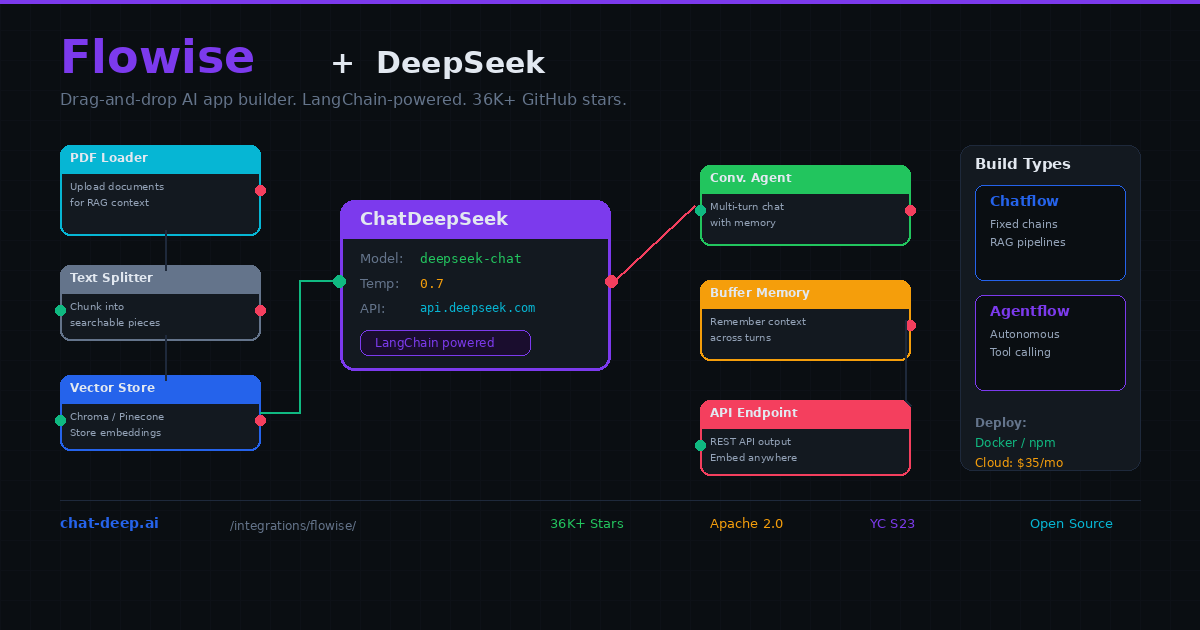
Flowise includes a native ChatDeepSeek node that connects directly to DeepSeek’s API. Drop it onto the canvas, paste your API key, select deepseek-chat or deepseek-reasoner, and connect it to other nodes. With over 36,000 GitHub stars and backing from Y Combinator (S23), Flowise has become the default choice for developers who want to build LangChain-powered applications without writing LangChain code.
This guide covers everything from installation through building RAG pipelines, configuring agents, and deploying to production. If you are new to DeepSeek, our API documentation covers the basics. For understanding the model options, visit our DeepSeek models hub.
Installing Flowise
The fastest path is Docker. One command gives you a running Flowise instance with all dependencies included:
docker run -d --name flowise \
  -p 3000:3000 \
  -v flowise_data:/root/.flowise \
  -e FLOWISE_USERNAME=admin \
  -e FLOWISE_PASSWORD=your_secure_password \
  flowiseai/flowise:latest
Open http://localhost:3000 in your browser. Log in with the credentials you set. Alternatively, install via npm with npx flowise start if you prefer running it directly on Node.js. For teams that do not want to manage infrastructure, Flowise Cloud offers managed hosting starting at $35 per month with no setup required.
Adding the ChatDeepSeek Node
Create a new Chatflow from the dashboard. On the canvas, click the “+” icon and search for “ChatDeepSeek.” Drag it onto your workspace. Click the node to configure it.
First, create a credential: click “Connect Credential” → “Create New.” Paste your DeepSeek API key. The credential is encrypted and stored locally — it will be reused across all your flows.
Next, select the model. deepseek-chat is the general-purpose model — fast, capable, and supports function calling. deepseek-reasoner produces chain-of-thought reasoning before answering, which is ideal for math, logic, and complex analysis but takes longer to respond. For most chatbot and RAG use cases, deepseek-chat is the right choice.
Adjust temperature (0.0 for deterministic output, 0.7 for conversational, 1.0 for creative), max tokens (limits the response length), and any other parameters your use case requires. Get your API key from the DeepSeek platform — our login guide covers account setup.
If you do not need a visual builder, credentials, or an API-driven app yet, read our DeepSeek App Guide first. It compares the official DeepSeek mobile app with Chat‑Deep.ai’s browser-based alternative and helps you decide whether you need Flowise at all or just a simpler access path.
Building a RAG Pipeline
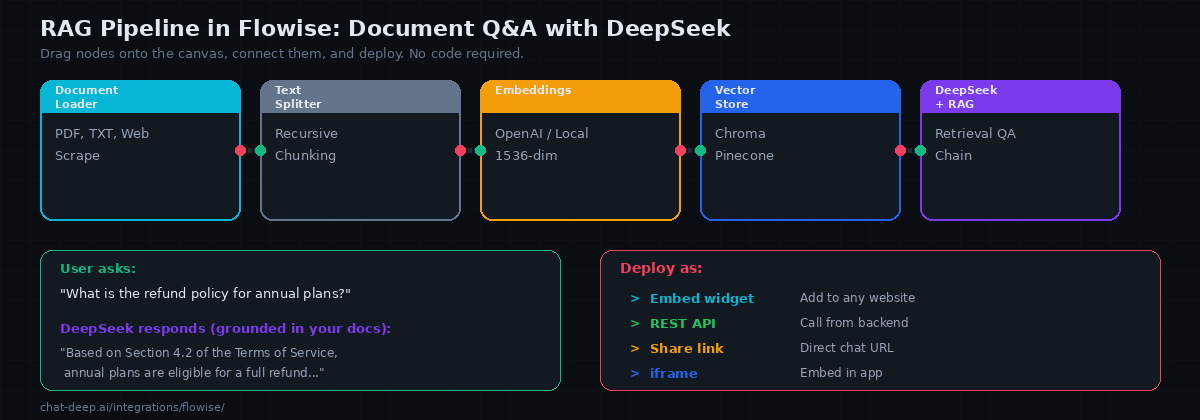
The most common Flowise application is a document Q&A chatbot — upload your documents, and users can ask questions that are answered using the actual content rather than the LLM’s general knowledge. Here is how to build one step by step on the canvas.
Node 1: Document Loader. Drag a PDF Loader (or Text File Loader, Web Scraper, etc.) onto the canvas. Point it to your document. Flowise supports PDFs, text files, CSVs, Notion pages, web URLs, and many other sources. For multiple documents, use the Directory Loader.
Node 2: Text Splitter. Connect the document loader to a Recursive Character Text Splitter. This breaks your documents into smaller chunks that fit within the LLM’s context. Set chunk size to 1000-2000 characters with a 200-character overlap for best results.
Node 3: Embeddings. Connect the text splitter to an embeddings node. OpenAI Embeddings (text-embedding-3-small) is the most common choice. You can also use local embeddings via Ollama or HuggingFace to avoid external API calls. Note that DeepSeek does not provide its own embeddings API, so you need a separate provider for this step.
Node 4: Vector Store. Connect the embeddings node to a vector store — Chroma (in-memory, great for development), Pinecone (managed, scales to millions of vectors), or any of the other supported stores. Flowise handles the indexing automatically when you “upsert” the documents.
Node 5: Retrieval QA Chain. Add a Retrieval QA Chain node. Connect the vector store as the retriever and the ChatDeepSeek node as the LLM. This node ties everything together: when a user asks a question, it searches the vector store for relevant chunks, passes them to DeepSeek as context, and returns a grounded answer.
Click the chat icon to test. Ask a question about your documents. DeepSeek should answer using the specific content from your files rather than generic knowledge. If the answer is not grounded in your documents, check the chunk size and overlap settings — chunks that are too large or too small both hurt retrieval quality.
Adding Conversation Memory
A stateless RAG pipeline forgets each question immediately. For multi-turn conversations where users follow up on previous answers, add a memory node. Drag a Buffer Memory node onto the canvas and connect it to your Conversational Retrieval QA Chain (use this instead of the plain Retrieval QA Chain for memory support).
Buffer Memory stores the conversation history in RAM and includes it in each DeepSeek prompt. Set the memory window size to control how many previous message pairs the LLM can see — 5 is a good default. For production deployments where you need memory to persist across server restarts, use Redis-Backed Chat Memory instead, which stores history in a Redis instance.
Chatflow vs. Agentflow
Flowise supports two fundamentally different application types, and choosing the right one matters for your DeepSeek integration.
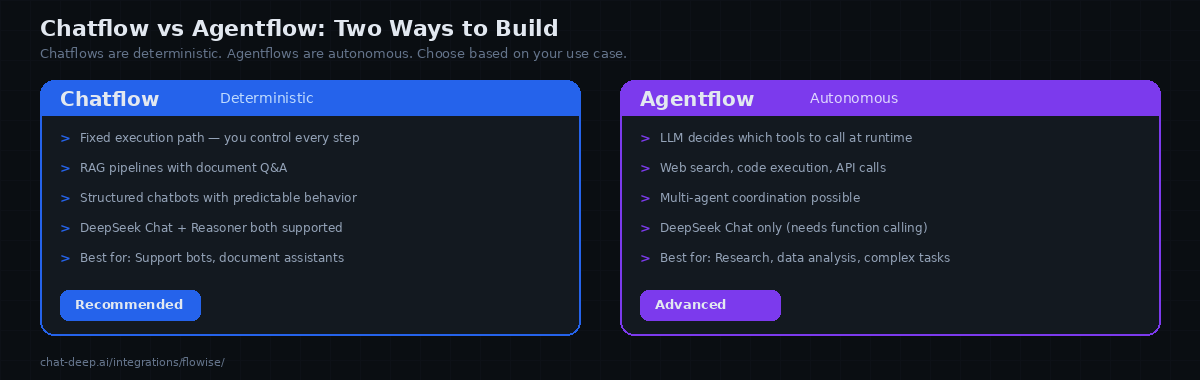
A Chatflow follows a fixed execution path that you define. User input enters at the top, flows through the nodes you connected, and exits at the bottom. The path never changes — the same nodes run in the same order every time. This is ideal for RAG pipelines, structured chatbots, and any application where you want predictable, controlled behavior. Both deepseek-chat and deepseek-reasoner work in chatflows.
Flowise Agentflows work best when the model path and node configuration reliably support the routing and tool pattern you selected. In practice, deepseek-chat is the safer default for current Flowise Agentflow builds. If a DeepSeek setup fails in Agentflow or Conditional Agent paths, describe it as a Flowise compatibility limitation for that node/version—especially around response_format, structured routing, or tool orchestration—not as a blanket statement that DeepSeek itself lacks function calling or structured output.
Start with chatflows for predictable behavior. Graduate to agentflows when your use case genuinely requires autonomous decision-making — research tasks, multi-step data analysis, or workflows where the required steps vary based on the input.
Connecting to Local DeepSeek via Ollama
For complete privacy and zero API costs, connect Flowise to a local DeepSeek model running through Ollama. Instead of the ChatDeepSeek node, use the ChatOllama node. Set the base URL to http://host.docker.internal:11434 (if Flowise runs in Docker) or http://localhost:11434 (if running natively). Select your local DeepSeek model name, such as deepseek-r1:14b.
Everything else in the flow works identically — the same document loaders, vector stores, memory modules, and agent configurations apply. The only difference is that inference happens on your hardware instead of DeepSeek’s servers. This setup is ideal for regulated industries, air-gapped environments, or simply eliminating variable API costs during development and testing.
Using Flowise Templates
Flowise comes with a built-in template library — pre-built flows that you can import and customize. Instead of building every chain from scratch, browse the templates for common patterns: Conversational Agent with memory, Retrieval QA Chain, SQL Database Chain, Web Scraping Chain, and many others. Import a template, swap the LLM node for ChatDeepSeek, add your credentials, and you have a working application in minutes.
Templates are especially valuable when you are learning Flowise. They show you the correct way to connect nodes, which node types work together, and what configuration options matter for each pattern. Even experienced users often start from a template and customize rather than building from an empty canvas.
Known Limitations with DeepSeek
There are reported Flowise compatibility issues when DeepSeek is used in certain Agentflow paths that rely on response_format or structured-routing behavior. The safest description is to attribute these errors to current Flowise node compatibility, not to a blanket claim that DeepSeek does not support structured outputs. If you hit this issue, prefer a Chatflow, manual branching, or a simpler agent pattern until the relevant Flowise node path is verified in your version.
The deepseek-reasoner model works well in Chatflows for Q&A and analysis tasks. In Flowise Agentflows, deepseek-chat is currently the supported path for tool-calling agents — deepseek-reasoner may not work in this context due to Flowise runtime compatibility, not because DeepSeek itself lacks the capability.
Additionally, Flowise’s streaming behavior with DeepSeek can occasionally produce duplicate tokens in the chat widget. If you notice this, disable streaming in the ChatDeepSeek node configuration as a workaround until the issue is resolved in a future Flowise release.
Deploying Your Application
Every Flowise chatflow and agentflow automatically gets a REST API endpoint. Click the API icon on your flow to see the endpoint URL and example curl commands. You can call this API from any frontend or backend application.
Flowise also generates an embeddable chat widget — a snippet of HTML you paste into your website to add a floating chat button. Users click it, and they are chatting with your DeepSeek-powered application directly on your site. Additionally, you can share a direct link for testing or embed the chat in an iframe.
For production deployments, put Flowise behind a reverse proxy (nginx or Caddy) with TLS. Set the FLOWISE_USERNAME and FLOWISE_PASSWORD environment variables to protect the admin dashboard. Use the API key feature to secure your endpoints so only your application can call them. Our Docker guide covers the general infrastructure patterns for self-hosting.
Flowise vs. Dify
Both are open-source visual AI app builders, but they target different experiences. Flowise is closer to a developer tool — it exposes the LangChain components directly as draggable nodes, giving you granular control over chains, agents, and memory. If you know LangChain concepts, Flowise feels like a visual IDE for them.
Dify is more of a product platform — it abstracts away the chain-level details and focuses on application types (chatbot, chatflow, workflow, agent). Dify includes built-in analytics, team collaboration, and a knowledge base manager that handles chunking and embedding without you touching individual nodes. Choose Flowise when you want maximum control over the LangChain pipeline. Choose Dify when you want a polished product experience with less configuration. Both work excellently with DeepSeek.
Production Tips
Persist your data. Mount a Docker volume for /root/.flowise to preserve your flows, credentials, and embedded documents across container restarts. Without a volume, you lose everything when the container is recreated.
Use Chroma for development, Pinecone for production. Chroma runs in-memory and requires no setup — perfect for building and testing. For production RAG applications with large document sets, migrate to Pinecone, Qdrant, or another managed vector store that handles persistence and scaling.
Monitor token costs. DeepSeek charges $0.28/M input tokens and $0.42/M output tokens. RAG pipelines inject context into every prompt, so costs scale with your document volume. Keep chunk sizes reasonable and use retrieval limits (top-k = 3-5) to avoid sending excessive context. Check our pricing page for current rates and our status page for API availability.
Secure your endpoints. Enable API key authentication on your published chatflows. Without it, anyone who discovers your Flowise URL can call your DeepSeek-powered endpoint and generate token costs on your API key.
Conclusion
Flowise gives you the power of LangChain with the speed and simplicity of a visual drag-and-drop builder. The native ChatDeepSeek node makes DeepSeek a first-class citizen on the canvas. RAG pipelines, conversational agents, memory-backed chatbots, and autonomous tool-calling agents — all built by dragging nodes and drawing connections instead of writing orchestration code.
Start with a simple chatflow: ChatDeepSeek connected to a Conversational Chain with Buffer Memory. That is a fully functional chatbot in under five minutes. Add a document loader and vector store to upgrade it to RAG. Move to agentflows when you need autonomous tool use. For complementary tools, see our Dify guide for a more polished product-focused builder, our LangChain guide for building in code, and browse the full integrations section for all the other ways to use DeepSeek across your entire development stack.