
LiteLLM solves a problem that shows up the moment your project uses more than one LLM provider. You end up with different SDKs, different auth patterns, different error formats, and no unified way to track costs or switch models. LiteLLM puts a single OpenAI-compatible interface in front of everything — over 100 providers including DeepSeek, OpenAI, Anthropic, Google Gemini, AWS Bedrock, and more.
You can use LiteLLM in two ways: as a Python SDK that you import directly into your code, or as a proxy server that sits between your application and the LLM APIs. Both options support DeepSeek’s full model lineup — deepseek-chat and deepseek-reasoner — with streaming, function calling, reasoning traces, and automatic cost tracking built in.
This guide covers both approaches, from basic SDK calls to deploying a production proxy with fallbacks, load balancing, and per-team budgets. If you are new to the DeepSeek API, our API documentation covers the authentication basics.
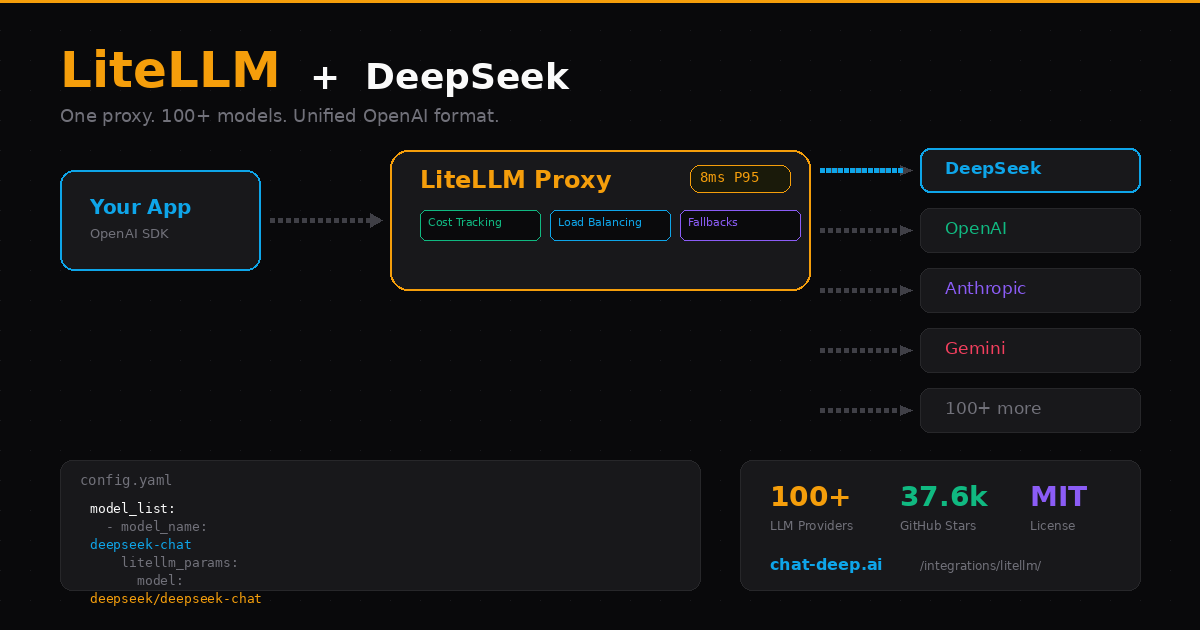
Why Put a Proxy in Front of DeepSeek?
Calling DeepSeek directly is simple and works well for individual projects. But when your team or product relies on LLM calls at scale, a proxy layer adds capabilities that no single provider SDK offers.
Automatic fallbacks. If DeepSeek’s API returns a 500 or times out, LiteLLM can automatically retry the request against a backup provider — say, OpenAI or Anthropic. Your users never see the failure. You configure this once in a YAML file and forget about it.
Cost tracking per team and key. LiteLLM logs every request with token counts and cost calculations. You can set spending limits per virtual API key, per team, or per project. When someone burns through $50 in a day, the proxy stops their requests before you get a surprise bill.
Provider-agnostic clients. Your application code talks to the proxy using the standard OpenAI SDK format. Switching from DeepSeek to Anthropic — or running both in a load-balanced pool — is a config change on the proxy side. Zero application code changes.
Observability out of the box. Every request is logged with model, latency, tokens, and cost. LiteLLM integrates with Langfuse, Helicone, and custom callbacks for monitoring. When something goes wrong at 3 AM, you can trace it.
Option 1: Python SDK
The fastest way to start. Install the package and call DeepSeek with a single function:
pip install litellmSet your API key and make a call:
from litellm import completion
import os

os.environ["DEEPSEEK_API_KEY"] = "your-api-key"

response = completion(
    model="deepseek/deepseek-chat",
    messages=[{"role": "user", "content": "Explain load balancing in one paragraph."}],
)

print(response.choices[0].message.content)
The key detail is the model prefix: deepseek/ tells LiteLLM to route the request to the DeepSeek API. LiteLLM supports all DeepSeek models — just prepend deepseek/ to any model name. The response object follows the OpenAI format, so it works with any code that expects OpenAI-style responses.
Streaming
Add stream=True and iterate over chunks — same pattern as OpenAI:
from litellm import completion
import os

os.environ["DEEPSEEK_API_KEY"] = "your-api-key"

response = completion(
    model="deepseek/deepseek-chat",
    messages=[{"role": "user", "content": "Write a git commit message for adding rate limiting."}],
    stream=True,
)

for chunk in response:
    content = chunk.choices[0].delta.content
    if content:
        print(content, end="", flush=True)
Reasoning Mode
DeepSeek’s reasoning model produces chain-of-thought traces before the final answer. LiteLLM gives you access to these traces through the reasoning_content field:
from litellm import completion
import os

os.environ["DEEPSEEK_API_KEY"] = "your-api-key"

resp = completion(
    model="deepseek/deepseek-reasoner",
    messages=[{"role": "user", "content": "If a cube has a volume of 27, what is the surface area?"}],
    thinking={"type": "enabled"},
)

print("Thinking:", resp.choices[0].message.reasoning_content)
print("Answer:", resp.choices[0].message.content)
You can enable thinking mode in three ways: use the deepseek-reasoner model directly, pass thinking={"type": "enabled"}, or set a reasoning_effort value like "low", "medium", or "high". Note that DeepSeek only supports on/off for thinking — it does not support budget_tokens like Anthropic does. Any reasoning_effort value other than "none" simply enables thinking mode. For more on how the reasoning model works, visit our DeepSeek V3 model page.
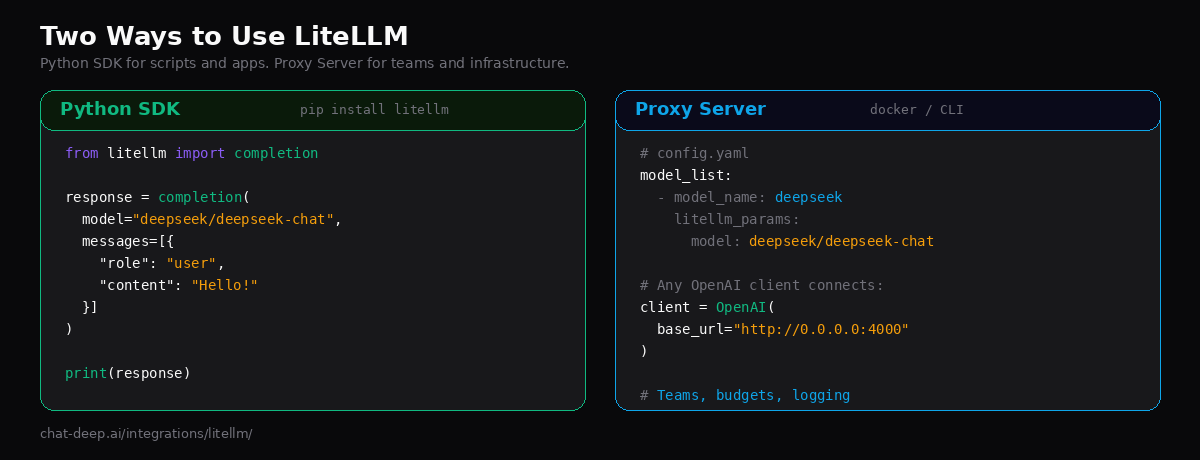
Option 2: Proxy Server
The proxy mode is where LiteLLM becomes an infrastructure component. You run it as a standalone service — via Docker or CLI — and your applications connect to it like they would to any OpenAI endpoint. This is the right choice when you have multiple services, multiple teams, or need centralized cost control.
Step 1: Create a Config File
Define your models in a config.yaml file:
model_list:
  - model_name: deepseek-chat
    litellm_params:
      model: deepseek/deepseek-chat
      api_key: os.environ/DEEPSEEK_API_KEY

  - model_name: deepseek-reasoner
    litellm_params:
      model: deepseek/deepseek-reasoner
      api_key: os.environ/DEEPSEEK_API_KEY

litellm_settings:
  drop_params: true   # Silently drop unsupported params instead of erroring
  request_timeout: 60
Step 2: Start the Proxy
Run with the CLI:
pip install 'litellm[proxy]'
export DEEPSEEK_API_KEY="your-api-key"

litellm --config config.yaml

# Proxy is now running at http://0.0.0.0:4000
Or use Docker for production deployments:
docker run \
  -v $(pwd)/config.yaml:/app/config.yaml \
  -e DEEPSEEK_API_KEY="your-api-key" \
  -p 4000:4000 \
  docker.litellm.ai/berriai/litellm-database:main-stable \
  --config /app/config.yaml
The -stable Docker tag is recommended for production — these images undergo 12-hour load tests before release.
Step 3: Connect Your App
Any OpenAI-compatible client can now talk to DeepSeek through your proxy:
from openai import OpenAI

client = OpenAI(
    api_key="sk-anything",           # Virtual key — set real auth in proxy config
    base_url="http://0.0.0.0:4000",  # Your LiteLLM proxy
)

response = client.chat.completions.create(
    model="deepseek-chat",
    messages=[{"role": "user", "content": "What is LiteLLM?"}],
)

print(response.choices[0].message.content)
Notice that the client code looks identical to a standard OpenAI SDK call. The only difference is the base_url pointing to your proxy instead of api.openai.com or api.deepseek.com. This means your frontend team, your backend services, and your data pipeline can all connect to the same proxy without knowing which LLM is behind it.
Fallbacks and Load Balancing
One of LiteLLM’s most valuable features is automatic failover. If DeepSeek is temporarily unavailable, you can route to a backup provider transparently:
model_list:
  - model_name: main-chat
    litellm_params:
      model: deepseek/deepseek-chat
      api_key: os.environ/DEEPSEEK_API_KEY

  - model_name: main-chat
    litellm_params:
      model: openai/gpt-4o-mini
      api_key: os.environ/OPENAI_API_KEY

router_settings:
  routing_strategy: "latency-based-routing"
  num_retries: 2
  allowed_fails: 3  # Cool down a model after 3 failures in a minute

litellm_settings:
  fallbacks: [{"main-chat": ["backup-chat"]}]
By giving two different models the same model_name, LiteLLM automatically load-balances between them. The routing_strategy determines how: latency-based-routing favors the faster provider, usage-based-routing distributes based on spend, and simple-shuffle round-robins evenly. If one model fails repeatedly, LiteLLM cools it down and routes traffic to the others.
This is especially useful for combining DeepSeek’s cost advantage with another provider’s reliability as a safety net. You can check current DeepSeek availability on our real-time status page.
Cost Tracking and Budgets
LiteLLM tracks costs automatically for every request. It knows DeepSeek’s pricing — $0.28/M input tokens, $0.42/M output tokens, and $0.028/M for cache hits — and calculates the cost per call. You can set budgets per virtual key to prevent overspending:
# Create a virtual key with a $10 monthly budget
curl -X POST 'http://0.0.0.0:4000/key/generate' \
  -H 'Authorization: Bearer sk-master-key' \
  -H 'Content-Type: application/json' \
  -d '{
    "max_budget": 10.0,
    "budget_duration": "30d",
    "models": ["deepseek-chat", "deepseek-reasoner"],
    "metadata": {"team": "engineering"}
  }'
When a key hits its budget limit, the proxy returns a 429 error instead of forwarding the request to DeepSeek. This gives you guardrails for dev/staging environments, external-facing APIs, or teams that need spending limits. For current pricing details, check our DeepSeek pricing page.
Accessing DeepSeek via Vertex AI
LiteLLM also supports accessing DeepSeek models hosted on Google Vertex AI. If your organization runs on GCP and prefers to use Vertex AI’s managed infrastructure, you can route through it:
model_list:
  - model_name: deepseek-vertex
    litellm_params:
      model: vertex_ai/deepseek-ai/deepseek-chat
      vertex_project: "your-gcp-project"
Use the vertex_ai/deepseek-ai/ prefix for Vertex-hosted DeepSeek models. This approach keeps all API calls within your GCP environment, which can simplify compliance and billing. For other cloud deployment options, see our guide on deploying DeepSeek on AWS, Azure, and GCP.
Switching Between Providers
With LiteLLM, testing different providers takes seconds. The SDK uses a prefix-based model naming convention:
from litellm import completion

# DeepSeek
response = completion(model="deepseek/deepseek-chat", messages=[...])

# OpenAI
response = completion(model="openai/gpt-4o", messages=[...])

# Anthropic
response = completion(model="anthropic/claude-sonnet-4-20250514", messages=[...])

# Same function. Same message format. Same response schema.
This makes it straightforward to benchmark DeepSeek against other providers on your specific use case. Run the same prompt through multiple models, compare quality and latency, and pick the best fit. Our DeepSeek vs. OpenAI comparison covers the high-level tradeoffs.
Error Handling
LiteLLM normalizes error responses across providers into a consistent format. Whether the error comes from DeepSeek, OpenAI, or Anthropic, your error handling code stays the same:
from litellm import completion
from litellm.exceptions import (
    RateLimitError,
    AuthenticationError,
    BadRequestError,
    Timeout,
)

try:
    response = completion(
        model="deepseek/deepseek-chat",
        messages=[{"role": "user", "content": "Hello"}],
    )
except AuthenticationError:
    print("Invalid DeepSeek API key.")
except RateLimitError:
    print("DeepSeek rate limit hit. Retrying...")
except Timeout:
    print("Request timed out. Check DeepSeek API status.")
except BadRequestError as e:
    print(f"Bad request: {e.message}")
The SDK also supports automatic retries with configurable backoff. Set num_retries in your completion call or in the proxy config to handle transient failures gracefully. For a full reference of DeepSeek error codes (401, 402, 429, 500, 503), see our API documentation.
MCP Server Support
LiteLLM’s proxy can act as a Model Context Protocol (MCP) server, allowing MCP-compatible clients to connect and use DeepSeek through a standardized tool interface. This is useful if you are building agentic workflows that need to call multiple tools alongside LLM generation. Configure your MCP endpoints in the proxy config and any MCP client can connect with the URL http://localhost:4000/mcp/.
Common Issues and Fixes
A few issues come up frequently when using LiteLLM with DeepSeek. Here is how to handle them.
UnsupportedParamsError with thinking/reasoning. If you pass thinking={"type": "enabled", "budget_tokens": 1024}, DeepSeek rejects it because it does not support budget_tokens. Use thinking={"type": "enabled"} without the budget parameter, or set drop_params: true in your config to have LiteLLM strip unsupported fields automatically.
Model prefix missing. If you see an authentication error or unexpected routing, double-check that your model string starts with deepseek/. Writing deepseek-chat without the prefix tells LiteLLM to use its default provider routing, which may not reach DeepSeek.
Reasoning content in multi-turn conversations. When using deepseek-reasoner, do not pass reasoning_content back in subsequent messages. The DeepSeek API returns a 400 error if reasoning traces appear in the message history. Only include the content field from assistant responses when building follow-up messages.
Proxy startup issues with Docker. Ensure you mount your config.yaml correctly and that environment variables are accessible inside the container. The os.environ/DEEPSEEK_API_KEY syntax in the config file tells LiteLLM to read the value from the container’s environment at runtime.
Best Practices
Use the proxy for teams, the SDK for solo projects. If you are the only developer calling DeepSeek, the SDK is simpler and has no infrastructure overhead. Once multiple people or services need access, the proxy gives you the control layer you will need.
Set drop_params: true in production. Different providers support different parameters. Rather than crashing on an unsupported param, drop_params tells LiteLLM to silently ignore what DeepSeek does not support. This is especially important for fallback scenarios where a request might hit a different provider.
Use stable Docker tags. For production proxy deployments, always use :main-stable instead of :latest. The stable images are load-tested before release. The LiteLLM GitHub repository documents the release cycle.
Pin virtual keys to specific models. When creating virtual keys, specify which models each key can access. This prevents a key meant for deepseek-chat from accidentally being used with an expensive provider.
Monitor with callbacks. LiteLLM supports Langfuse, Helicone, and custom logging callbacks. Enable at least one observability tool so you can track latency, errors, and cost per model over time.
Conclusion
LiteLLM turns DeepSeek from a standalone API into part of a managed LLM infrastructure. The Python SDK handles quick integrations with a single function call. The proxy server handles production workloads with fallbacks, cost tracking, load balancing, and team-level budgets. Both speak the OpenAI format, so your application code stays clean regardless of which option you choose.
Start with the SDK to validate that DeepSeek meets your quality bar. When you are ready to scale, deploy the proxy and add the operational features you need. For more ways to integrate DeepSeek into your stack, explore our LangChain, Vercel AI SDK, and OpenAI SDK guides, or browse the full integrations section.