
You have hundreds — maybe thousands — of notes in your Obsidian vault. Meeting notes, research summaries, project plans, reading highlights, journal entries. They form a knowledge base, but finding connections between them, synthesizing insights across topics, and keeping metadata organized is manual and time-consuming. DeepSeek changes this by turning your vault into an AI-powered second brain that actually thinks.
Through a growing ecosystem of Obsidian plugins, DeepSeek can read your notes, understand the context of your vault’s bidirectional links, search across all your files, summarize and polish your writing, auto-tag notes with intelligent metadata, and answer questions grounded in your own knowledge base — not the internet. Whether you connect to DeepSeek’s API for the full V3.2 model or run it entirely locally through Ollama for complete privacy, the integration transforms Obsidian from a static note-taking app into an active thinking partner.
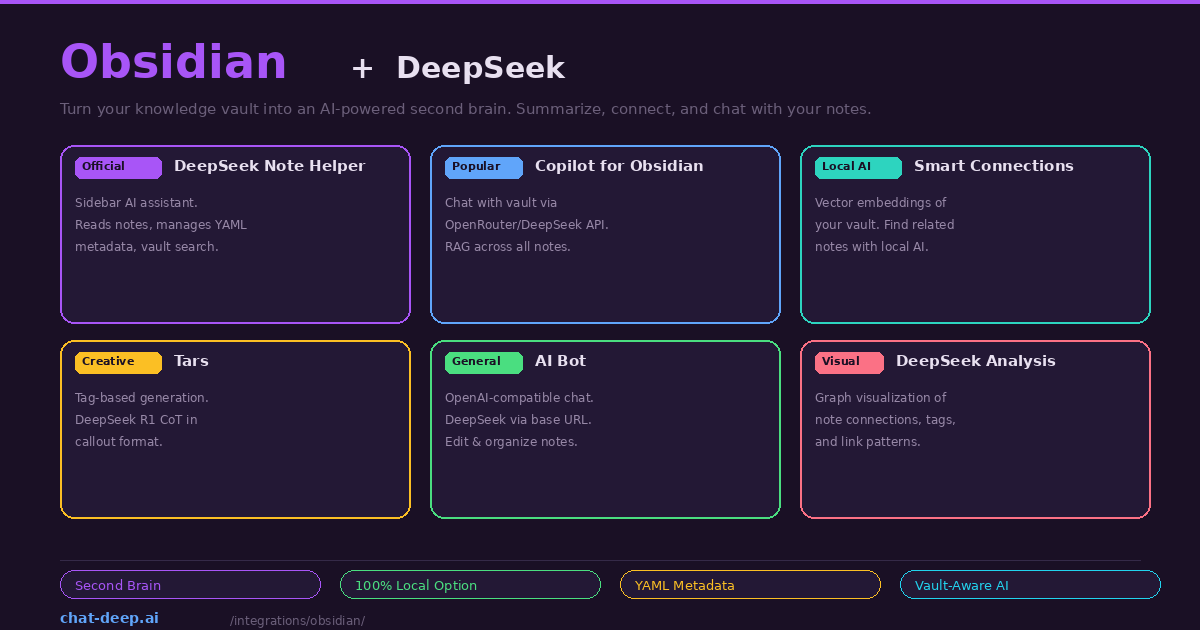
This guide covers the best plugins for connecting DeepSeek to Obsidian, the fully local “second brain” stack, practical use cases, and configuration tips. For DeepSeek API details, see our API documentation.
Plugin 1: DeepSeek Note Helper (Best for Vault-Aware AI)
The DeepSeek Note Helper is a plugin built specifically for DeepSeek integration. It adds a sidebar AI assistant that is deeply aware of your vault context. When you open a note, the sidebar automatically reads its full content as memory context. You can ask “summarize this note,” “polish the third paragraph,” or “find connections to my other project notes” — and the assistant understands exactly what you are referring to.
The plugin’s standout features go beyond simple chat. It traverses your bidirectional links, performs vault-wide searches to find related content, and manages YAML frontmatter automatically. Tell the assistant “add appropriate tags to this note based on its content and change the status to active,” and it updates the YAML Properties section hands-free. Selection focus lets you highlight specific text and the assistant locks onto it as the conversation topic — even if you click into the sidebar to type, the plugin remembers your selection.
Setup is straightforward: install from Settings → Community Plugins, enter your DeepSeek API key (sk-xxxxxxxxxx) in the plugin settings, and click the robot icon in the sidebar ribbon to activate the assistant. For local deployment, modify the API URL to point to your Ollama instance. Our login guide covers API key creation.
Plugin 2: Copilot for Obsidian (Best for RAG Across Your Vault)
Copilot for Obsidian is the most popular AI plugin in the Obsidian ecosystem. It supports DeepSeek through both the direct API and OpenRouter, providing a full RAG (Retrieval-Augmented Generation) experience across your entire vault.
To configure with DeepSeek, go to the Copilot settings and set the model to deepseek/deepseek-chat. You can connect through OpenRouter (use your OpenRouter API key and set the model to deepseek/deepseek-chat) or directly to DeepSeek’s API by entering https://api.deepseek.com as the base URL with your DeepSeek API key. Both approaches work — OpenRouter is convenient if you want to switch between multiple AI providers, while the direct connection avoids the intermediary.
Copilot’s vault-wide RAG means you can ask questions about your entire knowledge base: “What are the key themes across my reading notes from this month?” or “Find all notes related to project management and summarize the common patterns.” DeepSeek retrieves relevant notes, synthesizes the information, and responds with citations pointing back to specific notes in your vault.
Plugin 3: Smart Connections (Best for Local AI)
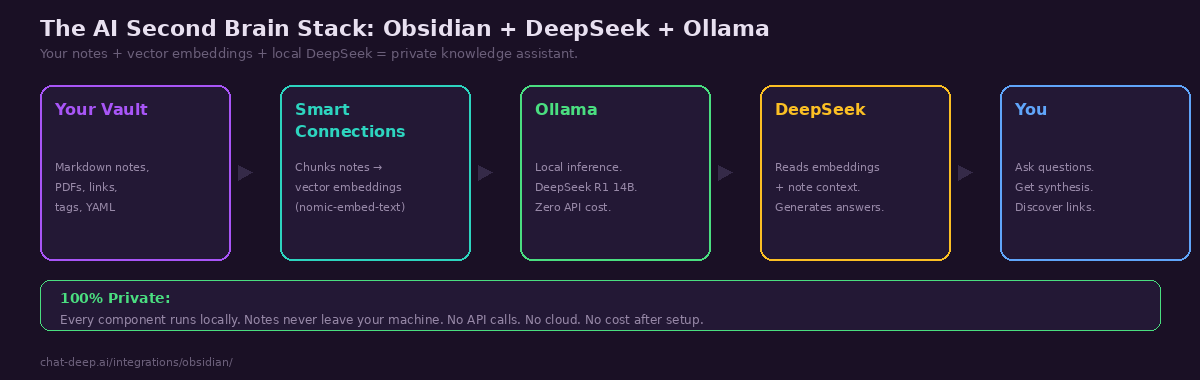
Smart Connections takes a different approach. Instead of sending your notes to an API, it builds a local vector database of your entire vault using embedding models running on your machine. Combined with DeepSeek via Ollama, this creates a completely private, offline second brain.
The setup requires three components: Ollama running DeepSeek R1 for chat, nomic-embed-text for embeddings, and Smart Connections configured to use both. In the plugin settings, select “Local (Ollama)” as the provider, set the endpoint to http://127.0.0.1:11434, and choose deepseek-r1:8b or deepseek-r1:14b as the chat model. For embeddings, select nomic-embed-text. The plugin then iterates through every markdown file in your vault, chunks them into small pieces, and calculates vector embeddings — entirely on your GPU.
Once indexed, the Smart Connections sidebar shows contextually related notes as you navigate your vault. Ask questions in the chat panel and DeepSeek answers from your personal knowledge base. The entire pipeline runs without internet — you could disconnect your network cable and it would still work. This is the gold standard for privacy-conscious knowledge management.
Plugin 4: Tars (Best for In-Note Generation)
Tars integrates AI conversations directly into your note editing flow. Instead of a separate sidebar, Tars uses tag-based triggers to generate text inline. Write a tag or prompt within your note, and Tars sends it to DeepSeek for completion. The response appears directly in your note as markdown.
What makes Tars especially interesting for DeepSeek users is its native support for the deepseek-reasoner model’s chain-of-thought output. When you use DeepSeek R1 through Tars, the reasoning steps appear in Obsidian callout format — the expandable blocks native to Obsidian’s markdown. This means you can see DeepSeek’s thinking process collapsed by default and expand it when you want to understand the reasoning behind an answer. With over 6,000 downloads, Tars has an established user base and supports multiple providers including DeepSeek, Claude, OpenAI, Gemini, and Ollama.
More Plugins
AI Bot is a general-purpose plugin that uses the OpenAI Node API library, making it compatible with DeepSeek through the https://api.deepseek.com base URL. It provides contextual understanding of your notes, intelligent suggestions, and automated editing tasks. Good for developers who want a lightweight, no-frills AI chat inside Obsidian.
DeepSeek Analysis focuses on vault visualization rather than chat. It analyzes your notes’ tags, links, and metadata to generate advanced graph views showing connection patterns, trending themes, and relationship strengths. This is useful for large vaults where manual exploration is impractical — DeepSeek identifies clusters and patterns you might miss.
DeepSeek AI Assistant is a minimal plugin triggered by the /ai slash command. Type /ai followed by a question anywhere in your note, and the response is inserted inline. Simple and effective for quick lookups without context-switching to a sidebar.
The Fully Local Second Brain Stack
For complete privacy and zero ongoing costs, here is the recommended local stack:
# Install Ollama and pull models
curl -fsSL https://ollama.com/install.sh | sh
ollama pull deepseek-r1:14b        # Chat model
ollama pull nomic-embed-text       # Embedding model

# Configure Smart Connections
# Provider: Local (Ollama)
# Chat Model: deepseek-r1:14b
# Embed Model: nomic-embed-text
# Endpoint: http://127.0.0.1:11434
The 14B model provides the best balance of reasoning quality and speed for knowledge work on consumer hardware (16 GB RAM or a GPU with 10+ GB VRAM). If your machine is limited, the 8B model is faster but less capable at synthesis. If you have a powerful GPU (RTX 4090 or M3 Max), the 32B model provides noticeably better analysis. For hardware requirements, see our Docker guide and Ollama guide.
After initial setup, Smart Connections builds the vector index on first run — this can take several minutes for large vaults (1000+ notes). Subsequent updates happen incrementally as you edit files. The entire process is local — watch your Wi-Fi icon and confirm no network traffic occurs during indexing.
Practical Use Cases
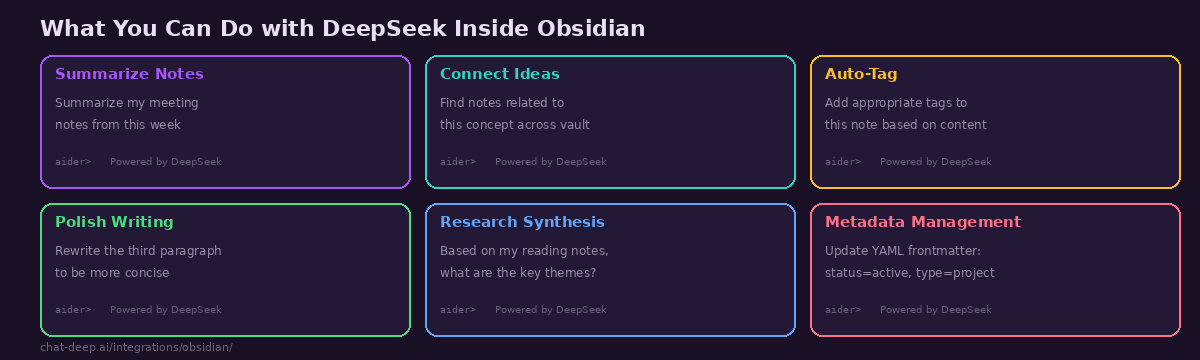
Weekly review synthesis. At the end of each week, ask DeepSeek: “Based on my daily notes from this week, summarize what I accomplished, what blockers I encountered, and suggest priorities for next week.” DeepSeek reads your daily entries, identifies themes, and produces a synthesis you could not easily write yourself by skimming individual notes.
Research connection discovery. After adding several reading notes on a topic, ask: “What connections exist between my notes on machine learning and my notes on product management?” DeepSeek traverses your vault’s link structure and content to surface unexpected connections — the kind of insight that makes a second brain valuable.
Automated metadata management. Use DeepSeek Note Helper to bulk-update YAML frontmatter across your vault. Instruct it to “scan all notes in the /projects folder and add a status property based on the note content — active if it mentions current work, completed if it has a completion date, and archived if the last edit was more than 6 months ago.”
Writing polish. Highlight a rough paragraph, and ask DeepSeek to rewrite it for clarity, adjust the tone for a specific audience, or expand a bullet-point outline into full prose. The selection focus feature in DeepSeek Note Helper makes this particularly smooth — highlight, describe the change, and the polished text appears in the sidebar ready to copy back.
Why DeepSeek Excels at Knowledge Work
Knowledge management tasks — summarization, synthesis, connection discovery, metadata organization — are reasoning-heavy. They require the model to read multiple documents, identify patterns across them, and produce structured output that correctly references source material. DeepSeek V3.2’s strong reasoning capabilities and 128K context window make it particularly well-suited for this kind of work.
The cost advantage is even more relevant for knowledge work than for coding. A typical vault interaction — sending a note plus its linked context to DeepSeek for summarization — might use 3,000-5,000 input tokens and 500-1,000 output tokens. At DeepSeek’s pricing ($0.28/M input, $0.42/M output), that is roughly $0.001-0.002 per interaction. A heavy day of vault exploration and synthesis costs under $0.50. Compare this to GPT-4o at approximately 10x the price, and the economics of using DeepSeek for daily knowledge management become compelling. See our pricing page for current rates and our DeepSeek V3 page for model capabilities.
The local option via Ollama eliminates cost entirely. After the one-time setup, every interaction is free — no token counting, no monthly bills, no usage anxiety. For writers, researchers, and knowledge workers who interact with their vault dozens of times per day, this removes the friction that prevents deep, sustained AI-assisted thinking.
Choosing the Right Plugin
If you want vault-aware AI with metadata management, install DeepSeek Note Helper. It is the most DeepSeek-specific plugin with features designed around the API’s capabilities.
If you want vault-wide RAG and flexibility to switch models, install Copilot for Obsidian via OpenRouter. It provides the deepest integration with Obsidian’s note ecosystem and supports multiple AI providers if you ever want to compare.
If you want complete privacy with no cloud dependency, install Smart Connections with DeepSeek via Ollama. Everything runs locally — your notes, embeddings, and AI inference never leave your machine.
If you want inline generation with reasoning visibility, install Tars. Its native support for DeepSeek R1’s chain-of-thought callouts is unique in the Obsidian ecosystem.
You can install multiple plugins simultaneously. A powerful combination is Smart Connections for passive note discovery (it shows related notes as you browse) plus DeepSeek Note Helper for active AI assistance (ask questions, edit metadata, polish writing).
Tips for Best Results
Structure your notes consistently. Use YAML frontmatter with standard properties (tags, status, date, type). This gives DeepSeek structured data to work with when managing metadata and filtering notes. A well-structured vault produces dramatically better AI results than a disorganized one.
Use bidirectional links generously. The more [[links]] between your notes, the richer the context DeepSeek has when traversing your vault. Plugins like DeepSeek Note Helper follow these links to understand relationships between ideas.
Adjust the embedding model for your vault size. For vaults under 500 notes, nomic-embed-text via Ollama is excellent. For larger vaults (5000+ notes), consider a more powerful embedding model or increase chunk size to reduce the number of vectors while maintaining quality.
Check API costs for large vaults. If using the DeepSeek API (not local), RAG queries against large collections can consume significant tokens. Monitor your usage on the DeepSeek platform. For heavy knowledge work, the local Ollama stack eliminates cost concerns entirely. For current rates, see our pricing page. Check our status page for API availability before critical research sessions.
Start with one plugin, then expand. Installing all six plugins at once creates complexity. Begin with the one that matches your most frequent need — probably DeepSeek Note Helper or Copilot — and learn its capabilities before adding more. Once you have a baseline workflow, add Smart Connections for passive discovery or Tars for inline generation.
Back up before experimenting. Some plugins modify your notes (adding YAML properties, inserting AI-generated text). Before enabling automated metadata management, back up your vault. Obsidian vaults are just folders of markdown files — a simple copy or git init is sufficient protection.
Conclusion
Obsidian’s plugin ecosystem gives you multiple paths to integrate DeepSeek into your knowledge management workflow — from vault-aware sidebar assistants to fully local second brain stacks. The combination of Obsidian’s markdown-first, link-rich note structure and DeepSeek’s reasoning capabilities creates a system that genuinely thinks with your notes, not just stores them. Whether you are a researcher synthesizing papers, a writer organizing a book project, a student connecting course materials, or a professional managing project knowledge, DeepSeek transforms your vault from a digital filing cabinet into an active thinking partner.
Start with one plugin that matches your primary need — DeepSeek Note Helper for active AI assistance, Copilot for vault-wide RAG, or Smart Connections for complete privacy. As your workflow develops, layer complementary plugins. The goal is a second brain that surfaces connections you missed, synthesizes insights across topics, and keeps your vault organized — all powered by DeepSeek’s reasoning at a fraction of the cost of alternatives.
For related guides, see our Ollama guide for local model setup, our Open WebUI guide for a browser-based chat interface with RAG, our models hub for choosing the right DeepSeek model, and browse the full integrations section for more ways to use DeepSeek across your entire workflow.