
Ollama is the fastest way to run DeepSeek on your own machine. Install it, pull a model, and start chatting — all in about two minutes. No API keys, no cloud accounts, no Docker configuration. The model runs entirely on your hardware, which means your prompts and responses never leave your computer.
DeepSeek R1 is one of the most downloaded models on Ollama, with over 78 million pulls. It is available in seven sizes, from the 1.5B-parameter distill that runs on a laptop with 4 GB of RAM to the full 671B-parameter model for research-grade GPU clusters. The R1 series uses chain-of-thought reasoning — it shows you its thinking process in <think> tags before delivering the answer, making it exceptionally strong for math, coding, and logical analysis.
This guide covers installation, model selection, CLI usage, the REST API, Python and JavaScript integration, connecting Ollama to frameworks like LangChain, and practical tips for getting the best performance. If you prefer calling DeepSeek’s hosted API instead, our API documentation covers that path.
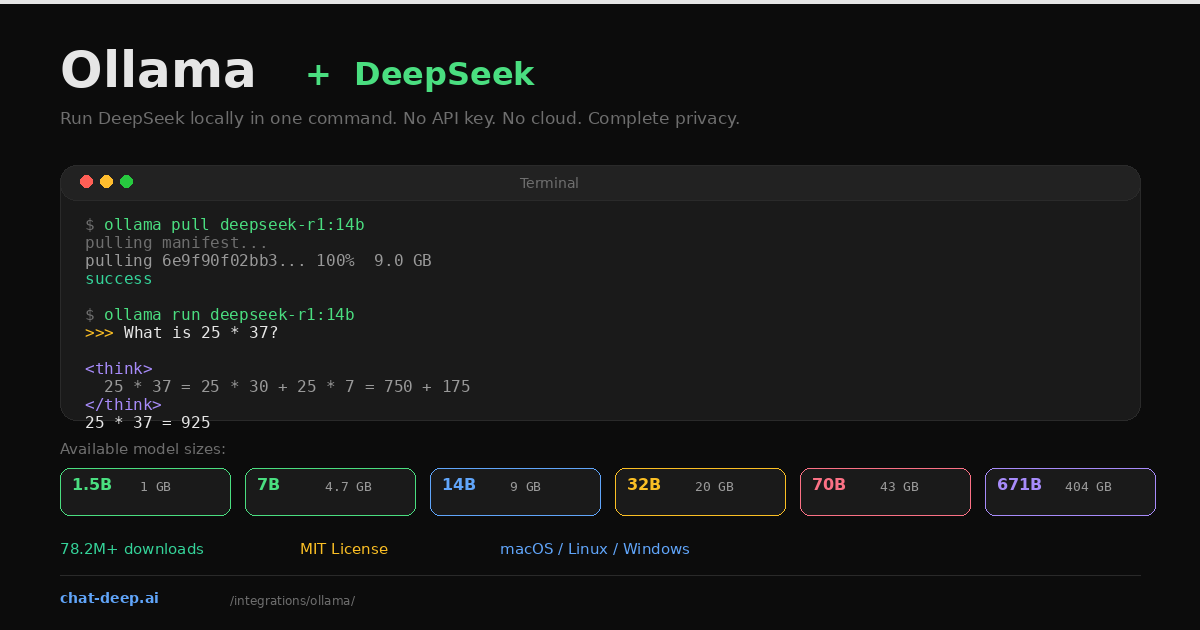
Install Ollama
Ollama supports macOS, Linux, and Windows (via WSL2 or the native installer). Install with one command:
# macOS / Linux
curl -fsSL https://ollama.com/install.sh | sh

# Windows — download the installer from ollama.com
# Or use winget:
winget install Ollama.Ollama
Verify the installation:
ollama --version
# ollama version 0.18.x
Ollama runs as a background service that manages model downloads, GPU detection, and inference. Once installed, it listens on http://localhost:11434 by default.
Choose a Model Size
DeepSeek R1 is available in distilled versions from 1.5B to 70B parameters, plus the full 671B model. The distilled versions are trained on reasoning data generated by the full R1, so even the smaller ones produce chain-of-thought output. The practical rule is simple: run the largest model your hardware can handle.
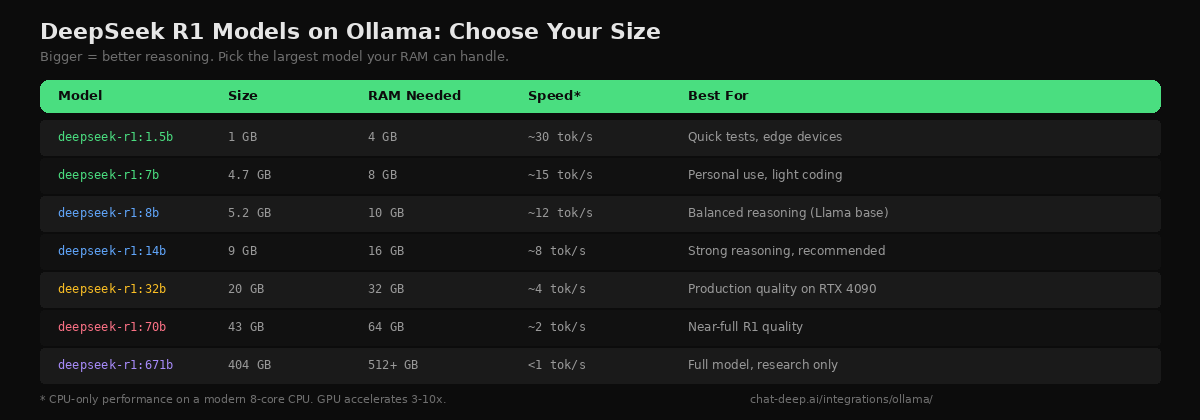
The 14B model is the recommended starting point for most developers. It fits in 16 GB of RAM, produces strong reasoning output, and runs at about 8 tokens per second on CPU. With an NVIDIA GPU that has 10+ GB of VRAM, Ollama automatically offloads layers to the GPU for a 3-10x speed boost — no configuration needed. On Apple Silicon Macs, Metal acceleration is enabled by default. For model architecture details and how the distilled versions compare to the full R1, see our DeepSeek models hub.
Pull and Run
Download a model and start chatting in two commands:
# Pull the 14B model (9 GB download)
ollama pull deepseek-r1:14b

# Start an interactive chat session
ollama run deepseek-r1:14b
Type a question at the >>> prompt. DeepSeek R1 first generates a reasoning trace (shown in <think> tags), then delivers the final answer. This visible chain of thought is what makes R1 different from standard chat models — you can see exactly how it approaches a problem before it commits to an answer.
>>> A farmer has 17 sheep. All but 9 run away. How many are left?

<think>
The phrase "all but 9" means 9 remain. This is a common trick question
where people subtract 9 from 17 to get 8, but the correct reading is
that 9 sheep did not run away.
</think>

9 sheep are left.
To hide the thinking process, use /set parameter think false inside the chat session. Type /bye to exit.
The REST API
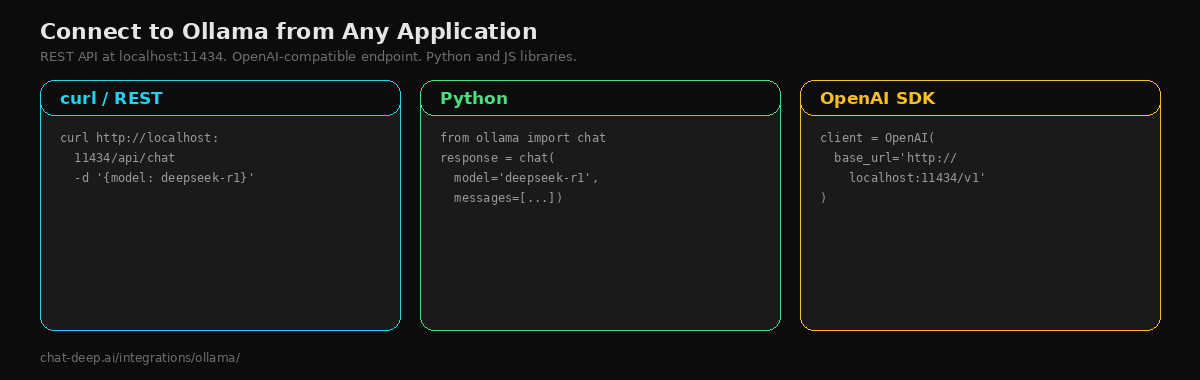
Ollama exposes a REST API at http://localhost:11434 that you can call from any programming language. There are two endpoints that matter for chat:
# Ollama's native chat API
curl http://localhost:11434/api/chat -d '{
  "model": "deepseek-r1:14b",
  "messages": [{"role": "user", "content": "Explain recursion simply."}],
  "stream": false
}'

# OpenAI-compatible endpoint (works with OpenAI SDK)
curl http://localhost:11434/v1/chat/completions -d '{
  "model": "deepseek-r1:14b",
  "messages": [{"role": "user", "content": "Explain recursion simply."}]
}'
The /v1/chat/completions endpoint follows the OpenAI format, which means any tool or library that speaks OpenAI — the OpenAI SDK, Vercel AI SDK, LiteLLM — can connect to your local Ollama instance by pointing the base URL to http://localhost:11434/v1.
Python Integration
Ollama publishes an official Python library that provides a clean, typed interface:
pip install ollamafrom ollama import chat
response = chat(
model="deepseek-r1:14b",
messages=[{"role": "user", "content": "Write a Python function to check if a number is prime."}],
)
print(response.message.content)For streaming, use the stream=True parameter and iterate over chunks. For async applications, the library provides AsyncClient that works with Python’s asyncio. You can also use the OpenAI SDK directly with Ollama — just set base_url to http://localhost:11434/v1 and use any api_key value (Ollama does not check it).
JavaScript and Node.js
Ollama also has a JavaScript library:
npm install ollamaimport ollama from 'ollama';
const response = await ollama.chat({
model: 'deepseek-r1:14b',
messages: [{ role: 'user', content: 'Explain closures in JavaScript.' }],
});
console.log(response.message.content);For Next.js applications, you can call Ollama from a Route Handler or Server Action just like you would call the DeepSeek API — the only difference is the URL pointing to localhost instead of a cloud endpoint.
Connecting to LangChain
LangChain has built-in support for Ollama. This means you can build RAG pipelines, agents, and chains using your local DeepSeek model:
from langchain_community.llms import Ollama

llm = Ollama(model="deepseek-r1:14b")

response = llm.invoke("Summarize the benefits of local AI inference.")
print(response)
You can swap this into any LangChain pipeline that currently uses a cloud-based LLM. The same chains, tools, and output parsers work because LangChain abstracts the provider difference. This is the fastest way to prototype a RAG system without spending anything on API tokens.
GPU Acceleration
Ollama automatically detects NVIDIA GPUs (via CUDA) and Apple Silicon (via Metal) and offloads model layers to the GPU. You do not need to configure anything — it just works. To verify GPU usage, run ollama ps while a model is loaded and check the “processor” column.
If you want to force all layers onto the GPU for maximum speed, set the environment variable OLLAMA_NUM_GPU=999 before starting the model. If the model does not fit entirely in VRAM, Ollama falls back to splitting layers between GPU and CPU automatically — this is the “hybrid” mode that makes Ollama uniquely flexible compared to GPU-only engines like vLLM.
On Apple Silicon Macs with unified memory, both CPU and GPU share the same memory pool. A MacBook Pro with 32 GB unified memory can comfortably run the 14B model, and a 64 GB configuration handles the 32B model. For GPU-heavy deployment on dedicated hardware, see our Docker guide which covers vLLM for production serving.
The R1-0528 Update
In May 2025, DeepSeek released a minor update to R1 called R1-0528. This update improved reasoning quality significantly — AIME 2025 scores reached 87.5%, approaching GPT-4 level on advanced math. It also fixed issues with JSON output formatting and reduced hallucinations. The update is available for the 8B and 671B variants on Ollama. Pull the latest version with ollama pull deepseek-r1 to get the updated weights. One trade-off: R1-0528 generates more thinking tokens per query (approximately 23K versus 12K in the original), which means longer response times but better reasoning quality.
Adding a Web Interface
The terminal is great for developers, but if you want a ChatGPT-like browser interface for your local DeepSeek, Open WebUI connects to Ollama with zero configuration. It provides a polished chat UI with conversation history, model switching, file uploads, and multi-user support:
docker run -d -p 3000:8080 \
  --add-host=host.docker.internal:host-gateway \
  -v open-webui:/app/backend/data \
  --name open-webui \
  ghcr.io/open-webui/open-webui:main
Open http://localhost:3000, create an account, and you will see all your Ollama models listed and ready to use. Open WebUI automatically discovers models from the Ollama instance running on the host. The --add-host flag lets the container reach the host’s Ollama service. This is the quickest way to give non-technical team members access to DeepSeek’s reasoning capabilities without them touching the terminal. For more on Open WebUI, see our Open WebUI integration guide.
Creating Custom Models with Modelfile
Ollama lets you create custom model variants using a Modelfile — similar to a Dockerfile but for LLMs. This is useful when you want to set a permanent system prompt, adjust temperature, or configure the context window for a specific use case:
# Modelfile
FROM deepseek-r1:14b

SYSTEM "You are a senior software engineer. Write clean, well-documented code. Explain your reasoning step by step."

PARAMETER temperature 0.3
PARAMETER num_ctx 16384
Build and run your custom model:
ollama create deepseek-coder --file Modelfile
ollama run deepseek-coder
The custom model inherits all of DeepSeek R1’s capabilities but starts every conversation with your system prompt and parameters. You can create multiple custom models for different tasks — one for coding, one for writing, one for data analysis — and switch between them by name. This is especially useful when different team members need different default behaviors from the same underlying model.
Other DeepSeek Models on Ollama
DeepSeek R1 is the most popular, but Ollama also hosts other DeepSeek models. deepseek-v3 is the general-purpose chat model without the chain-of-thought reasoning overhead — faster for simple tasks where you do not need the thinking traces. deepseek-coder-v2 is optimized for code generation. Check the available models with ollama search deepseek or browse the Ollama model library. For a comparison of all DeepSeek model families, visit our DeepSeek V3 page.
Known Limitations
Ollama with DeepSeek has a few limitations you should know about. Tool calling (function calling) does not work reliably with DeepSeek models on Ollama — the model produces malformed tool call outputs. If you need function calling, use the DeepSeek hosted API or deploy with vLLM via Docker instead. Structured JSON output is available through the format: "json" parameter in the API, but results vary by model size — the 32B and 70B versions produce more reliable JSON than the smaller distills.
Tips for Best Results
Use clear, structured prompts. DeepSeek R1 responds best to zero-shot prompts that clearly state the problem. Few-shot examples can actually degrade performance for this model — the reasoning engine works better when it figures out the approach itself.
Let it think. Do not disable the thinking process unless you are doing simple Q&A. For math, coding, and logic tasks, the chain-of-thought reasoning is what makes R1 better than standard models. The thinking tokens add latency but dramatically improve accuracy.
Manage model memory. Ollama keeps the last-used model loaded in memory. Run ollama stop deepseek-r1:14b to unload it and free RAM. Use ollama rm deepseek-r1:1.5b to delete models you no longer need from disk. Check what is loaded with ollama ps and what is downloaded with ollama list.
Run Ollama as a service. On Linux, the installer creates a systemd service. On macOS, Ollama runs as a menu bar app. For headless servers, start it with ollama serve or enable the systemd service so it starts on boot. This ensures the API is always available for your applications. For pricing comparisons between local inference and API usage, check our DeepSeek pricing page.
Conclusion
Ollama is the simplest path to running DeepSeek on your own hardware. Install, pull, run — and you have a local AI model with reasoning capabilities that rival top commercial offerings. No API keys, no recurring costs, no data leaving your machine. The OpenAI-compatible endpoint means every tool in the ecosystem connects without modification.
For developers, this changes the economics of AI features entirely. Prototyping with a local model costs nothing — no token bills, no usage caps, no rate limits. You can iterate on prompts all day, test edge cases exhaustively, and build entire applications against a local endpoint before deciding whether to deploy with the hosted API or self-host in production with a more powerful inference engine.
Start with the 14B model for a balance of quality and speed. Move to 32B when you need production-grade reasoning. Add Open WebUI when you want a browser interface for your team. When you outgrow Ollama’s throughput, graduate to vLLM in Docker for production serving. And when local hosting is not practical, the DeepSeek hosted API gives you the full V3.2 models at $0.28/M input tokens without any infrastructure — see our pricing page for details. Check API availability on our status page and browse the full integrations section for more ways to use DeepSeek across your stack.