
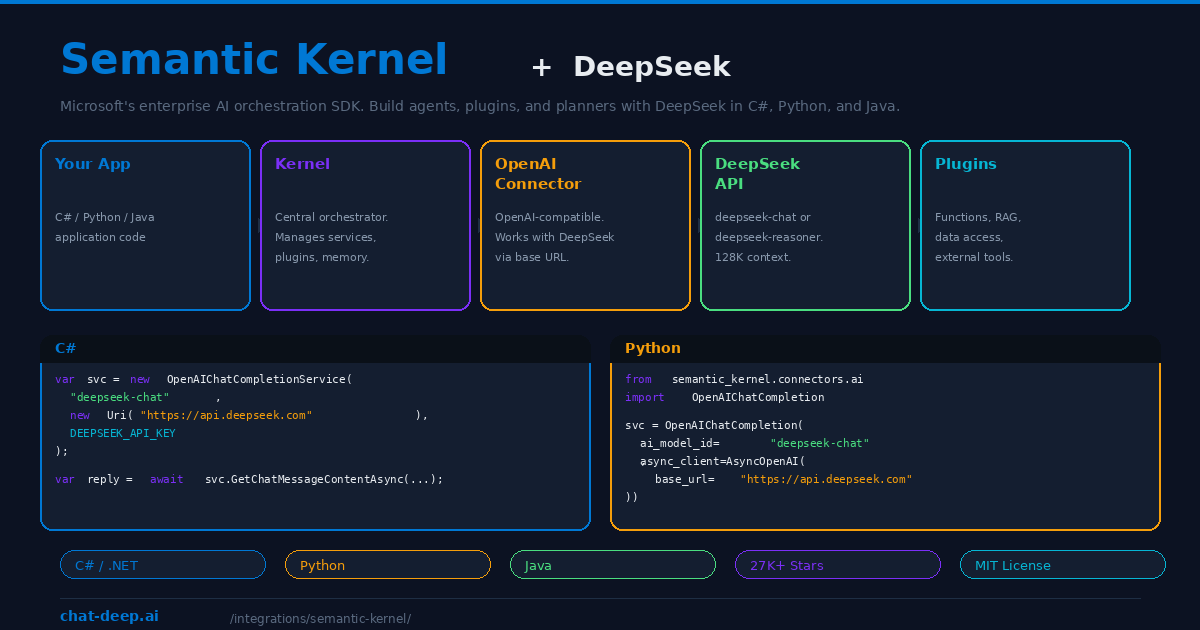
Semantic Kernel is Microsoft’s open-source SDK for building AI-powered applications. With over 27,000 GitHub stars and first-class support for C#, Python, and Java, it is the enterprise standard for integrating large language models into production software. Semantic Kernel does not just call an AI API — it orchestrates plugins, planners, memory systems, and multi-step workflows that turn a language model into an intelligent agent capable of reasoning over data and executing complex tasks.
DeepSeek works with Semantic Kernel through the OpenAI connector. Since DeepSeek’s API is fully compatible with the OpenAI chat completion format, you connect it by pointing the OpenAI service to https://api.deepseek.com — no custom connector needed, no workarounds, no compatibility layers. Microsoft’s official blog confirms this approach and provides sample code for both C# and Python.
This guide covers the setup in both languages, key Semantic Kernel concepts that work with DeepSeek, practical patterns for building AI agents, and why DeepSeek’s cost efficiency makes it particularly attractive for enterprise deployments. For API details, see our DeepSeek API documentation.
Setup in C# (.NET)
Install the Semantic Kernel NuGet package and create a chat completion service pointed at DeepSeek:
dotnet add package Microsoft.SemanticKernel

// Program.cs
using Microsoft.SemanticKernel;
using Microsoft.SemanticKernel.ChatCompletion;

var apiKey = Environment.GetEnvironmentVariable("DEEPSEEK_API_KEY");

var chatService = new OpenAIChatCompletionService(
    "deepseek-chat",                        // or "deepseek-reasoner"
    new Uri("https://api.deepseek.com"),
    apiKey
);

var chatHistory = new ChatHistory();
chatHistory.AddSystemMessage("You are a helpful enterprise assistant.");
chatHistory.AddUserMessage("Summarize our Q3 revenue trends.");

var reply = await chatService.GetChatMessageContentAsync(chatHistory);
Console.WriteLine(reply);
The OpenAIChatCompletionService constructor accepts a model ID, a base URI, and an API key. By setting the URI to DeepSeek’s endpoint, all requests route to DeepSeek’s infrastructure instead of OpenAI’s. Use deepseek-chat for the general model or deepseek-reasoner for chain-of-thought reasoning. Get your API key from platform.deepseek.com — our login guide covers account setup.
Setup in Python
Install the Semantic Kernel Python package and configure the OpenAI connector with DeepSeek’s base URL:
pip install semantic-kernel openai

import asyncio
from openai import AsyncOpenAI
from semantic_kernel.connectors.ai.open_ai import OpenAIChatCompletion
from semantic_kernel.contents import ChatHistory

DEEPSEEK_API_KEY = "sk-your-key-here"

async def main():
    chat_service = OpenAIChatCompletion(
        ai_model_id="deepseek-chat",
        async_client=AsyncOpenAI(
            api_key=DEEPSEEK_API_KEY,
            base_url="https://api.deepseek.com",
        ),
    )

    history = ChatHistory()
    history.add_user_message("Explain the factory design pattern.")

    response = await chat_service.get_chat_message_content(history)
    print(response)

asyncio.run(main())
The Python connector uses the AsyncOpenAI client from the official OpenAI library with the base_url overridden to point at DeepSeek. This is the same pattern recommended by Microsoft in their official Semantic Kernel blog post. Everything that works with the OpenAI connector — plugins, planners, memory — works identically with DeepSeek.
Key Concepts That Work with DeepSeek
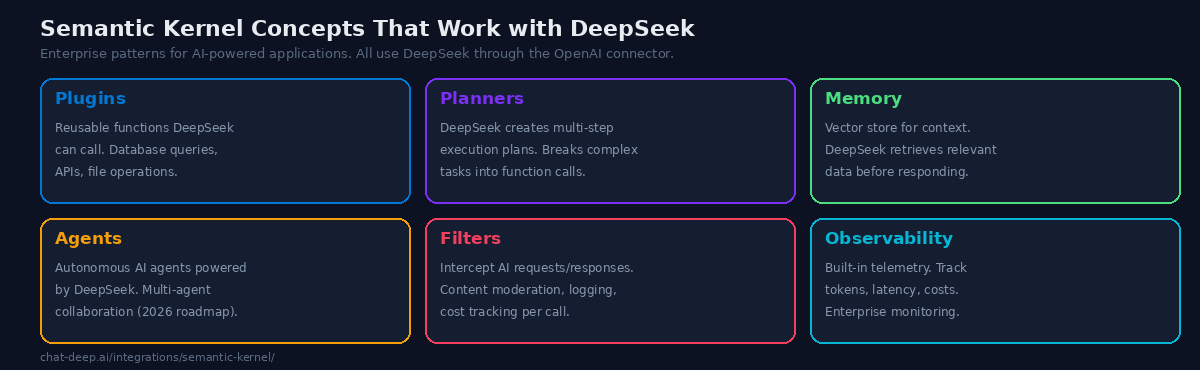
Semantic Kernel’s power comes from composing several architectural concepts around the AI model. Here is how each one works with DeepSeek.
Plugins. Plugins are collections of functions that DeepSeek can call during a conversation. A plugin might query a database, call an external API, read a file, or perform a calculation. When you register a plugin with the Kernel, DeepSeek can invoke its functions as needed to answer questions or complete tasks. For example, a “Sales” plugin with functions like GetQuarterlyRevenue(quarter) and GetTopCustomers(count) lets DeepSeek answer business questions by fetching real data rather than guessing.
Planners. Planners let DeepSeek break a complex request into a series of plugin function calls. Give it a high-level goal like “Prepare a summary of this quarter’s performance compared to last quarter” and the planner generates a step-by-step execution plan: call GetQuarterlyRevenue("Q3"), call GetQuarterlyRevenue("Q2"), calculate the difference, format the summary. DeepSeek’s reasoning capability makes it effective at creating these multi-step plans.
Memory. Semantic Kernel includes a memory system that stores and retrieves information using vector embeddings. This enables RAG (Retrieval-Augmented Generation) — DeepSeek searches the memory store for relevant context before generating a response. Note that DeepSeek does not currently offer an embeddings API, so you will need a separate embedding model (such as text-embedding-3-small from OpenAI or a local model via Ollama) for the memory store. DeepSeek handles the chat completion; the embedding model handles the vector search.
Agents. Semantic Kernel’s agent framework creates autonomous AI agents that can use plugins, maintain state, and collaborate with other agents. A DeepSeek-powered agent can monitor a data pipeline, triage support tickets, or manage a workflow — making decisions and taking actions based on its instructions and available tools. Multi-agent collaboration, where multiple DeepSeek agents work together on complex tasks, is on the 2026 roadmap.
Filters. Filters intercept requests before they reach DeepSeek and responses before they reach the user. Use filters for content moderation (block inappropriate prompts), logging (record all interactions for compliance), cost tracking (count tokens per request), and response validation (ensure output meets format requirements). Filters are essential for production deployments where governance matters.
Setup in Java
Semantic Kernel’s Java implementation supports DeepSeek through the same OpenAI-compatible pattern. Add the Maven dependency and configure the service with DeepSeek’s endpoint. The Java API mirrors the C# architecture, making it accessible to enterprise teams working in JVM-based environments. Java 17+ is required. The configuration follows the same three parameters: model ID (deepseek-chat), base URL (https://api.deepseek.com), and API key.
Practical Example: Building a Support Agent
Here is a realistic example of Semantic Kernel with DeepSeek: a customer support agent that answers questions by querying a knowledge base and escalating when it cannot help.
// Define a plugin with support functions
public class SupportPlugin
{
    [KernelFunction("search_knowledge_base")]
    [Description("Search the support knowledge base")]
    public async Task<string> SearchKnowledgeBase(string query)
    {
        // Query your vector database or search index
        return await _searchService.QueryAsync(query);
    }

    [KernelFunction("create_ticket")]
    [Description("Create a support ticket for human review")]
    public async Task<string> CreateTicket(string summary, string priority)
    {
        return await _ticketService.CreateAsync(summary, priority);
    }
}

// Register plugin and create the agent
var kernel = Kernel.CreateBuilder()
    .AddOpenAIChatCompletion("deepseek-chat",
        new Uri("https://api.deepseek.com"), apiKey)
    .Build();

kernel.Plugins.AddFromType<SupportPlugin>();

// DeepSeek can now call SearchKnowledgeBase and CreateTicket
var agent = new ChatCompletionAgent
{
    Name = "SupportBot",
    Instructions = "You are a customer support agent. Search the " +
        "knowledge base to answer questions. If you cannot find an " +
        "answer, create a support ticket for human review.",
    Kernel = kernel
};
When a customer asks “How do I reset my password?”, DeepSeek calls SearchKnowledgeBase("password reset"), retrieves the relevant article, and formats a helpful response. If the query is about a billing dispute that requires human judgment, DeepSeek calls CreateTicket with a summary and priority level. The agent handles routine questions autonomously while escalating complex issues — exactly the pattern enterprises need.
At DeepSeek’s pricing, this agent costs roughly $0.001 per customer interaction. Processing 10,000 support queries per month costs about $10 in API tokens — less than a single hour of a human support agent’s time. This is the economic argument that makes AI-powered support viable for businesses of every size.
Observability and Monitoring
Production AI applications need observability. Semantic Kernel includes built-in telemetry that tracks every AI request — token counts, latency, model used, function calls made, and errors encountered. This data integrates with standard monitoring tools (Application Insights, OpenTelemetry, Prometheus) so your AI agents appear in the same dashboards as your other services.
For DeepSeek specifically, token tracking helps you monitor costs in real time. Create a filter that logs input/output tokens per request and aggregates them into daily/weekly reports. Semantic Kernel’s filter pipeline makes this straightforward — a few lines of code give you complete visibility into your AI spending without modifying your application logic.
Why DeepSeek for Enterprise AI
Enterprise AI applications are token-intensive. An agent that processes customer support tickets might handle thousands of conversations per day, each involving several thousand tokens of context. A document analysis pipeline might process hundreds of reports per hour. At these volumes, the per-token cost difference between AI providers becomes a significant budget line item.
DeepSeek V3.2 costs $0.28/M input tokens and $0.42/M output tokens — roughly 90% less than GPT-4o for comparable quality. For an enterprise processing 100 million tokens per month (a realistic volume for a production AI application), that translates to roughly $70/month with DeepSeek versus $700+ with GPT-4o. Over a year, the savings fund an entire engineering position. For current rates, check our pricing page.
Semantic Kernel’s provider-agnostic architecture means you can start with DeepSeek and switch to Azure OpenAI or any other provider without changing your application code — just update the service configuration. This gives enterprises the flexibility to use DeepSeek for cost-effective batch processing while routing premium tasks to other models when needed. For a model comparison, see our models hub.
Semantic Kernel vs. LangChain
Both frameworks orchestrate LLM interactions, but they serve different audiences. LangChain is Python-first and emphasizes rapid prototyping with a large ecosystem of community-built components. Semantic Kernel is multi-language (C#, Python, Java) and emphasizes enterprise patterns — strong typing, production-grade observability, and deep integration with Microsoft’s development ecosystem.
If your team works primarily in Python and values speed of experimentation, LangChain is the natural choice. If your organization runs on .NET, needs Java support, or requires enterprise-grade governance features (SSO, audit trails, managed identities), Semantic Kernel is the stronger fit. Both work with DeepSeek through the OpenAI-compatible connector — the model integration is identical regardless of which framework you choose.
Using DeepSeek Reasoner
Swap deepseek-chat for deepseek-reasoner in the model ID to access chain-of-thought reasoning. The reasoner model shows its thinking process before delivering a conclusion, which is valuable for complex planning tasks, multi-step analysis, and debugging intricate logic. In Semantic Kernel’s planner, the reasoner model produces more reliable execution plans for tasks that require several interdependent steps.
The trade-off is speed — the reasoner takes longer per response due to the reasoning output. For latency-sensitive applications like real-time chat, use deepseek-chat. For batch processing, analytical tasks, and planner operations where accuracy matters more than speed, use deepseek-reasoner. For more on the differences, see our DeepSeek V3 page.
Tips for Production Deployments
Use environment variables for credentials. Never hardcode your DeepSeek API key. Use Environment.GetEnvironmentVariable() in C# or os.environ in Python. For Azure deployments, use Azure Key Vault integration.
Implement token tracking with filters. Create a filter that counts input and output tokens per request. This data feeds into your cost monitoring dashboard and helps you optimize prompts to reduce token usage without sacrificing quality.
Cache frequently used responses. If your application handles repetitive queries (common in customer support), implement a semantic cache that stores and retrieves previous DeepSeek responses for similar questions. This reduces API calls and improves response time.
Use the reasoner model selectively. Route complex planner tasks and analytical queries to deepseek-reasoner, and use deepseek-chat for everything else. Semantic Kernel makes this easy — configure two services and select the appropriate one per request based on task complexity.
Monitor API health. In production, implement retry logic and fallback providers. Semantic Kernel supports configuring multiple AI services — use DeepSeek as primary and Azure OpenAI as fallback. Check our status page for current API availability.
Conclusion
Semantic Kernel gives DeepSeek the enterprise scaffolding it needs to power production AI applications. Plugins let DeepSeek call your business logic. Planners break complex goals into executable steps. Memory provides RAG-based context retrieval. Agents create autonomous AI workers. Filters enforce governance and compliance. Observability tracks every token and millisecond. And all of this works in C#, Python, and Java with the same OpenAI connector — just point the base URL to DeepSeek and you are running.
The cost advantage compounds at enterprise scale. At 90% less than GPT-4o per token, DeepSeek makes it economically viable to deploy AI agents that would be prohibitively expensive with premium providers — customer support bots, document analyzers, data pipeline monitors, and multi-agent collaboration systems. Semantic Kernel’s provider-agnostic architecture means you are never locked in — switch providers with a config change, not a code rewrite. Start with DeepSeek for development and testing, then evaluate whether the production workload justifies staying or migrating.
Install the SDK (dotnet add package Microsoft.SemanticKernel for C# or pip install semantic-kernel for Python), configure the DeepSeek connector with three lines of code, and build your first plugin-powered agent. The Microsoft team provides official DeepSeek samples in the Semantic Kernel GitHub repository to help you get started quickly.
For other integration frameworks, see our LangChain guide and LlamaIndex guide. For cloud deployment patterns, see our cloud platforms guide and web apps integration guide. Browse the full integrations section for the complete DeepSeek ecosystem.