
Windsurf is the AI-native code editor that ranked #1 in the LogRocket AI Dev Tool Power Rankings in early 2026, ahead of both Cursor and GitHub Copilot. Built on VS Code’s foundation, it centers around Cascade — an agentic AI system that understands your entire codebase, plans multi-step changes across files, runs terminal commands, and fixes its own errors. DeepSeek V3 and DeepSeek R1 are both available as model options within Cascade.
Originally created by Codeium (the popular autocomplete extension), Windsurf was acquired by Cognition AI — the company behind Devin, the autonomous coding agent — in December 2025 for approximately $250 million. This acquisition positioned Windsurf at the intersection of IDE-level intelligence and fully autonomous development. With over a million users, 4,000+ enterprise customers, and FedRAMP High certification, Windsurf has established itself as a serious alternative to Cursor for teams that want agentic AI capabilities at a lower price point.
This guide covers how DeepSeek works inside Windsurf, Cascade’s key features, the credit system, and how Windsurf compares to Cursor for DeepSeek users. For DeepSeek API details, see our API documentation.
Getting Started
Download Windsurf from windsurf.com. It is available for macOS, Windows, and Linux. The editor looks and feels like VS Code — your extensions, themes, keybindings, and settings carry over seamlessly since Windsurf is built on the same VS Code foundation. Sign up for a Windsurf account to access the AI features. The free tier includes limited Cascade usage and unlimited tab completions powered by Windsurf’s proprietary SWE-1-mini model — enough to evaluate the platform before upgrading.
DeepSeek is available out of the box in the Cascade model picker. Open the Cascade panel (Cmd+K or Ctrl+K), click the model selector at the bottom, and choose DeepSeek-V3 or DeepSeek-R1 from the list. No API key configuration is needed — Windsurf handles the DeepSeek connection through its internal credit system. You pay through your Windsurf subscription rather than managing a separate DeepSeek account, which simplifies billing for individual developers and teams.
DeepSeek in the Credit System
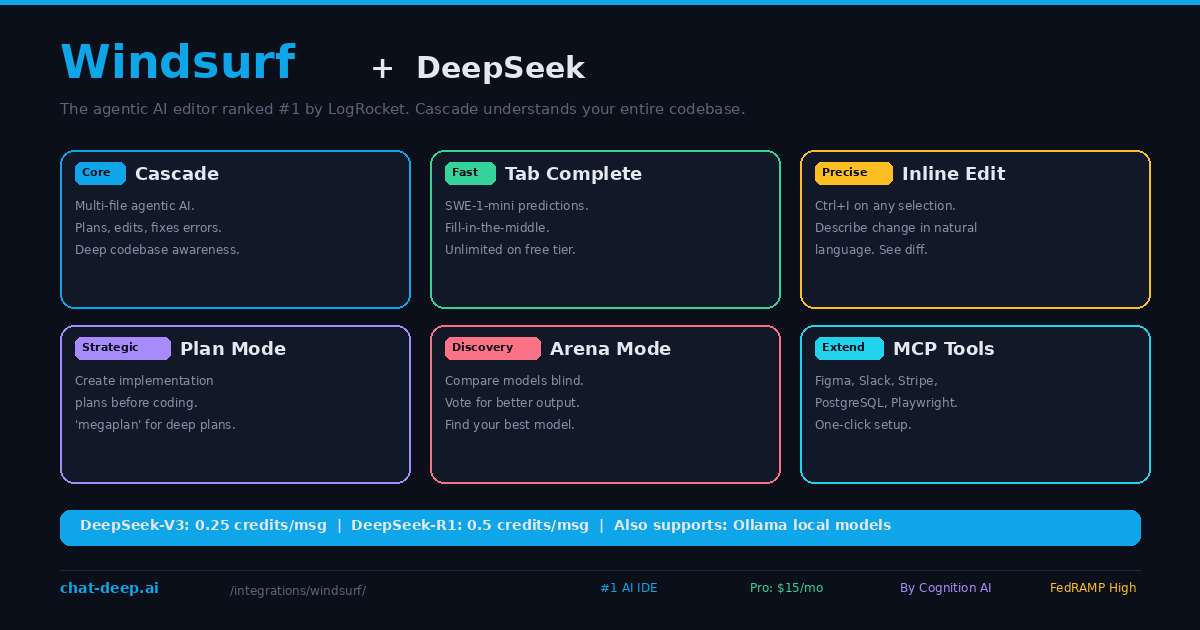
Windsurf uses a credit-based system for AI model usage. Each model costs a different number of credits per interaction. DeepSeek V3 costs 0.25 user prompt credits per message and 0.25 flow action credits per tool call — making it one of the most affordable models in the Windsurf lineup. DeepSeek R1 costs 0.5 credits per message and 0.5 per tool call due to its longer reasoning output.
The Pro plan ($15/month) includes a daily credit allowance that refreshes. For most developers, the allowance covers a full day of coding with DeepSeek. If you exceed it, overages are charged at API pricing. The free tier provides limited credits for testing, which is enough to evaluate DeepSeek’s coding capabilities before committing to a plan. For DeepSeek’s own API pricing, check our pricing page.
Cascade: The Core Experience
Cascade is Windsurf’s agentic AI assistant. It goes beyond chat and autocomplete — Cascade understands your project structure, reads files across the codebase, executes terminal commands, and iterates until the task is complete. When powered by DeepSeek, Cascade provides fast, cost-effective agentic coding.
Open the Cascade panel and describe your task in natural language. Cascade analyzes your codebase, proposes a plan, and begins executing. It creates new files, edits existing ones, runs build commands, and checks for errors — asking for your approval at critical steps. If a build fails, Cascade reads the error output and fixes the issue automatically.
What makes Cascade different from other AI assistants is its deep context awareness. The indexing engine processes your entire codebase (not just open files) and maintains a semantic understanding of your project. This means when you ask DeepSeek through Cascade to “add error handling to the payment module,” it already knows where the payment module is, what functions it contains, and how it connects to the rest of your application.
Key Features with DeepSeek
Tab Completion. Windsurf’s SWE-1-mini model powers tab completions by default (free and unlimited), but you can also route completions through DeepSeek for higher-quality predictions. The completions use fill-in-the-middle context and terminal awareness, predicting not just the next line but understanding what should come between existing code blocks.
Inline Edit (Ctrl+I). Select any code block, press Ctrl+I, and describe your change. DeepSeek generates the edit and shows a diff overlay. Accept or reject with one click. This works in code files, terminal, and even documentation — making it the fastest path for small, targeted modifications.
Plan Mode. Before diving into code, use Plan Mode to have DeepSeek create a detailed implementation plan. Type “megaplan” in the Cascade input to trigger an advanced planning form that asks clarifying questions before generating the plan. Review and refine the plan, then switch to Code mode to execute it. This two-phase approach prevents the AI from going down the wrong path on complex tasks.
Arena Mode. This unique Windsurf feature lets you compare AI models side by side with hidden identities. Two models process the same prompt, and you vote for the better response. Over time, this builds a personal leaderboard that shows which models actually work best for your coding style and codebase — far more useful than generic benchmarks. Use Arena Mode to compare DeepSeek against Claude, GPT, or Windsurf’s SWE-1.5 on real tasks from your project.
MCP Integration. Windsurf supports the Model Context Protocol with one-click setup for popular tools including Figma, Slack, Stripe, PostgreSQL, and Playwright. Through MCP, DeepSeek in Cascade can query your database, check design files, run browser tests, and interact with external services — all without leaving the editor.
Memories. Windsurf maintains persistent context across sessions through its Memories system. User-generated memories are rules you define (coding conventions, preferred APIs, project-specific patterns). Automatically generated memories are learned from your interactions over time. This means DeepSeek’s suggestions improve the more you use Windsurf — it remembers your preferences without you repeating them.
Previews and Deployment
Windsurf includes built-in preview capabilities for web development. Cascade can launch your application inside the editor, let you interact with it, and even deploy it to Netlify through tool calls. This means you can go from a natural language description to a live, deployed application without leaving the editor.
For frontend tasks, click on any element in the preview and let Cascade reshape it — adjusting layouts, colors, or functionality based on your description. DeepSeek processes both your code and the visual context to make targeted changes. This visual feedback loop is particularly effective for UI work where describing a change in words is harder than pointing at what needs to change.
Practical Example: Building a Dashboard
Here is how a real Cascade session with DeepSeek looks. You open a new Next.js project and type in the Cascade panel: “Build a dashboard page with a sidebar navigation, a header with user avatar, and three stat cards showing total users, revenue, and active sessions. Use Tailwind CSS and shadcn/ui components.”
Cascade with DeepSeek reads your project’s existing configuration — the Tailwind config, the component library, the layout patterns — and generates a complete dashboard. It creates the page component, the sidebar component, the stat card component, and updates the navigation. If the project uses App Router, Cascade creates the files in the correct directory. If it uses Pages Router, it adapts accordingly.
After generating the code, Cascade runs npm run dev and opens the preview inside the editor. You see the dashboard rendered live. If the stat cards are too wide, click on one in the preview and tell Cascade to adjust the layout. DeepSeek makes the CSS change and the preview updates immediately. The entire process — from description to live preview — takes under five minutes and costs roughly 2-4 credits.
Using Local DeepSeek via Ollama
For teams working with sensitive code, Windsurf supports local AI models through Ollama. Go to Settings → AI Provider → Ollama. Select your locally-running DeepSeek model. All AI interactions happen on your machine — no code is sent to any cloud service. This is essential for finance, healthcare, defense, and any environment with strict data residency requirements.
The trade-off is the same as with any local model: reduced speed and capability compared to the full DeepSeek V3.2 API. For the best local experience, use the 32B distill on an RTX 4090 or better. See our Docker guide for GPU requirements and our models hub for model comparisons.
Windsurf vs. Cursor for DeepSeek Users
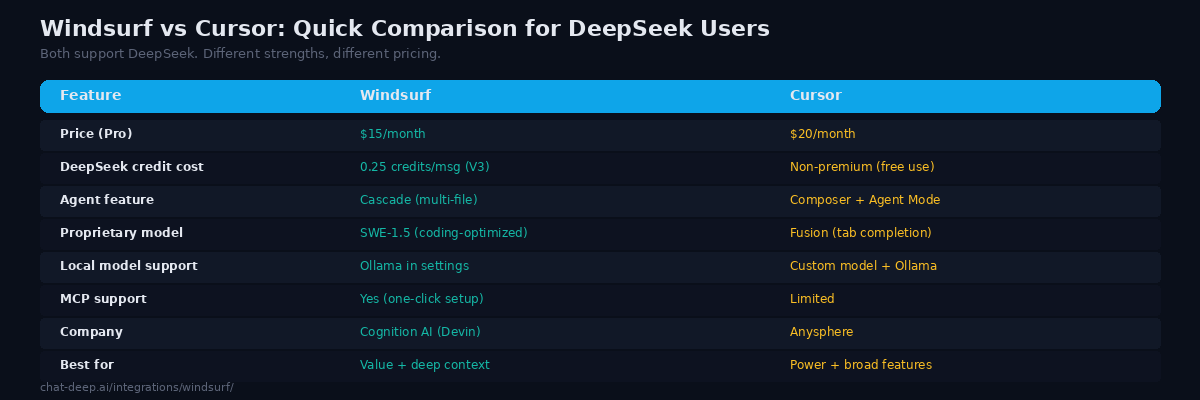
Both editors support DeepSeek and both are VS Code forks with deep AI integration. The differences come down to pricing, model access, and feature philosophy.
Windsurf Pro costs $15/month — 25% less than Cursor Pro at $20/month. DeepSeek V3 costs 0.25 credits per message in Windsurf, while in Cursor, DeepSeek is a non-premium model with effectively unlimited fast use. For heavy DeepSeek users, Cursor’s model is simpler: no credits to track. For users who also want premium models (Claude, GPT-5), Windsurf’s lower base price and credit system may work out cheaper overall.
Cascade and Cursor’s Composer are comparable in capability — both handle multi-file editing, terminal execution, and iterative error fixing. Cursor has Background Agents (cloud-based parallel agents) that Windsurf does not yet match. Windsurf has Arena Mode and the Memories system that Cursor lacks. On the enterprise side, Windsurf’s FedRAMP High certification is a significant advantage for government and regulated industries.
The honest answer: try both. Import the same project, run the same tasks with DeepSeek, and see which workflow feels more natural. Both editors offer free tiers sufficient for evaluation. For a detailed Cursor walkthrough, see our Cursor guide.
Tips for Best Results
Use DeepSeek V3 as your daily driver. At 0.25 credits per message, DeepSeek V3 is the most cost-effective way to use Cascade’s agentic features for everyday coding. Reserve DeepSeek R1 (0.5 credits) for tasks that genuinely need chain-of-thought reasoning — complex debugging, algorithm design, and architectural analysis.
Try Arena Mode to calibrate. Before committing to DeepSeek as your primary model, run Arena Mode comparisons against other available models on tasks from your actual project. You might find DeepSeek excels at certain task types while another model handles others better. Arena Mode eliminates bias by hiding model identities during comparison.
Use Plan Mode for complex features. Starting with a plan prevents Cascade from making assumptions that lead to wasted iterations. The “megaplan” command creates comprehensive plans that serve as a contract between you and the AI — review it, adjust it, then execute with confidence.
Set up Memories for your project. Add project-specific rules to the Memories system — your tech stack, naming conventions, forbidden patterns, and preferred libraries. DeepSeek reads these on every interaction, producing code that matches your project’s style from the first suggestion.
Monitor credits. Windsurf shows credit usage in real time. If you are burning through credits faster than expected, check whether you are using a model that costs more credits than necessary for the task. Simple code generation rarely needs DeepSeek R1 — save it for tasks that genuinely benefit from reasoning. Check our status page for DeepSeek API availability.
Conclusion
Windsurf brings DeepSeek into an editor that was designed around the AI experience from day one rather than having AI added as an afterthought. Cascade’s deep codebase indexing ensures DeepSeek understands your project structure before generating a single line of code. Plan Mode prevents wasted iterations on wrong approaches. Arena Mode helps you discover whether DeepSeek is the right model for your specific workflow. Memories make every session smarter than the last. And MCP integration extends DeepSeek’s reach into external tools and services.
At $15/month with the most affordable credit rates for DeepSeek in any commercial editor, Windsurf offers the best value for developers who want agentic AI coding without the premium price. The Cognition AI acquisition signals an ambitious roadmap toward fully autonomous development — and DeepSeek’s cost efficiency makes that vision economically viable for everyday use.
Download Windsurf, select DeepSeek V3 in the Cascade model picker, and describe your first task. For other AI coding tools, see our Cursor guide, Cline guide (VS Code extension agent), Continue guide (open-source Copilot alternative), and Aider guide (terminal pair programming). Browse the full integrations section for all the ways to use DeepSeek across your development stack.