
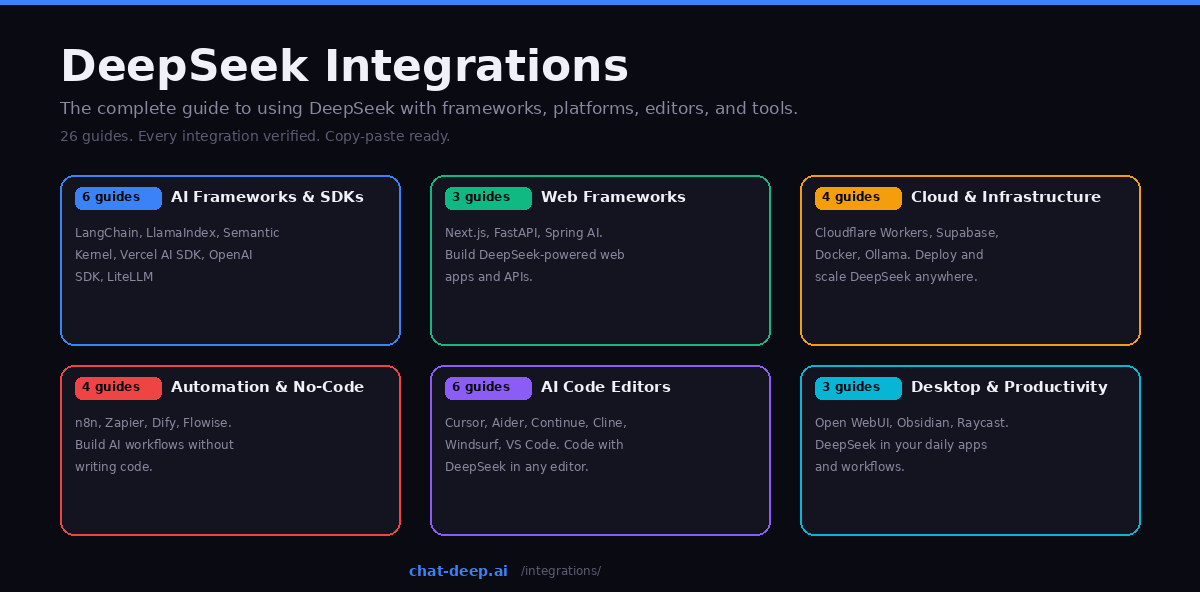
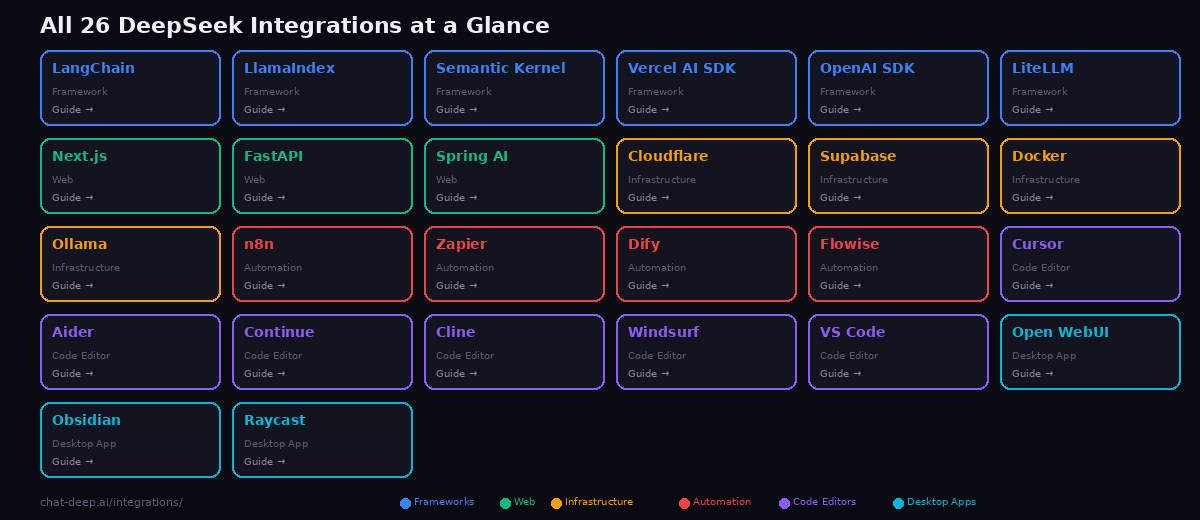
DeepSeek’s OpenAI-compatible API means it works with virtually every tool, framework, and platform in the AI ecosystem. This page is your starting point for connecting DeepSeek to the tools you already use. We have written 26 in-depth guides covering everything from AI orchestration frameworks to code editors, cloud platforms to desktop productivity apps. Each guide includes verified setup instructions, working code examples, and custom illustrations.
Browse by category below, or jump directly to the integration you need. Every guide links back to our API documentation, models hub, and pricing page for quick reference.
AI Frameworks & SDKs
These frameworks are the building blocks for AI-powered applications. They handle prompt management, chain orchestration, retrieval-augmented generation, and agent workflows — with DeepSeek as the reasoning engine.
LangChain — The most popular AI orchestration framework. Build chains, agents, and RAG pipelines with DeepSeek using the ChatOpenAI connector. Supports Python and JavaScript. Ideal for developers building complex AI workflows that combine DeepSeek with tools, memory, and data retrieval.
LlamaIndex — The leading framework for data-connected AI. Build retrieval-augmented generation systems that let DeepSeek answer questions from your documents, databases, and APIs. Specialized in indexing, chunking, and vector search for knowledge-intensive applications.
Semantic Kernel — Microsoft’s enterprise AI orchestration SDK. Build production-grade agents with plugins, planners, and memory in C#, Python, or Java. DeepSeek works through the OpenAI connector with three lines of configuration. The go-to choice for .NET teams and enterprise environments.
Vercel AI SDK — The TypeScript toolkit for building AI-powered web applications. Stream DeepSeek responses to React, Next.js, Svelte, and Vue frontends with built-in UI components. The fastest path from DeepSeek API to a production chat interface.
OpenAI SDK — Use the official OpenAI Python and Node.js libraries with DeepSeek by changing one line: the base URL. The simplest integration for developers already familiar with OpenAI’s API format. No new library to learn.
LiteLLM — A unified interface for 100+ LLM providers. Use LiteLLM as a proxy to route requests to DeepSeek, track costs, set rate limits, and switch between providers without changing your application code. Essential for teams managing multiple AI models.
Web Frameworks
Build web applications and APIs that are powered by DeepSeek. These guides cover server-side integration with the most popular web frameworks.
Next.js — Build full-stack AI web applications with streaming chat, server actions, and edge runtime support. Covers both App Router and Pages Router patterns with DeepSeek. The recommended framework for React-based AI products.
FastAPI — Build high-performance Python APIs that stream DeepSeek responses. Covers async streaming, dependency injection for API clients, and deployment patterns. The standard choice for Python backend developers building AI services.
Spring AI — Bring DeepSeek to the Java/Spring ecosystem. Spring AI provides auto-configuration, dependency injection, and the familiar Spring programming model for AI integration. Ideal for enterprise Java teams adding AI to existing Spring Boot applications.
Cloud & Infrastructure
Deploy, scale, and run DeepSeek across cloud platforms and local infrastructure. These guides cover everything from edge computing to self-hosted GPU inference.
Cloudflare Workers — Run DeepSeek at the edge with Cloudflare’s serverless platform. Covers Workers AI (distilled models), AI Gateway (rate limiting, caching, logging), and direct API calls from edge functions. Deploy AI globally with sub-50ms cold starts.
Supabase — Combine DeepSeek with Supabase’s Postgres database, Edge Functions, and pgvector for AI-powered backend applications. Build RAG systems that query your database with vector search and generate responses with DeepSeek.
Docker — Self-host DeepSeek models with vLLM, Ollama, or Docker Model Runner. Covers GPU configuration, Docker Compose stacks, and hardware requirements for each model size. The complete guide to running DeepSeek on your own infrastructure.
Ollama — Run DeepSeek locally on your laptop or workstation with a single command. Covers model sizes, performance tuning, API integration, and connecting Ollama to VS Code extensions, Open WebUI, and other tools. The simplest path to local AI.
Automation & No-Code Platforms
Build AI-powered workflows without writing code — or with minimal code. These platforms connect DeepSeek to thousands of other services through visual builders and drag-and-drop interfaces.
n8n — The open-source workflow automation platform. Connect DeepSeek to 1,000+ integrations using the native DeepSeek Chat Model node or the AI Agent node. Build automated content pipelines, data processing workflows, and AI-powered notifications.
Zapier — Automate DeepSeek across 7,000+ apps with zero code. The native DeepSeek app provides actions for Chat, Reasoner, Fill-in-the-Middle completion, and more. Build Zaps that trigger DeepSeek responses from emails, forms, Slack messages, and any other event.
Dify — An open-source LLM application platform for building chatbots, agents, and AI workflows. Provides a visual builder, RAG engine, and plugin ecosystem. Deploy DeepSeek-powered applications with a drag-and-drop interface and no backend code.
Flowise — Build LLM applications with a visual drag-and-drop interface. Connect DeepSeek to vector databases, document loaders, and memory modules using a node-based canvas. The native ChatDeepSeek node makes setup effortless.
AI Code Editors
Write code faster with DeepSeek as your AI programming assistant. These guides cover dedicated AI editors, VS Code extensions, and terminal-based tools.
Cursor — The AI-first code editor with DeepSeek built in as a non-premium model. Tab completion, Chat, Composer, inline edit, and Agent Mode — all powered by DeepSeek at no extra credit cost. The most polished AI coding experience available.
Aider — AI pair programming in your terminal. Describe changes in plain English and DeepSeek edits your code, commits to git, and iterates. Git-native workflow with repo-mapping and test-driven loops. DeepSeek holds a top score on Aider’s coding benchmark.
Continue — The free, open-source GitHub Copilot alternative for VS Code and JetBrains. Native DeepSeek provider with chat, tab autocomplete, inline editing, and codebase context. The best value for developers who want Copilot features without the subscription.
Cline — An autonomous coding agent in VS Code. Creates files, runs terminal commands, uses a browser, and fixes errors — with human-in-the-loop approval at every step. Over 5 million developers trust Cline for complex multi-file tasks.
Windsurf — The #1-ranked AI editor with Cascade, an agentic assistant that understands your entire codebase. DeepSeek available at 0.25 credits per message. Plan Mode, Arena Mode, MCP support, and Memories for persistent context. Acquired by Cognition AI.
VS Code — Every way to use DeepSeek in Visual Studio Code. A comprehensive hub covering Continue, Cline, Roo Code, CodeGPT, GitHub Copilot integration, and direct API usage. Includes a decision guide for choosing the right extension.
Desktop & Productivity Apps
Bring DeepSeek into the applications you use every day — chat interfaces, knowledge management, and system-level launchers.
Open WebUI — The most popular self-hosted AI chat interface with 124K+ GitHub stars. ChatGPT-like UI with document RAG, multi-model comparison, web search, and multi-user support. Run DeepSeek locally via Ollama or connect to the API. Deploy with one Docker command.
Obsidian — Turn your knowledge vault into an AI-powered second brain. Six plugins for DeepSeek integration: sidebar assistants, vault-wide RAG, vector embeddings, inline generation, metadata management, and graph analysis. Fully local option with Smart Connections and Ollama.
Raycast — Instant AI from your macOS launcher. One hotkey to ask, summarize, translate, fix grammar, and explain code — without leaving any application. Free DeepSeek Quick Actions extension or native AI Chat with the Pro plan at $8/month.
Getting Started
Every integration on this page connects to DeepSeek through the same API. Before diving into any guide, make sure you have the basics covered.
Create a DeepSeek account and get your API key from the DeepSeek platform. Our login guide walks through the process. Top up your account with a small amount to start — most development and testing costs under $1/day.
Choose your model. deepseek-chat is the general-purpose model (DeepSeek V3.2) with fast responses and broad capabilities. deepseek-reasoner adds chain-of-thought reasoning for complex analytical tasks. See our models hub for a detailed comparison and our DeepSeek V3 page for technical specifications.
Understand the pricing. DeepSeek charges $0.28/M input tokens and $0.42/M output tokens — among the most affordable rates in the industry. Cached inputs cost $0.028/M (90% discount). See our pricing page for the full breakdown and cost calculator.
Check the API format. DeepSeek’s API is fully compatible with the OpenAI chat completion format. Any tool that works with OpenAI can work with DeepSeek by changing the base URL to https://api.deepseek.com. See our API documentation for endpoints, parameters, and examples.
Which Integration Should You Start With?
If you are a developer building an AI application, start with LangChain (Python) or Semantic Kernel (C#/Java) for the framework, and Next.js or FastAPI for the web layer.
If you want AI coding assistance, start with Continue (free Copilot replacement) or Cursor (dedicated AI editor). Add Cline for autonomous agent tasks.
If you want AI without writing code, start with n8n (open-source) or Zapier (easiest setup) for automation, or Dify / Flowise for visual AI app building.
If you want complete privacy with local AI, start with Ollama for the model runtime, then add Open WebUI for the chat interface or Obsidian for knowledge management.
If you want instant AI in your daily Mac workflow, install Raycast — one hotkey for DeepSeek from any application.
Every guide on this page is self-contained — pick the one that matches your needs and follow along. For the latest DeepSeek ecosystem news and updates, visit our ecosystem blog and check API availability on our status page.