
LlamaIndex is a data framework designed specifically for connecting large language models to external data sources. Where other frameworks focus on general-purpose LLM chaining, LlamaIndex excels at indexing, retrieving, and querying your own documents — making it the go-to choice for building Retrieval-Augmented Generation (RAG) applications.
DeepSeek fits naturally into the LlamaIndex ecosystem thanks to its OpenAI-compatible API, 128K token context window, and aggressive pricing. LlamaIndex provides a first-party integration package that makes it straightforward to plug DeepSeek into any indexing or querying workflow.
This guide covers everything you need to build production-ready applications with DeepSeek and LlamaIndex: installation, basic usage, RAG pipelines, query engines, chat engines, agents, streaming, and structured output. If you are new to the DeepSeek API, our DeepSeek API guide covers authentication and endpoint details.
Why Use DeepSeek with LlamaIndex?
LlamaIndex was built from the ground up to solve a specific problem: how do you give an LLM access to your own data — documents, databases, APIs — and let it answer questions accurately? While general-purpose frameworks handle a broad range of tasks, LlamaIndex focuses on the data pipeline that makes RAG work well.
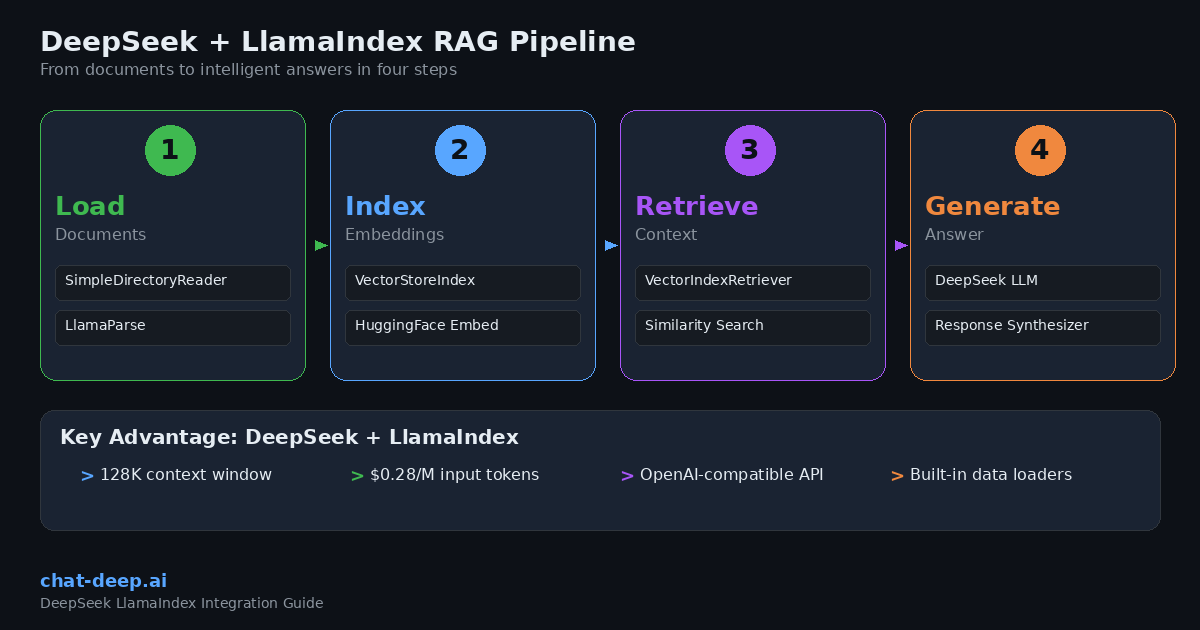
Purpose-built for RAG. LlamaIndex handles the entire data lifecycle: loading documents from dozens of sources, splitting them into nodes, creating embeddings, storing them in vector databases, and retrieving the most relevant pieces when a user asks a question. DeepSeek then generates the final answer grounded in that retrieved context.
Cost-effective at scale. RAG applications process large volumes of tokens because every query includes retrieved context alongside the user’s question. DeepSeek’s pricing — $0.28 per million input tokens and $0.42 per million output tokens — means you can serve thousands of queries per day without worrying about runaway API costs. With context caching, repeated inputs drop to $0.028 per million tokens. See our DeepSeek pricing page for full details.
Large context window. DeepSeek supports a 128K token context window, which is critical for RAG applications that need to inject multiple document chunks into a single prompt. This means you can retrieve more context without hitting token limits, leading to more accurate and comprehensive answers.
Simple integration. LlamaIndex offers a dedicated llama-index-llms-deepseek package with a clean API. If your project already uses LlamaIndex with another provider, switching to DeepSeek takes just a few lines of code. For a comparison between DeepSeek and other providers, see our DeepSeek vs. OpenAI article.
Prerequisites
Before starting, make sure you have:
- DeepSeek API key — Create an account on the official DeepSeek platform. Our DeepSeek login guide walks you through the process.
- Python 3.9 or higher installed on your system.
- Basic familiarity with Python and LLM concepts like tokens, embeddings, and vector stores.
Installation and Setup
Install the LlamaIndex core package along with the DeepSeek integration:
pip install llama-index llama-index-llms-deepseekSet your API key as an environment variable:
export DEEPSEEK_API_KEY="your-api-key-here"Now initialize the DeepSeek LLM and test it with a simple completion:
from llama_index.llms.deepseek import DeepSeek

llm = DeepSeek(
    model="deepseek-chat",
    api_key="your-api-key-here",  # or set DEEPSEEK_API_KEY env var
)

response = llm.complete("Explain vector databases in two sentences.")
print(response)
The DeepSeek class accepts the standard parameters: model, api_key, temperature, max_tokens, and timeout. If you set the DEEPSEEK_API_KEY environment variable, you can omit the api_key parameter entirely.
Setting DeepSeek as the Global Default
LlamaIndex uses a global Settings object to configure default models across your entire application. Setting DeepSeek as the default LLM means every query engine, chat engine, and agent will use it automatically without passing the model explicitly each time:
from llama_index.core import Settings
from llama_index.llms.deepseek import DeepSeek

Settings.llm = DeepSeek(model="deepseek-chat")

# Now all LlamaIndex components use DeepSeek by default
This approach keeps your code clean and avoids repeating the LLM configuration in every function call.
Choosing Between deepseek-chat and deepseek-reasoner
DeepSeek offers two model aliases. deepseek-chat maps to DeepSeek-V3.2 in standard mode — it handles general queries, tool calling, and structured output. This is the right choice for most LlamaIndex applications.
deepseek-reasoner maps to the thinking mode of V3.2, producing step-by-step reasoning traces before a final answer. It is ideal for complex math and logic problems.
Building a RAG Pipeline
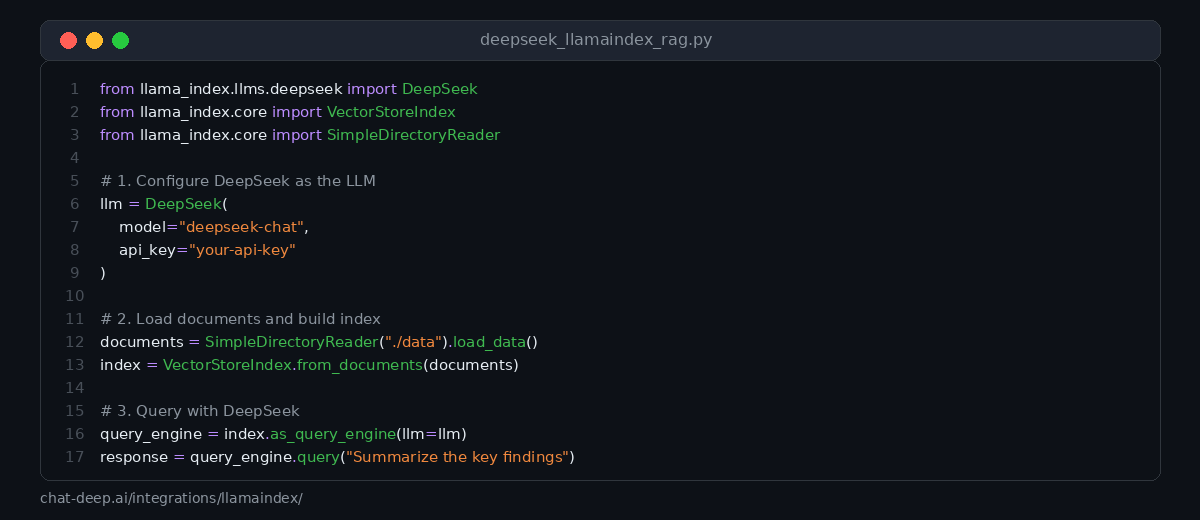
RAG is the primary use case for LlamaIndex. The workflow is straightforward: load your documents, create an index, and query it. LlamaIndex handles the chunking, embedding, retrieval, and prompt construction behind the scenes.
Here is a complete example that loads local files, indexes them, and answers questions using DeepSeek:
from llama_index.core import VectorStoreIndex, SimpleDirectoryReader, Settings
from llama_index.llms.deepseek import DeepSeek

# Configure DeepSeek as the default LLM
Settings.llm = DeepSeek(model="deepseek-chat")

# Step 1: Load documents from a local directory
documents = SimpleDirectoryReader("./data").load_data()

# Step 2: Build a vector store index
index = VectorStoreIndex.from_documents(documents)

# Step 3: Create a query engine and ask questions
query_engine = index.as_query_engine()
response = query_engine.query("What are the main conclusions of the report?")
print(response)
In this example, SimpleDirectoryReader loads all supported file types from the ./data directory — including PDFs, Word documents, text files, and more. VectorStoreIndex.from_documents() splits the documents into chunks, generates embeddings, and stores them in an in-memory vector store. When you call .query(), LlamaIndex retrieves the most relevant chunks and passes them to DeepSeek along with the question.
For production deployments, you will want to use a persistent vector store like Chroma, Pinecone, or Qdrant instead of the default in-memory store. LlamaIndex supports dozens of vector store backends out of the box.
Using Chat Messages
Beyond simple completions, DeepSeek works with LlamaIndex’s chat interface. This lets you send structured messages with system prompts, user inputs, and assistant responses:
from llama_index.llms.deepseek import DeepSeek
from llama_index.core.llms import ChatMessage

llm = DeepSeek(model="deepseek-chat")

messages = [
    ChatMessage(role="system", content="You are a helpful technical writer."),
    ChatMessage(role="user", content="Write a brief explanation of embeddings for developers."),
]

response = llm.chat(messages)
print(response)
The chat interface is particularly useful when you need precise control over the system prompt or want to maintain multi-turn conversations outside of a chat engine context.
Streaming Responses
For user-facing applications, streaming makes the experience feel responsive. Instead of waiting for the entire response, tokens appear as they are generated. LlamaIndex supports streaming at both the completion and chat levels:
from llama_index.llms.deepseek import DeepSeek

llm = DeepSeek(model="deepseek-chat")

# Stream a completion
for chunk in llm.stream_complete("Explain how vector search works."):
    print(chunk.delta, end="", flush=True)
Streaming also works with chat messages using the stream_chat() method. This is essential when building real-time chat interfaces in web applications where users expect immediate visual feedback.
Query Engine Customization
The default query engine works well for basic RAG, but LlamaIndex offers several ways to customize the retrieval and synthesis process for better results.
Adjusting Retrieval Parameters
You can control how many document chunks the retriever returns and how the response is synthesized:
from llama_index.core import VectorStoreIndex, SimpleDirectoryReader, Settings
from llama_index.llms.deepseek import DeepSeek

Settings.llm = DeepSeek(model="deepseek-chat", temperature=0)

documents = SimpleDirectoryReader("./data").load_data()
index = VectorStoreIndex.from_documents(documents)

# Customize the query engine
query_engine = index.as_query_engine(
    similarity_top_k=5,          # Retrieve top 5 chunks instead of default 2
    response_mode="tree_summarize",  # Use tree summarization for long contexts
)

response = query_engine.query("Provide a comprehensive summary of all findings.")
print(response)
The similarity_top_k parameter controls the number of retrieved chunks. Higher values provide more context but cost more tokens. The response_mode parameter changes how LlamaIndex synthesizes the answer from multiple chunks. Options include compact (default), tree_summarize (best for summarization), refine (iterative refinement), and simple_response_builder.
Custom Prompts
You can override the default prompts that LlamaIndex uses when querying DeepSeek:
from llama_index.core import PromptTemplate

custom_qa_prompt = PromptTemplate(
    "Context information is below.\n"
    "---------------------\n"
    "{context_str}\n"
    "---------------------\n"
    "Using the context above, answer the following question in detail. "
    "If the context does not contain the answer, say 'I could not find this information.'\n"
    "Question: {query_str}\n"
    "Answer: "
)

query_engine = index.as_query_engine(
    text_qa_template=custom_qa_prompt,
)

response = query_engine.query("What is the project timeline?")
print(response)
Custom prompts are essential when you need the model to follow specific formatting rules, cite sources, or restrict its answers to the provided context only. This is a common pattern in enterprise RAG systems where hallucination control is critical.
Building a Chat Engine
While query engines handle single-turn question-and-answer interactions, chat engines maintain conversation history. This is what you need for building chatbots that remember previous messages:
from llama_index.core import VectorStoreIndex, SimpleDirectoryReader, Settings
from llama_index.llms.deepseek import DeepSeek

Settings.llm = DeepSeek(model="deepseek-chat")

documents = SimpleDirectoryReader("./data").load_data()
index = VectorStoreIndex.from_documents(documents)

# Create a chat engine with conversation memory
chat_engine = index.as_chat_engine(
    chat_mode="condense_plus_context",
    verbose=True,
)

# Multi-turn conversation
response1 = chat_engine.chat("What does this project do?")
print(response1)

response2 = chat_engine.chat("Who are the main contributors?")
print(response2)

# The engine remembers context from the previous question
response3 = chat_engine.chat("What did the first contributor work on?")
print(response3)
The condense_plus_context chat mode condenses the conversation history and the new question into a single optimized query, then retrieves relevant context and generates the response. This gives you both conversation memory and RAG-grounded answers in one package.
Data Loaders and Connectors
One of LlamaIndex’s biggest strengths is its ecosystem of data loaders. Through LlamaHub, you can load data from hundreds of sources without writing custom ingestion code. Here are some commonly used loaders that work well with DeepSeek-powered RAG:
# Load from a web page
from llama_index.readers.web import SimpleWebPageReader
documents = SimpleWebPageReader().load_data(["https://example.com/docs"])

# Load from a database
from llama_index.readers.database import DatabaseReader
reader = DatabaseReader(uri="postgresql://user:pass@localhost/db")
documents = reader.load_data(query="SELECT content FROM articles")

# Load from Google Docs
from llama_index.readers.google import GoogleDocsReader
documents = GoogleDocsReader().load_data(document_ids=["your-doc-id"])

# Load PDFs with advanced parsing via LlamaParse
from llama_index.readers.llama_parse import LlamaParse
parser = LlamaParse(result_type="markdown")
documents = parser.load_data("./complex-report.pdf")
Each loader returns standard LlamaIndex Document objects that plug directly into any indexing pipeline. This means you can combine data from multiple sources — web pages, databases, cloud storage, and local files — into a single index and query it with DeepSeek.
Building Agents
LlamaIndex agents go beyond simple retrieval. They can reason about which tools to use, execute multi-step plans, and interact with external systems. DeepSeek’s deepseek-chat model supports the function calling required for agent workflows.
from llama_index.core.agent import ReActAgent
from llama_index.core.tools import QueryEngineTool, FunctionTool
from llama_index.core import VectorStoreIndex, SimpleDirectoryReader, Settings
from llama_index.llms.deepseek import DeepSeek

Settings.llm = DeepSeek(model="deepseek-chat", temperature=0)

# Tool 1: Query engine over your documents
documents = SimpleDirectoryReader("./data").load_data()
index = VectorStoreIndex.from_documents(documents)
query_tool = QueryEngineTool.from_defaults(
    query_engine=index.as_query_engine(),
    name="document_search",
    description="Search internal documents for information about projects and reports.",
)

# Tool 2: Custom function
def get_current_date() -> str:
    """Returns today's date."""
    from datetime import date
    return str(date.today())

date_tool = FunctionTool.from_defaults(fn=get_current_date)

# Build the agent
agent = ReActAgent.from_tools(
    tools=[query_tool, date_tool],
    llm=Settings.llm,
    verbose=True,
)

response = agent.chat("What were last month's key results according to our documents?")
print(response)
The ReActAgent follows a Reason-Act cycle: DeepSeek decides which tool to call based on the user’s question, observes the tool’s output, and then either calls another tool or generates a final response. This pattern is powerful for building assistants that combine document knowledge with real-time data lookups, calculations, or API calls.
Structured Output
When you need DeepSeek to return data in a specific schema rather than free-form text, LlamaIndex’s structured output feature handles the formatting and validation:
from llama_index.llms.deepseek import DeepSeek
from pydantic import BaseModel, Field

class CompanyInfo(BaseModel):
    name: str = Field(description="Company name")
    industry: str = Field(description="Primary industry")
    founded_year: int = Field(description="Year the company was founded")
    summary: str = Field(description="One-sentence company summary")

llm = DeepSeek(model="deepseek-chat", temperature=0)
structured_llm = llm.as_structured_llm(output_cls=CompanyInfo)

response = structured_llm.complete("Tell me about Anthropic.")
print(response.raw)  # Returns a CompanyInfo object
Structured output is valuable for data extraction workflows where you need to pull specific fields from documents — company names, dates, financial figures, product specifications — and store them in a structured format for downstream processing.
Using the OpenAI Compatibility Layer
If you prefer not to install the separate DeepSeek package, you can use LlamaIndex’s OpenAI integration with DeepSeek’s base URL. Since DeepSeek’s API follows the OpenAI format, this works seamlessly:
from llama_index.llms.openai import OpenAI

llm = OpenAI(
    model="deepseek-chat",
    api_key="your-deepseek-api-key",
    api_base="https://api.deepseek.com",
)

response = llm.complete("What is retrieval-augmented generation?")
print(response)
This approach is useful for quick testing or if you need to maintain compatibility with an existing OpenAI-based setup. For new projects, the dedicated llama-index-llms-deepseek package is recommended as it stays aligned with DeepSeek-specific features.
Best Practices for Production
When deploying DeepSeek + LlamaIndex applications in production, these practices help ensure reliability and quality.
Use persistent vector stores. The default in-memory store is fine for development, but production applications should use a dedicated vector database like Chroma, Pinecone, Qdrant, or Weaviate. This ensures your index survives application restarts and can scale to millions of documents.
Tune your chunking strategy. The default chunk size of 1024 tokens works for many use cases, but you may need to adjust it based on your documents. Technical documentation often benefits from larger chunks (2048 tokens) to preserve code blocks, while conversational FAQs work well with smaller chunks (512 tokens).
Set temperature to zero for factual queries. When accuracy matters more than creativity — which is the case for most RAG applications — use temperature=0. This makes DeepSeek’s responses more deterministic and reduces the chance of hallucination.
Monitor with observability tools. LlamaIndex integrates with tracing tools like Arize Phoenix and LangSmith. Enable instrumentation to track retrieval quality, token usage, and response latency across your pipeline. This data is invaluable for identifying and fixing weak spots.
Handle API errors gracefully. DeepSeek uses dynamic rate limiting. Implement retry logic with exponential backoff for 429 (rate limit) errors. Our DeepSeek API documentation covers all error codes and recommended handling strategies.
Check service availability. Before deploying critical workflows, verify the DeepSeek API is healthy on our real-time status page.
What You Can Build
The DeepSeek + LlamaIndex combination is especially well-suited for applications that need to combine external data with intelligent generation. Here are some practical ideas.
Knowledge base chatbot. Index your documentation, support articles, and internal wikis, then let users ask questions in natural language. DeepSeek generates accurate answers grounded in your actual content rather than general training data.
Document analysis tool. Load PDFs, contracts, or research papers and build a query engine that extracts specific information on demand. The 128K context window means DeepSeek can process long documents without losing important details.
Multi-source research assistant. Combine data loaders for web pages, databases, and local files into a single index. An agent can search across all sources, cross-reference information, and generate comprehensive summaries.
Structured data extraction pipeline. Use LlamaIndex’s ingestion pipeline with DeepSeek’s structured output to extract entities, relationships, and key metrics from unstructured documents at scale.
For deployment patterns, see our guides on integrating DeepSeek into web apps and cloud platform deployments.
Conclusion
LlamaIndex makes it easy to connect DeepSeek to your own data. The framework handles the complex plumbing of document loading, chunking, embedding, retrieval, and prompt construction, while DeepSeek provides the intelligence to generate accurate, contextual answers.
Start with a simple RAG pipeline using VectorStoreIndex and SimpleDirectoryReader. Once you see it working, add customizations: tune your chunking, swap in a persistent vector store, and experiment with chat engines and agents. The dedicated llama-index-llms-deepseek package keeps the integration clean and up to date.
For more integration guides across different tools and frameworks, explore our full integrations section and documentation hub.