
Last verified: July 29, 2026.
DeepSeek Fine Tuning is the process of adapting a DeepSeek model to your own tasks, tone, data format, domain vocabulary, or product workflow. For developers and ML teams, it can be useful when a general DeepSeek model is close to what you need but still fails on repeatable, domain-specific behavior: customer support policies, SQL generation, code conventions, legal classification, extraction schemas, medical QA workflows, internal documentation style, or agent tool-use patterns.
But fine-tuning is not always the right first move. Many teams should start with better prompting, retrieval-augmented generation (RAG), or the hosted API. As verified on July 29, 2026, DeepSeek’s official model list contains deepseek-v4-flash and deepseek-v4-pro. The announced retirement deadline for deepseek-chat and deepseek-reasoner passed on July 24, 2026 at 15:59 UTC. DeepSeek’s public API documentation does not currently document a first-party managed fine-tuning endpoint, so this guide applies to open-weight checkpoints, self-managed training, or third-party training platforms—not to fine-tuning the hosted V4 API models.
This guide explains how to fine tune DeepSeek in a practical way: which model to choose, when to use LoRA or QLoRA, how to prepare a dataset, how to run supervised fine-tuning with Hugging Face and TRL, how to evaluate the result, and how to deploy it safely.
Note: This article focuses on fine-tuning open-weight DeepSeek models or DeepSeek-derived distilled models. If you need managed training, use a provider that explicitly offers it or fine-tune open weights in infrastructure you control. Verify the checkpoint license, base-model terms, data rights, and deployment requirements before training.
Table of Contents
TL;DR
- For most teams, do not start with full fine-tuning. Try prompt engineering or RAG first.
- If the model needs to change behavior, format, style, or domain-specific decisions, use LoRA or QLoRA.
- The most practical DeepSeek R1 fine tuning path is usually a DeepSeek R1 Distill model, especially 1.5B, 7B, 8B, 14B, or 32B.
- DeepSeek-R1 and its distilled models are MIT licensed, and DeepSeek states that R1 API outputs can be used for fine-tuning and distillation.
- DeepSeek-V4-Pro and V4-Flash are powerful open-weight MoE models, but they are too large for ordinary full fine-tuning workflows. DeepSeek lists V4-Pro at 1.6T total parameters with 49B activated and V4-Flash at 284B total parameters with 13B activated.
- QLoRA is usually the best starting point when GPU memory is limited because it combines 4-bit quantization with LoRA adapters.
- A clean validation set is more important than a huge dataset.
- A lower training loss does not prove the fine-tune worked. Test behavior, safety, latency, regression cases, and task-specific metrics.
What Is DeepSeek Fine Tuning?
DeepSeek fine-tuning means taking a pretrained DeepSeek or DeepSeek-derived model and continuing training it on examples that represent your desired behavior. The goal is not to “teach” the model all your company knowledge from scratch. The goal is to make the model respond in the right way for a repeated task.
A fine-tuned model can learn:
- A specific response format.
- A product support style.
- Domain-specific labels.
- SQL patterns.
- Codebase conventions.
- Extraction schemas.
- Tool-calling patterns.
- Safer refusals or escalation behavior.
- More consistent reasoning for a narrow task.
Fine-tuning is different from simply giving the model more context at inference time. Before you train, understand the main options.
| Method | What it changes | Best for | When it is not enough |
|---|---|---|---|
| Prompt engineering | The instruction at inference time | Tone, simple formatting, behavior nudges | When behavior must be consistent across many edge cases |
| RAG | The information available to the model | Private docs, changing facts, knowledge-heavy QA | When the model’s behavior or output format is the real problem |
| Supervised fine-tuning, or SFT | The model’s learned response patterns | Instruction following, domain tasks, output style | When you need new reasoning ability, not just task imitation |
| LoRA | Small trainable adapter weights | Efficient customization | If you need to alter almost all model weights |
| QLoRA | LoRA on a quantized base model | Memory-efficient fine-tuning | If quantization hurts your target quality or deployment precision |
| Full fine-tuning | All or most weights | Large-budget research or deep domain adaptation | Usually too expensive and risky for most teams |
| Distillation | Training a smaller model from larger-model outputs | Smaller task-specific models | If teacher outputs are low quality or legally restricted |
| GRPO/RL-style training | Reward-driven behavior learning | Reasoning, verifiable tasks, tool behavior | If you do not have reliable reward functions |
DeepSeek-R1 is especially relevant because it popularized a reasoning-focused training pipeline involving reinforcement learning and distillation. DeepSeek’s R1 model card says R1 used two RL stages and two SFT stages, and that DeepSeek fine-tuned several smaller dense models using reasoning data generated by DeepSeek-R1.
Should You Fine-Tune DeepSeek?
DeepSeek Fine Tuning is worthwhile only when you can define the target behavior clearly and measure it. If your problem is “the model does not know our latest documentation,” use RAG. If your problem is “the model ignores our support policy even when the policy is in context,” fine-tuning may help.
| Situation | Best approach | Why |
|---|---|---|
| You need the model to answer from private documents | RAG | Knowledge can change without retraining |
| You need consistent JSON, SQL, labels, or templates | LoRA/QLoRA SFT | Fine-tuning can improve repeatable structure |
| You want a chatbot to follow a brand voice | Prompting first, then LoRA | Many style issues can be solved without training |
| You need a domain assistant for many repeated examples | LoRA/QLoRA | Strong fit for supervised examples |
| You need reasoning over verifiable answers | SFT plus evaluation; possibly GRPO/RL | Reasoning quality must be measured carefully |
| You need to customize a huge V4 model | API, RAG, or managed infrastructure | Full training large MoE models is not practical for most teams |
| You have fewer than 50 examples | Prompting or data collection | Too little data usually causes overfitting |
| Your labels are inconsistent | Fix the dataset first | Fine-tuning amplifies bad labels |
| You handle sensitive enterprise data | Self-host or use vetted providers | Privacy, residency, and compliance matter |
A practical rule: use fine-tuning when the model repeatedly fails in a way that can be corrected with high-quality examples.
Which DeepSeek Model Should You Fine-Tune?
DeepSeek’s R1 repository lists the full DeepSeek-R1 models at 671B total parameters with 37B activated parameters, plus six distilled dense checkpoints: 1.5B, 7B, 8B, 14B, 32B, and 70B. The distilled models are based on Qwen2.5 and Llama 3 series models.
DeepSeek-V4 is a different class of model. DeepSeek says V4-Pro has 1.6T total parameters with 49B activated, while V4-Flash has 284B total parameters with 13B activated; both support a one-million-token context window.
| Model | Best use case | Practicality for fine-tuning | Approximate hardware level | When not to use it |
|---|---|---|---|---|
| DeepSeek-R1-Distill-Qwen-1.5B | Experiments, classification, simple assistants, local prototyping | Very practical | Consumer GPU or even CPU for inference; small GPU for QLoRA | When you need strong reasoning or complex coding |
| DeepSeek-R1-Distill-Qwen-7B | General DeepSeek LoRA fine-tuning, SQL, support, domain QA | Highly practical | Single modern GPU for QLoRA; more VRAM for longer context | When latency must be tiny or reasoning is very hard |
| DeepSeek-R1-Distill-Llama-8B | Llama ecosystem compatibility and general instruction tasks | Highly practical | Similar to 7B/8B workflows | When Qwen tokenizer or math behavior is preferred |
| DeepSeek-R1-Distill-Qwen-14B | Better reasoning and domain accuracy | Practical with QLoRA | Larger single GPU or cloud GPU | When budget is limited or data is small |
| DeepSeek-R1-Distill-Qwen-32B | Stronger reasoning, coding, math-heavy tasks | Practical for experienced teams | High-memory GPU or multi-GPU | When you need fast iteration |
| DeepSeek-R1-Distill-Llama-70B | High-quality reasoning with dense model behavior | Expensive but possible with advanced QLoRA setups | 48GB+ class GPUs or multi-GPU; depends heavily on context length | When you cannot afford long training and serving costs |
| DeepSeek-V3 / V3.2 | Open-weight MoE reasoning and agentic workloads | Not a normal starter fine-tune target | Serious infrastructure | When you only need task formatting or small-domain adaptation |
| DeepSeek-V4-Flash | Fast V4 API usage, long context, agent workflows | Open weights exist, but ordinary fine-tuning is still hard | Serious infrastructure for training; API for most users | When a 7B/14B distilled model solves the task |
| DeepSeek-V4-Pro | Strongest V4 reasoning and agentic use cases | Not practical for normal full fine-tuning | Large-scale distributed infrastructure | When you need affordable iteration |
For most teams, the best starting point is DeepSeek-R1-Distill-Qwen-7B or DeepSeek-R1-Distill-Llama-8B. If you need better reasoning and can afford slower experiments, try 14B or 32B. If you only need a simple classifier, structured extractor, or style adapter, 1.5B may be enough.
LoRA vs QLoRA vs Full Fine-Tuning
LoRA and QLoRA are parameter-efficient fine-tuning methods. Instead of updating every model weight, they train small adapter matrices. Hugging Face Transformers integrates with PEFT adapters, including LoRA, and TRL’s SFTTrainer supports training adapters through PEFT.
QLoRA goes further by loading the base model in 4-bit precision and training LoRA adapters on top. Hugging Face PEFT describes QLoRA as 4-bit quantization plus LoRA, and the TRL documentation explains that QLoRA keeps quantized base weights frozen while training adapter parameters.
| Method | Memory usage | Cost | Speed | Accuracy potential | Overfitting risk | Deployment complexity | Best use case |
|---|---|---|---|---|---|---|---|
| LoRA | Medium | Low to medium | Fast | High for many tasks | Medium | Medium | When you have enough VRAM and want better quality than 4-bit training |
| QLoRA | Low | Low | Fast to moderate | Usually strong, but depends on quantization | Medium | Medium | Best default for limited GPU memory |
| Full fine-tuning | Very high | Very high | Slow | Highest in some cases | High | High | Research labs or large enterprises |
| Distillation | Medium to high upfront | Medium | Depends | Strong for narrow tasks | Medium | Medium | Smaller models trained from a stronger teacher |
| GRPO/RL | Variable | Medium to very high | Slow | Strong for verifiable reasoning tasks | High if reward is bad | High | Math, code, tool use, and reward-driven behavior |
Unsloth’s fine-tuning guide recommends starting with QLoRA for accessibility and warns that full fine-tuning is compute-heavy and usually unnecessary for many use cases.
Hardware Requirements and Cost Planning
Exact VRAM needs depend on model size, sequence length, batch size, optimizer, precision, quantization, gradient checkpointing, and whether you train only adapters or all weights. Treat the following as practical planning guidance, not official requirements.
| Model size | Practical method | Starting hardware guidance | Notes |
|---|---|---|---|
| 1.5B | LoRA or QLoRA | Small local GPU or low-cost cloud GPU | Good for testing the pipeline |
| 7B/8B | QLoRA | 16GB–24GB VRAM is a common starting range | Reduce sequence length first if OOM occurs |
| 14B | QLoRA | 24GB+ VRAM preferred | Good tradeoff for stronger reasoning |
| 32B | QLoRA or multi-GPU LoRA | 48GB+ or multi-GPU | Slower iteration; use a strong validation set |
| 70B | Advanced QLoRA, multi-GPU, or managed training | 48GB+ class hardware or distributed setup | Costs rise quickly |
| Huge MoE models | Specialized distributed training | Serious infrastructure | Usually use API, RAG, or hosted services instead |
Hugging Face PEFT notes that combining quantization with PEFT enables training very large models with much less memory, and gives QLoRA as an example of 4-bit quantization plus LoRA.
The biggest hidden cost is not only GPU time. It is iteration: cleaning data, running experiments, evaluating outputs, fixing regressions, and deploying safely.
Dataset Preparation for DeepSeek Fine Tuning
A fine-tuned model is only as good as the examples it sees. For most DeepSeek R1 Distill fine-tuning projects, start with a few hundred to a few thousand high-quality examples. For narrow formatting tasks, 100 excellent examples may show improvement. For complex domain behavior, you may need thousands or more.
Quality beats quantity. Remove duplicates, contradictory labels, low-quality answers, private data, irrelevant examples, and examples that reward hallucination.
Recommended dataset rules
- Use JSONL: one training example per line.
- Keep a validation split, usually 5–15%.
- Keep an untouched test set for final evaluation.
- Use consistent system prompts.
- Standardize refusal and escalation behavior.
- Remove personally identifiable information unless you have a lawful, documented reason.
- Avoid copyrighted, private, or confidential training data without permission.
- Do not train on hidden chain-of-thought traces unless you have a deliberate, safe reason.
- For reasoning models, prefer answer-quality supervision and short rationales over exposing sensitive internal reasoning.
TRL’s SFTTrainer supports standard language modeling, prompt-completion, conversational, and conversational prompt-completion dataset formats. It can automatically apply chat templates for conversational datasets.
JSONL example: conversational instruction
{"messages":[{"role":"system","content":"You are a concise technical support assistant for Acme Cloud."},{"role":"user","content":"My deployment failed with error E102. What should I do?"},{"role":"assistant","content":"Error E102 usually means the deployment token is expired. Create a new token in Settings > API Tokens, update your CI secret, and rerun the deployment. If the error continues, include the deployment ID when contacting support."}]}JSONL example: SQL generation task
{"prompt":[{"role":"system","content":"You convert analytics questions into PostgreSQL. Return only SQL."},{"role":"user","content":"Show monthly active users for the last 6 months from the events table. A user is active if they have at least one event in the month."}],"completion":[{"role":"assistant","content":"SELECT date_trunc('month', event_time) AS month, COUNT(DISTINCT user_id) AS active_users FROM events WHERE event_time >= date_trunc('month', CURRENT_DATE) - INTERVAL '5 months' GROUP BY 1 ORDER BY 1;"}]}For most SFT workflows, a prompt and completion format is easier to evaluate because the training target is cleanly separated from the user input.
Step-by-Step DeepSeek Fine-Tuning Tutorial
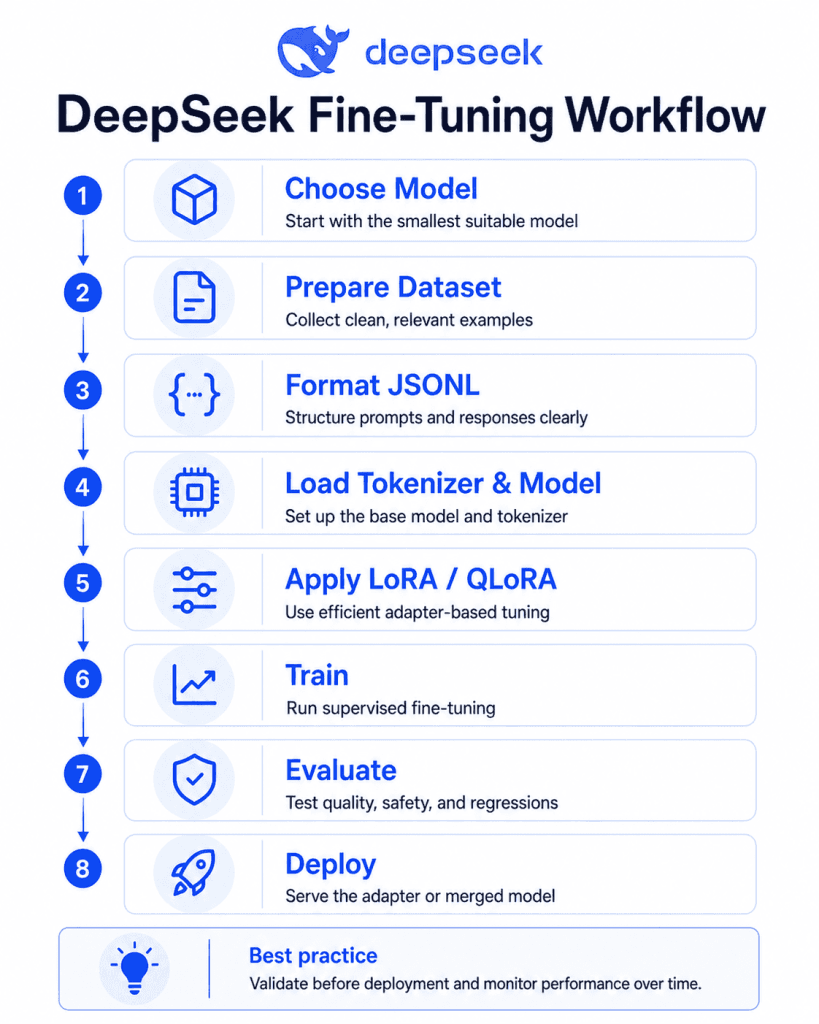
This tutorial uses DeepSeek-R1-Distill-Qwen-7B with QLoRA. You can switch to the 1.5B model if your hardware is limited.
DeepSeek says the R1 distilled models can be used similarly to Qwen or Llama models, and the R1 model card includes examples for serving distilled models with vLLM and SGLang.
Important: The code below is a practical template. Package versions, CUDA versions, GPU availability, and model compatibility can change. Test in a clean environment before production use.
1. Create the environment
python -m venv .venv
source .venv/bin/activate

pip install -U torch transformers datasets accelerate peft trl bitsandbytes huggingface_hub
Optional login:
huggingface-cli login2. Prepare your files
Create:
data/train.jsonl
data/valid.jsonl
Use conversational prompt-completion JSONL:
{"prompt":[{"role":"system","content":"You are a support assistant. Answer using the company policy."},{"role":"user","content":"Can I get a refund after 45 days?"}],"completion":[{"role":"assistant","content":"Refunds are available within 30 days of purchase. After 30 days, escalate the case to billing support if there are exceptional circumstances."}]}3. Train with QLoRA and TRL SFTTrainer
import os
import torch

from datasets import load_dataset
from transformers import AutoModelForCausalLM, AutoTokenizer, BitsAndBytesConfig
from peft import LoraConfig, prepare_model_for_kbit_training
from trl import SFTConfig, SFTTrainer

# Choose a practical DeepSeek R1 Distill model.
# For smaller GPUs, try: "deepseek-ai/DeepSeek-R1-Distill-Qwen-1.5B"
MODEL_NAME = "deepseek-ai/DeepSeek-R1-Distill-Qwen-7B"

TRAIN_FILE = "data/train.jsonl"
VALID_FILE = "data/valid.jsonl"
OUTPUT_DIR = "outputs/deepseek-r1-distill-qwen-7b-qlora"

# 4-bit QLoRA configuration.
bnb_config = BitsAndBytesConfig(
    load_in_4bit=True,
    bnb_4bit_quant_type="nf4",
    bnb_4bit_use_double_quant=True,
    bnb_4bit_compute_dtype=torch.bfloat16,
)

tokenizer = AutoTokenizer.from_pretrained(
    MODEL_NAME,
    trust_remote_code=True,
)

# Some causal LMs do not define a pad token.
if tokenizer.pad_token is None:
    tokenizer.pad_token = tokenizer.eos_token

model = AutoModelForCausalLM.from_pretrained(
    MODEL_NAME,
    quantization_config=bnb_config,
    device_map="auto",
    trust_remote_code=True,
)

model.config.use_cache = False
model = prepare_model_for_kbit_training(model)

# Qwen-style target modules. Adjust if your model architecture differs.
lora_config = LoraConfig(
    r=16,
    lora_alpha=32,
    lora_dropout=0.05,
    bias="none",
    task_type="CAUSAL_LM",
    target_modules=[
        "q_proj", "k_proj", "v_proj", "o_proj",
        "gate_proj", "up_proj", "down_proj"
    ],
)

dataset = load_dataset(
    "json",
    data_files={
        "train": TRAIN_FILE,
        "validation": VALID_FILE,
    },
)

training_args = SFTConfig(
    output_dir=OUTPUT_DIR,
    num_train_epochs=2,
    per_device_train_batch_size=1,
    per_device_eval_batch_size=1,
    gradient_accumulation_steps=8,
    learning_rate=1e-4,
    warmup_ratio=0.03,
    lr_scheduler_type="cosine",
    logging_steps=10,
    eval_strategy="steps",
    eval_steps=100,
    save_steps=100,
    save_total_limit=2,
    bf16=torch.cuda.is_available(),
    fp16=False,
    gradient_checkpointing=True,
    max_length=2048,
    packing=False,
    report_to="none",
)

trainer = SFTTrainer(
    model=model,
    args=training_args,
    train_dataset=dataset["train"],
    eval_dataset=dataset["validation"],
    peft_config=lora_config,
    processing_class=tokenizer,
)

trainer.train()

# Save the LoRA adapter and tokenizer.
trainer.save_model(OUTPUT_DIR)
tokenizer.save_pretrained(OUTPUT_DIR)

print(f"Saved adapter to {OUTPUT_DIR}")
TRL supports SFT datasets in conversational and prompt-completion formats, and supports PEFT adapter training directly through peft_config.
4. Run inference with the trained adapter
import torch
from transformers import AutoModelForCausalLM, AutoTokenizer, BitsAndBytesConfig
from peft import PeftModel

BASE_MODEL = "deepseek-ai/DeepSeek-R1-Distill-Qwen-7B"
ADAPTER_DIR = "outputs/deepseek-r1-distill-qwen-7b-qlora"

bnb_config = BitsAndBytesConfig(
    load_in_4bit=True,
    bnb_4bit_quant_type="nf4",
    bnb_4bit_use_double_quant=True,
    bnb_4bit_compute_dtype=torch.bfloat16,
)

tokenizer = AutoTokenizer.from_pretrained(BASE_MODEL, trust_remote_code=True)

base_model = AutoModelForCausalLM.from_pretrained(
    BASE_MODEL,
    quantization_config=bnb_config,
    device_map="auto",
    trust_remote_code=True,
)

model = PeftModel.from_pretrained(base_model, ADAPTER_DIR)
model.eval()

messages = [
    {"role": "system", "content": "You are a support assistant. Answer using the company policy."},
    {"role": "user", "content": "Can I get a refund after 45 days?"},
]

prompt = tokenizer.apply_chat_template(
    messages,
    tokenize=False,
    add_generation_prompt=True,
)

inputs = tokenizer(prompt, return_tensors="pt").to(model.device)

with torch.no_grad():
    output = model.generate(
        **inputs,
        max_new_tokens=256,
        temperature=0.2,
        top_p=0.9,
        do_sample=True,
    )

print(tokenizer.decode(output[0], skip_special_tokens=True))
5. Optional: merge the LoRA adapter
You may merge LoRA weights into the base model for simpler deployment, but test quality and memory first. PEFT documents merge_and_unload() for merging adapter weights into the base model.
from transformers import AutoModelForCausalLM, AutoTokenizer
from peft import PeftModel
import torch

BASE_MODEL = "deepseek-ai/DeepSeek-R1-Distill-Qwen-7B"
ADAPTER_DIR = "outputs/deepseek-r1-distill-qwen-7b-qlora"
MERGED_DIR = "outputs/deepseek-r1-distill-qwen-7b-merged"

tokenizer = AutoTokenizer.from_pretrained(BASE_MODEL, trust_remote_code=True)

base_model = AutoModelForCausalLM.from_pretrained(
    BASE_MODEL,
    torch_dtype=torch.bfloat16,
    device_map="auto",
    trust_remote_code=True,
)

model = PeftModel.from_pretrained(base_model, ADAPTER_DIR)
model = model.merge_and_unload()

model.save_pretrained(MERGED_DIR, safe_serialization=True)
tokenizer.save_pretrained(MERGED_DIR)
Common out-of-memory fixes
- Reduce
max_length. - Use a smaller model.
- Use QLoRA instead of LoRA.
- Set
per_device_train_batch_size=1. - Increase
gradient_accumulation_steps. - Enable gradient checkpointing.
- Disable packing during debugging.
- Use shorter examples.
- Avoid 70B models until the pipeline is proven on 7B or 14B.
Evaluation: How to Know If the Fine-Tune Worked
Do not judge a DeepSeek QLoRA project by training loss alone. A model can show lower loss and still become worse in production.
Use this evaluation flow:
- Save a baseline output from the original model.
- Create a validation set that was not used in training.
- Create a regression set of edge cases.
- Evaluate the fine-tuned model against the baseline.
- Review failures manually.
- Test latency and cost.
- Test safety and privacy behavior.
- Run production-like prompts.
| Task type | Useful metrics |
|---|---|
| Classification | Accuracy, F1, confusion matrix |
| Extraction | Exact match, field-level F1, schema validity |
| SQL generation | Execution accuracy, syntax validity, result correctness |
| Customer support | Policy compliance, escalation accuracy, tone |
| Coding | Unit tests, linting, build success |
| Reasoning | Final answer accuracy, consistency, verifier score |
| JSON generation | Parse rate, schema match, missing fields |
Evaluation checklist
- Does the model beat the original model on held-out examples?
- Does it preserve general helpfulness?
- Does it follow the requested format?
- Does it hallucinate less?
- Does it refuse or escalate correctly?
- Does it still handle normal unrelated prompts?
- Does it leak private training examples?
- Does it expose reasoning traces when it should not?
- Does latency still fit the product?
- Does the adapter load reliably in deployment?
For R1-style reasoning models, also check whether the fine-tune damages reasoning behavior. DeepSeek’s R1 model card notes usage recommendations for the R1 series, including special handling of thinking patterns.
Deployment Options
Deployment depends on whether you saved a LoRA adapter, merged model, or quantized model.
| Deployment option | Best for | Notes |
|---|---|---|
| Transformers locally | Testing, small internal tools | Simple but not always fastest |
| vLLM | Production serving, throughput | vLLM supports LoRA adapters for compatible models. |
| SGLang | Low-latency, high-throughput serving | SGLang is designed for production LLM serving across single-GPU and distributed setups. |
| Ollama | Local experimentation | Useful for quantized local models; not usually the main fine-tuning stack |
| Hugging Face Hub | Sharing adapters or private deployment artifacts | Push adapters privately if they contain business logic |
| Managed cloud training | Teams without ML infrastructure | Check privacy, pricing, and supported model list |
| DeepSeek API | Inference without self-hosting | Best when you do not need weight-level customization |
Clarify these three scenarios:
- Fine-tuning open-weight DeepSeek models
You download weights, train adapters or full weights, and deploy the result. - Using the DeepSeek API
You send prompts to DeepSeek-hosted models. This is not the same as weight-level fine-tuning. - Third-party hosted fine-tuning
A cloud provider trains or serves adapters for you. Review data retention, model availability, export options, and adapter ownership.
DeepSeek’s official model page says the API supports V4-Flash and V4-Pro, with one-million-token context length and features such as JSON output and tool calls.
Common Problems and Fixes
| Problem | Likely cause | Fix |
|---|---|---|
| CUDA out of memory | Model too large, context too long, batch too high | Use QLoRA, reduce max_length, use smaller batch |
| Tokenizer mismatch | Wrong tokenizer or chat template | Load tokenizer from the same base model |
| Bad chat format | Dataset does not match model template | Use messages or prompt-completion format consistently |
| Overfitting | Dataset too small or repetitive | Add validation data, reduce epochs, lower learning rate |
| Poor reasoning after fine-tuning | Training examples taught shallow answers | Add high-quality reasoning tasks or avoid tuning reasoning behavior |
| Catastrophic forgetting | Fine-tune too aggressive | Lower learning rate, fewer epochs, smaller LoRA rank |
| Adapter not loading | Wrong base model or path | Load the exact same base model used for training |
| Worse results after tuning | Bad labels or wrong objective | Compare examples, audit labels, rebuild dataset |
| Slow training | Long sequence length or inefficient hardware | Shorten examples, use packing carefully, use cloud GPU |
| JSON is invalid | Model not trained on strict schemas | Add schema validation examples and evaluate parse rate |
The most common mistake is trying to fix data problems with more training. Fine-tuning does not clean your dataset. It amplifies it.
Security, Privacy, and Licensing
DeepSeek-R1 and the R1 distilled models are permissively licensed. The DeepSeek R1 model card says the repository and model weights are MIT licensed, support commercial use, and allow modifications and derivative works, including distillation. It also notes that Qwen-derived and Llama-derived distill models inherit considerations from their base model families.
DeepSeek’s R1 release page also states that DeepSeek-R1 is MIT licensed and that API outputs can be used for fine-tuning and distillation.
However, licensing is only one part of compliance. You also need to review:
- Rights to your training data.
- Whether the dataset contains personal data.
- Whether the dataset contains customer secrets.
- Whether model outputs can reveal private examples.
- Whether your deployment must meet SOC 2, HIPAA, GDPR, or other compliance requirements.
- Whether the model has unacceptable bias or censorship behavior for your jurisdiction or product.
DeepSeek’s privacy policy states that user inputs may be collected as personal data, that the service is not designed to process sensitive personal data, and that personal data is directly collected, processed, and stored in the People’s Republic of China.
For enterprise use, do not send confidential production data to any API until your legal and security teams approve the provider’s terms, privacy policy, residency, retention, and opt-out controls.
DeepSeek’s terms state that users may apply inputs and outputs to use cases including training other models, such as distillation, as long as usage is legal and follows the terms. The same terms also say users are responsible for ensuring they have the rights and permissions needed for submitted inputs.
DeepSeek Fine Tuning Best Practices
Use this checklist before training:
- Start with the smallest model that could work.
- Try prompt engineering and RAG before fine-tuning.
- Use LoRA or QLoRA before full fine-tuning.
- Build a clean validation set.
- Keep an untouched test set.
- Remove duplicates and bad labels.
- Document dataset provenance.
- Use a conservative learning rate.
- Track every experiment.
- Compare against the base model.
- Evaluate safety and privacy.
- Test deployment latency.
- Monitor production drift.
- Keep adapters versioned.
- Do not train on data you are not allowed to use.
- Do not expose private chain-of-thought or sensitive reasoning traces in production.
A strong DeepSeek LoRA fine-tuning project is usually a data project first and a GPU project second.
FAQs
Can you fine-tune DeepSeek?
Yes. You can fine-tune open-weight DeepSeek or DeepSeek-derived models, especially the DeepSeek R1 Distill models. Most teams use LoRA or QLoRA instead of full fine-tuning.
Which DeepSeek model is best for fine-tuning?
For most developers, DeepSeek-R1-Distill-Qwen-7B or DeepSeek-R1-Distill-Llama-8B is the best starting point. Use 1.5B for low-cost tests, 14B or 32B for stronger reasoning, and 70B only when you have the budget and infrastructure.
Can I fine-tune DeepSeek R1?
You can fine-tune the R1 distilled models much more easily than the full R1 MoE model. The full DeepSeek-R1 model is listed as 671B total parameters with 37B activated parameters, making it impractical for ordinary fine-tuning.
Can I fine-tune DeepSeek V4?
Technically, V4 weights are available, but ordinary users should not treat V4-Pro or V4-Flash as normal full fine-tuning targets. V4-Pro is listed at 1.6T total parameters and V4-Flash at 284B total parameters, so most teams should use the API, RAG, or smaller distill models instead.
Is LoRA or QLoRA better for DeepSeek?
QLoRA is usually better when GPU memory is limited. LoRA may be preferable when you have more VRAM and want to avoid some quantization tradeoffs. Start with QLoRA, then test LoRA if quality is not enough.
How much VRAM do I need?
It depends on model size, context length, batch size, precision, and framework. As a practical starting point, 7B/8B models are often approachable with QLoRA on modern consumer or cloud GPUs, while 32B and 70B models require much more memory and careful setup.
How much data do I need?
For narrow formatting tasks, a few hundred excellent examples can help. For complex domain behavior, expect thousands of examples. Data consistency matters more than raw volume.
Is fine-tuning better than RAG?
No. Fine-tuning and RAG solve different problems. Use RAG when the model needs access to private or changing knowledge. Use fine-tuning when the model’s behavior, format, tone, or decision pattern needs to change.
Can I fine-tune DeepSeek on a laptop?
You may be able to experiment with very small or quantized models, but serious fine-tuning is much easier on a CUDA-capable GPU. For laptop workflows, start with 1.5B or use cloud GPUs.
Does fine-tuning improve reasoning?
It can improve reasoning on a narrow task if the dataset and evaluation are strong. It can also make reasoning worse if the dataset teaches shallow patterns or overfits to answer style.
Can I use DeepSeek API outputs for distillation or fine-tuning?
DeepSeek’s R1 release says API outputs can be used for fine-tuning and distillation, and the DeepSeek terms allow use of inputs and outputs for training other models as long as the usage is legal and follows the terms.
How do I deploy a fine-tuned DeepSeek model?
For testing, load the base model and adapter with Transformers and PEFT. For production, consider vLLM or SGLang. You can deploy the adapter separately or merge LoRA weights into the base model after testing.
Conclusion
DeepSeek Fine Tuning is most useful when you need a DeepSeek model to behave differently, not merely know more facts. For most teams, the best path is:
- Try prompting.
- Add RAG if the model needs private or changing knowledge.
- Use QLoRA or LoRA on a DeepSeek R1 Distill model if behavior must change.
- Evaluate against the base model with real production-like examples.
- Deploy only after privacy, safety, latency, and regression testing.
Avoid full fine-tuning huge DeepSeek MoE models unless you have serious distributed training infrastructure. For most practical products, a well-prepared dataset plus QLoRA on a 7B, 8B, 14B, or 32B R1 Distill model will be more useful than an expensive attempt to train the largest possible model.