
DeepSeek for Customer Support Automation means using DeepSeek models to handle repetitive support tasks.These tasks include answering FAQs, classifying tickets, drafting replies, and summarizing conversations.They also include detecting sentiment, routing urgent issues, and escalating complex cases to human agents. For SaaS companies, ecommerce brands, marketplaces, and support teams, DeepSeek can become part of a practical AI customer support automation workflow when it is connected to a help desk, knowledge base, CRM, and clear human handoff rules.
DeepSeek’s current API documentation lists deepseek-v4-flash and deepseek-v4-pro, supports OpenAI and Anthropic-compatible API formats, and includes support for JSON Output, Tool Calls, context caching, thinking/non-thinking modes, and a 1M context length.
Table of Contents
What Is DeepSeek for Customer Support Automation?
DeepSeek for customer support automation is the use of DeepSeek models inside customer service workflows to reduce manual work, improve response speed, and help agents resolve tickets more consistently.
It is not just a chatbot sitting on a website. A serious DeepSeek customer support automation setup can support multiple workflows:
- answering common customer questions;
- classifying incoming tickets by topic, urgency, language, and sentiment;
- drafting support replies for human review;
- summarizing long conversations before escalation;
- detecting refund risks, churn signals, abuse, complaints, and SLA issues;
- routing tickets to the right team;
- retrieving answers from an approved knowledge base;
- triggering backend actions through Tool Calls or middleware.
The strongest use case is not replacing every support agent. The stronger approach is using DeepSeek as a customer support AI agent that handles repetitive, low-risk tasks and gives human agents better context for complex, emotional, or high-value conversations.
Why Companies Are Considering DeepSeek for Support Workflows
Companies are considering DeepSeek AI customer service workflows because modern support teams are under pressure to respond faster without lowering quality. Ticket volume grows quickly, but hiring more agents is expensive. AI customer support automation can help by handling common questions, reducing manual triage, and giving agents better drafts.
DeepSeek is especially relevant for teams that want API flexibility. The official documentation says the DeepSeek API uses formats compatible with OpenAI and Anthropic, which can make it easier to connect DeepSeek to existing AI middleware, internal tools, or systems already designed around those API patterns.
The current DeepSeek model page also lists a 1M context length, JSON Output, Tool Calls, and context caching. These features matter in support because customer conversations often require structured classification, repeated system instructions, knowledge-base context, and integration with order systems or CRM data.
For many teams, the appeal is practical:
| Reason | Why it matters in support |
|---|---|
| API compatibility | Easier integration with existing OpenAI-style or Anthropic-style tooling |
| Structured outputs | Better ticket routing, tagging, prioritization, and reporting |
| Tool Calls | Enables backend actions such as order lookup or refund eligibility checks |
| Long context | Useful for long conversations, policies, and knowledge-base snippets |
| Context caching | Can reduce cost and latency for repeated prompts and recurring support flows |
| Model choice | Lets teams balance speed, cost, and reasoning depth by workflow |
Best Use Cases for DeepSeek in Customer Support
The best DeepSeek customer support automation use cases are repetitive, measurable, and easy to review. Start with tasks where the AI can help without making irreversible decisions.
| Use case | Example workflow | Automation level | Business impact |
|---|---|---|---|
| FAQ automation | Customer asks about pricing, shipping, setup, billing, or account settings; DeepSeek answers using approved help-center content | High | Reduces repetitive tickets and improves first response time |
| Ticket classification | New ticket is tagged as billing, technical issue, refund, onboarding, cancellation, or account access | High | Improves routing and reporting |
| Sentiment analysis | DeepSeek detects angry, confused, neutral, or satisfied tone | Medium | Helps prioritize frustrated customers |
| Priority and SLA routing | Urgent issues from enterprise customers are routed to senior agents | Medium | Reduces missed SLA risk |
| Drafting agent replies | DeepSeek drafts a response using ticket history and policy rules; agent reviews before sending | Medium | Reduces average handle time |
| Conversation summarization | Long chat or email thread is summarized before escalation | High | Saves agent time during handoff |
| Multilingual support | DeepSeek drafts or translates responses for non-English customers | Medium | Expands coverage while keeping human review |
| Refund/order-status workflow support | AI collects order ID, checks policy, and routes to a refund or logistics workflow | Medium | Speeds up common ecommerce cases |
| Knowledge base answer generation | AI proposes help-center article drafts from resolved tickets | Low to medium | Improves self-service content |
| Escalation risk detection | AI flags legal threats, chargebacks, safety concerns, churn risk, or VIP complaints | Medium | Protects revenue and reduces risk |
Where DeepSeek Fits in a Modern Support Stack
DeepSeek should sit inside a controlled support architecture. It should not be the only system deciding what customers see, especially for sensitive, financial, legal, or account-related cases.
A practical support stack looks like this:
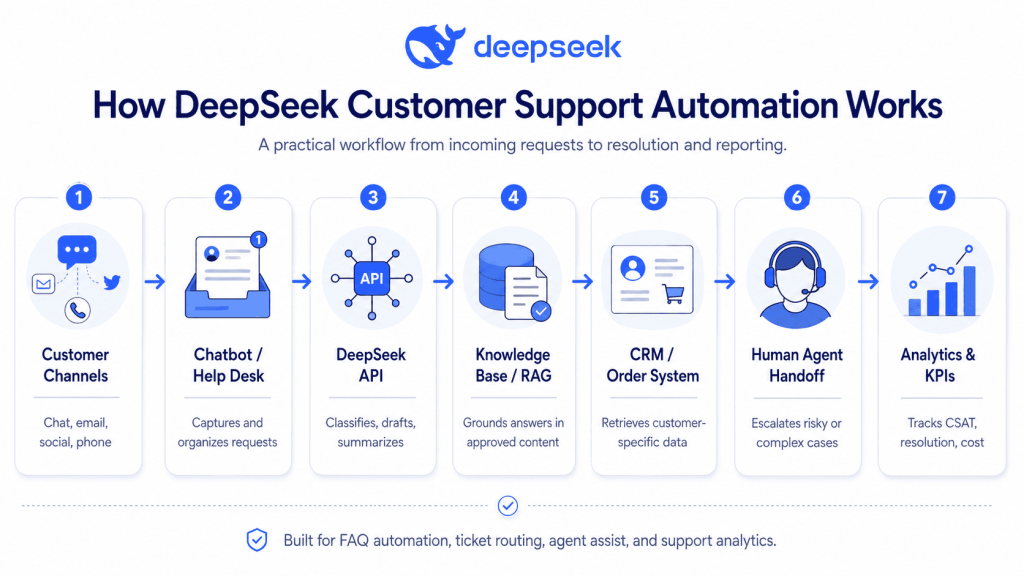
Customer Channel
  ↓
Website Chat / Email / Social DM / Help Desk
  ↓
Automation Layer
  ↓
DeepSeek API
  ↓
Knowledge Base / RAG System
  ↓
CRM / Order System / Subscription Platform
  ↓
Human Agent Handoff
  ↓
Analytics, QA, CSAT, and KPI Reporting
In this architecture, DeepSeek handles language understanding and response generation. Your support platform handles identity, ticket history, permissions, conversation state, and agent workflows. Your RAG system retrieves approved answers from help-center articles, policies, internal documentation, and product release notes. Your CRM or order system provides customer-specific facts.
The most important rule: DeepSeek should answer from approved sources and escalate when confidence is low.
DeepSeek API Features That Matter for Support Automation
OpenAI-Compatible and Anthropic-Compatible API Formats
DeepSeek’s API documentation says the API uses formats compatible with OpenAI and Anthropic. The documentation lists an OpenAI-format base URL and an Anthropic-format base URL, with deepseek-v4-flash and deepseek-v4-pro as current model options.
For support automation, this matters because many chatbot builders, internal AI tools, and orchestration layers already know how to call OpenAI-style or Anthropic-style APIs. In practice, this can reduce integration work.
Current Model Selection
As of the official DeepSeek pricing page, the listed models are:
| API model | Practical support use |
|---|---|
deepseek-v4-flash | High-volume FAQ automation, classification, routing, summarization, and low-latency drafts |
deepseek-v4-pro | More complex cases, reasoning-heavy workflows, long-context reviews, and advanced agentic tasks |
The same page lists DeepSeek-V4-Flash and DeepSeek-V4-Pro, 1M context length, maximum output of 384K, support for JSON Output, Tool Calls, Chat Prefix Completion beta, and FIM Completion beta in non-thinking mode.
DeepSeek also notes that deepseek-chat and deepseek-reasoner are planned for retirement on July 24, 2026, and currently map to non-thinking and thinking modes of deepseek-v4-flash.
JSON Output for Structured Ticket Classification
DeepSeek’s JSON Output feature is designed to return valid JSON strings for structured parsing. The official guide says users should set response_format to {"type": "json_object"}, include the word “json” in the prompt, provide an example format, and set max_tokens carefully to avoid truncation.
For customer support, JSON Output is valuable because help desks need consistent fields:
- intent;
- priority;
- sentiment;
- language;
- escalation status;
- confidence score;
- recommended action;
- internal summary.
Tool Calls and Function Calling
DeepSeek’s Tool Calls feature allows the model to call external tools, but the documentation makes an important distinction: the model returns the function call; your application provides and executes the actual function.
That distinction matters. A safe support automation workflow should not let the model directly issue refunds, cancel accounts, or change subscriptions without permission checks. Instead, DeepSeek can request a tool action such as lookup_order_status, check_refund_policy, or create_escalation_ticket, while your backend validates the request.
Context Caching
DeepSeek Context Caching is enabled by default for users, according to the official guide. If later requests overlap with previously cached prefixes, the overlapping portion may count as a cache hit.
In support automation, this is useful because many prompts reuse the same system instructions, safety rules, brand tone, escalation policy, or help-center context. Well-designed prompt templates can make repeated support flows more efficient.
Thinking and Non-Thinking Modes
DeepSeek documents thinking mode as a mode where the model generates reasoning content before the final answer. The documentation also says the thinking toggle defaults to enabled, and explains controls for thinking effort.
For customer support, use thinking mode selectively. Simple FAQ answers and ticket tagging may not need deeper reasoning. Complex cases such as policy conflicts, multi-step account issues, or difficult escalation decisions may benefit from a more capable model and higher reasoning effort.
Step-by-Step Implementation Plan
1. Audit Support Tickets
Start with 500 to 2,000 historical tickets. Categorize them by topic, complexity, channel, resolution type, and risk level.
Look for patterns:
- repeated questions;
- high-volume low-risk issues;
- tickets that require the same policy answer;
- tickets that require backend lookup;
- tickets that frequently escalate;
- tickets where agents spend time summarizing context.
2. Choose Automation Use Cases
Do not automate everything at once. Pick two or three use cases first.
Good first use cases:
- FAQ automation;
- ticket classification;
- reply drafting;
- conversation summarization;
- sentiment detection.
Avoid fully automating refunds, cancellations, compliance issues, safety complaints, legal threats, or high-value account decisions in the first version.
3. Clean and Structure the Knowledge Base
A DeepSeek customer service chatbot is only as reliable as the information it can use.
Prepare:
- help-center articles;
- refund policies;
- shipping policies;
- troubleshooting guides;
- account setup steps;
- pricing and billing rules;
- escalation rules;
- agent macros;
- product release notes.
Remove outdated articles. Merge duplicate policies. Add clear “last updated” dates. If the source material is messy, the chatbot will be messy.
4. Design Intents and Escalation Rules
Create a taxonomy of support intents.
Example intents:
billing_questiontechnical_issuerefund_requestorder_statusaccount_accesssubscription_cancellationbug_reportfeature_requestlegal_or_privacy_requesthuman_agent_request
Define escalation rules before launch. For example:
- escalate if confidence is below 0.75;
- escalate if the customer asks for a human;
- escalate if the customer mentions legal action;
- escalate if payment, identity, health, children, or sensitive personal data is involved;
- escalate if the customer is angry and the ticket is high-value.
5. Build Prompts and JSON Schemas
Use separate prompts for separate jobs. Do not ask one prompt to classify, summarize, answer, escalate, and trigger tools unless you have tested it carefully.
A typical workflow:
- Classification prompt;
- RAG retrieval;
- Reply-generation prompt;
- Safety and policy check;
- Human handoff or automated response.
6. Connect DeepSeek to Help Desk and CRM
Use the DeepSeek API through your backend, middleware, or automation platform.
Common integration targets:
- Zendesk;
- Freshdesk;
- Intercom;
- Help Scout;
- Gorgias;
- Salesforce Service Cloud;
- HubSpot Service Hub;
- internal admin dashboards;
- ecommerce order systems;
- subscription billing platforms.
Do not claim native integrations unless you verify them. In many cases, DeepSeek can be connected through HTTP requests, webhooks, middleware, or custom API orchestration.
7. Add Human Handoff
Human handoff should be part of the product experience, not an afterthought.
A good handoff includes:
- customer summary;
- detected intent;
- sentiment;
- previous steps attempted;
- retrieved knowledge-base sources;
- recommended next action;
- risk flags;
- transcript link.
8. Test With Historical Tickets
Before going live, run DeepSeek against historical tickets and compare results to agent outcomes.
Measure:
- classification accuracy;
- escalation accuracy;
- answer correctness;
- policy compliance;
- hallucination rate;
- unsafe automation attempts;
- average review time saved.
9. Launch a Limited Pilot
Start with one channel, one team, or one topic. For example, automate only order-status questions or password-reset FAQs.
During the pilot, keep human review for all generated customer-facing responses.
10. Measure and Improve
Use production data to improve prompts, knowledge-base coverage, routing rules, and escalation thresholds.
Example DeepSeek Prompts for Customer Support Automation
Ticket Classification Prompt
System:
You are a customer support classification assistant. Classify the ticket using only the provided message and context. Return valid JSON only.

User:
Classify this support ticket.

Customer message:
"""
{customer_message}
"""

Allowed intents:
billing_question, technical_issue, refund_request, order_status, account_access, subscription_cancellation, bug_report, feature_request, legal_or_privacy_request, human_agent_request, other

Return JSON with:
intent, priority, sentiment, customer_language, summary, escalation_required, confidence_score

Rules:
- Set escalation_required to true if the customer asks for a human, mentions legal action, reports account compromise, shares sensitive personal data, or expresses severe frustration.
- Do not invent facts.
- Confidence score must be between 0 and 1.
Sentiment Analysis Prompt
System:
You analyze customer sentiment for support prioritization. Return valid JSON only.

User:
Analyze the sentiment of this customer message:

"""
{customer_message}
"""

Return:
{
  "sentiment": "angry | frustrated | neutral | positive | confused",
  "urgency": "low | medium | high",
  "risk_flags": [],
  "reason": "short explanation"
}
Customer Reply Drafting Prompt
System:
You are a customer support reply assistant. Draft a helpful, concise reply for a human agent to review before sending.

Rules:
- Use only the provided knowledge base context.
- Do not promise refunds, discounts, compensation, timelines, or account changes unless the policy explicitly allows it.
- If the answer is not in the context, say that the agent should investigate.
- Keep the tone warm, clear, and professional.

Customer message:
"""
{customer_message}
"""

Knowledge base context:
"""
{retrieved_context}
"""

Draft the reply.
Escalation Detection Prompt
System:
You detect whether a customer support conversation should be escalated to a human. Return valid JSON only.

Conversation:
"""
{conversation_transcript}
"""

Escalation triggers:
- legal threat
- safety issue
- payment dispute
- account compromise
- privacy request
- angry VIP customer
- repeated failed resolution
- refund request outside standard policy
- customer asks for a human

Return:
{
  "escalation_required": true/false,
  "escalation_reason": "",
  "recommended_team": "",
  "confidence_score": 0.0
}
Knowledge Base Answer Prompt
System:
You answer customer questions using only approved knowledge base content.

Rules:
- Answer only from the provided context.
- If the answer is missing, say: "I do not have enough information to answer that accurately."
- Do not invent policies.
- Include the source article title used for the answer.
- Keep the answer short and customer-friendly.

Customer question:
"""
{customer_question}
"""

Approved context:
"""
{retrieved_knowledge_base_articles}
"""
Example JSON Output for Ticket Routing
{
  "intent": "refund_request",
  "priority": "medium",
  "sentiment": "frustrated",
  "customer_language": "en",
  "summary": "Customer is requesting a refund after receiving a damaged product.",
  "recommended_action": "Check order details, confirm refund eligibility, and route to ecommerce support team.",
  "escalation_required": true,
  "escalation_reason": "Refund request involving product damage and customer frustration.",
  "confidence_score": 0.87
}
A structure like this lets your help desk apply tags, set priority, trigger workflows, notify the right team, or show a draft recommendation to agents.
No-Code and Low-Code Integration Options
Teams that do not want to build a full custom backend can still test DeepSeek API for customer support.
Possible no-code or low-code approaches include:
| Tool type | Example workflow |
|---|---|
| Automation platform | New help desk ticket triggers an HTTP request to DeepSeek and updates ticket tags |
| Chatbot builder | Customer question is sent to middleware, which retrieves knowledge-base context and calls DeepSeek |
| CRM workflow | High-value customer complaint is summarized and routed to an account manager |
| Internal dashboard | Agent clicks “summarize conversation” or “draft reply” |
| Webhook middleware | Incoming ticket is classified, scored, and enriched before entering the queue |
Platforms such as Make.com, Manychat, and Zapier-style tools can be useful when they support HTTP requests, webhooks, or custom API calls. However, verify each platform’s current capabilities before claiming a native DeepSeek integration.
DeepSeek vs Traditional Support Chatbots
| Criteria | Rule-based bots | Generic AI chatbots | DeepSeek-powered support workflows |
|---|---|---|---|
| Flexibility | Low | Medium to high | High when connected to APIs and RAG |
| Setup complexity | Low | Medium | Medium to high |
| Best use case | Simple menus and FAQs | General Q&A and drafts | Ticket automation, RAG answers, routing, summaries, tool workflows |
| Accuracy controls | Strong for fixed flows, weak for open questions | Depends on setup | Stronger with JSON schemas, RAG, confidence thresholds, and human handoff |
| Cost | Predictable | Varies by provider | Depends on model choice, tokens, caching, and automation volume |
| Integrations | Usually platform-specific | Varies | Can integrate through API, webhooks, middleware, and help desk workflows |
| Human handoff | Often basic | Varies | Should be designed as a core workflow |
| Risk level | Low for fixed flows | Medium | Medium, but controllable with guardrails |
A DeepSeek customer service chatbot should not be treated as a magic replacement for support software. It works best as one layer in a larger automation system.
Cost Planning and ROI
DeepSeek’s official pricing page lists pricing per 1M tokens. As of the checked documentation, deepseek-v4-flash is listed at $0.0028 per 1M input tokens for cache hits, $0.14 per 1M input tokens for cache misses, and $0.28 per 1M output tokens. deepseek-v4-pro is listed with discounted pricing through May 31, 2026: $0.003625 per 1M input tokens for cache hits, $0.435 per 1M input tokens for cache misses, and $0.87 per 1M output tokens. Pricing can change, so always verify the official pricing page before forecasting production costs.
To estimate ROI, calculate the cost per automated or assisted ticket.
Important cost variables:
- average input tokens per ticket;
- average output tokens per reply;
- number of classification calls;
- number of RAG calls;
- whether repeated prompts benefit from cache hits;
- model choice;
- percentage of tickets fully automated;
- percentage of tickets only agent-assisted;
- cost of middleware, help desk tools, and QA review.
Simple formula:
Monthly savings = automated tickets × average handling cost − AI/tooling costExample:
Automated tickets per month: 20,000
Average manual handling cost: $2.50
AI/tooling cost: $6,000

Monthly savings = 20,000 × $2.50 − $6,000
Monthly savings = $44,000
This formula is useful, but incomplete. Also measure customer satisfaction, reopen rate, escalation quality, and incorrect-answer rate. Reducing cost while damaging trust is not a successful automation strategy.
Security, Privacy, and Compliance Considerations
Customer support data often contains personal information. It may include names, emails, phone numbers, addresses, billing issues, screenshots, order IDs, health information, legal complaints, or account access details.
DeepSeek’s privacy policy says its services are not designed or intended to process sensitive personal data, and it tells users not to provide sensitive personal data. It also says personal data may be retained as long as necessary for the purposes described in the policy and that data may be directly collected, processed, and stored in the People’s Republic of China.
That does not mean every company must avoid DeepSeek. It means support teams should involve legal, security, and compliance teams before sending customer data to any AI provider.
Use this checklist before production:
- redact unnecessary PII before sending prompts;
- avoid sending sensitive personal data;
- define data retention rules;
- use role-based access control;
- log AI actions and decisions;
- separate draft generation from final approval;
- require human review for high-risk cases;
- avoid sending passwords, payment card data, identity documents, or private health data;
- review regional requirements such as GDPR, CCPA, sector rules, or internal compliance policies;
- document which data is sent to the model and why.
How to Reduce Hallucinations in DeepSeek Support Bots
Hallucination prevention is one of the most important parts of DeepSeek customer support automation. A support bot that invents refund policies, product features, or delivery timelines can create real business problems.
Use these controls:
1. Use RAG From Approved Sources
Connect DeepSeek to a retrieval system that pulls from approved knowledge-base articles, policy documents, and product documentation.
2. Tell the Model What Not to Do
Your prompt should clearly state:
Do not invent policies.
Do not promise refunds unless the policy says so.
Do not provide legal, medical, or financial advice.
If the answer is not in the provided context, escalate to a human.
3. Require Structured Outputs
Use JSON Output for classification, routing, and escalation decisions. DeepSeek documents JSON Output as a way to produce valid JSON strings for structured parsing.
4. Use Confidence Thresholds
Example:
If confidence_score < 0.75, do not send an automatic answer. Route to a human agent.5. Keep Humans in the Loop
For high-risk categories, DeepSeek should assist agents, not act independently.
6. Monitor Real Conversations
Review samples every week. Track wrong answers, escalations, customer complaints, and agent overrides.
7. Update the Knowledge Base
Many AI errors are actually content errors. If your help center is outdated, incomplete, or contradictory, the AI will reflect that.
KPIs to Measure Success
Track automation quality, not just ticket deflection.
| KPI | What it measures | Why it matters |
|---|---|---|
| Automation rate | Percentage of tickets handled fully or partially by AI | Shows adoption and scale |
| Resolution rate | Percentage of issues resolved successfully | Measures actual usefulness |
| First contact resolution | Issues solved without repeat contact | Shows customer experience quality |
| Average handle time | Time agents spend per ticket | Measures productivity gain |
| First response time | Time before first customer response | Shows speed improvement |
| CSAT | Customer satisfaction score | Protects customer experience |
| Escalation rate | Percentage of conversations sent to humans | Shows automation boundary quality |
| Reopen rate | Tickets reopened after closure | Detects poor or incomplete answers |
| Cost per resolution | Total support cost per resolved issue | Measures financial impact |
| Hallucination/error rate | Incorrect, unsupported, or unsafe AI responses | Measures risk |
A good DeepSeek AI customer service implementation should improve speed and cost without reducing CSAT, increasing reopen rates, or hiding unresolved customer issues.
Common Mistakes to Avoid
Automating Too Much Too Early
Start with low-risk, high-volume workflows. Do not immediately automate refunds, cancellations, legal complaints, account security, or angry VIP cases.
No Human Handoff
A chatbot without a clear human handoff creates frustration. Customers should not feel trapped.
Poor Knowledge Base
DeepSeek cannot reliably answer from policies that are missing, outdated, or contradictory.
No Privacy Review
Support data can be sensitive. Review data flows before production, not after launch.
Vague Prompts
Bad prompt:
Answer the customer.Better prompt:
Answer using only the approved knowledge base. If the answer is missing, escalate to a human. Do not invent policies or make promises.No Confidence Thresholds
If the AI is unsure, the system should escalate.
Measuring Only Deflection
Ticket deflection is not enough. Measure resolution quality, CSAT, reopen rate, and error rate.
30-60-90 Day Rollout Plan
First 30 Days: Audit and Pilot Design
Focus:
- audit historical tickets;
- choose two or three automation use cases;
- clean your knowledge base;
- define intents and escalation rules;
- choose model and integration approach;
- create initial prompts;
- define success metrics.
Deliverables:
- support ticket taxonomy;
- pilot workflow map;
- knowledge-base cleanup list;
- prompt library;
- privacy review checklist;
- KPI baseline.
Days 31–60: Build, Test, and Limited Release
Focus:
- connect DeepSeek to a test environment;
- build JSON classification;
- connect RAG or approved help-center retrieval;
- test reply drafts;
- evaluate historical tickets;
- add human handoff;
- launch internally with agent review.
Deliverables:
- working prototype;
- test results;
- routing schema;
- escalation workflow;
- agent feedback report;
- updated prompts.
Days 61–90: Scale, Monitor, and Optimize
Focus:
- release to one live queue or topic;
- monitor daily;
- compare AI-assisted tickets with manual tickets;
- improve prompts;
- expand knowledge-base coverage;
- add more workflows only after the pilot is stable.
Deliverables:
- production dashboard;
- QA review process;
- improved prompts;
- cost report;
- rollout recommendation;
- next-use-case roadmap.
Is DeepSeek Right for Your Customer Support Team?
Good Fit When
DeepSeek may be a strong fit if your team has:
- high volume of repetitive tickets;
- a structured help center;
- clear support policies;
- technical ability to integrate APIs;
- support operations data;
- human review workflows;
- interest in cost-efficient automation;
- a need for structured outputs and ticket routing.
Not Ideal When
DeepSeek may not be ideal if:
- your knowledge base is outdated;
- your team cannot review AI outputs;
- most tickets are legal, medical, financial, or highly sensitive;
- your compliance team has not approved the data flow;
- you need a fully managed, native help desk AI product with minimal setup;
- you cannot monitor hallucinations and escalations.
Start With a Pilot If
Start with a limited pilot if you are unsure. A good pilot should test one or two workflows, use human review, and measure support KPIs before expanding.
Conclusion
DeepSeek for Customer Support Automation can help support teams classify tickets, answer common questions, draft replies, summarize conversations, detect sentiment, and route complex cases to human agents. The best results come from combining DeepSeek with an approved knowledge base, structured JSON outputs, Tool Calls, privacy controls, and clear escalation rules.
Do not treat DeepSeek as a complete replacement for your support operation. Treat it as an automation layer that helps your team respond faster, work more consistently, and focus human effort where it matters most.
A practical next step is to audit your last 1,000 support tickets, choose one high-volume low-risk workflow, and launch a reviewed pilot before scaling.
FAQ
Can DeepSeek automate customer support?
Yes. DeepSeek can automate or assist with common customer support tasks such as FAQ answers, ticket classification, sentiment detection, reply drafting, conversation summarization, and escalation routing. It should be connected to approved support data and human handoff rules.
Is DeepSeek good for support chatbots?
DeepSeek can be useful for support chatbots when it is grounded in a knowledge base and controlled with escalation rules. It is better suited to practical support workflows when paired with RAG, structured prompts, and monitoring.
Can DeepSeek integrate with help desk platforms?
DeepSeek can be integrated through its API, middleware, HTTP requests, webhooks, or custom backend services. The official docs describe OpenAI and Anthropic-compatible API formats, which can simplify integration with tools that already support those patterns.
How do I prevent DeepSeek from hallucinating support answers?
Use RAG from approved knowledge-base content, strict prompts, JSON schemas, confidence thresholds, human handoff, and regular QA reviews. Tell the model not to invent policies and to escalate when the answer is not in the provided context.
Is DeepSeek safe for customer data?
DeepSeek should be reviewed by your legal, security, and compliance teams before production use. Its privacy policy says the services are not intended for sensitive personal data, and it describes retention and data storage practices that companies should evaluate carefully.
What support tasks should not be fully automated?
Do not fully automate legal threats, account compromise, payment disputes, identity issues, sensitive personal data, complex refunds, health-related issues, or high-value customer complaints without human review.
How much does DeepSeek customer support automation cost?
Cost depends on model choice, token usage, cache hits, output length, ticket volume, and tooling. DeepSeek’s current pricing page lists separate prices for deepseek-v4-flash and deepseek-v4-pro, but API pricing can change and should be verified before forecasting.
What is the best way to start?
Start by auditing historical tickets, choosing one low-risk high-volume workflow, cleaning your knowledge base, creating structured prompts, testing with past tickets, and launching a small pilot with human review.