
Last updated: May 2026
DeepSeek for Writing is not about letting an AI tool replace your judgment. It is about using DeepSeek as a writing assistant that can help you move faster from idea to outline, draft, edit, summary, or polished version. In practical terms, you can use DeepSeek for writing blog posts, emails, product descriptions, SEO briefs, academic notes, fiction outlines, and editing tasks—provided you give it clear instructions and review the output carefully.
The quick verdict: DeepSeek is useful for drafting, outlining, rewriting, summarizing, editing, and idea generation. It is especially helpful when you already know your goal, audience, tone, and source material. But it still needs human direction, fact-checking, privacy awareness, and editorial judgment.
DeepSeek’s official documentation currently lists DeepSeek V4 Preview with two main models, DeepSeek-V4-Flash and DeepSeek-V4-Pro. DeepSeek says V4 models support a 1M context length, and its pricing page lists a maximum output of 384K tokens for the V4 models.
Quick Answer: Is DeepSeek good for writing?
Yes, DeepSeek can be good for writing when you use it as a structured assistant rather than an automatic author. It works well for outlines, drafts, rewrites, summaries, email copy, SEO planning, and creative brainstorming. For publishable work, you should still verify facts, improve the voice, check originality, and add your own examples or expertise.
What Is DeepSeek for Writing?
Using DeepSeek for writing means using a DeepSeek AI model to support different parts of the writing process. That can include brainstorming topics, organizing ideas, creating outlines, generating first drafts, rewriting rough paragraphs, improving tone, summarizing long documents, or checking whether a piece of content is clear.
The important point is that DeepSeek is a writing assistant, not a substitute for the writer. It can generate language quickly, but it does not automatically know your brand voice, your audience’s exact needs, your internal facts, your legal requirements, or your lived experience. The best results come when you treat DeepSeek like a smart junior writing partner: give it context, ask for a plan, review its work, and revise the output.
DeepSeek is also a current and evolving AI platform. In April 2026, DeepSeek announced DeepSeek V4 Preview, including V4-Pro and V4-Flash. V4-Flash is described by DeepSeek as the faster and more economical option, while V4-Pro is positioned for stronger reasoning and more complex tasks.
Is DeepSeek Good for Writing?
DeepSeek is good for many writing tasks, especially when the task is structured. It can help you write faster, organize messy ideas, turn notes into drafts, and create multiple versions of the same message. It is less reliable when you ask vague questions, request unsupported facts, or expect it to write a final article without your input.
| Task | How DeepSeek Helps | Human Review Needed? |
|---|---|---|
| Blog posts | Creates outlines, introductions, drafts, and section ideas | Yes, for facts, tone, originality, and examples |
| Emails | Drafts professional, persuasive, or concise emails | Yes, especially for accuracy and relationship context |
| Product descriptions | Generates benefit-focused copy and variations | Yes, for product facts and compliance |
| SEO outlines | Suggests headings, search intent angles, FAQs, and topic clusters | Yes, because search volume and SERP analysis need verification |
| Academic writing support | Explains concepts, improves clarity, and structures notes | Yes, especially for citations and academic integrity |
| Creative writing | Helps with plots, characters, dialogue, and worldbuilding | Yes, to avoid generic voice and clichés |
| Rewriting | Improves clarity, flow, tone, and concision | Yes, to preserve meaning |
| Summarizing | Condenses long text into key points | Yes, to check missing nuance |
| Editing | Identifies weak structure, repetition, and unclear phrasing | Yes, for final editorial judgment |
Google’s guidance on AI-generated content is also relevant here. Google says its focus is on content quality rather than how the content is produced, but using automation mainly to manipulate rankings violates its spam policies. In other words, AI-assisted writing can be acceptable when the final result is helpful, original, accurate, and people-first.
How to Use DeepSeek for Writing: Step-by-Step
1. Define the writing goal
Start with the outcome. Are you writing a blog post, landing page, email, LinkedIn post, academic summary, story outline, or product description? DeepSeek performs better when it knows the content type and purpose.
Weak instruction:
Write about remote work.
Better instruction:
Create a 1,200-word blog post for small business owners explaining how to build a remote work policy. Focus on productivity, communication, cybersecurity, and employee expectations.
2. Give DeepSeek context
Context is the difference between generic output and useful output. Tell DeepSeek about your audience, industry, product, brand, constraints, and what the reader already knows.
Useful context can include:
- Target audience
- Writing format
- Desired tone
- Word count
- Source notes
- Brand voice
- Examples to include
- Examples to avoid
- Required keywords
- Claims that must be verified
3. Specify audience and tone
Do not just ask for “professional writing.” Say what professional means in your context. A legal blog, a SaaS landing page, and a friendly newsletter all need different styles.
Example:
Write in a clear, practical tone for non-technical business owners. Avoid jargon. Use short paragraphs and explain technical terms simply.
4. Ask for an outline first
For longer content, ask DeepSeek for the structure before you ask for the full draft. This gives you a chance to correct the direction early.
A good outline prompt should ask for:
- H1 and H2 structure
- Search intent
- Key points per section
- Examples to include
- Questions the reader may have
- Sections that require fact-checking
5. Generate the draft section by section
Long AI drafts often become repetitive. A better workflow is to approve the outline, then generate one section at a time. This keeps the article focused and gives you more control over depth and tone.
6. Ask for editing, not just rewriting
“Rewrite this” is too broad. Ask for a specific editing goal:
- Make it clearer
- Reduce repetition
- Improve flow
- Make it more persuasive
- Make it more concise
- Keep the same meaning
- Preserve the brand voice
- Improve the introduction
- Add stronger transitions
7. Fact-check claims
DeepSeek’s own privacy policy includes a caution about factual accuracy, noting that model outputs may not always be factually accurate and should not be relied on blindly.
For publishable content, verify:
- Statistics
- Dates
- Product features
- Legal or medical claims
- Pricing
- Quotes
- Research references
- Competitor comparisons
8. Add your own examples, voice, and expertise
This is the step that turns an AI-assisted draft into useful content. Add real examples, screenshots, workflows, customer stories, mistakes you have seen, original comparisons, and practical recommendations.
Google’s people-first content guidance asks whether content provides original information, complete coverage, insightful analysis, and substantial value compared with other search results.
The easiest way to use DeepSeek for writing is to treat it as a structured workflow, not a one-click writing machine. The infographic below summarizes the process from the first prompt to a publish-ready draft.
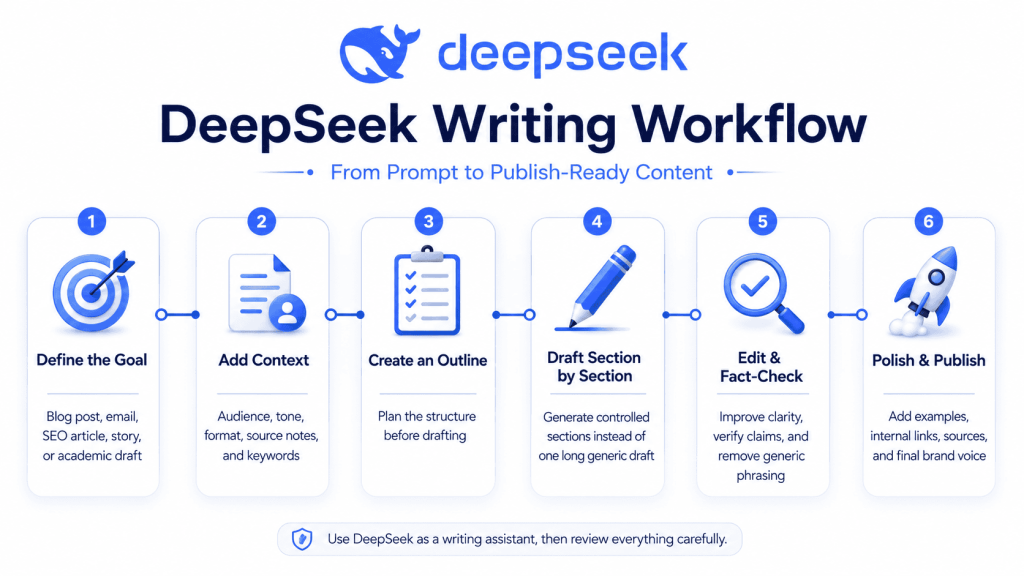
Best DeepSeek Writing Workflows
Blog post workflow
Best for: Bloggers, educators, consultants, and niche site owners.
Prompt template:
Create a detailed blog post outline for [TOPIC]. The target audience is [AUDIENCE]. The goal is to help readers [GOAL]. Use a [TONE] tone. Include an H1, H2s, H3s, key points for each section, examples to include, and a list of claims that need fact-checking before publication.
Editorial tip: Do not publish the first draft as-is. Add your own examples, internal links, external sources, and a stronger introduction.
SEO article workflow
Best for: Content marketers and SEO writers.
Prompt template:
Build an SEO content brief for the keyword [KEYWORD]. Include search intent, likely reader questions, recommended title, meta description, H2 structure, semantic keywords, internal link ideas, external source ideas, and a publishing checklist. Do not invent search volume or ranking difficulty.
Editorial tip: Use DeepSeek to organize the brief, but still check the actual search results manually.
Email writing workflow
Best for: Sales, support, newsletters, and client communication.
Prompt template:
Draft a [TYPE OF EMAIL] for [AUDIENCE]. The purpose is [GOAL]. Use a [TONE] tone. Keep it under [WORD COUNT] words. Include a clear subject line, a concise opening, the main message, and a polite call to action.
Editorial tip: Before sending, check names, dates, pricing, attachments, and relationship-specific details.
Academic writing support workflow
Best for: Students, researchers, and educators.
Prompt template:
Help me structure an academic essay on [TOPIC]. Create a thesis statement, section outline, key arguments, counterarguments, and questions I should research. Do not invent citations. Mark every claim that requires a source.
Editorial tip: Never rely on DeepSeek for real citations unless you verify every source yourself.
Creative writing workflow
Best for: Fiction writers, screenwriters, poets, and game writers.
Prompt template:
Help me develop a story idea in the [GENRE] genre. The premise is [PREMISE]. Create three possible plot directions, the main character’s internal conflict, the antagonist’s motivation, the setting, and five scene ideas. Avoid clichés and explain what makes each direction distinct.
Editorial tip: Use DeepSeek for options, not final voice. Your style should come from you.
Editing and rewriting workflow
Best for: Writers who already have a draft.
Prompt template:
Edit the following text for clarity, flow, and concision. Keep the original meaning. Do not add unsupported facts. After editing, list the most important changes you made. Text: [SOURCE TEXT]
Editorial tip: Ask DeepSeek to explain its changes so you can learn from the edit.
Summarizing and repurposing workflow
Best for: Turning long content into emails, social posts, briefs, or notes.
Prompt template:
Summarize the following text for [AUDIENCE]. Create: 1) a 100-word summary, 2) five key takeaways, 3) three social post ideas, and 4) one email newsletter version. Text: [SOURCE TEXT]
Editorial tip: Check whether the summary misses caveats or important details.
Best DeepSeek Prompts for Writing
1. Blog post outline prompt
Create a detailed blog post outline for [TOPIC]. The audience is [AUDIENCE], and the goal is [GOAL]. Use a [TONE] tone. Include an H1, H2s, H3s, key points, practical examples, and a list of facts that need verification.
2. Full article draft prompt
Write a [WORD COUNT]-word article on [TOPIC] for [AUDIENCE]. Follow this outline: [OUTLINE]. Use [TONE]. Include practical examples, short paragraphs, and clear transitions. Do not invent statistics, quotes, or sources. Mark any claim that needs verification.
3. SEO article brief prompt
Build an SEO content brief for [PRIMARY KEYWORD]. Include search intent, reader pain points, suggested title, meta description, URL slug, H2 structure, related keywords, internal link ideas, external source ideas, and an editorial checklist.
4. Rewrite for clarity prompt
Rewrite the following text to make it clearer and easier to read. Keep the meaning the same. Reduce jargon, shorten long sentences, and improve flow. Text: [SOURCE TEXT]
5. Improve tone prompt
Adjust the tone of this text to match [BRAND VOICE]. The audience is [AUDIENCE]. Keep the meaning, but make the style more [TONE: friendly/professional/confident/conversational]. Text: [SOURCE TEXT]
6. Email sequence prompt
Create a [NUMBER]-email sequence for [AUDIENCE] about [TOPIC/OFFER]. Include subject lines, preview text, body copy, and a clear call to action. Use a [TONE] tone and keep each email under [WORD COUNT] words.
7. Product description prompt
Write a product description for [PRODUCT]. Audience: [AUDIENCE]. Key benefits: [BENEFITS]. Features: [FEATURES]. Tone: [TONE]. Include a short description, bullet benefits, and a concise call to action. Do not add features that are not listed.
8. Creative story planning prompt
Develop a story plan for [GENRE] based on this premise: [PREMISE]. Include protagonist, antagonist, setting, central conflict, three-act structure, major turning points, and five possible opening scenes.
9. Academic writing assistant prompt
Help me plan an academic paper on [TOPIC]. Create a thesis, main arguments, counterarguments, research questions, and an outline. Do not create fake citations. Label any claim that needs a scholarly source.
10. Summary and key takeaways prompt
Summarize this text for [AUDIENCE]. Provide a short summary, detailed summary, five key takeaways, three implications, and any unclear or unsupported claims. Text: [SOURCE TEXT]
11. Fact-checking checklist prompt
Review this draft and create a fact-checking checklist. Identify statistics, dates, names, product claims, legal claims, medical claims, financial claims, and statements that need external verification. Text: [SOURCE TEXT]
12. Brand voice extraction prompt
Analyze the writing style in the following sample. Identify tone, sentence length, vocabulary, rhythm, common phrases, things to avoid, and rules for writing in this brand voice. Then create a reusable brand voice guide. Sample: [SOURCE TEXT]
Which DeepSeek Model Should Writers Use?
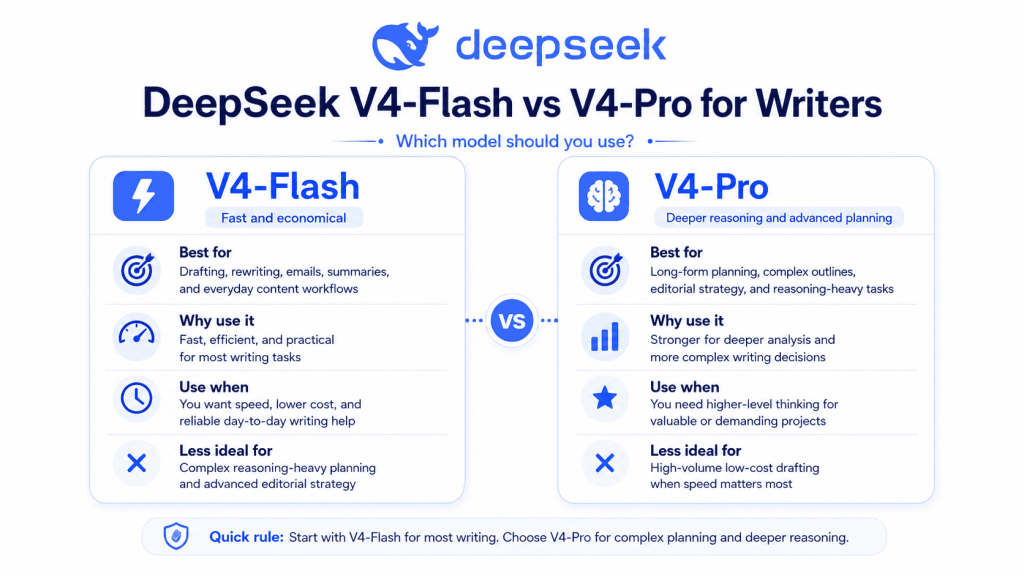
For most writing tasks, DeepSeek-V4-Flash is the practical default. DeepSeek describes V4-Flash as fast, efficient, and economical, and its pricing is lower than V4-Pro. That makes it a sensible choice for everyday drafting, editing, rewriting, summarizing, and content production.
DeepSeek-V4-Pro is better suited for complex planning, reasoning-heavy work, long-form editorial strategy, and tasks where deeper analysis matters more than speed or cost. DeepSeek positions V4-Pro as the stronger model for advanced reasoning and world knowledge.
| Model | Best For | Why Use It | When Not to Use It |
|---|---|---|---|
| DeepSeek-V4-Flash | Drafting, editing, rewriting, summaries, email writing, standard blog workflows | Faster and more economical; strong enough for most writing tasks | When you need deeper reasoning, complex strategy, or advanced long-form planning |
| DeepSeek-V4-Pro | Complex outlines, editorial strategy, long-form reasoning, research planning, multi-step analysis | Stronger reasoning and more advanced planning ability | When speed and cost matter more than depth |
DeepSeek’s pricing page also says both V4 models support thinking and non-thinking modes, with the older deepseek-chat and deepseek-reasoner names corresponding to V4-Flash compatibility modes. It notes that these older model names will be retired after July 24, 2026.
For writers, the simple rule is:
- Use V4-Flash for normal content work.
- Use V4-Pro for complex planning, analysis, and high-value long-form projects.
- Use thinking mode when you need deeper planning or structured reasoning.
- Use non-thinking mode when you need fast drafts, rewrites, or summaries.
DeepSeek Writing Settings: Temperature and Prompt Control
Temperature controls how predictable or creative the model’s output is. A lower temperature usually produces more focused and consistent writing. A higher temperature usually produces more varied, imaginative, or unexpected wording.
DeepSeek’s official temperature guidance lists:
| Use Case | Recommended Temperature |
|---|---|
| Coding / Math | 0.0 |
| Data Cleaning / Data Analysis | 1.0 |
| General Conversation | 1.3 |
| Translation | 1.3 |
| Creative Writing / Poetry | 1.5 |
DeepSeek’s documentation states that the default temperature is 1.0 and recommends 1.5 for Creative Writing / Poetry.
For writing, use these practical settings:
- 0.3–0.7: factual, structured, technical, or compliance-heavy writing.
- 0.8–1.1: standard articles, emails, summaries, and rewrites.
- 1.2–1.5: brainstorming, fiction, poetry, taglines, and creative concepts.
Temperature is not a substitute for a good prompt. A vague prompt at the perfect temperature will still produce vague writing. Prompt clarity matters more than settings.
DeepSeek for SEO Writing
DeepSeek can be useful for SEO writing, but it cannot replace SEO research. It can help you organize ideas, create content briefs, improve readability, draft meta titles, write descriptions, and generate internal link suggestions. It cannot guarantee rankings, verify live search volume, or understand the exact current SERP unless paired with real research.
DeepSeek can help with:
- Topic clustering
- Search intent analysis
- Article outlines
- Content briefs
- Meta titles and descriptions
- FAQ ideas
- Internal link anchor suggestions
- Competitor angle brainstorming
- Content refresh briefs
- Readability improvements
It cannot automatically:
- Guarantee Google rankings
- Verify keyword volume
- Replace real SERP analysis
- Confirm current competitor rankings
- Know your site authority
- Replace expert review
- Prove that a claim is true
A practical SEO workflow looks like this:
Keyword → intent → outline → draft → fact-check → optimize → publish → update
Google’s SEO Starter Guide says there are no secrets that automatically rank a site first, and it also states that content length alone is not a ranking factor. That means the goal is not to create the longest DeepSeek-generated article. The goal is to create the most useful, accurate, well-structured, and trustworthy page for the searcher.
DeepSeek for Creative Writing
DeepSeek can be a helpful creative partner. It can generate story premises, character sketches, plot twists, scene ideas, dialogue variations, worldbuilding details, and alternative endings. It is especially useful when you are stuck and need options.
Good creative uses include:
- Brainstorming story concepts
- Developing character backstories
- Creating scene outlines
- Improving dialogue rhythm
- Exploring alternate endings
- Building fictional worlds
- Generating poetry drafts
- Rewriting a scene in a different mood
The main risk is generic voice. AI-generated fiction can become predictable if the prompt is too broad. To improve the output, give DeepSeek examples of your style, character motivations, genre expectations, and what you want to avoid.
Example:
I am writing a quiet literary short story with restrained prose. Avoid dramatic clichés, fantasy language, and over-explaining emotions. Use subtle physical details and natural dialogue. Here is a sample of my style: [STYLE SAMPLE].
For creative writing and poetry, DeepSeek’s own temperature guide recommends a higher temperature of 1.5, which can help produce more varied language.
DeepSeek for Academic and Research Writing
DeepSeek can support academic writing, but it should not replace research, reading, or citation verification. It is most useful for structure and clarity.
Safe academic uses include:
- Explaining difficult concepts
- Creating essay outlines
- Turning notes into study summaries
- Suggesting research questions
- Improving paragraph clarity
- Creating flashcards
- Drafting counterarguments
- Simplifying dense text
- Generating revision checklists
Use caution with:
- Citations
- Literature reviews
- Legal, medical, or scientific claims
- Direct submission of AI-written work
- Institutional AI disclosure rules
Never assume that a citation generated by DeepSeek is real. Ask DeepSeek to mark claims that need sources, then verify them through academic databases, official publications, or your institution’s approved tools.
A safe academic prompt is:
Help me organize my notes into an essay outline. Do not write the final essay. Do not invent citations. Mark every claim that requires a source and suggest what type of source I should look for.
Limitations of Using DeepSeek for Writing
DeepSeek is powerful, but it has limits.
1. It can hallucinate
Like other generative AI tools, DeepSeek can produce statements that sound confident but are inaccurate. DeepSeek’s own privacy policy warns that model outputs may not always be factually accurate.
2. It can sound generic
If your prompt is vague, the output may feel like standard AI writing: polished but bland. Fix this by giving examples, audience details, brand voice rules, and specific constraints.
3. It needs fact-checking
Any article that includes statistics, pricing, product details, legal claims, medical claims, or technical facts should be checked against reliable sources.
4. It raises privacy questions
DeepSeek’s privacy policy says it may collect text input, voice input, prompts, uploaded files, photos, feedback, chat history, and other content provided to the service. It also says the services are not designed to process sensitive personal data and that users should not provide sensitive personal data.
DeepSeek also states that it directly collects, processes, and stores personal data in the People’s Republic of China to provide its services.
For that reason, do not paste sensitive personal, legal, financial, medical, client, or confidential business information into DeepSeek unless you understand the privacy policy, your compliance obligations, and your organization’s data rules.
5. It may not be ideal for live research
DeepSeek can help organize research, but you should verify live facts from primary sources, especially for fast-changing topics.
6. It may require brand editing
A good brand voice depends on rhythm, vocabulary, values, audience expectations, and repeated editorial choices. DeepSeek can imitate a style sample, but you should still review the final result.
DeepSeek vs ChatGPT vs Claude for Writing
DeepSeek, ChatGPT, and Claude can all support writing. The best choice depends on your workflow, budget, privacy requirements, model access, and preferred writing style.
| Tool | Best Writing Use | Strength | Weakness |
|---|---|---|---|
| DeepSeek | Cost-conscious drafting, rewriting, SEO briefs, long-context planning, structured prompts | Strong value, useful V4-Flash/V4-Pro model split, large context support | Requires careful fact-checking and privacy review |
| ChatGPT | General writing, ideation, editing, multimodal workflows, iterative drafting | Broad ecosystem and strong general-purpose assistance | Output quality depends heavily on model, plan, and prompting |
| Claude | Long-form writing, thoughtful editing, tone refinement, complex documents | Often strong at natural language flow and document work | Access, pricing, and model behavior vary by plan and use case |
The fair conclusion is not that one tool is always better. DeepSeek may be a strong choice when you want economical, structured writing support. ChatGPT may fit broader everyday workflows. Claude may appeal to writers who prioritize long-form tone and document refinement. For professional publishing, the workflow matters more than the tool: research, prompt, draft, verify, edit, and publish.
Practical Example: From Prompt to Polished Draft
Bad prompt
Write an article about AI writing.
This is too vague. DeepSeek does not know the audience, purpose, length, structure, tone, or quality standard.
Better prompt
Write a 1,500-word beginner-friendly blog post about using AI writing tools for small business marketing. The audience is non-technical business owners. Use a practical and reassuring tone. Include sections on brainstorming, email writing, blog outlines, social posts, editing, risks, and a publishing checklist. Do not invent statistics. Mark any factual claims that need verification.
Why the better prompt works
The better prompt gives DeepSeek:
- Topic
- Audience
- Word count
- Tone
- Structure
- Use cases
- Accuracy rules
- Editorial expectations
Possible DeepSeek output structure
H1: How Small Businesses Can Use AI Writing Tools
H2: What AI Writing Tools Can Help With
H2: Brainstorming Marketing Ideas
H2: Writing Better Emails
H2: Creating Blog Outlines
H2: Drafting Social Posts
H2: Editing Without Losing Your Voice
H2: Risks to Watch For
H2: Publishing Checklist
This structure is not the final article. It is a starting point you can improve with examples, screenshots, internal links, and verified sources.
Editorial Checklist Before Publishing DeepSeek-Written Content
Before publishing content created with DeepSeek, review it carefully.
- Confirm all factual claims.
- Verify statistics, dates, prices, and product details.
- Add first-hand examples or original insights.
- Improve the introduction so it answers the reader’s need quickly.
- Remove generic AI phrases.
- Check whether the article repeats the same point.
- Make the tone match your brand.
- Add internal links to relevant pages.
- Add external links to trustworthy sources.
- Optimize the SEO title and meta description.
- Check the H1 and H2 structure.
- Make sure the primary keyword appears naturally.
- Avoid keyword stuffing.
- Run an originality or plagiarism check when needed.
- Review legal, privacy, and compliance risks.
- Add author details or editorial review notes when appropriate.
- Update the article when DeepSeek model details, pricing, or policies change.
Frequently Asked Questions
Can I use DeepSeek for writing blog posts?
Yes. DeepSeek can help create blog outlines, drafts, introductions, summaries, and edits. For best results, provide the keyword, audience, tone, outline, and source notes. Always fact-check before publishing.
Is DeepSeek good for creative writing?
Yes, DeepSeek can help with plots, characters, worldbuilding, dialogue, and poetry. It works best when you provide genre, mood, style examples, and constraints. For creative writing and poetry, DeepSeek recommends a higher temperature setting of 1.5.
How do I use DeepSeek for SEO writing?
Use DeepSeek to create content briefs, outlines, meta descriptions, FAQs, internal link ideas, and draft sections. Do not rely on it for live keyword volume, ranking difficulty, or current SERP analysis unless you verify those separately.
Can DeepSeek write in my brand voice?
Yes, but you need to provide examples. Give DeepSeek a sample of your writing and ask it to extract tone, vocabulary, sentence structure, and style rules before drafting new content.
Is DeepSeek better than ChatGPT for writing?
Not always. DeepSeek may be attractive for cost-conscious writing workflows and long-context tasks, while ChatGPT and Claude may fit different writing, editing, or multimodal workflows. The best tool depends on your needs, budget, privacy requirements, and preferred output style.
Is DeepSeek safe for confidential writing?
You should be careful. DeepSeek’s privacy policy says it may collect prompts, uploaded files, chat history, and other user-provided content, and it says users should not provide sensitive personal data to the services. Review the policy and your compliance obligations before using it with confidential material.
Can DeepSeek help with academic writing?
Yes, DeepSeek can help with outlines, explanations, summaries, and clarity. It should not be used to invent citations, replace original research, or submit work in violation of academic rules.
What is the best DeepSeek prompt for writing?
The best prompt includes the task, audience, goal, tone, format, word count, source material, constraints, and review requirements. For example: “Write a [WORD COUNT]-word guide for [AUDIENCE] about [TOPIC]. Use [TONE]. Follow this outline. Do not invent facts. Mark claims that need verification.”
Does DeepSeek produce plagiarism-free content?
You should not assume that any AI tool guarantees plagiarism-free content. Use originality checks when needed, avoid copying protected text into prompts, and revise the output with your own ideas and examples.
Do I still need to edit DeepSeek content?
Yes. DeepSeek can produce strong drafts, but final content should be edited for accuracy, clarity, originality, tone, brand fit, and reader value.
Conclusion: Should You Use DeepSeek for Writing?
DeepSeek for Writing is a practical workflow, not a magic shortcut. It can help you brainstorm faster, create better outlines, draft more efficiently, rewrite rough text, summarize long materials, and explore creative ideas. The best way to use DeepSeek for writing is to give it clear instructions, choose the right model, work section by section, and review every important claim.
For most writing tasks, start with DeepSeek-V4-Flash because it is positioned as the faster and more economical V4 model. Use DeepSeek-V4-Pro when the task requires deeper reasoning, complex planning, or high-value editorial strategy.
Most importantly, keep the human writer in charge. DeepSeek can accelerate the process, but your expertise, judgment, examples, and editing are what make the final content worth publishing.