Last independently tested: July 27, 2026. To create a DeepSeek API key, sign in to the official DeepSeek Platform API Keys page, create a separate key for the application or environment that will use it, move the credential directly into server-side secret storage, and verify it with an authenticated request to https://api.deepseek.com/models. Never paste the key into client-side JavaScript, a public repository, a screenshot, a support ticket, or an analytics event.
This is also an explicit provider requirement, not only a local recommendation. Section 2.2 of the DeepSeek Open Platform Terms of Service requires users to keep API keys secure, prevent leakage, avoid sharing or public disclosure, and not expose a key in browser or other client-side code.
This guide goes beyond setup instructions. We created two temporary keys, ran a bounded 12-case authentication and rotation study, and revoked both keys when testing ended. All 12 cases produced their expected result: six valid authenticated operations returned HTTP 200 and six negative or revoked-key controls returned HTTP 401. The test published no key value, key fragment, Authorization header, balance amount, account identifier, raw response body, or provider request ID.
The official documentation defines the supported request contract; our live results are dated observations from one authorized account and one network environment. They are evidence, not a promise that every account, region, endpoint, or future request will behave identically.
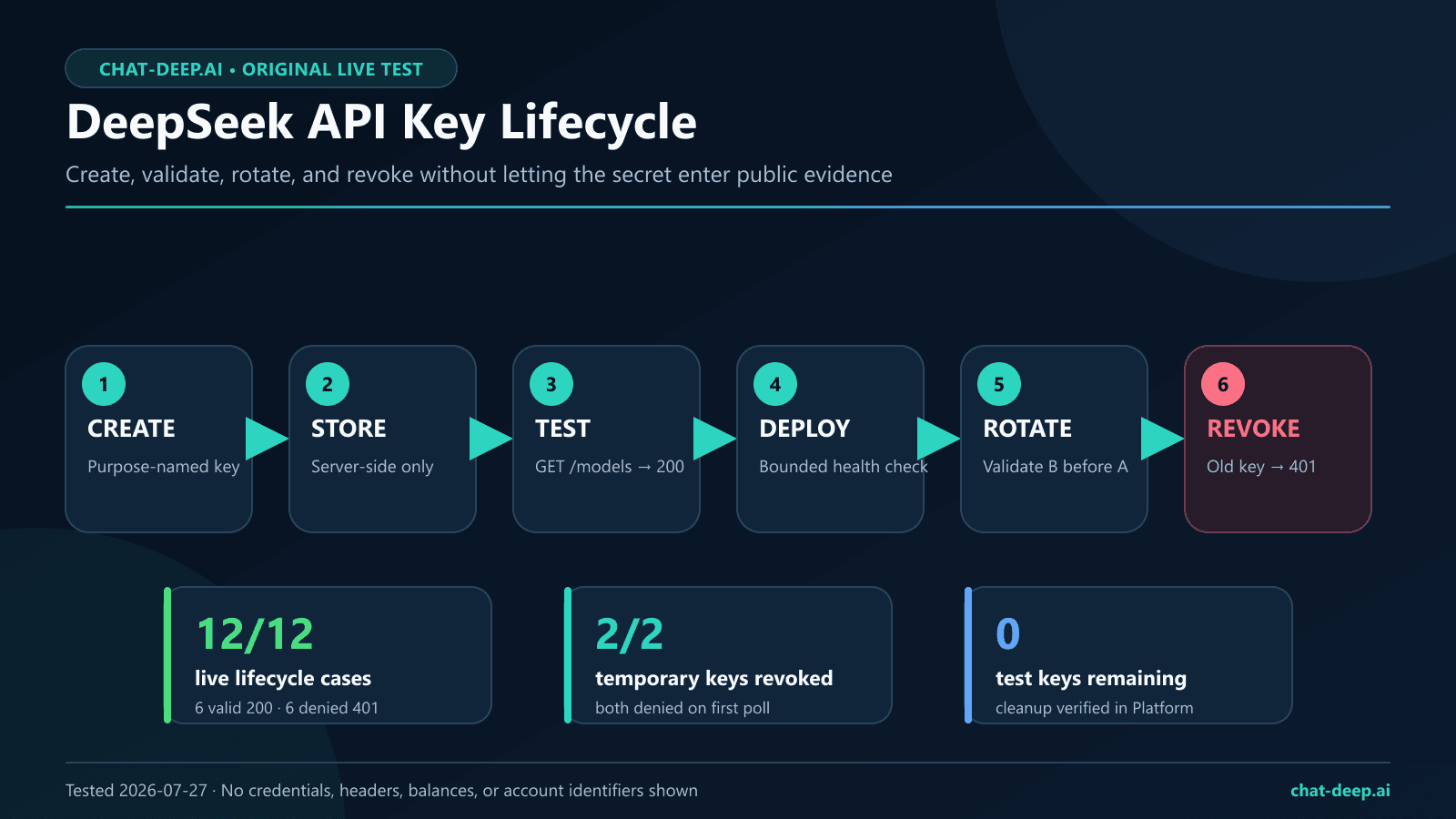
Quick answer: create and test a DeepSeek API key safely
- Open the official DeepSeek Platform and sign in.
- Open API Keys and create a key with a name that identifies one application and environment, such as
invoice-worker-prod. - Transfer the displayed credential directly into a secrets manager or a protected environment variable. Do not save it in source code or a document.
- Confirm that your application reads the variable without printing its value.
- Send a low-cost authentication probe to the documented
GET /modelsendpoint. - If the probe returns HTTP 200 and a valid model list, configure the same server-side secret for your application.
- Before replacing a key, create and validate a second key, switch the application, then revoke the old one.
- Remove temporary keys after testing and verify that each revoked key is denied.
The official DeepSeek first-call guide currently documents https://api.deepseek.com as the OpenAI-format base URL and links to the Platform for API-key creation. The official API reference introduction defines HTTP Bearer authentication, and the model-list reference documents GET /models. That makes the model list a better initial credential check than repeatedly paying for generated text.
What a DeepSeek API key does—and what this guide does not assume
A DeepSeek API key is a credential used by software to authenticate calls to the DeepSeek API. It is separate from a DeepSeek Chat browser session and should be treated like a password with billing consequences. The key belongs in a trusted backend, worker, command-line session, or secrets service—not in a webpage delivered to visitors.
| Question | Official source | What we observed |
|---|---|---|
| Where is the API host? | The first-call guide lists https://api.deepseek.com for OpenAI-format requests. | All 12 live cases used that origin only. |
| How is the key sent? | Official examples use an Authorization: Bearer header. | A valid Bearer key worked; missing, empty, wrong-scheme, invalid, and revoked controls were denied. |
| How can a key be checked? | The API reference documents GET /models. | Valid keys returned HTTP 200 and a non-empty model list during the test. |
| Can balance availability be queried? | The reference documents GET /user/balance and an is_available boolean. | The authorized probe returned HTTP 200 and a boolean; monetary values were intentionally omitted. |
The official sources reviewed for this update do not establish user-configurable per-key scopes, expiration dates, or IP allowlists. We therefore do not claim that those controls exist. Design your application so a leaked key can be rotated quickly, keep its access surface small, and consult the current Platform UI and official documentation before relying on any account-specific control.
How to create a DeepSeek API key
1. Open the official Platform
Start at platform.deepseek.com, sign in, and open the API Keys area. Check the hostname before entering credentials. A Chat page, third-party gateway, code editor extension, or unofficial “key generator” is not the official DeepSeek key console.
2. Give the key an operational name
Use a name that answers two questions: which workload uses this key, and in which environment? Good patterns include support-api-staging, document-worker-prod, or developer-alex-local. Avoid one shared name such as main. Separate names make incident response and planned rotation less ambiguous even when the console does not expose the secret again.
3. Transfer the credential without publishing it
When the Platform presents the new credential, move it directly into the intended secret store. Do not take a screenshot of the reveal dialog. Do not paste it into a WordPress draft, GitHub issue, chat conversation, CI log, spreadsheet, browser bookmark, or shell command that contains the literal value. If the credential is lost or its handling is uncertain, create a replacement and revoke the uncertain key.
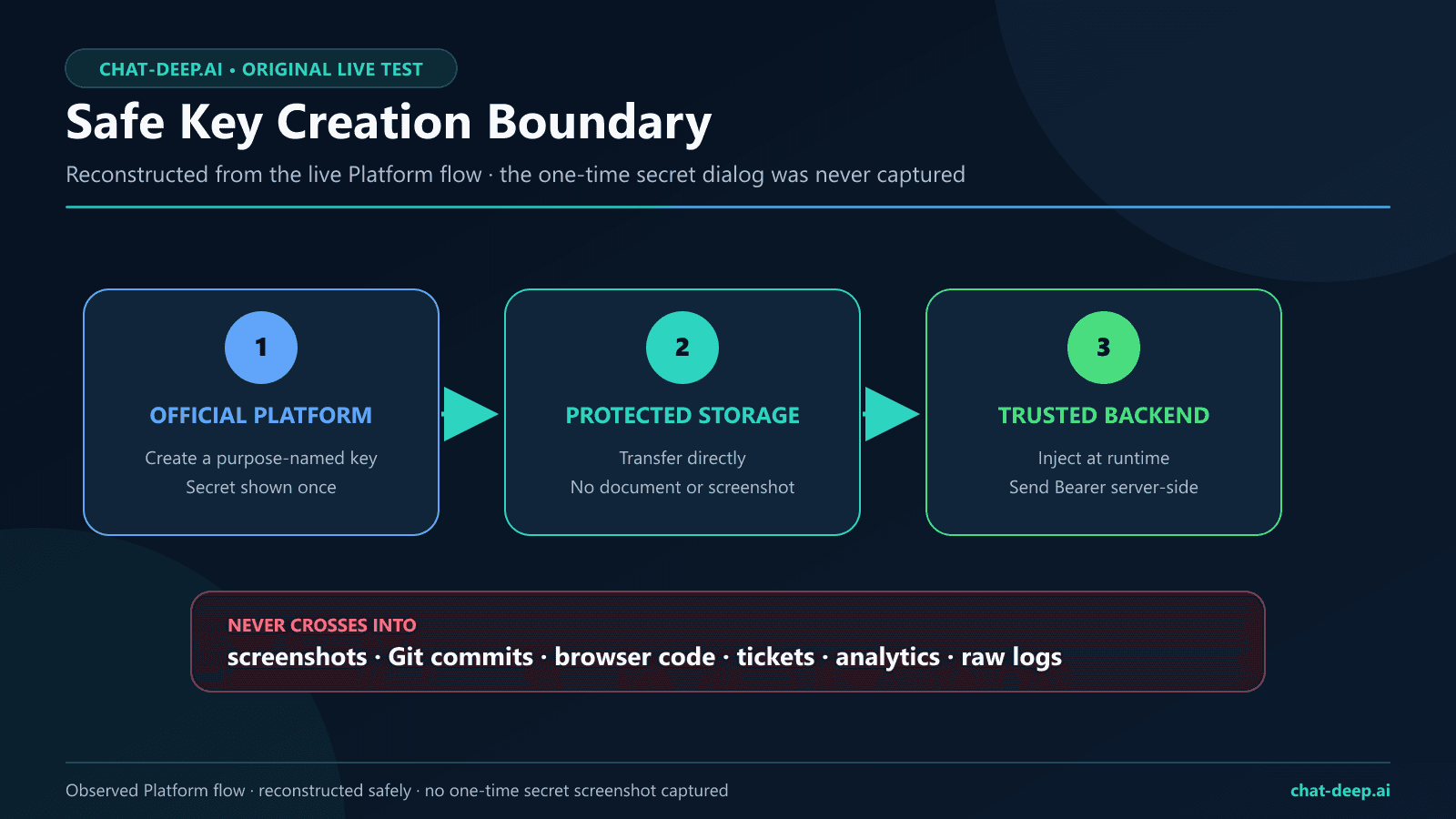
4. Record ownership, not the secret
In your internal inventory, record the console name, application owner, environment, creation date, and rotation status. Do not copy the credential itself into that inventory. The application’s secret manager should hold the value; the inventory should hold the operational context needed to replace it safely.
Store the key in an environment variable
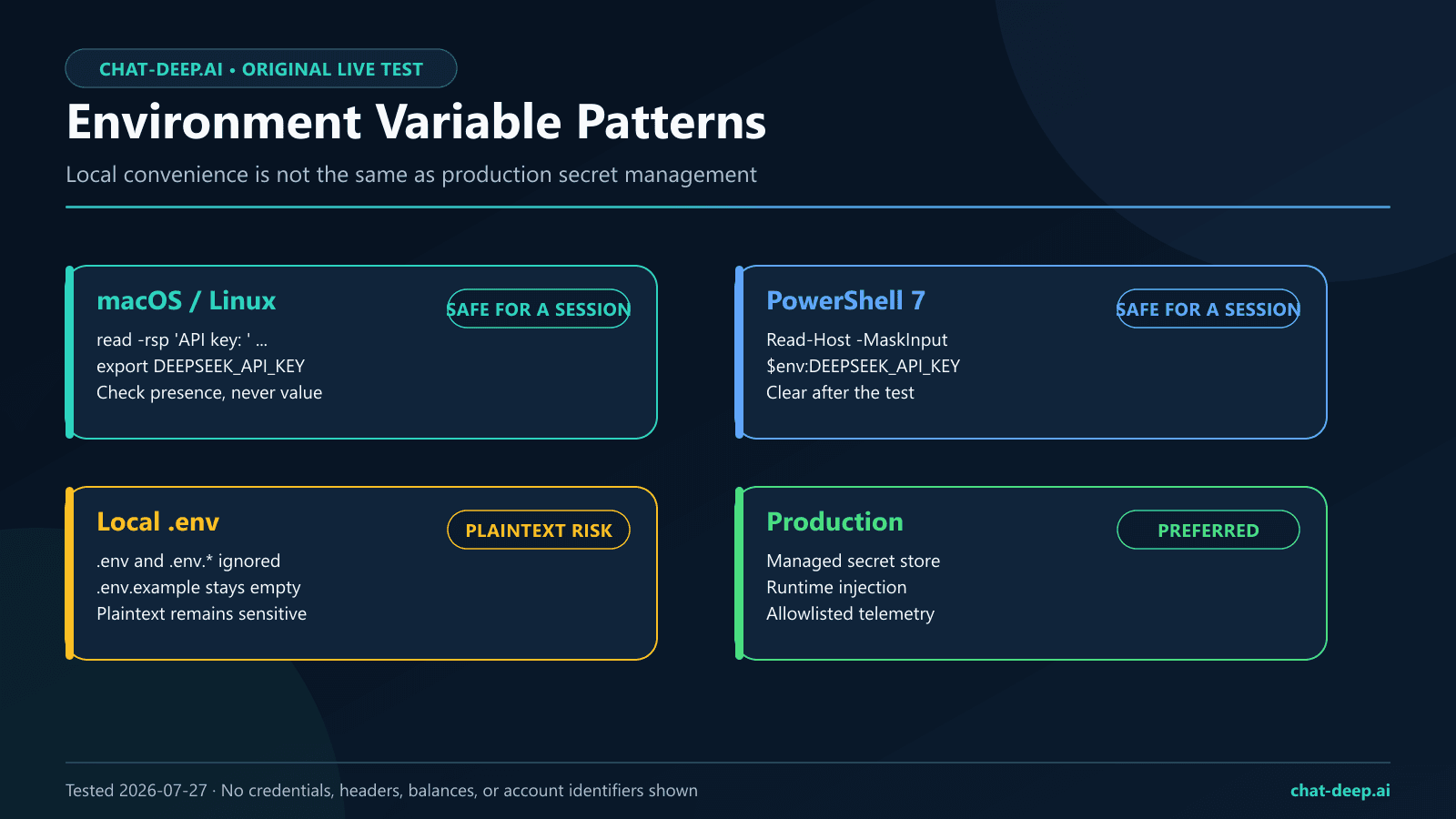
For local development, a process environment variable is safer than hardcoding the credential, provided you also control shell history, logs, crash reports, and local access. For production, prefer the secrets facility supplied by your hosting platform or cloud provider and inject the value at runtime. Never bundle a production key into a Docker image, mobile app, desktop installer, static website, WordPress theme, or JavaScript sent to a browser.
Bash on macOS or Linux: prompt without echoing the key
read -rsp 'DeepSeek API key: ' DEEPSEEK_API_KEY
echo
export DEEPSEEK_API_KEY

test -n "${DEEPSEEK_API_KEY:-}" \
  && echo "DEEPSEEK_API_KEY is set" \
  || echo "DEEPSEEK_API_KEY is missing"
This example uses Bash’s read -s and -p flags. On a system whose default shell is zsh or another shell, start Bash explicitly or use that shell’s documented no-echo prompt instead of assuming identical flags. The secret is entered at the prompt rather than appearing in the command itself, and the check confirms only presence. When the session ends, run unset DEEPSEEK_API_KEY. Production deployments should obtain the value from a secret store rather than an interactive prompt.
Windows PowerShell 7: use masked input for the session
$env:DEEPSEEK_API_KEY = Read-Host "DeepSeek API key" -MaskInput

if ([string]::IsNullOrWhiteSpace($env:DEEPSEEK_API_KEY)) {
  throw "DEEPSEEK_API_KEY is missing"
}

Write-Host "DEEPSEEK_API_KEY is set"
This avoids placing the literal value in PowerShell history and does not print it. Clear the process variable after the test with Remove-Item Env:DEEPSEEK_API_KEY. On shared systems, remember that environment variables are still secrets; local administrators, debuggers, dumps, or child processes may be able to read them.
If you use a local .env file
A private .env file can be practical for local development, but it is a secret-bearing file, not a harmless configuration file. Put .env, .env.*, and local credential exports in .gitignore before creating them. Keep a tracked .env.example containing only variable names and synthetic values.
# .gitignore
.env
.env.*
!.env.example

# .env.example — safe to commit
DEEPSEEK_API_KEY=
DEEPSEEK_BASE_URL=https://api.deepseek.com
Ignoring a file does not protect a secret that was already committed. If a real key enters Git history, a build artifact, or a log, revoke it first, create a replacement, and then clean the repository or log according to your incident procedure. Deleting the visible line without revoking the credential leaves the exposed key usable.
Test a DeepSeek API key without exposing it
Start with GET /models. The official model-list reference defines a successful response as an object whose data array contains model records. Our live valid-key probe returned HTTP 200 in 497 ms and listed deepseek-v4-flash and deepseek-v4-pro. That is a dated observation, so applications should discover or configure model IDs from current official sources instead of assuming the list can never change.
cURL: a non-generation authentication probe
curl --silent --show-error --fail-with-body \
  --url https://api.deepseek.com/models \
  --header "Authorization: Bearer ${DEEPSEEK_API_KEY}" \
  --header "Accept: application/json"
The command reads the credential from the current process instead of embedding the literal secret in a script. Use it only in a trusted terminal: depending on the operating system, command arguments and environment values may be visible to privileged process inspection. Do not add verbose tracing, because diagnostic output can expose headers.
PowerShell: validate status and model count
$headers = @{
  Authorization = "Bearer $env:DEEPSEEK_API_KEY"
  Accept = "application/json"
}

$result = Invoke-RestMethod `
  -Method Get `
  -Uri "https://api.deepseek.com/models" `
  -Headers $headers

if ($result.object -ne "list" -or $result.data.Count -lt 1) {
  throw "Unexpected model-list response"
}

Write-Host "Authentication succeeded; model records:" $result.data.Count
Do not print $headers, enable request tracing, or serialize the process environment. After the check, clear the header object and remove the environment variable if it was created only for this session.
Python: use the OpenAI SDK with DeepSeek’s base URL
import os
from openai import OpenAI

api_key = os.environ.get("DEEPSEEK_API_KEY")
if not api_key:
    raise RuntimeError("DEEPSEEK_API_KEY is missing")

client = OpenAI(
    api_key=api_key,
    base_url="https://api.deepseek.com",
)

models = client.models.list()
model_ids = [item.id for item in models.data]
if not model_ids:
    raise RuntimeError("No model records returned")

print("Authentication succeeded; model records:", len(model_ids))
This follows the base-URL and environment-variable pattern in DeepSeek’s official first-call documentation while using the non-generation model list for validation. For installation, typed clients, timeouts, and production error handling, continue to our DeepSeek Python SDK guide or the broader OpenAI SDK with DeepSeek guide.
Node.js: check the model list without logging the client
import OpenAI from "openai";

const apiKey = process.env.DEEPSEEK_API_KEY;
if (!apiKey) throw new Error("DEEPSEEK_API_KEY is missing");

const client = new OpenAI({
  apiKey,
  baseURL: "https://api.deepseek.com",
});

const models = await client.models.list();
if (!Array.isArray(models.data) || models.data.length === 0) {
  throw new Error("No model records returned");
}

console.log("Authentication succeeded; model records:", models.data.length);
Do not log the client configuration, request headers, process.env, or an exception object from a wrapper that attaches raw request details. Our DeepSeek Node.js and TypeScript guide covers application structure beyond this credential probe.
Optional: prove the key can authorize one completion
A successful model-list request proves authentication to that endpoint, not that every generation request will succeed. If you need an end-to-end check, send one deliberately small request using the official Chat Completions contract. Our study allowed exactly one paid-generation request, fixed it to deepseek-v4-flash, used a 16-token output cap, disabled automatic retries, and received HTTP 200 in 785 ms with finish_reason: stop. Usage was 17 prompt tokens, 6 completion tokens, and 23 total tokens.
Keep an explicit request budget around automated smoke tests. A failing deployment loop that repeatedly calls a generation endpoint can create cost and noise. For request structure, see the DeepSeek API guide; for current models and costs, use our DeepSeek models page and DeepSeek pricing page, then verify the current figures against the official pricing source.
Original live study: 12 authentication and lifecycle cases
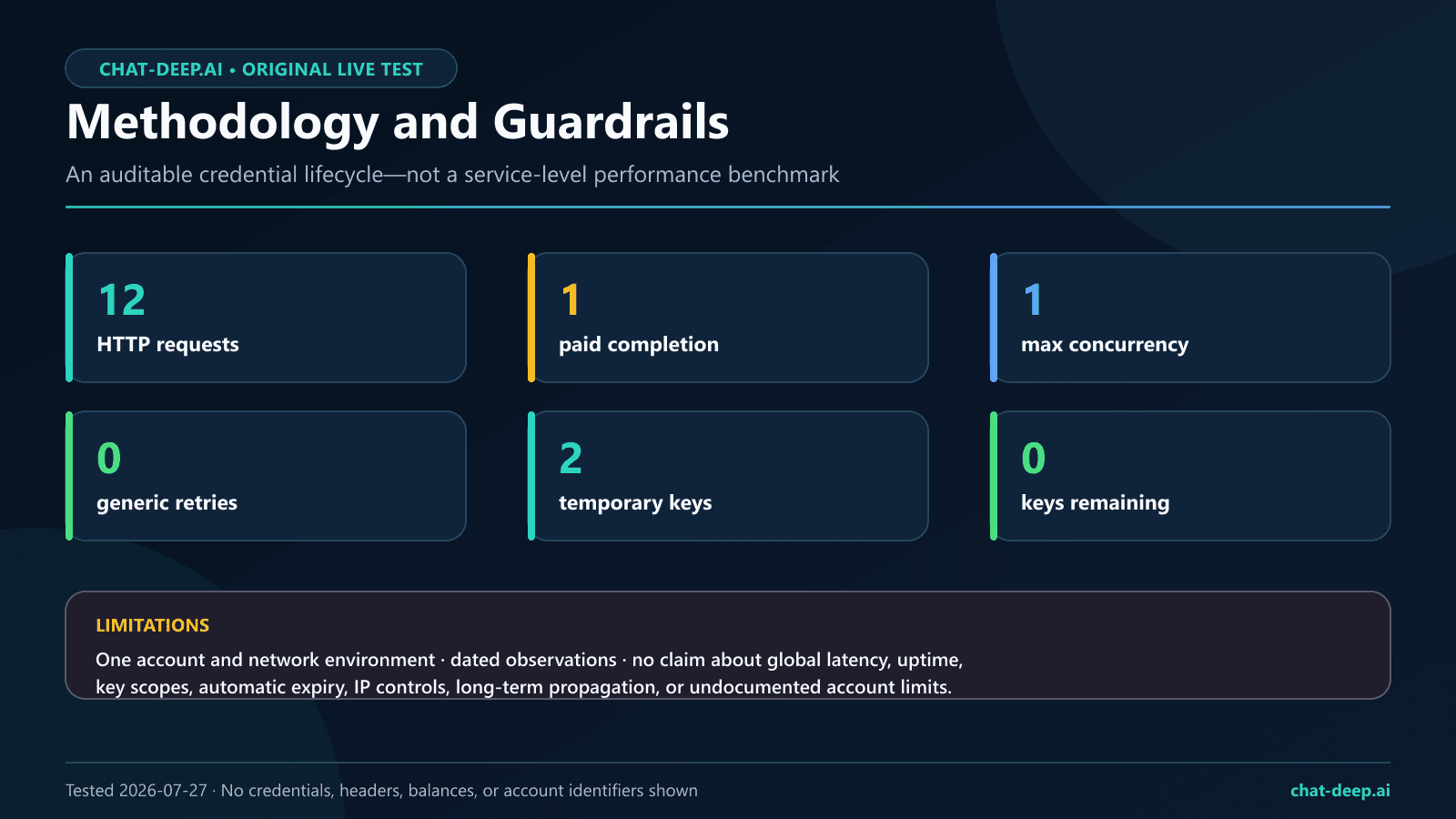
We ran the study from 10:42:01.137Z to 10:46:07.911Z on July 27, 2026. It made 12 HTTP requests with maximum application concurrency of one and zero automatic retries. The only repeat allowance was a declared revocation-poll schedule; both revoked keys were denied on the first poll, so no additional poll was needed. Two temporary keys were created for the study and both were revoked by the end.
| Case | Request and credential state | Status | Observed latency | Result |
|---|---|---|---|---|
| LIVE-01 | GET /models, valid key A | 200 | 497 ms | List schema passed; 2 models |
| LIVE-02 | POST /chat/completions, valid key A | 200 | 785 ms | Non-empty completion; 23 total tokens |
| LIVE-03 | GET /user/balance, valid key A | 200 | 276 ms | Availability boolean observed; amounts omitted |
| AUTH-01 | GET /models, header missing | 401 | 313 ms | Denied as expected |
| AUTH-02 | GET /models, empty Bearer value | 401 | 300 ms | Denied as expected |
| AUTH-03 | GET /models, wrong scheme | 401 | 304 ms | Denied as expected |
| AUTH-04 | GET /models, synthetic invalid key | 401 | 268 ms | authentication_error; message omitted |
| ROT-01 | GET /models, replacement key B | 200 | 320 ms | Replacement valid before switch |
| ROT-02 | GET /models, old key A during overlap | 200 | 300 ms | Old key still valid during overlap |
| ROT-03 | GET /models, revoked key A | 401 | First poll; 0 ms propagation observed | Revocation confirmed |
| ROT-04 | GET /models, key B after A revocation | 200 | 306 ms | Replacement remained valid |
| ROT-05 | GET /models, revoked test key B | 401 | First poll; 0 ms propagation observed | Cleanup revocation confirmed |
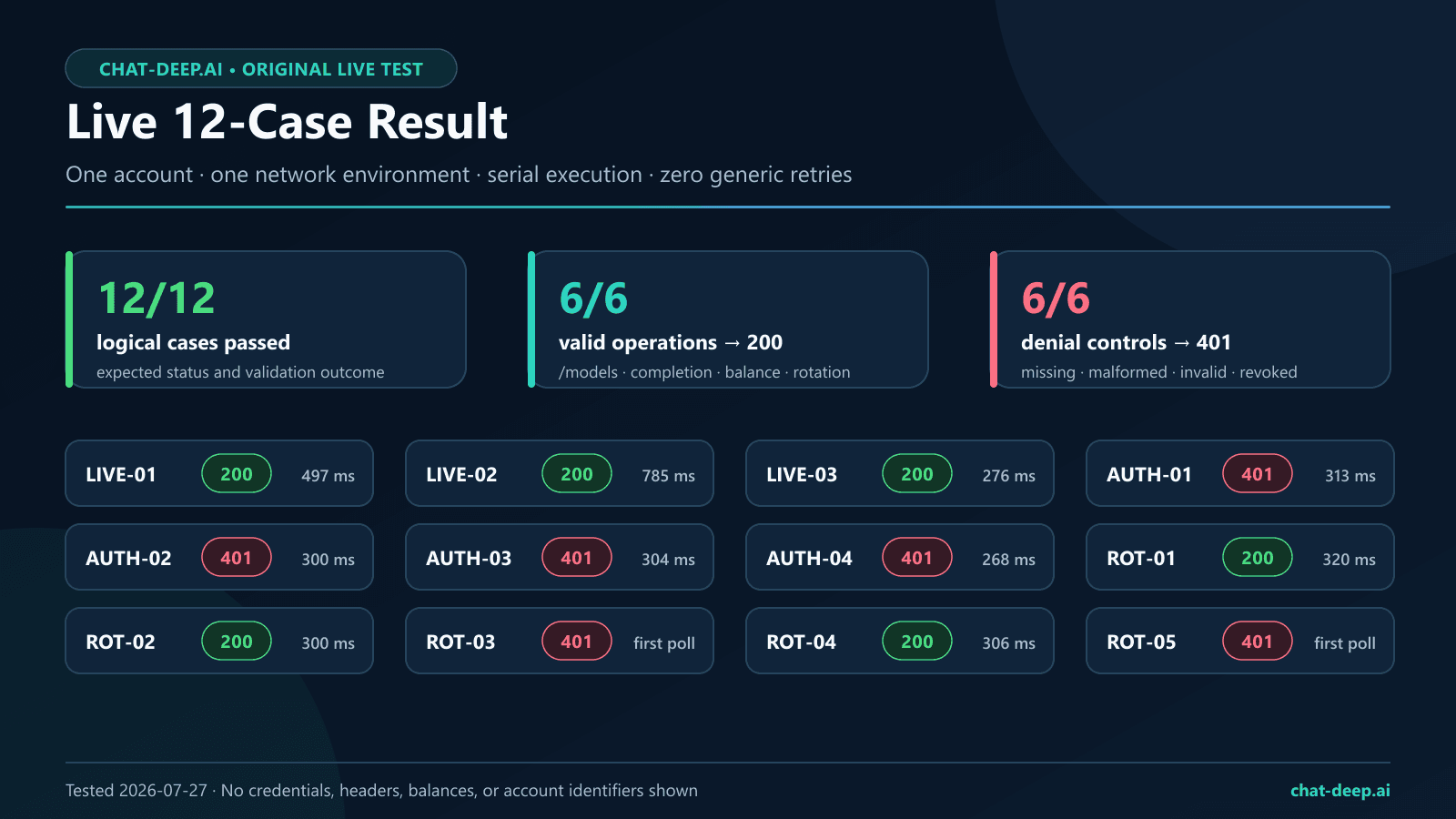
What passed
- 12/12 logical cases produced their expected status and validation outcome.
- 6/6 valid authenticated operations returned HTTP 200.
- 6/6 authentication-denial controls returned HTTP 401: four malformed or invalid credential variants plus two revoked-key checks.
- 2/2 temporary keys were revoked, and both revocations were confirmed within the 30-second study bound.
- 1/1 replacement-key continuity check passed after the old key was revoked.
- 0 temporary key rows remained when cleanup finished.
The valid model-list responses exposed two model IDs at test time: deepseek-v4-flash and deepseek-v4-pro. The balance endpoint returned a boolean is_available signal and an array shape consistent with the official reference. We published the boolean only; account-specific currency and monetary values were excluded. For a dedicated, privacy-aware implementation, see our DeepSeek API balance guide.
How to interpret 200 and 401 correctly
HTTP 200 from /models means the presented credential authenticated to that endpoint for that request. It does not guarantee balance, quota, generation success, model availability forever, or access to every endpoint. HTTP 401 means the credential presentation was not accepted. The official DeepSeek error-code page associates 401 with authentication failure and advises checking the key.
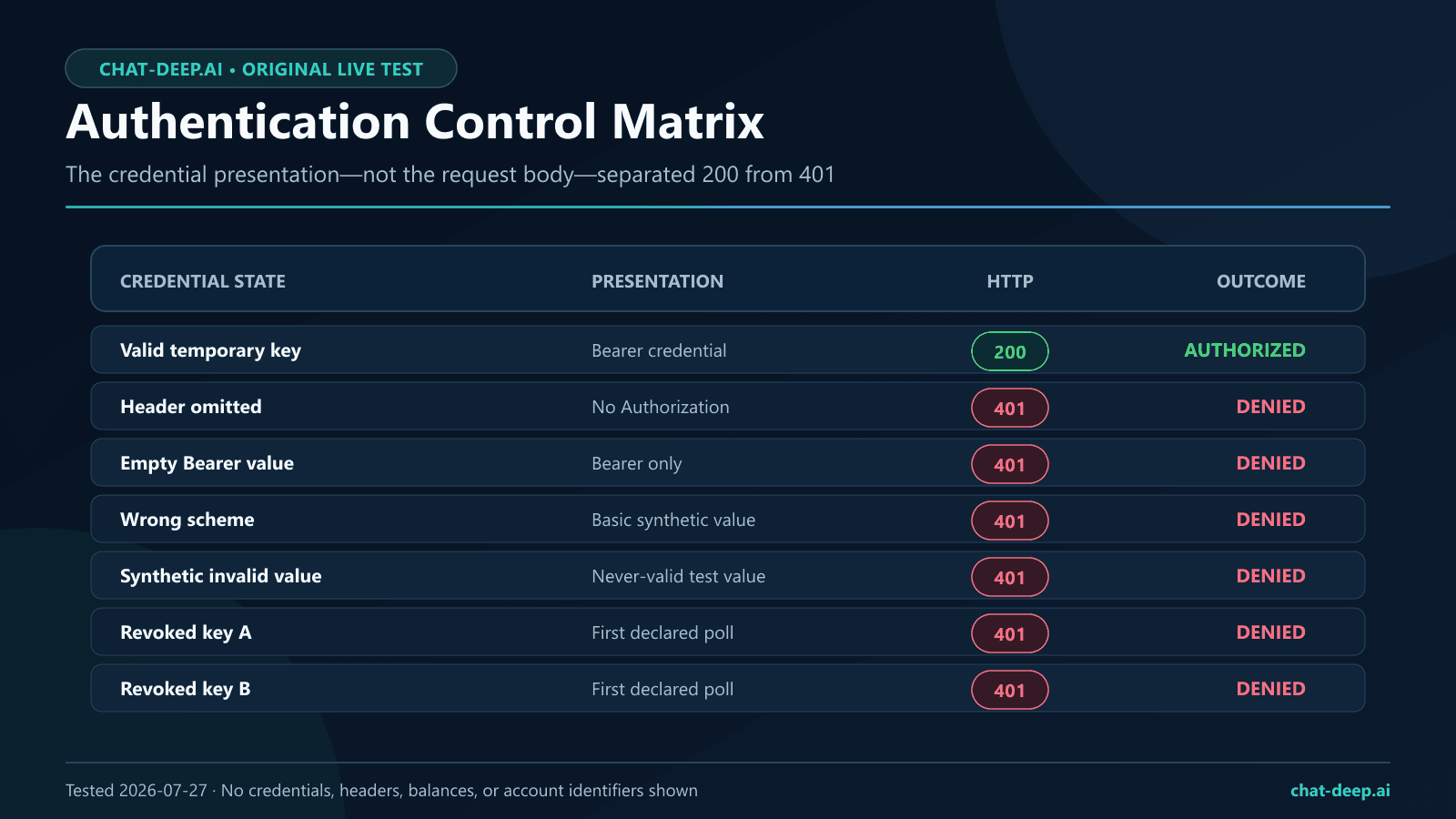
Troubleshoot by classifying the response before retrying. A 401 normally calls for credential or header repair, not exponential retry. A 402 points to account balance, a 422 to request parameters, and a 429 to pacing or concurrency. Our DeepSeek error codes guide provides a fuller decision tree, while DeepSeek API rate limits owns concurrency and backoff guidance.
Rotate a DeepSeek API key without downtime
Rotation is a controlled replacement, not simply deleting the current key. Use two separate keys for a short overlap window: key A is the current credential and key B is the replacement. Validate B before changing production, deploy B, verify the application, then revoke A. This sequence prevents an untested replacement from taking the service down.
- Create key B with a name that identifies it as the replacement.
- Store B through the same protected path used by the application; do not copy it into a deployment file.
- Call
GET /modelswith B and validate both HTTP status and response shape. - Confirm A still works during the deliberate overlap window.
- Deploy the configuration that points the application to B.
- Run one bounded health check through the real application path.
- Revoke A in the official Platform.
- Confirm A receives 401, while B still receives 200.
- Update the non-secret inventory with the rotation outcome.
- Remove any temporary test key when the exercise is complete.
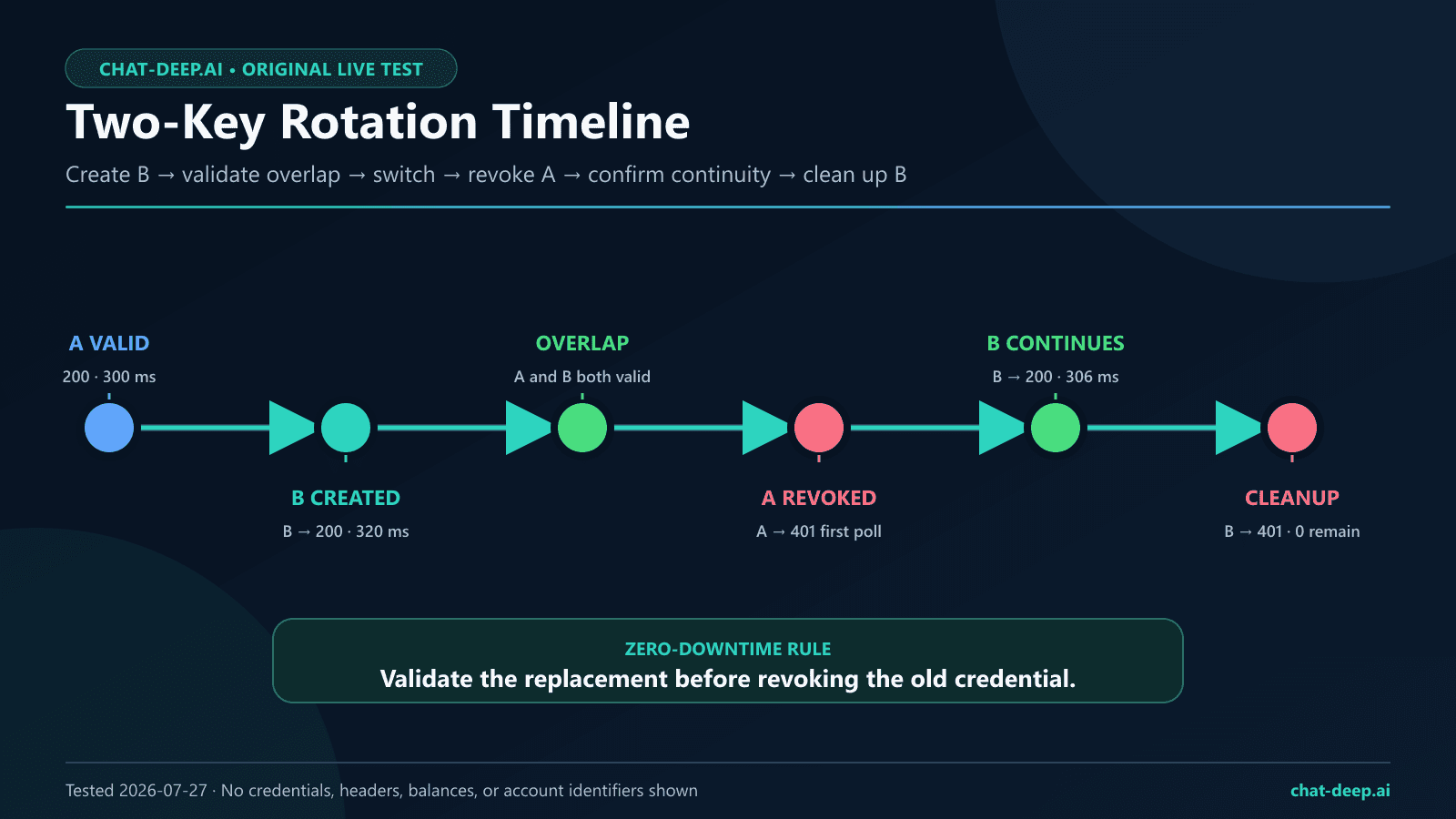
Our live sequence observed B returning 200 in 320 ms, followed by A returning 200 in 300 ms during overlap. After A was revoked, its first declared poll returned 401, and B then returned 200 in 306 ms. Finally, we revoked temporary key B and its first poll returned 401. Both first-poll observations recorded zero milliseconds of additional propagation delay under the harness definition. That does not promise instantaneous revocation everywhere; production runbooks should use a bounded poll window and stop on unexpected transport failures.
Emergency rotation after suspected exposure
If a key may have leaked, prioritize containment. Create and deploy a replacement through a trusted channel, revoke the exposed key, verify the revoked key is denied, and inspect application and billing telemetry for unusual use. Do not wait for a repository cleanup to finish before revoking. Preserve sanitized incident evidence, but never paste the secret into the ticket created to investigate it.
Leak prevention and offline security checks
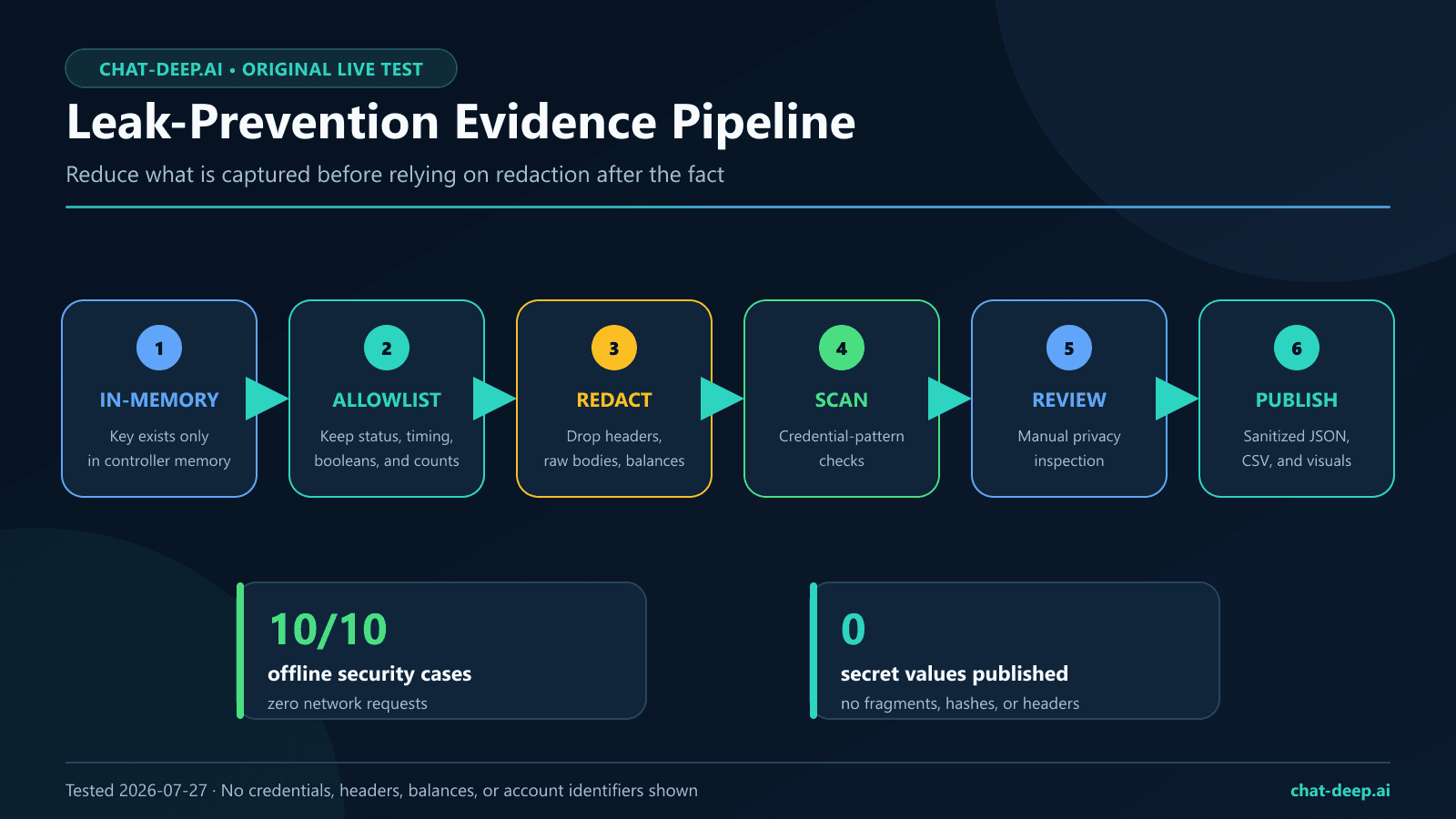
The reproducibility package separates live credential checks from deterministic offline tests. Live functions accept authorized credentials only as in-memory arguments. The public harness contains no helper that reads a key from command-line arguments, a file, an interactive transcript, or an environment variable. It fixes the network origin, serializes requests, disables generic retries, caps the paid completion, removes sensitive response fields, and scans prospective evidence before publication.
Offline result: 10/10 deterministic security cases passed with zero network requests. The run covered credential provenance, ignore rules, recursive redaction, secret detection, rotation-state guards, serial fixed-origin transport, authentication controls, amount-free balance handling, the one-completion budget, and replacement-key continuity.
The offline suite covers syntax, credential-provenance rejection, ignore rules, recursive redaction, static secret scanning, the rotation state machine, fixed-origin mock requests, the authentication matrix, amount-free balance output, one-paid-completion enforcement, and replacement continuity. These checks use in-memory mocks and do not contact DeepSeek. They reduce publication risk, but they do not replace repository secret scanning, deployment controls, least-access architecture, or a real incident-response drill.
Logging rules for production clients
- Allowlist log fields instead of trying to redact an entire raw request after capture.
- Never log
Authorization, client objects, complete environment dictionaries, or shell commands containing expanded secrets. - Keep raw provider response bodies out of credential tests unless a specific, sanitized field is required.
- Report a key by a non-secret internal alias such as
production-primary, never by a prefix or suffix. - Keep screenshots away from key-reveal dialogs, balances, profile menus, email addresses, and browser autofill overlays.
- Use separate credentials for separate applications and environments so one incident has a narrower replacement path.
For production evidence pipelines, the DeepSeek observability guide explains what to measure without turning telemetry into a secret store. If your application accepts model-generated structured data, validate that output separately using the DeepSeek JSON Output guide; successful authentication says nothing about output correctness.
Why a DeepSeek API key is not working
| Symptom | Likely class | Safe next check |
|---|---|---|
401 from /models | Missing, malformed, invalid, or revoked credential | Confirm the process loaded the intended variable, the header uses Bearer, the host is correct, and the key has not been revoked. Do not print it. |
| 402 from a paid request | Insufficient usable balance | Check the official Platform billing area or query only the fields you need from /user/balance. |
| 422 | Invalid request parameter | Compare the model and payload with the current endpoint reference. |
| 429 | Request pacing or account concurrency | Reduce in-flight work and apply bounded backoff according to the current rate-limit guidance. |
| Model list works, chat fails | Authentication passed but another precondition failed | Inspect status, model ID, balance availability, payload validation, and feature-specific requirements separately. |
| Local code says variable missing | Shell or deployment configuration | Check only whether the variable is present in the process; do not echo its value. |
Do not blindly retry a 401. Retrying the same invalid credential adds noise without changing the cause. Correct the configuration or rotate the key. Retry logic belongs around transient conditions such as selected 5xx failures or rate pressure, and it should have attempt, delay, and total-time limits.
Creating extra keys is not a capacity strategy. DeepSeek’s official Rate Limit & Isolation page says concurrency is calculated at the account level regardless of which API key is used. Use separate keys for ownership and rotation, but manage workload capacity with queues, bounded concurrency, and the practices in our DeepSeek API rate-limits guide.
A concise pricing and billing handoff
Creating a key is not the same as receiving unlimited free API usage. The official pricing page states that model usage is billed by tokens and that prices may change. This credential guide does not duplicate a volatile price table. Check our DeepSeek pricing page for the comparison and verify final figures on the official page before a production launch. Use the balance guide for availability checks, alerts, and privacy-safe handling of monetary data.
To view usage by API key, the official DeepSeek FAQ directs users to open the Platform’s Usage page, choose a month, export and unzip the usage package, then inspect the file named amount, which breaks usage down by key. Keep that report private because it is account-specific. This export is different from GET /user/balance: the documented balance endpoint reports account balance availability and totals, not per-key usage.
Methodology, evidence, and limitations
The live suite used one authorized DeepSeek Platform account, one network environment, the fixed origin https://api.deepseek.com, maximum concurrency one, and zero automatic retries. It made 12 logical requests, including one completion capable of incurring token charges. Key creation and revocation occurred in the official console; the harness received credentials only through an authorized in-memory controller.
Post-run harness audit: the preserved sanitized result passed a deterministic offline audit with zero new provider requests. The audit rechecked the exact 200 and 401 outcomes, recorded model-list, completion, balance, token-usage, cleanup, and privacy evidence. It also found that the original paid smoke test did not explicitly disable DeepSeek’s default thinking behavior. The official Thinking Mode guide says thinking defaults to enabled and temperature has no effect in that mode, so the original temperature setting must not be interpreted as a determinism control. The public harness is now stricter for future runs: it explicitly disables thinking for that 16-token smoke test, requires exact status codes, validates response schemas, and fails closed. This correction does not claim that the revised code produced the historical observation; the dated result remains preserved separately.
The study is intentionally small. It does not measure global latency, service availability, regional behavior, long-term revocation propagation, per-account limits, key scopes, key expiry, IP restrictions, or every API endpoint. The recorded milliseconds are useful for auditing this run, not ranking performance. No secret-reveal screenshot was captured, and no account balance value was published.
Reproduce the safe parts with the public DeepSeek API key test suite on GitHub. Review TEST_PLAN.md, SECURITY.md, the official source register, sanitized JSON/CSV results, and the deterministic offline tests before running anything. The live functions are opt-in and constrained; never place a real key in a fork, issue, pull request, command-line argument, test fixture, or published result.
Production checklist
- The key was created only in the official DeepSeek Platform.
- Its name identifies one application and environment.
- The value lives in protected server-side storage and is injected at runtime.
- Source code, Git history, images, tickets, logs, analytics, and client bundles contain no key value or fragment.
- A non-generation
/modelsprobe validates authentication during deployment. - Generation smoke tests have an explicit request and token budget.
- Logs use an allowlist and never capture Authorization headers or raw environments.
- Rotation uses a validated replacement and a short overlap window.
- Revoked credentials are tested for denial without unlimited polling.
- Billing, 429 handling, output validation, and observability have separate controls and owners.
FAQ
How do I get a DeepSeek API key?
Sign in to the official DeepSeek Platform, open its API Keys page, create a clearly named key, and move the credential directly into protected server-side storage. Test it with GET https://api.deepseek.com/models before connecting a production workload.
What is the DeepSeek API base URL?
The current official first-call guide lists https://api.deepseek.com for OpenAI-format requests. It separately lists https://api.deepseek.com/anthropic for Anthropic-format integrations. Match the SDK configuration and endpoint path to the format you actually use.
Can I test a DeepSeek API key without generating text?
Yes. The documented GET /models endpoint is a useful initial authentication probe because it does not request model-generated text. In our dated test, a valid key returned HTTP 200 and a non-empty model list. A generation call has separate model, balance, payload, and availability requirements.
Why does my DeepSeek API key return 401?
Check whether the process loaded the intended key, the header is exactly a Bearer credential, the request uses the official API host, and the key has not been revoked. Our missing-header, empty-Bearer, wrong-scheme, synthetic-invalid, and revoked-key controls all returned 401. Repair or rotate the credential instead of retrying the same request indefinitely.
Can I put a DeepSeek API key in browser JavaScript or WordPress?
No. Code and configuration delivered to a visitor can be inspected. Keep the key on a trusted backend and expose only your own authenticated, rate-limited application endpoint. Do not place a real key in a WordPress page, theme, plugin setting that renders publicly, analytics tag, or browser-side request.
Is an environment variable enough to secure the key?
It prevents ordinary source-code hardcoding, but it is only one layer. Privileged users, child processes, diagnostics, crash dumps, and careless logging can still expose environment values. Use a secrets manager in production, restrict runtime access, redact logs, and rehearse rotation.
What should I do if I committed a DeepSeek API key to GitHub?
Revoke the exposed key immediately, create and deploy a replacement, and inspect usage. Then remove the secret from current files and repository history according to your incident process. Adding the file to .gitignore after the leak does not revoke or erase the already published credential.
How do I rotate a DeepSeek API key without downtime?
Create key B while key A remains active, validate B, switch the application, verify the real application path, revoke A, and confirm that A is denied while B remains authorized. Our one-account live test observed exactly that continuity, but your runbook should still allow a bounded verification window.
Is a DeepSeek API key free?
Key creation and model usage are different questions. The official pricing page describes token-based charges for model requests and says prices may change. Check current pricing and usable balance before enabling production traffic, and cap automated smoke tests so a deployment loop cannot create unbounded calls.
How can I view usage by DeepSeek API key?
Open the Platform’s Usage page, select the relevant month, export and unzip the usage package, and inspect the amount CSV. The official FAQ says that file contains usage details broken down by key. Treat the export as private billing data; do not publish it or confuse it with the account-level /user/balance response.
Does a DeepSeek API key support scopes, expiry, or IP restrictions?
The official sources used for this update did not establish user-configurable per-key scopes, expiration, or IP allowlisting, so we do not assume those controls. Check the current Platform and official documentation for your account, and build fast rotation, server-side isolation, and minimal exposure into the application regardless.
Next step: create a separately named development key, place it in protected local storage, run one /models probe, and revoke it when the exercise ends. Then use the DeepSeek API guide to build the request path and the observability guide to monitor it without leaking credentials.