
Resume projects can help you prove what your resume claims. If you are a student, junior developer, career switcher, or self-taught programmer, learning how to plan and build resume projects using DeepSeek AI can give you a structured way to turn job requirements into finished portfolio work.
The goal is not to let AI “do everything.” The goal is to use DeepSeek as a planning, coding, debugging, documentation, and resume-positioning assistant while you still understand the decisions behind the project.
By the end of this guide, you will have a repeatable workflow, practical prompts, project ideas, GitHub documentation tips, and resume bullet templates you can adapt for your own portfolio.
DeepSeek’s official API documentation currently lists models such as deepseek-v4-flash and deepseek-v4-pro, with support for thinking and non-thinking modes, JSON output, tool calls, a 1M context length, and a maximum output limit of 384K tokens. Its API documentation also says the API format is compatible with OpenAI/Anthropic formats, which can make it easier to integrate into developer projects.
Quick Answer
To build resume projects with DeepSeek AI, start by choosing a target role, such as front-end developer, data analyst, or AI engineer. Then collect a few job descriptions and ask DeepSeek to extract the most important skills, tools, and project themes. Use those skills to generate project ideas, then score each idea by relevance, feasibility, originality, and proof of skill. Build a small MVP first, document it clearly, deploy it if possible, and turn the final result into strong resume bullets. The best projects are finished, explainable, and directly connected to the jobs you want.
What Makes a Project Resume-Worthy?
A resume-worthy project is not just something you built. It is something that helps a recruiter or hiring manager understand what you can do.
A strong resume project usually has these qualities:
- It solves a real or realistic problem.
- It demonstrates skills relevant to a target role.
- It has visible proof, such as a live demo, screenshots, GitHub repository, README, or short case study.
- It is easy to explain in interviews.
- It shows decisions, tradeoffs, testing, and improvements.
- It is customized enough to avoid looking like a copied tutorial.
For example, a basic weather app may not stand out if it only follows a tutorial. But a weather-based trip planner that recommends packing items, stores user preferences, uses an API, includes tests, and has a clean README can become a useful resume project.
The key question is: What does this project prove?
If the answer is “I followed instructions,” it is weak. If the answer is “I can analyze a problem, choose tools, build features, debug issues, document work, and explain tradeoffs,” it is much stronger.
How DeepSeek AI Can Help You Build Better Resume Projects
DeepSeek AI can support almost every stage of the project-building process. You can use it to analyze job descriptions, generate project ideas, scope features, compare tech stacks, scaffold code, debug errors, write test cases, improve README files, and rewrite resume bullets.
For example, DeepSeek can help you turn a vague goal like “I need a data analyst project” into a project plan with a dataset, dashboard metrics, visualizations, and a final case study. It can also help you break a full-stack app into smaller tasks, explain code you do not understand, and prepare interview answers about your design decisions.
However, you should treat AI output as a draft, not as final truth. Always verify code, test functionality, check documentation, and understand what you are submitting. DeepSeek’s own privacy policy says it may collect prompts, uploaded files, photos, feedback, chat history, and other inputs, and it says users should not provide sensitive personal data. It also states that personal data may be directly collected, processed, and stored in the People’s Republic of China.
Privacy note: Do not paste sensitive personal data, private resumes, API keys, proprietary code, confidential company information, or private client data into any AI tool. For resume-related projects, use anonymized or synthetic data whenever possible.
How to Plan and Build Resume Projects Using DeepSeek AI: The 8-Step Workflow
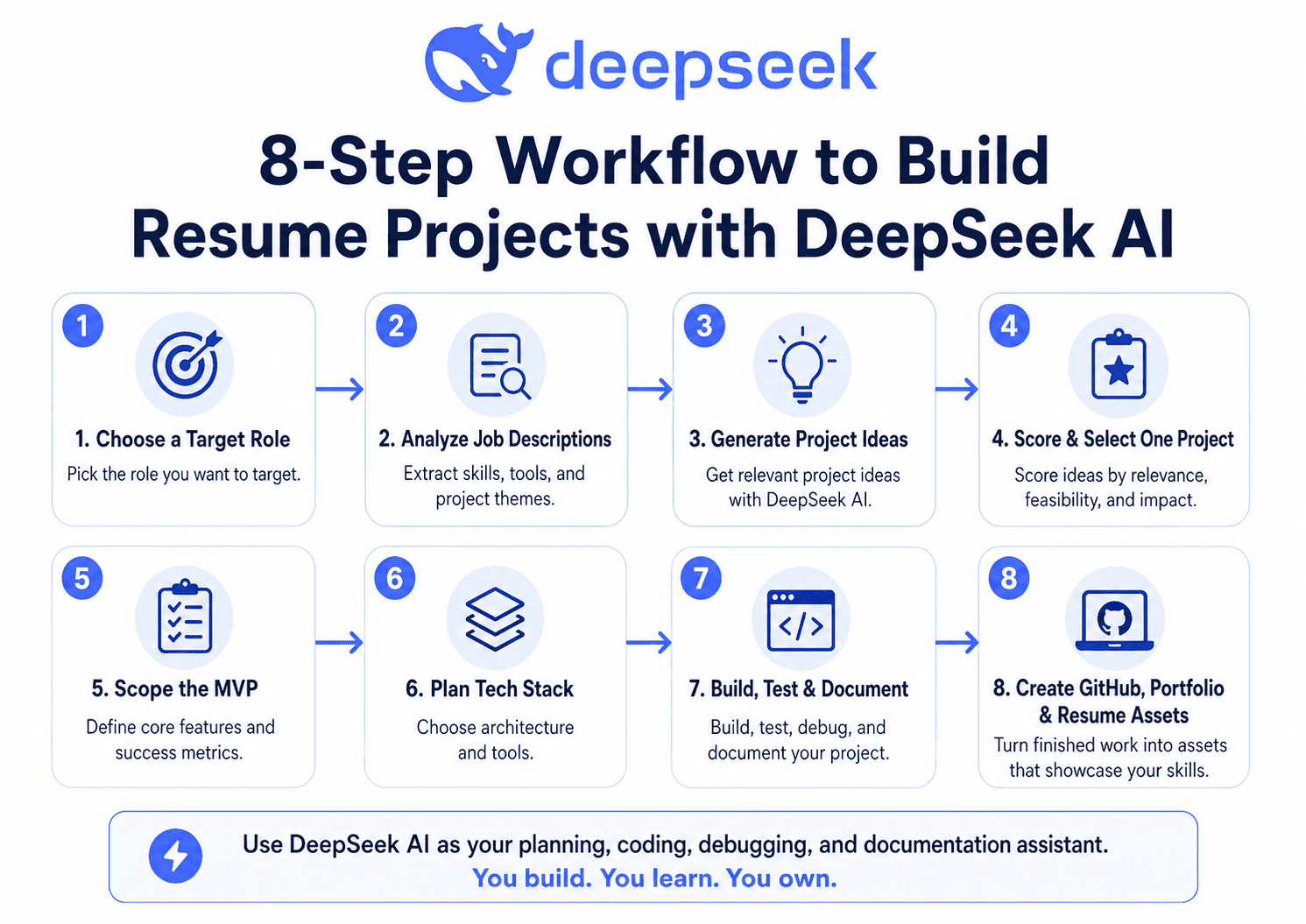
The best way to use DeepSeek for resume projects is to follow a structured workflow:
- Choose a target role.
- Extract required skills from real job descriptions.
- Generate project ideas connected to those skills.
- Score and select one project.
- Scope a realistic MVP.
- Plan the architecture and tech stack.
- Build, test, debug, and document the project.
- Turn the finished work into GitHub, portfolio, and resume assets.
This workflow prevents random project building. Instead of asking, “What project should I build?” you ask, “What project proves I can do the job I want?”
Step 1 — Choose a Target Role Before Choosing a Project
A common mistake is choosing a project before choosing a career direction. That usually leads to generic projects that do not match job requirements.
Start with one target role:
| Target Role | Project Should Prove |
|---|---|
| Front-end developer | UI, responsive design, state management, accessibility, API integration |
| Back-end developer | APIs, databases, authentication, performance, testing |
| Full-stack developer | Frontend, backend, database, deployment, end-to-end features |
| Data analyst | Data cleaning, dashboards, SQL, visualization, business insights |
| AI/ML engineer | Model usage, evaluation, data pipelines, inference, responsible AI |
| DevOps/cloud beginner | CI/CD, cloud deployment, monitoring, containers, infrastructure basics |
Use this DeepSeek prompt:
Analyze these 3 job descriptions and extract the top technical skills, soft skills, tools, and project themes I should demonstrate in my resume projects. Return the result as a prioritized table with columns for skill, frequency, importance, related project idea, and proof I can show.Paste only public job descriptions. Do not paste private recruiter messages, personal salary details, or confidential company information.
Step 2 — Use DeepSeek to Turn Job Skills Into Project Ideas
Once you know the required skills, ask DeepSeek to create projects that prove those skills.
Use this prompt:
I am targeting a [TARGET ROLE] role. Based on these skills: [PASTE SKILLS], generate 12 resume-worthy project ideas. Include beginner, intermediate, and advanced options. Each idea should solve a realistic problem, avoid generic tutorial clones, and be possible to finish in a weekend, 2 weeks, or 1 month.Then ask for a scoring table:
| Project Idea | Target Role | Skills Demonstrated | Difficulty | Resume Value | Time Estimate | Why It Stands Out |
|---|---|---|---|---|---|---|
| AI Job Match Dashboard | Full-stack / AI | React, FastAPI, DeepSeek API, text analysis | Medium | High | 2–4 weeks | Connects directly to hiring workflows |
| Sales Insights Dashboard | Data analyst | SQL, BI, charts, business analysis | Medium | High | 2 weeks | Shows business thinking, not just charts |
| Support Chatbot with Knowledge Base | AI developer | RAG, APIs, UX, testing | Advanced | High | 1 month | Demonstrates practical AI integration |
| Personal Portfolio Generator | Front-end | UI, forms, API calls, content generation | Medium | Medium | 1–2 weeks | Useful and easy to demo |
The best project is not always the hardest. It is the project that proves the right skills in a way a recruiter can quickly understand.
Step 3 — Score and Select the Best Project
Use a simple 1–5 scoring system:
| Criteria | Question | Score |
|---|---|---|
| Relevance | Does it match the target role? | 1–5 |
| Feasibility | Can you finish it with your current skills and time? | 1–5 |
| Demonstrable output | Can someone see or test it? | 1–5 |
| Interview value | Can you explain decisions and tradeoffs? | 1–5 |
| Originality | Is it customized beyond a tutorial? | 1–5 |
Ask DeepSeek:
Score these project ideas from 1 to 5 for relevance, feasibility, demonstrable output, interview explanation value, and originality. Recommend the best project for a junior [TARGET ROLE] candidate and explain why.Choose one project with a strong total score. Avoid starting five projects at once. One complete, documented project is usually more valuable than five unfinished repositories.
Step 4 — Scope the MVP With DeepSeek
Your MVP is the smallest version of the project that proves the core skill.
Ask DeepSeek to define:
- Problem statement
- User persona
- Core features
- Nice-to-have features
- Data or API needs
- Success metrics
- Constraints
- Deliverables
Use this prompt:
Create an MVP specification for this resume project: [PROJECT IDEA]. Include the problem statement, target user, 5 core features, 5 nice-to-have features, data/API requirements, success metrics, constraints, and final deliverables. Keep the scope realistic for a junior developer to finish in 2–3 weeks.For example, an “AI Resume Analyzer and Job Match Dashboard” MVP could include:
- A text box for anonymized resume content
- A text box for a job description
- Skill extraction
- Match score
- Gap analysis
- Improvement suggestions
- Exportable summary
The stretch version could add user accounts, saved comparisons, charts, PDF export, or multiple job comparisons.
Step 5 — Plan the Architecture and Tech Stack
Before writing code, ask DeepSeek to compare possible stacks. The right stack depends on your target role.
For a full-stack AI project, you might use:
- Frontend: React, Next.js, or Vue
- Backend: FastAPI, Node.js, or Django
- Database: PostgreSQL, SQLite, or MongoDB
- AI/LLM layer: DeepSeek API
- Auth: optional for MVP
- Deployment: Vercel, Render, Railway, or Docker-based hosting
- Testing: unit tests and integration tests
- Documentation: README, architecture diagram, demo screenshots
Prompt:
Compare three tech stack options for this project: [PROJECT IDEA]. For each option, explain the pros, cons, difficulty, deployment path, and which target role it best supports. Recommend one stack for a junior developer and explain the tradeoffs.Example architecture for AI Resume Analyzer and Job Match Dashboard:
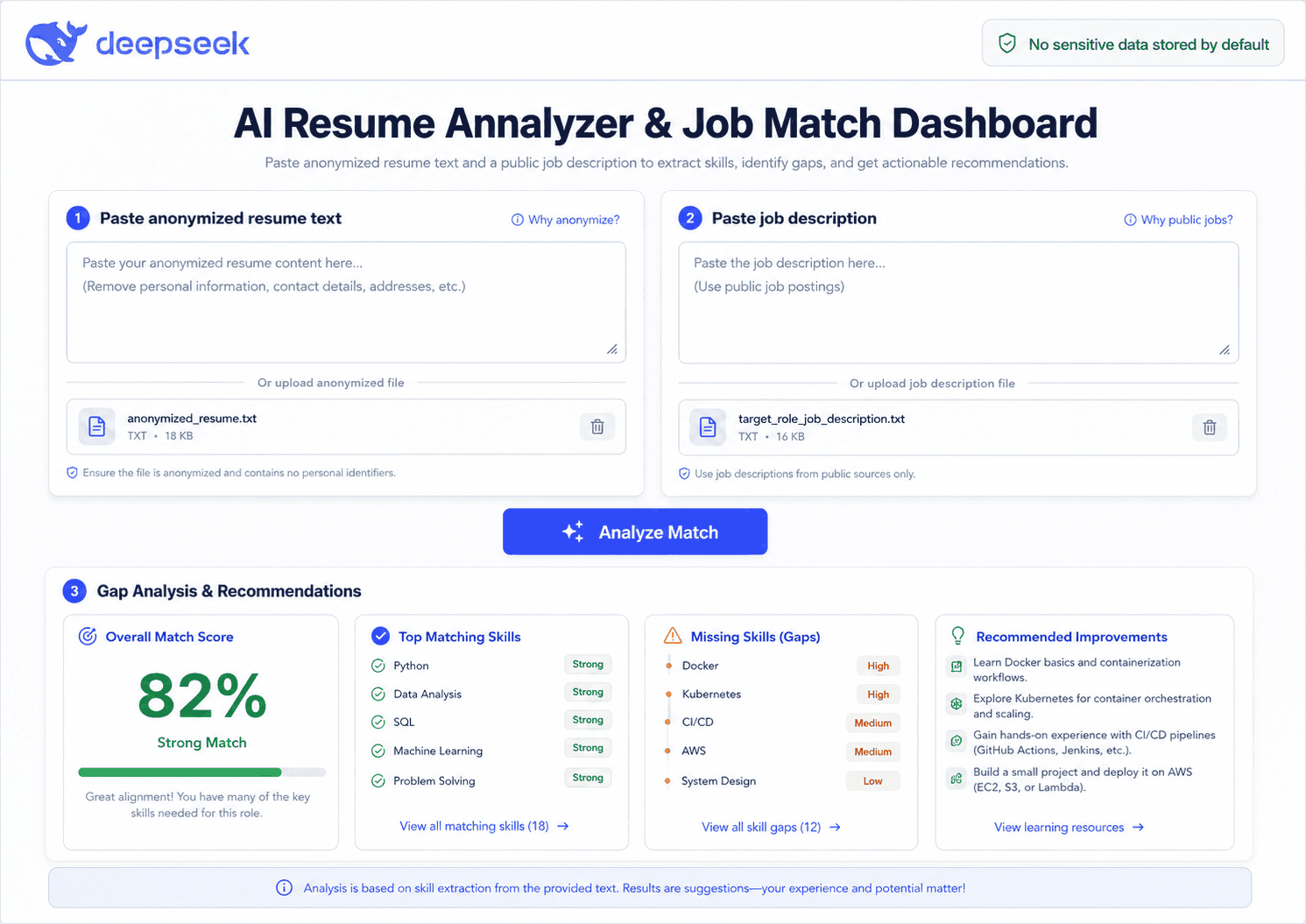
- User enters anonymized resume text.
- User pastes a public job description.
- Backend sends structured prompts to DeepSeek.
- DeepSeek extracts skills, compares requirements, and returns a gap analysis.
- Frontend displays match categories, missing skills, and improvement suggestions.
- App stores no sensitive data by default.
- README explains privacy decisions and limitations.
This is a strong resume project because it connects AI, full-stack development, UX, prompt design, and career use cases.
Step 6 — Build the Project With DeepSeek Without Losing Ownership
DeepSeek can help you move faster, but you still need to own the project.
Use this workflow:
- Ask for a project plan.
- Build one feature at a time.
- Ask DeepSeek to explain unfamiliar code.
- Write tests.
- Debug errors.
- Refactor.
- Document decisions.
- Commit progress to GitHub.
Useful prompts:
Break this MVP into weekly milestones and daily coding tasks. Keep each task small enough to complete in 1–2 hours.Generate starter code for [FEATURE] using [TECH STACK]. Explain each file and function so I understand how it works.I got this error: [ERROR]. Here is the relevant code: [CODE]. Explain the likely cause, suggest a fix, and show how to test that the fix works.Create unit test cases for this function/component. Include normal cases, edge cases, and failure cases.Review this code for readability, maintainability, and security issues. Suggest improvements without changing the core behavior.Explain this project feature in interview-friendly language. Include what problem it solves, why I built it this way, and what I would improve next.Do not copy large blocks of code you cannot explain. If an interviewer asks how your project works, your answer matters as much as the GitHub link.
Step 7 — Create a GitHub Repo That Recruiters Can Understand
A project without documentation is easy to ignore. GitHub’s own documentation says a README helps explain why a project is useful, what it does, and how people can use it. GitHub also notes that README files often include what the project does, why it is useful, how users can get started, where users can get help, and who maintains it.
Your README should include:
- Project title
- Problem solved
- Demo link
- Screenshots or GIF
- Tech stack
- Features
- Architecture
- Installation steps
- How it works
- Challenges and tradeoffs
- Future improvements
- License
- Contact or portfolio link
DeepSeek README prompt:
Write a professional GitHub README for my project. Details: [PROJECT DESCRIPTION], tech stack: [STACK], features: [FEATURES], setup steps: [STEPS], challenges: [CHALLENGES], future improvements: [IMPROVEMENTS]. Make it clear for recruiters and technical interviewers.Add screenshots even if the project is simple. Recruiters may not run your code, but they can quickly understand a visual demo.
Step 8 — Turn the Project Into Resume Bullets
A resume bullet should show action, technology, and result. Avoid vague claims.
Bad:
Built an AI project using DeepSeek.
Better:
Built an AI-powered job match dashboard using DeepSeek API, React, and FastAPI to compare resume skills against job descriptions and generate structured improvement recommendations.
Use this formula:
[Action verb] + [project/functionality] + [technology] + [scope/outcome] + [relevance to role]Resume bullet templates:
- Built a [PROJECT TYPE] using [TECH STACK] to solve [PROBLEM] for [USER TYPE].
- Integrated [API/TOOL] into a [FRONTEND/BACKEND] application to automate [TASK].
- Designed and deployed [FEATURE] with [TECHNOLOGY], improving [PROCESS/USER EXPERIENCE].
- Created a documented GitHub project with [FEATURES], [TESTS], and [DEMO] to demonstrate [SKILL].
- Developed an AI-assisted workflow that analyzes [INPUT] and returns [OUTPUT] using [MODEL/API].
DeepSeek prompt:
Rewrite this project description into 5 strong resume bullets for a junior [TARGET ROLE]. Each bullet should start with an action verb, mention technologies used, avoid exaggeration, and connect to job requirements.Resume Project Ideas You Can Build With DeepSeek AI
| Project | Best For | Skills Demonstrated | MVP Features | Stretch Features | Resume Bullet Angle |
|---|---|---|---|---|---|
| AI Resume Analyzer and Job Match Dashboard | Full-stack, AI | APIs, React, backend, prompt design | Resume/job comparison, skill gaps | Auth, saved reports, charts | Built an AI dashboard for job matching |
| Personal Portfolio Content Generator | Front-end | UI, forms, AI integration | Generate bio, project copy | Theme export, CMS integration | Created a tool that helps users write portfolio content |
| Customer Support Chatbot With Knowledge Base | AI, backend | RAG, APIs, search, testing | FAQ upload, answer generation | Source citations, admin panel | Built a support assistant with knowledge retrieval |
| AI Study Planner | Students, front-end | UX, scheduling, AI prompts | Goals, study plan, reminders | Calendar sync, progress tracking | Developed a personalized study planning app |
| Code Review Assistant | Developers | Static analysis, AI, GitHub workflow | Paste code, get feedback | GitHub PR integration | Built a code review helper for maintainability |
| Job Application Tracker With AI Summaries | Full-stack | CRUD, database, AI summaries | Track jobs, notes, next steps | Email parsing, analytics | Created an app to organize job applications |
| Data Dashboard With Natural Language Insights | Data analyst | SQL, charts, analysis | Upload data, show charts | AI insights, anomaly detection | Built a dashboard that explains trends in plain English |
| AI Email Response Assistant | Productivity apps | Prompting, UX, API use | Draft replies by tone | Inbox integration | Built an assistant for professional email drafting |
| Document Summarizer With Source Notes | AI developer | Summarization, chunking, UI | Upload text, summary, notes | Citations, search, history | Created a document analysis tool |
| Interview Question Generator | Career tools | AI prompts, forms, personalization | Role-based questions | Mock interview mode | Built a tool that generates interview prep questions |
DeepSeek Prompt Library for Resume Projects
Copy and adapt these DeepSeek project planning prompts:
1. Analyze these job descriptions and extract the top skills, tools, and project themes I should demonstrate.2. Generate 15 resume-worthy project ideas for a junior [ROLE], grouped by beginner, intermediate, and advanced difficulty.3. Score these project ideas by relevance, feasibility, originality, demonstrable output, and interview value.4. Create an MVP specification for [PROJECT], including user persona, features, constraints, success metrics, and deliverables.5. Compare three architecture options for [PROJECT] and recommend the best one for a junior developer.6. Break this MVP into milestones, user stories, and coding tasks.7. Generate starter code for [FEATURE] using [TECH STACK], and explain how each part works.8. Debug this error and explain the root cause, likely fix, and how to test the fix.9. Write unit and integration test cases for this project feature.10. Refactor this code for readability, maintainability, and performance without changing behavior.11. Write a recruiter-friendly GitHub README based on these project details.12. Turn this project into a portfolio case study with problem, process, solution, screenshots, and results.13. Rewrite this project into resume bullets for a junior [ROLE].14. Prepare me to explain this project in an interview, including architecture, tradeoffs, challenges, and improvements.Common Mistakes to Avoid
Avoid these mistakes when building portfolio projects with DeepSeek:
- Building tutorial clones with no customization.
- Choosing a project too big to finish.
- Hiding good work behind a poor README.
- Having no demo, screenshots, or clear explanation.
- Using AI-generated code without understanding it.
- Listing the project on a resume without measurable scope or impact.
- Uploading sensitive information into AI tools.
- Ignoring testing and deployment.
- Failing to prepare interview explanations.
- Starting too many projects before finishing one.
A small, complete project is usually better than an ambitious project that never reaches GitHub.
Final Checklist Before Adding the Project to Your Resume
Before adding the project to your resume, confirm:
- GitHub repo is public.
- README is complete.
- Screenshots or demo are included.
- Project runs locally.
- Code is organized.
- Commit history exists.
- Resume bullet is written.
- Project matches the target job.
- Privacy risks are removed.
- API keys are hidden.
- You can explain the architecture.
- You can describe what you would improve next.
FAQ
Can I use DeepSeek AI to build resume projects?
Yes. You can use DeepSeek AI to plan, code, debug, test, document, and describe resume projects. The important part is that you understand the project and can explain your decisions.
What kind of projects should I build with DeepSeek AI?
Build projects connected to your target role. For front-end roles, focus on UI and API integration. For data roles, focus on analysis and dashboards. For AI roles, focus on model integration, evaluation, and responsible use.
Is it okay to use AI-generated code in a resume project?
Yes, as long as you understand, test, and customize the code. Do not present AI-generated work as proof of skill if you cannot explain how it works.
How many projects should I put on my resume?
Most early-career candidates need two or three strong projects. One excellent project with a demo, README, and clear resume bullets can be more valuable than several weak projects.
Should I build a simple project or an advanced one?
Start with a simple project you can finish. Then add one or two advanced features to make it stand out. Finished and explainable beats complex and incomplete.
How do I explain an AI-assisted project in an interview?
Be honest. Explain that you used AI as a coding and planning assistant, then describe your own decisions, debugging process, architecture, testing, and improvements.
Can beginners use DeepSeek for portfolio projects?
Yes. Beginners can use DeepSeek to break projects into smaller tasks, explain unfamiliar code, and write documentation. Beginners should avoid copying code without learning from it.
What should I avoid sharing with DeepSeek?
Avoid sharing private resumes, personal identification details, API keys, passwords, proprietary code, confidential company documents, client data, or sensitive personal information.
Conclusion
The best resume projects are role-focused, finished, documented, and explainable. DeepSeek can help you move from a vague idea to a scoped MVP, architecture plan, working features, GitHub README, portfolio case study, and polished resume bullets.
Start with one small project that matches your target role. Use DeepSeek to plan faster, debug smarter, and communicate your work clearly, but keep ownership of the decisions and learning process.
That is the practical way to approach How to Plan and Build Resume Projects Using DeepSeek AI without turning your portfolio into a collection of unfinished or generic tutorial clones.