
Last reviewed: May 15, 2026
DeepSeek AI for Teachers is becoming a popular search topic because educators are looking for practical ways to use generative AI without losing control of quality, privacy, or professional judgment. Used carefully, DeepSeek can help teachers brainstorm lesson ideas, draft rubrics, simplify reading passages, create quizzes, plan differentiated activities, and prepare feedback.
But it should not be treated as a replacement for a teacher, a school-approved grading system, or a place to upload private student records.
DeepSeek’s official materials describe its services as generative AI products based on large language models that can generate text, tables, and code from user inputs. DeepSeek also offers access through its website, app, and API platform.
For teachers, the safest approach is simple: use DeepSeek as an AI teaching assistant for drafts and ideas, not as the final authority on curriculum, grading, facts, student data, or school policy.
Table of Contents
Quick Answer: What Is DeepSeek AI for Teachers?
Quick answer: DeepSeek AI for teachers is the use of DeepSeek’s generative AI tools to support classroom tasks such as lesson planning, worksheet creation, differentiated instruction, quiz drafting, rubric design, feedback writing, and teacher communication. It can save planning time, but teachers must fact-check outputs, adapt materials to their students, and avoid entering personal or sensitive student data.
What Is DeepSeek AI?
DeepSeek is a generative AI service powered by large language models. In practical classroom terms, that means it can respond to prompts, generate text, organize information, rewrite explanations, create tables, and draft educational materials.
Teachers may use DeepSeek for tasks such as:
- Brainstorming lesson activities.
- Creating a first draft of a DeepSeek lesson plan.
- Turning standards into learning objectives.
- Drafting formative assessment questions.
- Simplifying a complex passage.
- Generating discussion questions.
- Creating a rubric draft.
- Rewriting teacher emails in a clearer tone.
DeepSeek’s API documentation also states that its API uses a format compatible with OpenAI/Anthropic-style API workflows, which may matter for schools or developers building approved internal tools.
However, teachers should not assume that DeepSeek is automatically approved for school use, student use, or processing student data. DeepSeek’s own privacy policy says user inputs can include prompts, uploaded files, feedback, chat history, photos, and other content provided to the service. It also states that the services are not designed or intended to process sensitive personal data, including personal data of children.
Should Teachers Use DeepSeek AI?
Teachers can use DeepSeek responsibly when the task is low-risk, draft-based, and reviewed by a human. It is most useful when the teacher remains in control of accuracy, tone, curriculum alignment, and student needs.
DeepSeek’s terms caution that outputs may contain errors or omissions and should not be treated as professional advice. They also say outputs used for decisions with legal or material impact on natural persons, including educational decisions, should undergo human review.
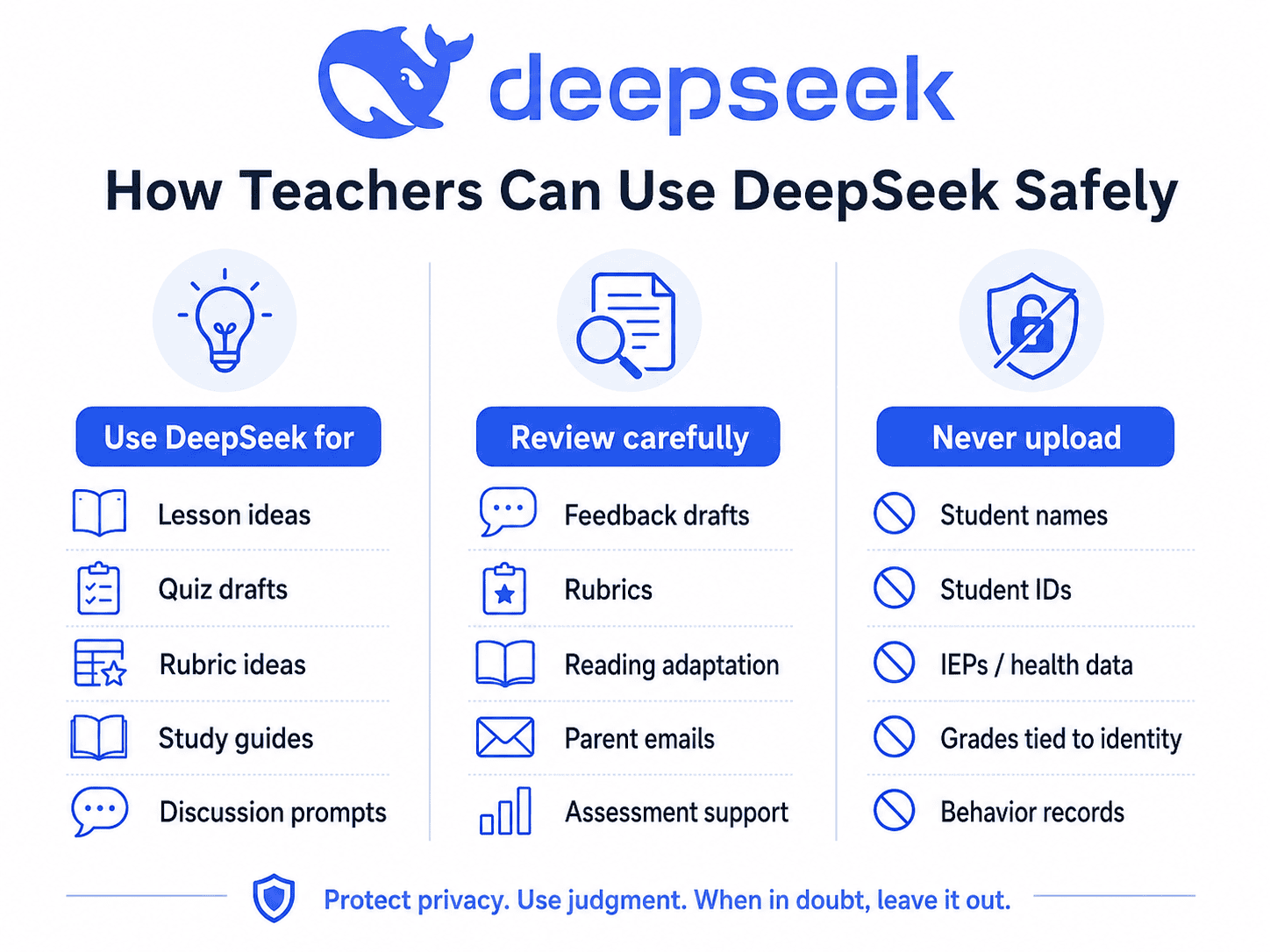
| Best for | Be careful with | Avoid |
|---|---|---|
| Brainstorming lesson ideas | Feedback drafts | Uploading student names |
| Drafting worksheets | Rubric suggestions | Uploading student IDs |
| Creating quiz questions | Reading-level adaptation | Uploading IEPs or health data |
| Rewriting explanations | Parent email drafts | Uploading behavior records |
| Generating discussion prompts | Assessment support | Unsupervised high-stakes grading |
| Creating study guides | Summaries of complex content | Treating AI outputs as final facts |
| Drafting classroom activities | AI literacy activities | Letting students use it without rules |
The UK Department for Education’s guidance on generative AI in schools recommends checking whether a tool is approved by the school, understanding how the tool uses personal data, acknowledging AI use where appropriate, and fact-checking AI results.
DeepSeek AI for Teachers: Best Classroom Use Cases
The best uses of DeepSeek AI in education are practical, teacher-led, and low-risk. The table below gives classroom workflows, ready-to-use prompts, and what teachers should review before using the output.
| Use case | What it helps with | Ready-to-use prompt | Teacher review needed |
|---|---|---|---|
| Lesson planning | Turns an objective into a structured lesson | “Act as a Grade 7 science teacher. Create a 45-minute lesson on photosynthesis with objectives, warm-up, direct instruction, activity, exit ticket, and homework.” | Check standards, timing, misconceptions, and age level. |
| Differentiated instruction | Creates varied versions of the same task | “Create three versions of this activity: support, core, and challenge. Keep the same learning objective but vary scaffolding and complexity.” | Check fairness and avoid lowering expectations too much. |
| Quiz creation | Drafts formative assessment items | “Create 10 multiple-choice questions and 3 short-answer questions on fractions for Grade 5. Include an answer key and common misconceptions.” | Verify answer accuracy and difficulty balance. |
| Rubric generation | Drafts criteria and performance levels | “Create a 4-level rubric for an 8th-grade argumentative essay. Criteria: claim, evidence, reasoning, organization, grammar.” | Align with your assignment and grading policy. |
| Feedback drafting | Helps phrase constructive comments | “Using this anonymized writing sample and rubric, draft strengths, next steps, and one revision question. Do not assign a grade.” | Remove personal data and review tone carefully. |
| Reading-level adaptation | Rewrites complex text for accessibility | “Rewrite this passage for Grade 6 readers while preserving key vocabulary: [paste non-sensitive text]. Add 5 comprehension questions.” | Check accuracy and whether key concepts were oversimplified. |
| Socratic questioning | Builds inquiry-based discussion | “Create 12 Socratic questions for a high school discussion on ‘The Tell-Tale Heart,’ moving from comprehension to analysis.” | Adjust for class maturity and curriculum goals. |
| Parent communication drafts | Creates a neutral first draft | “Draft a polite email to a parent about missing homework. Do not include student names. Keep the tone supportive and solution-focused.” | Add details manually after AI draft, following school policy. |
| Study guides | Summarizes topics into review format | “Create a one-page study guide for Grade 9 biology on cell organelles, including key terms, diagrams to draw, and practice questions.” | Check completeness and factual accuracy. |
| Professional development | Helps teachers reflect and plan | “Create a 30-minute professional development activity for teachers on responsible classroom AI use, including discussion questions.” | Align with district policy and local law. |
Generative AI may reduce administrative burden and support feedback or tailored support, but only when used safely and transparently.
How to Write Better DeepSeek Prompts for Teaching
The quality of DeepSeek prompts for teachers depends on specificity. A vague prompt produces generic output. A clear prompt produces something closer to classroom-ready.
Use this formula:
Role + Grade level + Subject + Objective + Student needs + Constraints + Output format + Review criteria
Prompt Formula Example
Role: Act as a middle school English teacher.
Grade level: Grade 8.
Subject: Argumentative writing.
Objective: Students will write a claim supported by evidence.
Student needs: Include support for English learners.
Constraints: 45-minute class, no devices.
Output format: Table with timing, teacher actions, student actions, materials.
Review criteria: Align with Common Core-style writing skills and include an exit ticket.
Before and After Prompt Examples
| Weak prompt | Better prompt |
|---|---|
| “Make a lesson about fractions.” | “Act as a Grade 5 math teacher. Create a 50-minute lesson on adding unlike fractions. Include a warm-up, visual model, guided practice, independent practice, 3 common misconceptions, and an exit ticket.” |
| “Make a rubric.” | “Create a 4-level rubric for a Grade 10 literary analysis paragraph. Criteria: thesis, textual evidence, explanation, organization, conventions. Use student-friendly language.” |
| “Write feedback.” | “Using the anonymized student paragraph below, draft feedback linked to this rubric. Give 2 strengths, 2 next steps, and 1 revision question. Do not assign a grade.” |
Ready-to-Copy DeepSeek Prompts for Teachers
Use these prompt boxes as starting points. Always adapt them to your curriculum, students, and school rules.
1. Lesson Plan Prompt
Act as an experienced [grade level] [subject] teacher. Create a [length]-minute lesson on [topic]. Include learning objectives, required materials, warm-up, direct instruction, guided practice, independent practice, differentiation, checks for understanding, and an exit ticket. Keep activities age-appropriate and aligned with [standard/curriculum goal].2. Differentiated Lesson Prompt
Create three versions of this classroom activity for [grade level]: support, core, and challenge. Keep the same learning objective: [objective]. Include scaffolds for struggling learners, extension tasks for advanced learners, and one way to check understanding.3. Exit Ticket Prompt
Create 5 exit ticket questions for a [grade level] lesson on [topic]. Include 2 recall questions, 2 application questions, and 1 reflection question. Provide an answer key and explain what each question reveals about student understanding.4. Multiple-Choice Quiz Prompt
Create a 12-question multiple-choice quiz for [grade level] students on [topic]. Include plausible distractors based on common misconceptions, an answer key, and a short explanation for each correct answer.5. Rubric Prompt
Create a 4-level rubric for [assignment type] in [grade level] [subject]. Criteria should include [criteria]. Use clear student-friendly language and include descriptors for advanced, proficient, developing, and beginning performance.6. Feedback Prompt
Using the anonymized student work below and the rubric provided, draft feedback that includes 2 strengths, 2 specific next steps, and 1 question to guide revision. Do not include a grade. Keep the tone supportive and specific.7. Misconception Analysis Prompt
Students often misunderstand [concept]. List 5 likely misconceptions, how each misconception might appear in student work, and one teaching strategy to address each misconception.8. Reading Passage Simplification Prompt
Rewrite the following passage for [grade level] readers while preserving the key ideas and academic vocabulary. Add definitions for difficult terms and create 5 comprehension questions.9. Classroom Discussion Prompt
Create a classroom discussion plan for [grade level] students on [topic/text]. Include 10 questions that move from basic comprehension to analysis, evaluation, and personal connection. Add discussion norms and sentence stems.10. Project-Based Learning Prompt
Design a project-based learning activity for [grade level] on [topic]. Include the driving question, final product, student roles, timeline, assessment rubric, required materials, and differentiation options.11. Parent Email Prompt
Draft a professional, supportive email to a parent/guardian about [general issue]. Do not include student names or private records. Keep the tone respectful, solution-focused, and concise. Include a suggested next step.12. Study Guide Prompt
Create a one-page study guide for [grade level] students on [topic]. Include key vocabulary, essential concepts, common mistakes, practice questions, and a short self-check section.13. Academic Integrity Prompt
Create a student-friendly classroom policy explaining acceptable and unacceptable uses of AI for [grade level]. Include examples, consequences, and a short reflection question about responsible AI use.14. AI Literacy Classroom Activity Prompt
Design a 30-minute AI literacy activity for [grade level] students. The activity should teach students how to question AI outputs, identify possible hallucinations, protect personal data, and use AI as a learning support rather than a shortcut.Example: Using DeepSeek to Create a Lesson Plan
Here is a realistic example for a Grade 8 science teacher.
Teacher Input Prompt
Act as an experienced Grade 8 science teacher. Create a 50-minute lesson on Newton’s Third Law of Motion. Students should understand that for every action, there is an equal and opposite reaction. Include a warm-up, short teacher explanation, hands-on activity using balloons or carts, guided questions, common misconceptions, differentiation, and an exit ticket. Format the lesson in a table.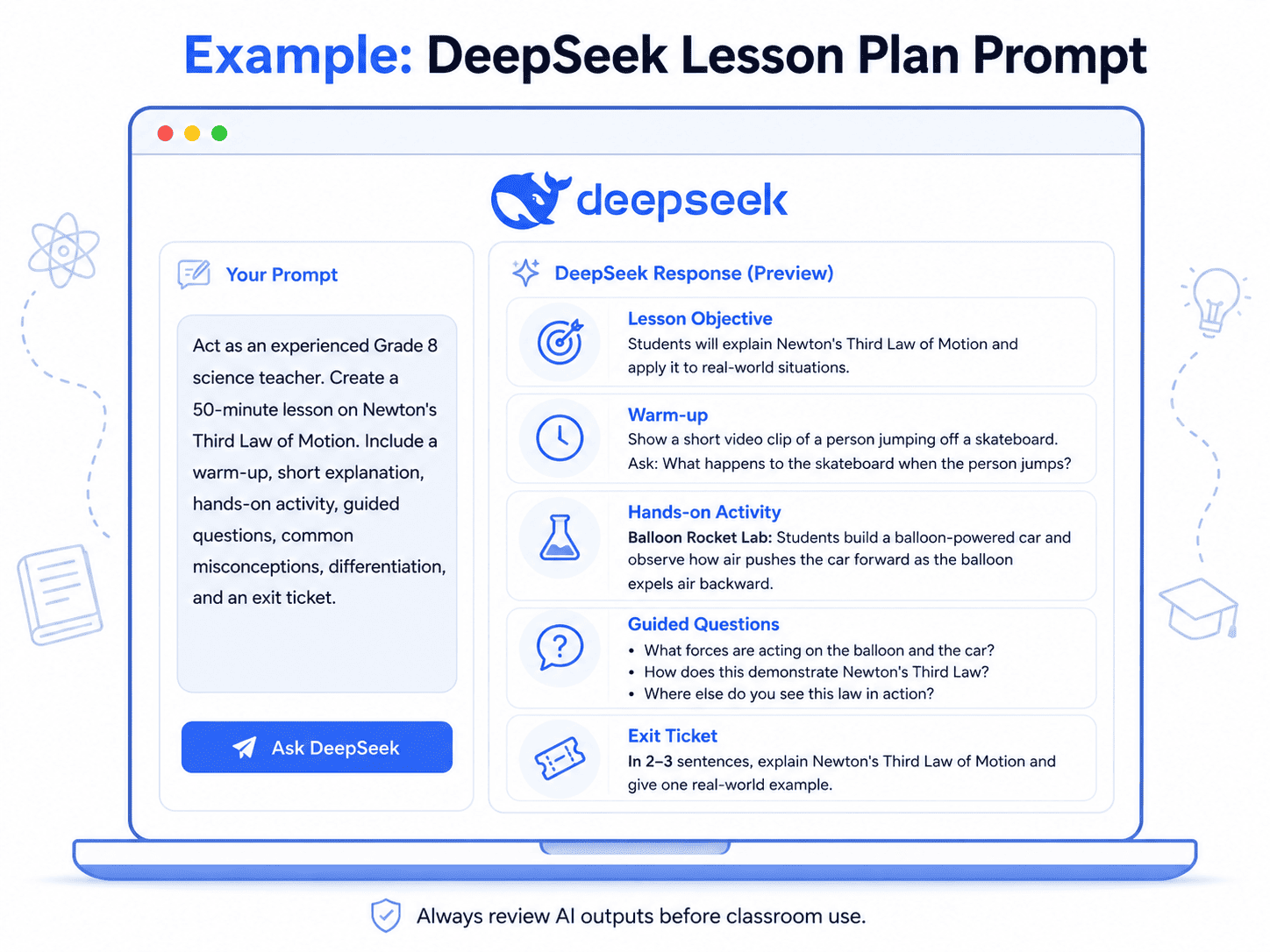
Expected Output Structure
| Lesson part | Time | Teacher action | Student action |
|---|---|---|---|
| Warm-up | 5 min | Ask students to explain what happens when a balloon is released. | Students predict motion and explain reasoning. |
| Mini-lesson | 10 min | Define action-reaction force pairs with examples. | Students identify force pairs. |
| Activity | 20 min | Guide balloon rocket or cart demonstration. | Students test, observe, and record results. |
| Discussion | 10 min | Ask students to connect observations to Newton’s Third Law. | Students explain evidence. |
| Exit ticket | 5 min | Ask students to identify an action-reaction pair. | Students submit individual responses. |
How the Teacher Should Improve It
The teacher should check whether the explanation is scientifically accurate, whether the activity can be completed with available materials, and whether the lesson matches the school curriculum. The teacher should also add classroom-specific details, such as group sizes, safety instructions, and accommodations.
Can DeepSeek Grade Student Work?
DeepSeek can help with grading support, but it should not replace teacher judgment.
A responsible use is to ask DeepSeek to compare an anonymized sample against a rubric and draft feedback. A risky use is uploading identifiable student work and asking the tool to make final grading decisions.
DeepSeek’s own terms state that outputs may include incorrect, incomplete, or inaccurate content. They also require human review when outputs are used for decisions that could have legal or material impact on people, including educational decisions.
Safer DeepSeek Grading Workflow
- Remove identifying student data.
- Use an anonymized sample.
- Provide a clear rubric.
- Ask for evidence-based comments, not a final grade.
- Review for accuracy, bias, and tone.
- Compare with your own professional judgment.
- Finalize manually.
Example Feedback Prompt
Using the anonymized student paragraph below, compare the work to this rubric. Draft feedback only. Do not assign a grade. Provide:
1. Two strengths with evidence from the paragraph.
2. Two specific revision suggestions.
3. One question that helps the student improve their reasoning.
4. A short encouraging closing sentence.
Privacy and Safety: What Teachers Should Not Put Into DeepSeek
This is the most important section of this guide.
DeepSeek’s privacy policy says it may collect user inputs such as text prompts, uploaded files, feedback, chat history, and other content provided to the service. It also says the services are not designed or intended to process sensitive personal data, including personal data of children, and that DeepSeek directly collects, processes, and stores personal data in the People’s Republic of China to provide its services.
If a school or developer builds an internal classroom tool using the DeepSeek API, they are responsible for their own privacy notice, consent process, data handling rules, and compliance with school or district policy. Do not assume DeepSeek’s public privacy policy alone covers the full downstream classroom workflow.
DeepSeek also states that its services are not aimed at children and that it does not knowingly process personal data from children.
Teacher safety note: Do not use DeepSeek as a storage place, grading system, student profile tool, or case-management system. Use it only for non-sensitive drafting and planning unless your school has formally approved a specific workflow.
Do Not Upload Checklist
Do not upload:
- Student names.
- Student ID numbers.
- Student email addresses.
- Grades linked to identities.
- IEPs or special education records.
- Health information.
- Behavior records.
- Counseling notes.
- Attendance records.
- Parent contact details.
- Confidential school documents.
- Unpublished exam materials.
- Any information your school classifies as private or restricted.
FERPA-related guidance defines personally identifiable information in education records as including direct identifiers such as a student’s name or identification number, indirect identifiers such as date of birth, and other information that can distinguish or trace a student’s identity.
COPPA imposes requirements on operators of websites or online services directed to children under 13, or operators that knowingly collect personal information online from children under 13.
Schools should also consider local data protection laws, district policy, vendor approval processes, parental consent rules, and age restrictions before allowing students to use any AI tool.
DeepSeek vs ChatGPT for Teachers
DeepSeek and ChatGPT can both support classroom AI workflows, but teachers should not choose based only on popularity, speed, or cost. The better choice depends on school approval, privacy requirements, available features, and the specific teaching task.
| Comparison area | DeepSeek for teachers | ChatGPT for teachers |
|---|---|---|
| Classroom usability | Useful for drafting, brainstorming, planning, and text-based classroom support. | Also useful for drafting, planning, feedback, tutoring-style support, file workflows, and education-specific workspaces. |
| Prompting | Works best with clear role, grade level, objective, constraints, and output format. | Also benefits from detailed prompts and iterative refinement. |
| Reasoning tasks | Can support planning, explanations, and structured outputs, but outputs require review. | Can support similar tasks; official education products may include more school-oriented features. |
| Privacy considerations | Teachers should carefully review DeepSeek’s privacy policy before using student-related content. | OpenAI states that ChatGPT for Teachers uses education-grade privacy and does not use shared content to train models by default. |
| School approval | Do not assume approval; check district policy. | Do not assume approval unless the school or district has adopted it. |
| Integrations | DeepSeek offers web, app, and API access; API details may matter for approved technical deployments. | ChatGPT for Teachers mentions file uploads, connectors, image generation, collaboration, and admin controls. |
| Best decision factor | Use only if it fits policy, privacy, and instructional needs. | Use only if it fits policy, privacy, and instructional needs. |
The safest answer is not “DeepSeek is better” or “ChatGPT is better.” The best tool is the one your school allows, your students can use safely, and your workflow can review responsibly.
A Responsible AI Checklist for Teachers
Before using DeepSeek AI in education, ask:
- Is this allowed by my school or district?
- Am I using an approved tool or an unapproved public tool?
- Did I remove all student personal data?
- Did I avoid sensitive student records?
- Is the output fact-checked?
- Does it match curriculum standards?
- Is it age-appropriate?
- Did I check for bias?
- Did I adapt the material to my students?
- Have I disclosed AI use if required?
- Am I using AI as support, not as a replacement?
- Would I be comfortable explaining this use to a parent, administrator, or data protection officer?
The European Commission’s updated guidance for educators emphasizes ethical, critical AI literacy, risk awareness, and responsible use of AI and data in teaching and learning.
UNESCO also frames generative AI in education around human-centered implementation, policy planning, and building human capacity rather than simply adopting tools without safeguards.
Common Mistakes Teachers Should Avoid
1. Using vague prompts
A vague prompt like “make a lesson” usually creates generic content. Add grade level, objective, standards, time, materials, student needs, and output format.
2. Trusting generated citations
AI tools can generate convincing but false citations. Always verify sources manually.
3. Uploading student data
Never paste identifiable student records into a public AI tool unless your school has approved that exact use and confirmed the data protection terms.
4. Using AI feedback without review
AI feedback can sound polished but miss the real learning need. Teachers should review every comment before giving it to a student.
5. Letting students use AI without rules
Students need clear expectations: when AI is allowed, how it should be cited or disclosed, and what counts as misuse.
6. Copying AI-generated lessons without adapting them
A lesson plan that looks complete may still be too long, too easy, too hard, misaligned with standards, or unsuitable for your classroom.
7. Treating DeepSeek as a final factual authority
DeepSeek’s own terms warn that outputs may contain errors and should be verified.
Conclusion
DeepSeek AI for teachers can be useful when it is used as a planning partner, brainstorming assistant, rubric drafter, quiz generator, and feedback support tool. It can help teachers move faster from a blank page to a usable draft.
But the professional responsibility stays with the teacher.
The best classroom use of DeepSeek is not “ask AI to teach.” It is:
- Ask AI for a draft.
- Review it carefully.
- Align it with standards.
- Adapt it to your students.
- Remove private data.
- Keep human judgment in charge.
Used this way, DeepSeek can support smarter AI lesson planning, stronger classroom materials, and more efficient teacher workflows without compromising student privacy or educational quality.
FAQ
1. What is DeepSeek AI for teachers?
DeepSeek AI for teachers means using DeepSeek’s generative AI tools to support teaching tasks such as lesson planning, worksheet creation, quiz drafting, rubric design, feedback writing, and classroom communication. Teachers should use it as a drafting assistant, not as a replacement for professional judgment.
2. Can DeepSeek create lesson plans?
Yes. DeepSeek can draft lesson plans when given a clear prompt with grade level, subject, objective, class length, materials, student needs, and output format. Teachers should review the plan for accuracy, timing, curriculum alignment, and classroom suitability.
3. Is DeepSeek safe for students?
Teachers should be cautious. DeepSeek’s privacy policy says the services are not aimed at children and are not designed or intended to process sensitive personal data, including personal data of children. Schools should review DeepSeek’s current privacy policy, age terms, and district rules before allowing student use.
4. Can teachers use DeepSeek for grading?
DeepSeek can help draft feedback or compare anonymized work against a rubric, but it should not make final grading decisions. High-stakes grading and educational decisions require teacher review.
5. What should teachers avoid uploading to DeepSeek?
Teachers should avoid uploading student names, IDs, grades tied to identities, IEPs, health data, behavior records, counseling notes, attendance records, parent contact details, and confidential school documents.
6. Is DeepSeek better than ChatGPT for teachers?
Not universally. DeepSeek and ChatGPT can both support teacher workflows. The better option depends on school approval, privacy requirements, features, integrations, cost, and instructional needs.
7. Can students use DeepSeek for homework?
Students should only use DeepSeek if their teacher or school allows it. Teachers should define acceptable use, require disclosure when needed, and design assignments that focus on learning, reasoning, and original thinking.
8. How can teachers write better DeepSeek prompts?
Teachers can write better prompts by including role, grade level, subject, learning objective, student needs, constraints, output format, and review criteria. The more specific the prompt, the more useful the output.
9. Does DeepSeek replace teachers?
No. DeepSeek can support planning, drafting, and brainstorming, but it cannot replace teacher judgment, classroom relationships, assessment expertise, safeguarding responsibilities, or knowledge of individual students.
10. What is the best way to start using DeepSeek in the classroom?
Start with low-risk teacher-only tasks, such as brainstorming lesson ideas, creating exit tickets, drafting discussion questions, or generating a rubric draft. Do not upload student data. Review every output before using it.