
How to Use DeepSeek AI for LinkedIn and Job Applications is simple: use it as a career assistant to analyze job descriptions, improve your LinkedIn profile, tailor your resume, draft cover letters, write recruiter messages, and prepare for interviews. The key is to give DeepSeek specific inputs, then review every output for accuracy, tone, and honesty before you use it.
DeepSeek’s official website currently lists free access to its chat experience and API access for developers, while its documentation shows current API model options such as deepseek-v4-flash and deepseek-v4-pro; it also notes that legacy names like deepseek-chat and deepseek-reasoner are scheduled for deprecation on July 24, 2026.
LinkedIn also offers several AI-powered job-search features, including resume tips, cover letter drafting, job insights, and profile writing assistance for eligible users. However, LinkedIn repeatedly recommends that members verify AI-generated responses because they may contain inaccuracies.
Table of Contents
Quick Answer: How to Use DeepSeek AI for LinkedIn and Job Applications
Use DeepSeek AI for job search tasks by giving it your target role, job description, resume, LinkedIn profile text, achievements, and preferred tone. Ask it to identify missing keywords, rewrite weak bullets, improve your LinkedIn headline, draft tailored cover letters, and create recruiter messages. Always edit the output so it sounds accurate, human, and specific to you.
| Use Case | What to Give DeepSeek | What It Can Produce | What You Must Review |
|---|---|---|---|
| LinkedIn headline | Target role, industry, skills, current headline | 5–10 headline options | Accuracy, tone, keyword relevance |
| LinkedIn About section | Current About text, achievements, target roles | A stronger profile summary | Authentic voice and measurable claims |
| Resume tailoring | Resume and job description | Keyword gaps and revised bullets | Truthfulness, ATS formatting, dates |
| Cover letter | Resume, role, company notes | A tailored draft | Company details and non-generic language |
| Recruiter outreach | Role, company, connection context | Short LinkedIn message | Personalization and length |
| Interview prep | Job description and resume | Likely questions and talking points | Real examples and STAR stories |
Google’s own guidance emphasizes helpful, reliable, people-first content rather than content created mainly to manipulate rankings, and its generative AI guidance says AI can be useful for research and structure when the final work adds real value.
What You Need Before Using DeepSeek AI
DeepSeek works best when you give it clear, specific material. Before asking it to rewrite anything, gather the following:
- Your target job title, such as “Product Marketing Manager,” “Data Analyst,” or “Customer Success Manager.”
- Your target industry, such as SaaS, healthcare, finance, education, logistics, or e-commerce.
- Your current resume.
- Your current LinkedIn headline, About section, and Experience descriptions.
- One specific job description.
- A short list of achievements with numbers, such as revenue generated, time saved, costs reduced, campaigns launched, customers supported, or processes improved.
- Your key tools and skills.
- Company research notes.
- Your preferred tone, such as confident, concise, warm, executive, or technical.
Do not upload sensitive personal data casually. Remove your full address, ID numbers, private salary details, confidential employer information, and anything covered by an NDA. DeepSeek’s privacy policy says users can manage, copy, or delete chat history through settings, but job seekers should still read the current policy and decide what they are comfortable sharing.
DeepSeek may collect prompts, uploaded files, feedback, chat history, and other inputs. Avoid uploading full resumes with unnecessary personal identifiers, confidential employer data, private salary details, ID numbers, or anything covered by an NDA.
A safer input format looks like this:
Target role: [JOB TITLE]
Target company: [COMPANY]
Industry: [INDUSTRY]
Job description: [JOB DESCRIPTION]
Resume summary: [CURRENT RESUME SUMMARY]
Top achievements: [ACHIEVEMENTS]
LinkedIn profile text: [LINKEDIN PROFILE]
Tone: [TONE]
Privacy rule: Do not invent personal details, employers, dates, metrics, degrees, or certifications.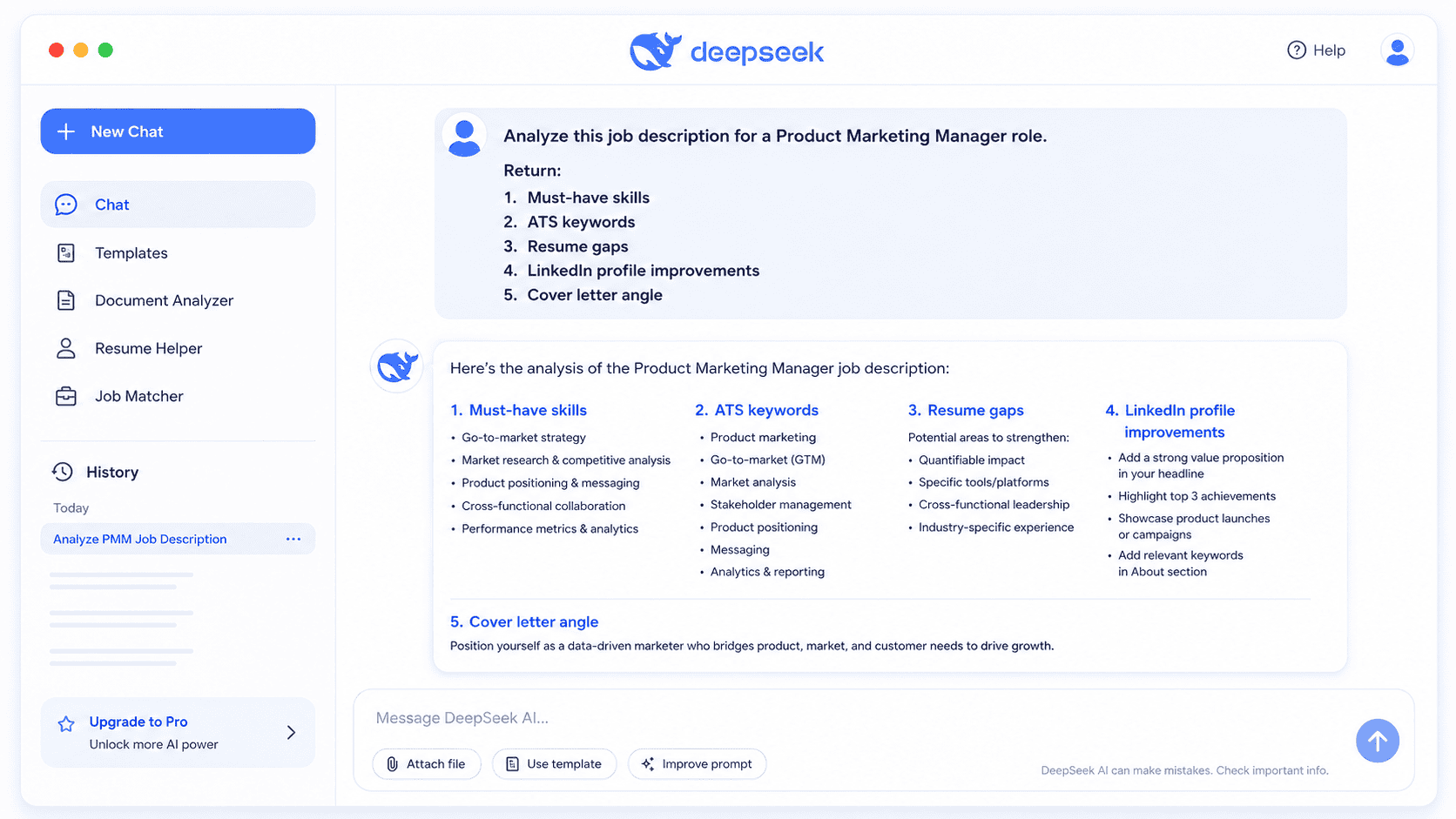
How to Use DeepSeek AI to Optimize Your LinkedIn Profile
Your LinkedIn profile should help recruiters understand three things quickly: what you do, where you create value, and why you are relevant to the role they are hiring for. DeepSeek can help you sharpen each profile section, but you should never let it turn your profile into a generic block of AI-written text.
LinkedIn’s own AI-powered writing assistant is currently described as a Premium feature for a select group of subscribers, and LinkedIn says it is available for the Headline, About, and Experience sections.
1. LinkedIn Headline Optimization
Your headline should include your target role, core specialty, important tools or skills, and a value signal.
Before:
Marketing Specialist | Open to WorkAfter:
B2B SaaS Marketing Specialist | Demand Generation, Content Strategy & HubSpot | Helping Teams Turn Campaigns Into Qualified PipelineLinkedIn headline prompt:
Act as a LinkedIn profile strategist.

I am targeting [JOB TITLE] roles at companies like [COMPANY] in [INDUSTRY].
Here is my current LinkedIn headline: [LINKEDIN PROFILE HEADLINE].
Here is the job description I want to align with: [JOB DESCRIPTION].
Here are my strongest achievements: [ACHIEVEMENTS].
Here are my key tools and skills: [SKILLS AND TOOLS].
Tone: [TONE].

Create 10 LinkedIn headline options under 220 characters.
Each headline should include:
1. A target role or specialty
2. 2–3 relevant keywords
3. A clear value angle
4. No fake claims, no buzzword stuffing, and no exaggerated titles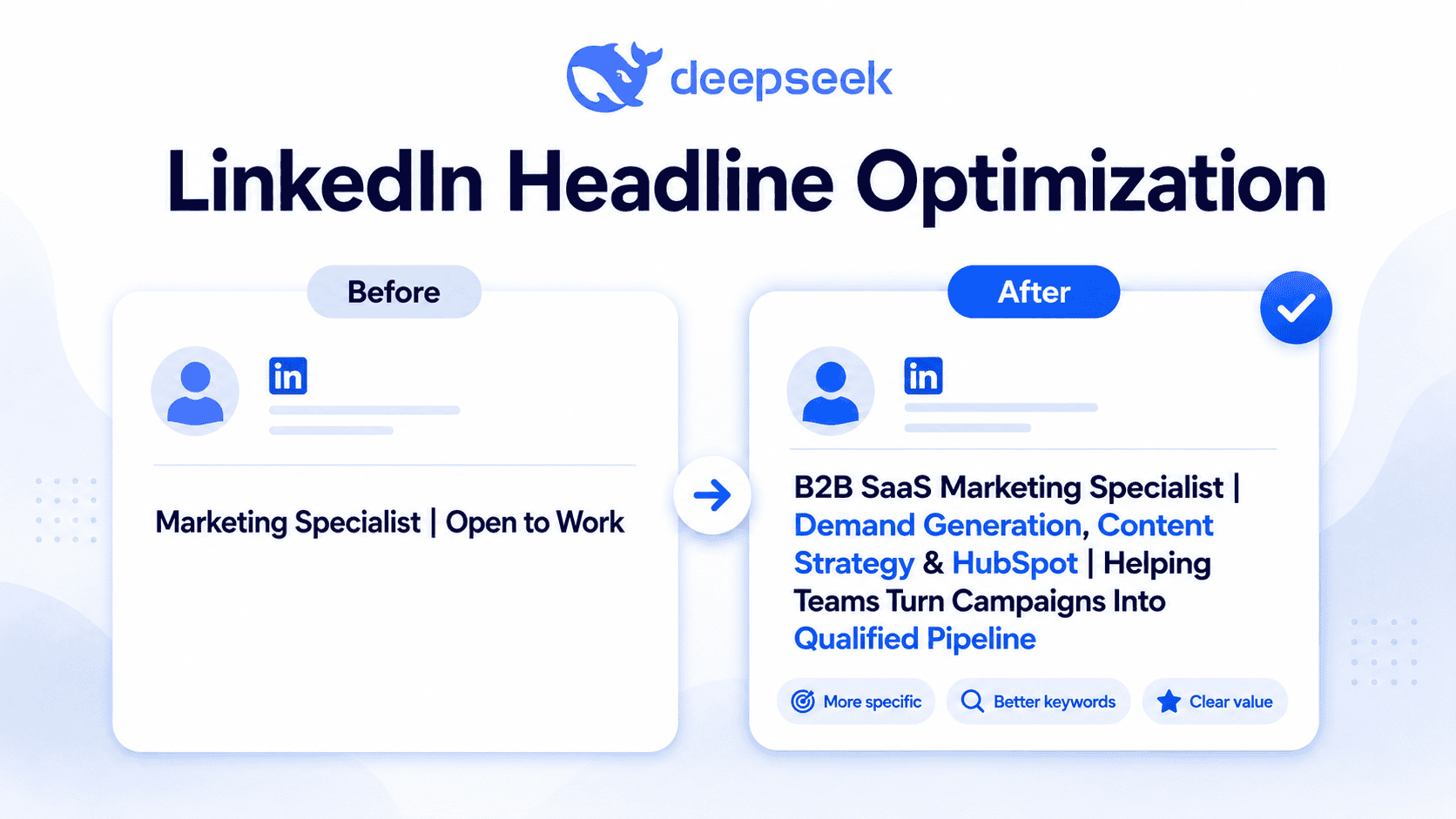
2. LinkedIn About Section
Your About section should read like a concise professional story, not a resume copy-paste. It should show your target direction, strongest experience, measurable wins, and a clear closing line.
LinkedIn About section prompt:
Act as a career writer and LinkedIn optimization expert.

Rewrite my LinkedIn About section for [JOB TITLE] roles at [COMPANY] or similar companies.

Inputs:
- Current LinkedIn About section: [LINKEDIN PROFILE]
- Current resume: [CURRENT RESUME]
- Target job description: [JOB DESCRIPTION]
- Achievements I can prove: [ACHIEVEMENTS]
- Skills/tools to include naturally: [SKILLS AND TOOLS]
- Tone: [TONE]

Write a LinkedIn About section in 3 short paragraphs:
1. Who I am and what I specialize in
2. Evidence of impact using only the achievements I provided
3. What roles, problems, or teams I am interested in

Do not invent degrees, employers, numbers, certifications, or tools.
3. LinkedIn Experience Section
DeepSeek can help convert vague job duties into achievement-driven bullets. The best bullets usually combine action, context, skill, and outcome.
LinkedIn Experience prompt:
Act as a resume and LinkedIn experience editor.

Rewrite my LinkedIn Experience section for [JOB TITLE] roles.

Inputs:
- Current role description: [LINKEDIN EXPERIENCE SECTION]
- Current resume: [CURRENT RESUME]
- Target job description: [JOB DESCRIPTION]
- Achievements and metrics I can prove: [ACHIEVEMENTS]
- Preferred tone: [TONE]

Create 4–6 LinkedIn experience bullets.
Each bullet should:
- Start with a strong action verb
- Include relevant keywords from the job description
- Use measurable results only if provided
- Sound natural on LinkedIn, not robotic
- Avoid fake numbers or inflated claims
4. Featured Section Ideas
The Featured section can support your job search by showing proof of work. Ask DeepSeek for ideas based on your target role.
Act as a LinkedIn portfolio strategist.

Based on my target role [JOB TITLE], target company [COMPANY], job description [JOB DESCRIPTION], LinkedIn profile [LINKEDIN PROFILE], current resume [CURRENT RESUME], achievements [ACHIEVEMENTS], and tone [TONE], suggest 8 LinkedIn Featured section ideas.

For each idea, include:
- What to feature
- Why it supports my target role
- A short title
- A 1-sentence description
- Whether it should be a document, project, article, case study, certificate, or media link

Do not suggest anything that requires confidential employer data.
5. Skills and Keywords
DeepSeek can identify skills that appear frequently in job descriptions, but you should only add skills you actually have.
LinkedIn skills and keyword prompt:
Act as a LinkedIn SEO and recruiter search specialist.

Compare my LinkedIn profile with this job description.

Inputs:
- Target job title: [JOB TITLE]
- Company: [COMPANY]
- Job description: [JOB DESCRIPTION]
- Current resume: [CURRENT RESUME]
- LinkedIn profile: [LINKEDIN PROFILE]
- Achievements: [ACHIEVEMENTS]
- Tone: [TONE]

Return:
1. Top hard skills from the job description
2. Top soft skills from the job description
3. Skills already reflected in my profile
4. Skills I should add only if they are true
5. Keywords to include naturally in my headline, About section, and Experience section
6. Keywords I should not add because they are not supported by my resume
6. LinkedIn Profile Audit Prompt
Act as a recruiter and LinkedIn profile auditor.

Audit my LinkedIn profile for [JOB TITLE] roles at [COMPANY] or similar employers.

Inputs:
- Job description: [JOB DESCRIPTION]
- Current resume: [CURRENT RESUME]
- LinkedIn profile: [LINKEDIN PROFILE]
- Achievements: [ACHIEVEMENTS]
- Tone: [TONE]

Score my profile from 1–10 in these areas:
1. Headline clarity
2. About section strength
3. Experience relevance
4. Keyword alignment
5. Recruiter search visibility
6. Evidence of impact
7. Human tone

Then give me a prioritized action plan with exact edits.
Do not invent information.
How to Use DeepSeek AI for Job Applications
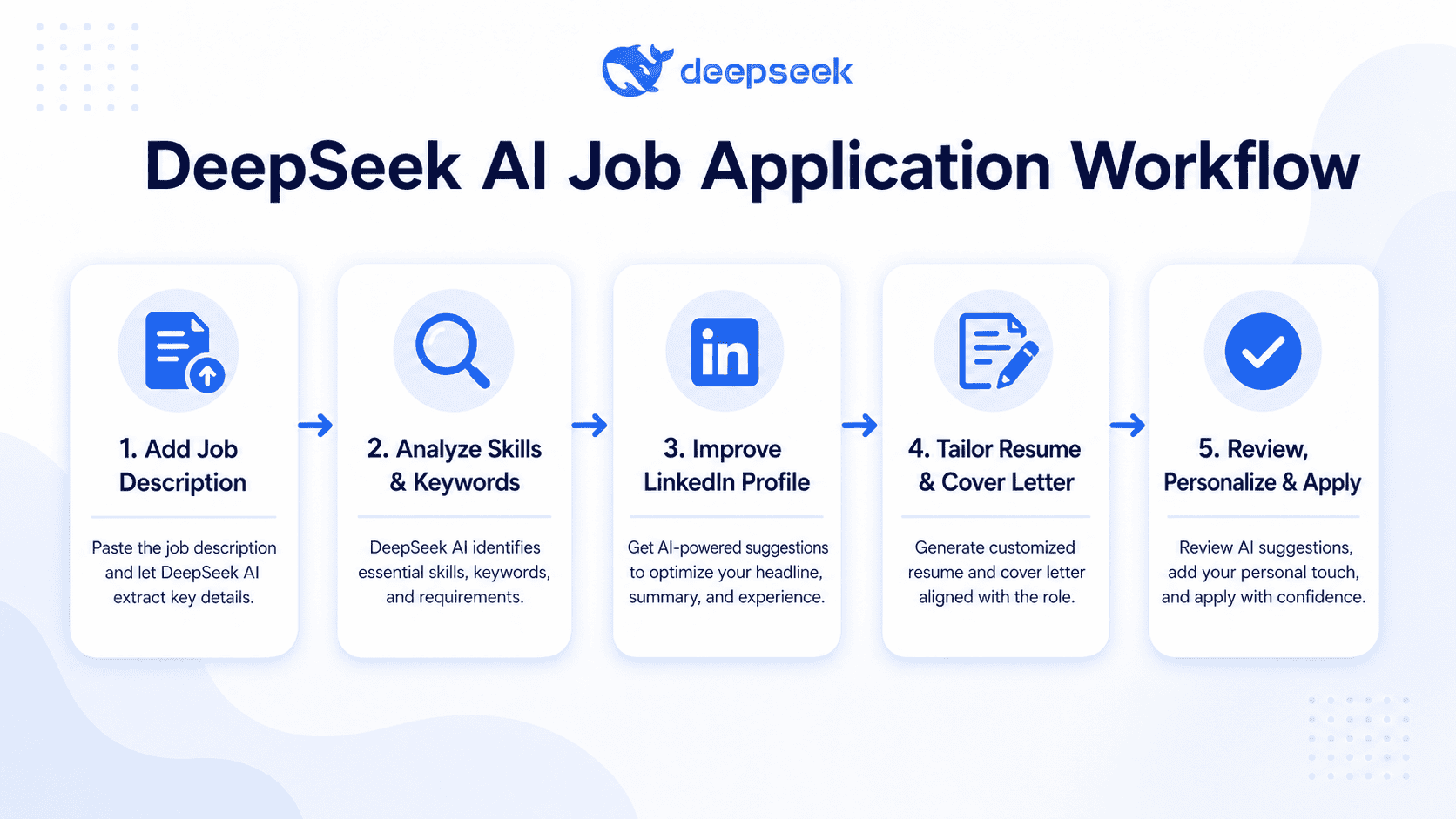
DeepSeek AI for job search works best when you move in order: analyze the job description, compare it with your resume, identify gaps, revise your documents, and then create tailored messages.
Indeed’s career guidance says resumes should be tailored to the job posting with relevant keywords and phrases that help applicant tracking systems and hiring managers identify fit.
| Job Application Task | DeepSeek Prompt Goal | Best Output Format | Human Review Needed |
|---|---|---|---|
| Analyze job description | Identify must-have and nice-to-have requirements | Bullet list or table | Confirm priorities are accurate |
| Extract ATS keywords | Find role-specific terms | Keyword table | Remove unsupported keywords |
| Tailor resume | Align resume with target role | Revised summary and bullets | Verify every claim |
| Improve bullets | Turn duties into achievements | Action-result bullets | Check numbers and scope |
| Draft cover letter | Create role-specific narrative | 3–4 paragraphs | Add company-specific details |
| Short answers | Answer application questions | Concise responses | Match word limits |
| Recruiter message | Create outreach note | 75–120 words | Personalize recipient/context |
| Interview prep | Prepare talking points | STAR stories and Q&A | Use real examples |
Step 1: Analyze the Job Description
Ask DeepSeek to separate hard requirements from softer preferences. This prevents you from tailoring your resume around minor phrases while missing core qualifications.
Analyze this job description for a [JOB TITLE] role at [COMPANY].

Job description:
[JOB DESCRIPTION]

My resume:
[CURRENT RESUME]

My LinkedIn profile:
[LINKEDIN PROFILE]

My achievements:
[ACHIEVEMENTS]

Tone: [TONE]

Return a table with:
1. Must-have qualifications
2. Nice-to-have qualifications
3. Repeated keywords
4. Tools and technologies
5. Responsibilities that matter most
6. Evidence from my resume that matches each requirement
7. Gaps I should address honestly
Step 2: Tailor Your Resume Without Keyword Stuffing
DeepSeek can help insert ATS resume keywords naturally, but it should not turn your resume into a keyword list. Indeed’s guidance on AI scanners emphasizes compatible formatting, keywords from the job description, and checking how the resume appears in plain text.
Use DeepSeek to improve relevance, not to fake qualifications.
Step 3: Write a Personalized Cover Letter
A strong cover letter should connect your experience to the role and company, not repeat your resume. Indeed’s current cover letter guidance says a strong cover letter highlights how your experience aligns with the role, expands on your skills more personally than a resume, and should be tailored through company and role research.
Step 4: Create Recruiter and Referral Messages
DeepSeek can draft concise LinkedIn messages, but the best messages include a real reason for reaching out. Mention the company, role, shared background, recent company news, or a specific team interest.
Step 5: Prepare for Interviews
After tailoring your application, paste the final job description and your updated resume into DeepSeek. Ask for likely interview questions, STAR stories, and gaps to prepare.
DeepSeek AI Prompts for LinkedIn and Job Applications
Use the following DeepSeek prompts for LinkedIn and job applications. Replace every placeholder with your real information. The better your inputs, the less generic the output will sound.
1. Job Description Analysis Prompt
Act as a recruiter analyzing a job description.

Inputs:
- Target job title: [JOB TITLE]
- Company: [COMPANY]
- Job description: [JOB DESCRIPTION]
- Current resume: [CURRENT RESUME]
- LinkedIn profile: [LINKEDIN PROFILE]
- Achievements: [ACHIEVEMENTS]
- Tone: [TONE]

Create a table with:
1. Must-have requirements
2. Nice-to-have requirements
3. ATS keywords
4. Tools/platforms mentioned
5. Soft skills implied
6. Resume evidence I already have
7. Honest gaps to address

Do not invent qualifications.
2. Resume Gap Analysis Prompt
Act as a senior resume reviewer.

Compare my resume to this [JOB TITLE] role at [COMPANY].

Inputs:
[JOB DESCRIPTION]
[CURRENT RESUME]
[LINKEDIN PROFILE]
[ACHIEVEMENTS]
[TONE]

Return:
1. Strong matches
2. Weak or missing areas
3. Keywords I can add truthfully
4. Keywords I should avoid because my background does not support them
5. 5 recommended resume edits ranked by impact
3. ATS Keyword Extraction Prompt
Act as an ATS keyword analyst.

For this [JOB TITLE] role at [COMPANY], extract the most important keywords from [JOB DESCRIPTION].

Compare them with:
- Resume: [CURRENT RESUME]
- LinkedIn profile: [LINKEDIN PROFILE]
- Achievements: [ACHIEVEMENTS]
- Tone: [TONE]

Return a table:
Keyword | Category | Importance | Already in Resume? | Safe to Add? | Suggested Placement

Only mark “Safe to Add” if the keyword is supported by my real experience.
4. Resume Summary Rewrite Prompt
Act as a resume writer.

Rewrite my resume summary for a [JOB TITLE] role at [COMPANY].

Inputs:
- Job description: [JOB DESCRIPTION]
- Current resume: [CURRENT RESUME]
- LinkedIn profile: [LINKEDIN PROFILE]
- Achievements: [ACHIEVEMENTS]
- Tone: [TONE]

Write 3 versions:
1. Concise version under 50 words
2. Keyword-rich version under 70 words
3. Executive-style version under 80 words

Do not include unsupported skills, fake metrics, or exaggerated seniority.
5. Achievement Bullet Improvement Prompt
Act as a resume bullet editor.

Improve these bullets for a [JOB TITLE] role at [COMPANY].

Inputs:
- Job description: [JOB DESCRIPTION]
- Current resume bullets: [CURRENT RESUME]
- LinkedIn profile: [LINKEDIN PROFILE]
- Real achievements and numbers: [ACHIEVEMENTS]
- Tone: [TONE]

Rewrite each bullet using this structure:
Action verb + task/project + skill/tool + measurable result.

If a metric is missing, suggest where I could add one, but do not invent it.
6. Cover Letter Prompt
Act as a career writer.

Write a tailored cover letter for a [JOB TITLE] role at [COMPANY].

Inputs:
- Job description: [JOB DESCRIPTION]
- Current resume: [CURRENT RESUME]
- LinkedIn profile: [LINKEDIN PROFILE]
- Achievements: [ACHIEVEMENTS]
- Tone: [TONE]
- Company notes: [COMPANY RESEARCH]

Structure:
1. Opening paragraph with role and reason for interest
2. Body paragraph connecting my experience to the job requirements
3. Body paragraph with 1–2 measurable achievements
4. Short closing paragraph

Keep it specific, warm, and under 350 words.
Do not invent company facts or personal achievements.
7. Short Application Answer Prompt
Act as a job application answer editor.

Help me answer this application question for a [JOB TITLE] role at [COMPANY].

Question:
[APPLICATION QUESTION]

Inputs:
- Job description: [JOB DESCRIPTION]
- Current resume: [CURRENT RESUME]
- LinkedIn profile: [LINKEDIN PROFILE]
- Achievements: [ACHIEVEMENTS]
- Tone: [TONE]
- Word limit: [WORD LIMIT]

Write 3 versions:
1. Direct and concise
2. More personal
3. More achievement-focused

Keep all claims accurate.
8. Recruiter Outreach Prompt
Act as a LinkedIn networking coach.

Write a recruiter outreach message for a [JOB TITLE] role at [COMPANY].

Inputs:
- Job description: [JOB DESCRIPTION]
- Current resume: [CURRENT RESUME]
- LinkedIn profile: [LINKEDIN PROFILE]
- Achievements: [ACHIEVEMENTS]
- Tone: [TONE]
- Recruiter context: [RECRUITER NAME OR CONTEXT]

Create 3 versions:
1. Under 75 words
2. Under 120 words
3. InMail version under 200 words

Make it specific, respectful, and not pushy.
9. Referral Request Prompt
Act as a professional networking writer.

Write a referral request for a [JOB TITLE] role at [COMPANY].

Inputs:
- Job description: [JOB DESCRIPTION]
- Current resume: [CURRENT RESUME]
- LinkedIn profile: [LINKEDIN PROFILE]
- Achievements: [ACHIEVEMENTS]
- Tone: [TONE]
- Relationship context: [HOW I KNOW THIS PERSON]

Create:
1. A casual LinkedIn message
2. A slightly more formal email
3. A follow-up message if they do not reply

Keep it polite and easy for the person to say yes or no.
10. Follow-Up Message Prompt
Act as a job search communication editor.

Write a follow-up message after applying for a [JOB TITLE] role at [COMPANY].

Inputs:
- Job description: [JOB DESCRIPTION]
- Current resume: [CURRENT RESUME]
- LinkedIn profile: [LINKEDIN PROFILE]
- Achievements: [ACHIEVEMENTS]
- Tone: [TONE]
- Application date: [APPLICATION DATE]
- Recipient: [RECRUITER OR HIRING MANAGER]

Create 3 versions:
1. Short LinkedIn message
2. Email follow-up
3. Post-interview thank-you note

Make the message concise and specific.
11. Interview Preparation Prompt
Act as an interview coach.

Prepare me for an interview for a [JOB TITLE] role at [COMPANY].

Inputs:
- Job description: [JOB DESCRIPTION]
- Current resume: [CURRENT RESUME]
- LinkedIn profile: [LINKEDIN PROFILE]
- Achievements: [ACHIEVEMENTS]
- Tone: [TONE]

Return:
1. 12 likely interview questions
2. 5 technical or role-specific questions
3. 5 behavioral questions
4. STAR story ideas based only on my achievements
5. Gaps I should prepare to explain honestly
6. Smart questions to ask the interviewer
12. Salary Negotiation Preparation Prompt
Act as a salary negotiation coach.

Help me prepare for salary negotiation for a [JOB TITLE] role at [COMPANY].

Inputs:
- Job description: [JOB DESCRIPTION]
- Current resume: [CURRENT RESUME]
- LinkedIn profile: [LINKEDIN PROFILE]
- Achievements: [ACHIEVEMENTS]
- Tone: [TONE]
- Offer details: [OFFER DETAILS]
- Location or remote status: [LOCATION]

Return:
1. My strongest value points
2. A confident negotiation script
3. A softer negotiation script
4. Benefits or flexibility questions to ask
5. Risks to avoid
6. A final version that sounds natural and professional

Do not invent market salary data unless I provide it.
DeepSeek AI vs LinkedIn’s Built-in AI Tools
DeepSeek AI and LinkedIn’s built-in AI tools can both help with job search, but they are useful in different ways.
| Tool | Best For | Availability Notes | Main Limitation |
|---|---|---|---|
| DeepSeek AI | Flexible drafting, job description analysis, resume feedback, prompts, interview prep | DeepSeek lists web, app, and API access; API docs show V4 model options | Requires careful prompting and manual fact-checking |
| LinkedIn AI-powered resume tips | Tailoring an uploaded resume to a specific job | LinkedIn says resume support is desktop-only and requires an existing uploaded resume | Availability may depend on account, region, and feature rollout |
| LinkedIn AI-powered cover letter drafting | Drafting a cover letter from a job posting | LinkedIn says it can review your profile against the job description and draft a cover letter | Output still needs verification and personalization |
| LinkedIn AI-powered writing assistant | Headline, About, and Experience suggestions | LinkedIn describes it as available to a select group of Premium subscribers | Not available to every member |
| LinkedIn AI-powered job insights/search | Job fit insights and natural-language job search | LinkedIn says AI-powered job search is gradually rolling out and users may not have access | Results depend on profile data and availability |
DeepSeek’s strength is flexibility. You can ask it to compare multiple job descriptions, create several resume versions, rewrite recruiter messages, and build interview preparation notes. LinkedIn’s strength is context inside the platform, especially when reviewing a specific job posting or improving profile sections. LinkedIn’s help pages explain that AI-powered resume tips, cover letter drafting, job insights, profile writing assistance, and AI-powered job search are feature-specific and may have eligibility or rollout limits.
Mistakes to Avoid When Using DeepSeek AI for Job Applications
1. Copying AI Output Word for Word
AI-generated writing often sounds polished but generic. Use DeepSeek for structure, alternatives, and drafts, then edit the final version so it sounds like you.
Indeed advises job seekers to use generative AI as an augmentation rather than a replacement, warning that AI output can include errors and inconsistencies.
2. Using Fake Achievements
Never ask DeepSeek to “make this sound more impressive” if that means creating numbers, projects, titles, or certifications you do not have. Indeed’s resume dishonesty guidance warns that falsifying or exaggerating qualifications can damage your professional reputation and may lead to serious consequences.
3. Overstuffing ATS Keywords
ATS resume keywords matter, but keyword stuffing can make your resume unreadable. Use keywords naturally in your summary, skills, and experience bullets.
4. Making Every Cover Letter Sound the Same
A generic cover letter is easy to spot. Mention the company, the role, and the specific reason your background fits the opportunity.
5. Uploading Sensitive Personal Data Carelessly
Before using any AI tool, remove sensitive details that are not needed for the task. You can replace private information with placeholders such as [PHONE], [EMAIL], [FORMER EMPLOYER], or [CLIENT NAME].
6. Ignoring Company-Specific Context
DeepSeek can draft a strong structure, but it does not automatically know why you care about a company. Add real research: product lines, mission, recent announcements, market, customer segment, or team focus.
7. Using a Robotic Tone
Ask DeepSeek to revise for clarity, warmth, and directness. Then read the final version aloud. If it sounds like a corporate template, rewrite it.
8. Applying to Every Job With the Same Resume
A single resume rarely fits every role. Tailor the summary, skills, and top bullets for each target job.
9. Not Proofreading
AI can produce grammar errors, awkward phrasing, wrong company names, and inconsistent formatting. Proofread every document before submitting.
10. Not Checking Employer AI Rules
Some employers may ask candidates not to use AI for certain application materials, assessments, or writing samples. Always follow the employer’s instructions.
Privacy, Ethics, and Accuracy Checklist
Use DeepSeek AI to clarify, organize, and improve your job search materials—not to deceive employers.
Before using AI-generated content, check the following:
- Remove unnecessary personal identifiers.
- Avoid uploading confidential employer or client data.
- Do not fabricate degrees, employers, dates, certifications, titles, metrics, or tools.
- Keep your authentic voice.
- Verify company names, job titles, recruiter names, and role requirements.
- Review every AI-generated sentence for accuracy.
- Add human context: why this company, why this role, and why your experience matters.
- Check whether the employer restricts AI use.
- Save your final version separately from the AI draft.
- Ask a trusted human reviewer to read important applications.
LinkedIn also explains that saved resume data may be used to personalize job recommendations and generative AI features, and it says resume data may contribute to improvements in LinkedIn’s AI models subject to settings. This is another reason to review platform privacy settings before uploading resumes.
Final Checklist Before You Submit
Use this checklist before sending any LinkedIn message, resume, cover letter, or job application:
- LinkedIn headline matches the target role.
- LinkedIn About section is specific, measurable, and human.
- Experience bullets include relevant skills and real achievements.
- Resume contains ATS keywords naturally.
- Resume format is simple and readable.
- Cover letter mentions the company and role specifically.
- All claims are accurate.
- No fake metrics, titles, dates, or certifications were added.
- Tone sounds like you.
- No confidential or unnecessary personal data remains.
- Application answers match the required word limits.
- Recruiter message is personalized.
- Documents are proofread.
- Employer AI-use instructions have been checked.
FAQs
Can DeepSeek AI write my LinkedIn profile?
Yes. DeepSeek AI can draft or improve your LinkedIn headline, About section, Experience descriptions, skills, and recruiter-facing summary. You should still edit the output so it reflects your real achievements, target roles, and personal voice.
Can I use DeepSeek AI to write a resume?
Yes. DeepSeek can help analyze a job description, identify ATS resume keywords, rewrite your summary, and improve bullet points. However, you must verify every detail and avoid adding unsupported skills or achievements.
Is it okay to use AI for job applications?
In most cases, AI can be used as a drafting and editing assistant, but you should follow the employer’s instructions. Use AI to improve clarity and structure, not to misrepresent your experience.
How do I make DeepSeek’s output sound less generic?
Give it specific inputs: your target role, job description, real metrics, tools, company research, and preferred tone. Then ask it to rewrite with fewer buzzwords, shorter sentences, and more concrete examples.
Can DeepSeek AI help with ATS keywords?
Yes. DeepSeek can extract keywords from a job description and compare them with your resume. Only include keywords that match your real experience.
Should I upload my full resume to DeepSeek AI?
You can, but it is safer to remove unnecessary sensitive information first. Use placeholders for private details and read the current privacy policy before uploading personal data.
Can recruiters tell if I used AI?
Recruiters may notice if your resume, cover letter, or message sounds generic, exaggerated, or inconsistent with your profile. The best approach is to use AI for drafts and then personalize the final version.
What is the best DeepSeek prompt for a cover letter?
The best prompt includes the job description, your resume, your LinkedIn profile, company research, real achievements, and tone. Ask for a concise, role-specific letter that avoids fake claims and generic wording.
Can DeepSeek AI help me message recruiters on LinkedIn?
Yes. DeepSeek can draft recruiter outreach messages, referral requests, follow-ups, and thank-you notes. Keep messages short, specific, and personalized.
Is DeepSeek AI better than LinkedIn’s built-in AI tools?
DeepSeek is more flexible for custom prompts, comparing documents, and creating multiple application assets. LinkedIn’s tools are useful inside the platform, especially for job postings and profile sections, but access may depend on eligibility, subscription, language, device, and rollout status.
Conclusion
DeepSeek AI can make your job search faster and more organized, especially when you use it to analyze job descriptions, improve LinkedIn profile sections, tailor resumes, draft cover letters, write recruiter messages, and prepare for interviews.
The best results come from combining DeepSeek’s speed with your real experience, judgment, and personal voice. Use it to sharpen your message, not to replace your honesty. Before you submit anything, check the facts, remove sensitive information, personalize the wording, and make sure the final version sounds like a strong, accurate version of you.