
Yes, you can use DeepSeek AI for exam revision, but the best way to use it is as a study coach, not as a replacement for studying. DeepSeek can help you turn a syllabus into a revision checklist, build a realistic study timetable, create flashcards, generate practice questions, explain difficult ideas, and review your mistakes.
The key is to use it actively. Do not just ask for summaries and read them passively. Use DeepSeek to test yourself, identify weak topics, practise exam-style answers, and improve your revision plan.
Quick Answer:
To use DeepSeek AI for exam revision, start by giving it your syllabus, exam date, weak topics, and available study time. Ask it to turn your material into a checklist, revision timetable, active-recall questions, flashcards, and past-paper-style practice. Paste notes or use document upload features only where your version of DeepSeek supports them, and avoid uploading sensitive personal or school documents. Always check AI-generated answers against your textbook, teacher notes, syllabus, and official mark schemes.
What Is DeepSeek AI and Why Use It for Exam Revision?
DeepSeek is an AI assistant that can answer questions, explain concepts, generate text, organise information, and help with reasoning tasks. DeepSeek’s official site currently promotes free access through its chat interface and API access for developers. Its newer official documentation also lists V4 models and notes that older API model names such as deepseek-chat and deepseek-reasoner are scheduled for deprecation on July 24, 2026, so model names and features should be checked before publishing or building workflows around them.
For exam revision, that means DeepSeek can work like an AI study assistant. It can help you organise revision, rewrite difficult explanations in simpler language, generate active-recall questions, create flashcards, produce mock quiz questions, and review your written answers.
It is especially useful when you need:
- A study plan from a messy syllabus.
- A simple explanation of a difficult topic.
- Practice questions for active recall.
- Flashcards for spaced repetition.
- Feedback on an essay plan or problem-solving method.
- A way to identify gaps in your knowledge.
However, DeepSeek should not be treated as a perfect source of truth. AI models can make mistakes, miss exam-board details, or create answers that sound confident but are incomplete. DeepSeek’s own privacy policy warns that users should not rely on the factual accuracy of model outputs in certain contexts.
Use it to learn, practise, and check your understanding. Do not use it to cheat, copy answers directly into assignments, or answer live exam questions.
Before You Start: Prepare Your Revision Materials
DeepSeek works better when you give it specific information. Before opening the chat, collect the materials that actually define your exam.
You should prepare:
- Your syllabus or exam specification.
- Class notes.
- Textbook chapter names.
- Past papers.
- Mark schemes.
- Your exam date.
- A list of weak topics.
- Your available study hours.
- Your school, college, or university AI policy.
This matters because DeepSeek may not know the exact version of your exam board, course, syllabus year, or teacher’s expectations unless you provide them. A vague prompt such as “help me revise biology” will usually produce a generic answer. A specific prompt with your exam date, topics, and weak areas will produce a much more useful study plan.
Also be careful with privacy. DeepSeek’s privacy policy says user inputs may include prompts, uploaded files, photos, feedback, and chat history, and it states that its services are not designed or intended to process sensitive personal data.
Do not upload student ID numbers, private school documents, unreleased exam papers, medical information, confidential files, or anything your institution has told you not to share.
How to Use DeepSeek AI for Exam Revision Step by Step
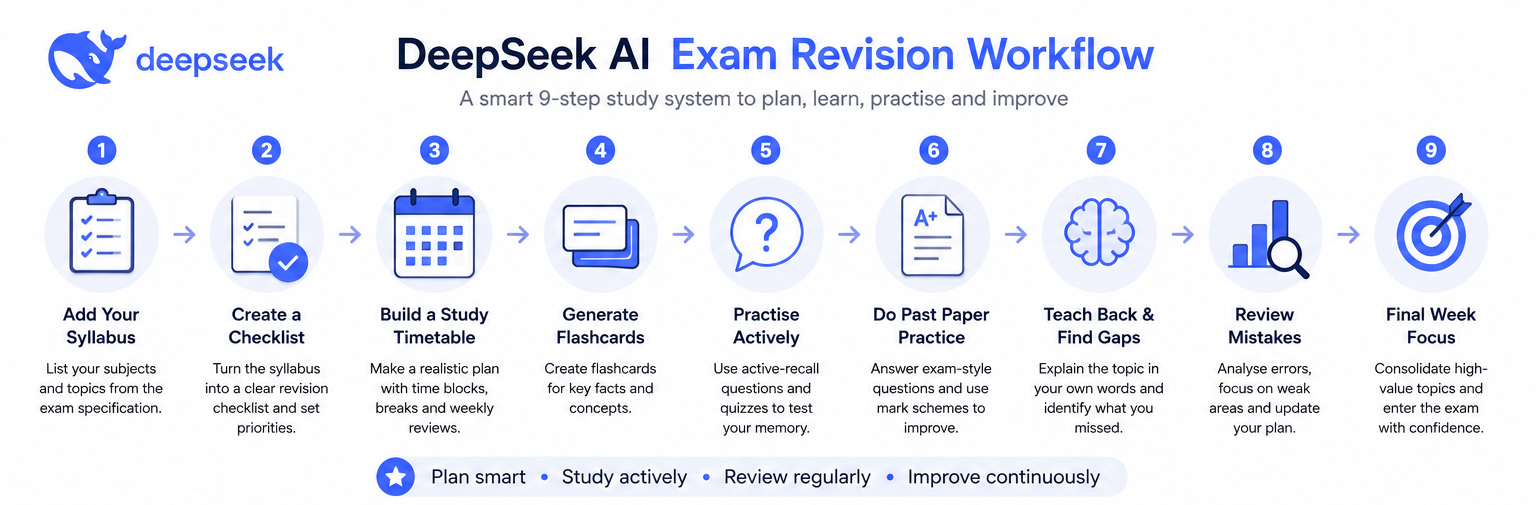
The best revision workflow is not “ask DeepSeek to summarise everything.” The best workflow is:
- Organise the syllabus.
- Create a plan.
- Revise one topic at a time.
- Test yourself.
- Review mistakes.
- Update the plan.
Here is how to do it.
Step 1: Turn Your Syllabus into a Revision Checklist
Start with the syllabus or exam specification. This gives your revision structure and stops you wasting time on topics that are not assessed.
Use this prompt:
Act as an exam revision coach. I will paste my syllabus or exam specification below.

Your task:
1. Turn it into a clear revision checklist.
2. Group topics into logical sections.
3. Mark each topic as High, Medium, or Low priority based on likely exam importance.
4. Add a "What I must be able to do" column for each topic.
5. Leave a blank "Confidence rating" column from 1–5.

Syllabus:
[paste syllabus here]
After DeepSeek gives you the checklist, do not accept it blindly. Compare it with the original syllabus and add anything missing. Then rate your confidence for each topic from 1 to 5.
Step 2: Build a Realistic Revision Timetable
A good revision timetable is specific, realistic, and flexible. It should include breaks, past-paper practice, and time to revisit weak topics.
Use this prompt:
Create a realistic exam revision timetable for me.

Exam date: [exam date]
Subjects: [subjects]
Available study time on weekdays: [hours]
Available study time on weekends: [hours]
Weakest topics: [list weak topics]
Strongest topics: [list strong topics]
Other commitments: [school, work, sports, travel, etc.]

Rules:
- Prioritise weak and high-value topics.
- Include active recall, flashcards, and past-paper practice.
- Add short breaks.
- Include weekly review sessions.
- Do not overload any single day.
- Present the timetable in a clear table.
The timetable should not be a fantasy plan. If you only have one hour after school, ask DeepSeek to build a one-hour plan. A plan you follow is better than a perfect plan you abandon.
Step 3: Summarise Notes Without Losing Exam Detail
Summaries are useful only if they preserve the details needed for the exam. A bad AI summary can remove examples, definitions, formulas, dates, or mark-scheme language.
Use this prompt:
Summarise these notes for exam revision, but do not remove important exam details.

Requirements:
1. Keep key definitions.
2. Keep formulas, dates, names, examples, and case studies.
3. Highlight common exam traps.
4. Add a short "must memorise" section.
5. Add 5 active-recall questions at the end.
6. Tell me what I should verify in my textbook or official notes.

Notes:
[paste notes here]
After you receive the summary, check it against the original source. Use the summary as a study aid, not as your only source.
Step 4: Create Active-Recall Questions
Active recall means trying to retrieve information from memory instead of just rereading notes. Cornell’s Learning Strategies Center describes retrieval practice as actively recalling information and putting it down in formats such as writing, diagrams, or charts; it also notes that this helps reveal what you do and do not understand.
Use DeepSeek to create questions, then answer them without looking at your notes.
Create active-recall questions from the topic below.

Topic: [topic]
Exam level: [GCSE / A-level / IB / university / other]
Exam board or course: [if relevant]

Create:
- 10 basic recall questions
- 10 application questions
- 5 challenging questions
- 3 common misconception questions

Do not give the answers first. Put the answers in a separate section after the questions.
The most important part is not generating the questions. It is attempting them before reading the answers.
Step 5: Make Flashcards for Spaced Repetition
Flashcards work best when each card tests one clear idea. Avoid cards that are too broad, such as “Explain the whole nervous system.” Use focused cards instead: “What is the role of the myelin sheath?”
Spaced practice means spreading study over time instead of cramming. Cornell describes spaced practice as studying material in spaced intervals and contrasts it with cramming.
Use this prompt:
Create flashcards for spaced repetition from the notes below.

Format the output as a table with these columns:
Question | Answer | Difficulty | Review Date

Rules:
- One idea per flashcard.
- Mix definitions, examples, formulas, causes, effects, and comparisons.
- Keep answers concise but accurate.
- Mark difficulty as Easy, Medium, or Hard.
- Suggest review dates using spaced repetition.

Notes:
[paste notes here]
You can then copy the cards into your notebook, spreadsheet, or flashcard app.
Step 6: Practise Past-Paper Style Questions
Past papers are one of the most important revision tools, but you should use DeepSeek carefully. Do not ask it to answer a live exam for you. Do not paste unreleased papers or confidential assessment material.
Instead, use it to create similar practice questions and explain how marks are awarded.
Create past-paper-style practice questions for this topic.

Topic: [topic]
Exam level: [level]
Exam board or course: [if relevant]
Question types I need: [multiple choice / short answer / essay / calculation / source analysis]

Create:
1. 5 exam-style questions.
2. A mark scheme for each question.
3. A model answer after the mark scheme.
4. Common mistakes students make.
5. A short explanation of how to improve from a low-mark answer to a high-mark answer.
Then attempt the questions under timed conditions before looking at the mark scheme.
Step 7: Use DeepSeek as a “Teach-Back” Partner
The teach-back method is simple: explain a topic in your own words, then ask DeepSeek to find gaps, unclear wording, or missing details.
Use this prompt:
I am going to explain a topic in my own words. Act as my revision coach.

Your task:
1. Identify any incorrect statements.
2. Identify missing exam-relevant details.
3. Ask me 5 follow-up questions.
4. Rewrite my explanation in a clearer version.
5. Tell me what to revise next.

My explanation:
[paste your explanation here]
This is much better than asking, “Explain this topic to me,” because it forces you to retrieve what you know first.
Step 8: Review Mistakes and Update Your Plan
Your mistakes are useful data. If you keep getting the same question type wrong, your revision plan should change.
Use this prompt after a quiz or past-paper session:
Analyse my revision mistakes and update my study plan.

Topic: [topic]
Questions I got wrong:
[paste questions]

My answers:
[paste your answers]

Correct answers or mark scheme:
[paste correct answers if available]

Please:
1. Identify the pattern in my mistakes.
2. Label each mistake as knowledge, application, calculation, timing, wording, or exam technique.
3. Tell me the three highest-priority topics to revise next.
4. Create a 3-day mini revision plan.
5. Give me 10 new questions targeting these weaknesses.
This turns DeepSeek from a content generator into a revision feedback tool.
Step 9: Use DeepSeek During the Final Week Before the Exam
The final week is not the time to relearn the whole course. It is the time to consolidate, practise, sleep properly, and target weak areas.
Use this prompt:
Create a final-week exam revision plan.

Exam: [subject and level]
Exam date: [date]
Days left: [number]
Weak topics: [list]
Strong topics: [list]
Past-paper scores so far: [scores]
Available study time each day: [hours]

Rules:
- Focus on high-impact review.
- Include timed questions.
- Include flashcard review.
- Include light review the day before the exam.
- Avoid cramming every topic.
- Include sleep and breaks.
A calm final-week plan is usually more effective than panic revision.
Best DeepSeek Prompts for Exam Revision
Use these prompts as a quick library. Replace the bracketed sections with your own details.
| Goal | Copy-paste prompt | Best for |
|---|---|---|
| Revision timetable | Create a realistic revision timetable for [subject] before [exam date]. I can study [hours] per day. Prioritise [weak topics] and include active recall, flashcards, and past papers. | Planning |
| Syllabus checklist | Turn this syllabus into a revision checklist with topic, subtopic, priority, what I must know, and confidence rating: [paste syllabus]. | Starting revision |
| Summary | Summarise these notes for exam revision. Keep key definitions, formulas, examples, and exam traps. Add 5 recall questions: [paste notes]. | Condensing notes |
| Flashcards | Create flashcards in a table: Question, Answer, Difficulty, Review Date. Use one concept per card. Topic: [topic]. Notes: [paste notes]. | Spaced repetition |
| Active-recall quiz | Create a 20-question active-recall quiz on [topic]. Do not show answers until the end. Mix easy, medium, and hard questions. | Self-testing |
| Past-paper practice | Create exam-style questions on [topic] for [level/exam board]. Include a mark scheme, model answer, and common mistakes. | Exam practice |
| Essay planning | Help me plan an essay answer for this question: [question]. Give a thesis, structure, key points, evidence, counterargument, and conclusion. | Essay subjects |
| Maths/science practice | Create 10 calculation or problem-solving questions on [topic]. Show answers only after the questions and explain each method step by step. | STEM subjects |
| Explain simply | Explain [topic] like I’m 15, then give the exam-level version, then test me with 5 questions. | Difficult concepts |
| Teach-back correction | I will explain [topic]. Check my explanation for errors, missing details, and unclear wording. Then ask me 5 follow-up questions: [paste explanation]. | Understanding gaps |
| Memory techniques | Create memory aids, mnemonics, and comparison tables for [topic]. Keep them accurate and suitable for exam revision. | Memorisation |
| Final 24-hour review | Create a calm final 24-hour review plan for [subject]. Include light recall, key formulas/definitions, exam technique, breaks, and sleep. | Day-before revision |
Example DeepSeek Revision Workflow
Let’s say a student is revising A-level Biology and struggles with photosynthesis.
Student Inputs
The student gives DeepSeek:
- Exam date: 21 days away.
- Topic: photosynthesis.
- Weak areas: light-dependent reactions, Calvin cycle, limiting factors.
- Materials: class notes, textbook pages, past-paper questions.
- Study time: 90 minutes today.
Prompt
Act as my A-level Biology revision coach.

I have 90 minutes today to revise photosynthesis.
My weak areas are:
- Light-dependent reactions
- Calvin cycle
- Limiting factors

Create a focused revision session with:
1. A 10-minute warm-up quiz.
2. A 25-minute explanation and summary plan.
3. A 20-minute active-recall task.
4. A 20-minute past-paper-style practice section.
5. A 10-minute mistake review.
6. A 5-minute final checklist.

Also give me the exact questions I should answer during the session.
Expected Output
DeepSeek should produce a timed plan, quiz questions, recall tasks, and practice questions. The student should answer the questions on paper before reading any model answers.
How to Verify the Result
The student should check:
- Definitions against the textbook.
- Process details against class notes.
- Required terminology against the syllabus.
- Marking points against official mark schemes.
How to Turn It into Real Revision
The student should record every mistake in a mistake log:
| Mistake | Type | Fix |
|---|---|---|
| Confused ATP and NADPH roles | Knowledge | Make 5 flashcards |
| Forgot where the Calvin cycle occurs | Recall | Add to diagram review |
| Lost marks for vague wording | Exam technique | Practise mark-scheme phrasing |
Then the student can ask DeepSeek to create a new mini-quiz only on those weak points.
What DeepSeek Can and Can’t Do for Exam Revision
| Can help with | Be careful with |
|---|---|
| Turning a syllabus into a checklist | It may miss syllabus details unless you provide them |
| Creating revision timetables | It does not know your real energy levels or commitments unless you tell it |
| Explaining difficult topics | Explanations can sound correct but still need checking |
| Making flashcards | Some cards may be too broad or too easy |
| Generating practice questions | Questions may not perfectly match your exam board |
| Reviewing essay plans | Feedback may not match your teacher’s exact marking standards |
| Analysing mistakes | You need to provide your answers and the mark scheme |
| Simplifying complex ideas | Oversimplification can remove exam detail |
| Supporting active recall | It cannot do the remembering for you |
| Helping with final-week planning | It should not encourage panic cramming |
DeepSeek’s official V4 release describes a 1M context length for V4 Preview, and its current API docs list V4 Flash and V4 Pro models, but student-facing features can vary by interface, account, region, and future updates. Always check the current interface and official documentation before relying on a specific feature such as file upload, long-context input, model names, or API pricing.
Ethical and Safe Use of DeepSeek for Students
Use DeepSeek to learn, not to cheat.
Good uses include asking for explanations, creating practice questions, checking your understanding, building flashcards, and improving your revision plan. Risky or unethical uses include asking it to answer live exam questions, copying AI output into assignments without permission, or using it to avoid doing your own thinking.
Follow these rules:
- Do not ask DeepSeek to answer a live exam or controlled assessment.
- Do not copy AI-generated answers directly into coursework or assignments.
- Do not upload student ID numbers, private school files, unreleased exam papers, or confidential documents.
- Do not share personal data about yourself, classmates, or teachers.
- Check your school, college, or university AI policy.
- Verify important facts with textbooks, teacher notes, official specifications, and mark schemes.
This is especially important because DeepSeek’s privacy policy says user inputs may include uploaded files and chat history, and it also says the service is not intended for sensitive personal data.
Common Mistakes to Avoid
Asking vague prompts
Bad prompt:
Help me revise chemistry.Better prompt:
Create a 60-minute active-recall revision session for GCSE Chemistry on electrolysis. I struggle with half-equations and predicting products. Include 10 questions and a mark scheme.Trusting every answer
DeepSeek can be useful, but it can still make mistakes. Always check important definitions, formulas, dates, case studies, and mark-scheme points.
Only reading summaries
Reading a summary feels productive, but it is often passive. Turn every summary into questions, flashcards, diagrams, or timed answers.
Skipping practice questions
Exams test performance, not just recognition. Use DeepSeek to generate questions, then practise under timed conditions.
Uploading sensitive files
Do not upload confidential school material, personal data, or unreleased papers. Paste only what you are allowed to share.
Using AI too late the night before
DeepSeek can help you organise a final review, but it cannot replace weeks of spaced practice.
Not matching prompts to the exam board or syllabus
Always include the course, level, exam board, paper type, and topic list when relevant.
DeepSeek vs Other AI Study Tools for Revision
DeepSeek is one option among many AI study tools. The right tool depends on what you need.
Choose based on:
- Accuracy: Does the answer match your textbook and mark scheme?
- Source grounding: Can the tool cite or use your approved materials?
- File support: Can it work with your notes or documents safely?
- Privacy: What data does the tool collect and store?
- Cost: Is the free version enough, or do you need paid access?
- Subject type: Some tools may be better for maths, coding, essays, or flashcards.
- Ease of use: Can you quickly create quizzes, summaries, and study plans?
DeepSeek can be strong for explanation, reasoning, planning, and prompt-based revision workflows. But no AI study tool should replace your syllabus, teacher guidance, textbook, or official mark scheme.
Final Exam Revision Checklist
Use this checklist before every exam.
- I have checked the official syllabus or exam specification.
- I have turned each topic into a revision checklist.
- I know my weakest topics.
- I have a realistic revision timetable.
- I have made flashcards for key facts, formulas, definitions, and examples.
- I have used active recall instead of only rereading notes.
- I have practised past-paper-style questions.
- I have reviewed my mistakes and updated my plan.
- I have checked AI-generated content against reliable sources.
- I know what I am allowed to use AI for under my institution’s rules.
- I have not uploaded sensitive or confidential material.
- I have planned sleep, breaks, and a calm final review.
FAQs
Is DeepSeek good for exam revision?
Yes, DeepSeek can be useful for exam revision when used as a study assistant. It can help you organise topics, create questions, explain concepts, make flashcards, and review mistakes. It should not replace textbooks, teachers, official specifications, or past papers.
Can DeepSeek make flashcards?
Yes. You can ask DeepSeek to turn notes into flashcards with question, answer, difficulty, and review date columns. For best results, ask for one idea per card and check the answers before using them.
Can DeepSeek create a revision timetable?
Yes. Give it your exam date, subjects, available study hours, weak topics, and other commitments. Ask for a realistic timetable that includes active recall, flashcards, past-paper practice, breaks, and weekly reviews.
Is using DeepSeek for exam revision cheating?
Using DeepSeek to understand topics, create practice questions, or plan revision is usually a learning use. It becomes cheating if you use it to answer live exam questions, complete controlled assessments, or submit AI-generated work as your own when your institution does not allow it.
Can DeepSeek help with past papers?
DeepSeek can help you practise past-paper-style questions, understand mark schemes, and review mistakes. Do not upload confidential or unreleased papers, and always check answers against official mark schemes.
What should I not upload to DeepSeek?
Do not upload student ID numbers, personal data, private school documents, unreleased exam papers, confidential files, medical information, or anything your school or university policy says not to share.
How accurate is DeepSeek for studying?
DeepSeek can be helpful, but it is not always accurate. It may miss details, simplify too much, or produce confident-sounding errors. Always verify important information with textbooks, teacher notes, official specifications, and mark schemes.
Can DeepSeek replace a tutor?
No. DeepSeek can support revision, but it cannot fully replace a tutor or teacher. A tutor can diagnose misunderstandings, adapt to your learning style, understand your course requirements, and give personalised feedback in a way AI may not reliably match.
Conclusion
Learning how to use DeepSeek AI for exam revision is not about getting AI to do the work for you. It is about using DeepSeek as a revision coach: a planner, question generator, flashcard creator, explanation partner, and mistake-review assistant.
Start with one simple task. Paste your syllabus and ask DeepSeek to turn it into a revision checklist. Or choose one weak topic and ask for a 20-question active-recall quiz. Then answer the questions before reading the answers.
That is where AI becomes useful: not when it replaces revision, but when it makes your revision more active, organised, and focused.