

You can call DeepSeek from Python using the openai package, a DeepSeek API key, and base_url="https://api.deepseek.com". Start with a small script that returns one answer. Once that works, you can add streaming, asynchronous requests, conversation history, or image input without changing the basic connection.
This guide follows DeepSeek’s hosted API and the current Python client documentation. The examples use deepseek-flash; deepseek-v4-pro is another current option for text requests. You do not need to download model weights or have a GPU for these API calls. Your computer runs the Python program; DeepSeek runs the model. For an overview of the service and its other connection options, see the DeepSeek API guide.
On this page: Install · API key · First request · Streaming · Async · Thinking · Conversation history · JSON and tools · Images · Responses API · Errors and retries · FAQ
Which Python package should you install?
For direct DeepSeek API requests, install openai. That is the client used in DeepSeek’s official Python quickstart. The name can be confusing: importing OpenAI does not mean the request goes to OpenAI when you explicitly configure DeepSeek’s address and key.
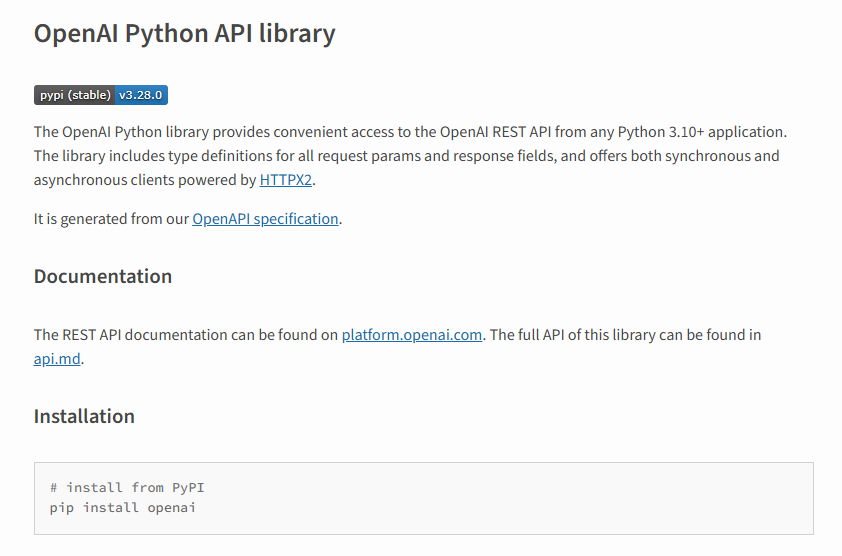
DeepSeek also has a Python SDK for its Harness agent runtime. It serves a different task: controlling an agent session and its tools. For a script that sends a prompt and receives a model response, use the REST client shown here. A similarly named package on a package index is not automatically an official DeepSeek client.
Install the client in a Python environment
You need Python 3.10 or newer for the current OpenAI Python library, an internet connection, and a DeepSeek API account with available balance. API usage is billed separately from using the chat application. Check the official model and pricing page when choosing a model or budgeting usage.
Create a project folder and a virtual environment so this project’s packages stay separate from your other work.
macOS or Linux
mkdir deepseek-python
cd deepseek-python
python3 -m venv .venv
source .venv/bin/activate
python -m pip install --upgrade openai
Windows PowerShell
mkdir deepseek-python
cd deepseek-python
py -m venv .venv
.\.venv\Scripts\Activate.ps1
python -m pip install --upgrade openai
If PowerShell blocks the activation script, you can use the environment’s interpreter directly: .\.venv\Scripts\python.exe -m pip install --upgrade openai. Use that same interpreter to run the example file. Activation is a convenience, not a requirement to use the environment.
Check which installation your program is using with python -m pip show openai. In an IDE, select this project’s virtual environment as its Python interpreter. A frequent cause of ModuleNotFoundError is installing the package in one environment and running the script in another.
Get your DeepSeek API key ready
Create a key in the DeepSeek platform. The API key guide covers the account steps if you have not done that yet. An OpenAI key will not authenticate a request to DeepSeek.
The complete scripts below first look for an environment variable named DEEPSEEK_API_KEY. If it is absent, they ask for the key through Python’s hidden-input prompt. Run the script in a terminal, paste the key when prompted, and press Enter. If Python warns that it cannot hide the input, cancel and use a terminal that supports hidden input. This keeps the key out of the source file and shell command history.
For an unattended job or deployed application, set the variable through your hosting environment or secret manager. A local .env file is another option, but Python does not load it automatically; you need a loader such as python-dotenv. Keep secret files out of version control and never print the key while debugging.
Send your first request
Save the following as deepseek_example.py in your project folder, then run python deepseek_example.py. It sends one short text request, checks how the response ended, and prints the answer and reported token usage.
import os
from getpass import getpass
from openai import OpenAI

api_key = os.getenv("DEEPSEEK_API_KEY") or getpass("DeepSeek API key: ")

with OpenAI(
    api_key=api_key,
    base_url="https://api.deepseek.com",
    timeout=60.0,
    max_retries=0,
) as client:
    response = client.chat.completions.create(
        model="deepseek-flash",
        messages=[{
            "role": "user",
            "content": "Explain a Python dictionary in two sentences.",
        }],
        max_tokens=1024,
        extra_body={"thinking": {"type": "disabled"}},
    )

    if not response.choices:
        raise RuntimeError("No response choice was returned.")
    choice = response.choices[0]
    if choice.finish_reason != "stop":
        raise RuntimeError(f"Answer not complete: {choice.finish_reason}")
    answer = choice.message.content or ""
    if not answer.strip():
        raise RuntimeError("The response contained no answer text.")

    print(answer)
    if response.usage is not None:
        print("Token usage:", response.usage.model_dump())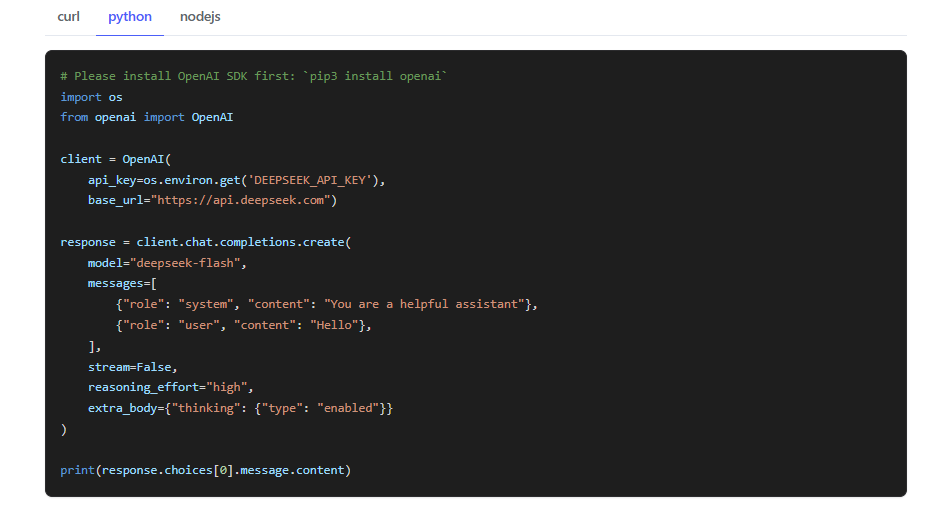
You should get a short explanation of dictionaries, followed by usage fields. The wording and token count will vary. Those usage values describe your request; they are not a dollar amount. If the program raises an error, use the troubleshooting section below before adding more features.
The address, model name, and key determine which service handles this request. The messages list carries your input, and max_tokens limits generation. Thinking is disabled here because the task is a simple definition. max_retries=0 makes a failed attempt visible immediately while you set up the connection; the timeout is an example setting, not a response-time guarantee.
finish_reason="stop" means generation ended normally. It does not prove the answer is accurate or suitable for another operation. In particular, do not treat length, tool_calls, or an interruption as a finished text answer. The finish-reason guide explains the next action for each value.
Stream the answer as it arrives
Streaming is useful when a person is waiting to read an answer. Instead of waiting for the whole response, you receive chunks and display their text as it arrives. Save this complete example as deepseek_stream.py and run it in the same environment.
import os
from getpass import getpass
from openai import OpenAI

api_key = os.getenv("DEEPSEEK_API_KEY") or getpass("DeepSeek API key: ")
parts = []
finish_reason = None
usage = None

with OpenAI(
    api_key=api_key,
    base_url="https://api.deepseek.com",
    timeout=60.0,
    max_retries=0,
) as client:
    with client.chat.completions.create(
        model="deepseek-flash",
        messages=[{"role": "user", "content": "Give three tips for readable Python."}],
        max_tokens=1024,
        extra_body={"thinking": {"type": "disabled"}},
        stream=True,
    ) as stream:
        for chunk in stream:
            if chunk.usage is not None:
                usage = chunk.usage
            if not chunk.choices:
                raise RuntimeError("Unexpected empty choices from DeepSeek.")
            choice = chunk.choices[0]
            text = choice.delta.content or ""
            parts.append(text)
            print(text, end="", flush=True)
            if choice.finish_reason is not None:
                finish_reason = choice.finish_reason

print()
if finish_reason != "stop":
    raise RuntimeError(f"Stream incomplete: {finish_reason!r}")
if not "".join(parts).strip():
    raise RuntimeError("No answer text was returned.")
if usage is not None:
    print("Token usage:", usage.model_dump())
The current DeepSeek streaming reference places total usage on the final content chunk, alongside a choice with a non-null finish_reason. It does not send a separate usage-only chunk with an empty choices array. Earlier chunks can have a null finish reason while generation is still running. Do not copy a different provider’s final-chunk assumptions unchanged.
The example displays provisional text before the final check. In an application, mark that text incomplete if the connection fails or the final reason is not stop. If the output will become a database record or another automatic action, keep it buffered until validation succeeds instead of acting on each fragment.
Closing the stream releases the connection, including when you exit its context after an exception. A retry is a new generation; it cannot be assumed to resume at the exact character where a connection broke. Avoid silently appending a repeated request to already displayed text.
Use AsyncOpenAI when your application is asynchronous
A normal script can use OpenAI. An application that already runs an event loop should use AsyncOpenAI so it can wait for the API without blocking unrelated work. Async does not make a single model response inherently faster.
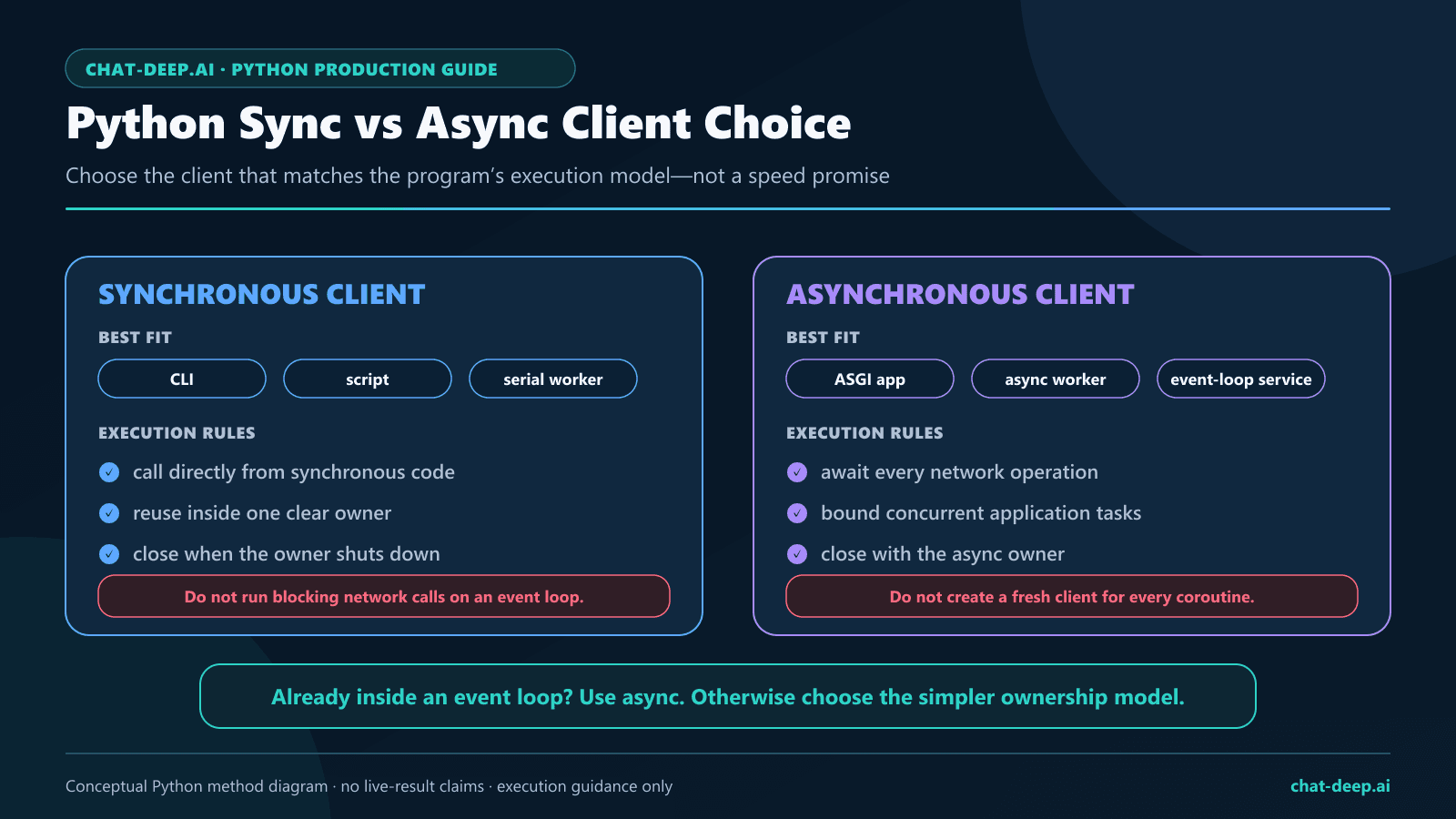
This is a complete asynchronous version of the first request. Save it as deepseek_async.py and run python deepseek_async.py.
import asyncio
import os
from getpass import getpass
from openai import AsyncOpenAI

async def main(api_key):
    async with AsyncOpenAI(
        api_key=api_key,
        base_url="https://api.deepseek.com",
        timeout=60.0,
        max_retries=0,
    ) as client:
        response = await client.chat.completions.create(
            model="deepseek-flash",
            messages=[{"role": "user", "content": "Explain a Python dictionary briefly."}],
            max_tokens=1024,
            extra_body={"thinking": {"type": "disabled"}},
        )
        if not response.choices:
            raise RuntimeError("No response choice was returned.")
        choice = response.choices[0]
        if choice.finish_reason != "stop" or not (choice.message.content or "").strip():
            raise RuntimeError(f"No complete text answer: {choice.finish_reason}")
        print(choice.message.content)

if __name__ == "__main__":
    key = os.getenv("DEEPSEEK_API_KEY") or getpass("DeepSeek API key: ")
    asyncio.run(main(key))
In a notebook that already has an event loop, call await main(key) after defining the function and key; do not also call asyncio.run(). For async streaming, await the request that creates the stream, enter it with async with stream:, and read chunks with async for chunk in stream:. The response checks remain the same.
When sending several requests, share a client and bound the number in flight with a queue or semaphore. Pick a limit that your application can handle and keep it within the provider’s allowance. Launching every item in a large dataset at once can exhaust your own connections before the model’s limits become relevant.
Set thinking mode and read provider-specific fields
Thinking is enabled by default on the current hosted models. With Chat Completions, put the DeepSeek-specific thinking object inside extra_body. The standard SDK argument for effort is reasoning_effort. In the first script, replace the request with the following when you want a reasoning task:
response = client.chat.completions.create(
    model="deepseek-flash",
    messages=[{
        "role": "user",
        "content": "Explain when caching an API response could return stale data.",
    }],
    max_tokens=8192,
    reasoning_effort="high",
    extra_body={"thinking": {"type": "enabled"}},
)
Keep the response checks from the original script. Reasoning uses part of the generation allowance, so a small token cap can leave little room for the final answer. message.content is the answer field; getattr(message, "reasoning_content", None) accesses DeepSeek’s additional reasoning field when present. Do not substitute it for a missing final answer.
The official thinking guide documents low, high, and max effort. It also distinguishes the sampling controls: temperature has no effect in thinking mode, while top_p works there in the effective range 0.95–1 and is ignored in non-thinking mode. Choose the controls for your task rather than setting every parameter.
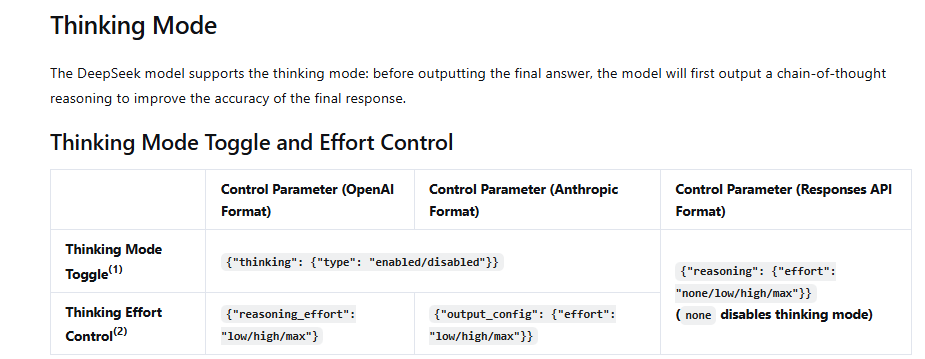
The SDK’s Python types describe OpenAI’s interface; they are not the complete specification of DeepSeek’s extensions. Use extra_body for an additional request field and getattr or model_extra for an extra response field. An available SDK method does not establish that DeepSeek supports its endpoint.
Keep conversation history in your Python application
Reusing a client does not give the model memory of previous requests. DeepSeek Chat Completions is stateless: include the messages needed for the next turn. Keep a separate message list for each user’s conversation.
For a text-only conversation with thinking disabled, this fragment replaces the request and handling inside the first script’s with OpenAI(...) as client: block. Each reply is checked before it is added to history.
messages = [{"role": "system", "content": "Explain Python with small examples."}]
for question in ["What is a dictionary?", "How is it different from a list?"]:
    messages.append({"role": "user", "content": question})
    response = client.chat.completions.create(
        model="deepseek-flash",
        messages=messages,
        max_tokens=1024,
        extra_body={"thinking": {"type": "disabled"}},
    )
    if not response.choices:
        raise RuntimeError("No response choice was returned.")
    choice = response.choices[0]
    answer = choice.message.content or ""
    if choice.finish_reason != "stop" or not answer.strip():
        raise RuntimeError("The conversation did not return a complete answer.")
    messages.append({"role": "assistant", "content": answer})
    print(answer)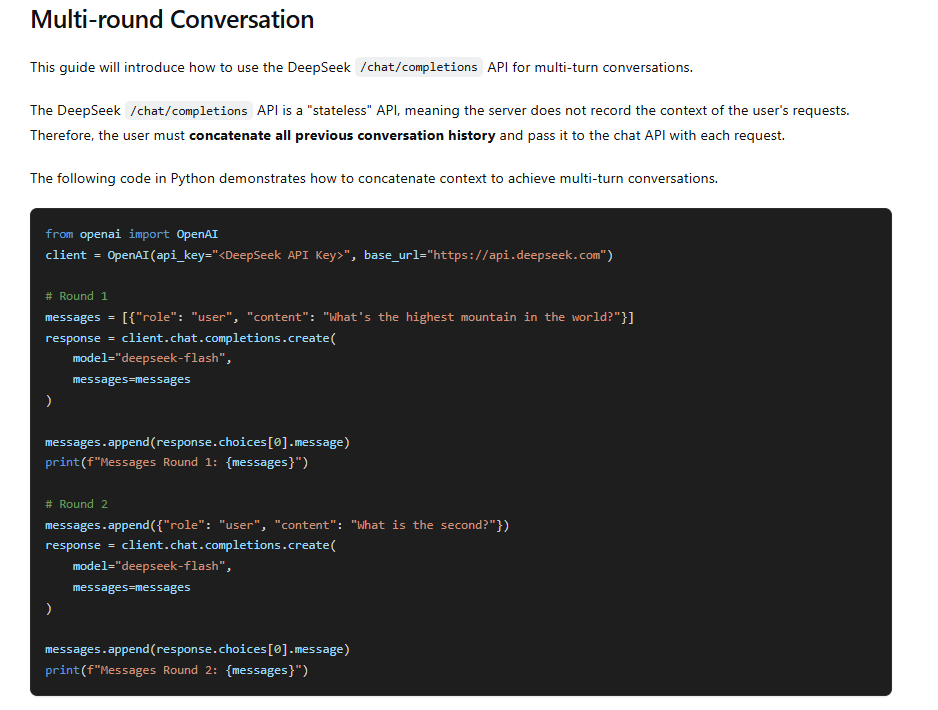
As the conversation grows, history consumes context and input tokens again. Retain relevant turns and handle long histories deliberately. For thinking requests that carry tools, preserve the full earlier assistant messages, including reasoning_content; rebuilding them from visible answer text alone can break the next request.
Get JSON that your program can use
Use JSON output when you need fields instead of prose. Set response_format={"type": "json_object"}, explicitly request JSON, and show the expected shape. DeepSeek’s JSON guide also warns about empty content and truncation, so parse and validate the result after checking its finish reason.
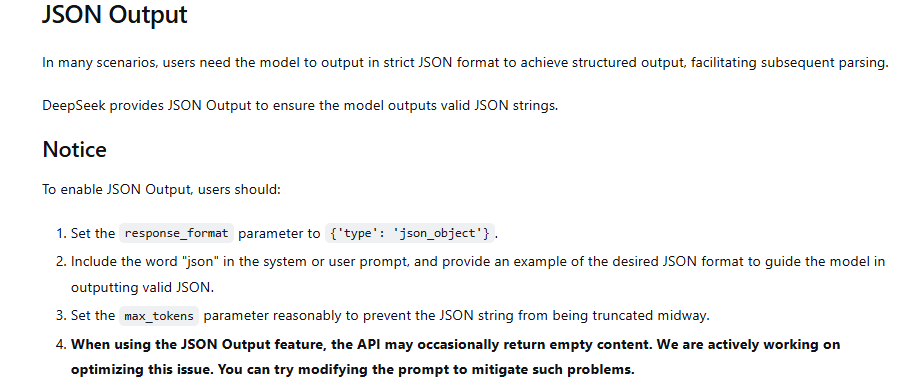
Add import json at the top of the first script, then replace its request and response-handling section with this fragment:
response = client.chat.completions.create(
    model="deepseek-flash",
    messages=[
        {"role": "system", "content": 'Return JSON with this shape: {"language": "...", "topic": "..."}.'},
        {"role": "user", "content": "Python dictionaries store key-value pairs."},
    ],
    response_format={"type": "json_object"},
    max_tokens=1024,
    extra_body={"thinking": {"type": "disabled"}},
)
if not response.choices or response.choices[0].finish_reason != "stop":
    raise RuntimeError("No complete JSON response was returned.")
text = response.choices[0].message.content or ""
if not text.strip():
    raise RuntimeError("The JSON response was empty.")
data = json.loads(text)
required = ("language", "topic")
if not isinstance(data, dict) or any(
    not isinstance(data.get(field), str) or not data[field].strip()
    for field in required
):
    raise ValueError("Expected nonempty language and topic strings.")
print(data)
A parsed dictionary can still contain an incorrect answer or omit information important to your task. Add the checks your application needs before storing it. For stricter output contracts, see the JSON output and schema guide.
Function calls need an application-side loop
When you pass function definitions in tools, a response can contain message.tool_calls instead of a finished answer. DeepSeek chooses a function and proposes arguments; your Python application decides whether to run it. The official tool guide separates these steps.
- Read each tool call, check the function name against the functions you allow, and parse its arguments with
json.loads(). - Validate the inputs and permissions before calling your own function. Do not execute arbitrary model-generated Python.
- Preserve the assistant message. Append the function’s actual result as a
role="tool"message with the matchingtool_call_id. - Send the updated history back to the model, with a limit on repeated tool rounds.
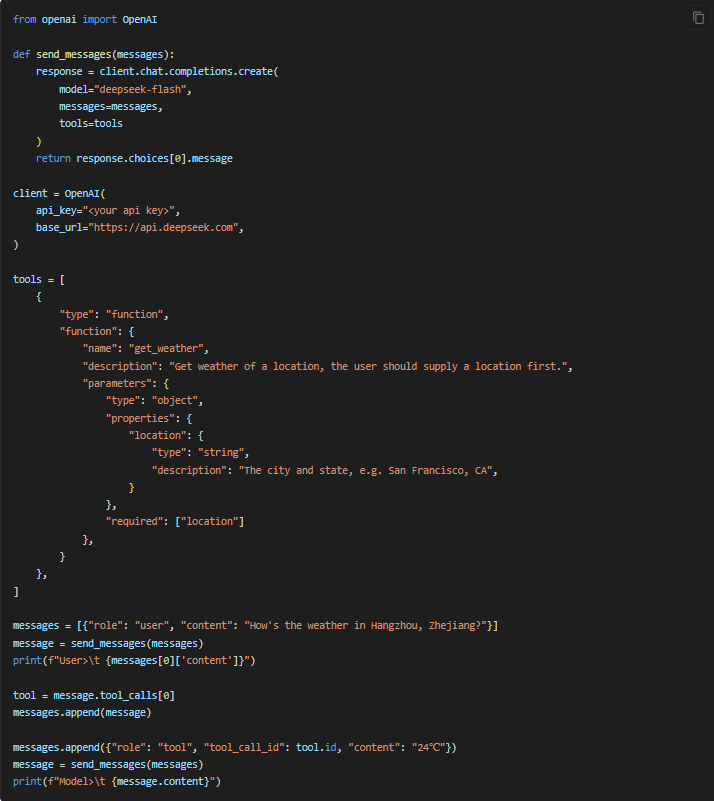
Use the complete Python function-calling example when adding that loop. A tool_calls finish reason means the model is waiting for this work; repeatedly resending the original prompt will not supply the missing result.
Send an image from Python
The current deepseek-flash model accepts image input; deepseek-v4-pro is text-only. The official vision guide supports public image URLs, Base64 data URLs, and uploaded image IDs. With Chat Completions, the user’s content becomes a list of text and image parts.
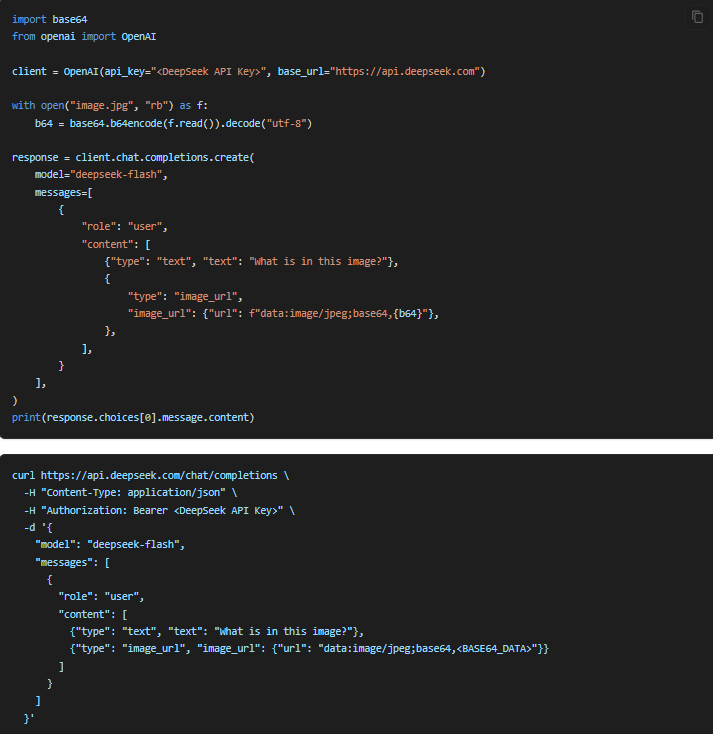
To send a local PNG, add import base64 and from pathlib import Path to the first script. Place an image you are allowed to share at chart.png in the project folder, then use this request inside the existing client block:
encoded = base64.b64encode(Path("chart.png").read_bytes()).decode("ascii")
response = client.chat.completions.create(
    model="deepseek-flash",
    messages=[{
        "role": "user",
        "content": [
            {"type": "text", "text": "Describe the main trend in this chart."},
            {"type": "image_url", "image_url": {
                "url": f"data:image/png;base64,{encoded}",
                "detail": "original",
            }},
        ],
    }],
    max_tokens=2048,
    extra_body={"thinking": {"type": "disabled"}},
)
Keep the first script’s response checks and printing below this request. For a JPEG, use its filename and the image/jpeg MIME type. A public URL goes in the same image_url.url field. Verify that it points to an accessible image rather than an HTML page or a login screen.
For repeated use, upload the image through the Files API and send {"type": "file", "file_id": "file-api-..."} as a content part. Inline images have a 32 MiB per-image limit and contribute to a 48 MiB request body limit; uploaded image references support larger files under their own limits. Base64 increases the body size, so check the upload and file-ID guide before sending large files. Image input consumes billed tokens.
Use the Responses API when your integration expects that format
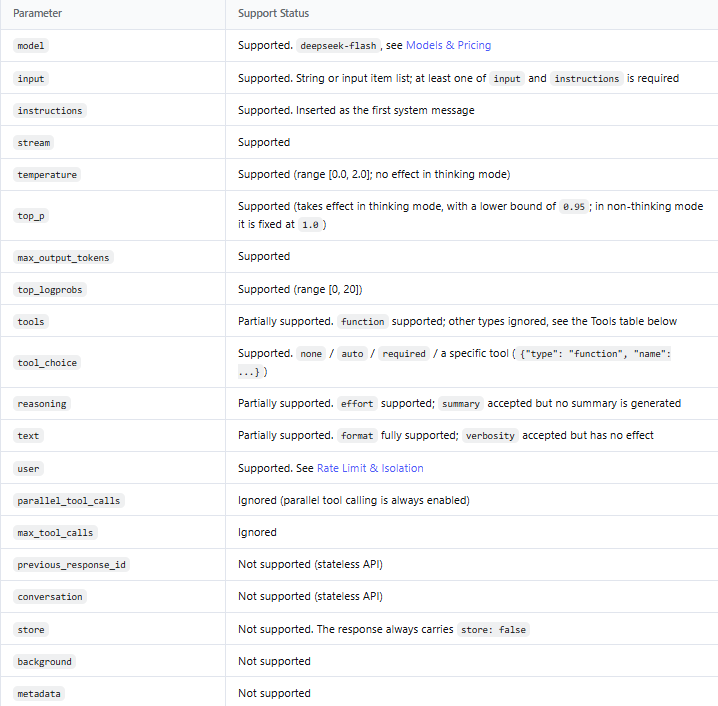
DeepSeek also supports client.responses.create(). You can keep the same client and credentials, but use the fields from DeepSeek’s Responses guide. Replace the first script’s request and handling with:
response = client.responses.create(
    model="deepseek-flash",
    instructions="Explain Python clearly and briefly.",
    input="When would I use a dictionary instead of a list?",
    reasoning={"effort": "none"},
    max_output_tokens=1024,
)
if response.status != "completed":
    raise RuntimeError(f"Response not complete: {response.status}")
if not response.output_text.strip():
    raise RuntimeError("No answer text was returned.")
print(response.output_text)
Here, reasoning={"effort": "none"} disables thinking, max_output_tokens sets the generation allowance, and output_text collects the answer text. Streaming uses semantic events such as response.output_text.delta and terminal completion, incomplete, or failure events. It does not use the Chat Completions chunk parser above.
Check DeepSeek’s compatibility table before using an OpenAI-specific feature. Support for the Responses request format does not imply support for every OpenAI tool, storage feature, or endpoint exposed by the Python package.
Handle errors, timeouts, and retries deliberately
The Python SDK retry policy retries certain connection and HTTP failures twice by default. These include HTTP 408, 409, 429, and 5xx responses. max_retries=0 disables that behavior. A failed stream after output has started is not automatically replayed during stream consumption.
The library’s default request timeout is ten minutes; you can set timeout on the client or through client.with_options(...). Choose it for the task. A short definition and a long reasoning request should not automatically get the same deadline, and retries can extend the total wait.
Find the cause before repeating the request
Use the status and error message together. The actions below follow DeepSeek’s error reference; Python connection and timeout exceptions describe transport failures rather than a model answer.
| What you see | What to check |
|---|---|
ModuleNotFoundError or a missing SDK method | Confirm the interpreter and installed package version. Avoid naming your script openai.py. |
HTTP 401 / AuthenticationError | Use a valid DeepSeek key with the DeepSeek base URL. Replace a revoked key. |
| HTTP 402 | Check the DeepSeek API account balance. Reinstalling the client will not add credit. |
| HTTP 400 or 422 | Read the server’s explanation and correct the request fields, model, or history. |
HTTP 429 / RateLimitError | Reduce concurrency and pace requests. Avoid adding a second uncontrolled retry loop. |
APITimeoutError or APIConnectionError | Check the connection, proxy, certificate setup, and timeout. Do not assume a partial stream is complete. |
| HTTP 500 or 503 | Consider a limited delayed retry; seek help if failures persist. |
For Python exception handling, import openai and catch the narrower timeout exception before the broader connection exception. Place this pattern around your request; the ellipsis marks the request code you are wrapping:
try:
    ...  # Your SDK request and response handling go here.
except openai.APITimeoutError:
    raise RuntimeError("The request timed out; no complete answer was accepted.") from None
except openai.APIConnectionError:
    raise RuntimeError("Could not complete the connection to DeepSeek.") from None
except openai.APIStatusError as exc:
    raise RuntimeError(f"DeepSeek returned HTTP {exc.status_code}.") from None
This is an exception-handling pattern, not another request. In a real application, record enough diagnostic information to act on the failure, such as the status, model, response ID when available, and a carefully reviewed error message. Do not log API keys or entire private conversations. The API error guide provides more detailed fixes.
Move from a working script to an application
The context managers in the complete examples close the clients when the scripts finish. For a service handling many requests, create a client at startup, reuse it, and close it at shutdown. In an async service, close it before the event loop ends. Conversation state belongs to each session, even when sessions share the same client.
You do not need a client factory or a service framework just to make your first call. Add a small shared configuration function when several parts of your application need the same model, URL, and timeout. Keep user input, API transport, and actions taken from the answer understandable and separately checkable.
Check your own code without spending API balance
Use small saved or synthetic response objects to check how your application handles empty content, incomplete output, and unexpected tool arguments. These checks can catch mistakes in your response handling without making a model request. They do not establish that a particular server feature works or that the model’s answers will be correct.
When you do make a live check in your own project, use a small non-sensitive prompt and inspect the actual response. A successful text request establishes that connection and request path; it does not validate image input, tools, or every failure case at once.
Before you rely on the integration, make sure the key is stored privately, unfinished answers remain unfinished, requests have sensible limits, and failures leave the user with a clear next step. Record the package version you have verified in your project so a later upgrade is a deliberate change.
Frequently asked questions
Can I use an OpenAI API key for DeepSeek?
No. Use a DeepSeek key and its API address. The shared client library provides the connection code; the providers have separate accounts and billing.
Do I need a GPU or to install DeepSeek locally?
No GPU is needed for the hosted API examples. Local model deployment is a separate setup with its own hardware and serving requirements.
Why does asyncio.run() fail in my notebook?
The notebook may already be running an event loop. Define the async function and use await main(key) in a cell instead of starting another loop with asyncio.run().
Why does my streaming example receive unexpected chunks?
Check the endpoint and API format first. The current first-party Chat Completions contract places usage and a terminal reason on the last content chunk with one choice. Responses uses a different event format, and a gateway may follow a different contract. A parser written for one should not silently assume the others match.
Can I use the same Python client for several users?
You can reuse a client within your application’s intended lifetime. Keep each user’s conversation history separate, enforce your application’s access rules, and bound concurrent work. Reusing connections does not require sharing chat history.
Why did I get an empty answer without an HTTP error?
Inspect finish_reason, tool calls, and the answer field. Thinking output is separate from the final answer, a tool request may be waiting for your function, and JSON mode can return empty content. A successful HTTP request alone does not establish that you have usable text.
Build on the first request that works
Run the small synchronous example first and confirm that you receive a complete answer. Then add the one feature your application needs next: streaming for a reader waiting on screen, async for an existing event loop, JSON for structured data, or images for visual input. Keeping that progression clear makes it easier to tell which change caused a problem.
Use DeepSeek’s API documentation for supported fields and model behavior, and the Python library reference for client behavior. Keep those two responsibilities separate as you extend the code, and validate the returned result before your application relies on it.