DeepSeek token usage is returned in different field shapes across Chat Completions, the Responses API, and the Anthropic-compatible Messages API. This guide separates those contracts, shows how automatic context-cache usage affects billing, adds Vision image-token accounting, and calculates current peak or off-peak cost without treating one interface’s field names as universal.
Last verified by Chat-Deep.ai: August 22, 2026.
Field definitions, model IDs, cache behavior, and prices were checked against DeepSeek’s first-party documentation. Verify production billing against the official documentation and your account records.
Quick answer
For a non-streaming response, read response.usage. DeepSeek’s documented relationships are:
prompt_tokens = prompt_cache_hit_tokens + prompt_cache_miss_tokens
total_tokens  = prompt_tokens + completion_tokens
cache_hit_rate = prompt_cache_hit_tokens / prompt_tokens
For Chat Completions cost, do not multiply total_tokens by one price. Apply the cache-hit input rate to prompt_cache_hit_tokens, the cache-miss input rate to prompt_cache_miss_tokens, and the output rate to completion_tokens. If completion_tokens_details.reasoning_tokens is returned, it is a breakdown within the completion count—not a fourth amount to add again.
On this page
- Chat Completions usage field reference
- Chat, Responses, and Anthropic field mapping
- Annotated response example
- Read usage in Node.js
- Capture usage while streaming
- Read usage in Python
- Calculate cache-aware API cost
- Count Vision image tokens
- Troubleshoot missing or unexpected fields
- Frequently asked questions
Chat Completions token usage field reference
The first-party DeepSeek Chat Completions schema documents the following fields under usage. These names belong to the Chat Completions contract; the Responses and Anthropic-compatible interfaces use different names.
The five main counters are documented in the non-streaming Chat Completions usage schema. completion_tokens_details and its nested reasoning count are a breakdown when returned. The API does not return a dollar cost or a cache_hit_rate field—both are derived in your application. If a gateway or SDK drops a documented counter, preserve it as unknown and leave the request unpriced rather than silently converting it to zero.
| Chat field | What it measures | How to use it |
|---|---|---|
prompt_tokens | All input tokens processed for the request, including cache hits and cache misses. | Use as total input and as the cache-hit-rate denominator. |
prompt_cache_hit_tokens | Input tokens that matched a persisted context-cache prefix. | Apply the selected model and time period’s cache-hit input rate. |
prompt_cache_miss_tokens | Input tokens that did not hit the context cache. | Apply the selected model and time period’s cache-miss input rate. |
completion_tokens | Tokens generated for the completion. | Apply the output-token rate. |
total_tokens | Prompt tokens plus completion tokens. | Use for volume monitoring, not as a single-price billing bucket. |
completion_tokens_details.reasoning_tokens | Reasoning tokens generated by the model when reported. | Track thinking usage, but do not add it again to completion_tokens. |
The two Chat Completions reconciliation checks
- Input check:
prompt_tokensmust equalprompt_cache_hit_tokens + prompt_cache_miss_tokensin the documented first-party Chat response. - Overall check:
total_tokensmust equalprompt_tokens + completion_tokens.
These checks expose incomplete stream handling, field loss in a gateway, or an SDK serializer that does not preserve provider-specific properties. Do not apply the Chat equations to another interface until its fields have been normalized.
Chat, Responses, and Anthropic usage fields are not interchangeable
| Interface | Input | Cache read | Output | Reasoning detail | Streaming source of truth |
|---|---|---|---|---|---|
| Chat Completions | usage.prompt_tokens | usage.prompt_cache_hit_tokens; misses are usage.prompt_cache_miss_tokens | usage.completion_tokens | usage.completion_tokens_details.reasoning_tokens | The additional usage chunk requested with stream_options.include_usage |
| Responses API | usage.input_tokens | usage.input_tokens_details.cached_tokens | usage.output_tokens | usage.output_tokens_details.reasoning_tokens | response.completed and response.incomplete carry the full response with documented usage. response.failed is terminal and carries the full response/error: never treat it as success, retain any usage actually present, and leave cost unknown when usage is absent |
| Anthropic-compatible Messages | Retain the raw message.usage object and use only keys actually returned | The DeepSeek compatibility page does not document a cache-usage field mapping; do not rename Chat cache fields | Use only output keys actually present in raw message.usage; do not assume Chat or Responses names | The DeepSeek compatibility page does not document a reasoning-usage field mapping | Follow the returned Anthropic event envelope and retain its final raw usage or error without translating Chat fields |
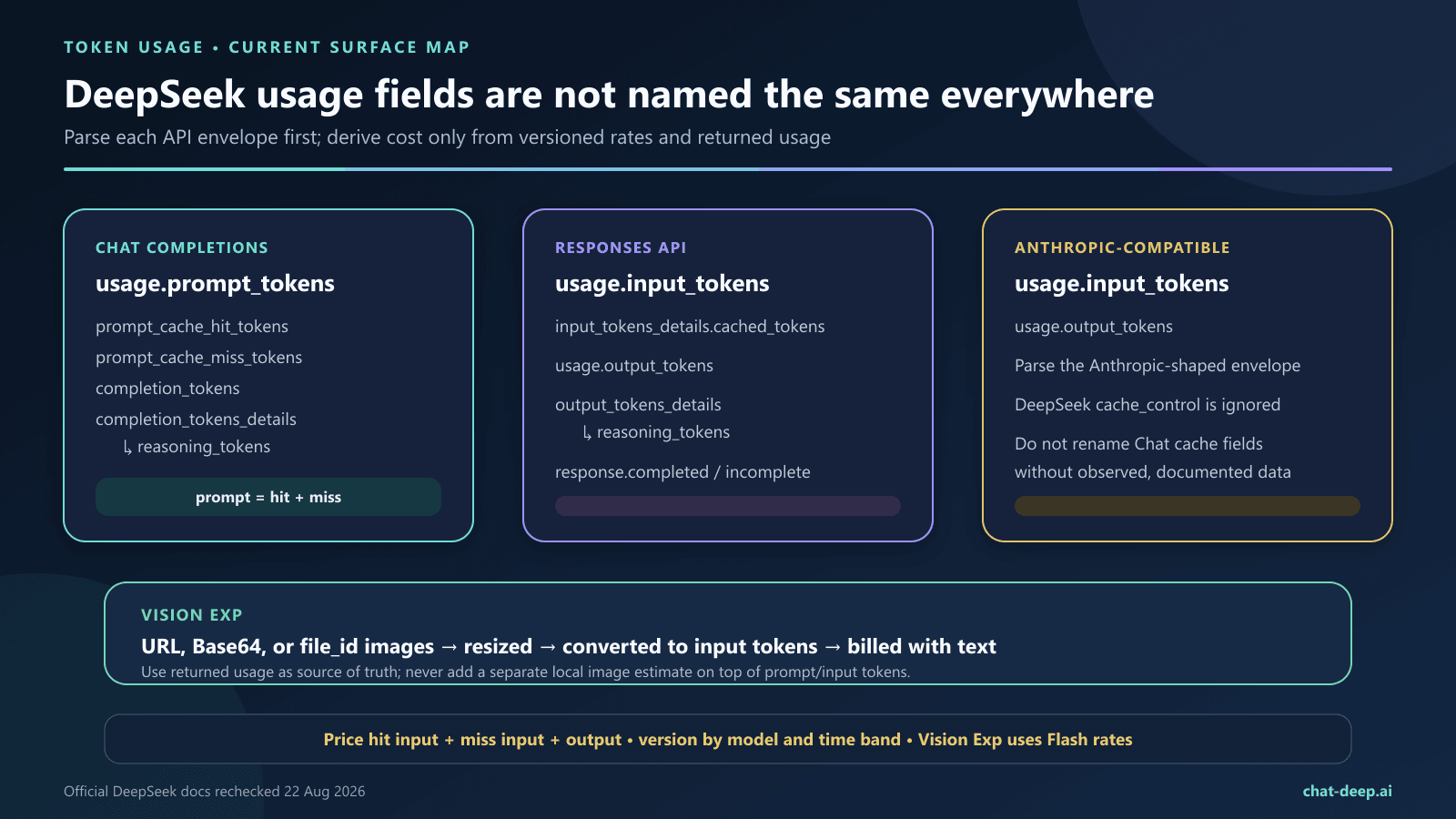
Anthropic compatibility boundary: DeepSeek’s compatibility guide says request-side cache_control is ignored and does not document a response-usage field mapping for the Anthropic-compatible endpoint. DeepSeek still manages its own automatic context cache. Store raw message.usage and use only fields that are actually present in the returned envelope; do not translate Chat cache or reasoning names into Anthropic names without separate documented or observed evidence.
Annotated DeepSeek usage response
The numbers below are illustrative; the field structure follows the documented Chat Completions schema.
{
  "usage": {
    "prompt_tokens": 12000,
    "prompt_cache_hit_tokens": 9000,
    "prompt_cache_miss_tokens": 3000,
    "completion_tokens": 950,
    "total_tokens": 12950,
    "completion_tokens_details": {
      "reasoning_tokens": 600
    }
  }
}- The request used 12,000 input tokens: 9,000 cache hits plus 3,000 cache misses.
- The cache-hit rate was 75%:
9,000 / 12,000 × 100. - The model generated 950 completion tokens.
- The 600 reasoning tokens are part of the completion-token breakdown. The overall token total remains 12,950, not 13,550.
Why total_tokens cannot calculate the bill by itself
Two requests can have the same total_tokens and different costs. One may have mostly cache-hit input, while the other has cache-miss input or a larger share of output. The selected model also changes all three rates. Preserve the separate counters instead of logging only the total.
The Responses API audit methodology uses separate provider-reported counters from both completed tracks to calculate a frozen peak-price estimate; it omits unattributed account-balance observations and does not present the figure as an invoice, account debit, or measured total spend.
Read and validate DeepSeek token usage in Node.js
This example uses the OpenAI JavaScript package with DeepSeek’s OpenAI-compatible base URL. Keep the API key in a server-side environment variable; an account password is not an API credential. For the complete connection setup, use the DeepSeek API guide.
import OpenAI from "openai";

if (!process.env.DEEPSEEK_API_KEY) {
  throw new Error("Set DEEPSEEK_API_KEY on the server.");
}

const model = "deepseek-flash";
const client = new OpenAI({
  apiKey: process.env.DEEPSEEK_API_KEY,
  baseURL: "https://api.deepseek.com",
});

const response = await client.chat.completions.create({
  model,
  messages: [
    {
      role: "system",
      content: "You are a concise technical analyst.",
    },
    {
      role: "user",
      content: "Explain context caching in three bullet points.",
    },
  ],
  thinking: { type: "enabled" },
  stream: false,
});

const usage = response.usage;
if (!usage) {
  throw new Error("The response did not include a usage object.");
}

const requiredFields = [
  "prompt_tokens",
  "prompt_cache_hit_tokens",
  "prompt_cache_miss_tokens",
  "completion_tokens",
  "total_tokens",
];

for (const field of requiredFields) {
  if (typeof usage[field] !== "number") {
    throw new Error(`Missing or invalid usage.${field}`);
  }
}

const promptTokens = usage.prompt_tokens;
const hitTokens = usage.prompt_cache_hit_tokens;
const missTokens = usage.prompt_cache_miss_tokens;
const completionTokens = usage.completion_tokens;
const totalTokens = usage.total_tokens;
const reasoningTokens =
  usage.completion_tokens_details?.reasoning_tokens ?? null;

if (promptTokens !== hitTokens + missTokens) {
  throw new Error("Prompt token counters do not reconcile.");
}

if (totalTokens !== promptTokens + completionTokens) {
  throw new Error("Total token counters do not reconcile.");
}

const cacheHitRate = promptTokens > 0
  ? (hitTokens / promptTokens) * 100
  : 0;

const normalizedUsage = Object.freeze({
  input_tokens: promptTokens,
  cache_hit_input_tokens: hitTokens,
  cache_miss_input_tokens: missTokens,
  output_tokens: completionTokens,
  reasoning_tokens: reasoningTokens,
  total_tokens: totalTokens,
});

console.table({
  ...normalizedUsage,
  cache_hit_rate_percent: Number(cacheHitRate.toFixed(2)),
});
Pricing boundary: validation and normalization are deliberately separate from pricing. Pass normalizedUsage, the returned model, the request timestamp, and a versioned rate-table ID to the cost function in the pricing section. Do not freeze prices inside every API call site.
TypeScript note: an OpenAI-compatible SDK’s type definitions may lag DeepSeek-specific response properties even when the raw JSON contains them. Define a narrow local interface for the documented usage shape or inspect the parsed raw response; do not silently convert missing fields to zero for billing.
Capture token usage in a streaming response
When stream: true, set stream_options.include_usage to true. DeepSeek documents an additional chunk before data: [DONE]; its usage object covers the whole request and its choices array is empty. Other chunks include usage: null, so never assume every streamed chunk contains final counters.
const stream = await client.chat.completions.create({
  model: "deepseek-flash",
  messages: [
    { role: "user", content: "Give me a short deployment checklist." },
  ],
  thinking: { type: "disabled" },
  stream: true,
  stream_options: { include_usage: true },
});

let finalUsage = null;

for await (const chunk of stream) {
  const text = chunk.choices[0]?.delta?.content;
  if (text) process.stdout.write(text);

  if (chunk.usage) {
    finalUsage = chunk.usage;
  }
}

if (!finalUsage) {
  throw new Error("The stream ended without a final usage chunk.");
}

console.log("\nFinal usage:", finalUsage);
Validate and price finalUsage with the same logic used for a non-streaming response. If the client disconnects before the usage chunk arrives, do not invent a local total and label it as official usage.
Responses API streaming uses final response events
The Responses API does not use Chat’s extra empty-choices usage chunk. Its terminal events are response.completed, response.incomplete, and response.failed. DeepSeek documents usage on the full response carried by completed and incomplete events. A failed event carries the full response/error and must be recorded as failure, never as a successful completion. Retain any usage object actually present on that failed response; if it is absent, do not assume zero tokens or zero cost—record the cost as unknown pending billing reconciliation.
let finalEventType = null;
let finalResponse = null;
let terminalError = null;

for await (const event of responseStream) {
  if (
    event.type === "response.completed" ||
    event.type === "response.incomplete" ||
    event.type === "response.failed"
  ) {
    finalEventType = event.type;
    finalResponse = event.response ?? null;
    terminalError = event.response?.error ?? event.error ?? null;
  }
}

if (!finalEventType) {
  throw new Error("The Responses API stream ended without a terminal event.");
}

const responsesUsage = finalResponse?.usage ?? null;

if (finalEventType === "response.failed") {
  console.error({
    terminal_event: finalEventType,
    error: terminalError,
    usage: responsesUsage,
    cost_status: responsesUsage ? "reconcile from returned usage" : "unknown",
  });
  throw new Error(
    "The Responses API stream failed; retain any returned usage and do not mark it successful."
  );
}

if (!responsesUsage) {
  throw new Error("The completed or incomplete response has no usage object.");
}

console.log({
  terminal_event: finalEventType,
  input_tokens: responsesUsage.input_tokens,
  cached_input_tokens:
    responsesUsage.input_tokens_details?.cached_tokens ?? null,
  output_tokens: responsesUsage.output_tokens,
  reasoning_tokens:
    responsesUsage.output_tokens_details?.reasoning_tokens ?? null,
});
For request, response, and SSE handling beyond usage metrics, see the DeepSeek API guide.
Read DeepSeek token usage in Python
The Python client can expose provider-specific fields as attributes or nested objects depending on the package version. This helper reads either an object attribute or a dictionary key and fails clearly when a required counter is missing.
import os
from openai import OpenAI

client = OpenAI(
    api_key=os.environ["DEEPSEEK_API_KEY"],
    base_url="https://api.deepseek.com",
)

response = client.chat.completions.create(
    model="deepseek-flash",
    messages=[
        {
            "role": "user",
            "content": "Explain cache-hit input in two sentences.",
        }
    ],
    stream=False,
    extra_body={"thinking": {"type": "disabled"}},
)

def read_field(obj, name, default=None):
    if obj is None:
        return default
    if isinstance(obj, dict):
        return obj.get(name, default)
    return getattr(obj, name, default)

usage = response.usage
required = {
    "prompt_tokens": read_field(usage, "prompt_tokens"),
    "prompt_cache_hit_tokens": read_field(
        usage, "prompt_cache_hit_tokens"
    ),
    "prompt_cache_miss_tokens": read_field(
        usage, "prompt_cache_miss_tokens"
    ),
    "completion_tokens": read_field(usage, "completion_tokens"),
    "total_tokens": read_field(usage, "total_tokens"),
}

missing = [name for name, value in required.items() if value is None]
if missing:
    raise RuntimeError(f"Missing usage fields: {', '.join(missing)}")

if required["prompt_tokens"] != (
    required["prompt_cache_hit_tokens"]
    + required["prompt_cache_miss_tokens"]
):
    raise RuntimeError("Prompt token counters do not reconcile")

if required["total_tokens"] != (
    required["prompt_tokens"] + required["completion_tokens"]
):
    raise RuntimeError("Total token counters do not reconcile")

details = read_field(usage, "completion_tokens_details")
reasoning_tokens = read_field(details, "reasoning_tokens")

prompt_tokens = required["prompt_tokens"]
hit_rate = (
    required["prompt_cache_hit_tokens"] / prompt_tokens * 100
    if prompt_tokens
    else 0
)

print({
    **required,
    "reasoning_tokens": reasoning_tokens,
    "cache_hit_rate_percent": round(hit_rate, 2),
})
Calculate DeepSeek API cost from usage fields
The official DeepSeek Models & Pricing page listed the following USD rates per one million tokens when checked on September 24, 2026. The legacy deepseek-v4-flash-vision-exp name routes to V4.1-Flash and is billed at the Flash rates.
| API model | Off-peak cache hit | Off-peak cache miss | Off-peak output | Peak cache hit | Peak cache miss | Peak output |
|---|---|---|---|---|---|---|
deepseek-flash | $0.003 | $0.15 | $0.60 | $0.006 | $0.30 | $1.20 |
deepseek-v4-pro | $0.022 | $0.66 | $1.98 | $0.044 | $1.32 | $3.96 |
Select the time period before multiplying: the documented peak windows are 01:00–04:00 and 06:00–10:00 UTC; other hours are off-peak. DeepSeek announced that, effective 00:00 Beijing time on Sunday, August 23, 2026, Saturdays and Sundays in Beijing time are off-peak for the full day. Version both the rate table and the scheduling rule, and check the official page again before production budgeting.
selected_rates = rate_table[model][rate_period]

estimated_cost_usd =
  (cache_hit_input_tokens / 1,000,000 × selected_rates.cache_hit)
  + (cache_miss_input_tokens / 1,000,000 × selected_rates.cache_miss)
  + (output_tokens / 1,000,000 × selected_rates.output)
Worked example with current rates
Using the illustrative response above—9,000 cache-hit tokens, 3,000 cache-miss tokens, and 950 output tokens—the estimated first-party API cost is:
deepseek-flash: $0.001047 off-peak or $0.002094 peak.deepseek-v4-pro: $0.004059 off-peak or $0.008118 peak.
These are calculations from the published rates, not an invoice. Images can increase Vision input tokens, promotions or prices can change, and third-party providers may apply different billing. Use the DeepSeek API cost calculator, the pricing guide, and your account records for production decisions.
How Vision image tokens appear in usage
The deepseek-flash model converts each image into tokens based on its dimensions, then bills those image tokens together with text input tokens. Vision does not introduce a separate dollar field: the image contribution is included in the input counter for the interface you used—Chat prompt_tokens, Responses input_tokens, or the returned Anthropic-shaped input usage.
- Every image is resized automatically before inference; small images are scaled up and large images are scaled down while preserving aspect ratio.
- The documented upper bound is 1,024 tokens per image. Multiple images are counted independently under the same rule.
detail: "low"downsamples animage_urlimage to 512×512 and can be faster and cheaper when fine detail is unnecessary.- Images can be supplied by external URL, Base64 data URL, or an image
file_id. This image-only Files path does not imply support for general PDF or DOCX inputs.
For planning, DeepSeek’s official image-token calculator estimates the tokens for a given image size; after automatic resizing, no single image exceeds 1,024 tokens. Treat those as estimates; the request’s returned usage remains the source of truth.
What the cache fields do—and do not—mean
DeepSeek says context caching is enabled by default. A later request may hit a persisted cache unit when it fully reuses a matching prompt prefix. The output is still generated through inference; a cache hit does not replay an old answer or make completion_tokens cheaper.
- A high hit count means input reuse: it does not mean the response was copied.
- A zero hit count is not automatically an error: the cache is best-effort, takes time to build, and depends on persisted prefix units.
- Exact early structure matters: changing dates, IDs, message order, whitespace, or other content near the beginning can reduce the reusable prefix.
- Cache entries are not permanent: DeepSeek says unused entries are generally cleared within hours to days.
- Isolation can matter: DeepSeek documents
user_idas usable for KV-cache isolation, so evaluate hit rates within the same intentional isolation design.
For prefix persistence, multi-turn examples, prompt layout, cache lifetime, and privacy considerations, use the dedicated DeepSeek context caching guide.
How reasoning tokens affect usage
When thinking mode is used, the response may include completion_tokens_details.reasoning_tokens. DeepSeek defines this as tokens generated for reasoning and places it inside the completion-token breakdown. Use completion_tokens for output billing, then use reasoning_tokens as an observability metric for the share of output spent on reasoning.
reasoning_share = (
    reasoning_tokens / completion_tokens
    if reasoning_tokens is not None and completion_tokens > 0
    else None
)
Guard against a zero denominator and treat a missing details object as “not reported,” not proof that every model path used zero internal computation. For thinking controls and reasoning_content, see the DeepSeek Thinking Mode guide.
What to log in production
Log one record after each completed request. Avoid storing full prompts or model output unless your security, privacy, and retention rules explicitly require them.
- Response ID and your own correlation ID
- Model ID and thinking-mode setting
- Raw provider usage plus normalized input, cache-hit, cache-miss, and output counters; keep the interface name with the record
- Reasoning tokens when reported, the provider total when present, and whether a Vision request included images
- Cache-hit rate and cache-miss rate
- Estimated cost using a versioned rate table
- Prompt-template version—not the secret or full prompt
- Latency, HTTP status, retry count, and
finish_reason
Aggregate by model, endpoint, template version, tenant or privacy-safe workload class, and time period. A site-wide average can hide one template whose changing prefix produces almost all cache misses. For dashboards, traces, and alerts beyond this field-level guide, continue to DeepSeek API observability.
Troubleshoot DeepSeek usage and cache fields
| Symptom | Likely explanation | What to check |
|---|---|---|
No usage object in a stream | include_usage was not enabled, or the final usage chunk was not consumed. | Set stream_options.include_usage: true, iterate until the stream ends, and handle the empty choices array. |
| Cache fields are absent | An older SDK type, proxy, logging layer, or third-party gateway may not preserve DeepSeek-specific fields. | Inspect the parsed response from the official base URL in staging. Update the client or gateway contract; do not silently record missing fields as zero. |
| Every input token is a cache miss | The request has no reusable persisted prefix, the early prompt changes, the cache is not ready, or isolation differs. | Keep reusable instructions and context identical at the front, move volatile values later, and test several requests while preserving the intended user_id policy. |
hit + miss does not equal prompt_tokens | The response is not using the documented first-party schema, a field was transformed, or the wrong stream chunk was logged. | Log the raw parsed usage object, endpoint, provider, model, and SDK version; price nothing until the mismatch is explained. |
| Estimated cost is too high or too low | The calculation used one rate for total_tokens, added reasoning twice, or used stale/model-mismatched rates. | Price hit input, miss input, and completion separately. Version rates by model and verification date. |
reasoning_tokens is missing | Thinking was disabled, no details object was returned, or a client dropped the provider-specific breakdown. | Treat the field as optional for telemetry, confirm the thinking setting, and inspect the unmodified response shape. |
| Responses fields were logged as Chat fields | An adapter renamed input_tokens or cached_tokens without preserving the source contract. | Keep the raw interface name and normalize through an endpoint-specific adapter. |
Anthropic cache_control did not change DeepSeek cache behavior | DeepSeek documents request-side cache_control as ignored. | Measure provider-returned usage and rely on DeepSeek automatic caching; do not infer a forced cache boundary. |
| Vision input cost is unexpectedly high | Image tokens are included with text input and depend on each image’s dimensions and detail mode. | Log image count and dimensions, use detail: "low" when appropriate, and compare with the official estimator and returned usage. |
Can you estimate tokens before sending a request?
DeepSeek provides an offline text-tokenizer demo and an official image-token calculator for planning. Estimates help with context limits, routing, and budgets, but the processed request’s returned usage values are authoritative for request-level monitoring. Tokenization varies by model and content, and Vision images are resized before their token estimate is calculated. See DeepSeek’s official Token & Token Usage guide.
Frequently asked questions
Does prompt_tokens include cached tokens?
Yes. DeepSeek documents prompt_tokens as the total prompt count and states that it equals cache-hit tokens plus cache-miss tokens.
Are DeepSeek cache-hit tokens free?
No. The first-party pricing table lists a lower input rate for cache hits and a higher input rate for cache misses. Apply the rate for the selected model and verification date.
Does total_tokens include reasoning tokens?
Reasoning tokens are reported inside completion_tokens_details, which is a breakdown of completion usage. They are therefore represented within completion_tokens and, through that count, within total_tokens. Do not add them a second time.
Why did an identical or similar request still show cache misses?
DeepSeek describes context caching as best-effort. A hit requires a full match with a persisted prefix unit, cache construction takes time, early changes can break the reusable prefix, and unused cache entries expire. Measure several representative requests instead of treating one retry as a guarantee.
Does a cache hit make output tokens cheaper?
No. Context caching applies to matching input prefixes. Output is generated again and is billed at the output rate.
How do I get DeepSeek usage data when streaming?
Send stream_options: {"include_usage": true} with stream: true. Save the non-null usage object from the additional chunk before the stream’s final marker. Its choices array is empty.
Will every OpenAI-compatible provider return these cache fields?
Not necessarily. OpenAI-format compatibility does not guarantee identical provider-specific usage fields or billing. If you use a gateway, cloud marketplace, or another model host, follow that provider’s response schema and pricing rather than assuming first-party DeepSeek fields.
Which usage value should I store?
Store the raw usage object together with the API interface, endpoint, returned model, request timestamp, and SDK or gateway version. Then normalize only fields documented or actually present for that interface into nullable input, cache, output, reasoning, and total counters. Never translate absent fields into zero or discard the raw envelope needed for later reconciliation.
Do Chat Completions and the Responses API use the same usage field names?
No. Chat uses prompt_tokens, completion_tokens, and DeepSeek’s prompt-cache hit/miss fields. Responses uses input_tokens, output_tokens, input_tokens_details.cached_tokens, and output_tokens_details.reasoning_tokens. Normalize them with separate adapters and retain the raw object.
Where do Vision image tokens appear?
They are included with the interface’s input-token count, together with text input. DeepSeek documents an upper bound of 1,024 tokens per image, with each image counted independently after automatic resizing.
Does Anthropic cache_control manage DeepSeek’s cache?
No. DeepSeek’s Anthropic compatibility guide lists request-side cache_control as ignored. DeepSeek manages context caching automatically; log the returned Anthropic-shaped usage without inventing a Chat-field translation.
How do weekends affect DeepSeek peak and off-peak rates?
DeepSeek announced that from 00:00 Beijing time on August 23, 2026, Saturdays and Sundays in Beijing time are off-peak all day. On other days, use the official UTC peak windows and recheck the pricing page before billing decisions.
Related DeepSeek guides
- DeepSeek API documentation and quickstart
- DeepSeek context caching explained
- Create a DeepSeek Chat Completion
- DeepSeek Thinking Mode
- DeepSeek API pricing
- DeepSeek API cost calculator
- DeepSeek API observability
Primary sources
- DeepSeek Create Chat Completion reference
- DeepSeek Responses API guide
- DeepSeek Anthropic API compatibility guide
- DeepSeek Vision guide and image-token rules
- DeepSeek Context Caching documentation
- DeepSeek Models & Pricing
- DeepSeek Token & Token Usage
Start with the raw interface-specific counters, normalize them without losing provenance, and calculate cost from the selected model, rate period, cache-hit input, cache-miss input, and output. Vision image tokens belong inside input usage—not in a guessed fourth billing bucket.