If you are trying to understand how DeepSeek works today, the first step is to separate three ideas that are often mixed together online: DeepSeek the company and product ecosystem, the official Web/App experience, and the current public API surface. This page focuses on the practical part: what the official DeepSeek API runs today, when to use chat mode versus thinking mode, what you actually pay, what the hard limits are, and what to verify before you build around it.
For the broader overview, start with our DeepSeek AI homepage or What Is DeepSeek?. If you want to test behavior immediately, open DeepSeek Chat on this site. If you are implementing against the official API, continue with our API Guide, pricing hub, and models hub.
Quick answer as of April 15, 2026: the current public API aliases deepseek-chat and deepseek-reasoner both map to DeepSeek-V3.2. Chat mode is the non-thinking path, reasoner is the thinking path, both share a 128K context limit and the same public token pricing, and the official docs explicitly note that the APP/WEB version may differ from the API version. The official web and app surfaces are presented as free access, while the API follows pay-as-you-go billing.
What Is Actually Running on DeepSeek Today?
A lot of DeepSeek content online is still written as if you choose between separate hosted models such as V3 and R1. That is no longer the right mental model for the public API. The official docs now state that both deepseek-chat and deepseek-reasoner correspond to DeepSeek-V3.2 with a 128K context window. The difference is mode, not model family: deepseek-chat is the non-thinking mode of V3.2, while deepseek-reasoner is the thinking mode of V3.2.
This hybrid setup started with DeepSeek-V3.1 in August 2025, when DeepSeek moved from separate hosted chat and reasoning lines to one model with two operating paths. Since December 1, 2025, the official public API surface has been on V3.2. If you are reading older pages about DeepSeek V3, DeepSeek R1, or DeepSeek-Coder, treat them as model history and background, not as the default hosted API surface today.
| Surface | What it maps to today | Output limit | Best fit |
|---|---|---|---|
deepseek-chat | DeepSeek-V3.2 (non-thinking mode) | Default 4K, max 8K | Fast chat, writing, extraction, routine coding, structured outputs |
deepseek-reasoner | DeepSeek-V3.2 (thinking mode) | Default 32K, max 64K | Complex reasoning, debugging, hard comparisons, deeper analysis |
| Official App / Web | Consumer surface that may differ from the API version | Product-specific | General use, file upload, web/app access |
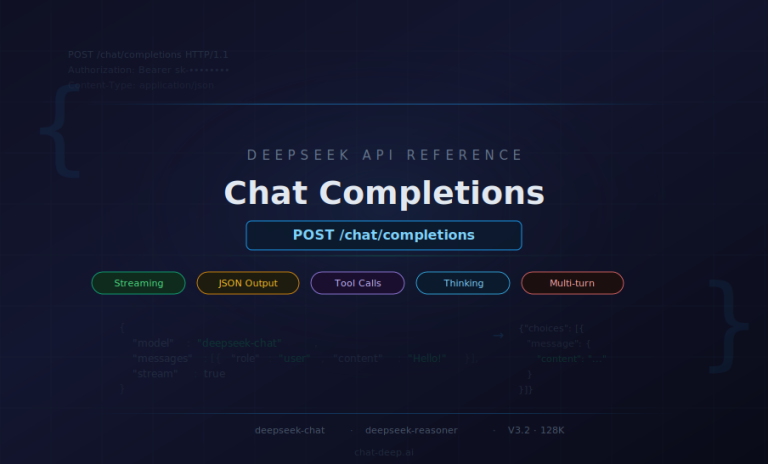
For the current API aliases, the core public capabilities are the same on both modes where documented: JSON Output, Tool Calls, and Chat Prefix Completion. FIM Completion remains available only on the non-thinking side.
Important: if you are comparing screenshots, user reports, or community tutorials, do not assume the public web chat and the API are identical. The official DeepSeek docs explicitly say the API version differs from the APP/WEB version. Use our app guide for the consumer experience and our API Guide for the developer surface.
How Chat Mode vs Thinking Mode Works in Practice
The most important practical decision is not “Which DeepSeek model should I use?” but rather “Does this task actually need thinking mode?” If the task is mostly direct generation, summarization, extraction, rewriting, classification, or routine coding, start with deepseek-chat. It is faster, easier to control, and less likely to spend tokens on internal reasoning you do not need.
Use deepseek-reasoner when the job genuinely benefits from a reasoning phase before the final answer: multi-step math, difficult debugging, strategy trade-offs, long-form analysis, or agent workflows where the model may need to think and call tools before concluding. DeepSeek’s official V3.2 release notes describe this as Thinking in Tool-Use: V3.2 is the first DeepSeek model to integrate thinking directly into tool use, and the official thinking-mode guide now documents tool calling inside thinking mode.
For API users, there are two operational details worth remembering. First, the max_tokens budget in thinking mode includes both the reasoning phase and the final answer. Second, DeepSeek exposes the reasoning phase through reasoning_content, which is useful for debugging integrations but also means you should follow the official multi-turn pattern correctly. If you only need exact request structure and field behavior, continue with our dedicated DeepSeek API Guide instead of relying on scattered code snippets.
| Choose this mode when… | Chat mode (deepseek-chat) | Thinking mode (deepseek-reasoner) |
|---|---|---|
| Speed matters most | Yes | Usually no |
| You need a concise direct answer | Best default | Often unnecessary |
| The task has several reasoning steps | Possible, but not ideal | Preferred |
| You want structured JSON or tool output | Strong fit | Also supported |
| You are cost-sensitive on output tokens | Usually cheaper in practice | Watch output length closely |
The rule of thumb is simple: start with chat mode, escalate to thinking mode only when the task clearly needs it. That keeps this page aligned with real-world use instead of treating reasoner as the automatic default.
Can DeepSeek Read Documents, Files, and Prior Context?
Yes, but the answer changes depending on the surface you are using. On the official product side, DeepSeek promotes long-context conversations and document handling. The official app announcement lists file upload & text extraction as a feature, and the official chat entry describes DeepSeek as able to upload documents and engage in long-context conversations. In practice, that means the web/app experience can be useful for reading long text files and asking follow-up questions.
For API work, think of DeepSeek as a text-first integration surface. The public API docs for deepseek-chat and deepseek-reasoner describe text chat-completions endpoints. If your source material is a PDF, a knowledge base export, or a long report, the reliable pattern is to extract the text you need and send that text in your prompt or retrieval pipeline. If a document depends heavily on charts, diagrams, screenshots, or photos, plan a separate OCR or vision step instead of assuming the core API will understand the visual layer on its own.
Context also has two different meanings that should not be mixed together. At the model level, the API does not remember earlier requests unless you send the prior messages or retrieved context again. At the product level, the official app can sync chat history across devices. Those are not contradictory claims: one describes the stateless API pattern, the other describes product-level history storage and retrieval.
That difference matters for privacy too. DeepSeek’s current privacy policy states that prompts, uploaded files, and chat history may be collected and used to operate and improve the service, and that service data may be processed and stored in the People’s Republic of China. If you handle sensitive customer, legal, health, or internal business data, review the official policy first and compare it with your own risk posture. For a site-level overview, continue with our DeepSeek safety guide and privacy policy.
If your real goal is a production workflow rather than ad hoc chat, move from this overview into our use cases coverage. That is where RAG, support automation, and app workflows belong. This page should stay focused on the practical model behavior itself.
DeepSeek Pricing: What You Actually Pay
One of the most common sources of confusion is mixing “DeepSeek is free” with “DeepSeek API is free.” Those statements refer to different surfaces. DeepSeek’s official homepage and app materials present the web/app experience as free access. The official API docs, however, describe a pay-as-you-go billing model with a unified pricing standard and no tiered plans. The public docs do not present a general public API free tier.
| Billing item | Public rate | What it means in practice |
|---|---|---|
| Input tokens (cache miss) | $0.28 / 1M | Fresh prompt text not served from cache |
| Input tokens (cache hit) | $0.028 / 1M | Repeated prompt prefixes served from DeepSeek caching |
| Output tokens | $0.42 / 1M | Generated text, including reasoning output in thinking mode |
Both deepseek-chat and deepseek-reasoner use the same public rates. The real cost difference in practice usually comes from output length, not endpoint pricing, because thinking mode can consume substantially more output tokens. The pricing page also notes that charges are deducted from topped-up balance or granted balance, with granted balance used first when both exist.
If you want to keep costs under control without changing models, do three things consistently. Put stable instructions and repeated context at the beginning of your prompts so DeepSeek’s context caching can help. Default to chat mode whenever deep reasoning is not required. And set sensible output limits instead of letting long answers run without a cap. For worked examples and planning math, use our API cost calculator and the full pricing hub.
Practical takeaway: free access on the official web/app side does not mean the API is free. When you write about “DeepSeek pricing,” always say which surface you mean. That keeps this page aligned with our pricing page and avoids one of the most common user misunderstandings.
What DeepSeek Can and Cannot Reliably Do
DeepSeek is powerful, but the useful way to describe its limits is with concrete boundaries instead of vague warnings.
1. The context and output caps are real
The current public API surface is documented at 128K context. Output limits differ by mode: chat mode defaults to 4K and goes up to 8K, while thinking mode defaults to 32K and goes up to 64K. Large documents, codebases, or conversations still need chunking, retrieval, or iterative workflows when they exceed the available budget.
2. Reasoning mode is not a free upgrade
Thinking mode can improve difficult tasks, but it is slower and usually more expensive in practice because the reasoning phase counts toward output. For API users, the official thinking-mode guide also notes that parameters such as temperature, top_p, presence_penalty, and frequency_penalty do not have effect in thinking mode. That is another reason not to use it by default for routine work.
3. Traffic and rate behavior are not “unlimited” in the simple sense
DeepSeek’s rate-limit page says the API does not expose a fixed public rate constraint in the simple way some providers do, but the FAQ also says account-exposed limits are adjusted dynamically according to real-time traffic pressure and recent usage. The official error docs list 429 and 503 outcomes, and the rate-limit page notes that requests can sit connected while waiting for scheduling. For production systems, that means you should still build retries, backoff, streaming, and graceful degradation instead of assuming perfect real-time behavior.
4. DeepSeek can hallucinate
DeepSeek’s own model mechanism and training disclosure says the model may generate incorrect or non-factual content and should not be treated as professional advice. That matters most in legal, medical, financial, compliance, and other high-stakes settings. A human review step is not optional there.
5. Hosted-service data handling deserves review
Do not describe the hosted DeepSeek service as if it never stores or processes user data. The official privacy policy says prompts, uploads, and chat history may be collected and used to operate and improve the service. If your use case involves sensitive information, review the policy directly and pair this page with our DeepSeek safety guide.
Practical Tips for Better DeepSeek Output
The fastest way to improve results is not chasing a new model name every month. It is matching the task to the right mode and giving the model a clear deliverable.
- Start with chat mode. Switch to thinking mode only when the task clearly needs multi-step reasoning.
- Name the output. Ask for “a 5-bullet brief,” “a JSON object,” “a patch diff,” or “a comparison table” instead of generic help.
- Send the real context. If you want the model to analyze a report, send the report text or retrieved passages. Do not expect hidden access to your systems.
- Use streaming when latency matters. The DeepSeek FAQ notes that web can feel faster partly because it streams token-by-token, while API defaults to non-streaming unless you enable it.
- Verify consequential answers. DeepSeek is strong at drafting, comparing, extracting, and reasoning, but factual verification is still your job in high-stakes work.
If your next step is prompt quality rather than platform understanding, go directly to our DeepSeek Prompts guide. If your next step is implementation, continue with the API Guide. This keeps the site architecture clean: this page explains how DeepSeek works in practice, while the other pages handle prompting and integration depth.
Frequently Asked Questions
What is the difference between deepseek-chat and deepseek-reasoner?
They currently point to the same underlying API model family, DeepSeek-V3.2. The difference is the operating path: deepseek-chat is non-thinking mode, while deepseek-reasoner is thinking mode. They share the same public pricing and context window, but they differ in behavior and output limits.
Does DeepSeek API have a free tier?
The official public docs present the API as pay-as-you-go billing from topped-up or granted balance, with a unified pricing standard and no tiered plans. DeepSeek’s official web and app surfaces are presented as free access, but the docs do not present a general public API free tier.
Can DeepSeek read PDFs and uploaded files?
On the product side, the official app and web experience support document-oriented workflows such as file upload and text extraction. For API integrations, treat DeepSeek as a text-first interface: extract the text you need, send that text in your prompt or retrieval pipeline, and do not assume the core API will interpret every visual element inside a document.
Does DeepSeek remember previous chats?
The API is stateless unless you send previous messages or retrieved context again. The official app can sync chat history across devices at the product layer. Those are two different layers of the system and should not be treated as the same thing.
What are the main practical limits today?
The biggest ones are the 128K context budget, different output caps by mode, higher token usage in thinking mode, dynamic traffic and rate behavior under load, the possibility of hallucinated output, and the need to review hosted-service data handling before sending sensitive content.
What model is behind the public API right now?
As of April 15, 2026, the official DeepSeek API docs say that both deepseek-chat and deepseek-reasoner correspond to DeepSeek-V3.2. The docs also explicitly say that the APP/WEB version may differ from the API version.
Where to go next on this site
Use the DeepSeek AI homepage for the broad overview, Models for family-level history and current aliases, Pricing for billing detail, and API Guide for request-level implementation. If you just want to see how DeepSeek behaves before you build, open Chat-deep.ai and test your own use case.
Last reviewed: April 15, 2026. This page is maintained by Chat-deep.ai, an independent DeepSeek resource. For the official source material behind the current API surface, review the DeepSeek API docs, Models & Pricing, Thinking Mode guide, change log, FAQ, Rate Limit page, Privacy Policy, and Model Mechanism and Training Methods.