
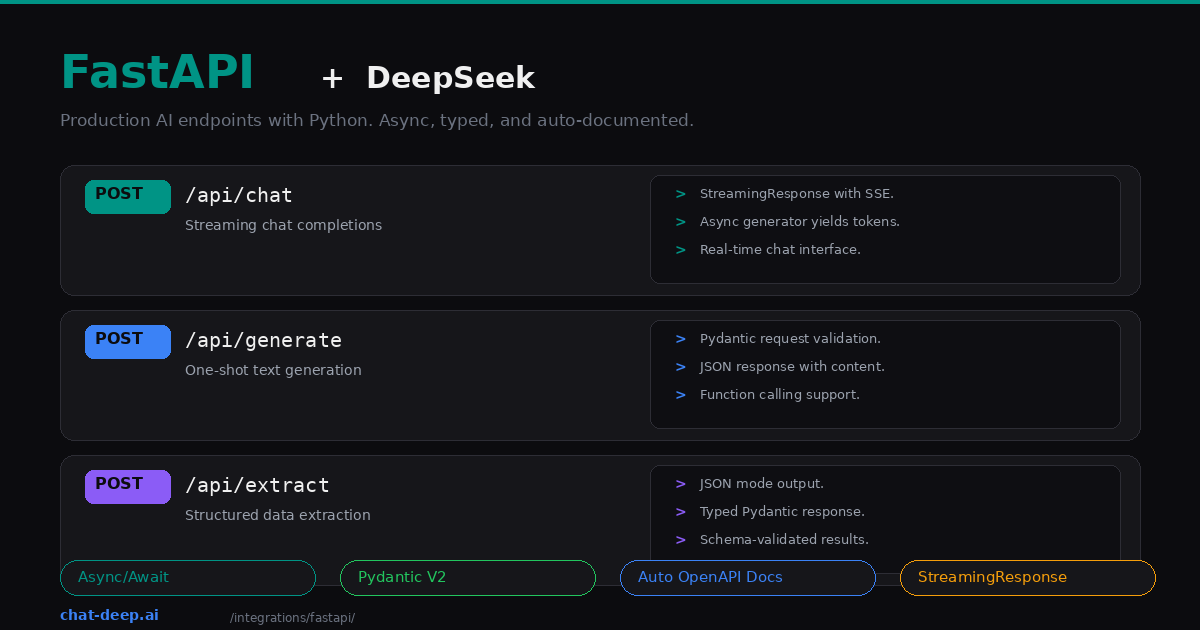
FastAPI is Python’s go-to framework for building production APIs. It gives you async support out of the box, automatic request validation through Pydantic, and auto-generated OpenAPI documentation — all things that matter when you are wrapping an LLM behind an endpoint. DeepSeek’s OpenAI-compatible API pairs naturally with FastAPI’s async architecture, making it straightforward to build typed, validated, streaming AI endpoints.
This guide builds three production-ready endpoints: a streaming chat completion, a one-shot text generator, and a structured data extractor. Each one demonstrates a different FastAPI + DeepSeek pattern that you can adapt to your own application. If you need background on the DeepSeek API itself, start with our API documentation.
Setup
Create a virtual environment and install the dependencies:
python -m venv venv
source venv/bin/activate  # Windows: venv\Scripts\activate

pip install fastapi uvicorn openai python-dotenv pydantic
Create a .env file:
DEEPSEEK_API_KEY=your-api-key-hereCreate a shared DeepSeek client module that the rest of your application imports:
# deepseek_client.py
import os
from openai import AsyncOpenAI
from dotenv import load_dotenv

load_dotenv()

client = AsyncOpenAI(
    api_key=os.environ["DEEPSEEK_API_KEY"],
    base_url="https://api.deepseek.com",
)
We use AsyncOpenAI instead of the synchronous OpenAI class because FastAPI runs on an async event loop. Blocking calls inside async endpoints would freeze the server for all other requests. The async client keeps the event loop free to handle concurrent users. Get your API key from the DeepSeek platform — our login guide covers account creation.
Endpoint 1: Streaming Chat
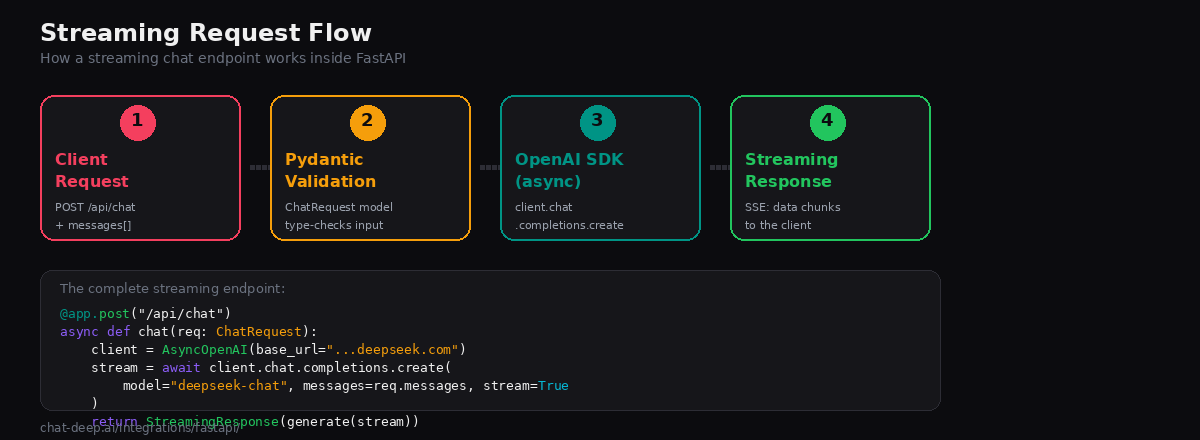
Streaming is essential for chat features. Without it, users stare at a blank screen until the entire response is generated. With streaming, tokens appear as DeepSeek produces them — typically within 200ms of the first token.
Define your request model and endpoint:
# main.py
from fastapi import FastAPI
from fastapi.responses import StreamingResponse
from pydantic import BaseModel
from deepseek_client import client

app = FastAPI(title="DeepSeek API")

class Message(BaseModel):
    role: str
    content: str

class ChatRequest(BaseModel):
    messages: list[Message]
    temperature: float = 0.7

async def stream_tokens(messages, temperature):
    stream = await client.chat.completions.create(
        model="deepseek-chat",
        messages=[m.model_dump() for m in messages],
        temperature=temperature,
        stream=True,
    )
    async for chunk in stream:
        content = chunk.choices[0].delta.content
        if content:
            yield f"data: {content}\n\n"
    yield "data: [DONE]\n\n"

@app.post("/api/chat")
async def chat(req: ChatRequest):
    return StreamingResponse(
        stream_tokens(req.messages, req.temperature),
        media_type="text/event-stream",
    )
Start the server with uvicorn main:app --reload and test it:
curl -N -X POST http://localhost:8000/api/chat \
  -H "Content-Type: application/json" \
  -d '{
    "messages": [{"role": "user", "content": "Explain async generators in Python."}]
  }'
The -N flag disables curl’s output buffering so you see tokens as they arrive. The StreamingResponse wraps an async generator that yields server-sent events. Pydantic validates the request body before the generator starts, so malformed requests fail fast with a 422 error and a clear message explaining what is wrong.
Endpoint 2: One-Shot Generation
Not every AI call needs streaming. Background jobs, batch processing, and API-to-API calls typically want a complete JSON response. Here is a simple generation endpoint:
class GenerateRequest(BaseModel):
    prompt: str
    system: str = "You are a helpful assistant."
    max_tokens: int = 1024

class GenerateResponse(BaseModel):
    content: str
    model: str
    usage: dict

@app.post("/api/generate", response_model=GenerateResponse)
async def generate(req: GenerateRequest):
    response = await client.chat.completions.create(
        model="deepseek-chat",
        messages=[
            {"role": "system", "content": req.system},
            {"role": "user", "content": req.prompt},
        ],
        max_tokens=req.max_tokens,
        temperature=0,
    )

    return GenerateResponse(
        content=response.choices[0].message.content,
        model=response.model,
        usage={
            "prompt_tokens": response.usage.prompt_tokens,
            "completion_tokens": response.usage.completion_tokens,
            "total_tokens": response.usage.total_tokens,
        },
    )
The response_model=GenerateResponse parameter does two things: it validates the output shape and generates accurate OpenAPI documentation for the endpoint. Anyone consuming your API can see exactly what fields to expect by visiting /docs — FastAPI generates the Swagger UI automatically.
Endpoint 3: Structured Data Extraction
One of the most practical AI use cases is pulling structured data out of unstructured text. Combine DeepSeek’s JSON mode with Pydantic to build a typed extraction pipeline:
import json

class ExtractionRequest(BaseModel):
    text: str

class ContactInfo(BaseModel):
    name: str | None = None
    email: str | None = None
    company: str | None = None
    role: str | None = None

@app.post("/api/extract", response_model=ContactInfo)
async def extract_contact(req: ExtractionRequest):
    response = await client.chat.completions.create(
        model="deepseek-chat",
        response_format={"type": "json_object"},
        messages=[
            {
                "role": "system",
                "content": (
                    "Extract contact information from the text. "
                    "Return JSON with keys: name, email, company, role. "
                    "Use null for missing fields."
                ),
            },
            {"role": "user", "content": req.text},
        ],
        temperature=0,
    )

    data = json.loads(response.choices[0].message.content)
    return ContactInfo(**data)
The response_format={"type": "json_object"} parameter tells DeepSeek to output valid JSON. Pydantic then validates and types the result. If DeepSeek returns a field with the wrong type, Pydantic catches it before the response reaches the client. This two-layer validation — JSON mode for structure, Pydantic for types — makes the endpoint reliable enough for production data pipelines.
Error Handling
Wrap your DeepSeek calls in error handlers that return meaningful HTTP responses:
from fastapi import HTTPException
from openai import APIError, RateLimitError, AuthenticationError

@app.post("/api/chat")
async def chat(req: ChatRequest):
    try:
        return StreamingResponse(
            stream_tokens(req.messages, req.temperature),
            media_type="text/event-stream",
        )
    except AuthenticationError:
        raise HTTPException(status_code=401, detail="Invalid DeepSeek API key.")
    except RateLimitError:
        raise HTTPException(status_code=429, detail="Rate limit exceeded. Try again shortly.")
    except APIError as e:
        raise HTTPException(status_code=502, detail=f"DeepSeek API error: {e.message}")
FastAPI converts HTTPException into a properly formatted JSON error response with the status code and detail message. The client gets a clear, actionable error instead of a generic 500. For a full list of DeepSeek error codes and what causes them, see our API reference.
Dependency Injection for the Client
FastAPI’s dependency injection system is a clean way to manage the DeepSeek client, especially when you need different configurations for testing:
from fastapi import Depends
from openai import AsyncOpenAI

def get_deepseek_client() -> AsyncOpenAI:
    return AsyncOpenAI(
        api_key=os.environ["DEEPSEEK_API_KEY"],
        base_url="https://api.deepseek.com",
    )

@app.post("/api/generate")
async def generate(
    req: GenerateRequest,
    client: AsyncOpenAI = Depends(get_deepseek_client),
):
    response = await client.chat.completions.create(
        model="deepseek-chat",
        messages=[{"role": "user", "content": req.prompt}],
    )
    return {"content": response.choices[0].message.content}
In tests, you can override the dependency with a mock client. This lets you test your endpoint logic without making actual API calls to DeepSeek, keeping your test suite fast and deterministic.
Using the Reasoning Model
DeepSeek’s deepseek-reasoner model produces chain-of-thought reasoning traces before the final answer. You can expose both the thinking process and the result through a dedicated endpoint:
class ReasonRequest(BaseModel):
    question: str

class ReasonResponse(BaseModel):
    reasoning: str | None
    answer: str

@app.post("/api/reason", response_model=ReasonResponse)
async def reason(req: ReasonRequest):
    response = await client.chat.completions.create(
        model="deepseek-reasoner",
        messages=[{"role": "user", "content": req.question}],
    )

    message = response.choices[0].message
    return ReasonResponse(
        reasoning=getattr(message, "reasoning_content", None),
        answer=message.content,
    )
The deepseek-reasoner response exposes reasoning_content, which is useful for tutoring, math, and analysis endpoints. In the current hosted DeepSeek API, the reasoner also supports JSON Output and Tool Calls. The key rule is message handling: when a new user turn starts, drop the previous reasoning_content; but if the same question continues through a thinking + tool-call loop, pass the assistant message back with reasoning_content so the model can continue reasoning.
Testing with pytest
FastAPI’s TestClient (powered by httpx) makes it straightforward to test your endpoints. Use dependency overrides to mock the DeepSeek client:
# test_main.py
from unittest.mock import AsyncMock, MagicMock
from fastapi.testclient import TestClient
from main import app, get_deepseek_client

# Create a mock that returns a predictable response
mock_client = AsyncMock()
mock_response = MagicMock()
mock_response.choices = [MagicMock()]
mock_response.choices[0].message.content = "Mocked response"
mock_response.model = "deepseek-chat"
mock_response.usage.prompt_tokens = 10
mock_response.usage.completion_tokens = 5
mock_response.usage.total_tokens = 15
mock_client.chat.completions.create.return_value = mock_response

app.dependency_overrides[get_deepseek_client] = lambda: mock_client

client = TestClient(app)

def test_generate_endpoint():
    response = client.post("/api/generate", json={
        "prompt": "Hello",
    })
    assert response.status_code == 200
    assert "content" in response.json()
Mocking the client means your tests run instantly without hitting the DeepSeek API. This is essential for CI/CD pipelines where you want fast, reliable, cost-free test runs. The dependency injection pattern described earlier makes this override clean — no monkey-patching required.
CORS and Frontend Integration
If your FastAPI backend serves a separate frontend (React, Vue, or a static site), you need to enable CORS:
from fastapi.middleware.cors import CORSMiddleware

app.add_middleware(
    CORSMiddleware,
    allow_origins=["http://localhost:3000"],  # Your frontend URL
    allow_methods=["POST"],
    allow_headers=["Content-Type"],
)
For a Next.js frontend connecting to a FastAPI backend, see our Next.js integration guide. For full-stack deployment patterns that combine FastAPI with web frontends, our web app integration guide covers architecture decisions and hosting options.
Rate Limiting Your API
If your FastAPI endpoints are public-facing, you should implement your own rate limiting on top of DeepSeek’s dynamic limits. A simple approach using slowapi works well:
from slowapi import Limiter
from slowapi.util import get_remote_address

limiter = Limiter(key_func=get_remote_address)
app.state.limiter = limiter

@app.post("/api/chat")
@limiter.limit("10/minute")
async def chat(req: ChatRequest, request: Request):
    return StreamingResponse(
        stream_tokens(req.messages, req.temperature),
        media_type="text/event-stream",
    )
This prevents individual users from consuming too many tokens. Without your own rate limiting, a single aggressive client could exhaust your DeepSeek API budget or trigger DeepSeek’s own 429 errors for your entire application. For more centralized rate limiting across multiple services, consider using LiteLLM as a proxy with per-key budgets.
Deployment
FastAPI runs on Uvicorn, an ASGI server. For production, use Uvicorn behind a process manager or inside a container:
# Docker
FROM python:3.12-slim
WORKDIR /app
COPY requirements.txt .
RUN pip install --no-cache-dir -r requirements.txt
COPY . .
CMD ["uvicorn", "main:app", "--host", "0.0.0.0", "--port", "8000", "--workers", "4"]
The --workers 4 flag runs four Uvicorn worker processes, letting your API handle concurrent requests across multiple CPU cores. Each worker has its own event loop and its own connection to the DeepSeek API. For high-traffic services, put Uvicorn behind nginx or a load balancer and scale horizontally.
Set DEEPSEEK_API_KEY as an environment variable in your deployment platform — never bake it into the Docker image. For cloud deployments, our guide on deploying DeepSeek on AWS, Azure, and GCP covers the infrastructure side. Check API availability on our status page before rolling out to production.
Choosing the Right Model
DeepSeek offers two model aliases through the API. Choosing the right one depends on your endpoint’s purpose.
deepseek-chat maps to DeepSeek-V3.2 in standard mode. It handles general chat, code generation, function calling, JSON mode, and structured output. This is the model you should use for most FastAPI endpoints. It supports the full 128K token context window and all API features including streaming and tool use.
deepseek-chat is still the best default for most FastAPI endpoints because it is simpler for standard chat, tool-heavy handlers, and structured-response workflows. deepseek-reasoner is the reasoning-first option for harder analysis and long-form problem solving. Avoid describing it as lacking function calling, JSON mode, or tool use at the model level; those features exist in DeepSeek’s current hosted API, even though deepseek-chat remains the easier default for most REST implementations.
Best Practices
Always use AsyncOpenAI. The synchronous client blocks the event loop. In a FastAPI app serving multiple concurrent requests, one blocking call stalls everyone. The async client cooperates with FastAPI’s concurrency model and lets Uvicorn handle thousands of connections per worker.
Set temperature=0 for deterministic endpoints. When your API feeds structured data into a database or downstream system, you want reproducible output. Reserve higher temperatures for creative or conversational features where variation is desirable.
Validate both input and output with Pydantic. Use BaseModel for request bodies and response_model for responses. This catches errors early, generates accurate docs, and prevents malformed data from leaking through your API. Pydantic V2 runs up to 50x faster than V1, so the validation overhead is negligible.
Consider using LiteLLM as a proxy. If your FastAPI service needs fallback providers, cost tracking, or per-key budgets, LiteLLM handles these at the infrastructure layer so your endpoint code stays focused on business logic.
Monitor costs. DeepSeek’s pricing is $0.28 per million input tokens and $0.42 per million output tokens — low, but high-traffic APIs can still accumulate. Log token usage from the response.usage object and set alerts when daily spend exceeds your threshold. See our pricing page for current rates.
Conclusion
FastAPI and DeepSeek complement each other well. FastAPI provides the async runtime, request validation, and auto-documentation that production APIs demand. DeepSeek provides the intelligence at a price that makes AI-powered endpoints economically viable even at scale. Together, they let you ship typed, validated, streaming AI features without the overhead of a separate inference layer or complex middleware.
Start with the streaming chat endpoint — it covers the most common need. Add the one-shot and extraction patterns as your API grows. Explore more integration options in our integrations section, including LangChain for chain-based workflows and the DeepSeek ecosystem overview for a broader look at what you can build.