
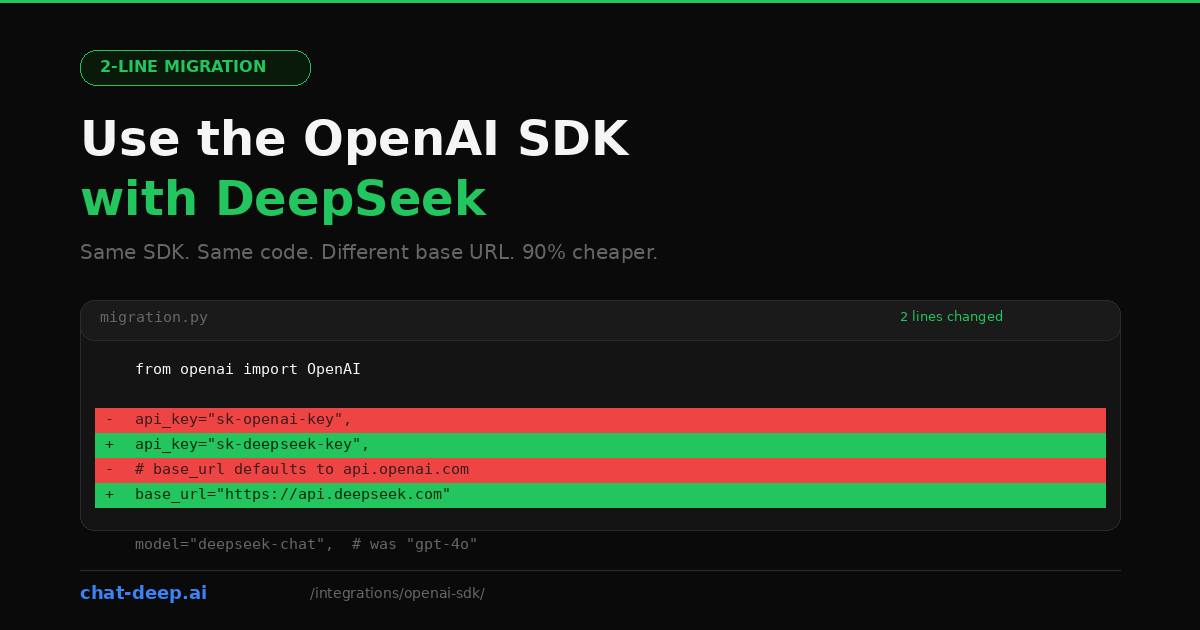
DeepSeek’s API follows the OpenAI chat completions format. That is not a rough approximation — it is a deliberate design choice. The endpoint structure, the request body, the response schema, streaming behavior, function calling, and even the error codes all mirror what the OpenAI SDK expects. This means you can use the official openai Python package or the openai npm package to talk to DeepSeek by changing two things: the API key and the base URL.
If you already have a working OpenAI integration, this is the fastest path to trying DeepSeek. No new dependencies. No new abstractions. Just point your existing client at a different server, swap the model name, and you are running on DeepSeek at a fraction of the cost.
The Minimal Change
Here is what a typical OpenAI setup looks like and what changes for DeepSeek.
Before (OpenAI)
from openai import OpenAI

client = OpenAI(
    api_key="sk-your-openai-key",
)

response = client.chat.completions.create(
    model="gpt-4o",
    messages=[
        {"role": "system", "content": "You are a helpful assistant."},
        {"role": "user", "content": "Explain REST APIs briefly."},
    ],
)

print(response.choices[0].message.content)
After (DeepSeek)
from openai import OpenAI

client = OpenAI(
    api_key="sk-your-deepseek-key",
    base_url="https://api.deepseek.com",
)

response = client.chat.completions.create(
    model="deepseek-chat",
    messages=[
        {"role": "system", "content": "You are a helpful assistant."},
        {"role": "user", "content": "Explain REST APIs briefly."},
    ],
)

print(response.choices[0].message.content)
Three things changed: api_key, base_url, and model. Everything else — the import, the method call, the message format, the response structure — is identical. That is the entire migration.
If you do not have a DeepSeek API key yet, our login guide covers account creation. New accounts receive free tokens to experiment with before adding a payment method.
The Same Thing in Node.js
The JavaScript/TypeScript SDK works the same way:
import OpenAI from 'openai';

const client = new OpenAI({
  apiKey: process.env.DEEPSEEK_API_KEY,
  baseURL: 'https://api.deepseek.com',
});

const completion = await client.chat.completions.create({
  model: 'deepseek-chat',
  messages: [
    { role: 'system', content: 'You are a helpful assistant.' },
    { role: 'user', content: 'Explain REST APIs briefly.' },
  ],
});

console.log(completion.choices[0].message.content);
Install the SDK with npm install openai if you have not already. The baseURL parameter (note the camelCase in JS vs. snake_case in Python) tells the client to send requests to DeepSeek instead of OpenAI. The rest of your code stays exactly as it is.
Environment Variables: The Clean Way
Hardcoding keys is convenient for a quick test but wrong for anything beyond that. Here is the recommended setup using environment variables.
Create a .env file:
DEEPSEEK_API_KEY=sk-your-deepseek-key
DEEPSEEK_BASE_URL=https://api.deepseek.com
Then in Python:
import os
from openai import OpenAI
from dotenv import load_dotenv

load_dotenv()

client = OpenAI(
    api_key=os.environ["DEEPSEEK_API_KEY"],
    base_url=os.environ["DEEPSEEK_BASE_URL"],
)

# Use client as normal
This pattern also makes it trivial to switch between OpenAI and DeepSeek by changing the environment variables without touching any code. Useful for A/B testing providers or maintaining a fallback.
Streaming
DeepSeek supports the same streaming interface as OpenAI. Set stream=True and iterate over the response chunks:
stream = client.chat.completions.create(
    model="deepseek-chat",
    messages=[
        {"role": "user", "content": "Write a haiku about debugging."},
    ],
    stream=True,
)

for chunk in stream:
    content = chunk.choices[0].delta.content
    if content:
        print(content, end="", flush=True)
The chunk structure is identical to OpenAI’s: each chunk contains a delta object with partial content. Your existing streaming UI code, progress indicators, and token counters should work without modification. For building streaming chat interfaces, see our web app integration guide.
Function Calling
DeepSeek supports OpenAI-style tool calling through the chat completions API. For straightforward tool-heavy integrations in the OpenAI SDK, deepseek-chat remains the simplest default. In the current hosted DeepSeek API, deepseek-reasoner also participates in tool calls in thinking mode, but it has special message-handling rules: during the same question’s thinking + tool-call loop, pass the assistant message back with reasoning_content; when a new user turn begins, omit the previous reasoning_content.
tools = [
    {
        "type": "function",
        "function": {
            "name": "get_stock_price",
            "description": "Get the current stock price for a given ticker symbol.",
            "parameters": {
                "type": "object",
                "properties": {
                    "ticker": {
                        "type": "string",
                        "description": "Stock ticker symbol, e.g., AAPL",
                    }
                },
                "required": ["ticker"],
            },
        },
    }
]

response = client.chat.completions.create(
    model="deepseek-chat",
    messages=[{"role": "user", "content": "What is Apple's stock price?"}],
    tools=tools,
    tool_choice="auto",
)

# Check if the model wants to call a tool
message = response.choices[0].message
if message.tool_calls:
    tool_call = message.tool_calls[0]
    print(f"Function: {tool_call.function.name}")
    print(f"Arguments: {tool_call.function.arguments}")
The tool call response format is the same as OpenAI’s: tool_calls array with function.name and function.arguments. After executing the function, you append the tool result to the messages array and call the API again for the final response — the exact same pattern you use with OpenAI.
JSON Mode
When you need the model to return valid JSON, use the response_format parameter just like you would with OpenAI:
response = client.chat.completions.create(
    model="deepseek-chat",
    response_format={"type": "json_object"},
    messages=[
        {
            "role": "system",
            "content": "You are a data extraction assistant. Always respond with valid JSON.",
        },
        {
            "role": "user",
            "content": "Extract the name, email, and company from: John Smith, john@acme.com, works at Acme Corp.",
        },
    ],
)

import json
data = json.loads(response.choices[0].message.content)
print(data)
When using JSON mode, always include an instruction in the system or user message telling the model to output JSON. The response_format parameter ensures the output is valid JSON, but the model still needs the prompt to know what structure you want.
Using the Reasoning Model
DeepSeek’s reasoning model (deepseek-reasoner) produces chain-of-thought traces before the final answer. Through the OpenAI SDK, you access it by changing the model name. The reasoning content appears in a separate field:
response = client.chat.completions.create(
    model="deepseek-reasoner",
    messages=[
        {"role": "user", "content": "A train leaves at 60 mph. Another leaves 30 min later at 90 mph. When does the second catch up?"},
    ],
)

# The reasoning trace
print("Thinking:", response.choices[0].message.reasoning_content)

# The final answer
print("Answer:", response.choices[0].message.content)
For normal multi-turn chat, do not carry reasoning_content from a previous answer into the next user turn. But during the same-question thinking + tool-call loop, you must send the assistant message back with reasoning_content intact so the model can continue reasoning. A blanket “never send reasoning_content back” rule is incorrect for the current Thinking Mode API.
What Works and What Does Not
DeepSeek’s OpenAI compatibility is extensive, but not 100%. Here is what you can rely on and where to watch out.
Works identically: chat completions, system/user/assistant message roles, streaming, function calling and tool use, JSON mode, multi-turn conversations, the max_tokens parameter, the stop parameter, temperature and top_p (on deepseek-chat).
Works with caveats: the base URL accepts both https://api.deepseek.com and https://api.deepseek.com/v1 — the /v1 is for compatibility only and does not indicate a model version. The reasoning model ignores temperature and penalty parameters silently.
Not supported: OpenAI-specific features like DALL-E image generation, Whisper audio transcription, text-to-speech, embeddings endpoints, fine-tuning API, the Assistants API, and vision/image inputs (DeepSeek has separate OCR models for this). If your application uses these features alongside chat completions, you will need to keep those calls on OpenAI while routing chat requests to DeepSeek.
Model Name Mapping
When migrating, you need to replace the OpenAI model name with the equivalent DeepSeek model. Here is the practical mapping:
| OpenAI Model | DeepSeek Equivalent | Notes |
|---|---|---|
gpt-4o, gpt-4o-mini, gpt-4-turbo | deepseek-chat | General-purpose chat, 128K context, simplest choice for tools and structured output |
o1, o1-mini, o1-preview | deepseek-reasoner | Reasoning-first model with reasoning_content; supports Tool Calls and JSON Output in thinking mode, but requires special message handling |
gpt-3.5-turbo | deepseek-chat | No direct low-tier equivalent; use deepseek-chat as the default option |
Both DeepSeek models share a 128K token context window. Pricing is the same regardless of which model you choose: $0.28/M input tokens (cache miss), $0.028/M (cache hit), and $0.42/M output tokens. For up-to-date rates, see our DeepSeek pricing page.
Async Usage
The OpenAI Python SDK ships with a built-in async client. If your application uses asyncio — common in FastAPI, aiohttp, or Discord bot projects — you can make non-blocking calls to DeepSeek without changing your migration approach:
import asyncio
from openai import AsyncOpenAI

client = AsyncOpenAI(
    api_key="sk-your-deepseek-key",
    base_url="https://api.deepseek.com",
)

async def main():
    response = await client.chat.completions.create(
        model="deepseek-chat",
        messages=[{"role": "user", "content": "What is dependency injection?"}],
    )
    print(response.choices[0].message.content)

asyncio.run(main())
The AsyncOpenAI class mirrors the synchronous OpenAI class exactly. Every method available on the sync client has an async equivalent. Streaming also works asynchronously — use async for chunk in stream instead of the synchronous for chunk in stream loop. This is particularly useful for server applications that need to handle many concurrent users without blocking the event loop.
Context Caching
DeepSeek automatically caches repeated input content. If your application sends the same system prompt or conversation prefix across multiple requests, subsequent calls pay the cache-hit rate ($0.028/M) instead of the full rate ($0.28/M) — a 90% discount on input tokens with zero code changes.
To maximize cache hits, structure your messages so static content comes first. A long system prompt followed by a short user message is ideal because the system prompt gets cached after the first request. Even changing a single character in the prefix breaks the cache match, so keep your system prompts identical across requests.
The OpenAI SDK does not expose DeepSeek’s cache metrics directly in the response. If you need to monitor cache hit rates, use DeepSeek’s platform dashboard or switch to a provider-specific SDK like Vercel AI SDK or LangChain, both of which expose cache metadata.
Error Handling
DeepSeek returns the same HTTP status codes as OpenAI, so your existing error handling should work. Here is a recap of the important ones:
from openai import OpenAI, APIError, RateLimitError, AuthenticationError

client = OpenAI(
    api_key=os.environ["DEEPSEEK_API_KEY"],
    base_url="https://api.deepseek.com",
)

try:
    response = client.chat.completions.create(
        model="deepseek-chat",
        messages=[{"role": "user", "content": "Hello"}],
    )
except AuthenticationError:
    print("Invalid API key. Check your DEEPSEEK_API_KEY.")
except RateLimitError:
    print("Rate limited. Back off and retry.")
except APIError as e:
    print(f"API error {e.status_code}: {e.message}")
The OpenAI SDK’s built-in exception classes work correctly because DeepSeek returns the same error response format. The 401 (authentication), 402 (insufficient balance), 429 (rate limit), and 500/503 (server errors) codes all follow the expected pattern. For a full reference, see our DeepSeek API documentation.
DeepSeek uses dynamic rate limiting rather than fixed quotas. If you encounter 429 errors during peak times, the built-in retry logic in the OpenAI SDK (max_retries parameter) handles this automatically. You can also check current API health on our real-time status page.
Running Both Providers Side by Side
You do not have to go all-in on DeepSeek. A common migration strategy is to route certain requests to DeepSeek while keeping others on OpenAI. Since both use the same SDK, this is just two client instances:
import os
from openai import OpenAI

openai_client = OpenAI(
    api_key=os.environ["OPENAI_API_KEY"],
)

deepseek_client = OpenAI(
    api_key=os.environ["DEEPSEEK_API_KEY"],
    base_url="https://api.deepseek.com",
)

# Route based on task
def get_completion(messages, task_type="general"):
    if task_type == "reasoning":
        return deepseek_client.chat.completions.create(
            model="deepseek-reasoner", messages=messages
        )
    elif task_type == "vision":
        return openai_client.chat.completions.create(
            model="gpt-4o", messages=messages  # DeepSeek has no vision chat model
        )
    else:
        return deepseek_client.chat.completions.create(
            model="deepseek-chat", messages=messages
        )
This pattern lets you gradually shift traffic to DeepSeek, monitor quality, and keep OpenAI as a fallback for features DeepSeek does not support yet. It is also a clean way to A/B test response quality between providers without changing your application architecture.
When to Use a Dedicated DeepSeek Package Instead
The OpenAI SDK approach is the fastest way to try DeepSeek and works well for straightforward chat and completion use cases. But if your application needs deeper integration, consider switching to a DeepSeek-specific package.
The LangChain integration (langchain-deepseek) is ideal for chain-based workflows, RAG pipelines, and agent systems. The LlamaIndex integration (llama-index-llms-deepseek) is built for document indexing and retrieval. The Vercel AI SDK (@ai-sdk/deepseek) provides type-safe streaming, React hooks, and structured object generation for web apps.
These packages expose DeepSeek-specific features like cache metrics, reasoning token separation, and provider-optimized error handling that the generic OpenAI SDK cannot access. For a broader view of DeepSeek’s integration options, explore our full integrations section and the DeepSeek ecosystem overview.
Conclusion
The OpenAI SDK is the simplest on-ramp to DeepSeek. Two lines change. Your streaming logic, your error handling, your function calls, your message format — all of it carries over. The migration takes minutes, not days, and the cost savings are immediate.
Start by pointing your existing client at https://api.deepseek.com, run your test suite, and compare the results. If the quality meets your bar, you have just cut your LLM costs by an order of magnitude without rewriting a single line of application logic.