
Spring AI brings the AI ecosystem into the Spring world. It provides a consistent, Spring-idiomatic API for working with language models, embeddings, vector stores, and function calling — all with the dependency injection, auto-configuration, and testability that Spring Boot developers expect. If you build backend services in Java or Kotlin and want to integrate DeepSeek, Spring AI is the most natural path.
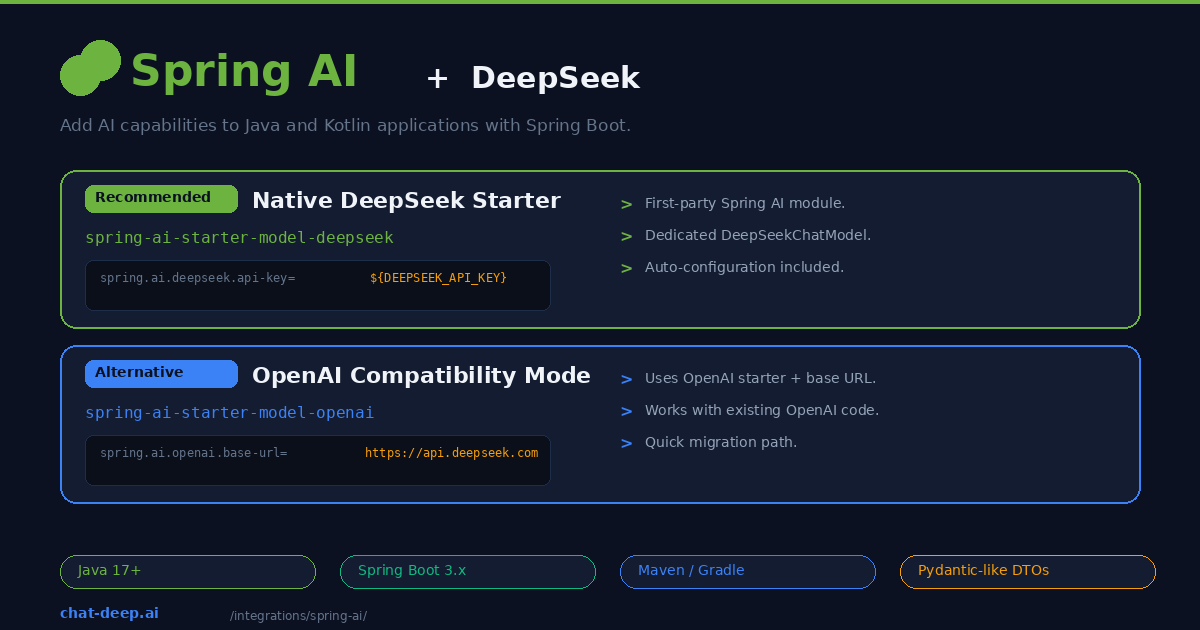
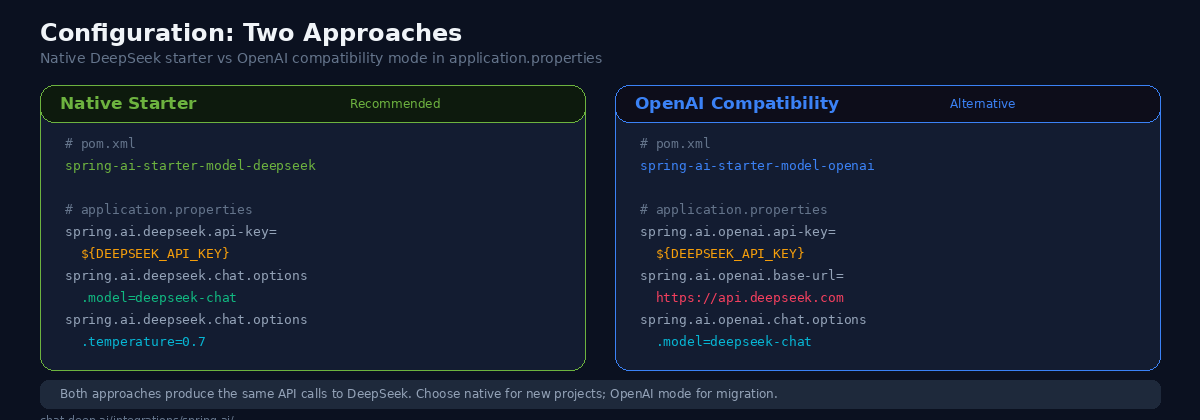
Spring AI offers two ways to connect to DeepSeek. The first is a dedicated DeepSeek starter module that auto-configures a DeepSeekChatModel bean. The second uses the OpenAI compatibility starter with DeepSeek’s base URL — useful if you are migrating from an existing OpenAI integration. Both approaches produce identical API calls to DeepSeek, so the choice comes down to whether you are starting fresh or migrating.
This guide covers both approaches, from project setup through streaming endpoints, function calling, structured output, and production configuration. If you are new to the DeepSeek API, our API documentation covers authentication and endpoint details.
Prerequisites
You will need Java 17 or higher (Java 21 recommended), Maven or Gradle, and a Spring Boot 3.2+ project. Get your DeepSeek API key from the platform — our login guide covers account creation. Spring AI is available from the Spring Milestone and Snapshot repositories in addition to Maven Central, so make sure your build tool can resolve them.
Approach 1: Native DeepSeek Starter (Recommended)
Spring AI ships a first-party DeepSeek module. Add the dependency to your pom.xml:
<dependency>
    <groupId>org.springframework.ai</groupId>
    <artifactId>spring-ai-starter-model-deepseek</artifactId>
</dependency>
Or with Gradle:
implementation 'org.springframework.ai:spring-ai-starter-model-deepseek'Configure your API key and model in application.properties:
spring.ai.deepseek.api-key=${DEEPSEEK_API_KEY}
spring.ai.deepseek.chat.options.model=deepseek-chat
spring.ai.deepseek.chat.options.temperature=0.7
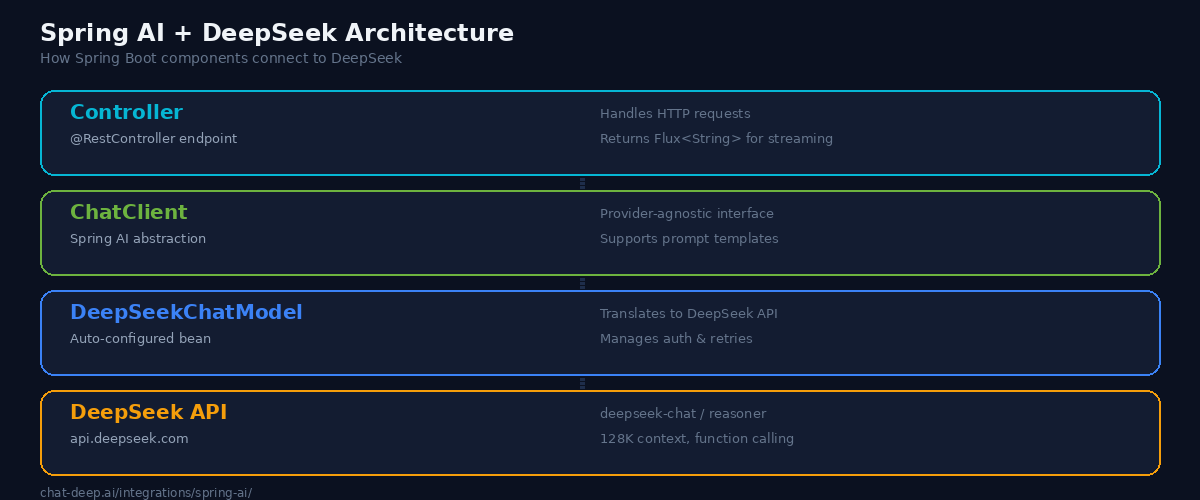
Spring Boot auto-configures a DeepSeekChatModel bean that you can inject anywhere. Here is a minimal REST controller:
@RestController
@RequestMapping("/api")
public class ChatController {

    private final ChatClient chatClient;

    public ChatController(ChatClient.Builder builder) {
        this.chatClient = builder.build();
    }

    @PostMapping("/chat")
    public String chat(@RequestBody String message) {
        return chatClient.prompt(message)
                .call()
                .content();
    }
}
The ChatClient is Spring AI’s high-level abstraction. It wraps the underlying DeepSeekChatModel and provides a fluent API for prompting, streaming, and structured output. You inject the builder, build the client, and use it across your endpoints. Spring handles the lifecycle, connection pooling, and configuration.
Approach 2: OpenAI Compatibility Mode
If you already have a Spring AI project using the OpenAI starter, you can point it at DeepSeek without switching dependencies. Add the OpenAI starter:
<dependency>
    <groupId>org.springframework.ai</groupId>
    <artifactId>spring-ai-starter-model-openai</artifactId>
</dependency>
Then set the base URL to DeepSeek’s endpoint:
spring.ai.openai.api-key=${DEEPSEEK_API_KEY}
spring.ai.openai.base-url=https://api.deepseek.com
spring.ai.openai.chat.options.model=deepseek-chat
Your controller code stays exactly the same. The ChatClient abstraction hides the provider difference. This approach is best for teams migrating from OpenAI who want to test DeepSeek without touching application code. For a broader comparison of these providers, see our DeepSeek vs. OpenAI article.
Streaming Responses
For real-time chat interfaces or any feature where users should see tokens as they arrive, use Spring AI’s streaming API with Project Reactor:
@GetMapping(value = "/stream", produces = MediaType.TEXT_EVENT_STREAM_VALUE)
public Flux<String> stream(@RequestParam String message) {
    return chatClient.prompt(message)
            .stream()
            .content();
}
The .stream().content() chain returns a Flux<String> — a reactive stream of token chunks. Spring WebFlux handles the server-sent events formatting automatically when you set the produces media type to TEXT_EVENT_STREAM_VALUE. The client receives tokens incrementally, creating a responsive user experience even for long generations.
If your project uses Spring MVC (servlet stack) instead of WebFlux, you can still stream by returning a SseEmitter and pushing chunks to it inside an async handler. However, WebFlux is the cleaner approach for streaming use cases. For building frontend chat UIs that consume these streams, see our web app integration guide.
Function Calling
DeepSeek’s deepseek-chat model supports function calling through Spring AI’s tool abstraction. You define a function as a Spring bean, register it with the chat client, and DeepSeek decides when to invoke it:
// Define the function
@Bean
@Description("Get the current weather for a given city")
public Function<WeatherRequest, WeatherResponse> getWeather() {
    return request -> {
        // Call your weather API here
        return new WeatherResponse(request.city(), 22.0, "sunny");
    };
}

record WeatherRequest(String city) {}
record WeatherResponse(String city, double temperature, String condition) {}

// Use it in the controller
@PostMapping("/chat-with-tools")
public String chatWithTools(@RequestBody String message) {
    return chatClient.prompt(message)
            .functions("getWeather")
            .call()
            .content();
}
Spring AI’s tool abstractions are easiest to demonstrate with deepseek-chat, so keep that as the default for .functions() and tool-calling examples. Do not describe deepseek-reasoner as lacking tool calling at the DeepSeek model level. In the current hosted DeepSeek API, both deepseek-chat and deepseek-reasoner support Tool Calls; any caveat here should be framed as a Spring AI or application-path consideration that you validate in your stack.
Structured Output
Spring AI can map DeepSeek’s response directly into Java records or classes using its structured output converters:
record BookRecommendation(
    String title,
    String author,
    String summary,
    int yearPublished
) {}

@PostMapping("/recommend")
public BookRecommendation recommend(@RequestBody String genre) {
    return chatClient.prompt("Recommend a classic book in the genre: " + genre)
            .call()
            .entity(BookRecommendation.class);
}
For typed .entity() examples, deepseek-chat is still the safest default. Avoid claiming that deepseek-reasoner lacks JSON mode or structured output as a DeepSeek capability. DeepSeek’s current hosted API documents JSON Output on both aliases. If a reasoning-heavy flow is harder to parse in your Spring stack, describe that as a framework/runtime caveat rather than a model limitation.
Using the Reasoning Model
To use DeepSeek’s reasoning model, change the model property:
spring.ai.deepseek.chat.options.model=deepseek-reasonerdeepseek-reasoner is best presented as a reasoning-first option for math, logic, and analysis endpoints. In the current DeepSeek API, it supports JSON Output and Tool Calls, but it still has reasoning-specific caveats: unsupported sampling and logprob parameters, larger output budgets, and special reasoning_content handling in multi-turn and tool-loop scenarios. For most Spring Boot APIs, deepseek-chat remains the simpler default.
Prompt Templates
Spring AI’s prompt template system brings structure and reusability to your DeepSeek interactions. Instead of building prompt strings manually, define templates with placeholders:
@PostMapping("/translate")
public String translate(
        @RequestParam String text,
        @RequestParam String targetLanguage) {
    return chatClient.prompt()
            .system("You are a professional translator. Translate accurately and naturally.")
            .user(u -> u.text("Translate the following to {language}:\n\n{text}")
                    .param("language", targetLanguage)
                    .param("text", text))
            .call()
            .content();
}
The .param() method safely injects variables into the template. This prevents prompt injection attacks where user input could override system instructions, and it makes your prompts easier to maintain and test. You can also load templates from resource files for complex prompts that would clutter your Java code.
Building a RAG Pipeline
Spring AI includes built-in support for Retrieval-Augmented Generation. You can connect DeepSeek to a vector store and let it answer questions grounded in your own documents. Here is a simplified example using Spring AI’s in-memory vector store:
@Service
public class DocumentService {

    private final VectorStore vectorStore;
    private final ChatClient chatClient;

    public DocumentService(VectorStore vectorStore, ChatClient.Builder builder) {
        this.vectorStore = vectorStore;
        this.chatClient = builder.build();
    }

    public void ingestDocuments(List<Document> documents) {
        vectorStore.add(documents);
    }

    public String askQuestion(String question) {
        // Retrieve relevant documents
        List<Document> relevantDocs = vectorStore.similaritySearch(question);

        String context = relevantDocs.stream()
                .map(Document::getContent)
                .collect(Collectors.joining("\n\n"));

        return chatClient.prompt()
                .system("Answer questions based only on the provided context. "
                        + "If the context does not contain the answer, say so.")
                .user(u -> u.text("Context:\n{context}\n\nQuestion: {question}")
                        .param("context", context)
                        .param("question", question))
                .call()
                .content();
    }
}
Spring AI supports production vector stores including Chroma, Pinecone, Qdrant, pgvector, Redis, and Weaviate. The 128K context window in DeepSeek means you can inject substantial amounts of retrieved content without hitting token limits, which is a significant advantage for document-heavy RAG applications. For more on RAG patterns, our LlamaIndex guide covers the Python side of document indexing and retrieval.
Kotlin Support
Spring AI works with Kotlin out of the box. The same APIs and auto-configuration apply, with Kotlin’s concise syntax making the code even cleaner:
@RestController
@RequestMapping("/api")
class ChatController(builder: ChatClient.Builder) {

    private val chatClient = builder.build()

    @PostMapping("/chat")
    fun chat(@RequestBody message: String): String =
        chatClient.prompt(message).call().content()

    @GetMapping("/stream", produces = [MediaType.TEXT_EVENT_STREAM_VALUE])
    fun stream(@RequestParam message: String): Flux<String> =
        chatClient.prompt(message).stream().content()
}
Kotlin’s data classes work seamlessly as structured output targets, and coroutines can be combined with the reactive streaming API for fully non-blocking implementations. If your team uses Kotlin, you get all of Spring AI’s capabilities with less boilerplate.
Multi-Provider Setup
A key advantage of Spring AI is its provider-agnostic design. You can wire multiple AI providers into the same application and route requests based on the use case:
@RestController
public class MultiProviderController {

    private final ChatClient deepSeekClient;
    private final ChatClient openAiClient;

    public MultiProviderController(
            @Qualifier("deepSeekChatClient") ChatClient.Builder deepSeekBuilder,
            @Qualifier("openAiChatClient") ChatClient.Builder openAiBuilder) {
        this.deepSeekClient = deepSeekBuilder.build();
        this.openAiClient = openAiBuilder.build();
    }

    @PostMapping("/analyze")
    public String analyze(@RequestBody String text) {
        // Use DeepSeek for cost-effective analysis
        return deepSeekClient.prompt("Analyze this text: " + text)
                .call()
                .content();
    }

    @PostMapping("/generate-image-description")
    public String describeForImage(@RequestBody String concept) {
        // Use OpenAI for image-related tasks DeepSeek doesn't support
        return openAiClient.prompt("Describe this concept visually: " + concept)
                .call()
                .content();
    }
}
This pattern lets you use DeepSeek for cost-sensitive workloads while keeping another provider for tasks DeepSeek does not support. Spring’s qualifier-based injection makes the routing clean and testable.
Configuration Reference
Here are the most commonly used Spring AI properties for DeepSeek:
| Property | Description | Default |
|---|---|---|
spring.ai.deepseek.api-key | Your DeepSeek API key | — |
spring.ai.deepseek.chat.options.model | Model name (deepseek-chat or deepseek-reasoner) | deepseek-chat |
spring.ai.deepseek.chat.options.temperature | Sampling temperature (0.0–2.0) | 1.0 |
spring.ai.deepseek.chat.options.max-tokens | Maximum tokens in the response | — |
spring.ai.deepseek.chat.options.frequency-penalty | Penalizes repeated tokens | 0.0 |
Set the API key via environment variable (${DEEPSEEK_API_KEY}) rather than hardcoding it. Use Spring profiles to configure different models or temperatures for development and production environments. For current pricing, check our DeepSeek pricing page.
Production Considerations
Use environment variables for secrets. Never commit API keys to version control. Spring Boot reads ${DEEPSEEK_API_KEY} from the environment automatically. In Kubernetes, use Secrets. In AWS, use Parameter Store or Secrets Manager.
Set timeouts. DeepSeek’s reasoning model can take longer for complex prompts. Configure HTTP client timeouts in your application.properties to avoid indefinite hangs. A 30-second timeout is reasonable for most chat use cases.
Monitor with Spring Actuator. Spring AI integrates with Micrometer for observability. Enable Actuator endpoints to track request counts, latencies, and token usage per model. This data feeds into your existing Prometheus, Grafana, or Datadog monitoring stack.
Handle rate limits. DeepSeek uses dynamic rate limiting. Implement retry logic with exponential backoff using Spring Retry or Resilience4j. Check current API availability on our status page.
Enable request logging. For debugging prompt issues, enable Spring AI’s logging at the DEBUG level for the org.springframework.ai package. This shows the full request and response payloads sent to and received from DeepSeek, including token counts and model metadata. Disable this in production to avoid logging sensitive prompt content.
# application.properties — debugging only
logging.level.org.springframework.ai=DEBUG
Test with mocks. Spring AI’s ChatClient is interface-based, making it easy to mock in unit tests. Use @MockBean to replace the chat model in integration tests so your CI pipeline runs without API calls. For other infrastructure patterns, see our guide on deploying DeepSeek on cloud platforms.
Conclusion
Spring AI makes DeepSeek accessible to the Java ecosystem with the same auto-configuration, dependency injection, and testing patterns that Spring developers already know. The native starter gives you a clean setup in minutes. The OpenAI compatibility path lets you migrate existing projects without changing application code. And Spring AI’s provider-agnostic abstractions mean you can swap or combine providers as your needs evolve.
The combination is especially compelling for enterprise Java teams. Spring Boot handles the service infrastructure — security, monitoring, configuration management, deployment — while DeepSeek provides the intelligence at a price point that works for high-volume business applications. Chat endpoints, document analysis pipelines, data extraction services, and internal tooling all become viable when the per-token cost drops by an order of magnitude compared to traditional providers. See our pricing page for current rates and our DeepSeek ecosystem overview for the full picture of what you can build.
Start with the native DeepSeek starter and a simple chat endpoint. Add streaming for user-facing features, function calling for tool integration, and structured output for data pipelines. For more integration patterns across different languages and frameworks, explore our FastAPI guide (Python), Next.js guide (TypeScript), or browse the full integrations section.