
DeepSeek has a first-party provider package for the AI SDK: @ai-sdk/deepseek. In practice, this gives you strong support for deepseek-chat, plus reasoning support for deepseek-reasoner, including streamed reasoning traces and provider metadata. For tool-heavy and schema-heavy production flows, deepseek-chat is the simplest default in the AI SDK today. If you plan to use deepseek-reasoner with tools or object generation, verify the behavior in your exact AI SDK version and provider path, because the surrounding SDK guidance is not perfectly uniform.
This guide is practical. You will install the SDK, generate your first response, stream tokens to a React chat UI, generate typed objects with Zod schemas, call tools, handle reasoning traces from DeepSeek R1, and deploy everything on Vercel. If you need background on the DeepSeek API itself, start with our API documentation.
What Makes This Stack Work
The AI SDK is not just a wrapper around fetch calls. It solves real problems that come up when you build AI features for production web apps.
Streaming is first-class. The SDK handles server-sent events, backpressure, and client-side rendering of partial responses. You call streamText() on the server and consume it with useChat() on the client — the SDK manages the connection, message state, and UI updates. This is the part that takes days to build from scratch and minutes with the AI SDK.
Type safety matters. Every function is fully typed. generateObject() takes a Zod schema and returns a validated, typed object — not a string you have to parse and hope is valid JSON. When your schema changes, TypeScript tells you immediately instead of letting it break at runtime.
Provider switching is trivial. The SDK abstracts away provider differences. Today you use DeepSeek. Tomorrow you might want to A/B test against Anthropic or fall back to OpenAI when DeepSeek is under load. Changing the model is a one-line diff. Your streaming logic, tools, and UI hooks stay exactly the same.
DeepSeek’s cost advantage amplifies all of this. At $0.28 per million input tokens and $0.42 per million output tokens, you can build features that would be prohibitively expensive with other providers. Chatbots, search assistants, content generators — they all become viable at this price point. Check our pricing page for the full breakdown.
Setup
Install the AI SDK core and the DeepSeek provider:
npm install ai @ai-sdk/deepseekSet your API key. Create a .env.local file (or .env for non-Next.js projects):
DEEPSEEK_API_KEY=your-api-key-hereThe SDK reads DEEPSEEK_API_KEY from the environment automatically. You can also pass it explicitly when creating a custom provider instance. Grab your key from the DeepSeek platform — our login guide covers account setup.
Generate Text
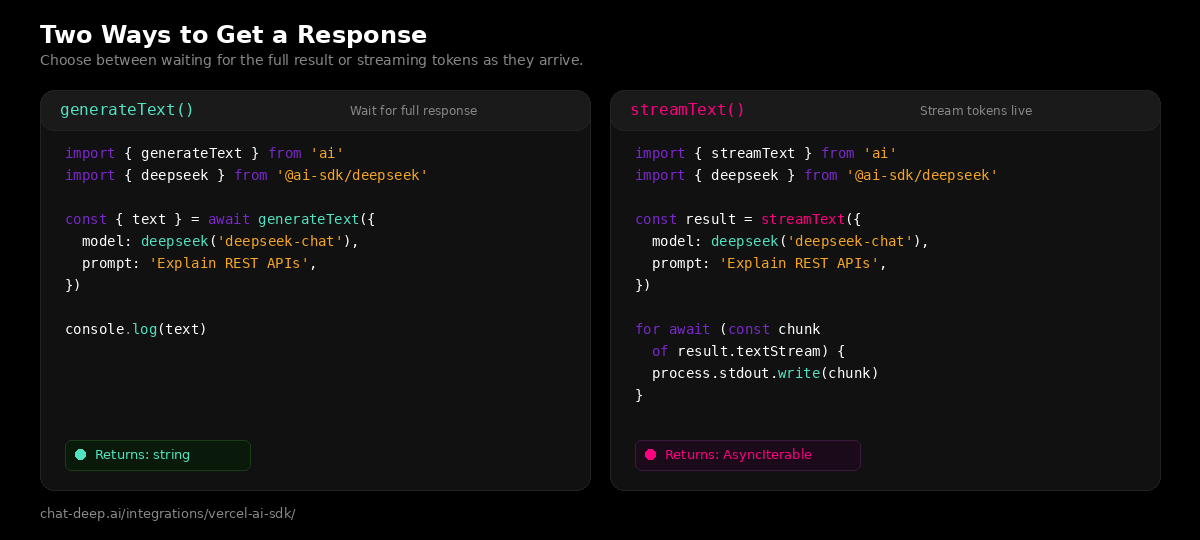
The simplest way to use DeepSeek through the AI SDK. Call generateText(), get back a string:
import { generateText } from 'ai';
import { deepseek } from '@ai-sdk/deepseek';

const { text } = await generateText({
  model: deepseek('deepseek-chat'),
  prompt: 'Explain WebSockets in three sentences.',
});

console.log(text);
This is a blocking call — it waits for the full response before returning. Use it for background jobs, API endpoints that need the complete result, or anywhere streaming is not required.
Stream Text
For user-facing features, streaming is almost always the better choice. Tokens appear immediately instead of making the user stare at a spinner:
import { streamText } from 'ai';
import { deepseek } from '@ai-sdk/deepseek';

const result = streamText({
  model: deepseek('deepseek-chat'),
  prompt: 'Write a commit message for adding user authentication.',
});

for await (const chunk of result.textStream) {
  process.stdout.write(chunk);
}
On the server side (like a Next.js API route), you typically return the stream directly as the response. The AI SDK provides a toDataStreamResponse() helper that formats it correctly for the client-side hooks.
Build a Chat UI with Next.js
This is where the AI SDK really shines. You can build a full streaming chat interface with surprisingly little code. Here is a complete example using Next.js App Router.
First, create the API route that handles chat requests:
// app/api/chat/route.ts
import { streamText } from 'ai';
import { deepseek } from '@ai-sdk/deepseek';

export async function POST(req: Request) {
  const { messages } = await req.json();

  const result = streamText({
    model: deepseek('deepseek-chat'),
    system: 'You are a helpful assistant. Be concise and accurate.',
    messages,
  });

  return result.toDataStreamResponse();
}
Then build the client-side chat component:
// app/page.tsx
'use client';

import { useChat } from '@ai-sdk/react';

export default function Chat() {
  const { messages, input, handleInputChange, handleSubmit } = useChat();

  return (
    <div>
      {messages.map((m) => (
        <div key={m.id}>
          <strong>{m.role === 'user' ? 'You' : 'DeepSeek'}:</strong>
          <p>{m.content}</p>
        </div>
      ))}

      <form onSubmit={handleSubmit}>
        <input
          value={input}
          onChange={handleInputChange}
          placeholder="Ask anything..."
        />
        <button type="submit">Send</button>
      </form>
    </div>
  );
}
That is a working chat interface. The useChat() hook manages the message array, sends POST requests to /api/chat, and streams the response into the UI automatically. No WebSocket setup, no manual state management, no event parsing. If you are building a chat feature into a Next.js app, this is the recommended starting point. For more complex web app integrations, see our web apps guide.
Generate Structured Objects
Sometimes you need structured data, not prose. The AI SDK’s generateObject() function combines DeepSeek’s generation with Zod schema validation to return typed, validated objects:
import { generateObject } from 'ai';
import { deepseek } from '@ai-sdk/deepseek';
import { z } from 'zod';

const { object } = await generateObject({
  model: deepseek('deepseek-chat'),
  schema: z.object({
    title: z.string().describe('Article title'),
    summary: z.string().describe('Two-sentence summary'),
    tags: z.array(z.string()).describe('Relevant topic tags'),
    readingTime: z.number().describe('Estimated reading time in minutes'),
  }),
  prompt: 'Analyze this article about serverless computing trends in 2026.',
});

console.log(object.title);       // string — typed!
console.log(object.tags);        // string[] — typed!
console.log(object.readingTime); // number — typed!
The Zod schema does double duty: it tells DeepSeek what structure to produce, and it validates the output before returning it to your code. If DeepSeek returns something that does not match the schema, the SDK throws a typed error instead of silently passing bad data downstream. This is critical for data extraction pipelines, form auto-fill features, and any workflow that feeds AI output into a database or API.
Tool Calling
DeepSeek’s deepseek-chat model supports tool calling through the AI SDK. You define tools with Zod parameter schemas, and the model decides when to invoke them:
import { generateText, tool } from 'ai';
import { deepseek } from '@ai-sdk/deepseek';
import { z } from 'zod';

const result = await generateText({
  model: deepseek('deepseek-chat'),
  tools: {
    getWeather: tool({
      description: 'Get the current weather for a location.',
      parameters: z.object({
        city: z.string().describe('City name'),
      }),
      execute: async ({ city }) => {
        // Call your weather API here
        return { city, temperature: 22, condition: 'sunny' };
      },
    }),
  },
  prompt: 'What is the weather like in Berlin right now?',
});

console.log(result.text);
The SDK handles the full tool-call cycle: DeepSeek requests a tool call, the SDK executes the function, sends the result back to DeepSeek, and DeepSeek generates the final response incorporating the tool output. You can define multiple tools and the model will choose the right ones based on the user’s question.
Working with DeepSeek Reasoner
DeepSeek R1 (via deepseek-reasoner) produces reasoning traces — the model’s internal thought process — before delivering a final answer. The AI SDK gives you access to these traces through the stream:
import { streamText } from 'ai';
import { deepseek } from '@ai-sdk/deepseek';

const result = streamText({
  model: deepseek('deepseek-reasoner'),
  prompt: 'Solve: If 3x + 7 = 22, what is x?',
});

for await (const part of result.fullStream) {
  if (part.type === 'reasoning') {
    console.log('[Thinking]', part.text);
  } else if (part.type === 'text') {
    console.log('[Answer]', part.text);
  }
}
The fullStream iterator emits separate events for reasoning and text. This lets you build UIs that show the model’s thought process — expanding “thinking” sections similar to what you see in the official DeepSeek chat interface. You can also enable thinking mode on deepseek-chat by passing a provider option instead of switching models. For more on the reasoning model, see our DeepSeek V3 page.
Accessing Cache Metrics
DeepSeek’s context caching can cut input token costs by up to 90%. The AI SDK exposes cache hit and miss metrics through the provider metadata:
import { generateText } from 'ai';
import { deepseek } from '@ai-sdk/deepseek';

const result = await generateText({
  model: deepseek('deepseek-chat'),
  prompt: 'Your prompt here',
});

console.log(result.providerMetadata);
// { deepseek: { promptCacheHitTokens: 1856, promptCacheMissTokens: 5 } }
Monitoring these numbers helps you optimize costs. If you are sending repeated system prompts or large context blocks, you will see high cache hit rates, which means significantly lower bills. This is especially relevant for chatbots where the system prompt stays the same across every message.
Custom Provider Configuration
For advanced setups — like pointing to a self-hosted DeepSeek instance, using a proxy, or managing multiple API keys — create a custom provider:
import { createDeepSeek } from '@ai-sdk/deepseek';

const myDeepSeek = createDeepSeek({
  apiKey: process.env.DEEPSEEK_API_KEY,
  baseURL: 'https://your-proxy.example.com/v1',  // optional
});

// Use it like the default provider
const result = await generateText({
  model: myDeepSeek('deepseek-chat'),
  prompt: 'Hello from a custom provider!',
});
This is useful when deploying behind a corporate proxy, using Vercel AI Gateway for routing and analytics, or hosting DeepSeek models on your own infrastructure via cloud platforms like AWS, Azure, or GCP.
Deploying on Vercel
If you are using Next.js, deploying to Vercel is the path of least resistance. Your API routes become serverless functions automatically, and Vercel’s edge network keeps latency low for users worldwide.
A few things to keep in mind for production deployments. Set DEEPSEEK_API_KEY in your Vercel project’s environment variables through the dashboard — never commit it to your repository. For streaming endpoints, Vercel’s serverless functions support long-running responses, but set a reasonable maxDuration in your route config if you expect long generations. Consider using Vercel AI Gateway for built-in observability, automatic retries, and provider failover — it supports DeepSeek V3.2 natively.
You can also deploy outside Vercel. The AI SDK is framework-agnostic at its core. It works anywhere Node.js runs: AWS Lambda, Cloudflare Workers, a Docker container on your own server, or a Deno runtime. The @ai-sdk/deepseek provider does not depend on Vercel infrastructure.
Error Handling
Production apps need to handle failures gracefully. The AI SDK throws typed errors that you can catch and respond to:
import { generateText, APICallError } from 'ai';
import { deepseek } from '@ai-sdk/deepseek';

try {
  const { text } = await generateText({
    model: deepseek('deepseek-chat'),
    prompt: 'Summarize this document.',
  });
  console.log(text);
} catch (error) {
  if (error instanceof APICallError) {
    console.error(`API error: ${error.statusCode} — ${error.message}`);
    // Handle rate limits (429), auth errors (401), etc.
  } else {
    throw error;
  }
}
For rate limit errors (HTTP 429), implement exponential backoff or use Vercel AI Gateway’s built-in retry logic. Our DeepSeek API guide documents all error codes and recommended handling strategies. You can also monitor API health on our real-time status page before deploying critical features.
Quick Reference
Here is a summary of the main AI SDK functions and how they work with DeepSeek:
| Function | What it does | deepseek-chat | deepseek-reasoner |
|---|---|---|---|
generateText() | Generate a complete text response | Yes | Yes |
streamText() | Stream text tokens as they are generated | Yes | Yes (with reasoning) |
generateObject() | Generate a typed object from a Zod schema | Yes | Limited (reasoning-first; verify behavior) |
streamObject() | Stream a partial object as it is generated | Yes | Limited (reasoning-first; verify behavior) |
tool() | Define tools the model can call | Yes | Supported at API level (verify SDK behavior) |
useChat() | React hook for streaming chat UI | Yes | Yes |
What to Build Next
You have the tools. Here are some directions to take them.
A customer-facing chatbot using useChat() with a system prompt grounded in your product documentation. DeepSeek’s low cost makes it viable to handle high volumes without blowing the budget.
A form auto-fill feature using generateObject() with Zod schemas that match your form fields. Upload a document, extract structured data, pre-populate the form. Type-safe from extraction to database.
A reasoning-powered tutor using deepseek-reasoner with the reasoning stream exposed in the UI. Students can see how the model thinks through math and logic problems step by step.
An agentic assistant that uses tool calling to search your database, check inventory, calculate prices, and respond with accurate, real-time information — all in a single conversation turn.
Explore more integration patterns in our LangChain guide, LlamaIndex guide, and the full documentation hub.