

You can connect Claude Code to DeepSeek through DeepSeek’s Anthropic-compatible API. Claude Code supplies the terminal interface and coding tools; DeepSeek supplies the model responses and bills the API usage. The connection uses a DeepSeek API key and https://api.deepseek.com/anthropic as the base URL.
There is an important support boundary: DeepSeek documents this integration, while Anthropic says it does not support routing Claude Code to non-Claude models. A documented connection is not a promise that every Claude Code feature will work with DeepSeek. This guide covers the terminal setup, how to check where requests go, and how to return to your previous configuration.
If your aim is simply to ask DeepSeek a coding question, its chat service is an easier starting point. This setup is for working inside a project with an agent that can inspect files, propose edits, and use development tools.
On this page
- What you need
- Install Claude Code
- Connect it to DeepSeek
- Check the connection and try a first task
- Model selection and the context window
- Keep the setup for later
- What it costs
- Features and limitations
- Fix common problems
- Switch back to your previous provider
- Frequently asked questions
What you need before connecting
- Claude Code installed on your computer. An existing working installation is enough; you do not need a second copy for DeepSeek.
- A DeepSeek API key and usable API balance. Create the key in the DeepSeek Platform. Access to the free DeepSeek chat app does not fund API requests. Our API key guide explains the account and key-management steps.
- A project you are allowed to share with this provider. Files selected for model context can leave your computer. Begin with a small non-sensitive repository, not a directory containing customer records or production secrets.
Before changing a working setup, make a private backup of your Claude Code settings and note any provider variables in your shell profile. On an organization-managed computer, check whether the provider is already configured centrally. Do not overwrite your team’s settings to make a personal example work.
The initial setup below changes only the environment of one terminal. It gives you a clear place to start troubleshooting and avoids changing every project before you know whether the connection suits your work.
1. Install Claude Code, or check your existing installation
Use the native installer from Claude Code’s current setup documentation. Open a terminal and run the command for your system.
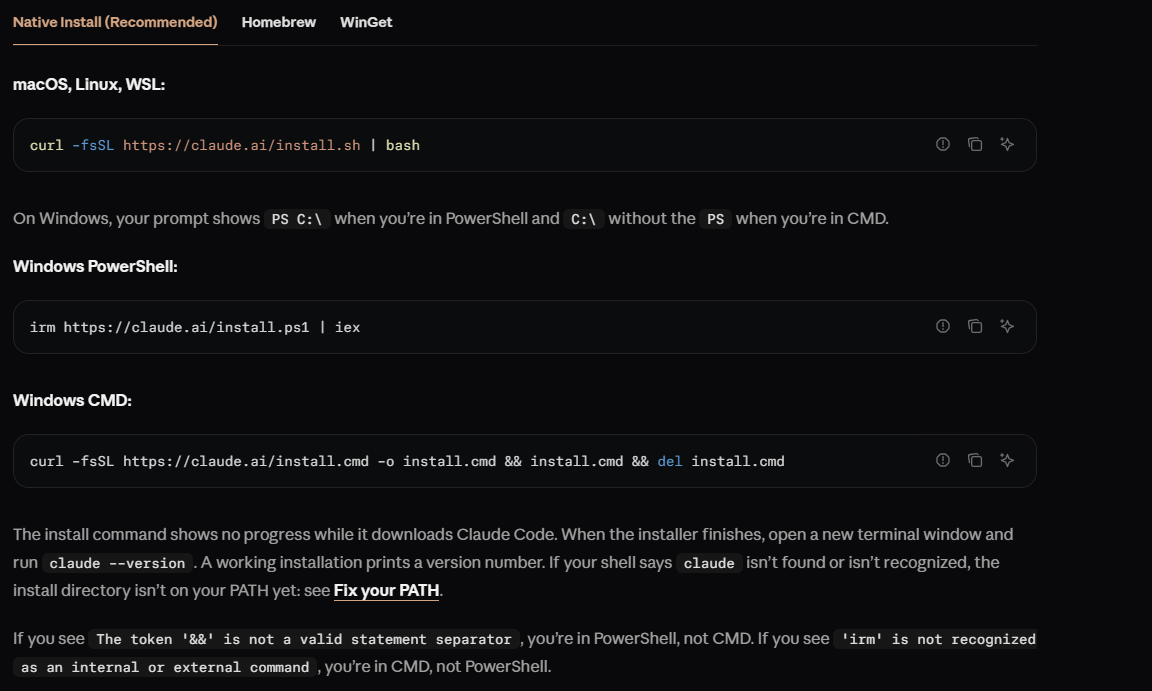
macOS, Linux, or WSL
curl -fsSL https://claude.ai/install.sh | bashWindows PowerShell
irm https://claude.ai/install.ps1 | iexOpen a new terminal after installation, then check the executable:
claude --versionA version number confirms that your shell can find Claude Code. If you already have it installed, begin with that check. Run claude doctor if installation or configuration diagnostics are needed.
DeepSeek’s integration page still shows an npm route with Node.js 18+. Anthropic’s current documentation specifies Node.js 22+ for the npm package. The native route above avoids that dependency. On native Windows, Git for Windows is currently optional, but provides Git Bash for tools that need it; WSL uses the Linux installation. Follow Anthropic’s platform requirements if your machine differs from these common setups.
2. Point Claude Code at DeepSeek
Open a fresh terminal. Replace YOUR_DEEPSEEK_API_KEY with your own key, keeping the quotes. Do not paste an Anthropic key here. The following values follow DeepSeek’s current Claude Code configuration, which uses Flash for the main session and the mapped model families.
A real key typed into a terminal command may be stored in shell history. Keep it out of shared screenshots, saved examples, and repositories; use a private credential-loading method if your environment provides one.
macOS, Linux, and WSL: Bash or Zsh
export ANTHROPIC_BASE_URL="https://api.deepseek.com/anthropic"
export ANTHROPIC_AUTH_TOKEN="YOUR_DEEPSEEK_API_KEY"
export ANTHROPIC_MODEL="deepseek-flash[1m]"
export ANTHROPIC_DEFAULT_OPUS_MODEL="deepseek-flash[1m]"
export ANTHROPIC_DEFAULT_SONNET_MODEL="deepseek-flash[1m]"
export ANTHROPIC_DEFAULT_HAIKU_MODEL="deepseek-flash"
export CLAUDE_CODE_SUBAGENT_MODEL="deepseek-flash"
export CLAUDE_CODE_EFFORT_LEVEL="max"
export CLAUDE_CODE_AUTO_COMPACT_WINDOW="786432"
Windows PowerShell
$env:ANTHROPIC_BASE_URL = "https://api.deepseek.com/anthropic"
$env:ANTHROPIC_AUTH_TOKEN = "YOUR_DEEPSEEK_API_KEY"
$env:ANTHROPIC_MODEL = "deepseek-flash[1m]"
$env:ANTHROPIC_DEFAULT_OPUS_MODEL = "deepseek-flash[1m]"
$env:ANTHROPIC_DEFAULT_SONNET_MODEL = "deepseek-flash[1m]"
$env:ANTHROPIC_DEFAULT_HAIKU_MODEL = "deepseek-flash"
$env:CLAUDE_CODE_SUBAGENT_MODEL = "deepseek-flash"
$env:CLAUDE_CODE_EFFORT_LEVEL = "max"
$env:CLAUDE_CODE_AUTO_COMPACT_WINDOW = "786432"
The assignments normally print nothing. Keep this terminal open: launching Claude Code from another window or a desktop shortcut will not necessarily use its variables. In PowerShell, use the PowerShell block rather than export; inside WSL, use the Bash block.
The endpoint and token choose the service and account. The model variables also cover Claude Code’s family aliases and subagents, so choosing an Opus-labelled slot does not silently mean you intended to pay for DeepSeek Pro. The next sections explain that distinction.
3. Check the connection before asking for code changes
In the same terminal, move into your project. Replace the example path with an existing folder on your computer:
cd "/path/to/your-project"
claude --permission-mode default
For a Windows-native project, the equivalent is:
Set-Location -LiteralPath "C:\path\to\your-project"
claude --permission-mode default
Review any workspace-trust prompt for the folder you chose. The default mode requests permission for edits and commands that require approval; previously allowed actions and ordinary file reads may still proceed without a new prompt. A model’s promise not to edit files is not a replacement for Claude Code’s permission controls.
Inside the Claude Code session, enter /status. According to the official connection checks, the status should identify:
- The Anthropic base URL as
https://api.deepseek.com/anthropic. - An active credential source using
ANTHROPIC_AUTH_TOKEN.
Use /model to inspect the selected model as well. A Claude Code logo or a response saying “I am DeepSeek” is not evidence of routing. Check the actual configuration, then send a small request. The first request consumes API tokens, including any context sent with it.
For an initial task, try this prompt:
Read the README and identify the project’s main entry point and test command. Cite the files you used. Do not edit files, install packages, or run tests yet. If the test command is unclear, say what information is missing.
You should be able to check the answer against the named files. If the project has no README or declared test command, a useful response should acknowledge that rather than invent one. Review the API usage in your DeepSeek account afterward; a successful terminal response checks connectivity, while the provider’s records are the place to verify billed usage.
Once that works, ask for one bounded change, such as a test for a named function. Read the proposed diff and run the relevant test before expanding the task. This makes it easier to distinguish a connection problem from a coding mistake.
Choosing Flash or Pro without confusing the model names
DeepSeek currently lists deepseek-flash for V4.1-Flash and deepseek-v4-pro for V4 Pro. Start with the documented Flash setup for a small task, then decide whether another model is worth its cost for your own code. A higher price alone does not establish a better result for that task.
To request Pro for a single launch while keeping the other settings, exit the session and run:
claude --model "deepseek-v4-pro[1m]" --permission-mode defaultThis selects the main-session model. Your explicit Haiku and subagent settings remain Flash, so mixed model usage can be intentional. If you want the Opus family alias to select Pro on future launches, change ANTHROPIC_DEFAULT_OPUS_MODEL to deepseek-v4-pro[1m] in the configuration you actually use.
Do not confuse those client-side choices with DeepSeek’s server-side mapping. Its compatibility documentation maps incoming claude-opus* names to Pro and claude-sonnet* or claude-haiku* names to Flash. They remain DeepSeek models. Explicit IDs make the intended route easier to inspect.
What do [1m] and 786432 mean?
The [1m] suffix tells Claude Code to use its million-token context configuration; it is stripped before the model ID is sent to the provider. It is not a separate paid plan. CLAUDE_CODE_AUTO_COMPACT_WINDOW sets the window used for automatic conversation compaction, and DeepSeek’s recipe uses 786432. Neither setting means every task should fill that window.
Claude Code’s model configuration reference explains these controls. Keep the documented values together initially. For long work, retain important project decisions in appropriate project files instead of expecting a compressed conversation to preserve every earlier detail.
Keep the setup for future sessions
Once the terminal setup works, you can store the same variables under env in a Claude Code settings file. User settings apply across projects; project-local settings have a narrower scope. On macOS and Linux the user file is ~/.claude/settings.json; on Windows it is %USERPROFILE%\.claude\settings.json.
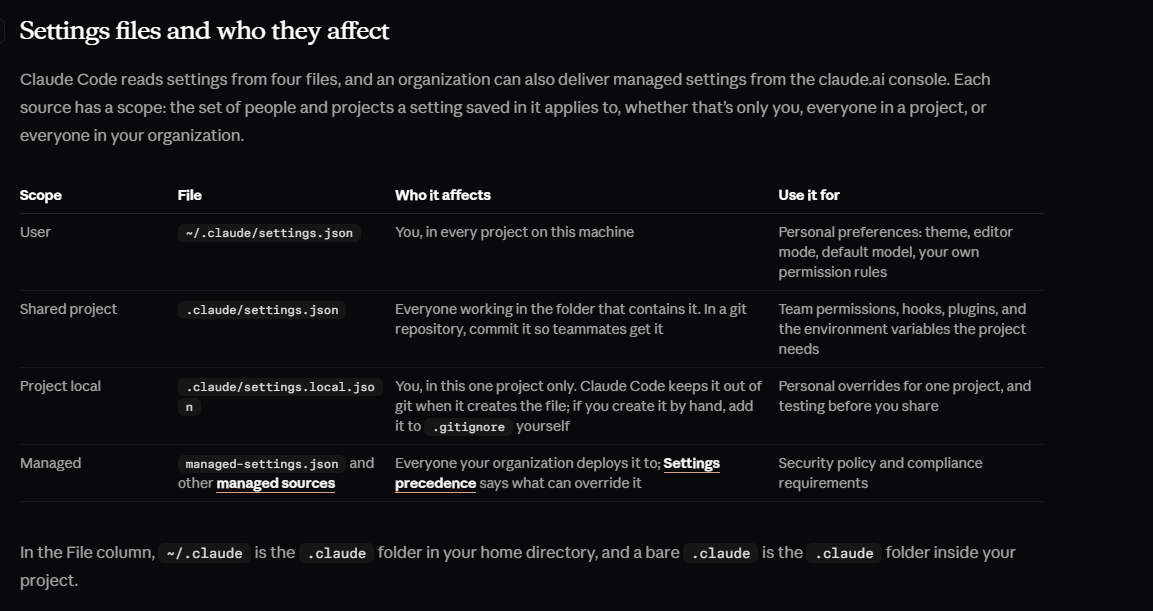
Back up an existing file and merge this env object into it, preserving its other settings. Do not replace the whole file if it contains permissions, hooks, or another configuration you still need.
{
  "env": {
    "ANTHROPIC_BASE_URL": "https://api.deepseek.com/anthropic",
    "ANTHROPIC_AUTH_TOKEN": "YOUR_DEEPSEEK_API_KEY",
    "ANTHROPIC_MODEL": "deepseek-flash[1m]",
    "ANTHROPIC_DEFAULT_OPUS_MODEL": "deepseek-flash[1m]",
    "ANTHROPIC_DEFAULT_SONNET_MODEL": "deepseek-flash[1m]",
    "ANTHROPIC_DEFAULT_HAIKU_MODEL": "deepseek-flash",
    "CLAUDE_CODE_SUBAGENT_MODEL": "deepseek-flash",
    "CLAUDE_CODE_EFFORT_LEVEL": "max",
    "CLAUDE_CODE_AUTO_COMPACT_WINDOW": "786432"
  }
}
This file contains a real credential when completed; it is not a secrets vault. Keep it private. For a project-only setup, use .claude/settings.local.json and ensure it is ignored by Git before adding a key. Do not put a credential in the shared .claude/settings.json.
Restart Claude Code and repeat the status check. Settings-file environment entries can override shell exports, so changing a terminal value may not change a value stored in a file. If you later use an IDE extension or background sessions, check the configuration for that surface explicitly; a successful CLI setup does not prove that an already-running editor inherited it.
What does DeepSeek in Claude Code cost?
Model requests sent to DeepSeek use your DeepSeek API balance. They are separate from a Claude Pro or Max subscription, and free DeepSeek chat access does not make this integration free.
The official rates checked on October 6, 2026 are below. All amounts are USD per one million tokens; each cell shows off-peak / peak.
| Model | Cached input | Uncached input | Output |
|---|---|---|---|
| Flash | $0.003 / $0.006 | $0.15 / $0.30 | $0.60 / $1.20 |
| Pro | $0.022 / $0.044 | $0.66 / $1.32 | $1.98 / $3.96 |
Peak periods are Monday–Friday, 01:00–04:00 and 06:00–10:00 UTC, excluding Chinese public holidays. Other periods are off-peak. Use the provider’s current schedule and rates when estimating a budget.
For illustration, one million uncached input tokens plus 100,000 output tokens on Flash would cost $0.21 off-peak or $0.42 at peak rates, assuming all those tokens use the stated rate. That is arithmetic for a hypothetical token total, not the cost of one prompt or a typical coding session.
A coding task may involve repeated requests, file context, tool results, and subagent work. If spending rises, reduce the task’s scope and inspect what is being processed rather than comparing only the length of your typed prompt. DeepSeek also says Claude Code web search generates extra model requests to summarize search content. See our DeepSeek pricing guide for the broader billing explanation.
Do not treat a dollar total in Claude Code as your DeepSeek invoice. Claude Code’s cost documentation describes locally calculated estimates in /usage; they need not match this provider’s rates and billing periods. Use the DeepSeek account’s usage and balance records to reconcile actual spending.
What works differently from a Claude-backed session?
The client and model have separate responsibilities. Claude Code manages its local workflow and permission interface; the provider must accept the requests that workflow produces. Keeping the same terminal does not make two models equally reliable at following instructions or choosing tools.
DeepSeek’s Anthropic-format support table documents text, streaming, system instructions, tool use, and tool results. It also supports image content, while the model table identifies Flash as the vision-capable option and Pro as text-only. Choose Flash when the request includes an image; changing only the endpoint does not give Pro vision support.
There are still gaps: document content blocks and several Anthropic-specific server features are unsupported. Reading text extracted from a local file is a different operation from sending a PDF as an API document block. If one file type fails, identify which path the client used before deciding the model cannot work with any information from that file.
Web search is explicitly described in DeepSeek’s Claude Code guide. That does not turn its ordinary chat-completions endpoint into a general search service, nor establish support for every Claude-hosted tool. Likewise, using a third-party base URL changes the availability of some Claude Code features; the environment-variable reference documents restrictions such as Remote Control.
For work where official client support is a requirement, treat that as a selection criterion before migrating. DeepSeek Harness is a separate first-party route worth considering. It is not required for the Claude Code configuration described here.
Fix common connection and workflow problems
claude is not found
Open a new terminal after installation and run claude --version again. If it still fails, follow the installer’s PATH guidance or the official setup troubleshooting link. Replacing the API key cannot repair a command your shell cannot find.
Claude Code opens a login screen or uses the wrong provider
Check that you launched it from the terminal where you set the variables. If a session opens, inspect /status before sending another task. Look for a settings-file env entry, wrapper, or previous cloud-provider configuration that changes the route. A managed setting needs an administrator’s review, not another conflicting value in your project.
For a clean comparison, exit the client and start a new session with the intended configuration. Keep your existing login saved: deleting it is not a necessary first troubleshooting step.
If an authentication warning names both ANTHROPIC_API_KEY and ANTHROPIC_AUTH_TOKEN, keep the DeepSeek token used in this guide and remove the stale competing key from this session’s configuration. Preserve your previous settings for rollback. Do not print either credential while diagnosing which source is active.
The model is wrong, or a model-selection error appears
Check the explicit model argument, the main model variable, family aliases, and subagent override. Avoid restoring an old session while diagnosing the starting configuration. If the error names a model restriction, consult the applied settings instead of assuming the provider accepted the choice. A displayed Opus label alone does not establish that Anthropic’s Opus handled the request.
An API error stops the request
Use the error returned by the service, not just the terminal’s final “request failed” message. DeepSeek’s error reference distinguishes the main cases:
| Error | First thing to check |
|---|---|
| 401 | The DeepSeek credential is valid and is the one this session actually loaded. Check for a copied placeholder, missing character, or revoked key. |
| 402 | The DeepSeek account has usable API balance. Buying a Claude subscription will not refill it. |
| 400 or 422 | The detailed message names a malformed request, parameter, or unsupported feature. Retry a small text-only task to narrow the failure. |
| 429 | Reduce simultaneous work and wait before retrying. Do not start more agents to compensate for a limit. |
| 500 or 503 | Wait briefly and retry a bounded request. Repeatedly changing local credentials is unlikely to fix a service-side error. |
If the fault persists, record the Claude Code version, selected model, time, error text, and whether an attachment or tool triggered it. Remove keys and private project content before sharing diagnostic information. Our API error guide explains the provider-side cases in more detail.
Replies work, but file edits or commands fail
Separate model access from local execution. A missing test runner, incorrect working directory, denied tool, and rejected API content block require different fixes. Read the proposed command and the actual failure. Do not disable permissions just to make the error disappear.
The setup works once and disappears in the next terminal
That is expected if you used only session variables. Persist the setup deliberately using the settings section above, then relaunch. If it works in the terminal but not an editor, inspect that editor’s Claude Code configuration; it may be a different process with a different environment.
Switch back without resetting Claude Code
If you only used the session commands, exit Claude Code, close that terminal, and open a fresh one from your normal launcher. The temporary assignments do not change your saved settings. This restores your previous environment only if you did not also save the values in a profile, settings file, or provider-switching tool.
If you made the setup permanent, restore your private backup or remove only the DeepSeek entries you added to the env object. Include the base URL, token, model-family overrides, subagent model, effort, and compaction values. Restore any previous values you replaced; preserve unrelated settings. Remove matching additions from your shell profile if you used that route.
Start a fresh session and inspect /status and /model again. A saved Claude login can become active after the gateway credential is removed, as described in Anthropic’s credential-precedence documentation. This changes routing; it does not cancel subscriptions or revoke the DeepSeek key.
Frequently asked questions
Do I need Claude Pro or Max for this DeepSeek setup?
DeepSeek documents this route using a DeepSeek API credential rather than Claude subscription credentials. A Claude subscription does not pay for the DeepSeek requests. Keep the support distinction in mind: Anthropic does not support non-Claude model routing, so this is not a promise of access to every Claude feature or client.
Does this run DeepSeek locally or work offline?
No. Claude Code runs on your machine, but this configuration sends model requests to DeepSeek’s hosted API. It does not download model weights, and those requests require a network connection. A local model server would be a separate setup.
Can I use the same setup in VS Code?
Do not assume a terminal’s variables reach the extension. Claude Code’s VS Code instructions place gateway values in claudeCode.environmentVariables in VS Code’s user settings, including the credential used by its login check. Establish the CLI connection first, then configure and verify the extension separately. The non-Claude support limitation still applies.
Do I need CC Switch, a proxy, or the Anthropic SDK?
None is part of the direct terminal route shown here. Claude Code can use the DeepSeek endpoint itself. A provider-switching utility may be convenient when you maintain several configurations, but it adds another place to inspect when the model or credential differs from what you expected.
Make the first task small enough to check
Start with Flash, confirm the endpoint and credential source, and ask for a concrete explanation of a small project. Then move to one edit you can review and one test you understand. You will learn more from that sequence than from handing over a large repository before checking the connection.
Keep the configuration if it fits your tasks, budget, and support needs. If a required feature is unreliable through this route, return to your previous provider or choose a client supported for your intended model. You should be deciding how to work, not spending each session guessing which service is answering.