Quick answer: use the official openai JavaScript client with a server-side DeepSeek API key and baseURL: "https://api.deepseek.com". DeepSeek currently documents three V4 API IDs on both Chat Completions and Responses: text-only deepseek-v4-flash and deepseek-v4-pro, plus the experimental text-and-image model deepseek-v4-flash-vision-exp.
This is an independent implementation guide. Chat-Deep.ai is not DeepSeek, does not operate the DeepSeek API, and is not affiliated with DeepSeek or OpenAI. Use the official DeepSeek Platform for keys, billing, and account support. The dated July 27 study on this page covers OpenAI-format Chat Completions with Flash and Pro; it predates Vision Exp and remains unchanged as historical evidence. The source-reviewed sections below reflect the three-model contract documented on August 22, 2026 and do not imply compatibility with every OpenAI endpoint or feature.
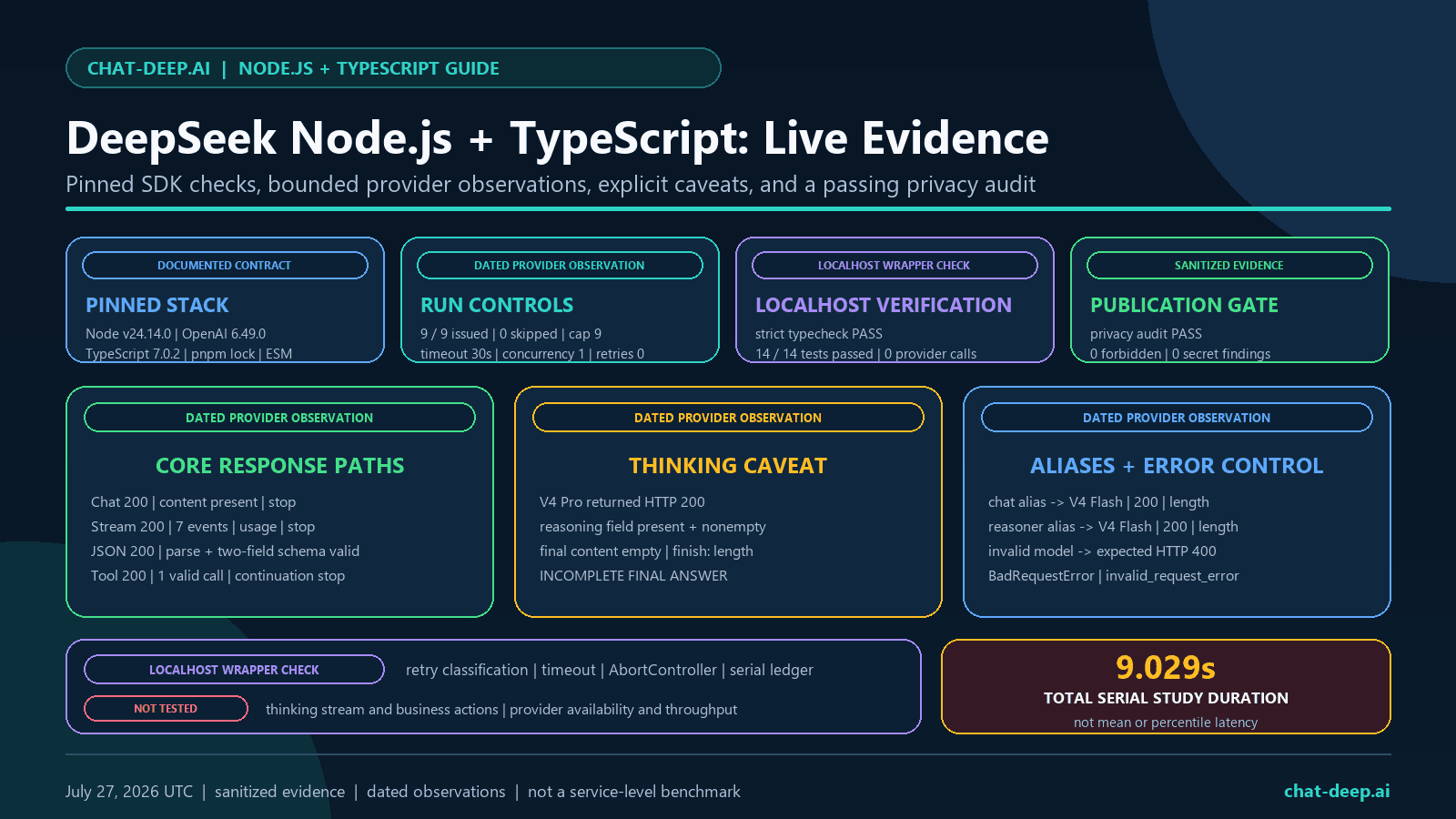
Evidence status: On July 27, 2026, a preregistered Node.js and TypeScript study issued all 9 planned DeepSeek requests serially, with concurrency set to 1 and automatic retries set to 0. The run started at 18:59:14 UTC and completed at 18:59:23 UTC; its 9.029-second total is study duration, not a latency benchmark. A separate localhost SDK matrix passed 14/14 tests, and the sanitized evidence passed its privacy audit with zero findings.
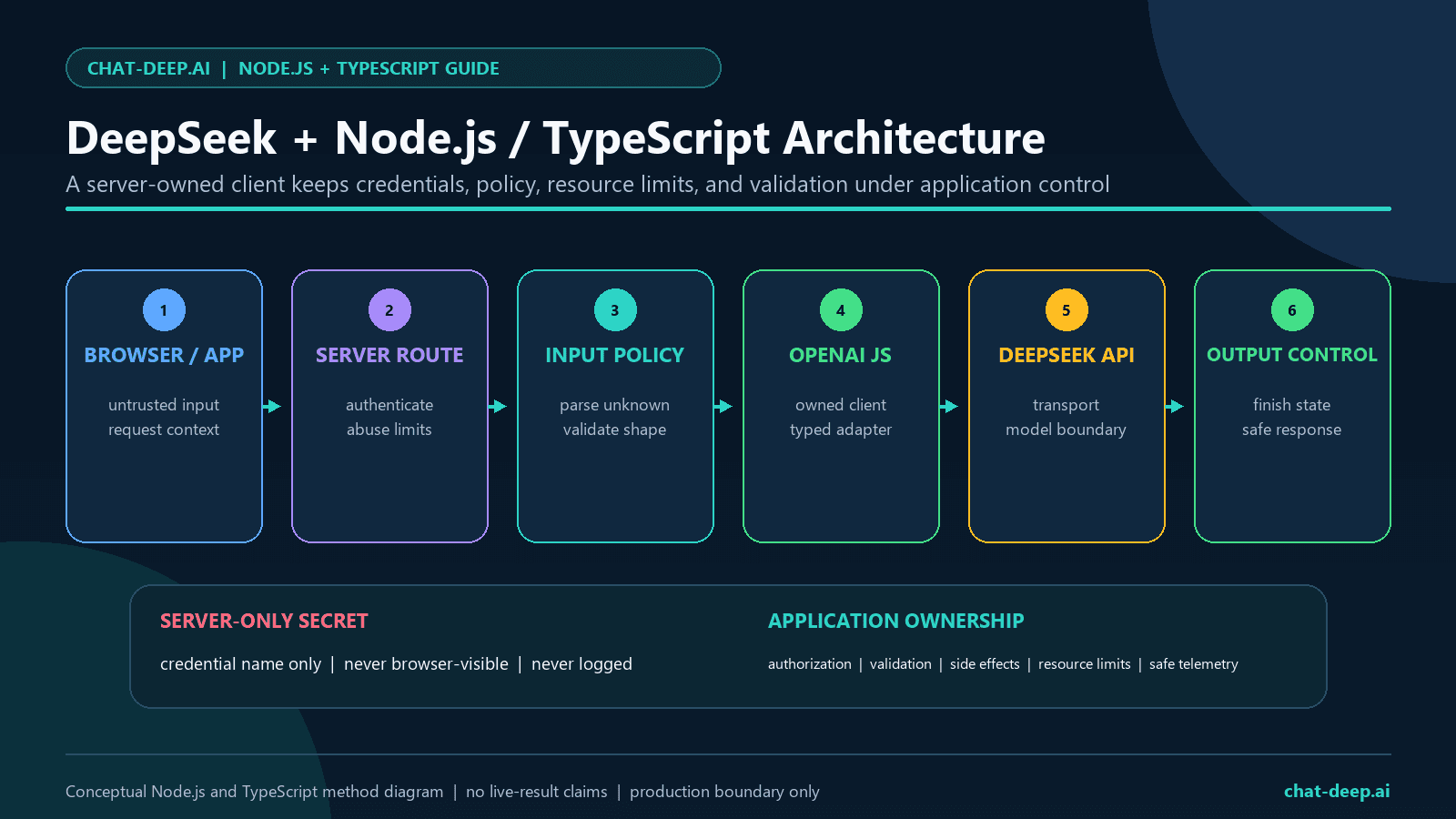
What “DeepSeek Node.js SDK” Means
DeepSeek’s official quick start shows Node.js developers using the official OpenAI JavaScript and TypeScript package as an HTTP client configured for DeepSeek. The package is the client transport; DeepSeek remains the model provider. That distinction matters because a compatible Chat Completions request does not prove compatibility with every OpenAI API, helper, role, field, or product.
- Install the package named
openai. - Use a DeepSeek API key, not an OpenAI API key.
- Set the Node option
baseURL, not Python’sbase_url. - Set the Node option
apiKey, not Python’sapi_key. - Call
client.chat.completions.create(). - Use DeepSeek’s documented
system,user,assistant, andtoolroles. - Use
max_tokensfor the DeepSeek Chat Completions request.
If you are migrating both Python and JavaScript code, use the broader OpenAI SDK with DeepSeek guide. This page stays focused on Node.js and TypeScript behavior.
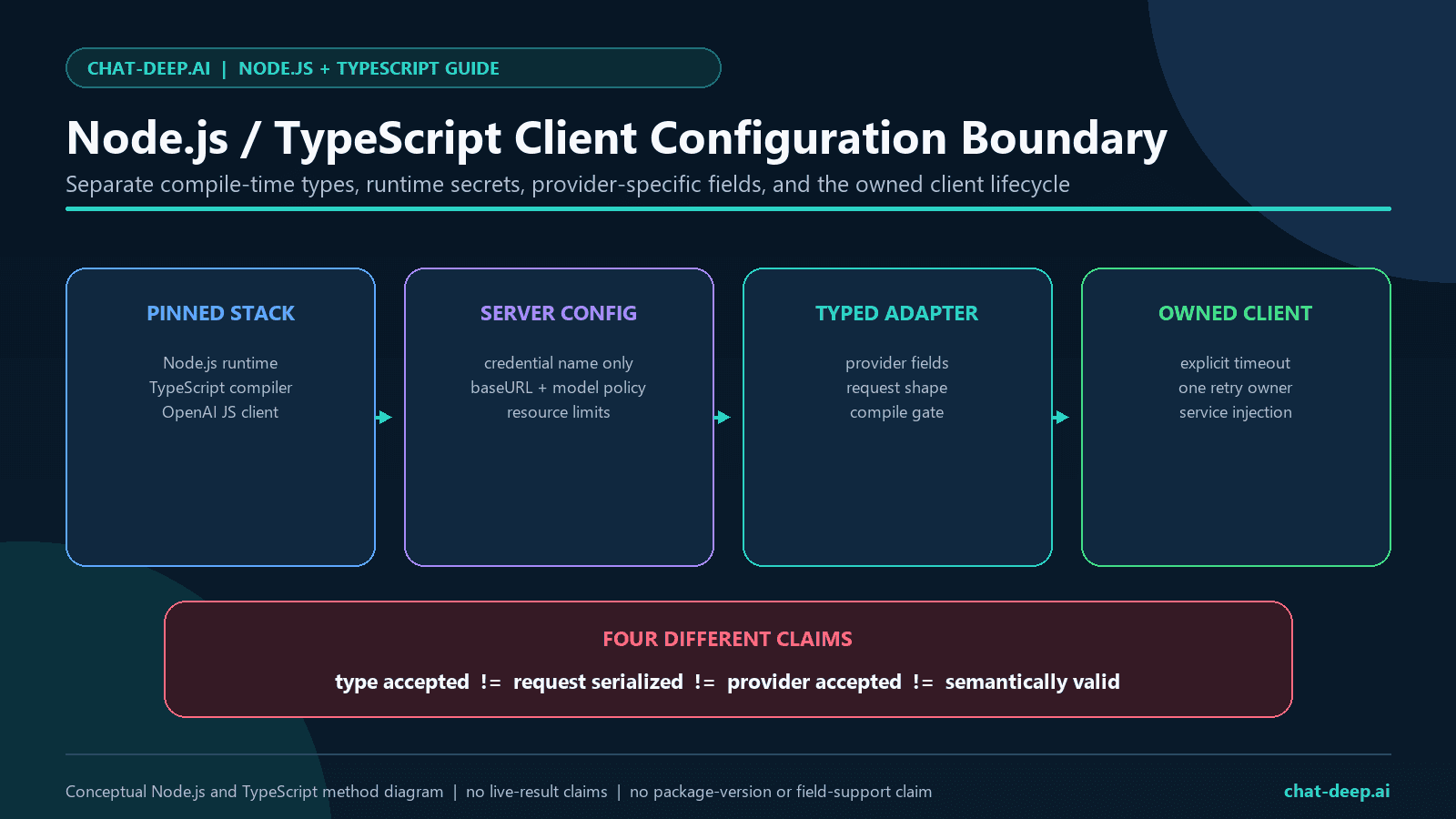
Install and Configure the Client
The OpenAI Node repository currently supports Node.js 22 LTS or later and TypeScript 4.9 or later. The bounded study for this page pins an exact package set before running so a future package change cannot silently rewrite the result.
npm install openai
npm install -D typescript @types/node tsx
Keep the key outside source code. A local environment file can be convenient for development, but it must be excluded from Git and must never be exposed through a public browser bundle, a client-visible framework variable, analytics, or an error response. See the dedicated DeepSeek API key guide for rotation and leak-response guidance.
import OpenAI from "openai";

function requireEnv(name: "DEEPSEEK_API_KEY"): string {
  const value = process.env[name];
  if (!value) {
    throw new Error(`Missing required environment variable: ${name}`);
  }
  return value;
}

export const deepseek = new OpenAI({
  apiKey: requireEnv("DEEPSEEK_API_KEY"),
  baseURL: "https://api.deepseek.com",
  timeout: 30_000,
  maxRetries: 2,
});
The 30-second timeout and two retries above are an example application policy, not a universal recommendation. The original test harness uses maxRetries: 0 so its provider request ledger remains exact. In production, one layer should own a bounded retry policy, and only retry work that is safe to repeat.
Type DeepSeek-Specific Request and Response Fields
The current DeepSeek Node example sends thinking as a top-level request field. The OpenAI Node client is typed for OpenAI’s documented surface, but its official README states that unknown top-level request parameters are passed through at runtime and unknown response properties are not stripped. The clean TypeScript pattern is therefore a narrow provider extension.
import OpenAI from "openai";

export type DeepSeekModel =
  | "deepseek-v4-flash"
  | "deepseek-v4-pro"
  | "deepseek-v4-flash-vision-exp";

type DeepSeekFields = {
  model: DeepSeekModel;
  thinking?: {
    type: "enabled" | "disabled";
  };
  reasoning_effort?: "low" | "medium" | "high" | "xhigh" | "max";
  user_id?: string;
};

export type DeepSeekNonStreamingParams =
  Omit<
    OpenAI.ChatCompletionCreateParamsNonStreaming,
    "model" | "reasoning_effort"
  > & DeepSeekFields;

export type DeepSeekStreamingParams =
  Omit<
    OpenAI.ChatCompletionCreateParamsStreaming,
    "model" | "reasoning_effort"
  > & DeepSeekFields;

export type DeepSeekMessage = OpenAI.ChatCompletionMessage & {
  reasoning_content?: string | null;
};

export type DeepSeekUsage =
  NonNullable<OpenAI.ChatCompletion["usage"]> & {
    prompt_cache_hit_tokens?: number;
    prompt_cache_miss_tokens?: number;
    completion_tokens_details?: {
      reasoning_tokens?: number;
    };
  };
Do not copy Python’s extra_body syntax into this Node request. Do not place a partial request under the second argument’s body option either; the resource source builds the POST body from the first argument, and an options-level body can replace it. Avoid broad any or as never casts because they hide mistakes in standard message and tool fields.
Compile and serialization observation: Strict TypeScript typechecking passed, and the independently rerun offline suite passed 14/14 tests. Against localhost fixtures, the full OpenAI Node SDK serialized DeepSeek’s thinking object at the request top level and correctly exposed the final usage-only streaming chunk with an empty choices array.
Choose a Current DeepSeek V4 Model
Choose by modality and workload. Flash and Pro are text models; Vision Exp is the experimental multimodal option for text plus images. DeepSeek currently documents a 1M context length, a maximum output of 384K, JSON Output, Tool Calls, Chat Completions, and Responses for all three. Thinking is documented as the default, so the copyable examples on this page select the mode explicitly. Check the official Models and Pricing page for current rates instead of copying a static price table.
Current DeepSeek V4 Account Concurrency Limits
Choose the exact API model for the workload, then size the application queue against that model’s documented account-level concurrency ceiling.
V4 Flash
deepseek-v4-flash
2,500 concurrent requests
Text model for chat, extraction, JSON, tools, streaming, and higher-volume application work.
V4 Flash Vision Exp
deepseek-v4-flash-vision-exp
2,500 concurrent requests
Experimental multimodal model for text and image inputs.
V4 Pro
deepseek-v4-pro
500 concurrent requests
Text model for harder reasoning, coding, planning, and long-context workflows.
How DeepSeek counts concurrency: one request occupies one concurrent connection from the time it is sent until the model response is complete. Limits are calculated for the account across all API keys; exceeding the relevant model limit returns HTTP 429.
Source reviewed August 22, 2026. These are concurrency ceilings, not throughput, latency, or availability guarantees. Recheck the official Rate Limit & Isolation guide before production capacity planning.
DeepSeek announced that deepseek-chat and deepseek-reasoner would become inaccessible after July 24, 2026 at 15:59 UTC. That cutoff has passed. New text code should use Flash or Pro; image workflows should use Vision Exp. Set thinking explicitly in either case. See the migration guide for site-wide replacement guidance.
Dated alias probes: On July 27, 2026, one bounded request to each legacy alias returned HTTP 200. Both deepseek-chat and deepseek-reasoner returned the model ID deepseek-v4-flash, and both stopped with finish_reason: "length". This records behavior at the test time only; it does not establish permanent support or future availability.
Minimal Compile-Safe TypeScript Request
import { deepseek } from "./client.js";
import type { DeepSeekNonStreamingParams } from "./deepseek-types.js";

const request: DeepSeekNonStreamingParams = {
  model: "deepseek-v4-flash",
  messages: [
    {
      role: "system",
      content: "Answer concisely. Return only the final answer.",
    },
    {
      role: "user",
      content: "Give one practical TypeScript API reliability rule.",
    },
  ],
  thinking: { type: "disabled" },
  max_tokens: 128,
  stream: false,
};

const completion = await deepseek.chat.completions.create(request);
const choice = completion.choices[0];

if (!choice) {
  throw new Error("DeepSeek returned no choice.");
}
if (choice.finish_reason !== "stop") {
  throw new Error(`Incomplete completion: ${String(choice.finish_reason)}`);
}
if (!choice.message.content) {
  throw new Error("DeepSeek returned empty final content.");
}

const finalAnswer = choice.message.content;
// Pass finalAnswer to the application layer; do not write it to telemetry.
Production code should decide which finish states are acceptable. DeepSeek documents stop, length, content_filter, tool_calls, and the provider-specific insufficient_system_resource. Do not treat partial output as complete merely because the HTTP request succeeded.
Ordinary chat observation: The bounded deepseek-v4-flash case returned HTTP 200 with one choice, nonempty final content, and finish_reason: "stop".
Send an Image with Vision Exp in Node.js
Use deepseek-v4-flash-vision-exp when the model must inspect pixels. Chat Completions accepts JPEG, PNG, GIF, or WebP images through a public URL, a Base64 data URL, or an uploaded file_id. Flash and Pro remain text-only. Keep the key and local file read on the server, validate MIME type and size before encoding, and never accept an arbitrary server-side path from a browser. See the focused Vision input guide for resolution and role details.
import { readFile } from "node:fs/promises";
import { deepseek } from "./client.js";
import type { DeepSeekNonStreamingParams } from "./deepseek-types.js";

const bytes = await readFile("diagram.png");

const request: DeepSeekNonStreamingParams = {
  model: "deepseek-v4-flash-vision-exp",
  messages: [
    {
      role: "user",
      content: [
        { type: "text", text: "Describe this diagram concisely." },
        {
          type: "image_url",
          image_url: {
            url: `data:image/png;base64,${bytes.toString("base64")}`,
          },
        },
      ],
    },
  ],
  thinking: { type: "disabled" },
  max_tokens: 256,
  stream: false,
};

const completion = await deepseek.chat.completions.create(request);
const answer = completion.choices[0]?.message.content;

if (!answer) {
  throw new Error("Vision Exp returned no final text.");
}

console.log(answer);
For a public HTTPS image, replace the data URL with its URL. For an image reused across requests, upload it once and reference its file_id as shown in the Responses example below. Base64 increases request size, so it is usually best for small, one-off images.
Use Thinking Mode Without Mixing Reasoning Into Final Content
DeepSeek returns the final answer in content and thinking metadata in the separate reasoning_content field. Most applications should display and persist the final answer, not hidden reasoning. For Chat Completions, choose the direct reasoning_effort values low, high, or max. Compatibility values medium and xhigh are accepted and both map to high; the mapping is identical for Flash and Pro. In thinking mode, temperature, top_p, presence_penalty, and frequency_penalty have no effect.
| Chat Completions request | Actual effort on Flash and Pro |
|---|---|
low | low |
medium (compatibility) | high |
high | high |
xhigh (compatibility) | high |
max | max |
deepseek-v4-flash and deepseek-v4-pro.import type {
DeepSeekMessage,
DeepSeekNonStreamingParams,
} from "./deepseek-types.js";
const request: DeepSeekNonStreamingParams = {
model: "deepseek-v4-pro",
messages: [
{
role: "user",
content: "Design a failure-safe queue for an idempotent API job.",
},
],
thinking: { type: "enabled" },
reasoning_effort: "high",
max_tokens: 512,
stream: false,
};
const completion = await deepseek.chat.completions.create(request);
const choice = completion.choices[0];
const message = choice?.message as
| DeepSeekMessage
| undefined;
if (!choice || choice.finish_reason !== "stop" || !message?.content) {
throw new Error("Missing or incomplete final answer.");
}
const reasoningWasReturned =
typeof message.reasoning_content === "string" &&
message.reasoning_content.length > 0;
console.log({
finalAnswerPresent: true,
reasoningWasReturned,
finishReason: choice.finish_reason,
});The boolean above is suitable for a sanitized test result. The reasoning text itself is not. For ordinary multi-turn chat, DeepSeek says previous reasoning does not need to be replayed. An active thinking-mode tool loop is different and is covered below. For the complete behavior, see the DeepSeek Thinking Mode guide.
Thinking field observation: The bounded deepseek-v4-pro thinking request returned HTTP 200. The reasoning_content field was present and nonempty, but the response ended with finish_reason: "length" and empty final content. Under this guide’s terminal checks, that is an incomplete answer, not a successful final result.
Stream Content, Capture Usage, and Support Cancellation
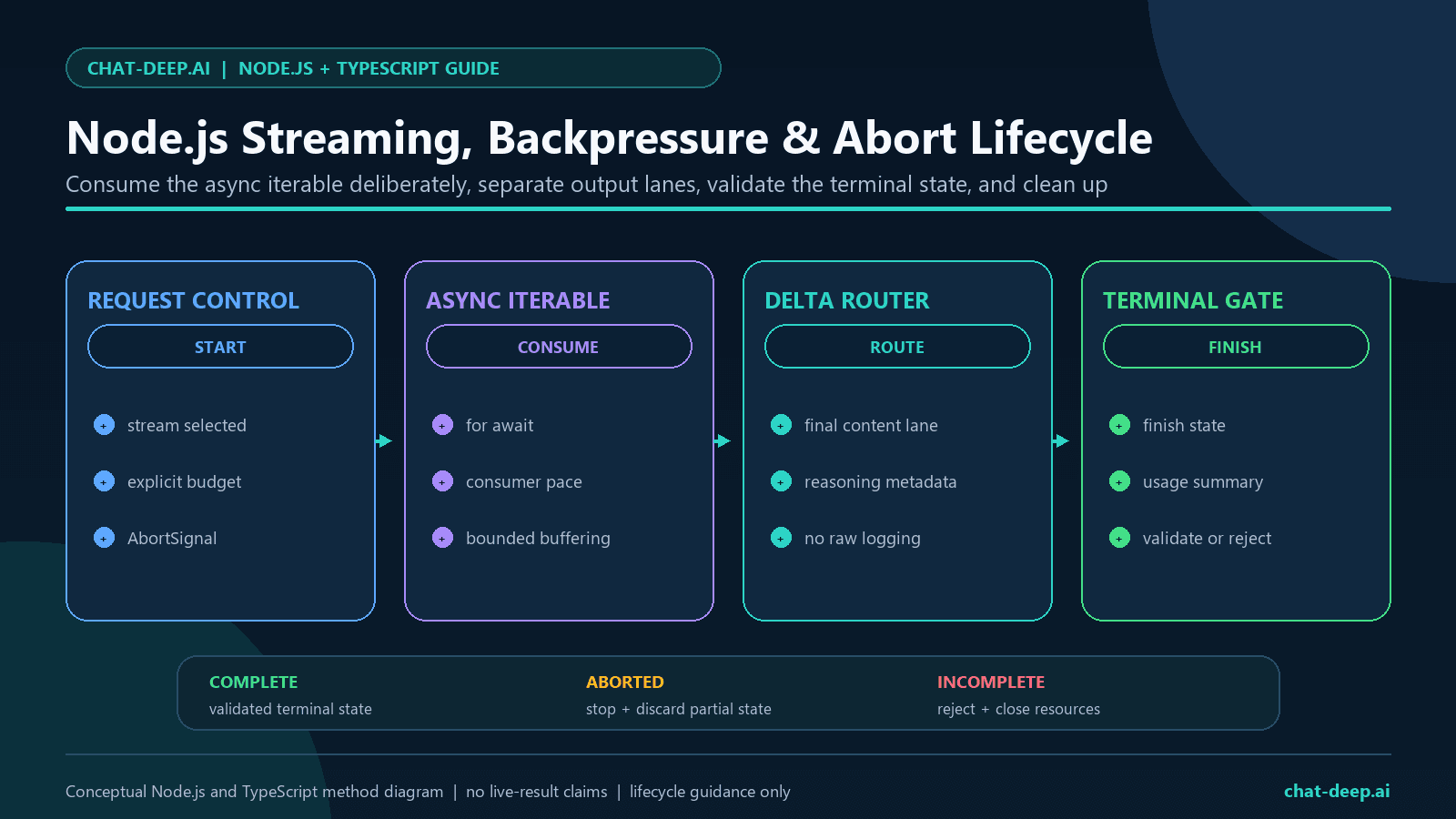
Set stream: true and consume the SDK’s async iterable with for await...of. When stream_options.include_usage is enabled, DeepSeek documents an additional usage chunk before [DONE]. Its choices array is empty, so a consumer must not assume every chunk has choices[0].
import type {
  DeepSeekStreamingParams,
  DeepSeekUsage,
} from "./deepseek-types.js";

type DeepSeekDelta = {
  content?: string | null;
  reasoning_content?: string | null;
};

const controller = new AbortController();

const request: DeepSeekStreamingParams = {
  model: "deepseek-v4-pro",
  messages: [
    { role: "user", content: "Explain one safe retry boundary." },
  ],
  thinking: { type: "enabled" },
  reasoning_effort: "high",
  max_tokens: 256,
  stream: true,
  stream_options: { include_usage: true },
};

const stream = await deepseek.chat.completions.create(request, {
  signal: controller.signal,
  timeout: 30_000,
  maxRetries: 0,
});

let finalText = "";
let reasoningObserved = false;
let usage: DeepSeekUsage | undefined;
let terminalFinish: string | undefined;

for await (const chunk of stream) {
  if (chunk.usage) {
    usage = chunk.usage as DeepSeekUsage;
  }

  const choice = chunk.choices[0];
  if (!choice) continue;

  const delta = choice.delta as DeepSeekDelta;
  if (delta.reasoning_content) reasoningObserved = true;
  if (delta.content) finalText += delta.content;
  if (choice.finish_reason) terminalFinish = choice.finish_reason;
}

if (terminalFinish !== "stop" || !finalText) {
  throw new Error("Rejecting an incomplete stream.");
}

console.log({
  finalTextPresent: finalText.length > 0,
  reasoningObserved,
  usageObserved: Boolean(usage),
  terminalFinish,
});
Pass an AbortSignal in the second request-options argument. A UI or route can call controller.abort() when the user cancels or the caller disconnects. Do not save partial JSON, partial tool arguments, or an incomplete final answer as a successful result. Consuming the async iterable sequentially also gives the application a natural place to honor downstream backpressure.
Streaming observation: The deepseek-v4-flash stream returned HTTP 200 across seven events. It included a content delta, a separate usage chunk, and a terminal finish_reason: "stop". No reasoning delta was observed in this non-thinking case.
Local cancellation control: In the offline localhost matrix, AbortController cancelled a controlled slow request after one attempt with no retry. This was an SDK behavior check and did not contact DeepSeek.
Return JSON and Validate It at Runtime
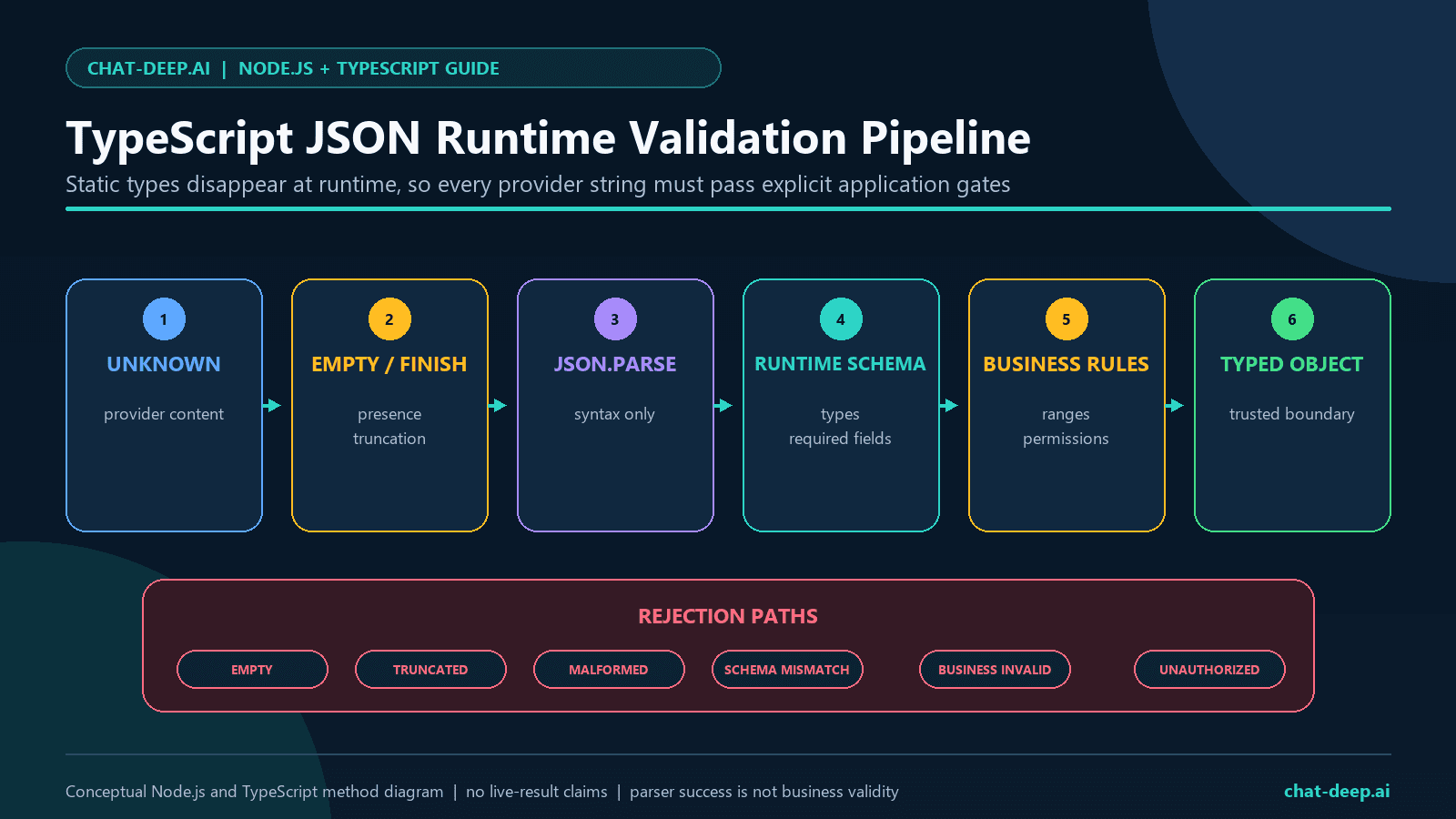
TypeScript types disappear at runtime. A cast cannot prove that model-produced JSON has the required keys, enum values, ranges, or business meaning. DeepSeek’s JSON Output contract requires response_format: { type: "json_object" }, the word “json” in the prompt, a clear target shape, and a reasonable output limit. The official guide also warns that content can occasionally be empty.
type TicketRoute = {
  queue: "billing" | "technical" | "account";
  urgency: "low" | "high";
};

function isTicketRoute(value: unknown): value is TicketRoute {
  if (!value || typeof value !== "object" || Array.isArray(value)) return false;
  const item = value as Record<string, unknown>;

  return (
    typeof item.queue === "string" &&
    typeof item.urgency === "string" &&
    ["billing", "technical", "account"].includes(item.queue) &&
    ["low", "high"].includes(item.urgency) &&
    Object.keys(item).every((key) =>
      ["queue", "urgency"].includes(key),
    )
  );
}

const request: DeepSeekNonStreamingParams = {
  model: "deepseek-v4-flash",
  messages: [
    {
      role: "system",
      content:
        'Return only valid json matching {"queue":"billing|technical|account","urgency":"low|high"}.',
    },
    {
      role: "user",
      content: "Route this synthetic ticket: password reset failed.",
    },
  ],
  response_format: { type: "json_object" },
  thinking: { type: "disabled" },
  max_tokens: 128,
  stream: false,
};

const completion = await deepseek.chat.completions.create(request);
const choice = completion.choices[0];

if (!choice || choice.finish_reason !== "stop") {
  throw new Error("JSON was missing or incomplete.");
}

const raw = choice.message.content;
if (!raw) throw new Error("JSON Output was empty.");

const parsed: unknown = JSON.parse(raw);
if (!isTicketRoute(parsed)) {
  throw new Error("JSON did not match the runtime contract.");
}
After schema validation, apply authorization and business rules before taking action. Valid JSON is not automatically accurate or safe. See the full DeepSeek JSON Output guide for prompt controls and edge cases.
JSON Output observation: The bounded deepseek-v4-flash request returned HTTP 200 with nonempty content. The content parsed as valid JSON, passed the preregistered runtime schema, and contained the two validated fields.
Run Tool Calls Through an Application Safety Gate
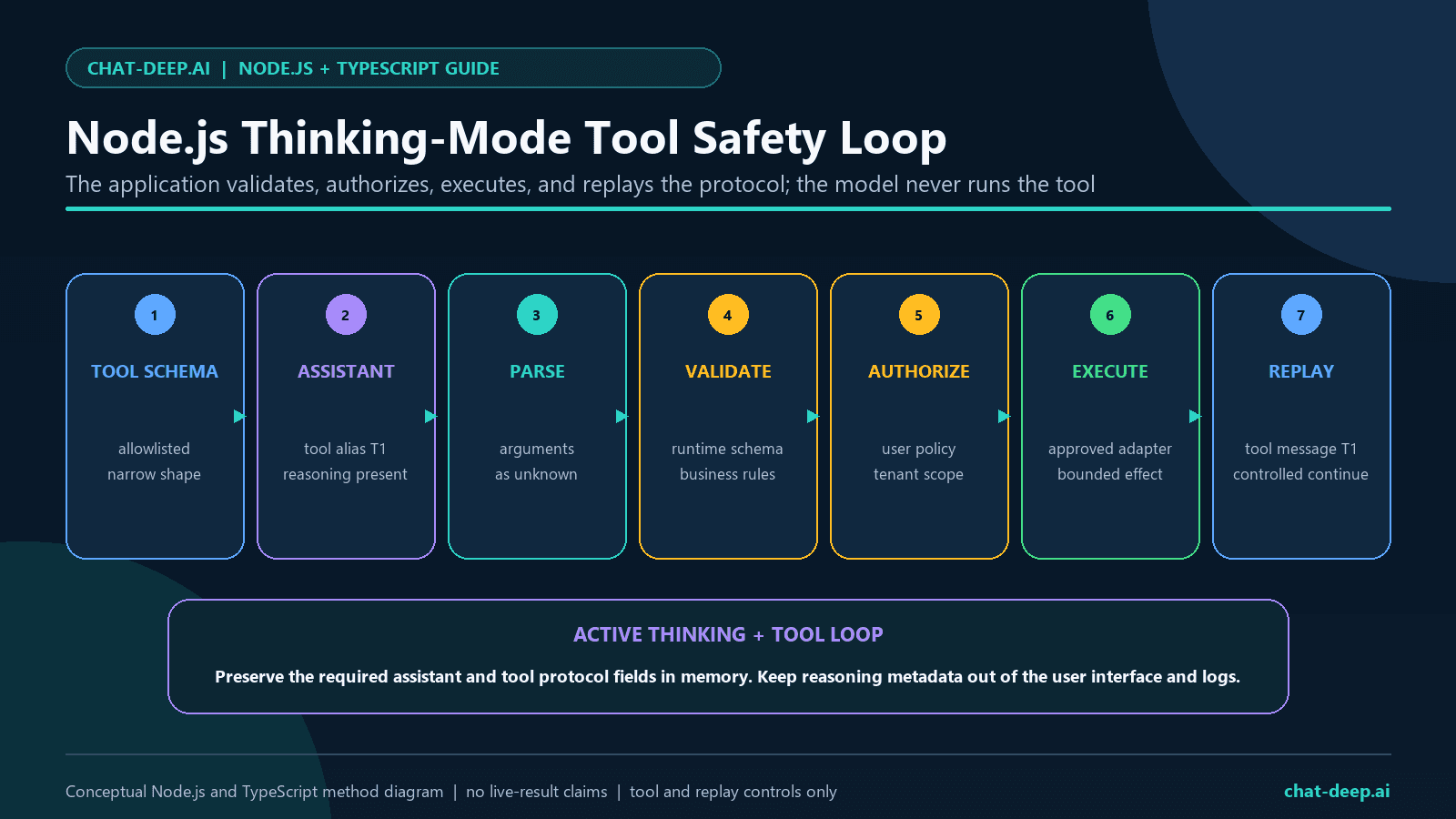
DeepSeek can request a function call, but it does not execute your function. Your Node.js application owns parsing, validation, authorization, side effects, the tool result, and continuation. A schema constrains shape; it does not grant permission.
type LookupArgs = { key: string };

function parseLookupArgs(raw: string): LookupArgs {
  const parsed: unknown = JSON.parse(raw);
  if (!parsed || typeof parsed !== "object") {
    throw new Error("Tool arguments must be an object.");
  }

  const value = parsed as Record<string, unknown>;
  if (
    typeof value.key !== "string" ||
    !/^[A-Z0-9_-]{1,32}$/.test(value.key) ||
    Object.keys(value).some((key) => key !== "key")
  ) {
    throw new Error("Tool arguments failed validation.");
  }

  return { key: value.key };
}

const tools: OpenAI.ChatCompletionTool[] = [
  {
    type: "function",
    function: {
      name: "lookup_synthetic_record",
      description: "Return one fixed synthetic record.",
      parameters: {
        type: "object",
        properties: {
          key: { type: "string" },
        },
        required: ["key"],
        additionalProperties: false,
      },
    },
  },
];

const messages: OpenAI.ChatCompletionMessageParam[] = [
  {
    role: "user",
    content: "Use the approved tool for synthetic key DEMO_1.",
  },
];

const firstRequest: DeepSeekNonStreamingParams = {
  model: "deepseek-v4-pro",
  messages,
  tools,
  thinking: { type: "enabled" },
  reasoning_effort: "high",
  max_tokens: 256,
  stream: false,
};

const first = await deepseek.chat.completions.create(firstRequest);
const firstChoice = first.choices[0];
const assistant = firstChoice?.message as
  | DeepSeekMessage
  | undefined;
const calls = assistant?.tool_calls;

if (
  !assistant ||
  firstChoice?.finish_reason !== "tool_calls" ||
  calls?.length !== 1
) {
  throw new Error("Expected one function tool call.");
}

const call = calls[0];
if (call.type !== "function") {
  throw new Error("Rejected a non-function tool call.");
}
if (call.function.name !== "lookup_synthetic_record") {
  throw new Error("Rejected an unapproved tool.");
}

const args = parseLookupArgs(call.function.arguments);
const safeResult = { key: args.key, value: "synthetic" };

type ReplayMessage =
  OpenAI.ChatCompletionAssistantMessageParam & {
    reasoning_content?: string | null;
  };

const replay: ReplayMessage = {
  role: "assistant",
  content: assistant.content,
  tool_calls: assistant.tool_calls,
  reasoning_content: assistant.reasoning_content ?? null,
};

messages.push(replay);
messages.push({
  role: "tool",
  tool_call_id: call.id,
  content: JSON.stringify(safeResult),
});

const finalRequest: DeepSeekNonStreamingParams = {
  model: "deepseek-v4-pro",
  messages,
  tools,
  thinking: { type: "enabled" },
  reasoning_effort: "high",
  max_tokens: 128,
  stream: false,
};

const final = await deepseek.chat.completions.create(finalRequest);
const finalChoice = final.choices[0];

if (
  !finalChoice ||
  finalChoice.finish_reason !== "stop" ||
  !finalChoice.message.content
) {
  throw new Error("Tool continuation was incomplete.");
}
In a thinking-mode tool loop, replay the assistant message with its reasoning_content and tool_calls, then add the matching tool_call_id. Never expose or log those raw values. For multiple calls, validate and answer each call separately. DeepSeek Strict Tool Calls are beta and use the beta base URL; keep them isolated from the normal client until separately tested. See the dedicated Tool Calls guide.
Tool round-trip observation: The initial deepseek-v4-flash request returned HTTP 200 with finish_reason: "tool_calls" and exactly one call. Its tool name was allowlisted and its arguments passed the local schema before execution. The conditional continuation then returned HTTP 200 with nonempty content, finish_reason: "stop", and the sanitized replay alias T1.
Handle Aborts, Timeouts, Retries, and Provider Errors Separately
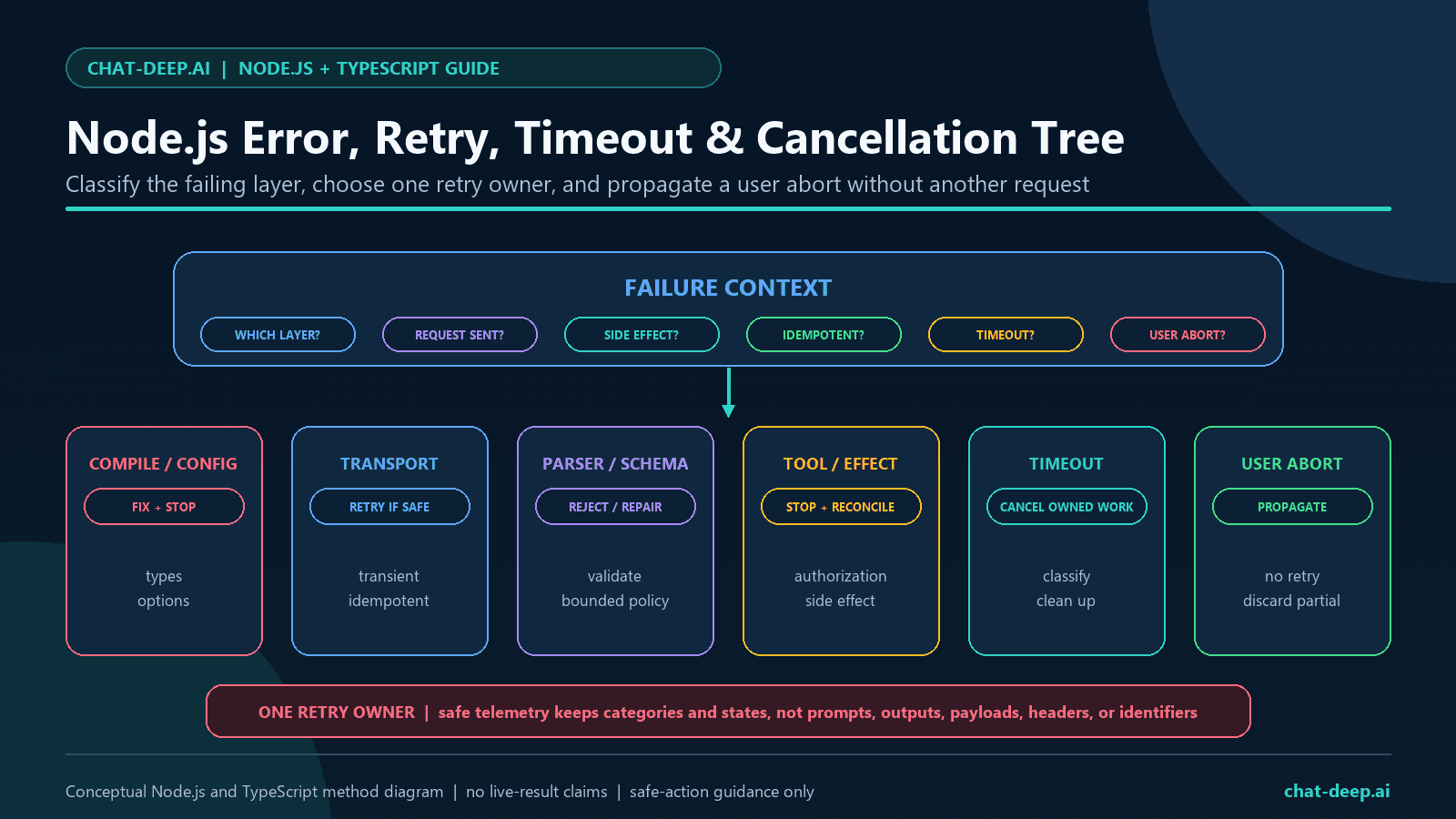
The current OpenAI Node client documents a ten-minute default timeout and two automatic retries. It retries connection failures, HTTP 408, 409, 429, and status 500 or higher. A timeout can therefore be retried unless you disable or override retries. The per-request options object accepts signal, timeout, and maxRetries.
| Failure | SDK or provider signal | Application response |
|---|---|---|
| User cancellation | OpenAI.APIUserAbortError | Stop and propagate cancellation; do not retry |
| Client timeout after attempts | OpenAI.APIConnectionTimeoutError | Record a timeout category and retry only if work is safe and policy allows |
| Network failure | OpenAI.APIConnectionError | Use one bounded retry owner for idempotent work |
| HTTP failure | OpenAI.APIError or subclass with status | Classify the status before retrying or asking the user to fix input or account state |
| Parser or schema failure | Local validation error | Reject output or use a bounded repair policy; do not treat it as a network retry |
| Tool-side uncertainty | Application adapter error | Stop and reconcile possible side effects before another attempt |
DeepSeek documents 400 for invalid format, 401 for authentication, 402 for insufficient balance, 422 for invalid parameters, 429 for rate limits, 500 for server errors, and 503 for overload. The OpenAI Node client has named classes for several common statuses; a DeepSeek 402 may remain a generic APIError, so always inspect error.status as well as the class.
type SafeErrorLog = {
  category: string;
  status: number | null;
  name: string;
};

function classifyError(error: unknown): SafeErrorLog {
  if (error instanceof OpenAI.APIUserAbortError) {
    return {
      category: "user_abort",
      status: null,
      name: error.name,
    };
  }

  if (error instanceof OpenAI.APIConnectionTimeoutError) {
    return {
      category: "timeout",
      status: null,
      name: error.name,
    };
  }

  if (error instanceof OpenAI.APIConnectionError) {
    return {
      category: "connection",
      status: null,
      name: error.name,
    };
  }

  if (error instanceof OpenAI.APIError) {
    return {
      category: "provider_status",
      status: error.status ?? null,
      name: error.name,
    };
  }

  return {
    category: "unexpected_local_error",
    status: null,
    name: "UnknownError",
  };
}
Log only allowlisted metadata. Do not log the key, Authorization header, raw prompts, final answers, reasoning, tool arguments, tool results, response headers, account data, or raw provider messages. For deeper diagnosis, use the DeepSeek Error Codes guide and the rate-limits guide.
Local retry control: With maxRetries: 0, a controlled HTTP 500 fixture produced one total attempt. In a separate test-only client with maxRetries: 1, the HTTP 429 fixture received two total attempts, while the HTTP 400 fixture received one. These were localhost classification tests, not DeepSeek availability measurements.
Local timeout control: With maxRetries: 0, a controlled timeout produced one localhost request attempt. This verifies the configured SDK boundary only; it is not a provider latency result.
Invalid-model provider control: The synthetic impossible model ID produced the expected HTTP 400 provider response. The SDK mapped it to BadRequestError with code invalid_request_error; no raw provider message or response body is published.
Read Token Usage and Context Cache Fields
Use the usage object returned by DeepSeek rather than estimating tokens from characters. DeepSeek’s response schema includes prompt, completion, and total tokens, plus cache-hit, cache-miss, and reasoning-token details where applicable.
const usage = completion.usage as DeepSeekUsage | undefined;

const safeUsageSummary = usage
  ? {
      promptTokens: usage.prompt_tokens,
      completionTokens: usage.completion_tokens,
      totalTokens: usage.total_tokens,
      cacheHitTokens: usage.prompt_cache_hit_tokens ?? 0,
      cacheMissTokens: usage.prompt_cache_miss_tokens ?? 0,
      reasoningTokens:
        usage.completion_tokens_details?.reasoning_tokens ?? 0,
    }
  : null;
DeepSeek context caching is enabled by default. It is prefix based and best effort, so a repeated request does not guarantee a hit. Report returned hit and miss fields; do not infer cache behavior from latency alone. Read the context caching guide for prefix design and tests. For current cost planning, use the site’s pricing page and recheck the official rates.
Use a Server Route, Not Browser-Side Credentials
A Next.js, Express, Fastify, serverless, or other Node application should expose its own authenticated route. Validate the incoming JSON and length, call DeepSeek on the server, return only the application result, and convert provider failures into safe user-facing errors.
export async function POST(request: Request): Promise<Response> {
  let body: unknown;

  try {
    body = await request.json();
  } catch {
    return Response.json({ error: "Invalid JSON body." }, { status: 400 });
  }

  if (
    !body ||
    typeof body !== "object" ||
    typeof (body as { message?: unknown }).message !== "string"
  ) {
    return Response.json({ error: "A message is required." }, { status: 400 });
  }

  const message = (body as { message: string }).message.trim();
  if (!message || message.length > 4_000) {
    return Response.json({ error: "Message length is invalid." }, { status: 400 });
  }

  try {
    const params: DeepSeekNonStreamingParams = {
      model: "deepseek-v4-flash",
      messages: [{ role: "user", content: message }],
      thinking: { type: "disabled" },
      max_tokens: 512,
      stream: false,
    };

    const result = await deepseek.chat.completions.create(params, {
      signal: request.signal,
      timeout: 30_000,
      maxRetries: 0,
    });

    const choice = result.choices[0];
    const answer = choice?.message.content;
    if (!choice || choice.finish_reason !== "stop" || !answer) {
      throw new Error("Empty or incomplete answer.");
    }

    return Response.json({ answer });
  } catch (error) {
    console.warn("DeepSeek request failed", classifyError(error));
    return Response.json(
      { error: "The assistant is temporarily unavailable." },
      { status: 503 },
    );
  }
}
A real route also needs user authentication, abuse controls, tenant isolation, a privacy policy, input and output limits, tool permissions, and spend monitoring. Do not send raw provider usage, exception objects, or debugging headers to the browser.
Use the Responses API with Flash, Pro, or Vision Exp
DeepSeek added native Responses API support on July 31, 2026 and has since expanded the documented surface. At the August 22 source review, the endpoint supports deepseek-v4-flash, deepseek-v4-pro, and deepseek-v4-flash-vision-exp. The same configured OpenAI client can call client.responses.create(); the first two models remain text-only, while Vision Exp can inspect images.
Responses reasoning uses a separate field and mapping: set reasoning.effort to none to disable thinking; minimal/low map to low, medium/high/xhigh map to high, and max maps to max. Do not reuse the Chat Completions reasoning_effort field here.
import "dotenv/config";
import OpenAI from "openai";

const client = new OpenAI({
  apiKey: process.env.DEEPSEEK_API_KEY,
  baseURL: "https://api.deepseek.com",
});

const response = await client.responses.create({
  model: "deepseek-v4-flash",
  instructions: "Answer concisely and return only the requested text.",
  input: "Give one safe rule for retrying an API request.",
});

if (response.status !== "completed" || !response.output_text) {
  throw new Error(`Responses request ended with ${response.status}`);
}

console.log(response.output_text);
Upload an Image and Reuse Its file_id
DeepSeek’s Files API currently stores images for model input; it is not a general document store. Upload a JPEG, PNG, GIF, or WebP with purpose: "user_data", pass the returned ID as an input_image to Vision Exp, and delete it when your retention policy no longer requires it. The documented maximum upload size is 64 MiB.
import { createReadStream } from "node:fs";
import { deepseek } from "./client.js";

const uploaded = await deepseek.files.create({
  file: createReadStream("chart.png"),
  purpose: "user_data",
});

try {
  const response = await deepseek.responses.create({
    model: "deepseek-v4-flash-vision-exp",
    input: [
      {
        role: "user",
        content: [
          { type: "input_text", text: "Summarize this chart." },
          { type: "input_image", file_id: uploaded.id, detail: "auto" },
        ],
      },
    ],
  });

  if (response.status !== "completed" || !response.output_text) {
    throw new Error(`Vision response ended with ${response.status}`);
  }

  console.log(response.output_text);
} finally {
  await deepseek.files.delete(uploaded.id);
}
Keep the compatibility boundaries explicit. DeepSeek does not support previous_response_id, conversation, or response storage, so send the required prior items again when continuing a workflow. Vision Exp accepts input_image by public URL, Base64 data URL, or file_id; Flash and Pro replace a Responses image with a text placeholder instead of inspecting its pixels. General input_file items and documents such as PDF or DOCX remain unsupported. Images are documented in user and developer input and in tool output; images in system or assistant items return HTTP 400. Tool support is partial, and unsupported parameters may be silently ignored, so acceptance without an error is not proof that a feature worked.
Responses streaming uses semantic events such as response.output_text.delta. A stream ends with response.completed, response.incomplete, or response.failed; unlike Chat Completions streaming, it does not send data: [DONE]. Handle incomplete and failed terminal events as non-success states and read usage from the final response object.
Evidence boundary: this section reflects the official Responses, Vision, and Files contracts rechecked August 22, 2026. It was not part of the page’s July 27 nine-request live test or 14-test localhost matrix.
Original DeepSeek Node.js TypeScript Test Methodology
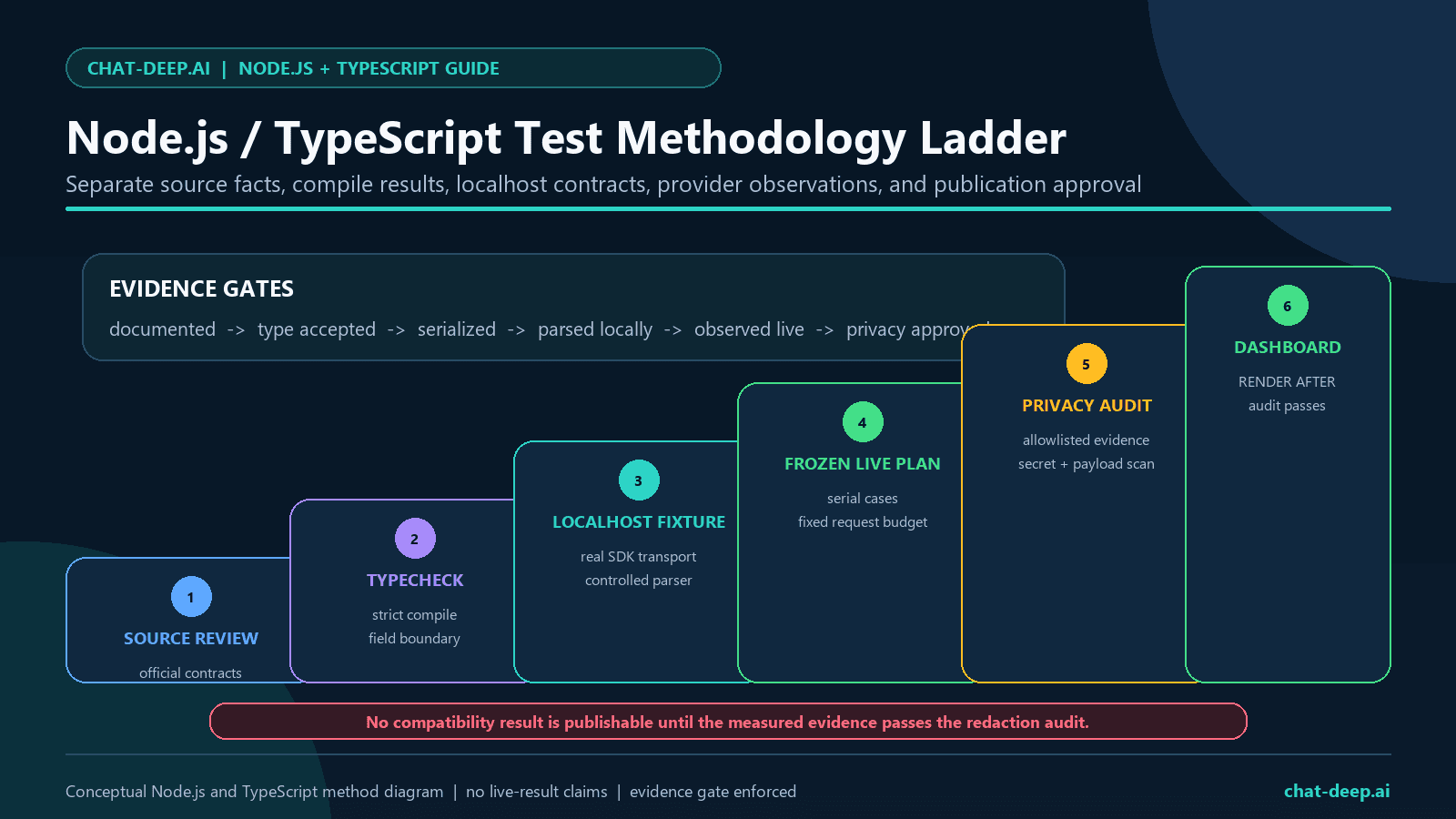
The study was preregistered before provider requests. It pins the OpenAI Node client, TypeScript compiler, Node declarations, API origin, request order, generation caps, timeout, concurrency, and retry count. Provider calls run serially. The only tool is synthetic, local, allowlisted, and side-effect free. A continuation is sent only after every tool-call safety gate passes.
| Position | Case | Planned model | Sanitized result |
|---|---|---|---|
| 1 | Ordinary chat | deepseek-v4-flash | HTTP 200; one choice; nonempty content; stop |
| 2 | Streaming | deepseek-v4-flash | HTTP 200; seven events; content delta and usage chunk observed; stop |
| 3 | JSON Output | deepseek-v4-flash | HTTP 200; nonempty content; valid JSON; two-field schema passed |
| 4 | Tool call, initial | deepseek-v4-flash | HTTP 200; tool_calls; one allowlisted call; argument schema passed |
| 5 | Conditional tool continuation | deepseek-v4-flash | HTTP 200; nonempty content; stop; replay alias T1 |
| 6 | Thinking metadata | deepseek-v4-pro | HTTP 200; reasoning present and nonempty; empty final content; length |
| 7 | Legacy alias probe | deepseek-chat | HTTP 200; returned deepseek-v4-flash; length; dated observation |
| 8 | Legacy alias probe | deepseek-reasoner | HTTP 200; returned deepseek-v4-flash; length; dated observation |
| 9 | Invalid-model control | Synthetic impossible ID | Expected HTTP 400; BadRequestError; invalid_request_error |
Environment and offline test summary: Node.js v24.14.0, openai 6.49.0, and TypeScript 7.0.2 were recorded. Strict typechecking passed, and the independently rerun offline suite passed 14/14 tests. The full SDK localhost matrix covered top-level thinking serialization, the usage-only stream chunk, retry classification, timeout behavior, cancellation, and the frozen request order without provider traffic.
Live request accounting: The run started on July 27, 2026 at 18:59:14 UTC and completed at 18:59:23 UTC. It issued 9/9 planned requests, skipped none, stayed within the nine-request cap, used concurrency 1, and enabled zero automatic retries. The 9.029-second total is the duration of this small serial study, not a latency, throughput, or service-level benchmark.
The published result artifacts contain only versions, public model names, case aliases, status classes, exception class names, counts, booleans, finish states, and validation outcomes. They exclude credentials, account data, prompts, generated answers, hidden reasoning, raw JSON, tool data, provider IDs, headers, and raw error text. The public harness source necessarily includes transparent synthetic test prompts and fixtures, never private or user-supplied prompts.
Reproducibility files: the sanitized harness, frozen plan, localhost tests, result schema, and privacy checks are available in the public GitHub evidence repository. It contains only synthetic test inputs and must contain no credential, account data, private or user-supplied prompt, provider output, hidden reasoning, provider ID, or local path.
How to Read the Results
The dated run verified the planned ordinary chat, streaming, JSON validation, tool-call, continuation, error-control, and response-field paths in one bounded environment. The thinking request demonstrated why HTTP 200 alone is insufficient: reasoning was present, but the generation ended at length with no final content. Both legacy aliases happened to resolve to deepseek-v4-flash during this run, but that observation is not a support promise. The sanitized evidence audit passed with zero forbidden-field or secret findings. These results do not measure answer quality, comparative performance, throughput, uptime, or untested OpenAI endpoints.
- A parsed HTTP success is not automatically a complete answer.
- Valid JSON is not automatically schema-valid or business-valid.
- A tool request is not automatically authorized or safe to execute.
- A typed SDK error proves client mapping, not the permanent behavior of the provider.
- An alias result is a dated observation, not a future compatibility promise.
- This is one bounded environment, not a latency, throughput, quality, or service-level benchmark.
- Untested OpenAI endpoints remain untested.
Common DeepSeek Node.js TypeScript Mistakes
- Using
base_urlorapi_keyin JavaScript. - Leaving the client at the default OpenAI origin.
- Exposing a DeepSeek key in browser code.
- Copying Python
extra_bodyinto a Node request. - Using old model aliases in new code.
- Sending an image to text-only Flash or Pro and assuming its pixels were inspected.
- Treating the image-only Files API as support for PDF, DOCX, or a general
input_file. - Confusing account concurrency with requests per second or stacking limits independently for each API key.
- Omitting an explicit thinking setting even though thinking defaults to enabled.
- Using
developerormax_completion_tokensin Chat Completions from an OpenAI-only example; Responses acceptsdeveloperinput but DeepSeek handles it likeuser. - Assuming every stream chunk has a choice.
- Mixing
reasoning_contentinto the final answer. - Parsing JSON without runtime validation.
- Executing a tool before allowlisting, validation, authorization, and side-effect review.
- Dropping reasoning protocol fields during a thinking tool loop.
- Stacking SDK retries and application retries without one bounded owner.
- Logging raw exceptions, prompts, outputs, reasoning, tool data, or identifiers.
FAQ
Does DeepSeek have an official Node.js SDK?
DeepSeek’s official quick start documents Node.js usage through the official OpenAI JavaScript and TypeScript package configured with DeepSeek’s API origin. Here, “DeepSeek Node.js SDK” refers to that configured client setup, not a separate DeepSeek-owned npm package.
What package should I install?
Install openai on the server with npm install openai. Pin and test the exact version used by your application.
What DeepSeek baseURL should Node.js use?
Use baseURL: "https://api.deepseek.com" in the client constructor. That is the current value in DeepSeek’s official quick start.
Should I append /v1?
Use the exact current documented base URL without /v1 in the primary Node setup. The SDK appends the Chat Completions resource path. Do not treat /v1 as a model version.
How do I type thinking in TypeScript?
Intersect the SDK’s exported streaming or non-streaming Chat Completion parameter type with a small provider type containing thinking?: { type: "enabled" | "disabled" }. Keep the field at the top level of the Node request object.
Should Node.js use extra_body?
No. extra_body is the pattern shown in DeepSeek’s Python SDK examples. DeepSeek’s current Node example sends thinking directly in the request object, and the OpenAI Node client documents pass-through behavior for unknown top-level parameters.
How do I stream DeepSeek in TypeScript?
Set stream: true, await client.chat.completions.create(), and consume the returned async iterable with for await...of. Guard empty-choice usage chunks and route reasoning_content separately from final content.
How do I cancel a DeepSeek request?
Create an AbortController and pass its signal in the second request-options argument. Treat APIUserAbortError as cancellation, not as a retryable provider failure.
Why did a streamed chunk have no choices?
With stream_options.include_usage, DeepSeek documents a final usage chunk whose choices array is empty. Read its usage object and continue without indexing a choice.
Are deepseek-chat and deepseek-reasoner still usable?
The announced retirement cutoff has passed. Use deepseek-v4-flash or deepseek-v4-pro for new text code, and deepseek-v4-flash-vision-exp when images are required. Both old aliases responded during the bounded July 27, 2026 probes, as reported above, but that dated observation is not a future compatibility promise.
Does this test prove DeepSeek supports the OpenAI Responses API?
No. The July 27 harness tested Chat Completions, not /responses. DeepSeek subsequently documented native Responses API support for Flash on July 31 and now lists all three current V4 API IDs on that endpoint. The section above reports that first-party contract separately; it does not retroactively add a Responses request to the historical test matrix.
Can Node.js send images to DeepSeek?
Yes, with deepseek-v4-flash-vision-exp. In Chat Completions, send an image_url part containing a public URL or Base64 data URL, or reference an uploaded image by file_id. In Responses, use input_image with image_url or file_id. Flash and Pro are text-only.
Does the DeepSeek Files API support PDF or DOCX?
No. The current Files API accepts JPEG, PNG, GIF, and WebP images for reuse with Vision Exp. That does not add general document or input_file support; extract and validate document text in your application before sending an appropriate text request.
What are the current DeepSeek concurrency limits?
DeepSeek currently documents 2,500 concurrent requests for Flash, 500 for Pro, and 2,500 for Vision Exp. These are account-level in-flight request limits across API keys, not requests-per-second guarantees. An exceeded limit returns HTTP 429.
Official Sources and Last Verified
Documentation reviewed: August 22, 2026. Historical live test date: July 27, 2026. The dated results above are unchanged. Model IDs, endpoint support, effort mappings, package versions, schemas, limits, and prices can change; recheck the official sources before a production release.
- DeepSeek Your First API Call
- DeepSeek Change Log
- DeepSeek Responses API
- DeepSeek Vision guide
- DeepSeek Files API
- DeepSeek Models and Pricing
- DeepSeek Create Chat Completion reference
- DeepSeek Thinking Mode
- DeepSeek JSON Output
- DeepSeek Tool Calls
- DeepSeek Error Codes
- DeepSeek Rate Limit and Isolation
- DeepSeek Context Caching
- DeepSeek V4 Preview Release
- Official OpenAI Node repository
For the broad developer overview, return to the DeepSeek API documentation hub.