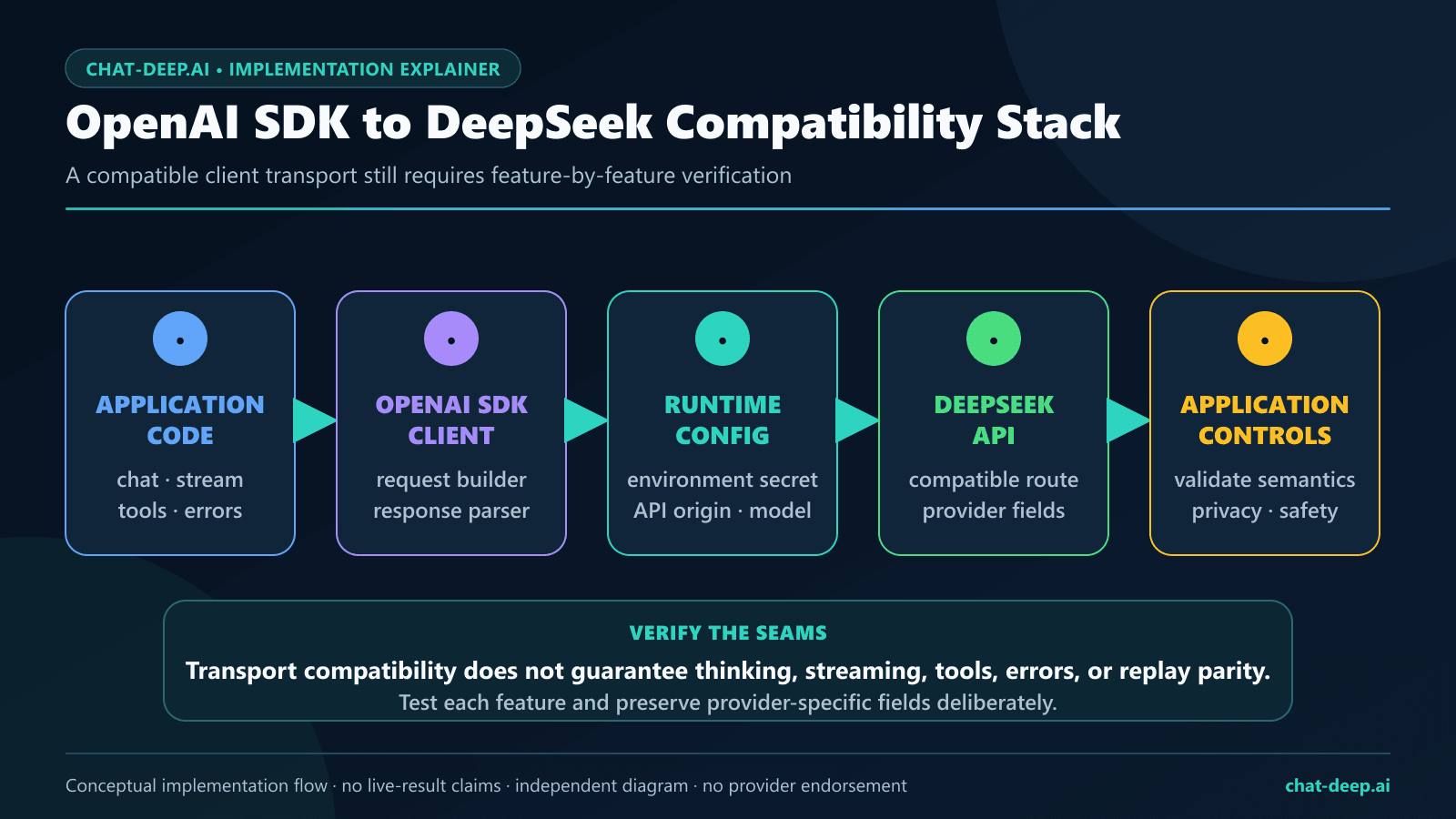
Live test date: July 27, 2026 (UTC). The OpenAI SDK with DeepSeek can act as an HTTP client for the provider’s documented OpenAI-format Models and Chat Completions endpoints in Python or JavaScript. The essential changes are the credential, API origin, model name, and any DeepSeek-specific request fields. The SDK remains the client library; DeepSeek remains the API provider.
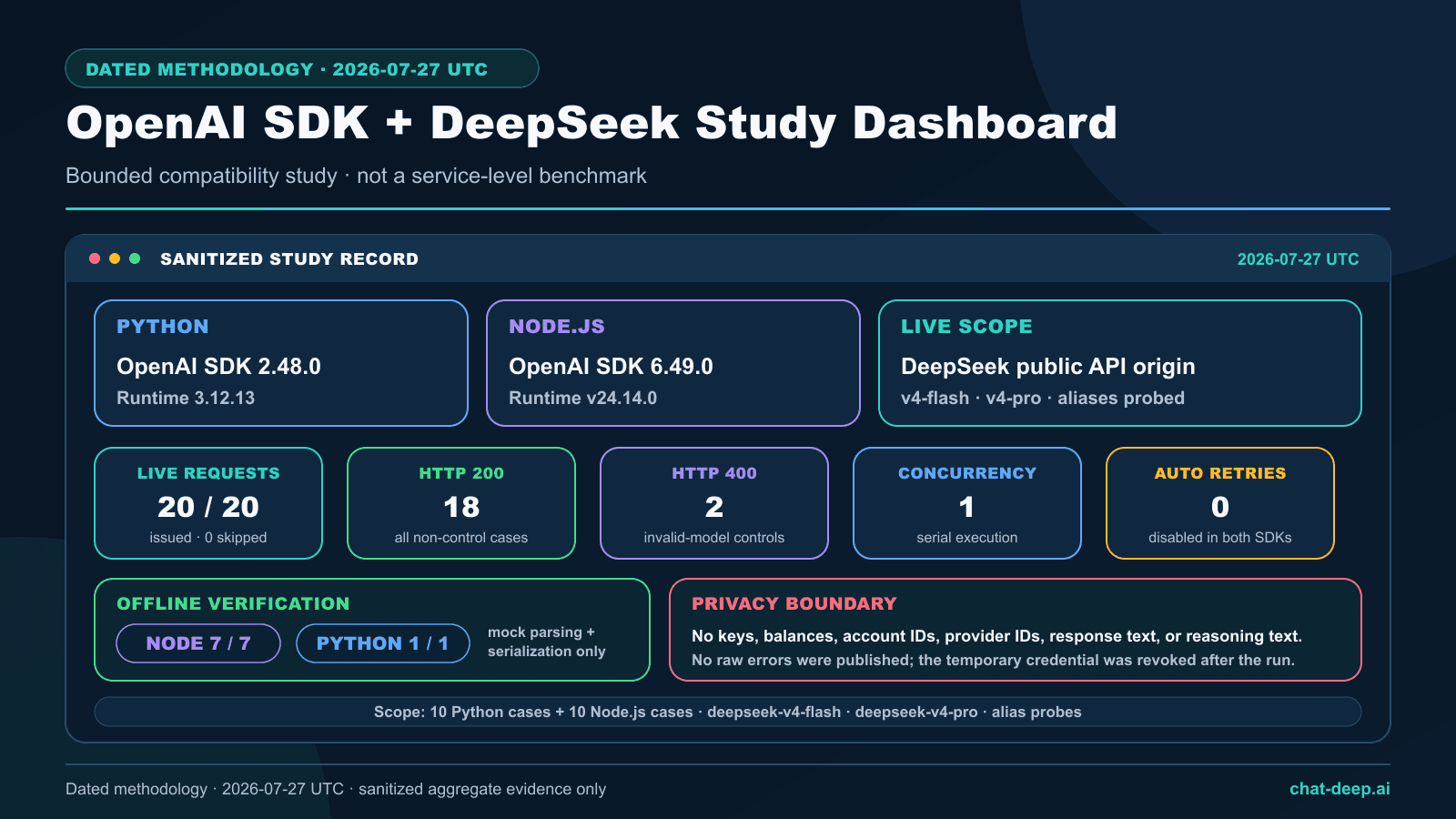
We tested that boundary with a preregistered 20-request study: ten requests through OpenAI Python 2.48.0 and ten through OpenAI Node 6.49.0. All 20 planned requests were issued serially, with concurrency one and automatic retries disabled. Eighteen returned HTTP 200. The other two were deliberately invalid-model controls; both returned HTTP 400 and were parsed by their SDK as BadRequestError with the sanitized code invalid_request_error. There were no skipped requests and no unexpected client failures.
The most important nuance appeared when the thinking field was omitted. Both SDKs received HTTP 200 and parsed one choice from deepseek-v4-flash, but both responses ended with finish_reason: "length", contained nonempty reasoning metadata, and contained no final user-facing content under the deliberately tight 64-token cap. This was successful transport plus an output-budget observation—not a failed API call. If you need fast final text, explicitly disable thinking or provide enough output budget for reasoning and the final answer.
This article reports feature-by-feature compatibility, not complete OpenAI platform parity. The July 27 study covered Models and Chat Completions only. DeepSeek now documents the Responses API for deepseek-v4-flash, deepseek-v4-pro, and the experimental image-capable deepseek-v4-flash-vision-exp; the current source-reviewed sections below are outside the 20-request matrix. Every other unlisted endpoint remains outside this study. Chat-Deep.ai is an independent technical publication and is not affiliated with or endorsed by DeepSeek or OpenAI. No API key, Authorization header, account identifier, raw prompt, generated answer, hidden reasoning, provider request ID, provider tool-call ID, balance, or raw error body is published.
- Models and Chat Completions parsed through both SDKs. The July 27
GET /modelsresponse contained the two V4 IDs tested here, and both clients parsed regular and streamed completions. - DeepSeek-specific fields reached the provider. Explicit thinking-disabled and thinking-enabled requests produced the expected response-field differences.
- JSON Output and one tool round trip worked in both clients. The JSON responses parsed, and both validated tool calls completed a safe synthetic continuation.
- Typed errors survived the provider boundary. Both impossible-model controls became SDK
BadRequestErrorexceptions with their HTTP status intact. - Compatibility is dated and scoped. Vision Exp and the current image-input support were released after this matrix; an HTTP 200 on one tested feature says nothing about an untested endpoint or future behavior.
Historical live results at a glance — July 27, 2026
| Measure | Recorded result |
|---|---|
| Provider requests | 20 issued of 20 planned; 0 skipped |
| HTTP outcomes | 18 × 200; 2 × 400 expected invalid-model controls |
| Unexpected client failures | 0 |
| SDKs | OpenAI Python 2.48.0; OpenAI Node 6.49.0 |
| Runtimes | Python 3.12.13; Node v24.14.0 |
| Provider origin | https://api.deepseek.com |
| Models exercised | deepseek-v4-flash and deepseek-v4-pro |
| Execution controls | Concurrency 1; automatic retries 0; 30-second client timeout |
| Offline verification | Node 7/7; Python 1/1; localhost only |
| Generation caps | 16 to 96 tokens, depending on the preregistered case |
| Observed request latency | Minimum 284 ms; median 1,151 ms; average 1,157.3 ms; nearest-rank p95 1,969 ms; maximum 2,453 ms |
The timing values describe only these 20 serial requests from one environment. They are included for reproducibility, not as a speed ranking, service-level claim, or comparison between Python and Node.js.
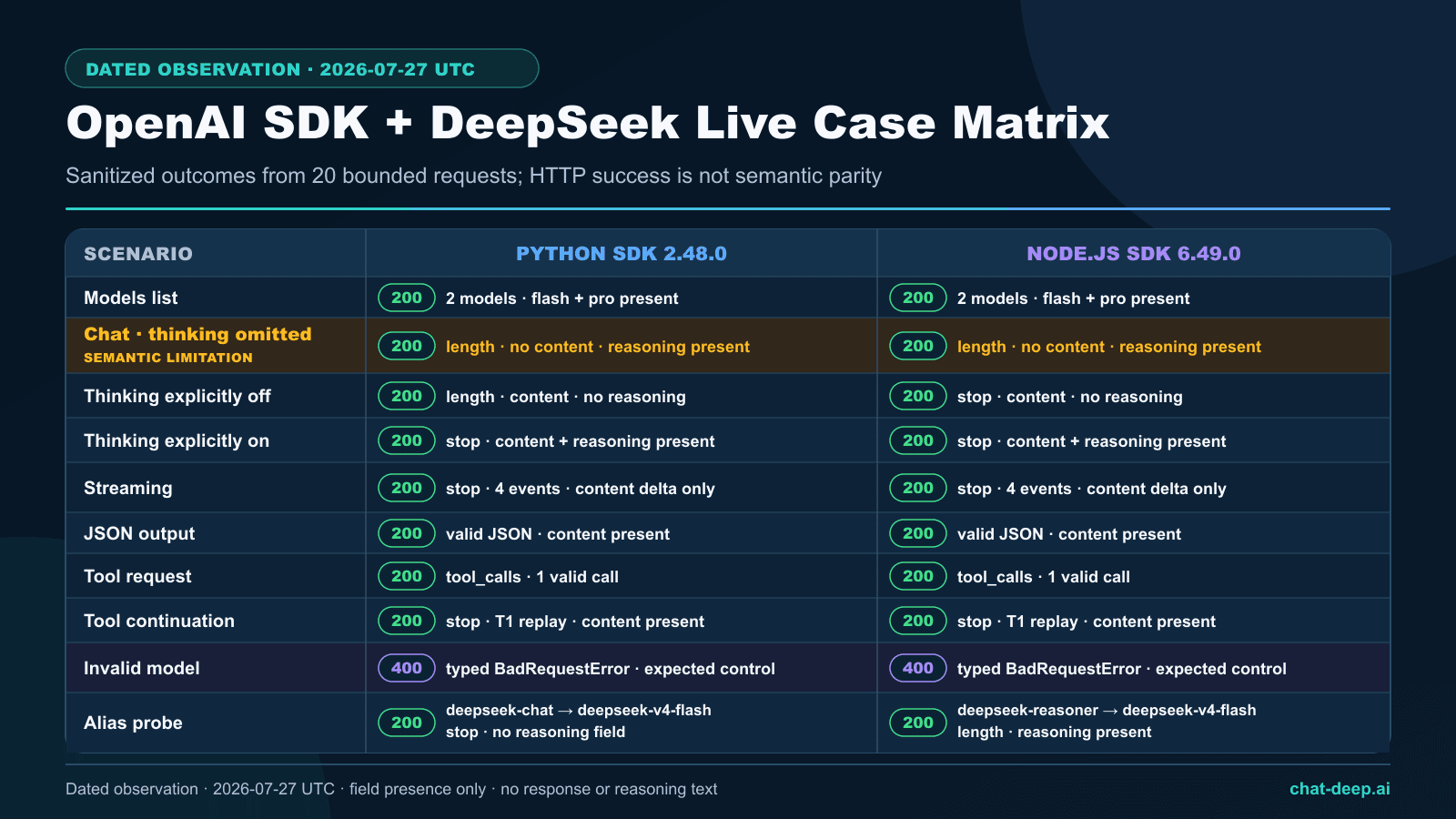
Complete 20-request case matrix
| Scenario | Python result | Node.js result |
|---|---|---|
| List models | 200; list parsed; 2 models; Flash and Pro present | 200; list parsed; 2 models; Flash and Pro present |
| Basic chat, thinking omitted | 200; length; reasoning nonempty; final content empty | 200; length; reasoning nonempty; final content empty |
| Thinking disabled | 200; length; content nonempty; reasoning field absent | 200; stop; content nonempty; reasoning field absent |
| Thinking enabled on V4 Pro | 200; stop; content and reasoning nonempty | 200; stop; content and reasoning nonempty |
| Streaming, thinking disabled | 200; 4 events; content delta seen; no reasoning delta; terminal stop | 200; 4 events; content delta seen; no reasoning delta; terminal stop |
| JSON Output | 200; content nonempty; valid JSON | 200; content nonempty; valid JSON |
| Initial tool call | 200; tool_calls; 1 call; validation passed | 200; tool_calls; 1 call; validation passed |
| Tool continuation | 200; stop; final content nonempty; alias T1 matched | 200; stop; final content nonempty; alias T1 matched |
| Impossible model control | 400; BadRequestError; invalid_request_error | 400; BadRequestError; invalid_request_error |
| Dated legacy-alias probe | deepseek-chat: 200; returned deepseek-v4-flash; stop; no reasoning field | deepseek-reasoner with thinking enabled: 200; returned deepseek-v4-flash; length; reasoning field present |
What “OpenAI-compatible” means here
DeepSeek’s Create Chat Completion reference documents an OpenAI-format POST /chat/completions request. Its List Models reference documents GET /models. The official DeepSeek Python and Node.js samples configure the OpenAI SDK with the DeepSeek API origin and a DeepSeek-issued key.
That compatibility is a request-and-response contract for specified surfaces. It does not make the providers interchangeable. Model IDs, billing, supported endpoints, defaults, beta features, error bodies, and provider-specific fields can differ. A migration layer should therefore make the provider origin, credential, model, thinking mode, output cap, retry policy, and feature flags explicit.
| Layer | What stays | What changes |
|---|---|---|
| Client package | The official openai package | Use a version tested with your integration |
| Credential | Bearer-style SDK configuration | Use a DeepSeek-issued key in DEEPSEEK_API_KEY |
| Origin | Custom SDK base-URL support | https://api.deepseek.com |
| Generation method | chat.completions.create() | Use DeepSeek model IDs and documented fields |
| Thinking | Parsed response objects and streaming deltas | Send DeepSeek’s thinking object deliberately |
| Operations | SDK exceptions, timeouts, and retry controls | Interpret DeepSeek status behavior and application safety separately |
The current hosted catalog must be treated separately from the dated July test matrix:
| Current model ID | Input | Chat Completions | Responses |
|---|---|---|---|
deepseek-v4-flash | Text | Supported | Supported |
deepseek-v4-pro | Text | Supported | Supported |
deepseek-v4-flash-vision-exp | Text + images (experimental) | Supported | Supported |
Vision images can arrive by public URL, Base64 data URL, or an image-only Files API file_id. The Files API is not general document storage: PDF, DOCX, and generic input_file inputs remain unsupported. See the Vision Exp model page, the image-input guide, and the image Files API guide.
For native endpoints, current model status, pricing, and non-SDK examples, use the DeepSeek API guide.
Install and configure the tested clients
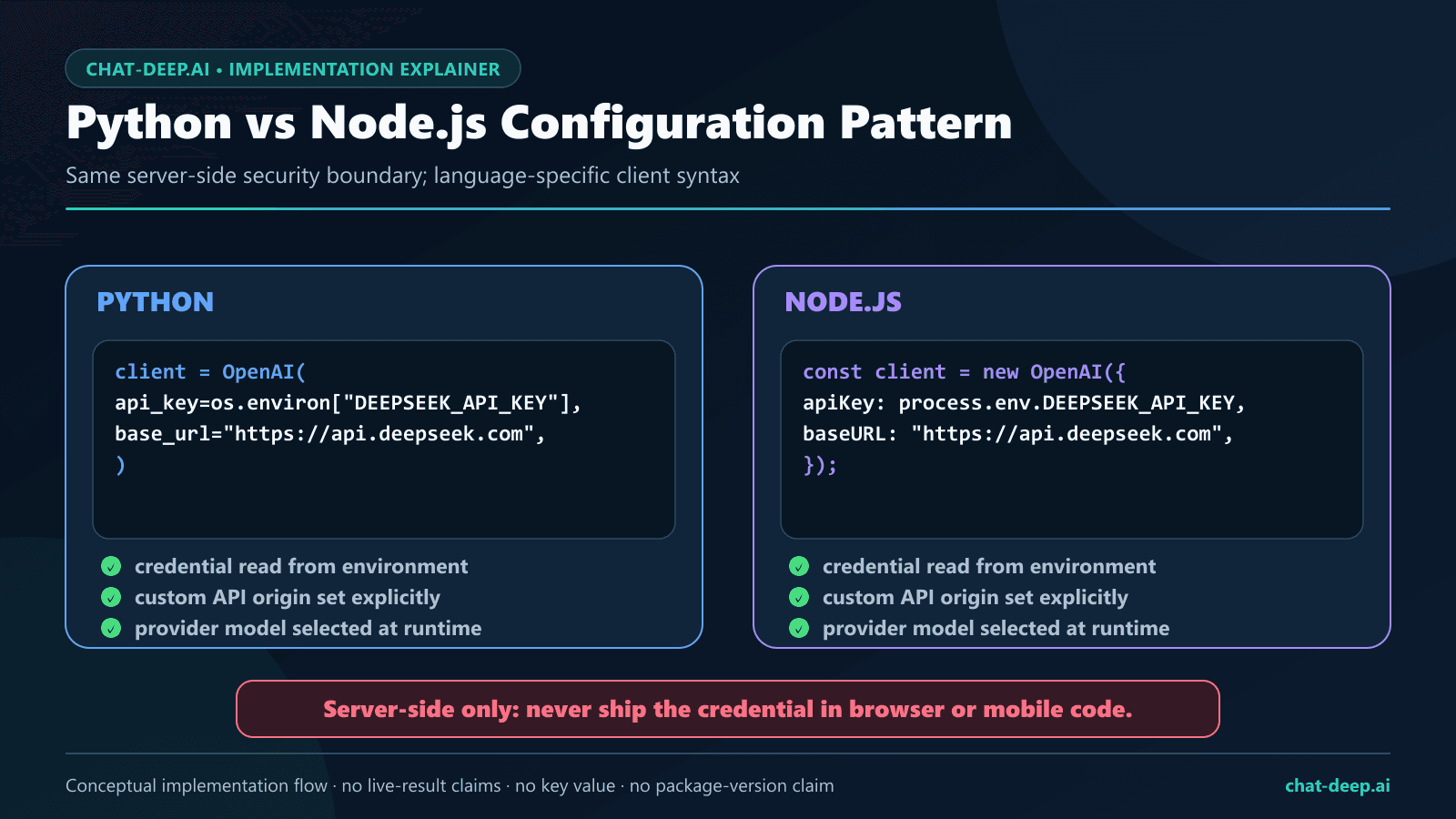
For an exact reproduction, install the tested package versions. These are snapshots, not a claim that later SDK versions will fail. Keep the credential on a trusted backend and never place it in browser JavaScript, a WordPress block, a mobile bundle, a public repository, a screenshot, or application logs. The DeepSeek API key guide covers key creation, storage, rotation, and revocation.
python -m pip install "openai==2.48.0"npm install openai@6.49.0Runnable Python example
Python uses base_url. DeepSeek’s provider-specific thinking object is passed through extra_body. This example disables thinking so a short request prioritizes final content.
import os
from openai import OpenAI

client = OpenAI(
    api_key=os.environ["DEEPSEEK_API_KEY"],
    base_url="https://api.deepseek.com",
    max_retries=0,
    timeout=30.0,
)

response = client.chat.completions.create(
    model="deepseek-v4-flash",
    messages=[
        {"role": "system", "content": "You are a concise technical assistant."},
        {"role": "user", "content": "Give three API migration checks."},
    ],
    max_tokens=256,
    stream=False,
    extra_body={"thinking": {"type": "disabled"}},
)

choice = response.choices[0]
if choice.finish_reason != "stop":
    raise RuntimeError("The completion did not finish normally.")
text = choice.message.content
if not isinstance(text, str) or not text.strip():
    raise RuntimeError("The completion contained no final content.")

print(text)
For Python-specific async patterns, environment setup, and production structure, use the DeepSeek Python SDK guide.
Runnable JavaScript example
JavaScript uses baseURL. It can send the additional thinking property directly in the request object.
import OpenAI from "openai";

const client = new OpenAI({
  apiKey: process.env.DEEPSEEK_API_KEY,
  baseURL: "https://api.deepseek.com",
  maxRetries: 0,
  timeout: 30_000,
});

const response = await client.chat.completions.create({
  model: "deepseek-v4-flash",
  messages: [
    { role: "system", content: "You are a concise technical assistant." },
    { role: "user", content: "Give three API migration checks." },
  ],
  max_tokens: 256,
  stream: false,
  thinking: { type: "disabled" },
});

const choice = response.choices[0];
if (choice?.finish_reason !== "stop") {
  throw new Error("The completion did not finish normally.");
}
const text = choice.message?.content;
if (typeof text !== "string" || !text.trim()) throw new Error("The completion contained no final content.");

console.log(text);
Type-safe TypeScript example without any
A provider-specific request type keeps the DeepSeek field visible without casting the entire object to any. Passing a named variable also avoids pretending that every OpenAI-oriented type already knows every DeepSeek extension.
import OpenAI from "openai";

type DeepSeekChatRequest = {
  model: string;
  messages: Array<{
    role: "system" | "user";
    content: string;
  }>;
  max_tokens: number;
  stream: false;
  thinking: {
    type: "enabled" | "disabled";
  };
  reasoning_effort?: "low" | "high" | "xhigh" | "max";
};

const client = new OpenAI({
  apiKey: process.env.DEEPSEEK_API_KEY,
  baseURL: "https://api.deepseek.com",
  maxRetries: 0,
  timeout: 30_000,
});

const request = {
  model: "deepseek-v4-pro",
  messages: [
    { role: "user", content: "List three safe retry rules." },
  ],
  max_tokens: 512,
  stream: false,
  thinking: { type: "enabled" },
  reasoning_effort: "high",
} satisfies DeepSeekChatRequest;

const response = await client.chat.completions.create(request);
const choice = response.choices[0];
if (choice?.finish_reason !== "stop") {
  throw new Error("The completion did not finish normally.");
}
const text = choice.message?.content;
if (typeof text !== "string" || !text.trim()) throw new Error("No final content was returned.");

console.log(text);
The dedicated DeepSeek Node.js and TypeScript guide owns ESM, CommonJS, async iteration, deployment, and deeper type-boundary patterns.
Thinking mode: defaults, explicit modes, and output budget
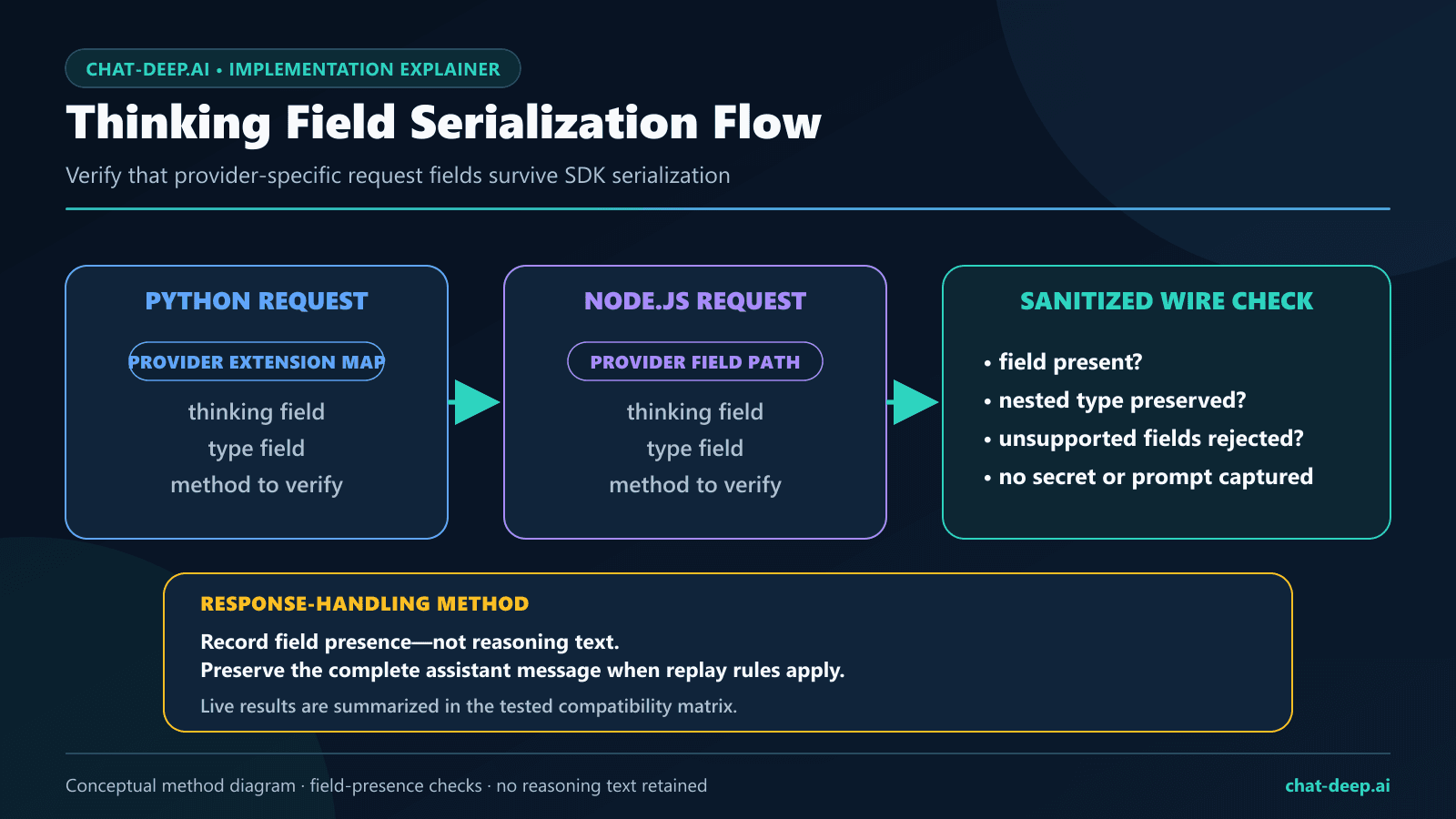
The official DeepSeek Thinking Mode guide documents thinking as enabled by default and tells Python users to place the thinking object inside extra_body. For Chat Completions, choose the direct reasoning_effort values low, high, or max. Compatibility values medium and xhigh are accepted and both map to high; the mapping is identical for Flash and Pro. In thinking mode, temperature, top_p, presence_penalty, and frequency_penalty have no effect.
| Chat Completions request | Actual effort on Flash and Pro |
|---|---|
low | low |
medium (compatibility) | high |
high | high |
xhigh (compatibility) | high |
max | max |
deepseek-v4-flash and deepseek-v4-pro.Our omitted-thinking request used deepseek-v4-flash with max_tokens: 64. Both SDKs returned 200, exposed nonempty reasoning_content, and stopped for length before final content appeared. The result is consistent with the documented enabled default. It also shows why a very small shared output budget can be misleading: a request may be accepted and parsed correctly while leaving no room for the final answer.
The explicit controls separated the modes cleanly. With thinking disabled on V4 Flash, both responses contained final content and no reasoning field; Python reached the 32-token cap, while Node finished with stop. With thinking enabled on V4 Pro, reasoning_effort: "high", and a 96-token cap, both clients returned stop with nonempty reasoning metadata and nonempty final content.
- Set
thinking.typeexplicitly when mode choice matters to product behavior. - Inspect
finish_reasonbefore treating content as complete. - Keep
reasoning_contentseparate from the final answer and do not expose it by default. - Budget for both reasoning and final content when thinking is enabled.
- Use the DeepSeek Thinking Mode guide for multi-turn and tool-replay rules.
Streaming through both SDKs
The streaming cases used V4 Flash with thinking disabled and a 32-token cap. Python and Node each parsed four SDK stream events, saw at least one content delta, saw no reasoning delta, and reached terminal finish_reason: "stop". The harness retained only event counts, field-presence booleans, and the terminal state—not the generated text.
A production consumer should iterate defensively. A chunk may contain no visible text, and a usage-only chunk can have an empty choices array when that option is requested. Tool-call arguments can also arrive over multiple deltas. Accumulate fields by choice and tool index, wait for a terminal state, then parse and validate the completed value before using it.
stream = client.chat.completions.create(
    model="deepseek-v4-flash",
    messages=[{"role": "user", "content": "Reply in one sentence."}],
    max_tokens=128,
    stream=True,
    extra_body={"thinking": {"type": "disabled"}},
)

parts: list[str] = []
finish_reason = None

for chunk in stream:
    for choice in getattr(chunk, "choices", []):
        delta = getattr(choice, "delta", None)
        text = getattr(delta, "content", None)
        if isinstance(text, str):
            parts.append(text)
        if choice.finish_reason is not None:
            finish_reason = choice.finish_reason

if finish_reason != "stop":
    raise RuntimeError(f"Incomplete stream: {finish_reason}")

print("".join(parts))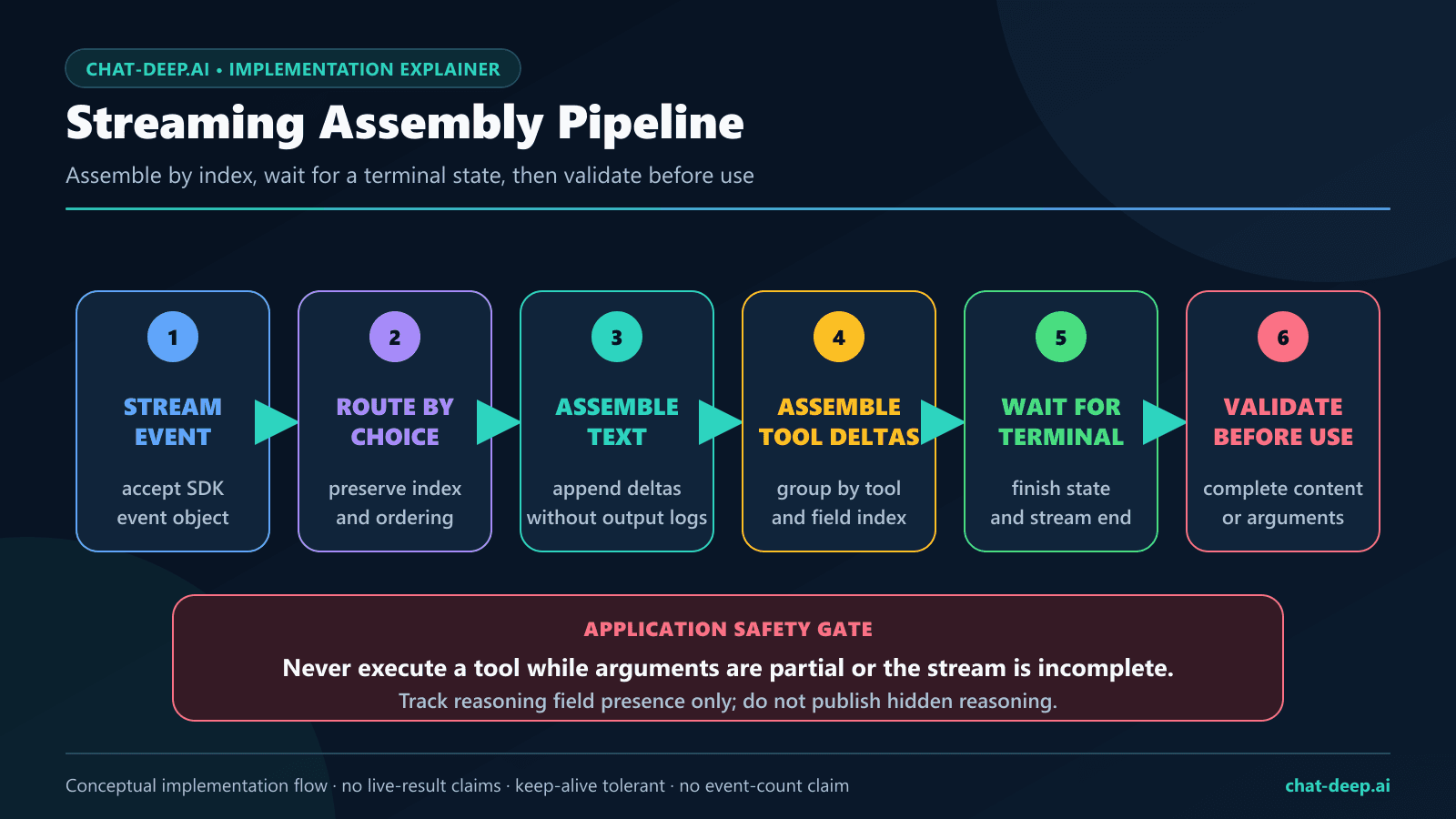
Responses API with the OpenAI SDK: current contract
After this page’s July 27 test run, DeepSeek added native Responses API support. The current contract, reviewed August 22, 2026, supports deepseek-v4-flash, deepseek-v4-pro, and deepseek-v4-flash-vision-exp. Flash and Pro accept text; the experimental Vision model accepts text plus images. The configured OpenAI clients use the same DeepSeek API origin, but the request, image, and streaming contracts differ from Chat Completions.
Responses reasoning uses a separate field and mapping: set reasoning.effort to none to disable thinking; minimal/low map to low, medium/high/xhigh map to high, and max maps to max. Do not reuse the Chat Completions reasoning_effort field on this endpoint.
# Python
from openai import OpenAI
import os

client = OpenAI(
    api_key=os.environ["DEEPSEEK_API_KEY"],
    base_url="https://api.deepseek.com",
)

response = client.responses.create(
    model="deepseek-v4-flash",
    instructions="Answer concisely.",
    input="Give one safe API retry rule.",
)
print(response.output_text)
// JavaScript
import OpenAI from "openai";
const client = new OpenAI({
apiKey: process.env.DEEPSEEK_API_KEY,
baseURL: "https://api.deepseek.com",
});
const response = await client.responses.create({
model: "deepseek-v4-flash",
instructions: "Answer concisely.",
input: "Give one safe API retry rule.",
});
console.log(response.output_text);Send an image through Responses
Use deepseek-v4-flash-vision-exp and an input_image content part. Its image_url may be a public http(s) URL or a Base64 data: URL. The following Python and JavaScript shapes follow DeepSeek’s current official Responses and Vision guides; they were syntax-checked locally but were not added to the historical 20-request count.
# Python: set PUBLIC_IMAGE_URL to a publicly accessible image
public_image_url = os.environ["PUBLIC_IMAGE_URL"]
response = client.responses.create(
    model="deepseek-v4-flash-vision-exp",
    input=[
        {
            "role": "user",
            "content": [
                {"type": "input_text", "text": "Describe this chart."},
                {
                    "type": "input_image",
                    "image_url": public_image_url,
                    "detail": "low",
                },
            ],
        }
    ],
)
print(response.output_text)
// JavaScript: set PUBLIC_IMAGE_URL to a publicly accessible image
const publicImageURL = process.env.PUBLIC_IMAGE_URL;
if (!publicImageURL) throw new Error("Set PUBLIC_IMAGE_URL");
const visionResponse = await client.responses.create({
model: "deepseek-v4-flash-vision-exp",
input: [
{
role: "user",
content: [
{ type: "input_text", text: "Describe this chart." },
{
type: "input_image",
image_url: publicImageURL,
detail: "low",
},
],
},
],
});
console.log(visionResponse.output_text);Reuse an uploaded image with file_id
For an image you will reuse—or one too large for the inline limits—upload JPEG, PNG, GIF, or WebP with purpose="user_data", pass the returned file_id to input_image, and delete it when retention is unnecessary. image_url and file_id are mutually exclusive on the same content part.
# Python: Files API image lifecycle
uploaded = None
try:
    with open("chart.png", "rb") as image_file:
        uploaded = client.files.create(
            file=image_file,
            purpose="user_data",
        )

    response = client.responses.create(
        model="deepseek-v4-flash-vision-exp",
        input=[
            {
                "role": "user",
                "content": [
                    {"type": "input_text", "text": "Describe this chart."},
                    {"type": "input_image", "file_id": uploaded.id},
                ],
            }
        ],
    )
    print(response.output_text)
finally:
    if uploaded is not None:
client.files.delete(uploaded.id)- Stateless:
previous_response_id,conversation, andstoreare unsupported; replay the required context yourself. - Vision input:
input_imagesupports public URLs, Base64 data URLs, or an image Files APIfile_idwithdeepseek-v4-flash-vision-exp. - Document boundary: generic
input_file, PDF, DOCX, and other document uploads remain unsupported. The DeepSeek Files API currently stores supported images only. - Role boundary: Responses images are allowed in
user/developermessage items and tool outputs, but not insystemorassistantmessages. In Responses, Flash and Pro replace aninput_imagewith placeholder text rather than inspecting its pixels; in Chat Completions, an image-bearing request sent to a non-Vision model returns HTTP 400. - Partial feature surface: tools are only partially supported, and several unsupported parameters are silently ignored.
- Different stream terminator: Responses streams finish with
response.completed,response.incomplete, orresponse.failed, not[DONE].
Evidence boundary: the text and image examples above reflect the first-party contract reviewed on August 22. They were not among the 20 live requests reported on this page and must not be added to that historical pass count.
JSON Output compatibility smoke test
Both JSON Output cases returned HTTP 200 with nonempty content that parsed as JSON. The requests explicitly disabled thinking, set response_format.type to json_object, included the word “JSON” in the prompt, supplied a compact example, and used a 64-token cap. Those details follow the official DeepSeek JSON Output guide.
This two-case smoke test does not prove schema adherence across arbitrary prompts. Never replace empty content with a plausible default object. Check the finish reason, reject empty output, parse inside an exception boundary, and validate required keys and value types. The DeepSeek JSON Output guide owns prompt ablations, truncation, empty-output handling, and application-side validation.
One safe tool-call round trip
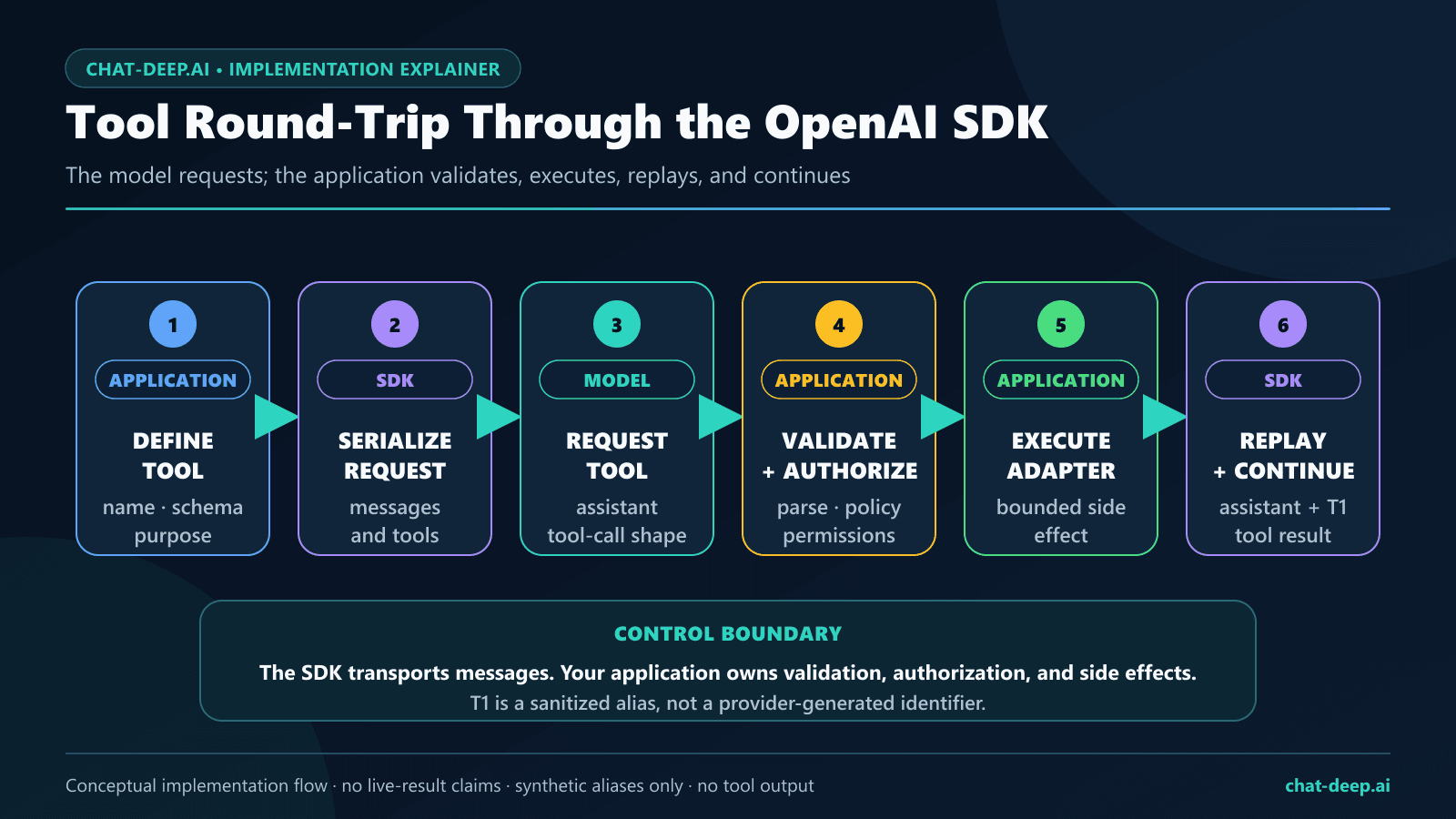
The tool test used one synthetic, local, side-effect-free function named get_temperature. Its schema defined exactly one required nonempty string field, city, and set additionalProperties to false. Each SDK received one tool call with finish_reason: "tool_calls". Both calls passed the application allowlist and JSON validation gate, so both continuations were issued.
The application preserved the assistant tool-call message, kept the provider-generated call ID in memory, appended a matching role: "tool" result, and sent the updated conversation back. Both continuations returned 200 with finish_reason: "stop" and nonempty final content. Persisted evidence replaced the call ID with the synthetic alias T1.
- Require exactly the expected number of calls.
- Allowlist the function name.
- Parse the argument string as JSON.
- Validate keys, types, ranges, and authorization.
- Execute only an approved adapter.
- Replay the complete assistant message and matching tool result.
- Request and validate the final completion.
This article intentionally stops at one compact round trip. Use the DeepSeek Tool Calls guide for tool_choice, multiple calls, strict beta schemas, thinking-mode replay, truncation, and security boundaries. DeepSeek’s first-party contract is in the official Tool Calls guide.
Typed errors, retries, and timeouts
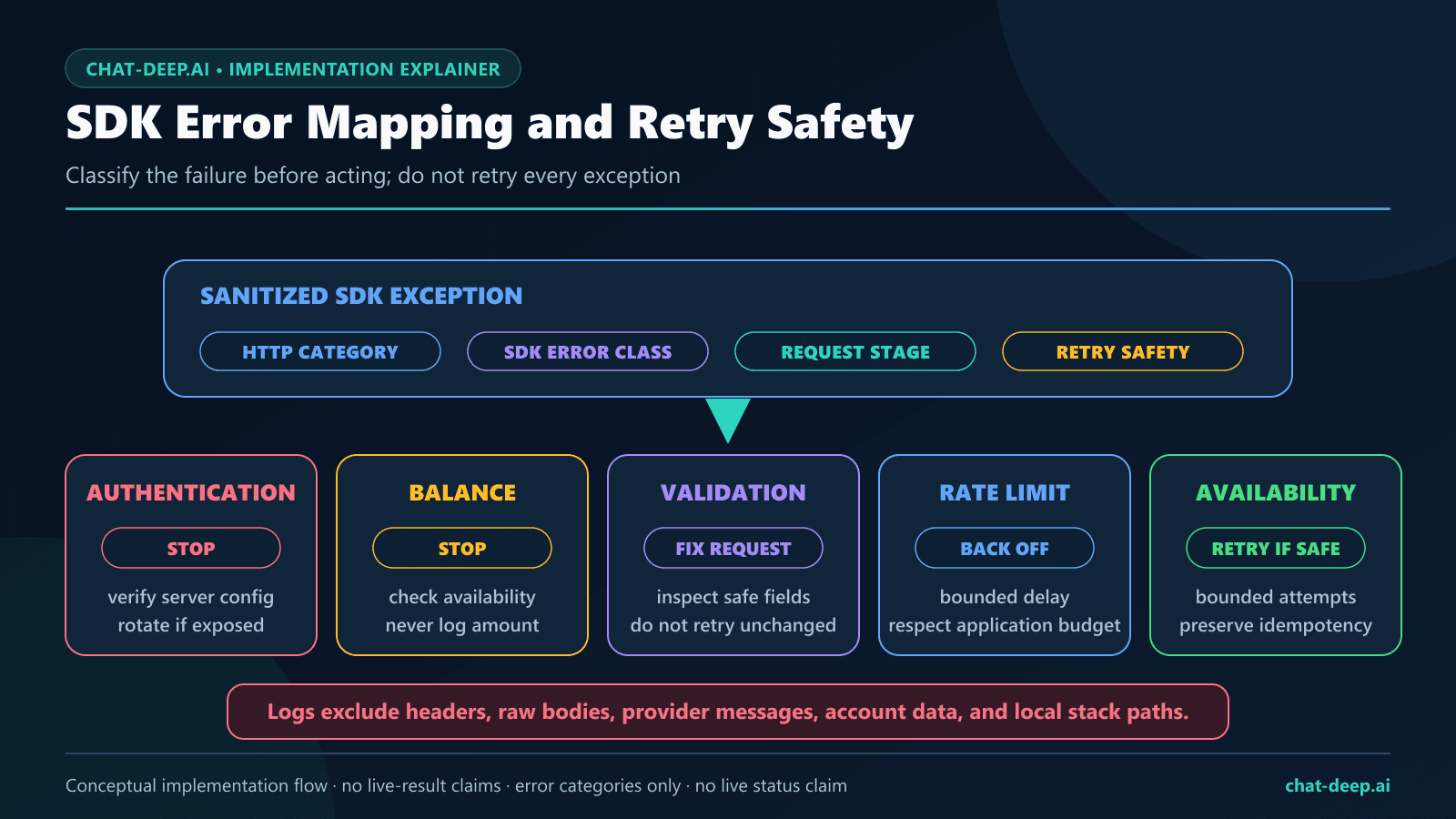
Each SDK sent one request using the synthetic model name deepseek-does-not-exist. DeepSeek returned HTTP 400 in both cases. OpenAI Python and OpenAI Node each surfaced the response as BadRequestError with the allowlisted error code invalid_request_error. The raw provider message was deliberately discarded.
The official OpenAI SDKs have automatic retry behavior for selected connection, timeout, rate-limit, and server failures. The study disabled those retries so one logical case equaled one provider request. In production, choose retry behavior deliberately. Never automatically repeat a payment, database write, email, file operation, or external tool action merely because an SDK can retry an HTTP request.
import openai

try:
    response = client.chat.completions.create(
        model="deepseek-v4-flash",
        messages=[{"role": "user", "content": "Reply briefly."}],
        max_tokens=128,
        extra_body={"thinking": {"type": "disabled"}},
    )
except openai.BadRequestError as exc:
    print("Request rejected:", exc.status_code)
except openai.RateLimitError:
    print("Rate limited; apply bounded backoff.")
except openai.APIConnectionError:
    print("Connection failed; inspect the underlying network cause.")
Log an internal case alias, operation type, status category, retry count, and safe timing metadata. Do not log credentials, Authorization headers, full prompts, generated content, hidden reasoning, raw provider errors, account data, or provider IDs. The DeepSeek Error Codes guide owns the broader status matrix and recovery policy; the first-party categories are listed in DeepSeek’s official Error Codes page.
What the legacy-alias probes observed
The July 27 GET /models response contained two public IDs: deepseek-v4-flash and deepseek-v4-pro. The current official catalog now also lists the experimental multimodal model deepseek-v4-flash-vision-exp; it was released after this study and was not part of its 20-request matrix. We nevertheless preregistered one dated observational request for each legacy alias, deepseek-chat and deepseek-reasoner, without assuming that either request would succeed or fail.
On July 27, both alias requests still returned 200 in this account and test environment. The Python deepseek-chat request explicitly disabled thinking, returned model deepseek-v4-flash, stopped normally, and exposed no reasoning field. The Node deepseek-reasoner request explicitly enabled thinking, returned model deepseek-v4-flash, exposed a reasoning field, and reached its 32-token cap.
These are observations, not a permanent compatibility promise. They do not override the documented current model list or guarantee that either alias will work for another account, date, SDK, mode, or request. Use V4 Flash or V4 Pro for text, or Vision Exp when the request must process images, and treat any alias dependency as migration debt.
Security boundary for an SDK migration
- Store
DEEPSEEK_API_KEYin protected server-side runtime storage or a secret manager. - Do not reuse an OpenAI credential with the DeepSeek origin or a DeepSeek credential with the OpenAI origin.
- Disable verbose request-body logging when prompts or responses can contain sensitive data.
- Keep raw reasoning out of user interfaces, analytics, screenshots, and public evidence.
- Validate JSON and tool arguments as untrusted input.
- Require authorization and confirmation before any side effect.
- Set explicit timeouts, bounded retries, maximum tool steps, and output caps.
- Rotate a credential immediately if it appears in source control, logs, screenshots, or support material.
Methodology, reproducibility, and limitations
The research question was narrow: can the pinned OpenAI Python and Node SDKs act as correct clients for DeepSeek’s documented Models and Chat Completions surfaces across basic chat, explicit thinking controls, streaming, JSON Output, one compact tool round trip, and typed invalid-model errors?
The plan was frozen before the live run. It allowed exactly ten requests per SDK and no more than 20 provider requests. Cases ran serially against https://api.deepseek.com. Python used max_retries=0; Node used maxRetries: 0. There was no generic retry wrapper. The live windows ran from 14:39:35 to 14:39:59 UTC on July 27, 2026. Generation caps ranged from 16 to 96 tokens to bound cost.
Before live execution, the harness ran localhost contract checks for the same request shapes: paths, provider-field serialization, streaming fixtures, JSON parsing, tool-call matching, and typed synthetic errors. Node passed 7/7 offline tests and Python passed 1/1. Localhost checks do not count as provider requests. Persisted live summaries used an allowlist of statuses, timings, exception names, public model strings, counts, booleans, finish states, and the synthetic tool alias. The temporary provider credential was revoked after the run.
You can audit the frozen request plan, English-only harness, redacted summaries, case-level CSV, security policy, and editable visual sources in the public OpenAI SDK with DeepSeek evidence suite. It contains no credential, account identifier, prompt text, response text, raw reasoning, provider request ID, provider tool-call ID, balance, or raw error body.
Limitations
- This was one bounded run from one environment and account on one date.
- Each live case was issued once; the study does not estimate repeatability or model-output variance.
- Tight generation caps intentionally constrained cost and caused several
lengthfinishes. - The latency sample is too small and uncontrolled for a performance benchmark.
- The tool was synthetic and side-effect free; no database, payment, email, filesystem, or external API was exercised.
- The test did not evaluate long context, high concurrency, cache economics, sustained rate limits, or every possible error.
- The July 27 study did not test the Responses API, Assistants, Realtime, Files, Batches, embeddings, fine-tuning, or any other unlisted endpoint. The Responses section added after the study is source-reviewed documentation, not part of the 20-request live matrix.
- An HTTP 200 proves only that the dated request was accepted and parsed. It does not establish semantic quality, complete platform parity, or future availability.
A separate Responses API compatibility audit reports the later two-track result set—48 live model-cases, 34 PASS and 14 FAIL—rather than adding it to this historical SDK matrix.
Production migration checklist
- Pin and record the SDK version you actually deploy.
- Set the DeepSeek origin and credential through environment-specific configuration.
- Use
deepseek-v4-flashordeepseek-v4-profor text, ordeepseek-v4-flash-vision-expfor image understanding; do not build a new integration around a legacy alias. - Route supported images as a public URL, Base64 data URL, or image Files API
file_id. Do not send PDF, DOCX, or another general document asinput_file. - Choose thinking mode explicitly and allocate a suitable output budget.
- Check HTTP status, SDK exception,
finish_reason, content presence, and feature-specific validation separately. - Assemble streams before parsing or executing structured output.
- Validate JSON objects and tool arguments in application code.
- Set timeouts and understand the SDK’s retry behavior before enabling retries.
- Make write operations idempotent or require confirmation; never blindly replay side effects.
- Rerun a small compatibility suite whenever the provider contract, model, or SDK version changes.
FAQ
Can I use the official OpenAI SDK with DeepSeek?
Yes, for the documented OpenAI-format surfaces you test. Configure the client with a DeepSeek API key, https://api.deepseek.com, a current DeepSeek model ID, and the required provider-specific fields. Our dated Models and Chat Completions cases parsed through both tested SDKs.
What is the DeepSeek base URL?
Use https://api.deepseek.com for the OpenAI-format origin covered here. Python calls the client option base_url; JavaScript and TypeScript call it baseURL.
Why did the default-thinking tests return no final content?
Both omitted-thinking requests used a deliberately small 64-token cap. They returned 200, nonempty reasoning metadata, and finish_reason: "length" before final content appeared. Explicitly disable thinking for a short direct answer or provide enough output budget for both reasoning and final content.
How do I send DeepSeek’s thinking field in Python?
Pass {"thinking":{"type":"enabled"}} or {"thinking":{"type":"disabled"}} through the OpenAI Python SDK’s extra_body argument. Thinking-enabled requests can also include the documented reasoning_effort.
Does an HTTP 200 mean JSON or tool arguments are safe?
No. Check the finish reason, reject empty or truncated values, parse the complete string, validate it against application rules, and authorize any action. The model proposes structured data; your application decides whether it is usable.
Does the OpenAI SDK retry DeepSeek requests automatically?
The official SDKs document automatic retries for selected failure categories. This study disabled them so request accounting remained exact. Review your installed SDK version and set retry behavior explicitly, especially around operations with side effects.
Should I use deepseek-chat or deepseek-reasoner?
No for new integrations. Both aliases returned 200 in our July 27 probes, but the current documented IDs are deepseek-v4-flash, deepseek-v4-pro, and the experimental multimodal deepseek-v4-flash-vision-exp. Choose the documented ID that matches the task and treat the alias probes as dated observations only.
Does this prove that every OpenAI API feature works with DeepSeek?
No. The dated evidence proves only the recorded behavior of the 20 listed Models and Chat Completions requests. DeepSeek now separately documents a limited, stateless Responses API surface for Flash, Pro, and Vision Exp. Image inputs work only with Vision Exp; that does not establish full OpenAI-platform parity or make general input_file, PDF, DOCX, or other document inputs supported.
Can the OpenAI SDK send images to DeepSeek?
Yes, with deepseek-v4-flash-vision-exp. Supply a supported JPEG, PNG, GIF, or WebP image as a public URL, a Base64 data URL, or an image Files API file_id. Flash and Pro remain text models and do not inspect image pixels.
Can I upload PDF or DOCX files with the OpenAI SDK?
No. DeepSeek’s current Files API is for supported image formats with purpose="user_data"; general documents and OpenAI-style input_file are not supported. Extract or transform document content in your application before sending supported text or images.
First-party sources
- DeepSeek Change Log
- DeepSeek Responses API
- DeepSeek Vision guide
- DeepSeek Files API guide
- DeepSeek Models and Pricing
- DeepSeek List Models API reference
- DeepSeek Create Chat Completion API reference
- DeepSeek Thinking Mode guide
- DeepSeek JSON Output guide
- DeepSeek Tool Calls guide
- DeepSeek Error Codes
- DeepSeek Python OpenAI SDK sample
- DeepSeek Node.js OpenAI SDK sample
- Official OpenAI Python SDK repository
- Official OpenAI JavaScript and TypeScript SDK repository
- OpenAI Chat Completions API reference