DeepSeek currently documents model-specific concurrency limits per provider account: 500 simultaneous requests for deepseek-v4-pro, 2,500 for deepseek-v4-flash, and 2,500 for deepseek-v4-flash-vision-exp. Each request occupies one slot from dispatch until the full model response completes, including a streamed response. All API keys, services, and replicas using the same account share the applicable model counter; excess concurrency returns HTTP 429.
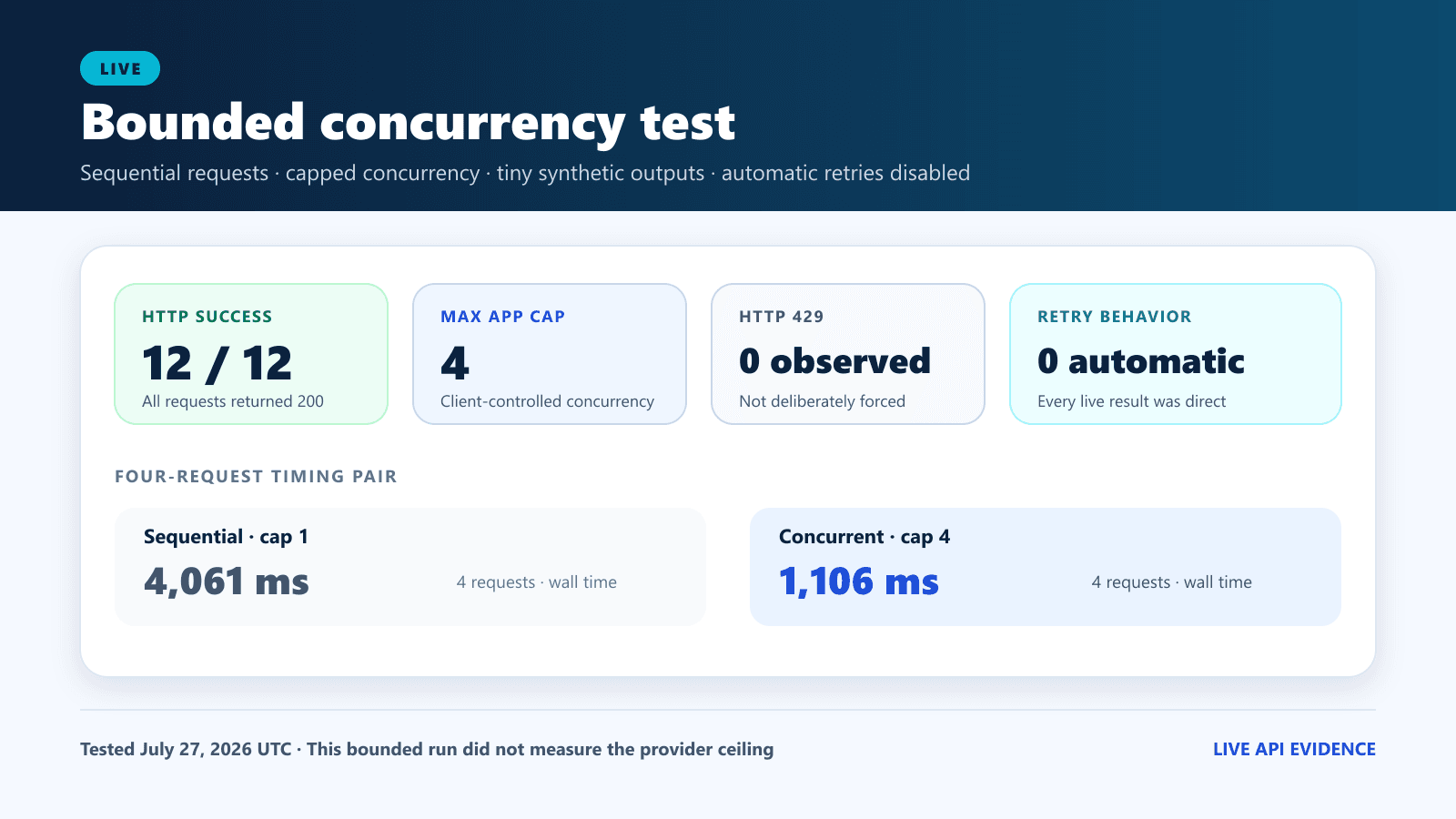
This guide combines the official DeepSeek Rate Limit & Isolation contract, the current Models & Pricing table, and DeepSeek’s August 21 Vision release with original live observations and deterministic local tests completed on July 27, 2026 UTC. The live study used one model inventory request and 12 deliberately small completions, never exceeded four simultaneous calls, disabled automatic retries, and did not attempt to manufacture a 429. The local tests exercised a 24-job queue, retry decisions, blank-line parsing, and SSE keep-alive comments without sending provider traffic.
Current documentation status — verified August 22, 2026 UTC: DeepSeek now lists Vision Exp alongside Flash and Pro. The live study below remains frozen to July 27. Its
GET /modelsresult contained Flash and Pro because Vision Exp had not yet been released; the new model changes the current documentation table, not the recorded July request count, inventory, timings, or parser observations.
Chat-Deep.ai is an independent technical publication and is not affiliated with or endorsed by DeepSeek. Keep credentials outside source code by following the DeepSeek API key guide, and treat every timing in this article as a dated observation rather than a speed promise. For endpoint setup and response anatomy, see the DeepSeek API overview.
DeepSeek API rate limits: quick answer
| Question | Current official answer | July 27 evidence |
|---|---|---|
| What is the V4 Pro limit? | 500 concurrent requests per account and model | One minimal Pro control returned HTTP 200; we did not test the ceiling |
| What is the V4 Flash limit? | 2,500 concurrent requests per account and model | Eleven minimal Flash calls returned HTTP 200; peak client concurrency was four |
| What is the Vision Exp limit? | 2,500 concurrent requests per account and model | Not part of the July 27 study; released August 21 |
| Do additional API keys add capacity? | No. Keys using the same account share the applicable model limit | Accepted as an official contract; not inferred from our small run |
| What happens above the limit? | DeepSeek documents HTTP 429 | We intentionally did not force a 429 |
| Is there a public RPM or TPM table? | The current public rate-limit page does not publish one | No RPM or TPM ceiling was estimated from our results |
| Did four successful concurrent calls verify 2,500? | No | They verified only that our client reached and respected its cap of four |
Current V4 concurrency limits
DeepSeek’s current documentation gives each account a model-specific concurrency allowance:
| Model | Documented account concurrency | What one slot represents |
|---|---|---|
deepseek-v4-pro | 500 | One dispatched request whose full response has not completed |
deepseek-v4-flash | 2,500 | One dispatched request whose full response has not completed |
deepseek-v4-flash-vision-exp | 2,500 | One dispatched text-and-image request whose full response has not completed |
The same limits appear on the current official Models & Pricing page. The current catalog lists deepseek-v4-pro, deepseek-v4-flash, and the experimental multimodal deepseek-v4-flash-vision-exp. Use these explicit identifiers and maintain a separate limiter per model; do not assume an older alias has the same routing or allowance.
Current official limits · verified August 22, 2026
Three model-specific concurrency budgets
deepseek-v4-pro500deepseek-v4-flash2,500deepseek-v4-flash-vision-exp2,500Scope: per provider account and per model, aggregated across every API key and service. One slot remains occupied until the full response completes; streaming does not release it early.
What concurrency means—and what it does not mean
Concurrency measures requests in flight, not requests started during a minute. If ten requests are dispatched and all ten are still waiting or generating, the application has ten concurrent requests. A slot is released only when the full response completes; receiving the first streamed token does not release it. A short completion and a long completion each use one slot while active. A multi-step tool workflow may issue several separate API requests; provider concurrency applies to each in-flight request, not to time spent running tools between requests.
A Vision Exp request also occupies one slot, whether its image input comes from a URL, Base64 data, or a supported image file_id. Large or numerous images can increase input tokens, billed usage, and request duration, so the slot may remain occupied longer; they do not turn one HTTP request into multiple concurrency slots.
A useful planning approximation is:
approximate throughput = available concurrency / average request durationThis is a simplified capacity model, not a DeepSeek performance guarantee. Real throughput depends on the duration distribution, queue discipline, model, prompt and output lengths, streaming, provider conditions, retries, and the mix of workloads. A long JSON Output completion or an individual tool-calling completion can hold a slot longer than a minimal classification request; a later tool round is a separate request. Measure the workload you actually operate.
Does DeepSeek publish RPM or TPM limits?
The current public Rate Limit & Isolation page publishes concurrency, not a direct requests-per-minute, tokens-per-minute, or requests-per-day table. That does not prove that no other protection, account-specific policy, or operational control can exist. The accurate statement is narrower: DeepSeek’s current public rate-limit documentation does not state a general RPM or TPM allowance for the direct API.
Do not convert 500 or 2,500 into RPM by multiplication. Two applications can have the same concurrency but very different completion rates when request durations differ. Flash and Vision Exp each have a documented 2,500 ceiling, but they are separate model counters—not one pooled 5,000-request allowance.
How we tested safely
The live plan was designed to verify client behavior without approaching the provider ceilings. It made 13 authenticated HTTP operations in total: one GET /models inventory and 12 Chat Completions calls. Eleven completions used V4 Flash and one used V4 Pro. Each completion used the same synthetic English instruction, disabled thinking, limited output to eight tokens, and requested the exact answer OK.
- Maximum submitted at once: four.
- Automatic live retries: zero.
- Stop rule: no later group would be submitted after 429, 500, 503, another non-success status, or a transport failure.
- Prohibited tests: no load flood, balance manipulation, ceiling search, invalid credential loop, or deliberate long request.
- Redaction: no API key, authorization header, balance, provider request ID, raw prompt, raw response body, or private identifier was published.
The test harness recorded public model IDs, statuses, elapsed time, the client-side in-flight count, finish metadata, token counters, byte counts, hashes, and parser counters. This produces reproducible compatibility evidence without presenting a tiny sample as a capacity benchmark.
Live results: sequential versus four-request execution
| Check | Result | Correct interpretation |
|---|---|---|
GET /models | HTTP 200; returned V4 Flash and V4 Pro | Dated model-discovery observation |
| All completions | 12/12 returned HTTP 200 | The bounded plan completed successfully |
| Model mix | 11 Flash, 1 Pro | Only one minimal Pro control was needed |
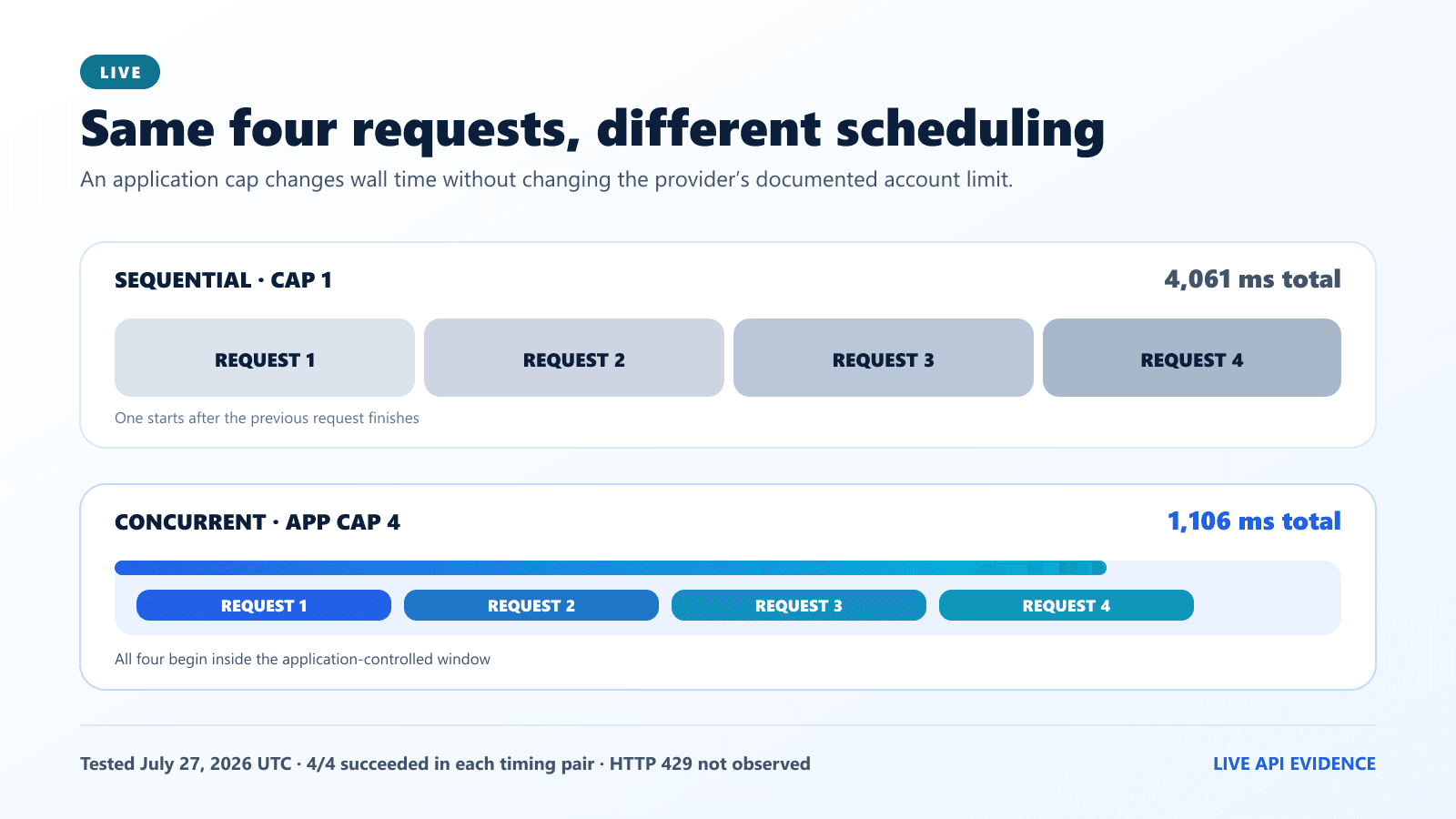
| Four Flash requests, sequential | 4,061 ms total | One measured batch from one client environment |
| Four Flash requests, submitted together | 1,106 ms total; observed peak four | The client used its four-request cap correctly |
| Streaming Flash request | 341 ms to first body chunk; 756 ms total; three data events; [DONE]; final text OK | One successful parser observation |
| Live SSE keep-alive comments | Zero observed | A quick response need not contain a keep-alive comment |
| Non-streaming leading blank lines | Zero observed | The live request did not need the blank-line recovery path |
| HTTP 429 | Not forced and not observed | The official ceiling was not tested |
The four-request client-side group completed about 3.67 times faster than the four sequential calls in this one minimal run. This was ordinary concurrent request scheduling, not a native Batch API. The result demonstrates the practical value of controlled parallelism for this sample; it does not show that every workload will scale linearly, and it says nothing about behavior near 2,500 concurrent Flash requests.
The key limitation: four successful simultaneous calls validate a four-request application cap. They do not experimentally validate DeepSeek’s documented limit of 2,500.
Offline queue benchmark: 24 jobs under four caps
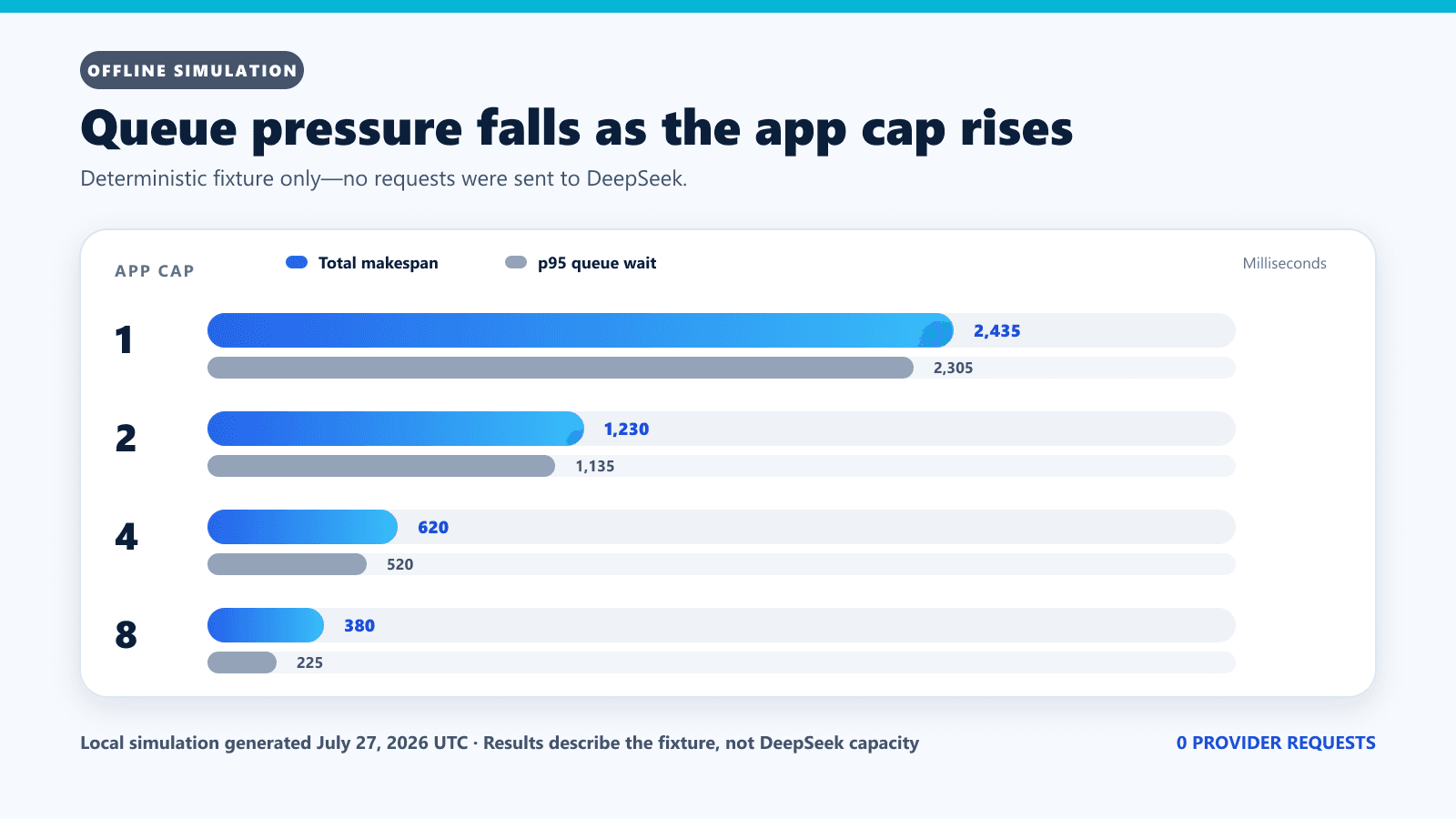
A queue must prove that it respects the configured application limit before it is connected to a high-volume workload. We therefore scheduled the same 24 synthetic jobs through deterministic worker pools of one, two, four, and eight. The virtual jobs had fixed durations, arrived at time zero, and made no API request. Because the simulation advances a virtual clock, every run is repeatable.
| Worker cap | Observed peak | Makespan | Queue wait p50 | Queue wait p95 |
|---|---|---|---|---|
| 1 | 1 | 2,435 ms | 1,160 ms | 2,305 ms |
| 2 | 2 | 1,230 ms | 520 ms | 1,135 ms |
| 4 | 4 | 620 ms | 220 ms | 520 ms |
| 8 | 8 | 380 ms | 80 ms | 225 ms |
More workers reduced queue wait and makespan in this fixed synthetic schedule. That is expected when independent jobs are available, but it does not mean an application should run at DeepSeek’s official ceiling. Set a lower internal cap with headroom for interactive traffic, background jobs, retries, deployments, and other services using the same account. Aggregate counters across those services and keep separate budgets for Pro, Flash, and Vision Exp. Increase a cap only after observing real queue wait, in-flight counts, latency, and errors.
A production-safe JavaScript queue
The following Node.js pattern creates a fixed worker pool instead of launching every pending job as an immediate API task. It retries only statuses selected by application policy, observes an optional Retry-After value without assuming it will exist, and never logs the response body or credential. The live study itself used zero automatic retries; this example is a separate production pattern. For package-based examples and TypeScript configuration, see the DeepSeek Node.js and TypeScript guide.
const API_URL = "https://api.deepseek.com/chat/completions";
const RETRYABLE = new Set([429, 500, 503]);

class DeepSeekHttpError extends Error {
  constructor(status, retryAfter) {
    super(`DeepSeek returned HTTP ${status}`);
    this.status = status;
    this.retryAfter = retryAfter;
  }
}

function retryAfterMilliseconds(value) {
  if (!value) return null;
  const seconds = Number(value);
  if (Number.isFinite(seconds) && seconds >= 0) {
    return seconds * 1000;
  }
  const date = Date.parse(value);
  return Number.isFinite(date) ? Math.max(0, date - Date.now()) : null;
}

function sleep(ms, signal) {
  return new Promise((resolve, reject) => {
    const abort = () => {
      clearTimeout(timer);
      signal?.removeEventListener("abort", abort);
      reject(new DOMException("Aborted", "AbortError"));
    };
    const finish = () => {
      signal?.removeEventListener("abort", abort);
      resolve();
    };
    const timer = setTimeout(finish, ms);
    if (signal?.aborted) return abort();
    signal?.addEventListener("abort", abort, { once: true });
  });
}

async function requestOnce(job, signal) {
  const apiKey = process.env.DEEPSEEK_API_KEY;
  if (!apiKey) {
    throw new Error("DEEPSEEK_API_KEY is not set");
  }

  const timeout = AbortSignal.timeout(90_000);
  const requestSignal = signal
    ? AbortSignal.any([signal, timeout])
    : timeout;

  const response = await fetch(API_URL, {
    method: "POST",
    redirect: "manual",
    signal: requestSignal,
    headers: {
      "Authorization": `Bearer ${apiKey}`,
      "Content-Type": "application/json",
    },
    body: JSON.stringify({
      model: job.model ?? "deepseek-v4-flash",
      messages: job.messages,
      max_tokens: job.maxTokens ?? 512,
      ...(job.userId ? { user_id: job.userId } : {}),
    }),
  });

  if (!response.ok) {
    const retryAfter = response.headers.get("retry-after");
    await response.body?.cancel();
    throw new DeepSeekHttpError(
      response.status,
      retryAfter,
    );
  }
  return response.json();
}

async function completeWithRetry(job, {
  maxAttempts = 3,
  baseDelayMs = 500,
  maximumDelayMs = 10_000,
  signal,
} = {}) {
  for (let attempt = 0; attempt < maxAttempts; attempt += 1) {
    try {
      return await requestOnce(job, signal);
    } catch (error) {
      const canRetry =
        error instanceof DeepSeekHttpError &&
        RETRYABLE.has(error.status) &&
        attempt + 1 < maxAttempts;

      if (!canRetry) throw error;

      const cap = Math.min(
        maximumDelayMs,
        baseDelayMs * (2 ** attempt),
      );
      const jitter = Math.floor(Math.random() * cap);
      const serverHint = retryAfterMilliseconds(error.retryAfter);
      if (serverHint !== null && serverHint > maximumDelayMs) {
        // Do not retry earlier than requested or hold a worker beyond
        // this application's maximum delay budget.
        throw error;
      }
      await sleep(Math.max(jitter, serverHint ?? 0), signal);
    }
  }
  throw new Error("Retry loop ended unexpectedly");
}

async function runBoundedQueue(jobs, {
  workers = 4,
  signal,
} = {}) {
  if (!Number.isInteger(workers) || workers < 1) {
    throw new TypeError("workers must be a positive integer");
  }

  const results = Array(jobs.length);
  let nextIndex = 0;

  async function worker() {
    while (!signal?.aborted) {
      const index = nextIndex;
      nextIndex += 1;
      if (index >= jobs.length) return;

      try {
        results[index] = {
          ok: true,
          value: await completeWithRetry(jobs[index], { signal }),
        };
      } catch (error) {
        results[index] = {
          ok: false,
          status: error instanceof DeepSeekHttpError
            ? error.status
            : null,
          errorType: error?.name ?? "Error",
        };
      }
    }
  }

  const workerCount = Math.min(workers, jobs.length);
  await Promise.all(
    Array.from({ length: workerCount }, () => worker()),
  );
  return results;
}
This pool guarantees that no more than workers jobs execute at once in this process. A job remains assigned to its worker during backoff, which is conservative and simple. Multiple processes, replicas, and services need a shared counter or distributed limiter keyed by provider account and model; adding local semaphores does not create additional provider capacity. At larger scale, put delayed retries into a separate scheduled queue, add a global retry budget, and use duplicate-work protection when completions can trigger downstream writes.
What HTTP 429 means
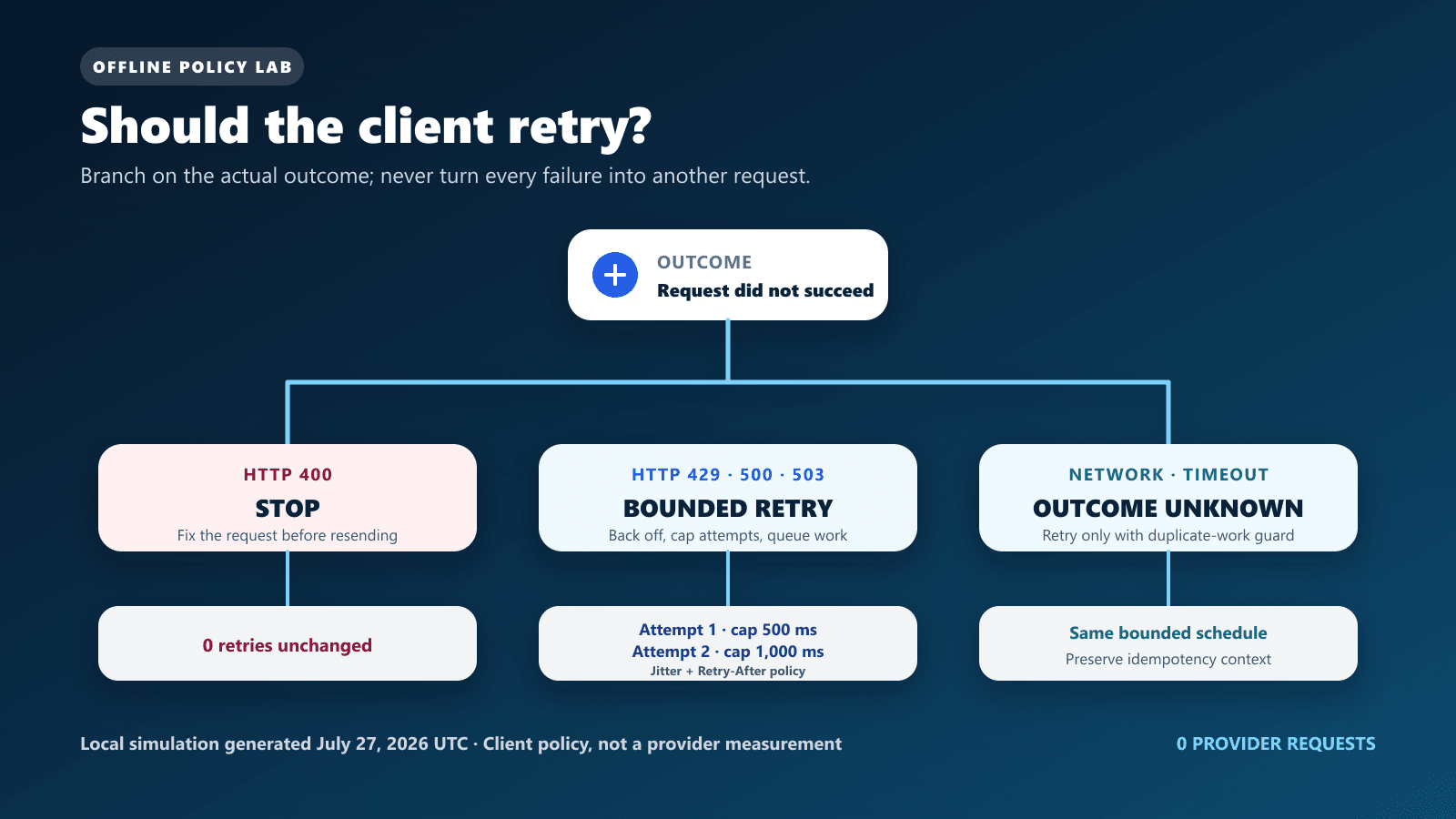
DeepSeek’s official error-code guide describes 429 as “Rate Limit Reached” and says the client is sending requests too quickly. The rate-limit page is more specific about current V4 concurrency: requests beyond the applicable account or per-user_id limit receive HTTP 429.
A 429 tells the application to reduce pressure; it does not expose the provider’s complete internal diagnosis. Check your own active requests by model, all services sharing the account, long-lived calls, queue depth, and retry activity. Do not solve 429 by creating more keys under the same account, because the official limit is account-level.
| Status or outcome | Official guidance or safe policy | Our evidence source |
|---|---|---|
| 400 | Fix the request body; do not repeat the same payload unchanged | Official error class; local fixture stopped after one attempt |
| 401 | Fix authentication or rotate the invalid key; do not retry unchanged | Official error class; no live failure induced |
| 402 | Check and top up account balance; do not retry unchanged | Official error class; no live failure induced |
| 422 | Correct invalid parameters; do not retry unchanged | Official error class; no live failure induced |
| 429 | Pace requests; queue and bounded backoff are our client policy | Local fixture 429 → 429 → 200; not forced live |
| 500 | DeepSeek says retry after a brief wait and contact support if persistent | Local fixture 500 → 200 |
| 503 | DeepSeek says retry after a brief wait | Local fixture 503 → 200 |
| Network failure or timeout | Outcome may be unknown; retry only under an explicit duplicate-safe policy | Local timeout-to-success fixture; not a provider response |
| User cancellation | Stop immediately and do not schedule another attempt | Local cancellation-during-backoff fixture |
Our simulated three-attempt 429 path accumulated 1,950 ms of virtual backoff before success. The 500 and 503 fixtures also terminated within their budgets, while 400, 401, 402, and 422 are terminal until their cause is corrected. The copyable default above automatically retries only 429, 500, and 503; it surfaces network failures and timeouts because their outcome can be unknown. No fixture slept in real time or generated an API request. For the complete client-error and provider-error boundary, use the DeepSeek error codes guide.
Keep-alive lines are not rate-limit failures
DeepSeek documents a request keep-alive mechanism for calls that wait before inference begins. A non-streaming connection may receive empty lines, while a streaming connection may receive SSE comments such as : keep-alive. DeepSeek says custom parsers should ignore these contents. If inference has not begun after ten minutes, the server closes the connection.
Our quick live stream produced three data events, a [DONE] marker, and the answer OK. It showed zero keep-alive comments. The non-streaming observation showed zero leading blank lines. Those absences do not conflict with the documentation: the mechanism may appear while a request is waiting, and these requests completed quickly.
We tested the recovery paths locally. The non-streaming fixture placed three blank lines before valid JSON and parsed successfully. The SSE fixture split two : keep-alive comments and two data events across five arbitrary chunks; the parser ignored the comments, observed [DONE], and reconstructed OK.
async function readDeepSeekSse(response, onData) {
  if (!response.body) throw new Error("Response body is unavailable");
  const reader = response.body.getReader();
  const decoder = new TextDecoder();
  let buffer = "";
  let streamEnded = false;

  const processEvent = (event) => {
    const data = event
      .split("\n")
      .filter((line) => !line.startsWith(":"))
      .filter((line) => line.startsWith("data:"))
      .map((line) => line.slice(5).trimStart())
      .join("\n");

    if (data === "[DONE]") return true;
    if (data) onData(JSON.parse(data));
    return false;
  };

  try {
    while (true) {
      const { value, done } = await reader.read();
      buffer += decoder.decode(value, { stream: !done });
      // Normalize after appending so CRLF split across chunks is handled.
      buffer = buffer.replaceAll("\r\n", "\n");

      let boundary = buffer.indexOf("\n\n");
      while (boundary !== -1) {
        const event = buffer.slice(0, boundary);
        buffer = buffer.slice(boundary + 2);

        if (processEvent(event)) return;
        boundary = buffer.indexOf("\n\n");
      }

      if (done) {
        streamEnded = true;
        break;
      }
    }

    // Some intermediaries close without a final blank delimiter.
    if (buffer.trim()) processEvent(buffer);
  } finally {
    if (!streamEnded) await reader.cancel().catch(() => {});
    reader.releaseLock();
  }
}
Do not launch a duplicate retry merely because the first call is quiet. Track time waiting for the first event separately from total duration, set an application deadline appropriate to the workflow, and let the parser ignore valid keep-alive syntax.
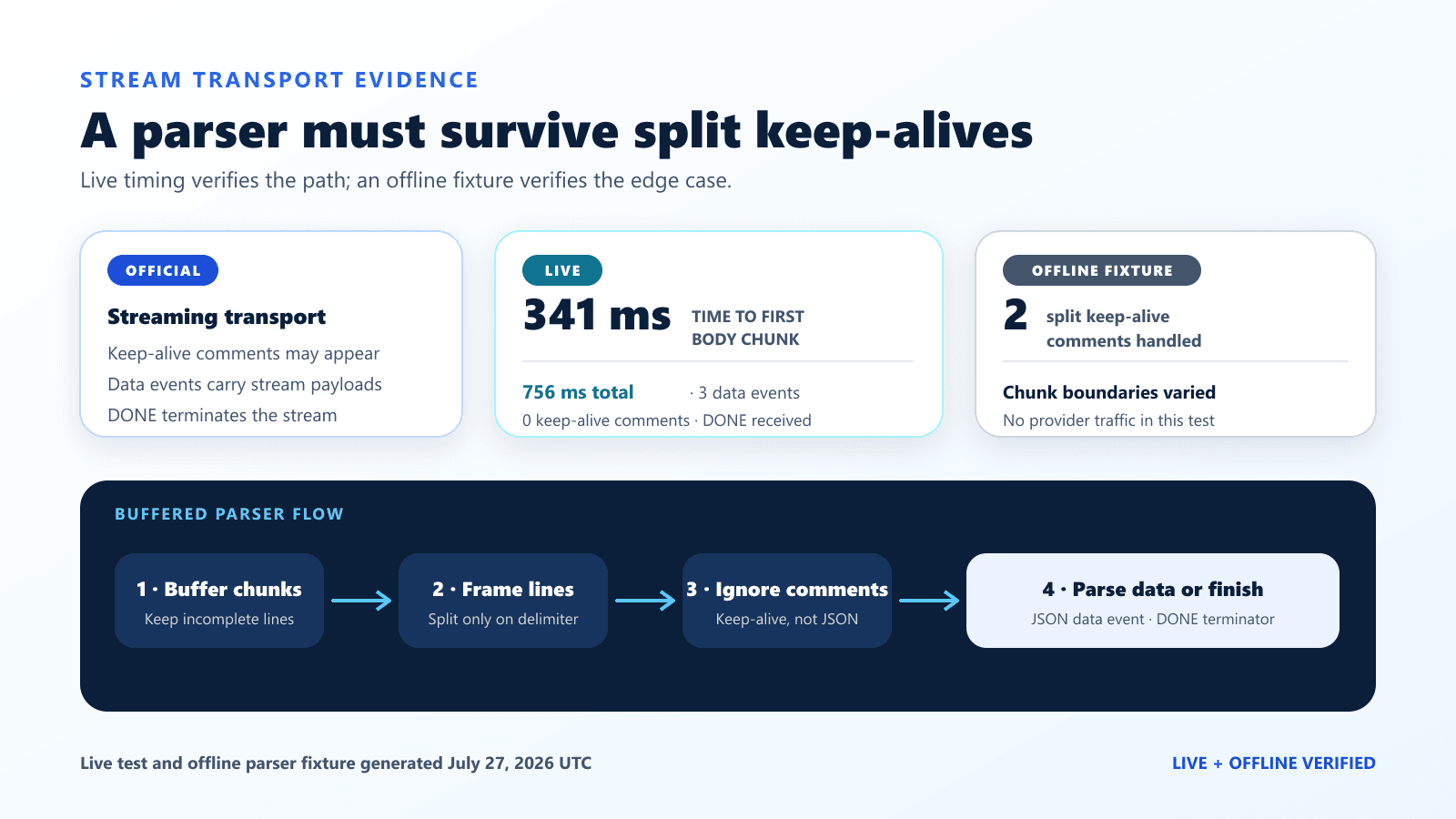
DONE marker.API keys and user_id isolation
Multiple keys share one account limit
DeepSeek states that concurrency is calculated at provider-account level regardless of which API key is used, and the published limits are model-specific. Separate keys remain useful for environment separation, rotation, and access control, but they do not multiply capacity. If production, staging, background workers, and manual tests share one account, aggregate their active requests for each model across every key and service.
What user_id changes
The optional user_id supports content-safety, KV-cache, and scheduling isolation under the same account. DeepSeek requires a string matching [a-zA-Z0-9\-_]+, with a maximum length of 512, and says not to include private user information. For cache-hit behavior and measurement, see the DeepSeek Context Caching guide; isolation and cache reuse are separate concerns.
For regular API users, all user_id values are combined when calculating concurrency. For accounts with increased concurrency quotas, DeepSeek applies a total account limit and also per-user_id limits: 500 for V4 Pro, 2,500 for V4 Flash, and 2,500 for Vision Exp. An empty ID is treated as a special user_id. This improves isolation; it is not authentication and cannot bypass the total account allowance.
Map the identifier to the protocol you use: user_id in Chat Completions, top-level user in the Responses API, and metadata.user_id in the Anthropic-compatible API. Keep the value stable and opaque, match [a-zA-Z0-9-_]+, stay at or below 512 characters, and never place personal information in it.
const body = {
  model: "deepseek-v4-flash",
  messages: [{ role: "user", content: "Classify this ticket." }],
  user_id: "tenant_123",
};
Use a stable opaque application identifier rather than an email address, name, phone number, or other personal data. Store tenant attribution in your own protected logs if needed; a successful response alone does not prove how provider-side isolation was scheduled.
When to request more concurrency
DeepSeek’s rate-limit page links to a capacity expansion request and says appropriate concurrency is matched to actual business needs with no additional fee for the capacity expansion itself. Normal input and output token usage remains billable under the current pricing rules. Expansion is an application process, not a promise that every requested number will be granted.
Before requesting an increase, collect evidence that the existing capacity—not an unbounded client—is the constraint:
- peak and p95 active requests by model;
- queue depth and queue-wait percentiles;
- request duration and time to first streamed event;
- 429, 500, 503, timeout, and cancellation rates;
- retry attempts and virtual or real backoff time;
- interactive versus background workload share;
- per-tenant pressure using non-private identifiers;
- projected growth and the business reason for additional capacity.
If the queue remains empty and active requests stay well below the internal cap, more provider concurrency will not solve latency. Investigate request duration, output size, network conditions, or downstream processing first.
What to monitor in production
The minimum useful dashboard separates demand, provider activity, and client recovery. Track current in-flight requests, queue depth, queue wait, request duration, time to first event, status code, timeout and cancellation counts, retry attempts, and the configured worker cap. Break down active requests by model and internal service, then aggregate all services that use the same account.
deepseek_inflight_requests{model="deepseek-v4-pro"}
deepseek_inflight_requests{model="deepseek-v4-flash"}
deepseek_inflight_requests{model="deepseek-v4-flash-vision-exp"}
deepseek_queue_depth{queue="interactive"}
deepseek_queue_wait_seconds
deepseek_request_duration_seconds{model="deepseek-v4-flash"}
deepseek_time_to_first_event_seconds{model="deepseek-v4-flash"}
deepseek_http_responses_total{model="deepseek-v4-flash",status="429"}
deepseek_retry_attempts_total{reason="http_503"}
Never put an API key, raw authorization header, private user_id, or unredacted prompt and response into ordinary metrics. The DeepSeek observability guide owns the full logging, tracing, alerting, and redaction design.
Common rate-limit mistakes
- Treating concurrency as RPM: simultaneous active work and requests started per minute are different measurements.
- Pooling all models into one counter: maintain separate Pro, Flash, and Vision Exp counters while aggregating every key and service under the account.
- Running at the official ceiling: an internal cap needs headroom for other services, long requests, and recovery traffic.
- Launching every job immediately: thousands of promises behind a semaphore still consume memory; a fixed worker queue bounds active work.
- Retrying 429 immediately: synchronized retries can create another burst. Use a finite budget and jittered delay.
- Retrying terminal errors: correct 400 or 422 inputs, 401 credentials, and 402 balance instead of repeating unchanged requests.
- Creating more keys for capacity: keys under one account share each model’s limit.
- Parsing SSE comments as JSON: lines beginning with a colon are comments and must be ignored.
- Assuming silence means failure: keep-alive behavior exists for waiting requests; avoid duplicating an open call.
- Calling a four-request test a ceiling benchmark: only the current official documentation supports the 500, 2,500, and 2,500 limits; the July study validated only its client cap.
Reproducibility and limitations
The public DeepSeek API rate-limit test harness uses Node.js 20 or newer and no third-party dependency. Its syntax, request plan, completion budget, four-request maximum, zero-retry rule, endpoint allow-list, queue invariants, retry fixtures, and parser fixtures can be validated without an API key or network request.
The live evidence is intentionally small. It used one client environment, minimal outputs, one Pro completion, 11 Flash completions, and one point in time. It did not test long context, large outputs, regional variation, sustained traffic, multiple accounts, multiple API keys, expanded quotas, or provider behavior near an official ceiling. It did not reproduce 429, 500, or 503. Queue and retry results are deterministic simulations, not hosted-model performance.
DeepSeek can change models, limits, validation, and response behavior after publication. Recheck the official pages and rerun a bounded compatibility test before a production rollout. Preserve the distinction among an official statement, a live dated observation, a local simulation, and an application recommendation.
Frequently asked questions
What are the current DeepSeek API rate limits?
DeepSeek currently documents model-specific limits per provider account: 500 for deepseek-v4-pro, 2,500 for deepseek-v4-flash, and 2,500 for deepseek-v4-flash-vision-exp. A request counts from dispatch until its full model response completes.
Does Vision Exp have its own concurrency limit?
Yes. DeepSeek lists 2,500 concurrent requests for deepseek-v4-flash-vision-exp. It is a separate model-specific counter, but all keys and services under the same provider account contribute to it. Use an application cap below the provider ceiling, especially when image inputs make requests longer.
Does DeepSeek publish RPM or TPM limits?
The current public Rate Limit & Isolation page does not provide a general RPM or TPM table for the direct API. It documents model-specific concurrency instead. Do not interpret that limited public table as proof that no other operational control can exist.
Do multiple DeepSeek API keys increase the limit?
No. DeepSeek says concurrency is calculated at account level regardless of which API key is used. Use separate keys for security and environment separation, not as a rate-limit bypass.
What causes DeepSeek HTTP 429?
DeepSeek describes 429 as sending requests too quickly and states that exceeding the applicable concurrency limit returns 429. Reduce submitted work, inspect account-wide active requests, queue overflow, and retry with a finite backoff policy only when appropriate.
Does DeepSeek always send Retry-After with 429?
The current official pages do not promise that header. A client can respect a valid value when present while retaining its own capped backoff and retry budget. Do not build a safe policy that depends on the header always existing.
Does user_id give each tenant a separate limit?
Not for a regular account: all user_id values are combined for concurrency calculation. Accounts with expanded quotas have a total account limit plus per-user_id limits documented as 500 for Pro, 2,500 for Flash, and 2,500 for Vision Exp.
Does streaming release the concurrency slot after the first token?
No. The official definition holds a slot until the model response completes. Streaming can improve perceived responsiveness, but the request remains active through the end of the response.
Why does a DeepSeek response contain empty lines or : keep-alive?
They are documented connection keep-alives while a request waits. Non-streaming requests may contain empty lines, and streaming requests may contain SSE : keep-alive comments. A custom parser should ignore them instead of treating them as JSON or a failure.
How can I test my queue without forcing a 429?
Use deterministic local jobs to verify that active work never exceeds the configured worker cap, then—only when needed—run a very small live concurrent group far below the official ceiling. Report it as a client-cap compatibility test, not as a provider-limit benchmark or native Batch API test.
Current official model and limit documentation last verified August 22, 2026 UTC. Live API observations remain dated July 27, 2026 UTC and were not rerun for this documentation update. Limits, prices, and behavior can change; verify the linked DeepSeek sources before deployment.