

You can check your DeepSeek API balance in the official Platform or request it through GET https://api.deepseek.com/user/balance. The account holds the funds used for API requests. Its balance is separate from how much you have spent during a selected period, and being able to use the chat app does not establish that your API connection has funds available.
For a quick check, start with the Platform. For a script or application, the balance endpoint returns the available funds and whether they are sufficient for API calls. This guide covers both routes, how to top up, and what to check when a payment or balance error does not look right.
Table of Contents
Check your balance in the DeepSeek Platform
Sign in to the official DeepSeek Platform using the account that owns the API key in your application. Check the account balance there, then use the relevant account page if you need to understand a change:
- Billing: open the Billing page to check top-up records and the refund route.
- Usage: open the Usage page to see consumption for a chosen period and API key.
- Top Up: use the Top Up page when you want to add funds.
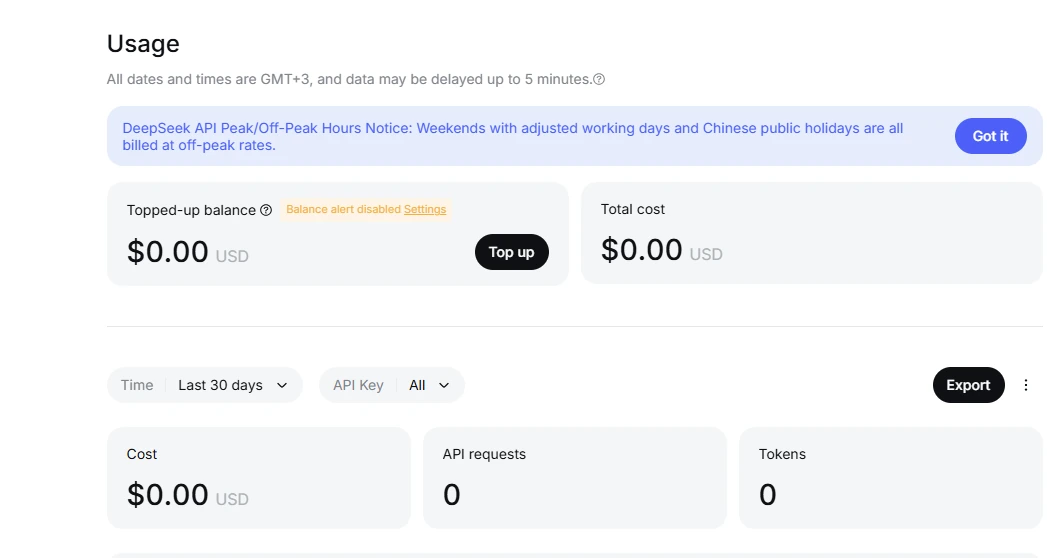
Those destinations are identified in DeepSeek’s official API help articles. A successful payment record and your remaining balance answer different questions: the record confirms a top-up, while the balance can change as requests consume funds.
Check the provider as well as the model name. An app offering a DeepSeek model might bill you through its own account or another API gateway. In that case, start with that provider’s billing page. Adding money to a direct DeepSeek account will not replenish a separate provider’s credits. Chat-Deep publishes independent guides about DeepSeek; it does not manage your official API balance.
Check DeepSeek API balance with a request
The official Get User Balance reference defines a GET request to /user/balance. It takes no prompt or model name. DeepSeek uses Bearer authentication, so the request needs the API key for the account you want to check.
This Bash example assumes you have already set DEEPSEEK_API_KEY privately in your environment. Run it in a private terminal; it prints your balance. The 20-second timeout is an example client setting.
curl --silent --show-error --fail-with-body --max-time 20 \
  https://api.deepseek.com/user/balance \
  -H "Accept: application/json" \
  -H "Authorization: Bearer ${DEEPSEEK_API_KEY}"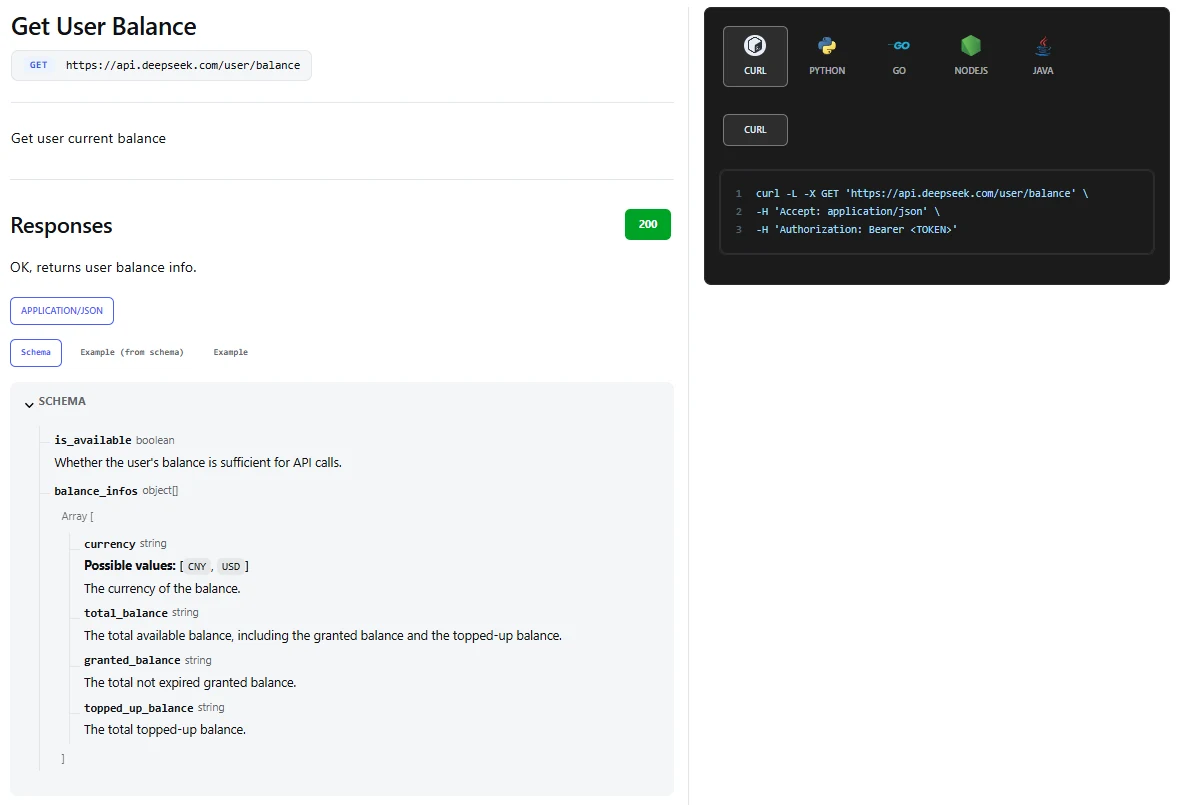
This reads account information rather than generating a model response. If you have not created or configured a key yet, the DeepSeek API key guide walks through that setup. Use the balance request on a trusted server or your own machine; putting the credential into browser JavaScript would expose it.
Here is an illustrative response using US dollars. The amounts are made up to explain the fields; they are not a real account balance, a sign-up offer or a minimum top-up.
{
  "is_available": true,
  "balance_infos": [
    {
      "currency": "USD",
      "total_balance": "12.50",
      "granted_balance": "2.50",
      "topped_up_balance": "10.00"
    }
  ]
}
In this example, US$12.50 is available: US$2.50 in unexpired granted funds and US$10.00 in topped-up funds. The API returns the amounts as strings. Keep that distinction when reading the response into code.
What the balance response means
The fields below follow the official response schema. Read the availability flag and the balance entries together.
| Field | Meaning | How to use it |
|---|---|---|
is_available | Whether the account has sufficient balance for API calls. | Use it as a current funding signal, not an estimate of how many requests remain. |
balance_infos | An array of balance records, grouped by currency. | Read the entries rather than assuming the first one is always USD. |
currency | The currency associated with that record. | Match it before displaying, comparing or adding amounts. |
total_balance | The total available balance. | Use this for the current total; it already includes the two components below. |
granted_balance | Granted funds that have not expired. | Do not assume every account receives a grant or that a grant lasts indefinitely. |
topped_up_balance | Funds added through top-ups. | Distinguish purchased funds from granted funds when reviewing your account. |
Do not add all three amount fields together: that would count the components twice. In the example above, the total is US$12.50, not US$25.00. The schema permits both USD and CNY currency labels; the examples here use USD. Never relabel a returned currency or combine different currencies into one total.
is_available: true also does not mean the service is online or that your next batch is affordable. Another process could spend funds after the check, and the next request could need more than expected. Authentication, request validation and service availability can still affect an API call.
The endpoint does not include payment history, invoice details, per-key spending or grant-expiration dates. It cannot explain every change in a balance on its own. Use Billing for payment records and Usage for consumption.
A simple Python balance check
If you want to add a balance check to a script, this example uses Python’s standard library and the same environment variable. It selects USD explicitly and uses Decimal for the monetary value. It prints the amount to your private terminal; remove that print statement if your application sends output to shared logs.
import json
import os
from decimal import Decimal
from urllib.error import HTTPError, URLError
from urllib.request import Request, urlopen

request = Request(
    "https://api.deepseek.com/user/balance",
    headers={"Authorization": f"Bearer {os.environ['DEEPSEEK_API_KEY']}"},
)

try:
    with urlopen(request, timeout=20) as response:
        data = json.load(response)
except HTTPError as error:
    raise SystemExit(f"Balance check failed: HTTP {error.code}") from None
except URLError:
    raise SystemExit("Could not reach the balance endpoint.") from None

usd = next(
    (row for row in data["balance_infos"] if row["currency"] == "USD"),
    None,
)
print("Funds available for API calls:", data["is_available"])
if usd is None:
    print("No USD balance entry was returned.")
else:
    total = Decimal(usd["total_balance"])
    print(f"USD balance: {total}")
A missing USD entry is different from a USD balance of zero. Likewise, a failed request means you could not read the balance; it does not prove the account is empty. If you build a dashboard around this example, keep the last successful check time visible and treat failed refreshes separately.
How to top up your API balance
- Confirm you are signed in to the account that created the API key used by your application.
- Open the official Top Up page and review the amount, currency and payment options shown.
- Complete the payment through that official flow.
- Check the payment result under Billing, then refresh your balance before resuming work.
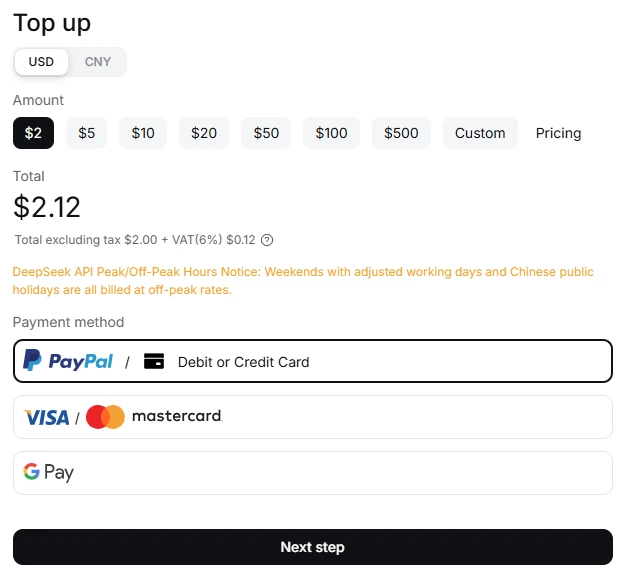
DeepSeek’s top-up help article lists PayPal, bank card, Alipay and WeChat Pay. Use the options actually offered for your account at checkout. The public sources reviewed for this guide do not establish one universal minimum USD top-up, so use the amount choices on the official page rather than a number from an old tutorial.
Top up around the work you expect to do. DeepSeek’s deduction rules say API fees draw from granted or topped-up balance, with granted funds used first when both are available. The price of a request depends on its token usage and the applicable model rates. Our DeepSeek pricing guide explains those costs in USD.
Creating another key in the same account does not add funds. A new credential can solve a revoked or exposed key, but it does not address an empty balance.
Fix insufficient balance or a missing top-up
HTTP 402: insufficient balance
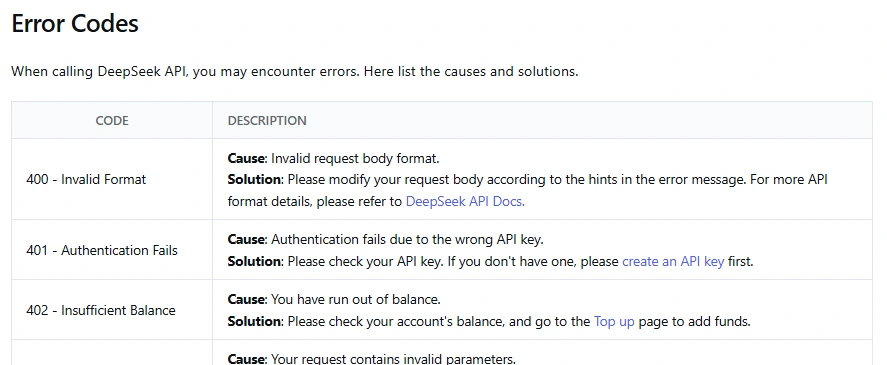
DeepSeek’s official error reference identifies 402 as an insufficient-balance error and directs users to check their funds and top up. Pause unchanged retries while you investigate the billing account. Sending the same paid request repeatedly does not add credit.
First identify who owns the connection. With your own direct DeepSeek key, check its Platform account. With a third-party app or gateway, inspect its provider settings and billing instructions. The name of the model alone does not tell you which account needs funds.
If you have sufficient funds in the correct account, check that the running application loaded the intended key. A saved configuration, background worker or deployed server may still be using a different credential. After fixing the cause, try one small request before restarting a large job.
You paid, but the balance is missing
Check Billing for a completed transaction in the account you are currently using. The official “Incorrect Top-up Balance” article says a missing previous balance often comes from signing in to a different account. It recommends checking the Google or email login used for the payment.
If the payment belongs to the correct account and the balance still does not match, collect the transaction reference, payment time and the account details needed by support. Use DeepSeek’s private support channel rather than posting receipts or account screenshots publicly. Avoid another payment just to see whether it fixes the first one.
DeepSeek also states that deactivating an account and registering again creates a separate account; the previous balance does not transfer. If that happened, follow the refund-support route in its help center.
The balance request itself fails
Keep the HTTP status separate from the account amount. A 401 points to authentication; a connection timeout leaves the balance unknown. Other API errors need their own diagnosis. The balance reference documents a successful 200 response, so do not assume it guarantees a particular error body for every failure. Our DeepSeek API error guide covers request errors, rate limits and temporary service problems.
Why your balance changes, and how to check spending
A top-up is money added to the account; usage is money consumed by API work. Comparing a historical payment with today’s balance without checking usage can make ordinary spending look like missing credit.
For a concrete example, suppose an account starts with US$10.00 and subsequently consumes US$1.20 in API usage, with no other changes. The remaining balance would be US$8.80. These are illustrative amounts, not a quote for any model or workload.
To investigate actual spending, DeepSeek’s usage-by-key instructions say to open Usage and select the time range and API key. The Export option also provides a ZIP containing two CSV files; the one named amount contains usage details by key.
Unexpected consumption is a reason to inspect background jobs, automated retries and applications sharing the account. If a key may have leaked, revoke and replace it through the Platform, then update the applications that used it. A balance check can alert you to a problem, but usage records are more useful for finding where the spending came from.
Keep a low balance from interrupting your work
For occasional use, check the Platform before a large task and review usage afterward. For an unattended application, an account-level balance check and a low-funds notification can give you time to act.
- Choose a threshold around your workload. A suitable reserve for a short personal script may be too small for an agent that makes many calls.
- Track freshness. Record when the last successful balance check ran. A failed refresh should show “balance unavailable” or a stale reading, not invent a zero.
- Coordinate checks. Let one scheduled check serve the application rather than making every worker query the balance before every generation.
- Bound spending separately. Set appropriate output limits, retry limits and job limits. Reading a balance does not reserve it for the task that comes next.
The balance documentation does not prescribe a polling interval or an automatic top-up policy. Choose a check schedule based on how quickly your application spends funds. Keep the API key on the server, and only expose account information to users who need to see it.
Frequently asked questions
Do DeepSeek API credits expire?
The official help center says topped-up balances do not expire. Granted funds are a separate category: the balance schema includes only grants that have not expired. Check the terms of any grant offered to your account; the balance response itself does not provide its expiration date.
Can I get a refund for unused balance?
DeepSeek’s help center directs online-payment refunds to Billing → Refunds and corporate-transfer requests to support. Its Open Platform Terms, section 6.3, say requests are reviewed and, if approved, cover the remaining unspent balance in one payment, potentially minus necessary costs. Partial refunds and refunds of spent amounts are excluded. Review those conditions before submitting a request.
Does every new account get free API credit?
The existence of a granted_balance field does not promise a grant to every account. Check your actual balance and any offer shown in the official Platform. Access to the consumer chat is not proof of API credit, and a promotion described in an older guide may no longer apply.
Does each API key have its own balance?
The documented endpoint returns the user’s account balance. Use the Platform’s usage-by-key view to investigate what a particular key consumed. Do not interpret a new key as a new allocation of funds, or assume that a third-party provider shares the same billing arrangement.
Can I estimate how many requests my balance will cover?
Only with an estimate of your workload. Requests vary in input size, output length and applicable rates, so a balance cannot be converted into a fixed request count. Use representative token usage and current USD prices, then allow room for longer answers and retries. For implementation examples, start with the DeepSeek API guide.
Know which account you are funding
The most useful balance check starts with the connection your application actually uses. Once you have the right account, the Platform gives you a straightforward way to review funds and payments, while /user/balance lets your application read the current funding state.
If a number looks wrong, compare the payment record with usage before adding more money. For ongoing work, keep a sensible reserve and make a failed balance check visible. That gives you a clear next step when something changes, without turning a simple account check into another complicated system to maintain.