

A DeepSeek API error needs a different fix depending on what failed. Check the request for 400 or 422, the key for 401, and the account balance for 402. For 429, reduce simultaneous work; for 500 or 503, allow time for the service to recover before retrying. Repeatedly sending the same request can make a temporary problem worse without fixing a configuration error.
This guide covers applications connected to the DeepSeek API. If you cannot sign in to the chat website or the mobile app, use our DeepSeek troubleshooting guide. A working chat session does not prove that a separate API connection has a valid key, usable balance or correct settings.
DeepSeek API error codes at a glance
The meanings below follow DeepSeek’s official error reference. The action column gives you a starting point; the sections that follow explain how to find and correct the cause.
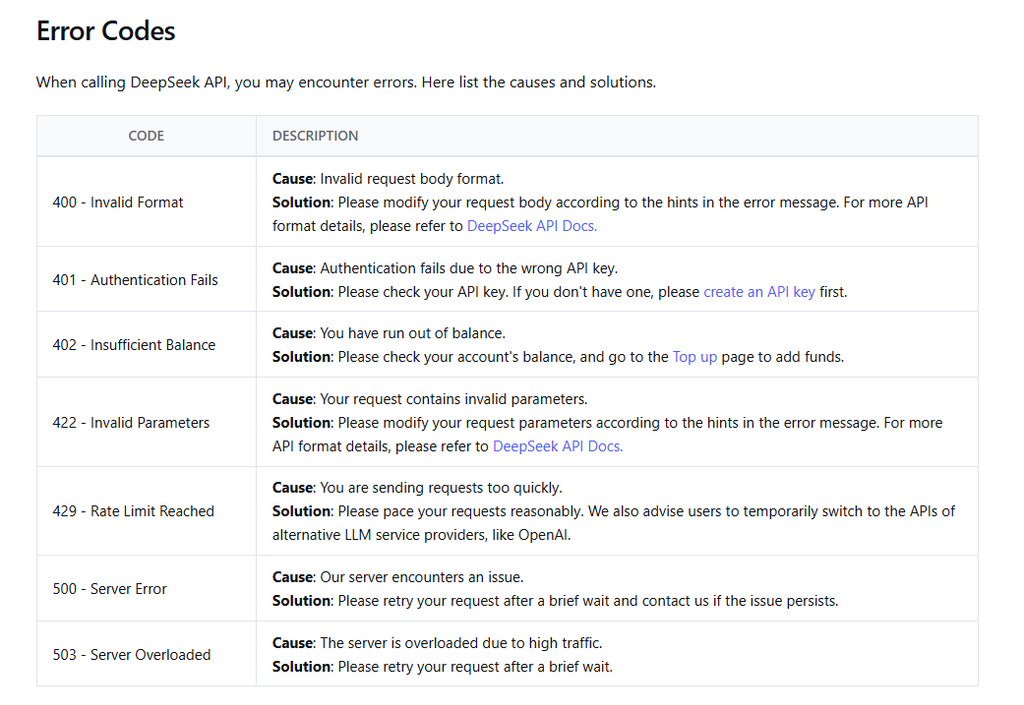
| HTTP status | Meaning | Start here |
|---|---|---|
| 400 | The request format is invalid. | Inspect the body and the field identified in the error. |
| 401 | Authentication failed. | Check the key, provider and authorization settings. |
| 402 | The account has insufficient balance. | Check the billing account used by this connection. |
| 422 | A request parameter is invalid. | Check supported values and combinations. |
| 429 | The request limit was reached. | Reduce concurrent work and queue the remainder. |
| 500 | A server error occurred. | Wait briefly; investigate persistent failures. |
| 503 | The server is overloaded. | Delay retries and check official service status. |
Find the actual error before changing settings
An app’s “request failed” banner is rarely enough to diagnose the problem. Open its connection details, error panel or private developer log and look for the numeric HTTP status and the accompanying message. In your own code, keep the response status available even if parsing the response body fails.
- Identify the provider. Are requests going directly to
api.deepseek.com, to a gateway, or to an app vendor’s backend? A provider can have its own keys, credits and limits even when the selected model is called DeepSeek. - Separate the status from the message. HTTP 401 and a JSON field such as
error.codeare different pieces of information. Read the numeric status together with the message; do not treat a generic string such asinvalid_request_erroras a diagnosis on its own. - Note when the problem starts. A first-request failure points you toward setup. A failure after adding a file, enabling tools or continuing a long conversation points toward what changed.
- Change one thing at a time. Keep a copy of the configuration, remove optional features temporarily, and retry only after making a relevant correction.
If you do not receive an HTTP response at all, skip to connection and timeout problems. A local DNS error, certificate failure or client exception is not automatically a DeepSeek server error.
401: check the key and the provider together
Start with the credentials loaded by the application that failed. A key saved in one terminal or app profile may not be the key used by your server, scheduled job or currently selected connection.
- For the official service, use a key from the DeepSeek Platform. A key from another provider is not interchangeable.
- Paste the complete value into the app’s private key field, without quotes or accidental spaces. Do not paste a masked key from a dashboard.
- For a direct HTTP request, use
Authorization: Bearer YOUR_API_KEY, replacing the placeholder with your credential through private configuration. - Check whether the key was revoked and whether the application picked up its replacement. Restart or redeploy the relevant process when its environment settings require that.
The official setup guide lists https://api.deepseek.com for the OpenAI-compatible connection and https://api.deepseek.com/anthropic for the Anthropic format. Match the app’s protocol as well as its provider. A base-URL field and a field asking for a complete request endpoint are not necessarily interchangeable.
Do not generate more keys until you have checked which connection the app actually uses. If the credential has been exposed, revoke it and replace it. Our API key guide covers creation, secure storage and an optional model-list check without generating an answer.
402: check the API balance, even if chat is free
Open the Platform account associated with the key and inspect its balance. If you recently paid, check that the transaction completed in that same account. A payment to a gateway or another app does not add funds to a direct DeepSeek API account.
The official Top up page is the place to add funds for the direct API. If a completed payment is not reflected in your account, contact billing support with the transaction details privately instead of making repeated payments. Creating a new key in the same account does not create new credit.
For a programmatic balance check, DeepSeek documents GET https://api.deepseek.com/user/balance with Bearer authentication. Its is_available field indicates whether the balance is sufficient for API calls, while balance_infos contains the available balance details. See the official balance response for the field definitions. Keep account amounts out of public logs.
Free access to the consumer chat and paid API usage are separate. The DeepSeek pricing guide explains token charges and gives examples in US dollars; there is no need to guess a minimum deposit from an old tutorial.
400 and 422: correct the request or its parameters
Use the error’s field name or explanation to narrow the search. A request can be valid JSON and still have the wrong structure for the endpoint. For Chat Completions, check that you are using POST /chat/completions, sending JSON, and supplying a supported model plus a nonempty messages array.
For example, this is a small text-only request in the documented format. In Bash, it assumes you have already set DEEPSEEK_API_KEY privately. It sends one generation request and therefore uses API credit; the 60-second limit is an example client timeout, not a promised response time.
curl --silent --show-error --include --max-time 60 \
  https://api.deepseek.com/chat/completions \
  -H "Authorization: Bearer ${DEEPSEEK_API_KEY}" \
  -H "Content-Type: application/json" \
  -d '{
    "model": "deepseek-flash",
    "messages": [{"role": "user", "content": "Say hello."}],
    "thinking": {"type": "disabled"},
    "max_tokens": 64,
    "stream": false
  }'
The example prints response headers as well as the body so you can see the HTTP status. Avoid adding verbose request tracing or posting its full output publicly. For Python or Node.js setup, our DeepSeek API guide provides complete first-request examples.
If the small request works, add your original options back individually. Check the Chat Completions reference for the exact combination you use. Two documented examples matter when adapting an existing client: stream_options requires stream: true, and forcing a tool with tool_choice: "required" or a named function requires thinking to be disabled. These are configuration constraints, not reasons to keep resending an unchanged payload.
When the first message works but the next one fails
Check how your application rebuilds conversation history. DeepSeek’s thinking-mode guide says that requests carrying tools must pass back the previous turns’ reasoning_content, including turns without a tool call. Omitting it can produce a 400 error. Preserve the relevant assistant-message fields rather than saving only its visible answer.
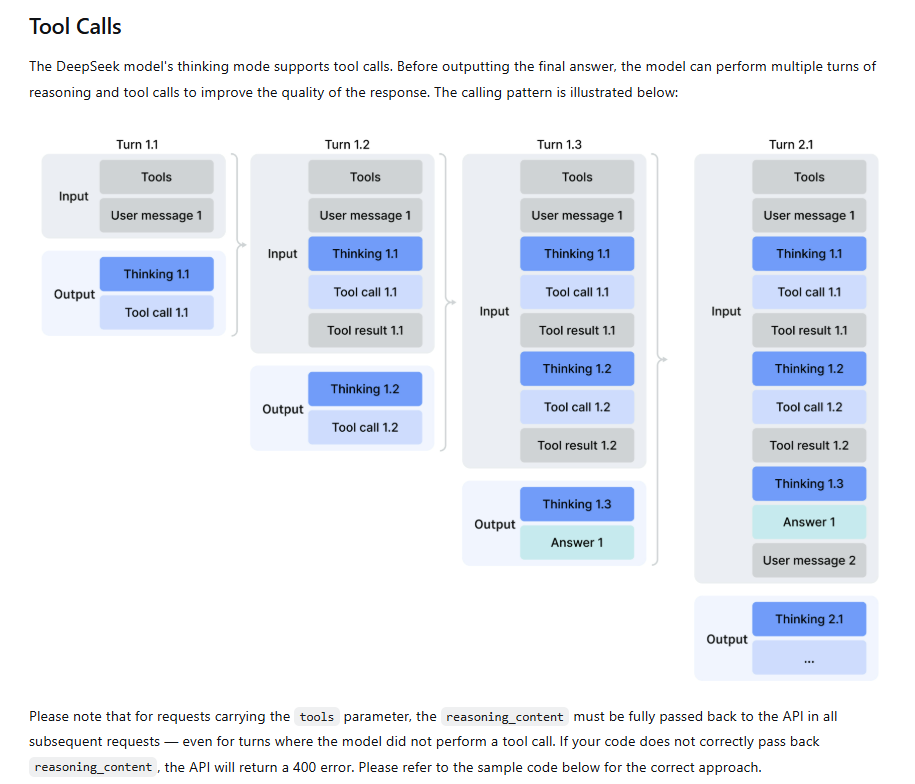
For requests without tools, that guide says previous reasoning content does not need to be sent back. This distinction helps explain why a basic chat can work while an agent integration fails. In an app you do not maintain, use its documented DeepSeek integration and check for a client update. Starting a fresh chat can help isolate a history problem, but does not repair the way the app stores subsequent turns.
When the message mentions a model or an unsupported option
Check the model ID against the provider you are actually calling. The official first-call guide currently recommends deepseek-flash and deepseek-v4-pro. A model label copied from a different provider’s menu may not be an accepted ID on the official endpoint.
Remove options the integration has copied from another API, then consult the matching endpoint reference before restoring them. Also check whether the model supports the input you added. A text-only request succeeding does not establish support for images, files or every tool feature.
429: reduce simultaneous requests
For the direct API, the official concurrency documentation checked on October 5, 2026 lists 2,500 concurrent requests for deepseek-flash and 500 for deepseek-v4-pro per account. Concurrency means unfinished requests, not requests per minute. Each request occupies a slot until its response completes, including while it is streaming.
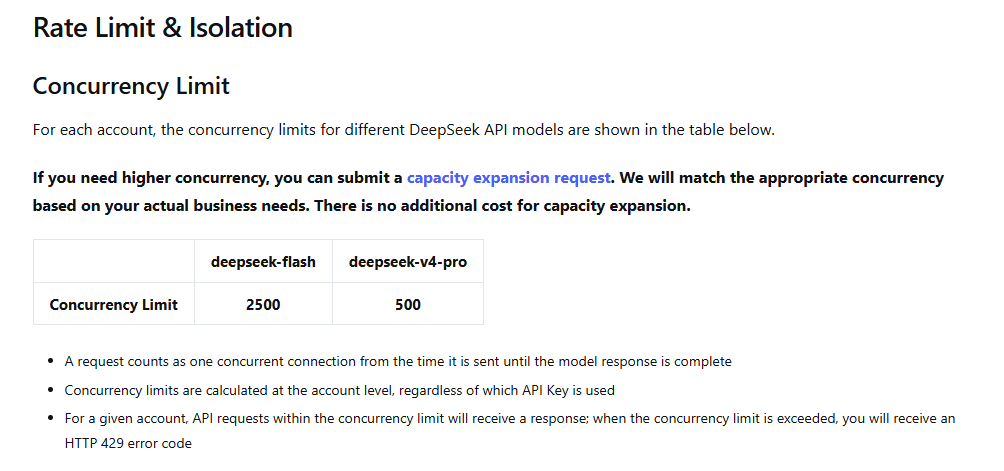
Count work across all processes using the account. Ten workers can each look quiet while their combined workload exceeds a shared limit. Separate API keys do not multiply the account allowance, and a gateway may impose different limits from the direct service.
- Reduce the number of active requests and queue new jobs instead of starting all of them at once.
- Pause or slow automatic retries so they do not compete with new work.
- Look for long-running requests or abandoned streams that the application has not finished handling.
- Resume gradually after the error rate falls. For sustained capacity needs, use DeepSeek’s documented capacity-expansion process.
For example, if a batch starts too many tasks together, lowering worker concurrency addresses the cause. Adding an immediate retry to every rejected task creates another burst. Choose your queue size and retry budget around how long a user or job can reasonably wait.
500 and 503: allow for a service problem
Before changing a working API key or rewriting your payload, check the official DeepSeek status page. It separates API components from chat services, so look for the model service used by your application and the relevant incident period.
A short sequence of delayed retries can help with a temporary failure. If the error persists, pause background batches, keep unsent work in a queue, and tell interactive users that the request could not be completed. Do not leave an invisible retry loop running indefinitely.
Switching providers is an application decision: the alternative needs a working integration, suitable data handling and its own billing arrangement. Changing only the model name is not a complete fallback. If a previously working configuration fails repeatedly without a clear incident, collect the details in the support section.
Timeouts, network errors and requests that appear stuck
First determine which component stopped waiting: your application, its HTTP client, your reverse proxy or a third-party gateway. A timeout can happen without a DeepSeek HTTP error reaching the application. DNS and TLS failures can prevent the connection from being established at all.
DeepSeek documents blank lines for non-streaming keep-alives and : keep-alive comments for streaming requests. A custom parser must allow for those while waiting for output. The same keep-alive documentation says the server closes the connection if inference has not started after ten minutes. That is a waiting rule, not a recommendation to make every application wait ten minutes.
Set client and proxy timeouts deliberately, and match your parser to streaming or non-streaming output. For connection failures, check the endpoint, network route, proxy and certificate setup. Do not disable certificate verification to make an authentication test pass.
A timeout after sending a request leaves its outcome uncertain: the server may have started work even though the client stopped waiting. Repeating it can duplicate work or cost. The HTTP retry guidance cautions against automatically replaying non-idempotent requests without knowing they are safe to repeat. This matters especially for agents that can trigger external actions.
What about 403, 404, 405 or 415?
These are not entries in DeepSeek’s seven-code quick reference. If you encounter one, identify which server returned it and use the general HTTP status definitions to guide the next check:
- 403: access was refused. Read the provider or gateway’s explanation and check applicable permissions or access restrictions.
- 404: check the requested route and resource. A mistyped endpoint or duplicated path deserves attention before the key.
- 405: check the HTTP method. Opening a URL in a browser sends a different request from posting a Chat Completions payload.
- 415: check the media type and body encoding required by that endpoint.
These checks are general troubleshooting advice, not a claim that every configuration mistake produces a particular DeepSeek status. A gateway can also return its own error before the request reaches the model provider.
HTTP 200, but the answer is empty or incomplete
A successful HTTP response still needs application-level handling. In the Chat Completions response, inspect the message fields and finish_reason before assuming a blank display means an outage.
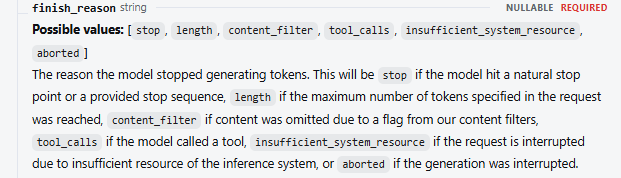
- A tool was requested: handle the returned tool call and send its result through the documented conversation flow. A tool request is not itself the final answer.
- The answer hit its length limit: review the output budget and conversation size. Raising an output limit without considering the context budget can introduce another problem.
- You are using thinking mode: distinguish
reasoning_contentfrom the finalcontent, and let a streaming response finish. - You requested JSON: include an explicit JSON instruction and allow enough output tokens. DeepSeek’s JSON Output guide also acknowledges occasional empty content and suggests adjusting the prompt.
If your application reports a JSON-decoding error, determine whether it was parsing the HTTP response or the model’s generated text. Those are different layers. The Requests documentation, for example, explains that decoding can fail on an empty or non-JSON body, and that successful JSON decoding does not by itself establish HTTP success. Retain the status before attempting to parse a body, and validate generated JSON separately.
Retry settings that help instead of hiding the problem
Use retries for temporary conditions, not as a substitute for fixing credentials or input. A practical policy for a small integration is:
- Stop on request, authentication or balance errors until their cause has changed.
- For temporary rate or server failures, wait longer between attempts and add some randomness so clients do not all retry together.
- Set both an attempt limit and an overall deadline. If waiting would exceed the deadline, stop or reschedule the job.
- If a valid
Retry-Afterheader is present, respect its wait. If it is longer than your allowed wait, defer the task rather than retrying earlier. - Check retries in every layer: your code, the client library, the gateway and the job queue. Avoid multiplying their retry counts accidentally.
As an illustrative starting policy, you might allow two delayed retries, around two and four seconds apart with a small random variation. Those numbers are not DeepSeek requirements and may be unsuitable for a long outage or a tight response deadline. Adjust them to the workload, and handle an uncertain timeout separately before replaying a request.
What to include when asking for help
If the problem persists after the relevant checks, prepare a short report: approximate time and timezone, provider hostname, endpoint, model, HTTP status, client or app version, and whether a small text-only request also fails. Include a sanitized error message and the last change that preceded the problem.
Keep API keys, authorization headers, private prompts and billing details out of public posts. Share account or transaction information only through the provider’s private support channel when needed. DeepSeek lists api-service@deepseek.com in its API documentation. For a third-party gateway or app, start with its support team when the failing request goes through its service.
Frequently asked questions
Why does DeepSeek chat work while my API connection fails?
They use different access paths. Check the API connection’s provider, key, balance and request settings even when your chat account works normally. Free chat access does not fund API calls, and a chat service’s status does not rule out a problem affecting an API model.
My key works with the model list. Why does generation still fail?
A successful model-list request confirms access to that endpoint. Generation additionally depends on usable balance, a valid payload, the selected model and service availability. Diagnose the status from the failed generation request rather than replacing an already accepted key.
Does DeepSeek always return a Retry-After header?
The official error reference does not promise it. Handle the header when present and have a limited retry policy for when it is absent. Under the HTTP specification, the value can be a delay in seconds or an HTTP date, so a parser should not assume it is always a number.
Why am I getting errors when the status page is green?
A status page reports service incidents; it does not validate your individual request. Check whether the failure is limited to one key, client, model or payload. An invalid parameter or gateway restriction can persist while the provider’s broader service remains available.
Getting your request working again
The error code gives you a starting point; the response message helps you narrow down the cause. Check the relevant setting, make one change at a time, and retry with a small request before returning to your full workflow.
If the problem persists, keep the error message and a minimal example with credentials removed. Those details make it easier to get useful help—and avoid spending time changing parts of your setup that were already working.