
Last verified: July 23, 2026 · Scope: DeepSeek API connection methods, third-party platform routes, agent tools, security controls, and the integration guides published on Chat-Deep.ai. Chat-Deep.ai is independent, is not operated or endorsed by DeepSeek or the platform vendors named here, and is not an official support channel for any of them.
DeepSeek integrations connect a DeepSeek model endpoint to another system through an API client, connector, automation platform, agent host, orchestration framework, or custom backend. DeepSeek processes the input and can return text, structured data, or a proposed tool call. The surrounding application—not the model—reads accounts, executes functions, changes records, sends messages, and controls permissions.
Quick answer: Does DeepSeek have integrations?
Yes, but “integration” can describe several different arrangements. DeepSeek documents OpenAI-compatible Chat Completions, an Anthropic-compatible endpoint, JSON Output, Tool Calls, and setup guides for a number of third-party agent tools. Other products—including Slack, Gmail, Notion, Jira, WordPress, Shopify, Zapier, Make, n8n, and Pipedream—may connect through their own connector, API, webhook, plugin, or a custom application.
- Documented by DeepSeek: API formats and model features described in DeepSeek’s own documentation.
- Listed for reference: a third-party tool for which DeepSeek provides configuration instructions without guaranteeing effectiveness or security.
- Platform-provided: a connector or model node maintained by an automation or software vendor.
- Custom integration: software you build to exchange data between DeepSeek and another service.
Do not assume that a platform name on an integration page means native access, an official partnership, or a security guarantee. Verify the exact connector, maintainer, model route, permissions, data flow, retention terms, and actions available in the version you will deploy.
In this DeepSeek integrations guide
- What a DeepSeek integration actually is
- How to interpret “supported platform” claims
- Seven integration methods compared
- Official DeepSeek API integration basics
- Automation and internal-tool platforms
- Business, communication, project, and commerce platforms
- Developer frameworks, RAG, and agent tools
- Tool Calls, MCP, and webhooks
- A safer reference architecture
- Security and privacy checklist
- A low-risk rollout plan
- Testing and production checks
- Common integration mistakes
- Frequently asked questions
What a DeepSeek integration actually is
A model does not become a connector merely because it can describe an action. A working integration usually has several independent layers, each with a different owner:
| Layer | Typical responsibility | Question to answer |
|---|---|---|
| Source application | Holds the email, ticket, document, order, message, event, or record | Which exact fields may leave this system? |
| Trigger or connector | Detects an event or retrieves approved data through an API, webhook, plugin, or scheduled job | Who maintains it, and which permissions does it receive? |
| Integration backend | Authenticates users, minimizes data, builds the prompt, applies policy, and calls the model | Where does it run, and what does it log or retain? |
| DeepSeek endpoint | Generates text, structured output, or a proposed function call from supplied input | Which model, API format, account, and data terms apply? |
| Validation layer | Parses output, checks schemas, applies allowlists and business rules, and rejects unsafe results | What happens when output is missing, malformed, or wrong? |
| Approval and executor | Obtains human confirmation where required and performs an authorized external action | Who can approve, and how is authorization checked at execution time? |
| Audit and recovery | Records a redacted event trail, detects failures, prevents duplicates, and supports rollback | Can you explain, stop, and reverse the workflow safely? |
This separation matters because every layer can add a data recipient, failure mode, fee, permission, and retention rule. For example, a “DeepSeek to Gmail” workflow may involve Google, an automation vendor, your cloud host, DeepSeek’s API, a logging service, and the user who approves the draft. Reviewing only DeepSeek’s model features would leave most of the real system unexamined.
Native, documented, listed, and possible are not the same
Use the following labels when evaluating a DeepSeek integration claim. They are more useful than a binary “supported” or “not supported” badge.
| Status | What it means | What it does not prove |
|---|---|---|
| DeepSeek-documented API capability | DeepSeek’s documentation describes the endpoint or feature, such as Chat Completions, Anthropic compatibility, JSON Output, or Tool Calls | Compatibility with every SDK field, endpoint, workflow, or platform |
| DeepSeek setup guide for a third-party tool | DeepSeek publishes configuration instructions for an external agent or coding tool | Ownership, endorsement, long-term compatibility, effectiveness, or security |
| Platform connector | Zapier, Make, n8n, Pipedream, or another vendor provides a DeepSeek connector or configurable model node | A connector maintained by DeepSeek or identical capabilities across vendors |
| Custom API connection | The target service exposes an API or webhook that your backend can connect to DeepSeek | A ready-made product, a safe default configuration, or permission to use the data |
| Manual workflow | A person copies approved material into a chat and transfers the reviewed result | Automated access to an account or synchronization between systems |
| Self-hosted endpoint | Your organization runs compatible open weights behind an endpoint it controls | Automatic privacy, feature parity with DeepSeek’s hosted API, or absence of telemetry and logs |
DeepSeek’s own agent setup pages display a third-party notice stating that the listed tool is provided externally, is shown for reference, and is not guaranteed for effectiveness or security. Treat that notice as a general reminder to evaluate the tool vendor independently.
DeepSeek integration methods compared
| Method | Best fit | Main advantage | Main limitation |
|---|---|---|---|
| Direct API request | A backend that needs a focused model call | Fewest layers and direct control over the request | You build authentication, validation, retries, monitoring, and any connection to another system |
| OpenAI-compatible SDK | Existing Chat Completions code or teams familiar with OpenAI client libraries | Small configuration change for a common request style | It is not compatibility with every OpenAI API, product, field, or helper |
| Anthropic-compatible API | Anthropic SDK workflows and selected agent hosts such as Claude Code | Useful for software built around the Anthropic Messages format | Several Anthropic content types, tools, and fields are unsupported or ignored |
| No-code or low-code platform | Simple triggers, routing, scheduled work, and reviewed drafts | Fast assembly and many prebuilt app connectors | Another data processor, platform-specific limits, and less control over runtime behavior |
| Custom API and webhook service | Business systems, fine-grained permissions, and production controls | Strong control over data flow, validation, approvals, and user experience | Engineering, security, operations, and maintenance responsibility |
| Orchestration framework | RAG, agents, retrievers, tools, multi-step chains, and observability | Reusable components and ecosystem integrations | More dependencies and abstraction; provider features may lag in wrappers |
| Self-hosted model endpoint | Teams able to operate model infrastructure and control the runtime | Greater control over hosting and data paths | Hardware, model serving, updates, security, logging, evaluation, and connector code remain your responsibility |
Choose the simplest method that meets the real requirement. A single server-side request does not need an agent framework. A workflow that writes to customer or financial records should not rely on an opaque one-click connector without clear authorization, validation, and rollback.
DeepSeek API integrations: official connection basics
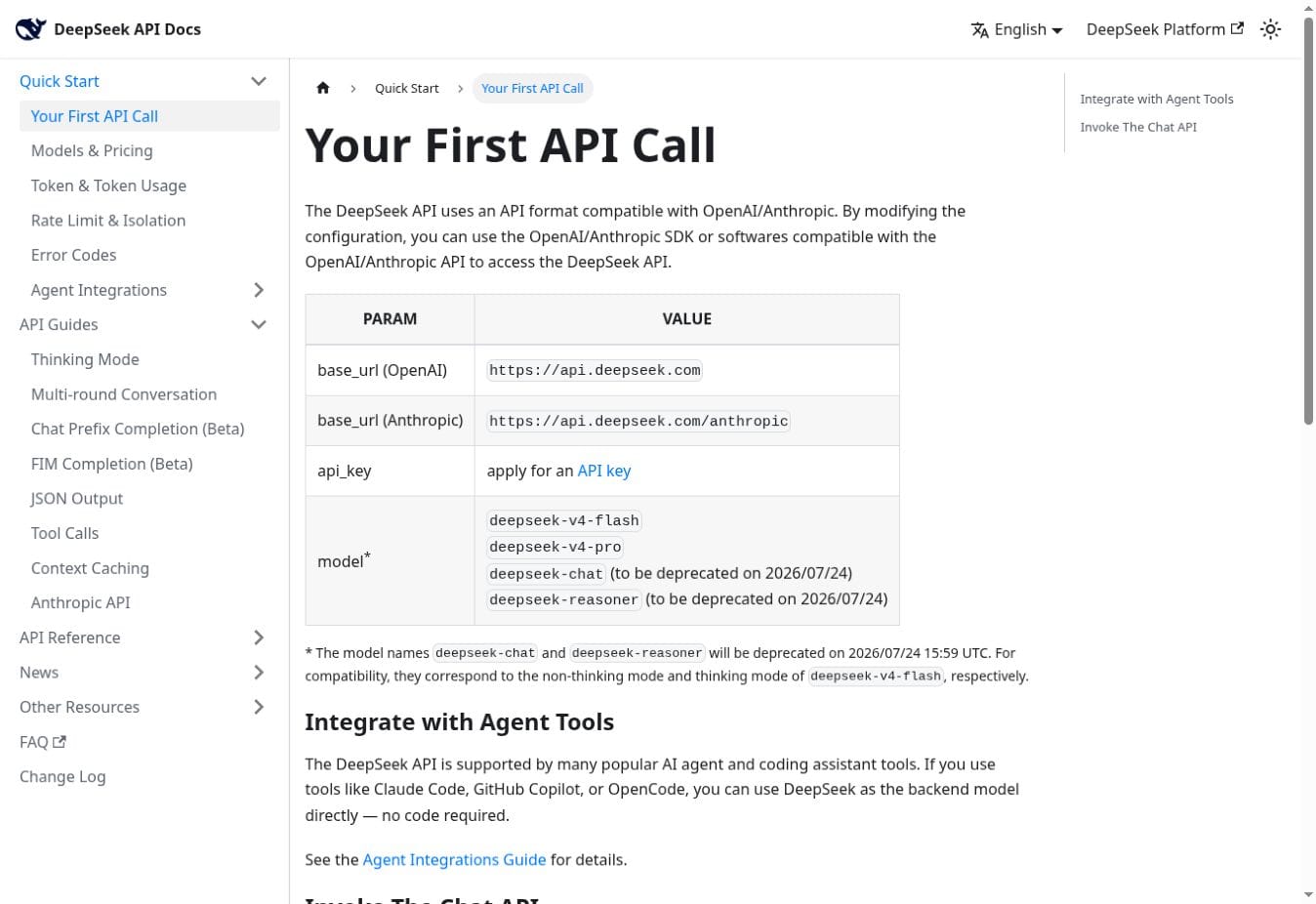
The official DeepSeek first API call guide documents two base URLs:
- OpenAI-compatible Chat Completions:
https://api.deepseek.com - Anthropic-compatible Messages API:
https://api.deepseek.com/anthropic
For new hosted-API integrations, use deepseek-v4-flash or deepseek-v4-pro. DeepSeek’s V4 release notice sets July 24, 2026, 15:59 UTC as the cutoff after which deepseek-chat and deepseek-reasoner are fully retired and inaccessible. Do not use those legacy aliases in new integrations or long-lived setup documentation.
OpenAI-compatible does not mean every OpenAI feature
DeepSeek documents an OpenAI-style Chat Completions route. That can make migration easier because the OpenAI SDK lets you change the base URL and API key. The DeepSeek API reference reviewed on July 23, 2026 documents Chat Completions rather than claiming parity with OpenAI Responses, Assistants, Files, vector stores, image input, every message role, or every optional field. Treat a capability that is absent from DeepSeek’s schema as unsupported until DeepSeek documents it and you test the exact route. Compare each request with DeepSeek’s own Chat Completion schema instead of assuming drop-in parity.
import OpenAI from "openai";

const apiKey = process.env.DEEPSEEK_API_KEY;

if (!apiKey) {
  throw new Error("Missing DEEPSEEK_API_KEY");
}

const client = new OpenAI({
  baseURL: "https://api.deepseek.com",
  apiKey,
});

const response = await client.chat.completions.create({
  model: "deepseek-v4-flash",
  messages: [
    {
      role: "system",
      content: "Return a concise draft. Do not claim to perform external actions.",
    },
    {
      role: "user",
      content: "Draft a two-sentence status update from these approved facts: ...",
    },
  ],
  stream: false,
});

console.log(response.choices[0]?.message?.content ?? "");
Run this on a server, serverless function, or private backend. Never place a DeepSeek API key in browser JavaScript, a mobile bundle, a public repository, a screenshot, a prompt, or a client-visible network request. The detailed OpenAI SDK with DeepSeek guide covers Python, Node.js, streaming, JSON, and tool loops; the API key guide covers creation, storage, rotation, and common authentication failures.
Anthropic-compatible endpoint
The DeepSeek Anthropic API guide supports Anthropic-style requests through https://api.deepseek.com/anthropic. This is useful for Anthropic SDK code and selected agent hosts. It is still a compatibility layer, not a complete implementation of every Anthropic feature.
- Image, document,
search_result, code-execution-result, and container-upload content types are not documented as supported. mcp_serversis ignored, whilemcp_tool_useandmcp_tool_resultare not supported.- On the Anthropic-compatible endpoint, names beginning with
claude-opusmap todeepseek-v4-pro, names beginning withclaude-sonnetorclaude-haikumap todeepseek-v4-flash, and an unsupported model name is automatically mapped todeepseek-v4-flash. Use an allowlisted model ID and verify the returned model instead of relying on an arbitrary name. anthropic-beta,anthropic-version,container,service_tier, andtop_kare ignored;thinking.budget_tokensis ignored; andoutput_configsupports onlyeffort. In thinking mode, sampling and penalty parameters do not affect generation even if compatibility handling avoids an error.
Capabilities useful in integrations
| Capability | Useful role | Boundary to remember |
|---|---|---|
| Streaming | Return partial text to a chat UI or long-running client | Your SSE parser must handle empty chunks, keep-alive comments, cancellation, timeouts, and a partial response |
| JSON Output | Request a parseable JSON object for classification or extraction | Set response_format to {"type":"json_object"}, include the word “json” and an example shape in the prompt, allow enough output, parse and validate the result, and handle occasional empty content or truncation when finish_reason="length" |
| Tool Calls | Let the model propose an allowed function and arguments | The host validates and executes; the model has no independent authority to act |
| Strict Tool Calls beta | Constrain function arguments to a supported JSON Schema subset | Schema conformity does not prove facts, authorization, safety, or a correct business decision |
| Thinking mode | Support more demanding reasoning and agent-style tasks | When thinking mode produces a tool call, preserve and return the assistant’s reasoning_content in subsequent tool-loop requests; omitting it causes HTTP 400. Keep this field inside the application rather than exposing it by default |
| Multi-turn chat | Maintain an application conversation | The Chat API is stateless; your application sends the relevant history on each request |
| Context caching | May reduce repeated-prefix processing cost | It is best-effort caching, not durable memory, a database, or a substitute for application state |
Use the dedicated guides for DeepSeek JSON Output and DeepSeek Tool Calls when implementing those features. This hub defines their role in an architecture without duplicating the full request schemas and troubleshooting steps.
Automation and internal-tool platforms
An automation platform usually contributes the trigger, credentials, app connectors, scheduling, branching, retries, and action steps. DeepSeek contributes the model response. Capabilities therefore depend on the exact connector version and workflow—not simply on the phrase “DeepSeek integration.”
| Platform route | How it commonly connects | Best first workflow | What to verify |
|---|---|---|---|
| n8n | DeepSeek Chat Model node where available, OpenAI-compatible credentials, HTTP Request, an AI Agent, or a locally served model | Read-only classification or a draft that stops for approval | Node availability, credential storage, model route, tool permissions, execution history, and retry behavior |
| Pipedream | DeepSeek API call inside a workflow triggered by an app event, schedule, webhook, or HTTP request | Sanitize an event and produce structured data for review | Secret storage, code-step ownership, event payloads, logs, retries, and destination authorization |
| Retool | Custom AI provider or a backend resource using an OpenAI-compatible endpoint | Internal tool that displays a draft or analysis beside the source record | Resource location, user and tenant authorization, query exposure, audit logs, and production access |
| Zapier | A Zapier-maintained DeepSeek app, supported action, or generic webhook/API step | Generate a reviewed summary or draft from low-risk input | Verify the vendor’s DeepSeek directory |
| Make | A Make connector module or direct API request inside a scenario | Transform approved structured fields without writing back automatically | Verify the vendor’s DeepSeek directory |
| Other no-code platforms | Vendor connector, HTTP action, webhook, or custom component | A reversible read-only proof of concept | Connector availability, ownership, capabilities, permissions, data retention, and privacy terms |
How to connect DeepSeek with n8n
In n8n, use the DeepSeek Chat Model node when it is available in the workspace and supports the behavior you need. Use an HTTP Request node when you need direct control over https://api.deepseek.com/chat/completions, request fields, JSON Output, or error handling. An AI Agent adds tool selection around the model; the connected n8n tools still perform the external actions. A locally served compatible model is a separate hosting route with different model, hardware, and privacy characteristics.
- Create a DeepSeek credential in n8n instead of pasting the API key into a prompt, expression, or Code node.
- Add a manual or test trigger, then connect the DeepSeek model node or an HTTP Request node.
- Select
deepseek-v4-flashordeepseek-v4-proand begin with synthetic or non-sensitive input. - Inspect the model result before adding a Slack, email, database, ticket, or commerce action.
- Add schema checks, permission checks, approval, retry limits, and idempotency before activating the workflow.
Before using a connector, confirm who stores the API key, whether data is visible in run history, whether logs include prompts or outputs, which region executes the workflow, how retries behave, and whether an operator can export or delete records. A “no-code” workflow still has an architecture and a security boundary.
DeepSeek integrations by platform
The following products can participate in a DeepSeek workflow through one or more external routes. Unless a row says otherwise, do not interpret it as a native feature inside DeepSeek. Use the connection routes and verification controls below to identify the API, webhook, connector, permissions, limitations, and review steps required for each platform.
Communication and collaboration
| Platform | Verified connection routes | Appropriate first use | Control to verify |
|---|---|---|---|
| Gmail and Outlook | Email APIs, add-ons, automation platforms, or a custom backend | Summarize a selected message or draft a reply for review | Mailbox and message scope, recipients, attachments, retention, and explicit approval before sending |
| Google Workspace | Workspace APIs, Apps Script, third-party automation, or a custom application | Draft from an approved document excerpt or prepare calendar fields without creating the event | Per-service OAuth scopes, shared-drive access, calendar identity, cross-app data flow, and write approval |
| Slack | Slack app, bot, Events API, slash command, workflow platform, or backend service | Channel summary or internal Q&A draft with source links | Workspace consent, channel allowlist, app scopes, private-channel access, message retention, and posting approval |
| Microsoft Teams | Teams app or bot, Microsoft Graph, Power Automate, Azure-hosted middleware, or another approved service | Meeting follow-up draft or read-only knowledge answer | Tenant consent, Graph and bot permissions, team or meeting scope, middleware storage, and posting identity |
| Discord | Discord bot, slash command, automation platform, or self-hosted service | Opt-in command for summaries or FAQ answers | Bot permissions, server and channel allowlists, moderation boundaries, member data, and command rate limits |
| WhatsApp Business and Telegram | WhatsApp Business Platform, Telegram Bot API, middleware, and a DeepSeek backend | Agent-reviewed answer draft or simple intent routing | User consent, approved templates where required, conversation identifiers, escalation, retention, and send authority |
Email and chat systems contain private threads, attachments, member data, and instructions supplied by other people. Retrieve only the message or fields needed for the task. Treat message content as untrusted input, and never let a message instruct the model to expand its own permissions, reveal secrets, change policy, or send an unapproved response.
Projects, knowledge, and IT service management
| Platform group | Connection route | Suitable scope | Control to verify |
|---|---|---|---|
| Notion | Notion API, automation platform, manual transfer, or a feature available inside a specific workspace | Database entries, approved-page workflows, summaries, and permission-bounded retrieval | Integration access to pages and databases, workspace sharing, properties exposed, destination database, and write approval |
| Jira, Confluence, and Linear | Product APIs, webhooks, automation, or engineering middleware | Product specifications, sprint material, issue drafts, and handoffs | Project and space allowlists, issue visibility, user identity, field validation, and approval before assignment or status changes |
| ServiceNow and Jira Service Management | ITSM APIs, workflow engines, event hooks, or an internal service | Ticket triage, knowledge suggestions, escalation, and service-desk controls | Service roles, customer and agent visibility, knowledge permissions, SLA effects, escalation policy, and approval before writes |
The two Jira routes serve different needs. Jira with Confluence or Linear usually supports product and engineering work; Jira Service Management with ServiceNow belongs to incidents, requests, knowledge, SLAs, and operational escalation. In either case, a draft issue is lower risk than an automatic priority change, assignment, closure, or production action.
Customer support, sales, and commerce
| Platform group | Connection route | Safe starting point | Control or supporting guide |
|---|---|---|---|
| Zendesk, Intercom, and Freshdesk | Helpdesk APIs, webhooks, custom apps, or orchestration middleware | Internal ticket summary, intent suggestion, or reply draft grounded in approved help content | Ticket and customer visibility, approved knowledge sources, agent identity, escalation rules, and approval before sending |
| Shopify and WooCommerce | Store APIs, webhooks, plugins, helpdesk events, or a custom backend | Product-copy draft from verified catalog fields or a return-reason summary | Store scopes, verified catalog and order fields, customer data, refund authority, inventory state, and write approval |
| Sales and CRM systems | CRM API, workflow automation, or internal sales application | Summarize an approved record or draft a next-step note without changing the pipeline | DeepSeek for sales and CRM workflows |
Customer-facing workflows need stronger grounding and handoff rules than internal drafting. A model should not invent product specifications, policy exceptions, delivery promises, refunds, account status, prices, warranties, or eligibility. Retrieve the approved source, attach traceable evidence, block unsupported claims, and route uncertain or sensitive cases to an authorized person.
For operating-model design rather than platform setup, use the separate guides to customer-support automation with DeepSeek and DeepSeek for IT service desks.
Web, content, and data platforms
| Platform group | Connection route | Important boundary | Control or supporting guide |
|---|---|---|---|
| WordPress | Server-side plugin, custom plugin, REST API, or automation service | DeepSeek does not install plugins or publish safely without WordPress permissions and review controls | Keep the key server-side; restrict post types, authors, status transitions, media access, and publishing authority |
| Webflow and Framer | Manual workflow, CMS APIs, CSV, plugin, server API, or middleware where available | Model output is a content or structure draft, not proof, a design system, or a ranking guarantee | Verify CMS collection access, fields, locale, staging destination, asset rights, and approval before publication |
| Power BI | Approved exports, a governed backend, scripts, or a documented platform route | Verify measures, row-level security, refresh state, and the source data | DeepSeek and Power BI |
| Tableau and Looker Studio | Approved data extracts, APIs, scripts, or a separate orchestration layer | The model does not certify calculations or dashboard access controls | DeepSeek with Tableau and Looker Studio |
WordPress and WooCommerce overlap technically but serve different workflows: WordPress integration centers on CMS permissions, plugins, drafts, and publishing, while Shopify and WooCommerce workflows also involve catalog, orders, returns, customers, inventory, and commerce authority. For CSV, Excel, Python, and analysis workflows, use the dedicated DeepSeek data-analysis guide.
Janitor AI and other custom chat interfaces
Janitor AI and some other third-party chat interfaces may provide a Custom API, Proxy, or OpenAI-compatible provider form. The URL, API key, and model name must belong to the same route. For a direct DeepSeek base-URL field, use https://api.deepseek.com. If the interface explicitly requests the complete Chat Completions endpoint, use https://api.deepseek.com/chat/completions. Select deepseek-v4-flash or deepseek-v4-pro, save the configuration, refresh the chat interface if required, and begin with a short non-sensitive test.
Do not combine a DeepSeek API key with an OpenRouter or other proxy URL, and do not use a proxy-provider model slug with the direct DeepSeek endpoint. Interface labels can change, so verify whether the field expects a base URL or a complete endpoint. The platform and any proxy become additional data processors; review their privacy, logging, retention, content, age, and account policies separately, and never expose the API key in a character card, public preset, prompt, or screenshot.
Developer frameworks, RAG, and agent tools
Frameworks and retrieval
A framework can organize prompts, retrievers, tools, memory owned by the application, multi-step flows, and observability. It does not make the model more accurate by itself, and it does not remove the need to evaluate provider-specific behavior.
| Framework or pattern | What it adds around DeepSeek | What you still provide | Guide |
|---|---|---|---|
| LangChain | Model wrappers, prompts, chains, tools, agents, retrievers, structured-output helpers, and tracing integrations | Package-version testing, credentials, retrieval data, policies, validation, and operations | DeepSeek LangChain integration |
| LlamaIndex | Document ingestion patterns, indexes, retrievers, query engines, and response synthesis | An embedding model, storage, document permissions, evaluation, and source verification | DeepSeek LlamaIndex integration |
| Vector database | Stores and retrieves embeddings or indexed document chunks | Chunking, embeddings, tenant isolation, deletion, access filtering, and source provenance | DeepSeek vector-database guide |
| RAG knowledge base | Grounds an answer in retrieved approved content | Document governance, retrieval quality, citations, abstention, testing, and human escalation | DeepSeek RAG knowledge base |
DeepSeek’s hosted Chat API does not document a general embeddings endpoint, managed vector store, or document-ingestion service equivalent to a complete RAG stack. A DeepSeek RAG application therefore commonly uses a separate embedding model, parser, vector or search system, authorization layer, and document lifecycle.
Agent and coding tools listed in DeepSeek documentation
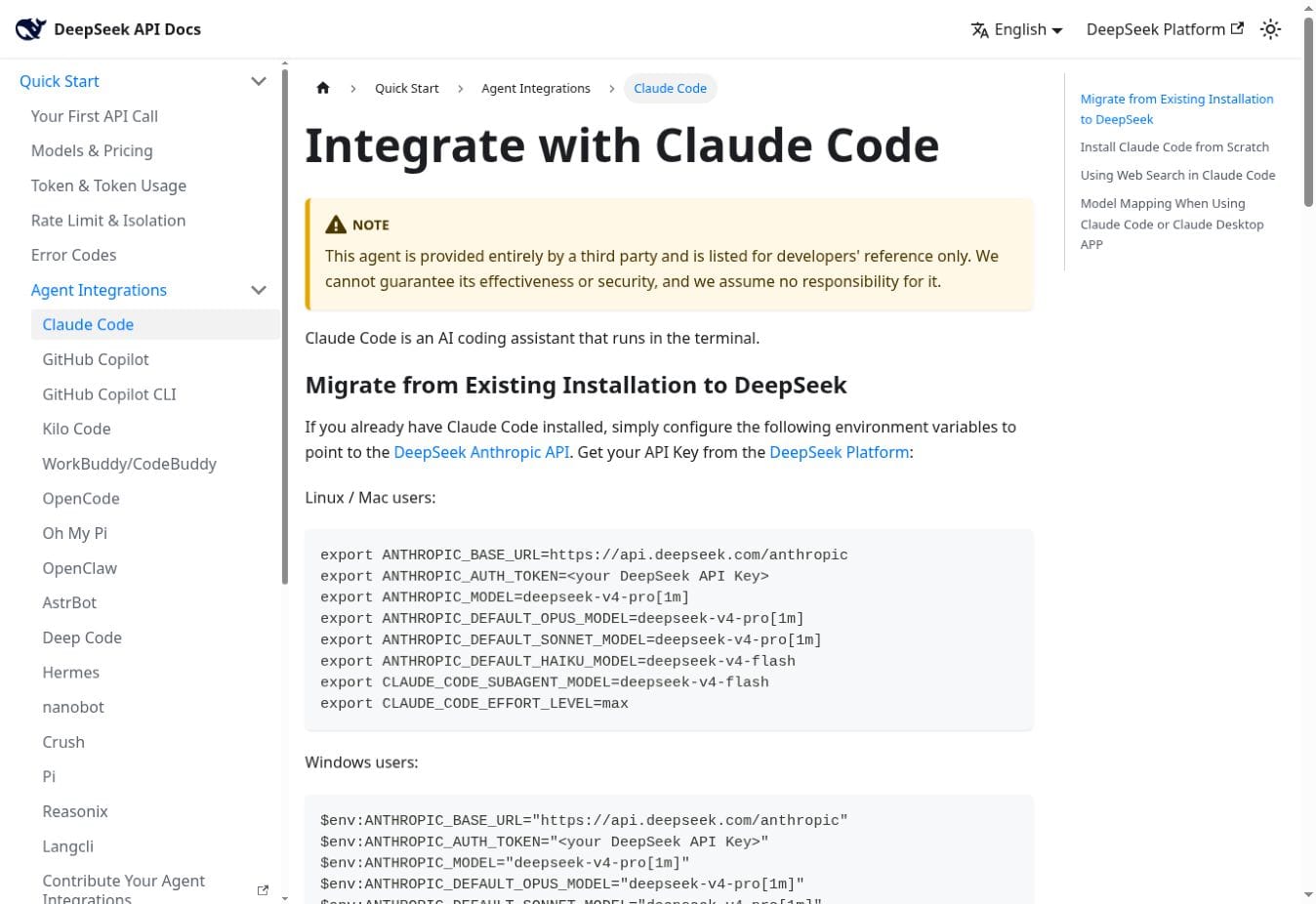
DeepSeek’s Agent Integrations documentation provides setup pages for third-party tools including Claude Code, GitHub Copilot Chat, GitHub Copilot CLI, Kilo Code, WorkBuddy/CodeBuddy, OpenCode, Oh My Pi, OpenClaw, AstrBot, Deep Code, Hermes, nanobot, Crush, Pi, Reasonix, and Langcli.
| Tool route | Connection pattern | Important qualification |
|---|---|---|
| Claude Code | Configure the DeepSeek Anthropic-compatible endpoint and model mapping | The tool is third-party. DeepSeek documents web search in this specific integration; that does not make search a universal Chat Completions feature. |
| GitHub Copilot Chat | Third-party extension route described in DeepSeek’s setup guide | It is not a native GitHub or DeepSeek connector, can depend on non-public Copilot interfaces, and may add another model provider for image descriptions. |
| GitHub Copilot CLI | Anthropic provider configuration | An “offline” label does not mean prompts remain on the device when the endpoint is api.deepseek.com. |
| OpenCode | Provider configuration in the host | Test the documented host version, model mapping, tools, and thinking behavior before relying on it. |
| Other listed hosts | Tool-specific environment variables, provider files, or custom model configuration | Host limits, costs, fields, and workarounds are not necessarily DeepSeek API limits or guarantees. |
Do not copy model limits or price values from a third-party host configuration into an API architecture. A host may set a conservative context or output cap, and an older page may retain retired aliases. Use DeepSeek’s Models & Pricing page for provider specifications and test the exact tool release you intend to deploy.
Tool Calls, MCP, and webhooks: the important differences
| Mechanism | What it does | Who executes | Security meaning |
|---|---|---|---|
| JSON Output | Asks the model for a JSON object | No external action is inherent | Parse and validate every value; valid JSON can still be false or unsafe |
| Tool Call | The model proposes a function name and JSON arguments | Your application or agent host | Validate the function, arguments, identity, authorization, and target state before execution |
| Strict Tool Call beta | Constrains arguments to DeepSeek’s supported JSON Schema subset | Your application or agent host | Improves shape conformity; it is not authentication, permission, truth, or business-rule validation |
| MCP | A host connects to MCP servers and exposes their tools or resources | The MCP-capable host and server | DeepSeek does not document a native MCP endpoint; the host must enforce trust and permissions |
| Webhook | An application sends an event to start or continue a workflow | The source platform and your integration service | Verify signatures, timestamps, replay protection, event type, tenant, and payload size |
| Connector action | A platform step sends, creates, updates, deletes, or retrieves data | The connector or middleware under granted credentials | Scope credentials narrowly and require confirmation for consequential side effects |
The official Tool Calls guide documents function tools only, with a maximum of 128 functions per request. The model can propose a function and arguments, but the application provides and executes the function. Non-strict arguments can be malformed or include invented parameters. Strict mode is beta: it requires https://api.deepseek.com/beta, strict:true on every function, a supported JSON Schema subset, all object properties marked required, and additionalProperties:false. It still requires authorization and business validation.
DeepSeek’s Anthropic-compatible documentation says mcp_servers is ignored and MCP tool-use/result blocks are unsupported. You can still use DeepSeek as the model inside an MCP-capable host. In that architecture, the host connects to MCP, translates or presents tools, executes allowed calls, and returns sanitized results. Do not describe this as DeepSeek natively hosting MCP servers.
A safer DeepSeek integration architecture
Recommended flow: source system → authenticated integration service → data minimization and policy gate → DeepSeek API or approved model endpoint → output validation → human approval where required → narrowly scoped connector action → redacted audit event.
| Stage | Implementation control | Failure response |
|---|---|---|
| 1. Authenticate the requester | Identify the user, tenant, role, and allowed workflow before retrieving data | Reject an unknown, disabled, or out-of-scope identity |
| 2. Read minimally | Fetch only approved fields and records; use read-only access where possible | Stop if the connector returns another tenant, excessive fields, or restricted data |
| 3. Sanitize and label | Remove secrets and unnecessary personal data; label source text as untrusted content | Quarantine or route material that violates the workflow’s data policy |
| 4. Call the model | Use an allowlisted endpoint, model, prompt version, output limit, and timeout | Apply bounded retries only to retryable failures; do not hide a model or provider change |
| 5. Validate output | Parse structure; enforce schema, types, allowed values, lengths, IDs, and business rules | Reject, repair safely, or route to a person—never pass malformed output to an executor |
| 6. Re-authorize the action | Check the user’s live permission and the target’s live state immediately before writing | Stop if access was revoked, the record changed, or the action exceeds policy |
| 7. Confirm consequences | Show a human the target, recipients, changed fields, source, and proposed effect | Require rejection or editing when the action is ambiguous or consequential |
| 8. Execute once | Use idempotency keys, optimistic locking, transaction boundaries, and narrow credentials | Prevent duplicate messages, events, refunds, tickets, or record changes |
| 9. Record and monitor | Log redacted metadata, prompt version, decision, approver, action result, and request IDs | Alert an owner, pause the workflow, preserve evidence, and provide rollback instructions |
Illustrative workflow: email request to reviewed project task
This fictional example demonstrates boundaries; it is not a live test or a claim that every email or project platform supports the same connector.
- An authorized employee selects one email and clicks Prepare task draft. The integration does not scan the whole mailbox.
- The backend retrieves the subject, body, and permitted attachment text. It removes signatures, tracking data, unnecessary addresses, and secrets.
- The prompt treats the email as untrusted source material and asks for JSON containing a proposed title, evidence excerpt, due-date status, owner status, questions, and a
human_review_requiredflag. - The validator rejects unknown fields and checks lengths and allowed values. It does not accept an owner or date unless the source explicitly supports it.
- A preview shows the source excerpt beside the proposed task. The employee confirms the correct project, edits the title, selects the owner, and supplies the real deadline.
- The backend checks the employee’s project permission again and creates one task with an idempotency key.
- The system stores a redacted audit event and the external task ID. A failed or duplicate response does not trigger an uncontrolled retry.
The model’s contribution is extraction and drafting. The connector retrieves the email and creates the task. The backend owns policy and validation. The employee supplies authority and judgment. Keeping those roles separate makes the workflow easier to test, explain, and stop.
DeepSeek integration security and privacy checklist
Protect API keys and platform credentials
- Keep DeepSeek keys, OAuth tokens, webhook secrets, database passwords, and service-account credentials on the server or in a managed secret store.
- Use separate credentials for development, staging, and production; do not share one personal key across a team.
- Restrict access to the deployment identity that needs the secret, and rotate or revoke it after suspected exposure.
- Prevent secrets from entering source control, prompts, screenshots, analytics, error traces, support tickets, and automation run history.
- Set cost and concurrency alerts and investigate unexpected usage instead of treating billing anomalies as only a finance issue.
DeepSeek’s Open Platform Terms place responsibility for protecting the API key and operating downstream applications on the developer. A browser should call your authenticated backend—not the DeepSeek API with a secret embedded in client code.
Map the complete data flow
Document every system that receives or stores input, output, metadata, attachments, and logs: the source platform, connector vendor, automation service, cloud host, DeepSeek route, observability tools, error tracker, data warehouse, and target application. For each one, record purpose, fields, region, retention, deletion process, subprocessors, access roles, and legal or contractual basis.
A workflow built in a user’s DeepSeek account, cloud project, or automation platform is not governed by Chat-Deep.ai’s Privacy Policy or Security page; those pages describe this site’s own scope. Chat-Deep.ai’s browser chat also does not connect to the user’s Gmail, Slack, Notion, or other accounts and should not be presented as an integration console.
Minimize data and permissions
- Request the narrowest OAuth scopes and API roles that support the exact workflow.
- Prefer a dedicated service identity over a powerful administrator or employee account.
- Retrieve selected records and fields, not an entire mailbox, workspace, drive, ticket history, store, or knowledge base.
- Remove personal data, secrets, hidden fields, comments, revision history, and attachments the model does not need.
- Separate read permissions from write permissions, and keep the first release read-only or draft-only.
Treat connected content as untrusted
Email, documents, tickets, webpages, community posts, product data, and tool results can contain instructions that conflict with the integration’s policy. This is a prompt-injection risk: an attacker may try to make the model reveal data, call a different tool, alter recipients, ignore approval, or retrieve more context.
- Separate system instructions from retrieved content and clearly label the latter as untrusted data.
- Allowlist tools, target systems, fields, recipients, and destinations independently of the model response.
- Do not place credentials or hidden secrets in model-visible context.
- Validate every tool argument and enforce authorization outside the model.
- Require confirmation before sending, publishing, deleting, purchasing, refunding, booking, changing access, or modifying a system of record.
- Test indirect injection inside attachments, retrieved documents, HTML, tool results, and quoted email threads—not only the user’s visible prompt.
Use the OWASP prompt-injection guidance and OWASP API Security project as risk references alongside your organization’s policies, threat model, and applicable requirements.
Validate output and control side effects
| Control | Required check |
|---|---|
| Schema | Type, required fields, additional fields, lengths, formats, enums, and parser success |
| Identity | Authenticated user, tenant, recipient, owner, customer, account, and target record |
| Authorization | Live permission for the exact action, not merely permission to ask the model |
| Facts | Names, dates, amounts, status, source excerpts, citations, and policy version |
| Business rules | Thresholds, inventory, eligibility, workflow state, separation of duties, and required approvers |
| State conflict | Whether the target changed between reading and writing |
| Idempotency | Whether a retry could create a duplicate message, event, order, task, payment, or refund |
| Human confirmation | Clear preview of the final target and effect before a consequential or irreversible action |
Design logging, retention, and incident response together
Logs should make an integration explainable without becoming a second copy of every prompt, document, email, and credential. Record a request ID, workflow version, model route, redacted input classification, tool selected, validation result, approver, target object, execution result, latency, token usage, and error category. Avoid raw access tokens and minimize personal or confidential content.
- Define separate retention periods for application records, model inputs and outputs, connector histories, approval evidence, debug traces, and security events.
- Restrict production logs by role, encrypt them, monitor exports, and make deletion requests cover every processor in the data path.
- Use correlation IDs so an operator can trace one run across the source, backend, model request, approval step, and destination without logging all content.
- Prepare a kill switch that can disable a workflow, connector, tenant, tool, or write action without waiting for a code release.
- Document how to revoke keys and OAuth grants, identify affected records, notify owners, restore data, and prevent duplicate replay after an outage.
Hosted API versus a local or self-hosted model
Self-hosting compatible DeepSeek open weights can give an organization more control over the model server and network path, but it does not make an integration private by definition. The source connector, vector database, orchestration service, telemetry, backups, logs, evaluation tools, and destination may still transmit or retain data. The organization also becomes responsible for model serving, access control, patching, capacity, abuse protection, and model-version evaluation.
Confirm which endpoint each component actually calls. A coding agent running on a laptop can still send prompts to api.deepseek.com; “local tool” and “local model” are different claims. Use the local DeepSeek guide when local deployment is the requirement, and keep platform integration instructions separate from model-hosting instructions.
Give users accurate notice and control
Tell users when AI is involved, which data is sent, why it is processed, whether a person reviews the result, which external action may follow, and how they can correct or challenge it. DeepSeek’s Open Platform Terms place downstream legal, privacy, security, and user-agreement responsibilities on the operator and require appropriate disclosure that generated content is AI-produced and for reference. Do not imply that an integration is a DeepSeek partnership or use DeepSeek branding in a way that suggests official approval.
A low-risk DeepSeek integration rollout plan
Start with a narrow task whose input, expected output, owner, and failure cost are easy to define. Advance authority only after evidence shows that the preceding level is reliable. The model does not need write access merely because the eventual business process includes a write.
| Level | Integration behavior | Evidence required before advancing |
|---|---|---|
| 0 — Evaluation | Use synthetic or de-identified examples; save no external action | Defined success metrics, failure taxonomy, data classification, and baseline quality |
| 1 — Read-only assistance | Retrieve a narrow record set and summarize, classify, or answer for an employee | Permission checks, retrieval precision, redaction, source grounding, and acceptable error rate |
| 2 — Draft only | Create a draft email, ticket reply, document, query, or task for a person to edit | Clear provenance, review interface, no automatic send, and measured acceptance and correction rates |
| 3 — Proposed structured action | Return validated fields and preview the exact action without executing it | Schema validation, allowlists, business-rule checks, conflict detection, and complete preview |
| 4 — Human-approved write | An authorized person confirms the target and effect immediately before execution | Live authorization, audit event, idempotency key, rollback path, and incident drill |
| 5 — Limited automation | Execute only predefined, low-impact cases within strict thresholds; route exceptions to people | Stable production metrics, sampled review, drift detection, spend limits, kill switch, and named owner |
Which integration route should you choose?
| If your main requirement is… | Start with… | Upgrade when… |
|---|---|---|
| A model feature inside your own product | Server-side DeepSeek API call | You need tools, retrieval, workflow state, or multiple providers |
| A simple trigger between common SaaS applications | n8n, Pipedream, Zapier, Make, or an approved automation platform | Data sensitivity, custom authorization, volume, or control exceeds the platform’s fit |
| An internal employee interface over several APIs | Retool or a custom internal application | You need a customer-facing product, complex tenancy, or specialized operations |
| RAG over governed organizational knowledge | LangChain, LlamaIndex, or custom retrieval plus a vector/database layer | The abstraction blocks a provider feature or creates unacceptable operational complexity |
| A coding or agent tool | A DeepSeek-documented third-party setup guide plus the tool vendor’s documentation | The host’s compatibility route, privacy, or reliability is unsuitable |
| Maximum control over model hosting | A self-hosted endpoint after infrastructure and security assessment | Operational cost or feature requirements make a managed endpoint preferable |
Testing a DeepSeek integration before production
A successful demonstration proves only that one path worked once. Test the model behavior, the deterministic application controls, and the connector side effects separately. Keep a versioned evaluation set that represents ordinary cases, difficult cases, disallowed requests, malicious content, and operational failures.
| Test case | Expected safe behavior |
|---|---|
| Normal, complete input | Correct schema and useful result with traceable source fields |
| Missing or ambiguous fields | Ask for clarification, mark uncertainty, or stop; do not invent required values |
| Very long or malformed content | Apply size limits, safe parsing, chunking rules, and a controlled error path |
| Prompt injection in an email, document, webpage, or tool result | Ignore untrusted instructions, expose no secrets, and call no unauthorized tool |
| Cross-tenant record reference | Deny access before model retrieval or tool execution |
| Revoked permission after drafting | Fail the live authorization check and execute nothing |
| Invalid, empty, or truncated JSON | Reject parsing, retry only within policy, and route to review |
| Hallucinated tool, field, recipient, or record | Reject through allowlists and existence checks |
| Duplicate event or network retry | Use the same idempotency key and avoid a duplicate external action |
| Target changed after it was read | Detect the version conflict and require a fresh review |
| API 401, 402, 429, timeout, or 5xx response | Classify the error, apply bounded retry where appropriate, alert when necessary, and never bypass controls |
| Connector partially succeeds | Record the exact state, avoid blind replay, and reconcile or compensate safely |
| Human rejects or edits the proposal | Capture a useful reason without treating sensitive edited content as unrestricted training data |
| Kill switch activated | Prevent new runs and writes while preserving enough redacted evidence for investigation |
Production-readiness checklist
- The deployed model ID, base URL, API format, SDK version, prompt, schema, and connector version are pinned or change-controlled.
- Development, staging, and production use separate credentials, data, webhooks, queues, and destination records.
- Timeouts, retry limits, backoff, concurrency, rate limits, budgets, maximum input and output sizes, and circuit breakers are explicit.
- Every external write has authorization, validation, idempotency, an auditable actor, and a defined recovery method.
- Metrics cover quality, refusal or escalation, correction rate, latency, availability, token use, cost, connector errors, policy blocks, and approval outcomes.
- Alerts have owners and runbooks; operators can disable the workflow, rotate credentials, inspect a run, and reconcile partial actions.
- Privacy, security, procurement, contractual, and user-notice reviews cover every processor—not only the model endpoint.
- A scheduled review checks documentation changes, model behavior, connector ownership, permissions, retention, costs, and business rules.
Authentication, billing, request-validation, rate-limit, timeout, and server failures should be diagnosed from the raw HTTP status, response body, request ID, model ID, timestamp, and connector run ID. Use the dedicated DeepSeek error codes guide for API-specific causes and fixes. Connector failures should also be checked in the source and destination platform logs because a successful model response does not prove that the external action succeeded.
Common DeepSeek integration mistakes
- Calling every connection native. Distinguish DeepSeek-documented API behavior, a third-party reference guide, a vendor connector, and custom code.
- Putting the API key in the frontend. A browser, mobile app, downloadable workflow, or public repository cannot keep a shared secret.
- Assuming compatibility means parity. OpenAI- and Anthropic-compatible routes implement selected request styles, not every product and field in those ecosystems.
- Letting model output equal authorization. A proposed function call is input to a policy-controlled executor, not permission to act.
- Trusting valid JSON as a correct answer. Syntax can pass while names, amounts, dates, identifiers, or decisions are wrong.
- Sending too much data. Broad mailbox, workspace, drive, database, or ticket access increases privacy risk, injection surface, latency, and cost.
- Giving a connector administrator privileges. Use narrow scopes, separate service identities, target allowlists, and read/write separation.
- Retrying writes blindly. Network uncertainty can turn one action into duplicate emails, tickets, orders, tasks, events, refunds, or payments.
- Treating API caching as memory. The application must manage conversation history, durable state, retrieval, and user records.
- Calling a laptop agent offline. A locally installed host may still send prompts, code, and tool results to a hosted API.
- Launching with autonomous writes. Begin with read-only output or drafts, measure failures, then add tightly bounded authority.
- Ignoring connector ownership and updates. A marketplace listing or community package can change maintainer, permissions, API route, or behavior.
DeepSeek integrations FAQ
Does DeepSeek have integrations?
DeepSeek provides hosted API formats and model features that applications can integrate, plus setup pages for selected third-party agent tools. Many business applications connect through their own API, webhook, plugin, automation platform, or a custom backend. That does not make every named platform a native or official DeepSeek integration.
Which platforms can connect to DeepSeek?
Possible routes include automation tools such as n8n, Pipedream, Zapier, and Make; communication and work platforms such as Gmail, Outlook, Google Workspace, Slack, Teams, Discord, WhatsApp, Telegram, Notion, Jira, Confluence, Linear, ServiceNow, and Jira Service Management; and web, support, commerce, data, and developer systems. Availability depends on the platform API, connector, account plan, permissions, region, and implementation.
Are Slack, Gmail, Notion, and Microsoft 365 native DeepSeek integrations?
Do not describe them as native unless the specific platform and DeepSeek both document a first-party connection. They can be connected through platform APIs, vendor or community connectors, automation tools, or custom services. Verify the maintainer and data flow for the exact route you deploy.
What is the easiest way to integrate DeepSeek?
For a feature in your own application, a server-side OpenAI-compatible Chat Completions request is usually the smallest starting point. For a simple business trigger, an approved automation platform can be faster. Ease of setup should not replace data-flow, permission, validation, and vendor review.
Can I use the OpenAI SDK with DeepSeek?
Yes. Configure the client with https://api.deepseek.com, a DeepSeek API key, and a supported DeepSeek model ID such as deepseek-v4-flash or deepseek-v4-pro. Treat it as Chat Completions compatibility, not support for every OpenAI API, product, field, message role, or content type.
Which DeepSeek model IDs should new integrations use?
Use deepseek-v4-flash or deepseek-v4-pro for new hosted DeepSeek API integrations. DeepSeek set July 24, 2026, at 15:59 UTC as the retirement cutoff for the legacy deepseek-chat and deepseek-reasoner aliases, after which they are inaccessible. New configurations should not depend on those names.
Can I use an Anthropic SDK or Claude Code with DeepSeek?
DeepSeek documents an Anthropic-compatible endpoint at https://api.deepseek.com/anthropic and a third-party Claude Code setup. The compatibility layer excludes or ignores several Anthropic content types and fields, so use DeepSeek’s compatibility table and test the exact host workflow.
Does DeepSeek execute tool calls by itself?
No. The model can return a function name and proposed JSON arguments. Your application must parse and validate them, confirm authorization, run an allowlisted function, return a sanitized tool result to the model if needed, and record the action.
Does DeepSeek support MCP?
A host application can bridge Model Context Protocol servers to DeepSeek by exposing MCP tools as callable functions and executing them outside the model. DeepSeek does not document a native hosted MCP endpoint, and its Anthropic-compatible API says mcp_servers is ignored while MCP tool-use content blocks are unsupported.
Does DeepSeek provide webhooks for Gmail, Slack, stores, or project tools?
The DeepSeek Chat Completions API is a model request endpoint, not an event source for those platforms. Gmail, Slack, Shopify, Jira, and similar systems—or an automation service—generate the webhook or polling trigger. Your backend then sends approved content to DeepSeek and handles any validated response.
Does the DeepSeek API remember previous requests?
The API does not maintain conversation state for your application. Send the relevant approved history with each request and keep durable user, workflow, and business state in your own controlled systems. DeepSeek context caching may temporarily retain reusable request prefixes under the provider’s cache behavior, but it is best-effort processing optimization rather than persistent conversation memory.
Can the hosted DeepSeek V4 API process images or uploaded files?
The documented V4 hosted chat models are text-only, and the Anthropic-compatible route does not support image and document content blocks. An application may extract text from an allowed file with a separate parser and send that text, but the parser, file security, permissions, size limits, and extraction quality become part of the integration.
How should I protect a DeepSeek API key?
Store it in a server-side secret manager or protected environment, give access only to the deployment identity, separate environments, rotate after exposure, and prevent it from entering code, browser requests, logs, prompts, screenshots, and downloadable workflows. Revoke a compromised key rather than relying only on deleting the visible copy.
Is it safe to send confidential or personal data through a DeepSeek integration?
There is no universal yes or no. Determine whether the proposed data and processors satisfy your law, contracts, customer commitments, organizational policy, region, retention, security, and access requirements. Minimize and redact data, obtain the required basis or consent, review DeepSeek and connector terms, and keep high-impact actions under deterministic and human control.
Is a self-hosted DeepSeek integration automatically private or offline?
No. It can reduce transmission to an external model provider if the weights and endpoint are truly under your control, but connectors, telemetry, logs, vector stores, orchestration, backups, and destination services may still move data. Verify every outbound route and operate the model server securely.
How do I reduce prompt-injection risk in connected applications?
Treat retrieved emails, files, web content, tickets, and tool results as untrusted data. Keep secrets outside model context, allowlist tools and destinations, validate arguments, enforce authorization and business rules in code, minimize permissions, and require confirmation for consequential actions. Test indirect injection inside retrieved content.
Can DeepSeek integrate with Zapier, Make, n8n, or Pipedream—and which should I use?
Yes, depending on the platform and connector version, DeepSeek can be connected through a vendor connector, model node, HTTP request, webhook workflow, or custom code. Choose according to approved connectors, deployment model, regional and retention requirements, credential controls, observability, code flexibility, pricing, and team capability. Regardless of platform, use minimum permissions, input filtering, output validation, approval for consequential actions, idempotency, audit records, and a kill switch.
Can Chat-Deep.ai connect to my accounts or run these workflows for me?
No. This page is an independent educational directory and architecture guide. The Chat-Deep.ai browser chat does not connect to your Gmail, Slack, Notion, Microsoft, store, project, or automation accounts and does not execute the integrations described here.
Primary references and verification notes
The following sources were reviewed on July 23, 2026. Product behavior, model availability, connector ownership, terms, and limits can change; verify them again before implementation or publication of a platform-specific claim.
- DeepSeek API Docs — First API Call: base URLs, V4 model IDs, and agent-tools directory.
- Create Chat Completion: request and response fields, tools, tool choice, structured response format, and streaming.
- Anthropic API compatibility guide: endpoint, model mapping, supported fields, ignored fields, and unsupported content types.
- JSON Output guide: JSON request requirements and empty or truncated output cautions.
- Tool Calls guide: function definitions, arguments, tool selection, host execution, and strict-mode beta requirements.
- Multi-round conversation guide and context caching guide: application-managed history and best-effort cache behavior.
- Claude Code integration page: example of a DeepSeek-listed third-party tool and the third-party effectiveness and security disclaimer.
- DeepSeek Open Platform Terms of Service and DeepSeek Privacy Policy: operator duties, credentials, downstream services, user notice, branding, and provider data terms.
- OWASP LLM01 Prompt Injection and OWASP API Security: independent security risk references.
Start with the connection boundary, not the platform logo
Define what data may leave the source, what DeepSeek may propose, what code must verify, and who may authorize the result. Then choose the smallest integration route that meets those requirements. For implementation fundamentals, continue to the DeepSeek API guide. For a multi-step operating pattern, use the DeepSeek workflow automation guide.