
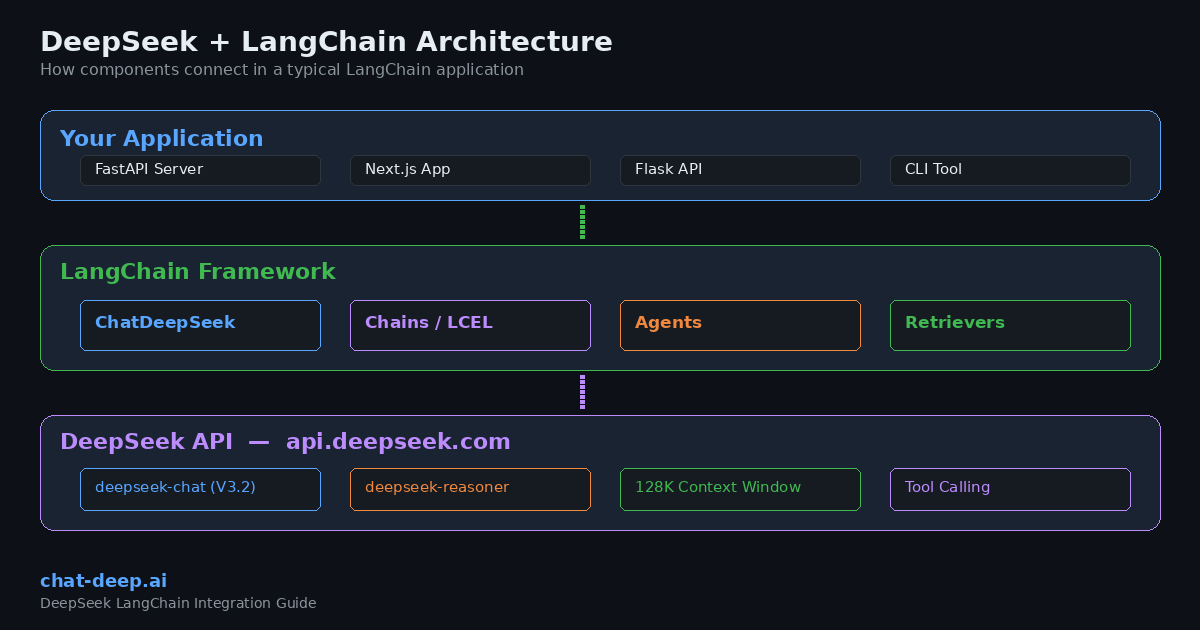
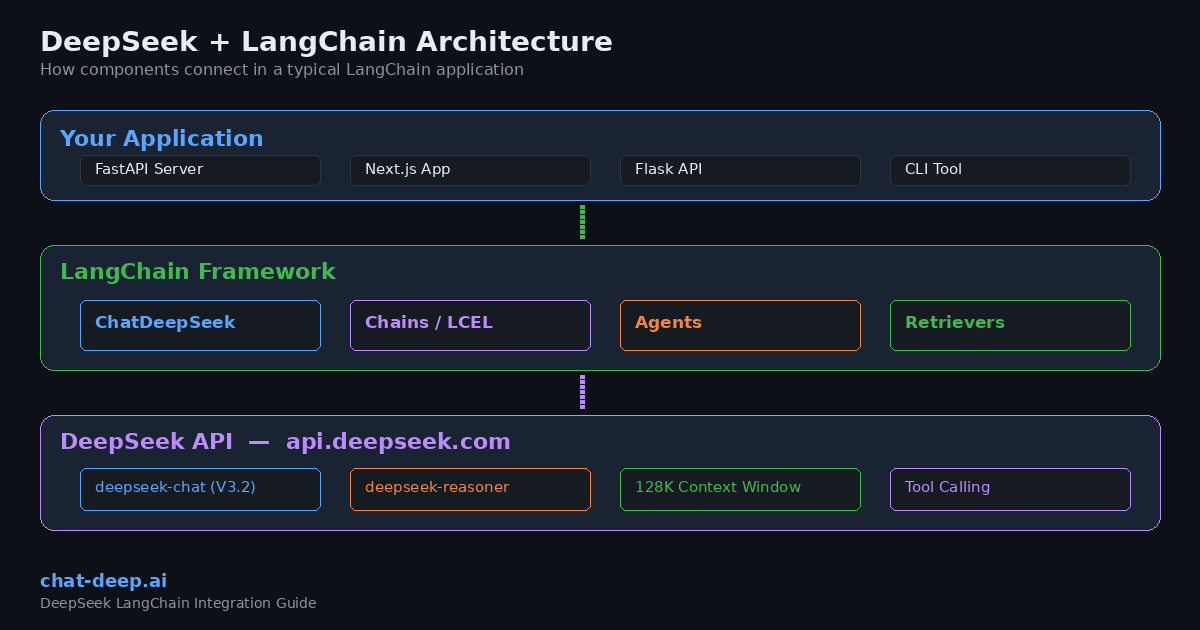
LangChain is one of the most widely used frameworks for building applications powered by large language models. It provides a modular, provider-agnostic architecture that lets developers chain together prompts, tools, memory, and retrieval systems into production-ready AI workflows. DeepSeek, with its OpenAI-compatible API and competitive pricing, fits naturally into the LangChain ecosystem.
This guide walks you through integrating DeepSeek with LangChain in both Python and JavaScript. You will learn how to set up the official langchain-deepseek package, build chains, implement streaming, use tool calling, create RAG pipelines, and deploy LangChain agents — all backed by DeepSeek’s powerful models.
If you are new to the DeepSeek API, start with our DeepSeek API guide for authentication basics and endpoint details. For a broader view of the DeepSeek product landscape, see the DeepSeek ecosystem overview.
Why Use DeepSeek with LangChain?
Choosing DeepSeek as your LLM provider inside LangChain comes with several practical advantages that matter in real-world applications.
Cost efficiency. DeepSeek’s API pricing is significantly lower than comparable providers. At $0.28 per million input tokens (cache miss) and $0.42 per million output tokens, you can process large volumes of text without burning through your budget. With context caching enabled, repeated input drops to $0.028 per million tokens — a 90% savings. For detailed rate comparisons, check our DeepSeek pricing page.
OpenAI compatibility. DeepSeek’s API follows the OpenAI chat completions format. This means you can swap DeepSeek into any LangChain project that previously used OpenAI by changing a few lines of configuration. No rewriting of chains, agents, or output parsers required.
Model flexibility. Through LangChain, you can switch between deepseek-chat (the V3.2 general-purpose model) and deepseek-reasoner (the thinking/reasoning mode) depending on your task. Both share a 128K token context window. Learn more about each model on our DeepSeek models hub.
No vendor lock-in. LangChain’s abstraction layer means your application logic stays the same regardless of which LLM sits behind it. If you ever need to compare DeepSeek against another provider, you can do so with a config change instead of a codebase rewrite. We cover this comparison in depth in our DeepSeek vs. OpenAI for developers article.
Prerequisites
Before you start, make sure you have the following ready:
- DeepSeek API key — Sign up on the official DeepSeek platform and generate your key. Our DeepSeek login guide covers account creation step by step.
- Python 3.9+ (for the Python integration) or Node.js 18+ (for the JavaScript integration).
- A basic understanding of LLM concepts like prompts, tokens, and chat completions.
Installation and Setup (Python)
LangChain provides an official langchain-deepseek package that wraps the DeepSeek API with full LangChain compatibility. Install it alongside the core LangChain package:
pip install -U langchain langchain-deepseekSet your API key as an environment variable. This is the recommended approach for keeping secrets out of your codebase:
export DEEPSEEK_API_KEY="your-api-key-here"Alternatively, you can pass the key directly when initializing the model. Here is the basic setup:
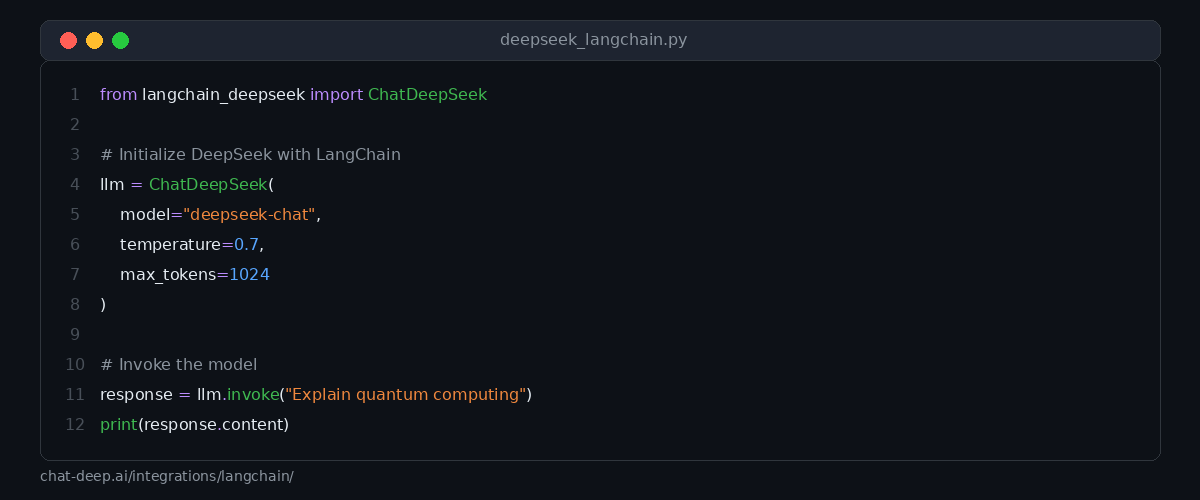
from langchain_deepseek import ChatDeepSeek

llm = ChatDeepSeek(
    model="deepseek-chat",
    temperature=0.7,
    max_tokens=1024,
    max_retries=2,
)

response = llm.invoke("Explain how RAG works in three sentences.")
print(response.content)
The ChatDeepSeek class accepts the same parameters you would use with OpenAI in LangChain: model, temperature, max_tokens, timeout, and max_retries. The package automatically reads the DEEPSEEK_API_KEY environment variable if you do not pass the key explicitly.
Choosing the Right Model
DeepSeek offers two main model aliases through the API. Understanding when to use each one helps you get better results and manage costs effectively.
deepseek-chat maps to DeepSeek-V3.2 in standard mode. It handles general conversation, content generation, code writing, tool calling, and structured output. This is the model you should use for most LangChain applications, especially those involving agents and function calling.
deepseek-reasoner maps to DeepSeek-V3.2 in thinking mode. It produces intermediate reasoning steps before delivering a final answer, making it ideal for complex math, logic puzzles, and multi-step analysis.
Installation and Setup (JavaScript / TypeScript)
LangChain also provides a JavaScript/TypeScript package for DeepSeek. Install it using npm:
npm install @langchain/deepseek @langchain/coreSet your environment variable:
export DEEPSEEK_API_KEY="your-api-key-here"Then initialize and use the model:
import { ChatDeepSeek } from "@langchain/deepseek";

const model = new ChatDeepSeek({
  model: "deepseek-chat",
  temperature: 0.7,
});

const response = await model.invoke([
  { role: "user", content: "Explain how RAG works in three sentences." },
]);

console.log(response.content);
The JavaScript package follows the same patterns as other LangChain.js integrations. If you have worked with @langchain/openai before, the transition to @langchain/deepseek is straightforward.
Building Chains with LCEL
LangChain Expression Language (LCEL) lets you compose chains declaratively using the pipe operator. This makes it easy to build multi-step workflows where the output of one component feeds into the next.
Here is a practical example that creates a prompt template, sends it to DeepSeek, and parses the output as a string:
from langchain_deepseek import ChatDeepSeek
from langchain_core.prompts import ChatPromptTemplate
from langchain_core.output_parsers import StrOutputParser

prompt = ChatPromptTemplate.from_messages([
    ("system", "You are a senior software engineer. Explain concepts clearly and concisely."),
    ("human", "{question}"),
])

llm = ChatDeepSeek(model="deepseek-chat", temperature=0.5)

chain = prompt | llm | StrOutputParser()

result = chain.invoke({"question": "What is the difference between REST and GraphQL?"})
print(result)
The pipe operator (|) connects each component in sequence. The prompt formats the user’s question, the LLM generates a response, and the output parser extracts the text content. You can extend this pattern by adding more components, such as retrievers, memory modules, or custom functions.
Streaming Responses
For user-facing applications, streaming delivers a significantly better experience because the response appears token by token instead of waiting for the entire completion. DeepSeek’s API supports server-sent events, and LangChain makes streaming simple:
from langchain_deepseek import ChatDeepSeek

llm = ChatDeepSeek(model="deepseek-chat", temperature=0.7)

for chunk in llm.stream("Write a brief introduction to vector databases."):
    print(chunk.content, end="", flush=True)
Streaming also works with LCEL chains. Replace .invoke() with .stream() on any chain, and LangChain will handle the streaming plumbing automatically. This is particularly useful when building chat interfaces in web applications and SaaS platforms.
Tool Calling and Function Calling
One of the most powerful features of the DeepSeek + LangChain combination is tool calling. DeepSeek’s deepseek-chat model supports function calling, which lets the model decide when to call external tools and what arguments to pass.
Here is how to define and bind tools in LangChain:
from langchain_deepseek import ChatDeepSeek
from langchain_core.tools import tool

@tool
def get_weather(city: str) -> str:
    """Get the current weather for a given city."""
    # In production, call a real weather API here
    return f"The weather in {city} is 22°C and sunny."

@tool
def calculate(expression: str) -> str:
    """Evaluate a mathematical expression."""
    return str(eval(expression))

llm = ChatDeepSeek(model="deepseek-chat", temperature=0)

# Bind tools to the model
llm_with_tools = llm.bind_tools([get_weather, calculate])

response = llm_with_tools.invoke("What is the weather in Tokyo and what is 15 * 7?")
print(response.tool_calls)
When you bind tools to the model, DeepSeek can examine the user’s query and decide which tools to invoke. The response includes a tool_calls attribute with the function names and arguments. You can then execute those functions and pass the results back to the model for a final answer.
Structured Output
When your application needs the model to return data in a predictable format — such as JSON — LangChain’s structured output feature is the right approach. Combined with DeepSeek, you can define a Pydantic model and get validated, typed responses:
from langchain_deepseek import ChatDeepSeek
from pydantic import BaseModel, Field

class MovieReview(BaseModel):
    title: str = Field(description="The movie title")
    rating: float = Field(description="Rating out of 10")
    summary: str = Field(description="A brief summary of the review")

llm = ChatDeepSeek(model="deepseek-chat", temperature=0)
structured_llm = llm.with_structured_output(MovieReview)

result = structured_llm.invoke("Review the movie Inception by Christopher Nolan.")
print(f"Title: {result.title}")
print(f"Rating: {result.rating}")
print(f"Summary: {result.summary}")
The model returns a MovieReview object with validated fields instead of raw text. This eliminates the need for manual JSON parsing and reduces errors in downstream processing. Structured output is particularly valuable for data extraction, form filling, and API response generation.
Building a RAG Pipeline
Retrieval-Augmented Generation (RAG) is one of the most common LangChain use cases. It combines a vector store with an LLM so the model can answer questions based on your own documents rather than relying solely on its training data.
Here is a complete RAG pipeline using DeepSeek and FAISS as the vector store:
from langchain_deepseek import ChatDeepSeek
from langchain_community.vectorstores import FAISS
from langchain_community.embeddings import HuggingFaceEmbeddings
from langchain_core.prompts import ChatPromptTemplate
from langchain_core.output_parsers import StrOutputParser
from langchain_core.runnables import RunnablePassthrough

# 1. Create embeddings and vector store
embeddings = HuggingFaceEmbeddings(model_name="all-MiniLM-L6-v2")

documents = [
    "DeepSeek V3.2 supports a 128K token context window.",
    "The DeepSeek API is compatible with OpenAI's chat completions format.",
    "DeepSeek-R1 is optimized for multi-step reasoning tasks.",
    "Context caching reduces input token costs by 90 percent.",
]

vectorstore = FAISS.from_texts(documents, embeddings)
retriever = vectorstore.as_retriever(search_kwargs={"k": 2})

# 2. Create the prompt template
prompt = ChatPromptTemplate.from_messages([
    ("system", "Answer the question based only on the following context:\n\n{context}"),
    ("human", "{question}"),
])

# 3. Build the RAG chain
llm = ChatDeepSeek(model="deepseek-chat", temperature=0)

rag_chain = (
    {"context": retriever, "question": RunnablePassthrough()}
    | prompt
    | llm
    | StrOutputParser()
)

answer = rag_chain.invoke("What is the context window size of DeepSeek V3.2?")
print(answer)
This pipeline retrieves the two most relevant documents from the vector store, injects them into the prompt as context, and then asks DeepSeek to generate an answer grounded in that context. DeepSeek’s 128K context window is a major advantage here — it can handle large document sets without truncation. For cloud deployment options, see our guide on integrating DeepSeek with AWS, Azure, and GCP.
Creating a LangChain Agent
Agents take tool calling a step further. Instead of a single tool invocation, an agent can reason about which tools to use, call them in sequence, observe the results, and then decide on the next action. This creates autonomous workflows that can handle complex, multi-step tasks.
from langchain_deepseek import ChatDeepSeek
from langchain_core.tools import tool
from langgraph.prebuilt import create_react_agent

@tool
def search_docs(query: str) -> str:
    """Search internal documentation for relevant information."""
    # Replace with your actual search logic
    return f"Found 3 results for '{query}': API rate limits, authentication, error codes."

@tool
def run_sql(query: str) -> str:
    """Execute a SQL query against the analytics database."""
    # Replace with your actual database logic
    return "Result: 1,247 active users in the last 7 days."

llm = ChatDeepSeek(model="deepseek-chat", temperature=0)

agent = create_react_agent(
    model=llm,
    tools=[search_docs, run_sql],
)

result = agent.invoke({
    "messages": [{"role": "user", "content": "How many active users do we have this week?"}]
})

for message in result["messages"]:
    print(message.content)
The create_react_agent function from LangGraph builds an agent that follows the ReAct pattern: Reason, Act, Observe, Repeat. DeepSeek handles the reasoning and tool selection, while LangGraph manages the execution loop. This approach works well for internal tools, customer support bots, and data analysis assistants.
Using the OpenAI Compatibility Layer
If you have an existing LangChain project that uses the langchain-openai package, you can point it at DeepSeek without installing any new packages. Since DeepSeek’s API follows the OpenAI format, the ChatOpenAI class works with DeepSeek’s endpoint:
from langchain_openai import ChatOpenAI

llm = ChatOpenAI(
    model="deepseek-chat",
    openai_api_key="your-deepseek-api-key",
    openai_api_base="https://api.deepseek.com",
    max_tokens=1024,
)

response = llm.invoke("Summarize the benefits of open-source LLMs.")
print(response.content)
This approach is useful for quick testing or gradual migration. However, for new projects, the dedicated langchain-deepseek package is recommended because it stays in sync with DeepSeek’s API updates and handles provider-specific details more accurately.
Conversation Memory
For chatbot applications, you typically need the model to remember previous messages in the conversation. LangChain provides several memory backends that work seamlessly with DeepSeek:
from langchain_deepseek import ChatDeepSeek
from langchain_core.chat_history import InMemoryChatMessageHistory
from langchain_core.runnables.history import RunnableWithMessageHistory

llm = ChatDeepSeek(model="deepseek-chat", temperature=0.7)

# Store for session histories
store = {}

def get_session_history(session_id: str):
    if session_id not in store:
        store[session_id] = InMemoryChatMessageHistory()
    return store[session_id]

chain_with_memory = RunnableWithMessageHistory(
    llm,
    get_session_history,
)

# First message
config = {"configurable": {"session_id": "user-123"}}
response1 = chain_with_memory.invoke("My name is Alex.", config=config)
print(response1.content)

# Follow-up — the model remembers the name
response2 = chain_with_memory.invoke("What is my name?", config=config)
print(response2.content)
The RunnableWithMessageHistory wrapper automatically injects previous messages into each request. DeepSeek’s 128K context window means you can maintain long conversation histories without worrying about token limits in most scenarios.
Error Handling and Best Practices
When building production applications with DeepSeek and LangChain, keep these practices in mind to ensure reliability and performance.
Handle rate limits gracefully. DeepSeek uses dynamic rate limiting. If you receive a 429 status code, the max_retries parameter in ChatDeepSeek handles automatic retries with exponential backoff. Set it to 2 or 3 for most applications. For details on all error codes, see our DeepSeek API documentation.
Use environment variables for secrets. Never hardcode API keys in your source files. The langchain-deepseek package reads from DEEPSEEK_API_KEY automatically. Use a .env file with python-dotenv for local development.
Monitor token usage. Enable LangSmith tracing to track token consumption, latency, and chain execution details. This helps you optimize prompts and identify bottlenecks in multi-step workflows.
Use temperature wisely. For factual tasks, code generation, and structured output, set temperature=0. For creative content, brainstorming, and conversational responses, use values between 0.5 and 0.9.
Check API status. Before deploying time-sensitive workflows, verify that the DeepSeek API is healthy. Our DeepSeek status page provides real-time monitoring with response-time tracking.
Quick Reference: ChatDeepSeek Parameters
Here is a summary of the most commonly used parameters when initializing ChatDeepSeek:
| Parameter | Type | Description |
|---|---|---|
model | str | Model name, e.g., "deepseek-chat" or "deepseek-reasoner" |
temperature | float | Sampling temperature (0.0 to 2.0) |
max_tokens | int | Maximum tokens to generate |
timeout | float | Request timeout in seconds |
max_retries | int | Number of retry attempts on failure |
api_key | str | DeepSeek API key (reads from env if not set) |
What You Can Build
The DeepSeek + LangChain combination opens the door to a wide range of applications. Here are some practical ideas to get you started:
Customer support chatbot. Combine RAG with conversation memory to build a chatbot that answers questions from your knowledge base. DeepSeek’s low token cost makes it economical to handle high volumes of support queries.
Code review assistant. Use an agent with tools that access your Git repository, linter, and documentation. DeepSeek’s strong coding performance (built on extensive programming data) makes it well-suited for this use case.
Document analysis pipeline. Ingest PDFs, contracts, or research papers into a vector store and query them conversationally. The 128K context window lets you process large documents in a single pass.
Workflow automation agent. Connect LangChain tools to your internal APIs — CRM systems, databases, project management tools — and let the agent orchestrate multi-step tasks based on natural language instructions.
For more integration ideas, explore our guides on integrating DeepSeek into web apps and deploying DeepSeek on cloud platforms.
Conclusion
LangChain provides the framework. DeepSeek provides the intelligence. Together, they give developers a cost-effective, flexible, and powerful foundation for building AI-powered applications. Whether you are prototyping a simple chatbot or deploying a production RAG pipeline with autonomous agents, the integration is straightforward and well-supported in both Python and JavaScript.
Start with the basic setup, experiment with chains and tools, then scale up to agents and RAG as your application demands. The official langchain-deepseek package keeps your integration clean, and DeepSeek’s OpenAI-compatible API ensures you always have a fallback path if you need it.
Ready to go deeper? Explore the rest of our documentation hub for API references, error code guides, and advanced integration patterns.