
For DeepSeek’s hosted API, the current model IDs are deepseek-flash and deepseek-v4-pro. Use those exact strings in the model field. A name on a model card, a Hugging Face repository path, or a label in the chat app can refer to related technology without being a valid API ID.
The distinction matters when you copy a tutorial, download weights, or connect a coding tool. DeepSeek-V4.1-Flash is a release name; deepseek-flash is the hosted API identifier; and deepseek-ai/DeepSeek-V4.1-Flash identifies a repository. This guide explains which name belongs where and how to check it before changing your configuration.
On this page: Current API IDs · Naming layers · Check an API name · Old aliases · Read checkpoint names · Local tools and providers · Fix naming errors · FAQ
Current DeepSeek API model names
DeepSeek’s official model table lists the following identifiers. These are for requests sent to DeepSeek itself, rather than an independent provider hosting DeepSeek weights.
| Use in the API | Model version listed by DeepSeek | Accepted input |
|---|---|---|
deepseek-flash | DeepSeek-V4.1-Flash | Text and images |
deepseek-v4-pro | DeepSeek-V4-Pro-0813 | Text |
Both have Chat Completions, Responses, and Anthropic-compatible interfaces. Choose the interface your application supports, then use its documented request format. Changing the interface does not mean you should invent another spelling of the model name.
V4 Pro remains available. DeepSeek’s September 10 update says its API service continues after September 14. A guide describing deepseek-v4-pro as an automatic route to Flash conflicts with that updated notice and the current model table.
These mappings were checked against the official documentation on October 8, 2026. If you need to choose between the models, the DeepSeek model selection guide covers their roles. Here, the question is which identifier your software needs.
Why the same model has several names
A model’s public name helps people recognize it. An API ID helps a service route a request. A repository name tells a loader where to find files. Those jobs are different, so the names do not follow one universal substitution rule.
For example, DeepSeek-V4 names a release family, while DeepSeek-V4-Pro identifies a member of that family. Adding the namespace gives deepseek-ai/DeepSeek-V4-Pro, an official repository path. Lowercase deepseek-v4-pro is the hosted API ID. The similarities are useful for recognition, but the API ID does not establish which repository revision is running.
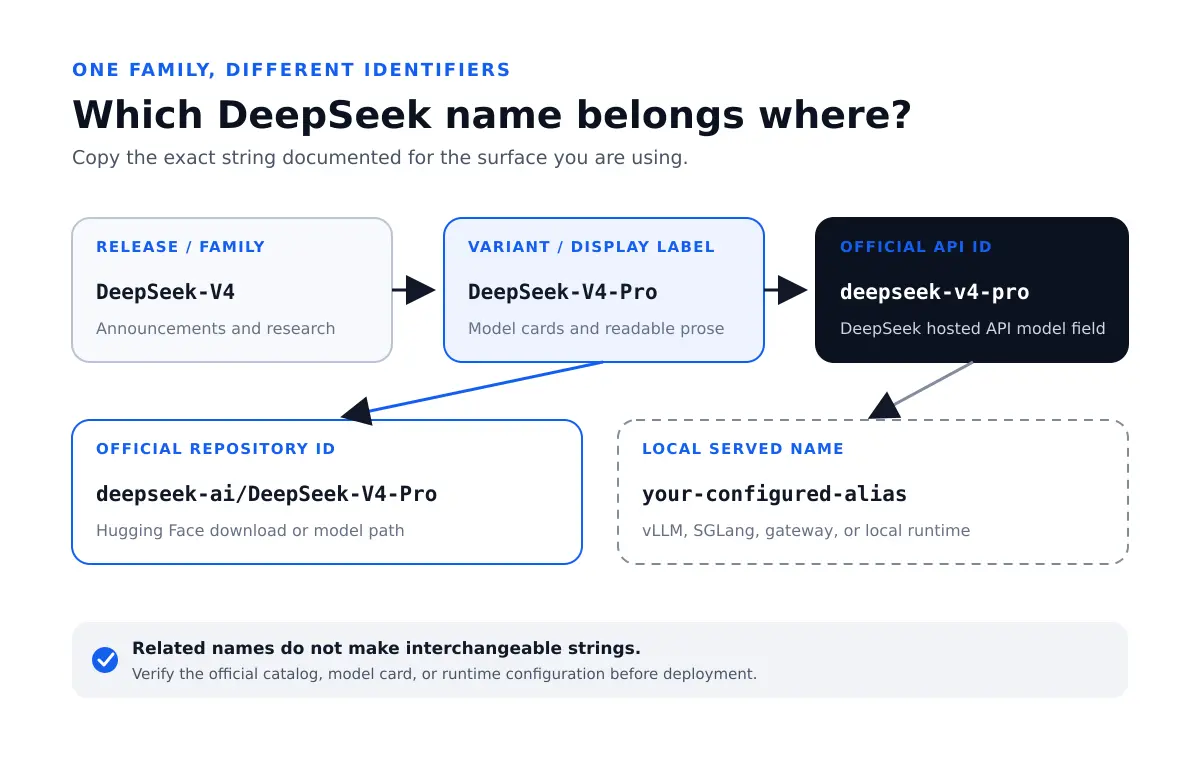
There are two further layers to watch. A chat-app control such as DeepThink describes how you use the product, rather than a portable model ID. A local server or cloud provider can also assign its own name to a deployment. In that case, the endpoint’s configuration determines what your client must send.
This is why “OpenAI-compatible” does not mean “use OpenAI model names,” and why a Hugging Face path can work on one server but fail on another. Compatibility describes an interface; the destination service still controls its model catalog.
How to check the name for DeepSeek’s hosted API
Start with the destination URL. For DeepSeek’s OpenAI-format API, the base URL is https://api.deepseek.com. If your application points elsewhere, use that service’s catalog instead of assuming this page’s DeepSeek-hosted IDs apply.
The official Lists Models endpoint returns the available models. With your API key already stored in the DEEPSEEK_API_KEY environment variable, this Bash command requests the catalog; it does not generate a chat response:
curl --fail-with-body --silent --show-error \
  https://api.deepseek.com/models \
  -H "Accept: application/json" \
  -H "Authorization: Bearer ${DEEPSEEK_API_KEY}"
In the returned data array, copy the relevant object’s id value into your request. The separate name field is a display label for model pickers. The response can also describe supported input types, context and output limits, effort levels, and protocol-specific capabilities. Those fields help a client present appropriate controls; they are not extra text to append to the ID.
For example, the following is a Chat Completions request body using Pro with maximum reasoning effort. It illustrates the configuration, not a recorded API result:
{
  "model": "deepseek-v4-pro",
  "messages": [
    {"role": "user", "content": "Explain how a hash table handles collisions."}
  ],
  "thinking": {"type": "enabled"},
  "reasoning_effort": "max"
}
The model name and the reasoning setting occupy different fields. Keep that separation when adapting an example. For authentication and a complete first request, follow the DeepSeek API setup guide.
Is DeepSeek V4 Pro Max a different model?
No. The V4 model card uses “Pro Max” for Pro running at maximum reasoning effort. It is not a separate hosted ID called deepseek-v4-pro-max. Selecting Pro and setting its effort to max are two parts of the configuration.
DeepSeek’s Thinking Mode documentation uses different control fields for each interface: reasoning_effort in Chat Completions, output_config.effort in the Anthropic-compatible interface, and reasoning.effort in Responses. The direct named levels are low, high, and max; the guide also documents compatibility mappings for other labels. Do not transfer a setting between interfaces just because its name looks familiar.
A downloaded model can expose different controls through its own encoder or serving framework. For instance, the V4.1-Flash model card describes a numeric effort range of 1–100. That does not make an integer interchangeable with every hosted API’s documented effort field. Use the instructions for the interface you are actually running.
What happened to the older API names?
An API alias can keep its spelling while the model behind it changes. DeepSeek’s change log records that behavior: deepseek-reasoner referred to R1 in early 2025, later to R1-0528, and subsequently to thinking modes in newer families. It was never a permanent promise to serve the original R1 weights.
| Name in an older configuration | Documented status | What to do |
|---|---|---|
deepseek-v4-flash | The old model is retired; the name is still accepted and routes to V4.1-Flash. | Use deepseek-flash in new or updated DeepSeek integrations. |
deepseek-v4-flash-vision-exp | The experimental model is retired; this name also routes to V4.1-Flash. | Use deepseek-flash for the current multimodal model. |
deepseek-chat and deepseek-reasoner | DeepSeek announced discontinuation for July 24, 2026. Neither is listed as a current model in the model table. | Choose a supported ID and set thinking explicitly for your chosen interface. |
The first two compatibility routes are stated in the current model table’s footnote; their requests use Flash pricing. Do not extend that promise to every historical alias. An old name appearing in a blog post or working through a gateway does not prove DeepSeek still documents it as a supported route.
Likewise, an API retirement does not by itself remove downloadable weights. You might still run a historical checkpoint locally, but that requires its repository, runtime, and hardware—not the retired cloud name. For existing code using the older chat/reasoner split, use the API migration guide to update the request as well as its name.
How to read a DeepSeek checkpoint name
A checkpoint is a saved model artifact. Its name often identifies a family, training variant, size, or dated release. On Hugging Face, the complete repository ID includes the publisher before the slash. Preserve both parts when a loader asks for a repository.
Repository names and dated releases
deepseek-ai/DeepSeek-V4-Pro and deepseek-ai/DeepSeek-V4-Pro-0813 are different repository IDs. The 0813 model card identifies that release as the official version superseding the preview. Omitting the suffix is not simply a shorter spelling of the same download.
Other familiar dated names include DeepSeek-V3-0324 and DeepSeek-R1-0528. Their suffixes correspond to the documented March 24 and May 28 releases. Read the model card or release note rather than treating every four-digit ending as a universal date format.
A repository name still does not pin every file forever. When you need a repeatable local deployment, record the repository revision or commit, the tokenizer and configuration, and the serving version. A hosted API name offers a different level of control: you cannot pin arbitrary DeepSeek weights just by adding a date to its ID.
What DeepSeek-R1-Distill-Qwen-32B means
Read this name from left to right. DeepSeek-R1 identifies the source reasoning family. Distill indicates a distilled model. Qwen identifies the base-model family used to build it. 32B is its parameter-size class, not a 32 GB download, a context length, or an API version.
DeepSeek’s R1 download table explains that these distilled models were fine-tuned from Qwen or Llama models using samples generated by R1. A 32B distilled model is therefore not a 32B slice of the full R1 architecture. Keeping the base family in the name helps you find the right tokenizer, configuration, and license.
Be especially careful with shorthand such as “R1 8B.” Ollama’s R1 tag list contains both 8b-0528-qwen3 variants and 8b-llama-distill variants. The size alone does not tell you which one a tutorial means. Compare the complete tag and its underlying model before downloading or replacing an existing installation.
Base, Instruct, Zero, DSpark, and quantization labels
Base indicates a checkpoint before instruction or chat post-training. Instruct and Chat usually identify versions prepared to follow requests or converse, though the wording is not uniform across families. The V4 download table, for example, separates the -Base checkpoints from post-trained versions without an -Instruct suffix. For an interactive assistant, check which release the model card recommends instead of assuming the shortest name is the base model.
Zero has a specific meaning in DeepSeek-R1-Zero: it identifies the training variant that used reinforcement learning without an initial supervised fine-tuning stage. It does not mean zero cost, zero parameters, or a generic lightweight edition.
Exp, Terminus, and Speciale belong to particular release names, rather than a reusable API setting. Exp marks an experimental release; Terminus names a V3.1 update; Speciale identifies a V3.2 variant whose hosted access was announced for a limited period. Their release notices establish the relevant availability and behavior. You cannot request those variants by adding the suffix to a current API ID.
DSpark refers to speculative decoding. The Flash-DSpark repository includes a speculative-decoding module, and the Pro-0813 card also describes an attached DSpark module. This affects the serving setup. It does not create a hosted API ID that you can obtain by appending -DSpark to deepseek-flash.
GGUF is a model file format. Labels such as Q4_K_M and Q8_0 identify quantization types; FP8 and BF16 describe numerical precision. AWQ and GPTQ refer to quantization methods. These describe how weights are represented or packaged, rather than establishing a new DeepSeek generation. Hugging Face’s GGUF reference explains the format and common quantization labels.
For a converted download, inspect the publisher, source checkpoint, file variant, and compatible runtime. A third-party GGUF conversion may be useful, but the presence of “DeepSeek” in its filename does not make it an official DeepSeek upload. The open-weight and licensing guide explains how to check the release terms.
Names such as Coder, Math, Prover, VL, Janus, and OCR identify other specialist projects or model families in DeepSeek’s official model collection. Their existence as downloadable models does not mean those words are accepted by the hosted API. Start from the relevant model card if your task requires one of those families.
Which name should you use in local tools and other providers?
vLLM and SGLang: loaded model versus served name
A local server needs a model path to load weights. Its clients may see a different name. vLLM’s --served-model-name option sets the API-facing name; without it, the name follows the model argument. SGLang also provides a served-model-name setting for its OpenAI-compatible model listing.
For example, an administrator could load deepseek-ai/DeepSeek-R1-Distill-Qwen-32B and expose it as support-assistant. That alias is an illustration, not an official DeepSeek name. A client calling that deployment would use the configured name. Sending deepseek-flash would not download Flash or switch the weights behind the server.
Ask the server’s operator for its model listing or inspect the launch configuration. Check the source repository separately if you need to know which weights the alias represents. The vLLM setup guide covers the wider deployment process.
Ollama and LM Studio
Ollama uses a model name and tag, such as deepseek-r1:8b. The tag is part of Ollama’s catalog; it is not an ID for DeepSeek’s cloud API. To inspect the models available in a local Ollama installation, its list-models endpoint is GET /api/tags, typically at http://localhost:11434/api/tags. Match the returned name to the one in your application.
LM Studio exposes GET /v1/models for its OpenAI-compatible server. Use a returned ID. With Just-In-Time loading enabled, that list can include downloaded models that are not yet loaded, so appearing in the list does not mean the weights are already occupying memory.
In either tool, check the actual model package before applying instructions written for another variant. A filename, registry tag, and API-facing identifier may all be visible in the same workflow, but they serve different purposes.
Cloud providers, gateways, and Claude-shaped names
A third-party provider can require a namespace, version, regional profile, or deployment name. Copy the value from that provider’s own catalog for the endpoint you use. DeepSeek’s model list is not a directory of every independent service hosting its weights.
There is also a documented compatibility case within DeepSeek itself. Its Anthropic model mapping routes names beginning with claude-opus to Pro and names beginning with claude-haiku or claude-sonnet to Flash. This applies to DeepSeek’s Anthropic-compatible interface. It does not mean DeepSeek is serving Anthropic’s Claude weights, or that the same mapping applies on Anthropic’s servers.
If an application displays a Claude label while you have configured a DeepSeek endpoint, inspect the endpoint and mapping before interpreting that label. Where the application accepts an explicit DeepSeek ID, use it to make the configuration easier to understand.
Fixing “model not found” and other naming problems
Changing punctuation at random is rarely the best way to diagnose a rejected model. Work through the destination, identifier, and access in that order:
- Confirm the base URL. Check the configuration the application actually loads, including environment variables and gateway settings. A valid DeepSeek ID can fail if the request goes to another provider.
- Compare the exact ID with that endpoint’s catalog. Use
id, not the readable display name. Remove accidental spaces or quotation marks copied into a settings field, and preserve the documented case, punctuation, namespace, and tag. - Check the kind of value the field expects. A loader may need a repository or file path; an API client needs the served ID. Putting a Hugging Face path into DeepSeek’s hosted API does not make it load that repository.
- Separate retirement from access and request errors. An old alias may need replacement. A provider-specific deployment may require access on your account. Authentication, insufficient balance, and an unsupported input type need their own fixes; a model-list entry does not override those requirements.
- Inspect application mappings. A wrapper can replace the model name you select with its own alias. Compare its documented configuration with the request or error it shows. If the ID is correct, use the API error guide rather than continuing to rename the model.
For reproducibility, keep the endpoint and model ID together in your project’s configuration notes. For local models, add the source revision and runtime; for hosted models, record the documented version and relevant settings. A successful request confirms that a route works, but it does not prove the underlying weights are permanently fixed.
DeepSeek model names FAQ
Should I use deepseek-v4.1-flash or deepseek-flash?
Use deepseek-flash with DeepSeek’s hosted API. DeepSeek-V4.1-Flash is the release name. Do not construct an API ID by lowercasing a release title; copy the documented identifier.
Can I still download R1 if deepseek-reasoner is no longer current?
Yes. Hosted aliases and downloadable releases have separate lifecycles. The official R1 repositories identify the available weights. To use R1 through a provider instead, choose an R1 entry from that provider’s catalog rather than assuming an old DeepSeek alias still selects it.
Does an 8B tag always mean the same R1 model?
No. Check the base family and release as well as the size. An R1-distilled Llama 8B model and an R1-0528 Qwen3 8B model are distinct artifacts. Runtime catalogs may offer shorthand tags, so inspect what the complete entry resolves to.
Is DeepThink or Expert Mode an API model name?
No. These are product controls or labels used in DeepSeek’s chat experience. Use the API’s model ID and its own thinking settings when building an integration. A label in the app does not pin a checkpoint for an API request.
Does Q4 mean a four-billion-parameter model?
No. Q4 refers to quantization, while a size label such as 4B refers to billions of parameters. Quantization changes how weights are represented; it does not change the model’s parameter count into the number in the quantization label.
Can I force an old hosted version by adding its date to the model ID?
Only if the provider explicitly offers that dated ID. A date in a repository name does not create a corresponding hosted route. If you need specific historical weights, use a documented versioned deployment or the appropriate local checkpoint.
Use the name that belongs to your endpoint
Before changing a configuration, identify what the field is asking for: a hosted model ID, a repository, a runtime tag, or a local served name. Copy that value from its own catalog, then check the release and settings behind it. That resolves the common naming mistakes without turning a simple setup change into a search through every DeepSeek release.
For a new DeepSeek-hosted integration, start with one of the two current IDs above and the official model listing. For a local deployment, choose the exact artifact first, then confirm the name your server exposes. Once those agree, you can focus on whether the model fits your task rather than whether the client is calling the model you intended.