
To test DeepSeek API integration code without spending tokens or using an API key, isolate the HTTP boundary, inject a fake fetch implementation, and feed your parser response fixtures shaped like DeepSeek Chat Completion objects. Then assert the outgoing request, normalize volatile response fields, exercise streaming chunks and [DONE], block unmatched network calls, and run the same deterministic suite in CI.
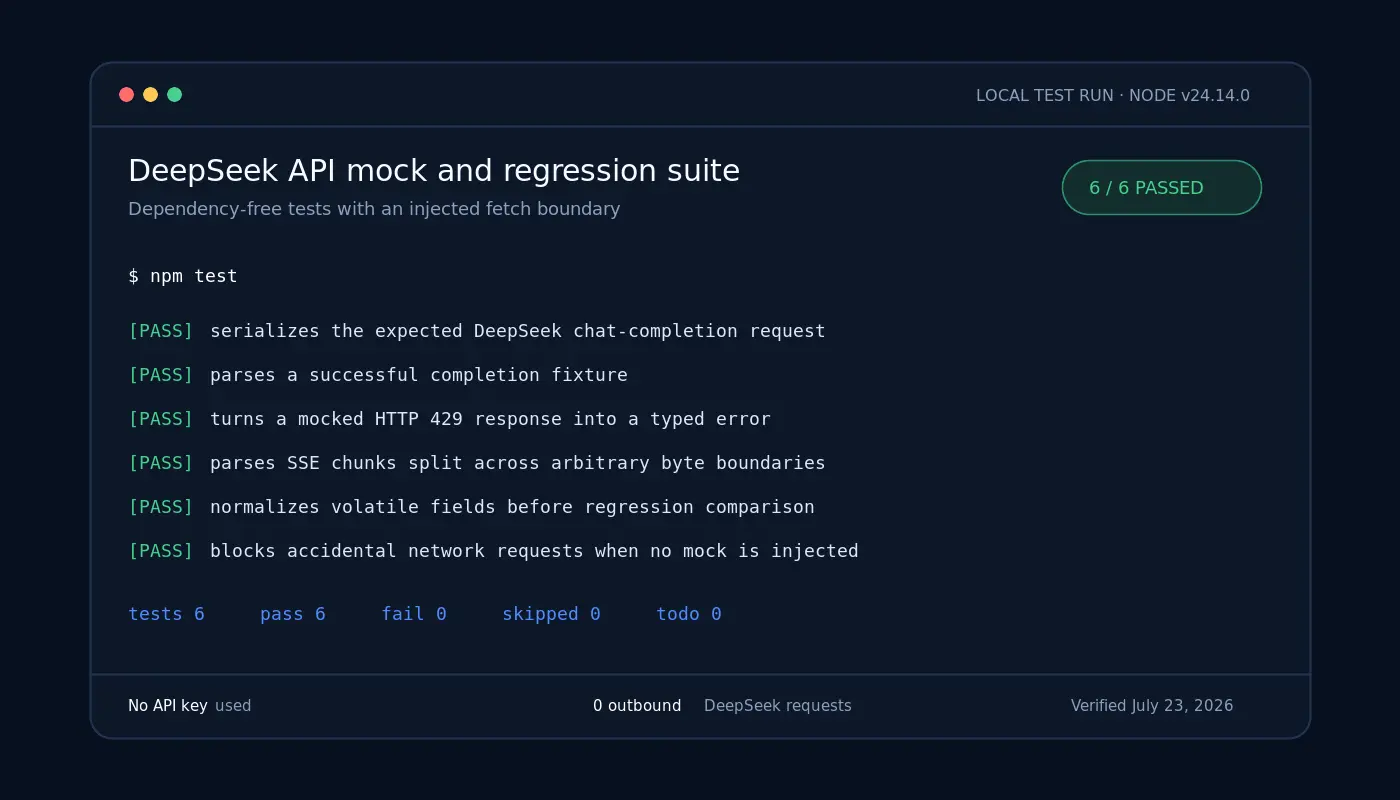
Last verified: July 24, 2026 · Tested locally: Node.js v24.14.0 · Result: 6 passed, 0 failed · Live DeepSeek requests: 0
Independent testing note: Chat-Deep.ai is not DeepSeek and is not endorsed by DeepSeek. The examples on this page were checked against DeepSeek’s public API reference and executed locally with handcrafted mocked responses. No live DeepSeek request, account, reader credential, paid token, or real API key was used. These tests validate application behavior—not hosted-model quality, uptime, latency, rate limits, or billing.
This guide focuses on the software boundary around POST /chat/completions: request serialization, response parsing, controlled errors, Server-Sent Events (SSE), and regression protection. If you instead need credentials and a first live request, start with the DeepSeek API guide.
How to Test DeepSeek API Calls Without an API Key
The safest pattern is dependency injection: your application accepts a fetchImpl function instead of reaching directly for the global network client. Production passes the real fetch; tests pass a local function that records the request and returns a controlled Response. A dummy string such as unit-test-key verifies the Authorization header without creating or exposing a credential.
- Request test: verify the host, path, method, headers, model, messages, and thinking setting.
- Response test: parse a JSON fixture that contains only the documented fields your application consumes.
- Streaming test: feed the parser SSE data split across inconvenient byte boundaries.
- Regression test: compare a normalized application-facing object with an approved fixture.
- Network guard: fail immediately if a test accidentally tries to reach the internet.
What Mock Tests Can—and Cannot—Prove
| Mocks can prove | Mocks cannot prove |
|---|---|
| Your URL, method, headers, and JSON body match the contract you defined | A real DeepSeek API key is valid |
| Your app parses the documented response fields it uses | The hosted service is available |
Your SSE parser handles chunks, empty lines, usage-only events, and [DONE] | Live latency, concurrency behavior, or rate limits |
| Controlled 4xx and 5xx responses reach the intended error path | Generated-answer quality, factual accuracy, or safety |
| Your unit suite runs in CI without credentials | Pricing, token billing, or production uptime |
This distinction prevents test-suite confidence from becoming production overconfidence. Answer quality, hallucination scoring, golden datasets, and human review belong in a DeepSeek evaluation framework. Comparing prompt or model variants belongs in DeepSeek A/B testing. This page tests the transport contract and your code around it.
A Four-Layer DeepSeek API Test Strategy
| Layer | Purpose | Credentials? | Default CI? |
|---|---|---|---|
| Unit mock | Test the request builder, parser, and error mapping | No | Yes |
| Fixture contract test | Keep the response shapes your app consumes explicit and reviewable | No | Yes |
| Regression test | Catch unintended changes to a stable normalized interface | No | Yes |
| Optional live smoke test | Check credentials, connectivity, and the hosted endpoint | Yes | No—separate workflow |
The first three layers should be fast and repeatable. Keep the fourth separate because it can fail for reasons unrelated to a code change, consumes a real service, and requires secret handling.
Build a Testable DeepSeek Client in Node.js
The runnable example uses Node’s built-in test runner, so there are no external packages to install. Use Node.js 20 or newer for the built-in fetch, Response, ReadableStream, and test-runner APIs used here.
Minimal project structure
deepseek-api-mock-regression-tests/
├── src/
│   └── deepseek-client.js
├── test/
│   ├── fixtures/
│   │   ├── chat-completion.json
│   │   ├── chat-completion.normalized.json
│   │   └── chat-completion.stream.txt
│   ├── helpers/
│   │   └── mock-fetch.js
│   └── deepseek-client.test.js
├── demo/
│   └── regression-failure.demo.js
└── package.json
{
"name": "deepseek-api-mock-regression-tests",
"private": true,
"type": "module",
"scripts": {
"test": "node --test test/deepseek-client.test.js",
"test:regression-demo": "node --test demo/regression-failure.demo.js"
},
"engines": {
"node": ">=20"
}
}Inject fetch instead of hard-coding the network
The key design choice is the fetchImpl parameter. The default remains the real global client for production, while every unit test supplies a deterministic replacement.
export const DEFAULT_DEEPSEEK_BASE_URL = "https://api.deepseek.com";
export const DEFAULT_DEEPSEEK_MODEL = "deepseek-v4-flash";

export async function createChatCompletion({
  apiKey,
  messages,
  model = DEFAULT_DEEPSEEK_MODEL,
  thinking,
  baseURL = DEFAULT_DEEPSEEK_BASE_URL,
  fetchImpl = globalThis.fetch
}) {
  if (typeof fetchImpl !== "function") {
    throw new TypeError("fetchImpl must be a function");
  }

  const url =
    `${baseURL.replace(/\/+$/, "")}/chat/completions`;

  const response = await fetchImpl(url, {
    method: "POST",
    headers: {
      "content-type": "application/json",
      authorization: `Bearer ${apiKey}`
    },
    body: JSON.stringify({
      model,
      messages,
      thinking,
      stream: false
    })
  });

  const payload = await response.json();

  if (!response.ok) {
    throw new Error(
      payload?.error?.message ||
      `DeepSeek request failed with HTTP ${response.status}`
    );
  }

  return payload;
}
If your application uses an OpenAI client instead of a small HTTP wrapper, the same principle applies: place the SDK behind your own adapter and mock that adapter. The OpenAI SDK with DeepSeek guide covers the live SDK configuration separately.
Create a Fixture from the Chat Completion Schema
A fixture is test data you own. It is not an “official response,” and it should not pretend to be a captured live answer unless you actually recorded and sanitized one. Build it from the fields documented in DeepSeek’s Create Chat Completion reference, then keep only the fields your parser or application uses.
{
  "id": "cmpl-test-001",
  "object": "chat.completion",
  "created": 1780000000,
  "model": "deepseek-v4-flash",
  "system_fingerprint": "fp_fixture_001",
  "choices": [
    {
      "index": 0,
      "message": {
        "role": "assistant",
        "content": "The mock path works.",
        "reasoning_content": null,
        "tool_calls": []
      },
      "finish_reason": "stop",
      "logprobs": null
    }
  ],
  "usage": {
    "prompt_tokens": 12,
    "completion_tokens": 6,
    "total_tokens": 18,
    "prompt_cache_hit_tokens": 0,
    "prompt_cache_miss_tokens": 12,
    "completion_tokens_details": {
      "reasoning_tokens": 0
    }
  }
}
On the verification date, the API reference listed deepseek-v4-flash and deepseek-v4-pro as accepted model values. DeepSeek’s change log scheduled the legacy deepseek-chat and deepseek-reasoner aliases for discontinuation on July 24, 2026. Use the V4 IDs in new fixtures and recheck the change log when maintaining this example after that date.
The basic fixture sets reasoning_content to null. For a non-thinking request, send {"thinking":{"type":"disabled"}} explicitly; the API reference says thinking is enabled by default. Disabling thinking simplifies this fixture, but it does not make a live model response deterministic. For thinking-mode and tool-loop tests, preserve reasoning_content as described in the official Thinking Mode guide.
Mock the DeepSeek Chat Completions Request
The helper below records every call and returns a local Response. It does not contact DeepSeek or any other host.
export function createJsonFetch({
  body,
  status = 200,
  headers = { "content-type": "application/json" }
}) {
  const calls = [];

  const fetchImpl = async (url, init = {}) => {
    calls.push({ url: String(url), init });
    return new Response(JSON.stringify(body), {
      status,
      headers
    });
  };

  fetchImpl.calls = calls;
  return fetchImpl;
}
Now assert the outbound contract. The dummy key exists only inside the test and must never be replaced with a production credential.
test("serializes the expected DeepSeek request", async () => {
  const fetchImpl = createJsonFetch({
    body: completionFixture
  });

  await createChatCompletion({
    apiKey: "unit-test-key",
    messages: [
      { role: "user", content: "Reply from the fixture." }
    ],
    thinking: { type: "disabled" },
    fetchImpl
  });

  assert.equal(fetchImpl.calls.length, 1);
  assert.equal(
    fetchImpl.calls[0].url,
    "https://api.deepseek.com/chat/completions"
  );
  assert.equal(fetchImpl.calls[0].init.method, "POST");
  assert.equal(
    fetchImpl.calls[0].init.headers.authorization,
    "Bearer unit-test-key"
  );

  assert.deepEqual(
    JSON.parse(fetchImpl.calls[0].init.body),
    {
      model: "deepseek-v4-flash",
      messages: [
        { role: "user", content: "Reply from the fixture." }
      ],
      thinking: { type: "disabled" },
      stream: false
    }
  );
});
Regression-Test the Parsed Response
A raw response contains fields that should not normally gate a build: IDs, timestamps, backend fingerprints, exact live wording, and frequently token counts. Map the response to the stable interface your application promises, then compare that normalized result with an approved fixture.
export function normalizeCompletionForRegression(payload) {
  return {
    object: payload.object,
    model: payload.model,
    choices: payload.choices.map((choice) => ({
      index: choice.index,
      finish_reason: choice.finish_reason,
      message: {
        role: choice.message?.role ?? null,
        content: choice.message?.content ?? null,
        reasoning_content:
          choice.message?.reasoning_content ?? null,
        tool_calls: choice.message?.tool_calls ?? []
      }
    }))
  };
}
The downloadable project also keeps synthetic usage values in its approved fixture because it deliberately regression-tests the usage parser. If your code does not consume token accounting, omit exact counts. If it does, use stable handcrafted values rather than expecting a live request to return the same counts every time.
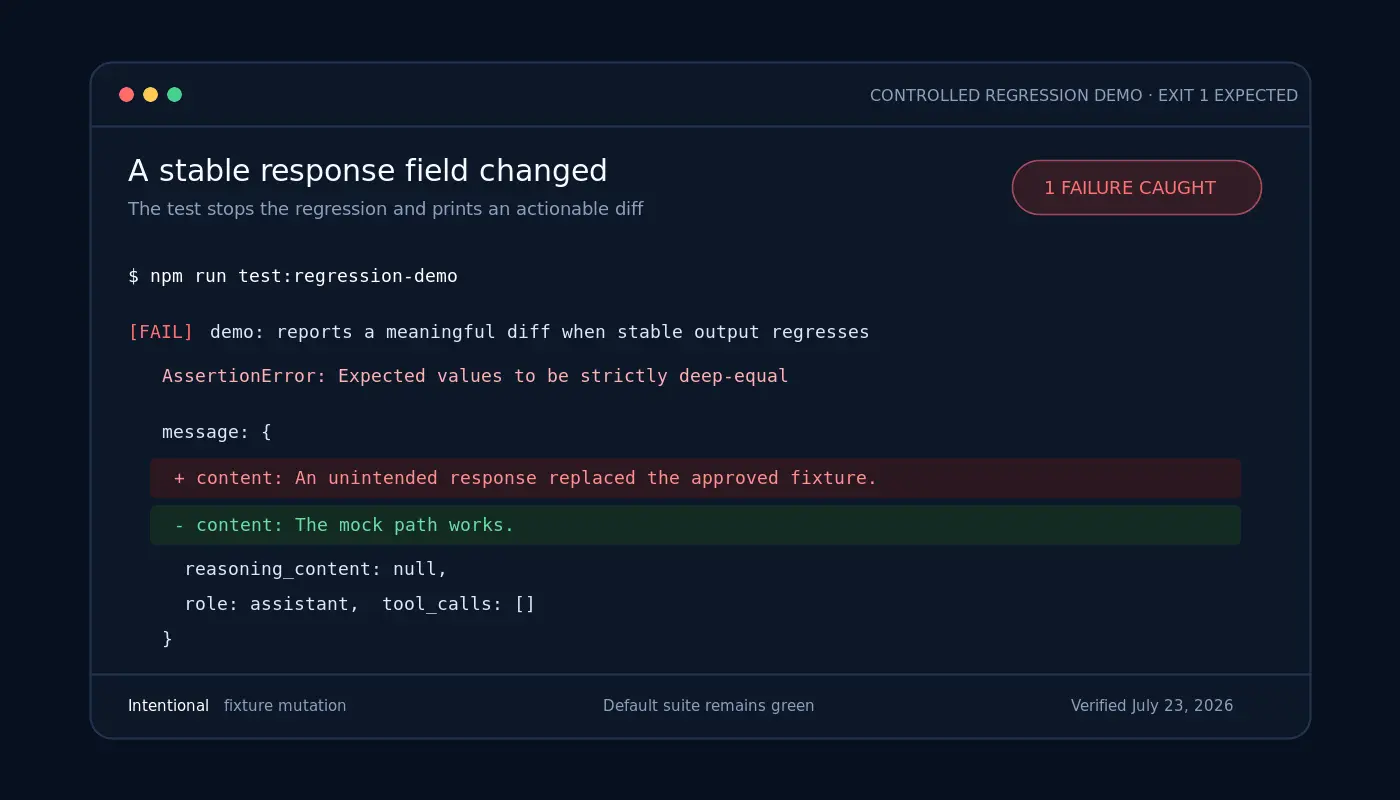
The intentionally failing demonstration lives outside the default test path. It changes one approved field, runs a deep comparison, and exits with status 1. This proves that the regression guard detects a meaningful change without leaving the everyday suite red.
Test DeepSeek Streaming Responses and [DONE]
DeepSeek documents streaming as data-only SSE terminated by data: [DONE]. When stream_options.include_usage is enabled, the service can send an additional usage chunk before termination; that chunk has an empty choices array. A safe parser must not assume every event contains text or even a choice.
data: {"choices":[{"index":0,"delta":{
  "role":"assistant",
  "reasoning_content":"Check the fixture. "
},"finish_reason":null}]}

data: {"choices":[{"index":0,"delta":{
  "content":"Mock stream OK."
},"finish_reason":null}]}

data: {"choices":[{"index":0,"delta":{},
  "finish_reason":"stop"}]}

data: {"choices":[],"usage":{"total_tokens":18}}

data: [DONE]- Split the fixture across arbitrary byte boundaries, not only newline boundaries.
- Ignore blank lines and non-data SSE lines.
- Keep
reasoning_contentseparate from finalcontent. - Do not pass
[DONE]toJSON.parse. - Accept a usage-only chunk with
choices: []. - Assert the final
finish_reasonyour application expects to handle.
Keep network timeouts and provider keep-alive behavior outside the unit parser itself. The operational details are covered in the DeepSeek API keep-alive and timeout guide.
Test Controlled Errors Without Calling DeepSeek
Return an error fixture from the same fake fetch and assert your application’s typed error, status, provider message, and retry classification. The verified suite includes a 429 case:
const fetchImpl = createJsonFetch({
  status: 429,
  body: {
    error: {
      message: "Too many requests in the test fixture",
      type: "rate_limit_error",
      code: "rate_limit_exceeded"
    }
  }
});

await assert.rejects(
  createChatCompletion({
    apiKey: "unit-test-key",
    messages,
    fetchImpl
  }),
  (error) => {
    assert.equal(error.status, 429);
    assert.equal(error.code, "rate_limit_exceeded");
    return true;
  }
);
Add analogous fixtures for the statuses your product handles, such as 401 for authentication and 503 for temporary unavailability. Unit tests should verify policy, not simulate waiting for real backoff intervals. For status meanings and production recovery guidance, use the separate DeepSeek API error-code reference.
Block Accidental Network Calls
A mock is only trustworthy when an unmatched request fails closed. Replace the global fetch during the suite so a missing injection cannot silently reach the real endpoint:
const originalFetch = globalThis.fetch;

before(() => {
  globalThis.fetch = async (url) => {
    throw new Error(
      `Unexpected network access: ${String(url)}`
    );
  };
});

after(() => {
  globalThis.fetch = originalFetch;
});

test("blocks an unmocked request", async () => {
  await assert.rejects(
    createChatCompletion({
      apiKey: "unit-test-key",
      messages
    }),
    /Unexpected network access/
  );
});- Do not read
DEEPSEEK_API_KEYanywhere in the unit suite. - Do not enable network passthrough by default.
- Fail when the hostname or path changes unexpectedly.
- Do not print Authorization headers in test logs or screenshots.
- Use a visibly fake sentinel value—not a key copied from a dashboard.
Run the Mock Suite in CI Without Secrets
The mock-only job needs Node and the repository—nothing else. There is deliberately no DEEPSEEK_API_KEY secret in this workflow.
name: DeepSeek API contract tests

on:
  pull_request:
  push:
    branches: [main]

jobs:
  test:
    runs-on: ubuntu-latest
    steps:
      - uses: actions/checkout@v4
      - uses: actions/setup-node@v4
        with:
          node-version: 24
      - run: npm test
Commit fixtures beside the tests so every change is reviewable. A fixture update should be treated as a code change: explain which documented contract or application requirement changed, review the diff, and run the intentional regression demo only when teaching or verifying the guard—not in the default CI job.
Python Equivalent with unittest.mock
Python uses the same architecture: put network behavior behind an injectable transport or patch the narrow function your adapter calls. This compact example uses an injected callable, which avoids patching global state:
from unittest import TestCase
from unittest.mock import Mock

def create_chat_completion(http_post, api_key, messages):
    return http_post(
        "https://api.deepseek.com/chat/completions",
        headers={
            "Authorization": f"Bearer {api_key}",
            "Content-Type": "application/json",
        },
        json={
            "model": "deepseek-v4-flash",
            "messages": messages,
            "thinking": {"type": "disabled"},
            "stream": False,
        },
    )

class DeepSeekClientTest(TestCase):
    def test_request_contract(self):
        fixture = {
            "object": "chat.completion",
            "model": "deepseek-v4-flash",
            "choices": [{
                "message": {
                    "role": "assistant",
                    "content": "The mock path works."
                },
                "finish_reason": "stop",
                "index": 0
            }]
        }
        http_post = Mock(return_value=fixture)

        result = create_chat_completion(
            http_post,
            "unit-test-key",
            [{"role": "user", "content": "Test"}],
        )

        self.assertEqual(
            result["choices"][0]["message"]["content"],
            "The mock path works.",
        )
        http_post.assert_called_once()
For advanced call inspection, side effects, and async mocks, see Python’s official unittest.mock documentation.
When to Add an Optional Live Smoke Test
Add a live smoke test only when you need to verify a deployed secret, DNS/TLS connectivity, provider availability, or a real response schema. Keep it in a manual or scheduled workflow, use a small non-sensitive prompt, and store the key only in a server-side secret manager. The live path was not executed for this article.
- Assert that the HTTP request succeeds and at least one choice exists.
- Validate the shape of the response—not the exact generated sentence.
- Record the model ID and mode used for the run.
- Handle every documented stop condition; see the DeepSeek
finish_reasonguide. - Log usage safely without asserting exact counts; see the token usage and cache fields guide.
- Do not save sensitive prompts, responses, or Authorization headers as CI artifacts.
If you need to create and validate a real credential, follow the DeepSeek API key testing guide. Do not turn that live check into a replacement for deterministic unit tests.
Common DeepSeek API Testing Mistakes
- Using a real key in unit tests: this creates leak, cost, and availability risks with no benefit to parser tests.
- Snapshotting the raw response: IDs, timestamps, fingerprints, usage values, and live text create noisy failures.
- Asserting exact live wording: a valid model response is probabilistic and can change without a client regression.
- Treating temperature zero as a guarantee: it does not create a contractual exact-output test, and sampling controls do not take effect in DeepSeek thinking mode.
- Ignoring empty choices in a usage chunk: the documented streaming usage event can contain
choices: []. - Parsing
[DONE]as JSON: it is a stream terminator, not a completion object. - Allowing network passthrough: one missing mock can turn a unit test into an accidental paid request.
- Using legacy model aliases in new fixtures: dated aliases make the test obsolete sooner.
- Confusing protocol regression with model quality: successful mocks say nothing about correctness, grounding, or safety.
DeepSeek API Testing Checklist
- ☐ Request URL, method, and path are asserted.
- ☐ Authorization uses a dummy sentinel value only.
- ☐ A dated, supported model ID is used in fixtures.
- ☐ Success and malformed-response paths are covered.
- ☐ Controlled error fixtures exercise application policy.
- ☐ SSE chunks are split across arbitrary byte boundaries.
- ☐ Blank events, usage-only chunks, and
[DONE]are covered. - ☐ Volatile fields are excluded from ordinary regression comparisons.
- ☐ Accidental network access fails immediately.
- ☐ CI runs without API secrets.
- ☐ Optional live smoke tests are kept separate.
- ☐ Fixture source and verification date are documented.
Frequently Asked Questions
Can I test DeepSeek API calls without an API key?
Yes. Mock tests can verify your request builder, response parser, streaming code, error mapping, and regression behavior with a dummy key and local fixtures. They cannot verify a real credential, hosted availability, latency, billing, or generated-answer quality.
Should I mock the OpenAI SDK or the HTTP boundary?
Prefer mocking the smallest interface your application owns. If you wrap the OpenAI SDK in an adapter, mock that adapter. If you own a small HTTP client, inject fetch. Avoid tests that depend on undocumented SDK internals, because an SDK update can break the mock without changing the API contract you care about.
What should a DeepSeek response fixture include?
Include the documented fields your application consumes: normally object, model, choices[].message, finish_reason, and selected usage fields. Add reasoning_content, tool_calls, log probabilities, or cache fields only when your code handles them.
Should I snapshot the entire DeepSeek response?
No. Normalize the response into a stable application-facing object first. Raw IDs, timestamps, fingerprints, exact live text, and token counts are often volatile. Snapshotting everything creates noise and encourages developers to approve large diffs without understanding what changed.
How do I test a DeepSeek streaming response?
Store a small SSE fixture, split it into arbitrary byte chunks, and feed those chunks through a local ReadableStream. Assert accumulated reasoning and final content separately, verify the last finish reason, accept a usage-only event with no choices, and stop cleanly at data: [DONE].
Can mocks verify rate limits or service availability?
Mocks can verify how your code reacts to a chosen 429 or 503 response. They cannot prove the provider’s live thresholds, concurrency behavior, availability, or recovery time. Those require monitoring and carefully separated live checks.
Should regression tests compare the exact generated text?
Only when the text is a handcrafted fixture used to test your parser or downstream application logic. Do not expect a live probabilistic model to return the same sentence on every run. Model-output evaluation needs task-specific rubrics or deterministic structural checks, not an exact-string unit test.
Which DeepSeek model ID should test fixtures use?
Use the model ID your production integration targets and record the fixture’s verification date. On July 23, 2026, DeepSeek’s API reference listed deepseek-v4-flash and deepseek-v4-pro. Recheck the official reference when maintaining the test later.
Testing Methodology and Reproducibility
| Environment | Node.js v24.14.0; npm 11.9.0 |
|---|---|
| External packages | None |
| Command | npm test |
| Verified result | 6 passed; 0 failed; exit status 0 |
| Intentional demo | npm run test:regression-demo; exit status 1 as designed |
| Outbound requests | 0; the suite blocks unmatched network access |
| Fixture basis | Handcrafted against the public Chat Completion schema |
| Verification date | July 23, 2026 |
The suite covers request serialization, successful completion parsing, a mocked 429 error, SSE parsing across arbitrary byte boundaries, normalized regression comparison, and an accidental-network guard. It does not claim to test a live key or hosted model behavior.
Conclusion
Reliable DeepSeek API testing starts by separating deterministic software checks from live service checks and model evaluation. Inject the HTTP boundary, keep small dated fixtures, assert the request contract, test streaming termination and empty events, normalize before regression comparison, and block every unmatched network call. That gives every pull request fast protection without an account, secret, token charge, or dependency on provider availability.
Then add a narrowly scoped live smoke test only when you need proof of credentials and connectivity, and use a separate evaluation workflow when you need evidence about answer quality.