

DeepSeek thinking mode lets the model produce reasoning before its final answer. To turn it off in Chat Completions, send "thinking": {"type": "disabled"}. With the OpenAI Python SDK, put that object inside extra_body. For the Responses API, use "reasoning": {"effort": "none"} instead.
The distinction matters: DeepSeek supports several API formats, and their controls are not interchangeable. Both current models, deepseek-flash and deepseek-v4-pro, support thinking and non-thinking modes. Thinking is enabled by default, with high as the default effort. You do not need to change models just to switch thinking off. See the official model table for the current model versions.
Table of Contents
Use the controls for your API format
Start with the method your application calls. A client using chat.completions.create() needs the Chat Completions settings; messages.create() uses the Anthropic-compatible format; responses.create() uses Responses. The following table shows a straightforward configuration for each.
| API format | Turn thinking off | Enable thinking and select high effort |
|---|---|---|
| Chat Completions | {"thinking":{"type":"disabled"}} | {"thinking":{"type":"enabled"},"reasoning_effort":"high"} |
| Anthropic-compatible Messages | {"thinking":{"type":"disabled"}} | {"thinking":{"type":"enabled"},"output_config":{"effort":"high"}} |
| Responses API | {"reasoning":{"effort":"none"}} | {"reasoning":{"effort":"high"}} |
These are request-body fields, not complete requests. The official thinking-mode guide shares the thinking.type switch between Chat Completions and Anthropic. Anthropic effort belongs in output_config.effort; reasoning.effort belongs to Responses.
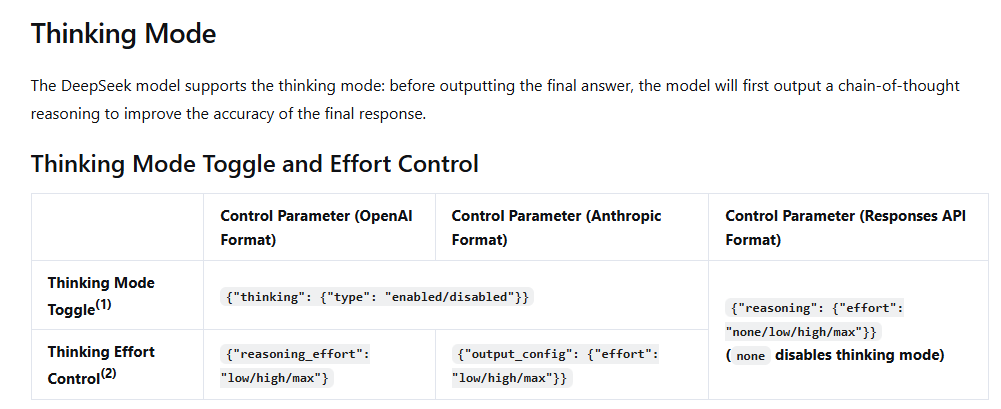
There is also an alternative for Chat Completions: its endpoint reference explicitly supports reasoning_effort: "none" to disable thinking, and low, high, or max to enable it. The general guide emphasizes the separate switch. Use one clear configuration rather than combining a disabled switch with an effort value that requests thinking.
How to disable DeepSeek thinking
For a first direct request, use the explicit disabled switch and leave out reasoning_effort. That keeps the intent easy to inspect and avoids carrying an enabled-thinking value over from another request template.
The examples below call DeepSeek’s own API. Set DEEPSEEK_API_KEY in your environment first, and keep it out of browser-side JavaScript and source control. If you still need a key or API credit, the DeepSeek API setup guide covers those steps. Running these examples uses your API account; the small arithmetic question makes the expected answer easy to recognize.
cURL: send the switch in the JSON body
This command uses a Bash-compatible shell. It explicitly requests non-thinking mode and allows up to 1,024 output tokens.
curl --fail-with-body https://api.deepseek.com/chat/completions \
  -H "Authorization: Bearer ${DEEPSEEK_API_KEY}" \
  -H "Content-Type: application/json" \
  --data '{
    "model": "deepseek-flash",
    "messages": [{"role": "user", "content": "What is 17 times 19?"}],
    "thinking": {"type": "disabled"},
    "max_tokens": 1024
  }'
Read the answer from choices[0].message.content. The correct arithmetic result is 323; the exact wording may vary. A successful HTTP response alone does not tell you that a wrapper forwarded the thinking setting, so check the outgoing JSON if you are adapting this to another client.
Python: put thinking inside extra_body
Install the SDK with python -m pip install openai, then run:
import os
from openai import OpenAI

client = OpenAI(
    api_key=os.environ["DEEPSEEK_API_KEY"],
    base_url="https://api.deepseek.com",
)

response = client.chat.completions.create(
    model="deepseek-flash",
    messages=[{"role": "user", "content": "What is 17 times 19?"}],
    extra_body={"thinking": {"type": "disabled"}},
    max_tokens=1024,
)

print(response.choices[0].message.content)
print("Finish reason:", response.choices[0].finish_reason)
extra_body is an SDK argument. It adds thinking to the top level of the outgoing JSON; it is not another JSON container to send over HTTP. This is the pattern used in DeepSeek’s official SDK examples.
If your client exposes reasoning_effort directly, the endpoint reference also supports replacing the extra_body line with reasoning_effort="none". That is an alternative configuration, not a requirement to send both controls.
Node.js: use the thinking request property
Install with npm install openai. Save this as deepseek-fast.mjs and run node deepseek-fast.mjs. This is server-side JavaScript, where the API key stays in the environment.
import OpenAI from "openai";

const client = new OpenAI({
  apiKey: process.env.DEEPSEEK_API_KEY,
  baseURL: "https://api.deepseek.com",
});

async function main() {
  const response = await client.chat.completions.create({
    model: "deepseek-flash",
    messages: [{ role: "user", content: "What is 17 times 19?" }],
    thinking: { type: "disabled" },
    max_tokens: 1024,
  });
  console.log(response.choices[0].message.content);
  console.log("Finish reason:", response.choices[0].finish_reason);
}

main().catch((error) => {
  console.error(error.message);
  process.exitCode = 1;
});
Use deepseek-flash for Flash or deepseek-v4-pro for Pro. Changing that name selects the model; it does not replace the thinking control. Likewise, asking “answer without thinking” in a prompt is not a substitute for setting the request parameter.
When to use thinking, and which effort to choose
Use the task to make the choice. Reformatting supplied text, extracting a short field, or drafting a routine reply gives you a sensible starting point for non-thinking mode. Debugging a failure across several functions, working through a mathematical argument, or reconciling conflicting requirements gives you a reason to try thinking.
Those are starting recommendations, not measured performance claims. A difficult task can still receive a wrong answer with more reasoning. Check the result against the task’s requirements rather than treating a long reasoning trace as evidence of correctness.
| Setting | Where to start | What would justify changing it? |
|---|---|---|
| Thinking off | Routine transformations and questions with a clear, short answer. | The model repeatedly misses a step or constraint that requires more analysis. |
low | A bounded reasoning task or a small code change. | The answer still misses relevant interactions or edge cases. |
high | The default baseline for multi-step analysis and debugging. | Compare a lower setting if the result is already reliable, or max for a difficult unresolved task. |
max | A demanding problem where the quality of the result matters more than getting a quick first answer. | Keep it only when the benefit on your workload justifies the token use and waiting time. |
To enable thinking with the Python client defined above, use:
response = client.chat.completions.create(
    model="deepseek-flash",
    messages=[{
        "role": "user",
        "content": "Explain how to detect a cycle in a directed graph.",
    }],
    reasoning_effort="high",
    extra_body={"thinking": {"type": "enabled"}},
    max_tokens=8192,
)

print(response.choices[0].message.content)
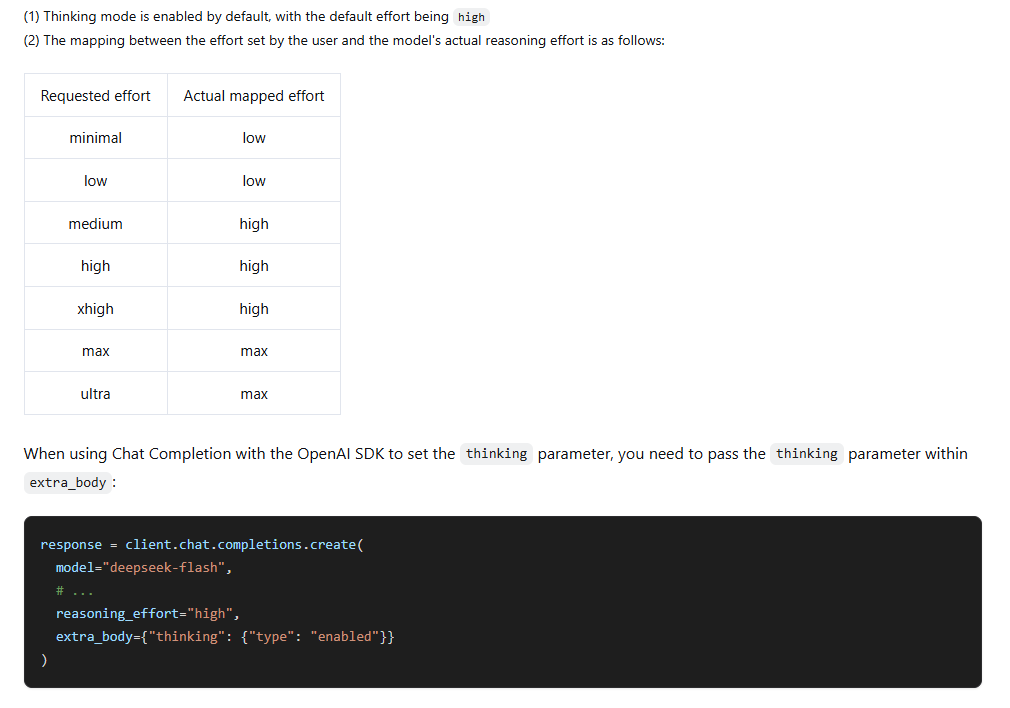
Replace high with low or max to change effort. Low still means thinking is enabled. Effort is not an exact reasoning-token budget and does not force the model to use a particular number of tokens. The output cap is a separate control.
For new code, use the native low, high, and max values. DeepSeek documents compatibility mappings such as minimal to low and medium/xhigh to high. A framework showing “xhigh” therefore does not necessarily request more effort than “high” from DeepSeek.
Thinking mode in the Anthropic-compatible API
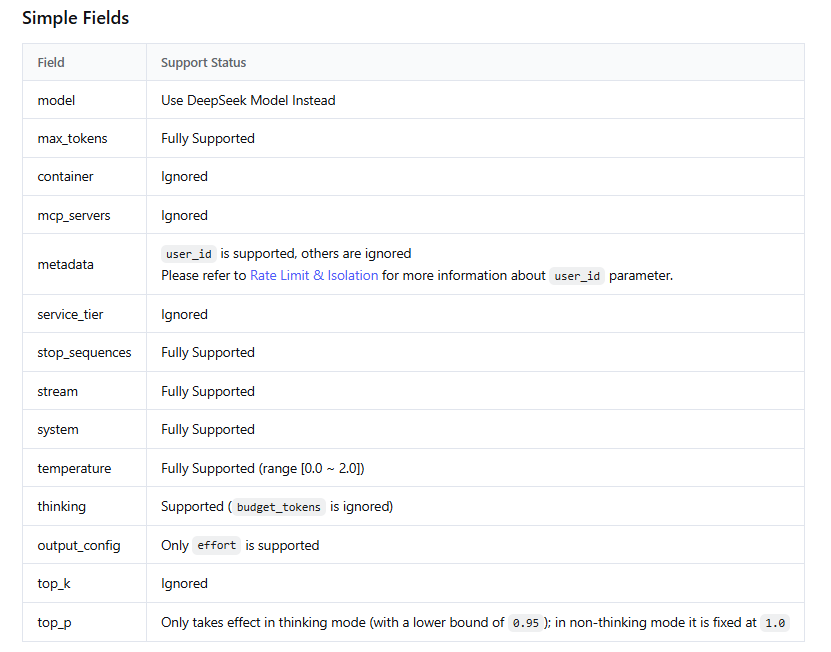
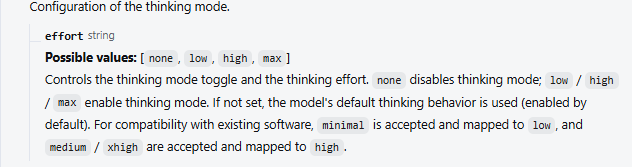
Use https://api.deepseek.com/anthropic as the base URL. In this format, thinking.type switches thinking on or off, while output_config.effort selects the effort when it is on. DeepSeek’s Anthropic compatibility guide also states that budget_tokens is ignored, so a Claude-specific thinking budget is not an effective DeepSeek budget.
Install with python -m pip install anthropic. This complete example disables thinking and prints text blocks from the reply:
import os
from anthropic import Anthropic

client = Anthropic(
    api_key=os.environ["DEEPSEEK_API_KEY"],
    base_url="https://api.deepseek.com/anthropic",
)

response = client.messages.create(
    model="deepseek-flash",
    max_tokens=1024,
    messages=[{"role": "user", "content": "What is 17 times 19?"}],
    thinking={"type": "disabled"},
)

for block in response.content:
    if block.type == "text":
        print(block.text)
For an enabled-thinking request, replace the thinking line with extra_body={"thinking": {"type": "enabled"}, "output_config": {"effort": "high"}}. That forwards DeepSeek’s documented fields without borrowing a different API format. Choose an output allowance suited to the task as well; the 1,024-token example above is for a short non-thinking answer.
Do not use reasoning={"effort": "none"} as the Anthropic switch. That object configures Responses. Using the same API key does not make the request fields interchangeable.
Thinking mode in the Responses API
Responses combines the switch and effort in reasoning.effort: none turns thinking off, and low, high, or max enables it at that level. Use the OpenAI SDK with DeepSeek’s base URL, as shown in the official Responses guide.
import os
from openai import OpenAI

client = OpenAI(
    api_key=os.environ["DEEPSEEK_API_KEY"],
    base_url="https://api.deepseek.com",
)

response = client.responses.create(
    model="deepseek-flash",
    input="What is 17 times 19?",
    reasoning={"effort": "none"},
    max_output_tokens=1024,
)

print(response.output_text)
To request thinking, change none to the desired effort and give the request enough output space. Responses uses max_output_tokens, whereas Chat Completions uses max_tokens. The Responses reference defines that output allowance as including both reasoning and the visible answer.
Keep response parsing consistent too. Responses returns reasoning and message items; it does not use Chat Completions’ choices[0].message.reasoning_content path. For streaming, answer text arrives through response.output_text.delta, and the ending event reports completed, incomplete, or failed. Do not wait for a Chat Completions-style [DONE] marker.
Read reasoning and the final answer separately
In Chat Completions, the assistant message has separate reasoning_content and content fields. Use content for the answer your application consumes. Showing a reasoning trace, hiding it, or storing it for a conversation are separate application decisions.
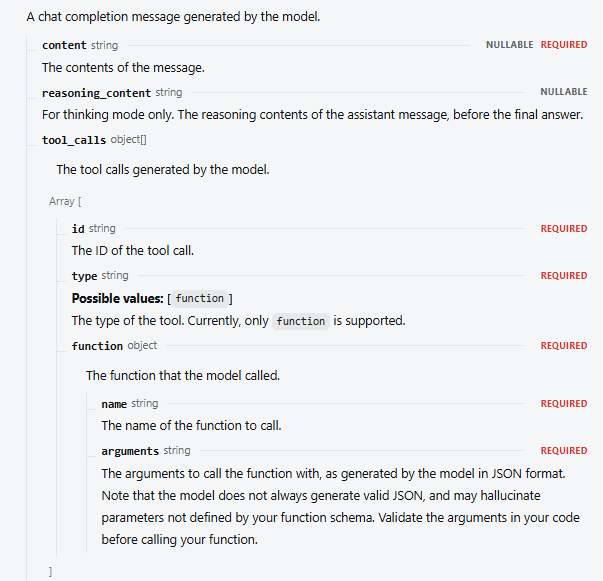
With streaming enabled, an early chunk may contain reasoning but no answer text. Do not treat that empty content value as completion. The following example reuses the OpenAI Python client from the earlier Python section, collects reasoning separately, and prints the answer as it arrives:
stream = client.chat.completions.create(
    model="deepseek-flash",
    messages=[{"role": "user", "content": "Explain how binary search works."}],
    stream=True,
    reasoning_effort="high",
    extra_body={"thinking": {"type": "enabled"}},
    max_tokens=8192,
)

reasoning_parts = []
answer_parts = []
finish_reason = None

for chunk in stream:
    if not chunk.choices:
        continue
    choice = chunk.choices[0]
    delta = choice.delta
    reasoning = getattr(delta, "reasoning_content", None)
    if reasoning:
        reasoning_parts.append(reasoning)
    if delta.content:
        answer_parts.append(delta.content)
        print(delta.content, end="", flush=True)
    if choice.finish_reason is not None:
        finish_reason = choice.finish_reason

print()
print("Finish reason:", finish_reason)
reasoning_text = "".join(reasoning_parts)
answer_text = "".join(answer_parts)
Check finish_reason before treating the result as complete. A length result needs a look at the output allowance and available context; an interrupted connection may leave you without a final finish reason at all. Keeping only answer text in the interface does not stop reasoning tokens from being generated or billed.
What to send back in multi-turn conversations
For Chat Completions, the important dividing line is whether the request includes tools. It is not simply whether the last response happened to call a function.
Without tools, you can carry forward user messages and assistant answers. Previous reasoning_content is ignored even if you send it. This text-only example reuses the OpenAI Python client and deliberately leaves out tools:
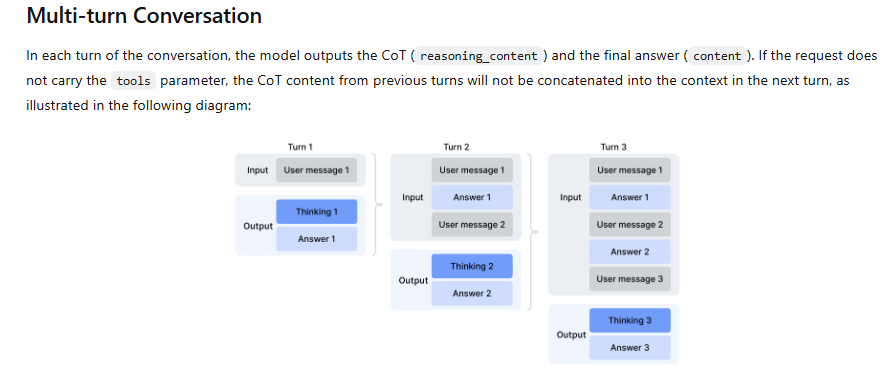
messages = []

for question in ("What is 17 times 19?", "Subtract 3 from that result."):
    messages.append({"role": "user", "content": question})
    response = client.chat.completions.create(
        model="deepseek-flash",
        messages=messages,
        reasoning_effort="high",
        extra_body={"thinking": {"type": "enabled"}},
        max_tokens=8192,
    )
    choice = response.choices[0]
    if choice.finish_reason != "stop" or not choice.message.content:
        raise RuntimeError(f"No complete text answer: {choice.finish_reason}")
    answer = choice.message.content
    messages.append({"role": "assistant", "content": answer})
    print(answer)
For a thinking-enabled request carrying tools, preserve the previous assistant reasoning as well as its answer and tool calls, including turns that did not call a tool. DeepSeek documents a 400 error when required reasoning is missing. In the OpenAI Python SDK, appending response.choices[0].message retains those fields; append each tool result with its matching tool_call_id before continuing. The official replay example shows the full sequence.
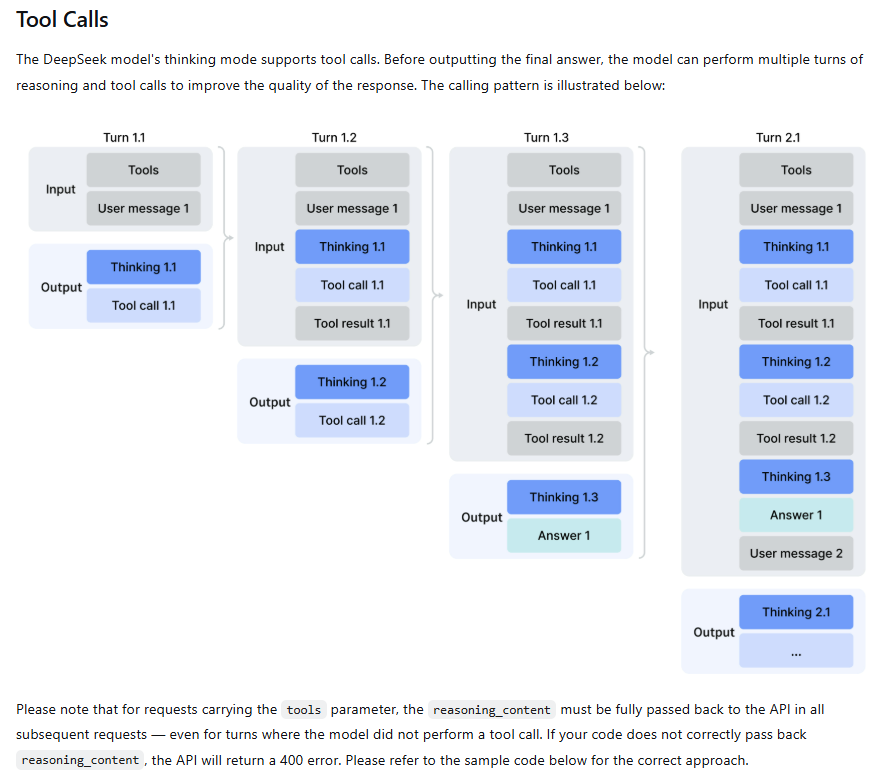
This distinction prevents a common integration mistake: a text-only history cleaner silently strips fields that an agent later needs. Keep the history policy attached to the request type. Our tool-calling guide covers the complete function-execution loop, while the section on growing conversation history covers input growth and preserving required reasoning and tool call/result pairs.
Responses uses its own input-item format. DeepSeek’s Responses service is stateless: previous_response_id and conversation are not supported. Manage and resend the required history rather than expecting an earlier response ID to restore it.
How thinking affects cost, output space, and sampling
Thinking tokens are part of generated output, so a short visible answer can still have substantial output usage. In Chat Completions, read usage.completion_tokens for the total and usage.completion_tokens_details.reasoning_tokens for the reasoning portion. The reasoning count is a breakdown, not an extra amount to add to completion tokens.
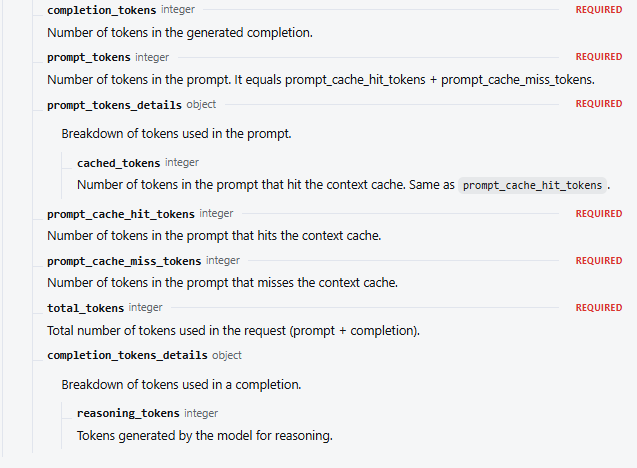
For example, a hypothetical response with 1,000 completion tokens and 700 reasoning tokens used 1,000 output tokens, not 1,700. Multiply the total by the applicable model output rate in the official USD price table, then account for input separately. The token-usage guide explains the cache and usage fields in more detail.
An output cap must leave room for reasoning and the answer. In Chat Completions, omitting max_tokens currently selects different defaults: 8K in non-thinking mode, 64K in thinking mode, or 128K with max effort. These are defaults, not promised answer lengths. Setting an explicit cap makes a comparison between configurations easier to interpret.
If reasoning consumes most of a small allowance, increasing effort without increasing available output space may not solve an incomplete answer. Review the cap, shorten an unnecessarily broad task, or choose a lower effort. Input and generated output must also fit the context window; see the context and output limits guide for planning that space.
Sampling controls have their own restrictions. In thinking mode, temperature, presence_penalty, and frequency_penalty have no effect. top_p works only in thinking mode, with an effective range of 0.95–1; lower values are treated as 0.95. In non-thinking mode, top_p is fixed at 1 and your supplied value is ignored. These rules are documented in the request reference.
Consequently, temperature zero is not an off switch, and lowering it will not reduce effort in thinking mode. Set the mode and effort first, then adjust the controls that actually apply to that mode.
When thinking will not turn off
The request reports a thinking/effort conflict
If you encounter “thinking options type cannot be disabled when reasoning_effort is set,” inspect the request your client actually sends. For the explicit-switch approach, send thinking.type: "disabled" and remove an inherited low, high, or max effort. For the effort-only approach supported by the current Chat Completions reference, send reasoning_effort: "none" without a contradictory enabled switch.
Do not turn an error from one integration into a rule that the field is always forbidden. The current endpoint documentation explicitly accepts none. The useful diagnostic question is whether your chosen provider, endpoint, and client agree on the configuration being sent.
A framework or app seems to ignore the setting
Check the destination and API format first, then inspect provider defaults, per-call overrides, and the final serialized body. A setting called “reasoning” in an app may be a display preference or may map to a different field. Hiding the trace does not establish that thinking is disabled.
For deepagents or LangChain-based applications, configure the selected model/provider using its documented options. The Deep Agents customization documentation describes supplying a configured model. Do not assume every wrapper forwards the same extra_body or model_kwargs structure, or that an agent-level effort selector reaches DeepSeek unchanged.
Start by comparing your configuration with one direct request above. If that works, add the framework’s options back one at a time. When inspecting logs, redact the API key and private prompt content. There is no need to build a separate benchmark just to find a field that was dropped or overridden.
The response contains reasoning but no usable answer
Confirm that your code reads content after the reasoning phase and continues consuming the stream. Then inspect the finish reason or Responses status. If generation reached its output limit, revisit the allowance and task scope. If an agent response contains tool calls, the application may need to execute them and return results before it receives the final answer.
For an authentication, balance, rate-limit, or server error, use the API error guide. Changing thinking settings is not a general fix for a request that never reached generation.
FAQ
Can I disable thinking on both Flash and Pro?
Yes. DeepSeek’s current model table lists thinking and non-thinking support for both deepseek-flash and deepseek-v4-pro. Choose the model for your task, then use the control appropriate to your API format.
Is reasoning_effort=”none” supported?
Yes, the current Chat Completions reference documents it as an off switch. Responses uses the nested equivalent, reasoning={"effort":"none"}. For Anthropic-compatible Messages, use thinking={"type":"disabled"}. Keep the formats separate.
Does low effort mean no thinking?
No. Low is an enabled-thinking level. To request non-thinking mode, use an explicit off configuration rather than selecting the lowest enabled level.
Does hiding the thinking text reduce my API bill?
Hiding text in the interface does not change the tokens generated by the service. Change the request configuration if you want to disable thinking, and use returned usage to understand what the request consumed.
Are these the same settings for DeepSeek R1 or a local model?
This guide covers DeepSeek’s current hosted API. A local R1 model, another inference server, or a third-party gateway has its own supported request fields and model behavior. Check that service’s documentation before copying these controls; an OpenAI-compatible URL alone is not enough to establish support.
Does changing thinking in the DeepSeek app change my API requests?
Configure API requests in the application that sends them. The official chat app and your API client are separate ways of using DeepSeek; the API examples here do not configure the chat interface, and an app setting is not an API request parameter.
Start with one clear configuration
For a routine task, begin with thinking explicitly disabled and check whether the answer meets your needs. For a task that benefits from more analysis, enable thinking at high effort, then consider changing the level based on the result, token use, and waiting time. Keep the model and task consistent while making that comparison.
The essential setup is straightforward: use the right field for your API, leave enough space for the answer, and preserve the history your request type needs. Once that works, connect the configuration to your application rather than carrying conflicting settings forward from several different examples.