

DeepSeek Tool Calls, also called function calling, let the model request a function that your application provides. You describe the function and its inputs, send those definitions with the conversation, and receive a function name plus arguments. Your code checks the request, runs the function, and sends its result back so DeepSeek can answer the user.
This is useful when an answer depends on information or actions outside the model: checking stock, looking up an order, retrieving a document, or updating a record. DeepSeek does not execute your Python code or gain access to your database just because you describe a tool. That connection belongs to your application.
The guide below starts with a complete Python example for the official Chat Completions API, then covers tool selection, thinking mode, strict schemas, multiple calls, streaming, and common failures. The stock records in the example are fictional, and the function only reads local demonstration data.
How a DeepSeek tool call works
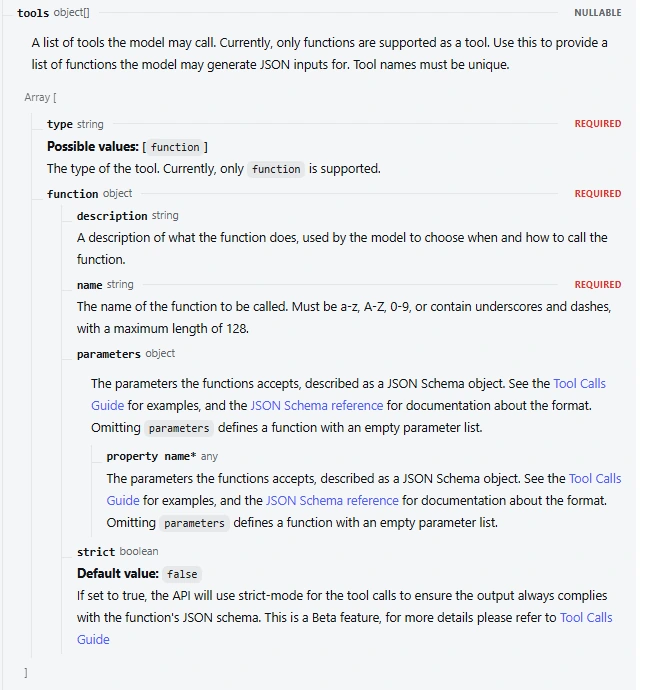
A tool definition contains a name, a description of when to use it, and a JSON Schema describing its arguments. The definition is an interface, not the function’s implementation. For example, lookup_stock might accept a product code, while your own Python function performs the actual lookup.
- Send the question and available tools. The Chat Completions request includes
messagesand atoolsarray. - Inspect the assistant’s response. It may contain ordinary text, one tool call, or several calls.
- Validate and execute the requested function. Check the function name and arguments before passing them to your application.
- Return the result. Keep the assistant’s tool-call message in the conversation and add a
role: "tool"message whosetool_call_idmatches that call. - Ask for the next response. DeepSeek can use the result in its answer or request another step if the task needs one.
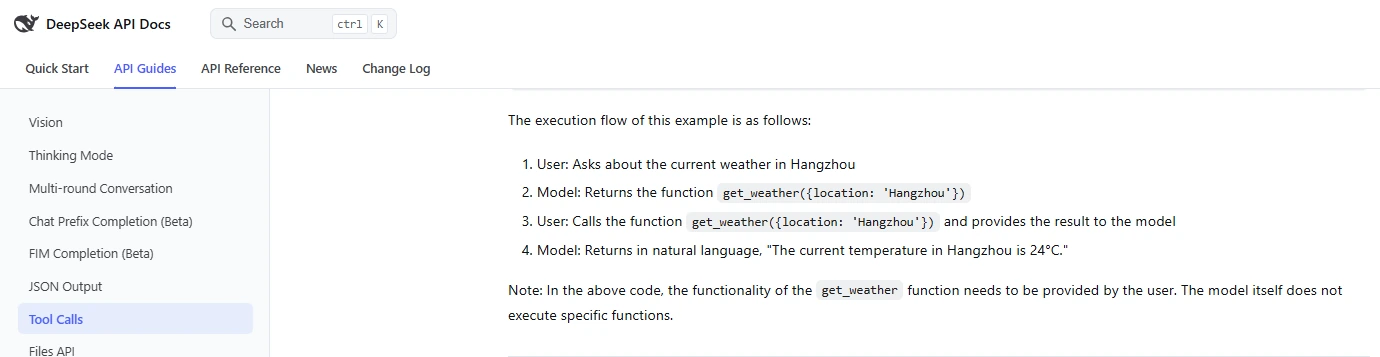
That sequence follows DeepSeek’s official Tool Calls guide. The important relationship is between a call and its result: the returned ID connects the data your function supplies to the request that produced it.
Complete Python function-calling example
This example uses Python’s standard library, so no SDK installation is required. Set your API key in a server-side environment variable named DEEPSEEK_API_KEY, save the code as tool_calls.py, and run python tool_calls.py. If you need a key, follow the DeepSeek API key setup guide.
The local stock lookup is simulated; the model requests made when you run the script are real API requests and can incur usage charges. There are no purchases, database writes, or external stock-service calls in this example.
import json
import os
import re
from urllib.request import Request, urlopen

API_URL = "https://api.deepseek.com/chat/completions"
DEMO_STOCK = {"BK-100": 7, "BK-200": 0}

TOOLS = [{
    "type": "function",
    "function": {
        "name": "lookup_stock",
        "description": (
            "Look up available units for a product code supplied by the user. "
            "This only reads stock; it does not reserve or buy anything."
        ),
        "parameters": {
            "type": "object",
            "properties": {
                "sku": {"type": "string", "pattern": "^[A-Z]{2}-[0-9]{3}$"}
            },
            "required": ["sku"],
            "additionalProperties": False,
        },
    },
}]

def lookup_stock(sku):
    if sku not in DEMO_STOCK:
        return {"sku": sku, "error": "product_not_found"}
    return {"sku": sku, "available_units": DEMO_STOCK[sku]}

def reject_constant(value):
    raise ValueError(f"Invalid JSON constant: {value}")

def validate_calls(calls):
    validated, ids = [], set()
    for call in calls:
        call_id = call.get("id")
        if (call.get("type") != "function" or
                not isinstance(call_id, str) or not call_id.strip() or
                call_id in ids):
            raise ValueError("Invalid or duplicate tool call ID")
        function = call.get("function") or {}
        if function.get("name") != "lookup_stock":
            raise ValueError("Unknown function")
        args = json.loads(function["arguments"], parse_constant=reject_constant)
        if not isinstance(args, dict) or set(args) != {"sku"}:
            raise ValueError("Expected exactly one sku argument")
        if not isinstance(args["sku"], str) or not re.fullmatch(
                r"[A-Z]{2}-[0-9]{3}", args["sku"]):
            raise ValueError("Invalid product code")
        ids.add(call_id)
        validated.append((call_id, args["sku"]))
    return validated

def ask_deepseek(messages):
    payload = {
        "model": "deepseek-flash",
        "messages": messages,
        "tools": TOOLS,
        "tool_choice": "auto",
        "thinking": {"type": "disabled"},
        "max_tokens": 1000,
        "stream": False,
    }
    request = Request(
        API_URL,
        data=json.dumps(payload).encode("utf-8"),
        headers={
            "Authorization": "Bearer " + os.environ["DEEPSEEK_API_KEY"],
            "Content-Type": "application/json",
        },
        method="POST",
    )
    with urlopen(request, timeout=60) as response:
        return json.load(response)

def answer_stock_question(question):
    messages = [
        {"role": "system", "content":
         "Use lookup_stock for product availability. Ask for a product code "
         "if it is missing. Base stock answers on the tool result."},
        {"role": "user", "content": question},
    ]
    for _ in range(4):
        response = ask_deepseek(messages)
        choice = response["choices"][0]
        message = choice["message"]
        calls = message.get("tool_calls") or []
        if not calls:
            content = message.get("content")
            if (choice.get("finish_reason") != "stop" or
                    not isinstance(content, str) or not content.strip()):
                raise ValueError("No completed answer was returned")
            return content
        if choice.get("finish_reason") != "tool_calls":
            raise ValueError("Tool arguments may be incomplete; no tool was run")
        if len(calls) > 5:
            raise ValueError("Too many calls for this example")
        validated = validate_calls(calls)
        messages.append(message)
        for call_id, sku in validated:
            messages.append({
                "role": "tool",
                "tool_call_id": call_id,
                "content": json.dumps(lookup_stock(sku)),
            })
    raise RuntimeError("Stopped after four model requests without a final answer")

if __name__ == "__main__":
    print(answer_stock_question("How many units of BK-100 are available?"))
For the demonstration question, the lookup returns seven units. An appropriate final answer would report that count, but its wording is not fixed. The code does not rely on the model already knowing the stock figure: the data comes from lookup_stock after the requested product code is checked.
The loop allows up to four model requests and five tool calls in a response. Those are limits chosen for this small example, not DeepSeek account limits. It stops on malformed arguments or an abnormal finish rather than running a partial request. The timeout applies to the HTTP operation; a production workflow should also have an overall time budget and timeouts for its own tools.
To connect a real service, replace the body of lookup_stock with your database or API lookup. Keep access checks in that function or the service it calls. Do not let the model supply trusted credentials or decide which customer’s private records it is allowed to read.
What to look for in the response
The API returns each requested function inside message.tool_calls. These are the fields your application needs:
| Field | Purpose | How to use it |
|---|---|---|
id | Identifies the individual call | Return the same value as tool_call_id; do not invent a replacement. |
function.name | Names the requested function | Match it against functions your application explicitly supports. |
function.arguments | Contains the arguments as a JSON string | Parse the string, then check its keys, types, and permitted values. |
finish_reason | Explains why generation ended | For this tool-call path, require a completed tool_calls finish; do not execute truncated output. |
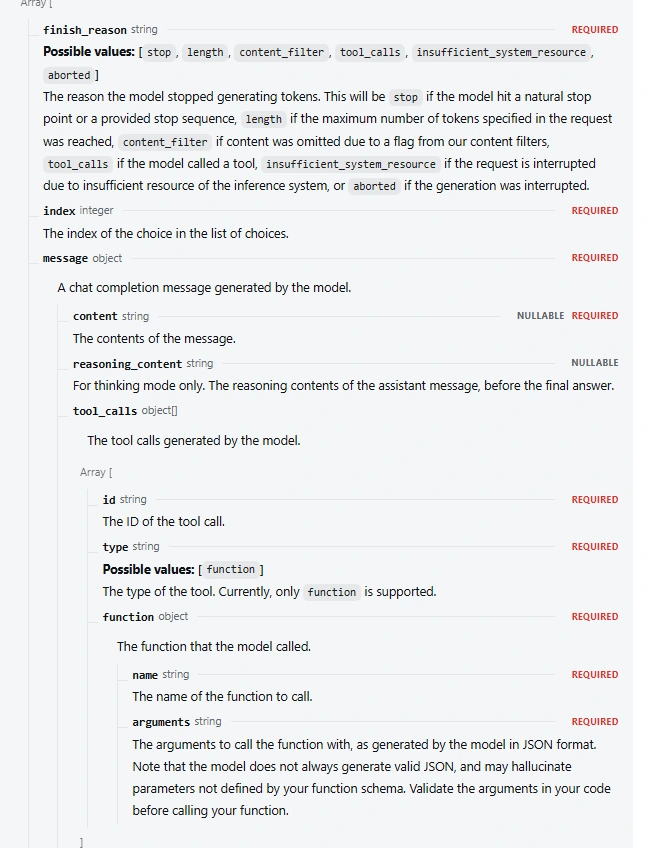
The Chat Completions reference warns that generated arguments may contain invalid JSON or parameters outside your definition. A successful HTTP response alone does not make a requested function ready to execute.
Choose when DeepSeek should call a tool
tool_choice controls whether the model can answer directly or must request a function. Choose it for the current step of your workflow, rather than forcing the same behavior throughout a conversation.
| Chat Completions setting | Behavior | Typical use |
|---|---|---|
"auto" | The model can answer or request one or more tools. | A conversation where some questions need a lookup and others do not. |
"none" | The model does not request a tool. | A final explanation after all required results are available. |
"required" | The model must request one or more tools. | A controlled step that must use an available function. |
{"type":"function","function":{"name":"lookup_stock"}} | Requests the named function. | A step where your application has already chosen which function is needed. |
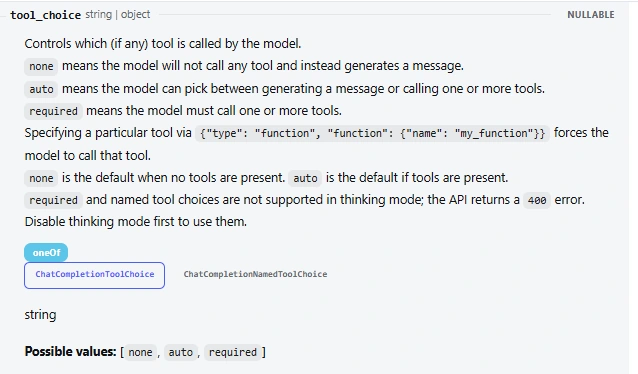
With tools present, the documented default is auto; without them, it is none. In Chat Completions, required and a named choice are not supported while thinking is enabled and return HTTP 400. Disable thinking first if that step needs either control. These rules are specified in the tool-choice reference.
If you force a tool for the first request, switch back to auto or use none when you want the final answer. Otherwise, your own request can keep demanding another function call after the lookup is finished. Also allow a clarification question when required information, such as the product code, is missing.
Use tool calls with thinking mode
DeepSeek supports tool use in thinking mode, and thinking is enabled by default. The first example switches it off explicitly to keep a simple lookup easy to follow. For a task involving planning or several dependent lookups, you can enable it with the following raw Chat Completions fields:
{
  "thinking": {"type":"enabled"},
  "reasoning_effort": "high",
  "tool_choice": "auto"
}
The crucial requirement is conversation history. DeepSeek’s Thinking Mode guide says that requests carrying tools must pass back the returned reasoning_content in subsequent requests, including assistant turns that did not call a tool. Omitting required reasoning can produce HTTP 400.
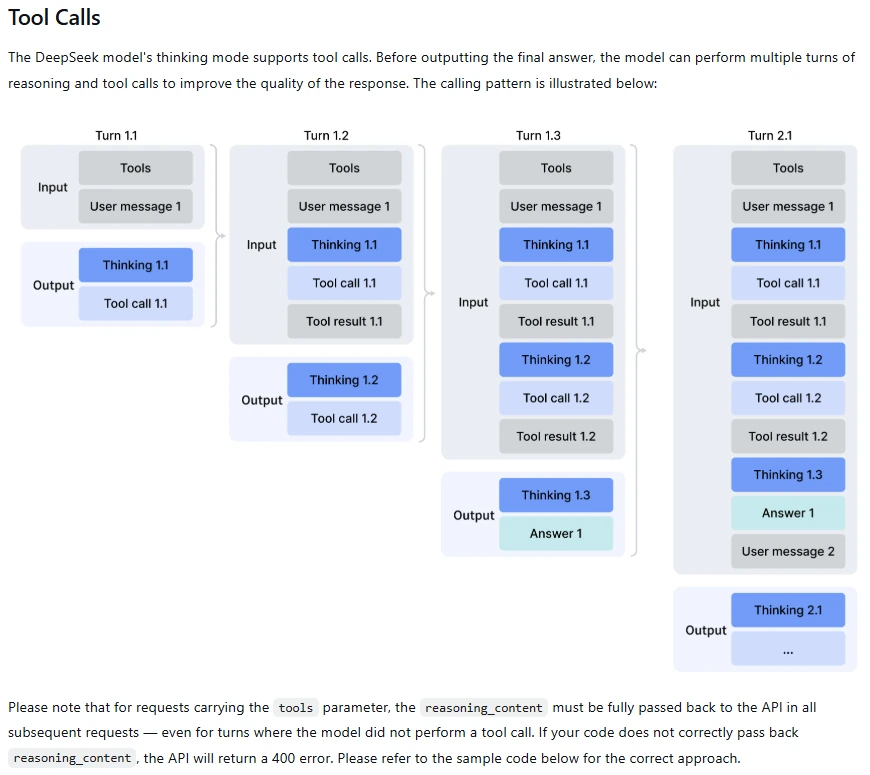
Preserve the complete assistant message in your internal history, including tool_calls and any reasoning_content, then append the matching tool results. The example’s messages.append(message) keeps those fields together. Display the final answer to the user separately; reasoning text is not a tool result and should not be mixed into the answer or argument parser.
In a longer conversation, do not casually strip fields or summarize away a tool-call message while keeping its result. Trim completed history only with a clear strategy for preserving the relationships needed by the next request. The system prompt guide covers the complementary task of keeping your application instructions clear.
Enable strict function schemas when you need them
DeepSeek’s strict mode is a Beta feature that constrains tool arguments to the function’s JSON Schema. The official setup requires the Beta base URL and strict: true on every function in the request’s tools list. It supports both thinking and non-thinking modes.
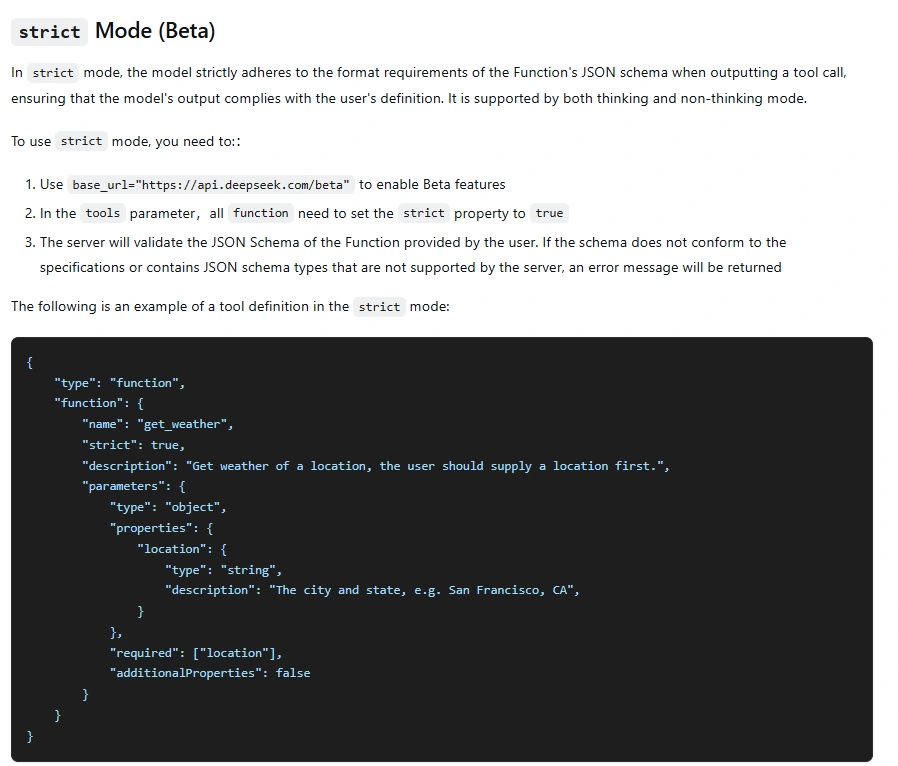
For the Python example, change the endpoint and add the strict flag before making requests:
API_URL = "https://api.deepseek.com/beta/chat/completions"
TOOLS[0]["function"]["strict"] = True
The demonstration schema already lists its only property in required and sets additionalProperties to false. Apply both rules to every nested object too. DeepSeek validates the supplied schema, so a schema using unsupported features may fail before the model generates a call.
The strict-mode documentation lists objects, strings, numbers, integers, booleans, arrays, enums, and anyOf. It supports constraints such as string patterns and numeric bounds, but lists minLength, maxLength, minItems, and maxItems as unsupported. Do not assume an arbitrary schema from another provider will work unchanged.
For example, a maximum number of records returned by a lookup is something your handler should enforce even if your preferred schema keyword is unavailable. Likewise, strict formatting does not prove that a product exists or that a user may edit it. Keep the local checks that protect your actual application behavior.
Handle multiple calls and streaming correctly
Return a result for every requested call
Treat tool_calls as an array, even if your first example only requests one function. Preserve the assistant message containing the entire array, then attach a result with the matching ID for each call before asking the model to continue. The Python example validates the whole batch before running any handler.
Several requested calls do not mean you must execute them simultaneously. Independent stock lookups can run concurrently when your service permits it. A reservation followed by a stock check may need to run in order. Choose execution order and concurrency in application code, with limits that fit the services being called.
If a valid lookup finds no record, return that outcome explicitly, as the example does with product_not_found. If a service fails, return a concise error result associated with the call ID when continuing is appropriate, or stop the workflow. Do not silently omit a result and send an incomplete conversation back.
Assemble streamed arguments before using them
In Chat Completions streaming, parts of a function call arrive through delta.tool_calls. Group fragments by their tool-call index, retain the call ID and name when supplied, and concatenate the argument-string fragments for that call. A fragment such as {"sku":"BK- is not a usable request.
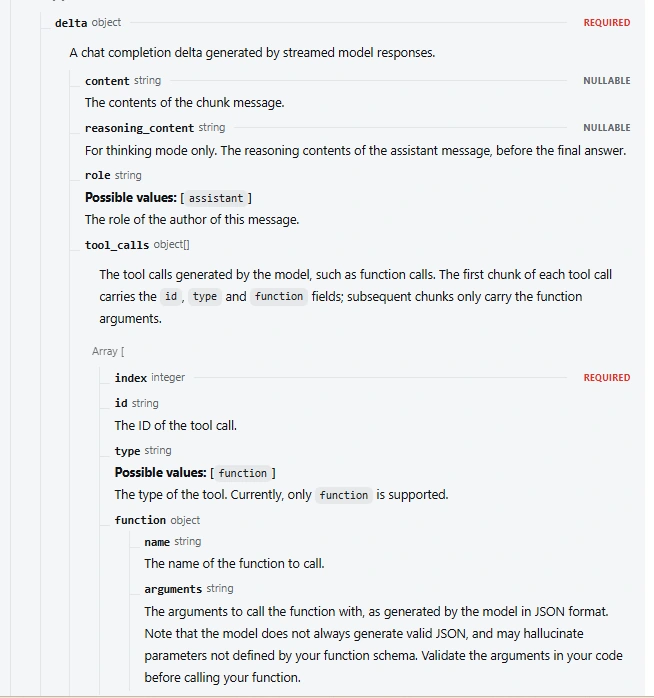
Wait for completion, check the finish reason, and only then parse and validate the assembled calls. At the raw SSE level, Chat Completions ends with data: [DONE]. Its current streaming reference places usage statistics on the last chunk before that marker; it does not emit a separate usage-only chunk. If the connection ends early or generation stops at length, do not execute the partial arguments.
Streaming can show progress to the user, but it should not trigger a function merely because its name has appeared. For short background lookups, non-streaming requests avoid the extra assembly work.
Troubleshoot function-calling failures
| Problem | Likely place to inspect | Next step |
|---|---|---|
| The model answers without a tool. | The tool description, tool_choice, and whether the task needs external data | With auto, a direct answer is allowed. Clarify when the tool is needed; use a supported forced choice for a controlled step. |
HTTP 400 with required or a named tool | The thinking setting and endpoint | For Chat Completions, disable thinking before using either choice. |
| HTTP 400 mentions reasoning or conversation history. | Stored assistant messages and their tool results | Preserve returned reasoning when tools are used, the complete tool-call message, and matching result IDs. |
| Arguments are incomplete or invalid JSON. | finish_reason, output allowance, and stream assembly | Do not execute. Allow enough output or simplify the task; fix a parser that mixes fragments from different calls. |
| The strict schema is rejected. | Beta URL, strict flags, required fields, and unsupported keywords | Match the current documented schema subset, including nested object rules. |
| The same lookup repeats indefinitely. | Whether results are returned, whether the answer is sufficient, and any forced tool choice | Fix the conversation loop, stop forcing calls when finished, and enforce a maximum number of rounds. |
| The handler fails after a valid call. | Your database, external service, permissions, and timeout | Handle it as an application failure. Retrying the model request does not repair the underlying service. |
For malformed arguments, you can either stop and report a failure or return a controlled validation error for the model to correct. If you choose correction, keep the call-result pairing valid and limit the number of attempts. For actions that change data, check whether the earlier attempt already succeeded before retrying it.
Record the model, HTTP status, finish reason, function name, and failure category when diagnosing recurring problems. Keep credentials and unnecessary private tool results out of logs. Authentication, credit, rate-limit, and service failures are covered separately in the DeepSeek API error guide.
Keep execution under your application’s control
A schema checks the shape of a request. It cannot decide whether the current user owns an order, whether a refund has already been issued, or whether a destination is approved. Enforce those decisions in the handler or downstream service using the authenticated user’s permissions.
Expose specific functions such as lookup_stock or get_order_status instead of giving the model a general command runner. Grant each integration only the access it needs, and require confirmation for consequential actions such as sending a message or making a purchase. These principles follow OWASP’s guidance on excessive agency.
Tool results can also contain untrusted material, such as text from a web page or support ticket. A result that tells the assistant to ignore its instructions or disclose private data is still source content, not permission to perform another action. Keep authorization outside the model, and prevent duplicate writes when a workflow retries or resumes.
Using tools through Responses or another API format
The main example uses Chat Completions. DeepSeek also documents function calls in Responses, but the request and result fields differ:
| Part of the workflow | Chat Completions | Responses |
|---|---|---|
| Tool definition | type: "function" with a nested function object | type: "function" with top-level name, description, and parameters |
| Generated call | An entry in message.tool_calls | A function_call output item |
| Function result | A role: "tool" message with tool_call_id and string content | A function_call_output input item with matching call_id and output |
| Conversation history | Send the necessary messages again. | Send the necessary input items again; DeepSeek’s API is stateless. |
Follow the Responses reference and compatibility guide when adapting a client. Do not transfer a Chat Completions field or Beta strict-mode setting simply because another API uses a similar name. Responses streaming has semantic events such as response.function_call_arguments.delta and ends with a completion, incomplete, or failure event rather than [DONE].
There is also a distinction between replaying the model’s actual calls and inserting calls it never generated. DeepSeek’s Tool Calls guide says that inserting client-created tool calls into the middle of a conversation is supported through its Anthropic-compatible and Responses interfaces, but not Chat Completions. Replaying a real assistant tool call with its result, as shown above, is the ordinary Chat Completions workflow.
Frequently asked questions
Which DeepSeek models support function calling?
The current official Chat Completions API lists deepseek-flash and deepseek-v4-pro and provides Tool Calls for them. Support in a local deployment or another provider depends on that service and model release; check its documentation rather than assuming the hosted API fields apply.
Should I use Tool Calls or JSON Output?
Use Tool Calls when the model needs to request a function your application can run. Use structured final output when you simply need an answer or extracted record in JSON. You do not need to create a fake function just to receive a structured answer; the JSON Output guide covers JSON mode and JSON Schema.
Does adding a search tool give DeepSeek built-in web access?
No. A function named search_web still needs an implementation that performs the search and returns the results. DeepSeek’s current Responses compatibility guide lists built-in tools such as web search, file search, and MCP as ignored. An application can connect its own services, but that is different from the API executing those services for you.
Does a tool call add API cost?
A tool-assisted answer often uses one model request to select the function and another to interpret its result. Tool definitions, conversation history, and returned data contribute to the request content, while generated arguments and answers contribute to output. Your external service may have its own charges. Keep results focused on what the next step needs, and use the pricing guide for current API rates.
Start with one useful function
Begin with a small lookup whose inputs and result you understand. Get the full cycle working: define the tool, receive its call, validate the arguments, return the result with the correct ID, and produce a useful final answer. That gives you a clear place to diagnose problems before adding more tools.
Expand the workflow when the task needs it. Thinking mode can support a more involved sequence, strict schemas can improve the argument contract, and streaming can improve the interface. The application still owns the decision to execute, the permissions involved, and what happens when a step fails.