Documentation review date: August 24, 2026. For direct REST API calls, install the official openai package and configure OpenAI or AsyncOpenAI with base_url="https://api.deepseek.com". DeepSeek’s current Models & Pricing page and August 21 release note document the text-only deepseek-v4-flash and deepseek-v4-pro models plus the experimental text-and-image deepseek-v4-flash-vision-exp model on the Chat Completions and Responses API paths. DeepSeek also publishes a separate Python package for its Harness runtime; that package serves a different purpose from the REST client used throughout this guide.
This page is deliberately Python-specific. It covers installation, synchronous and asynchronous clients, resource lifecycle, streaming iteration, DeepSeek-specific fields through extra_body, Vision Exp image input by URL, Base64 data URL, or Files API file_id, defensive JSON and tool handling, timeouts, retries, typed exceptions, offline tests, and production structure. The broader OpenAI SDK with DeepSeek compatibility guide owns Python-versus-Node comparisons and the complete dated compatibility matrix.
Evidence status: this guide combines first-party documentation with a bounded Python live run completed on July 27, 2026. The run pinned Python and SDK versions, issued exactly 14 requests with one request in flight and automatic retries disabled, and retained only sanitized structural outcomes. The complete reproducible test materials are available in the public Python SDK evidence repository.
- Use Python 3.10 or newer for the current official OpenAI Python package.
- For direct REST calls, install
openai. The officialdeepseek-harness-sdkpackage is for DeepSeek Harness automation, not a general replacement for this REST client; do not confuse it with similarly named third-party packages. - Route text requests to Flash or Pro and image requests to the experimental Vision Exp model.
- Keep one client alive long enough to reuse its connection pool, then close it deterministically.
- Choose thinking mode explicitly and pass DeepSeek’s
thinkingobject throughextra_body. - Validate finish state, JSON, and tool arguments before application use.
- Make retry policy explicit and keep live integration tests opt-in.
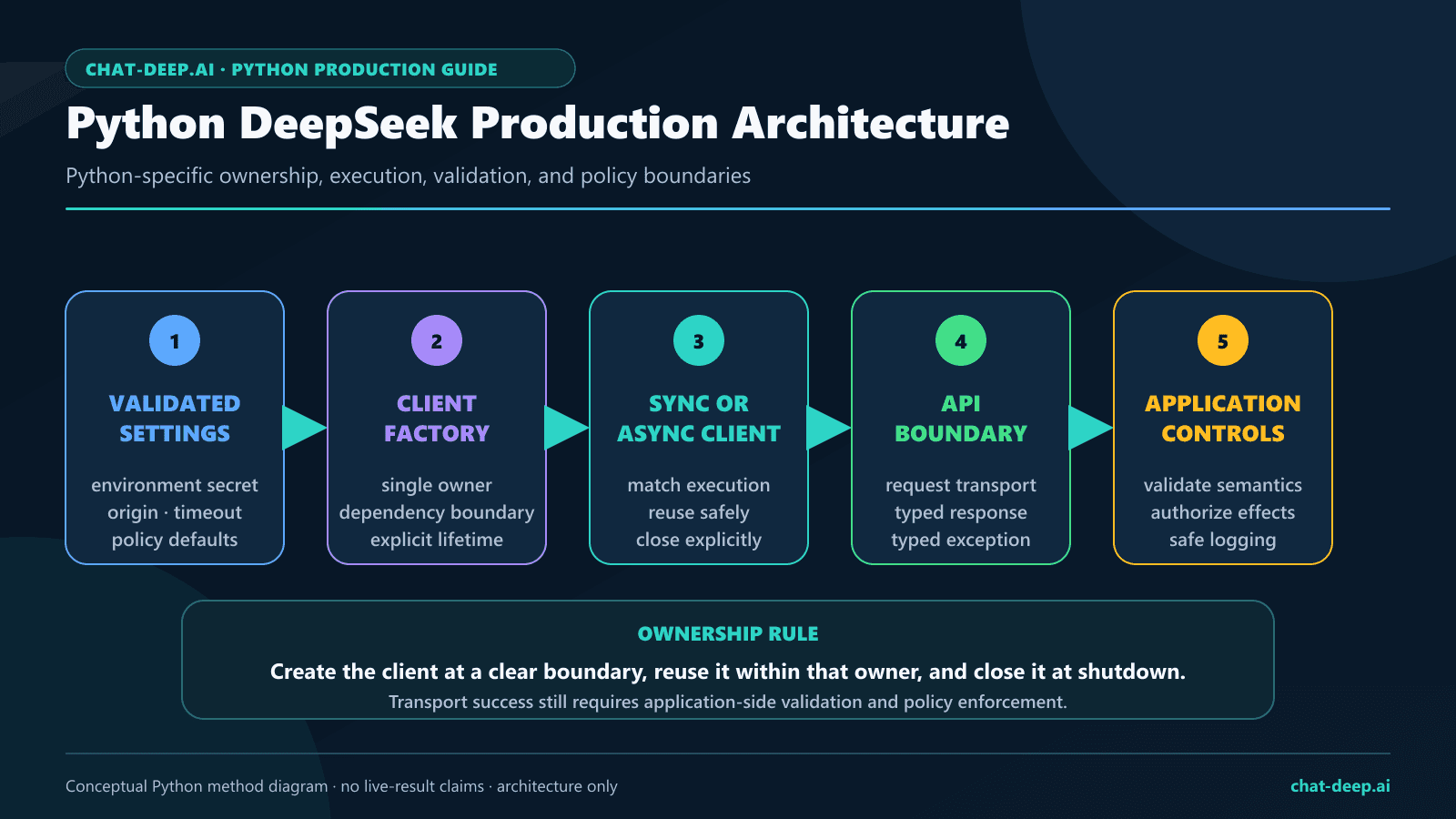
For the provider-wide endpoint, model, pricing, Responses API, and feature reference, use the DeepSeek API guide.
What is the DeepSeek Python SDK?
“DeepSeek Python SDK” can refer to two different integrations. For direct calls to https://api.deepseek.com, DeepSeek’s first-party REST samples install openai, import OpenAI, set DeepSeek’s API origin, and call either client.chat.completions.create() or client.responses.create(). Separately, the official DeepSeek Harness project publishes the deepseek-harness-sdk distribution, imported as deepseek_harness, for controlling the Harness runtime. That Developer Preview Harness client is not a general DeepSeek REST SDK or a replacement for the openai-based examples on this page. The August 21 Models & Pricing page and release note document deepseek-v4-flash, deepseek-v4-pro, and deepseek-v4-flash-vision-exp on Responses. That documentation inventory is not a claim that this page ran a new authenticated GET /models request.
The distinction matters. The Python package supplies client construction, request serialization, response models, streaming iterators, timeouts, retries, exceptions, and HTTP connection management. DeepSeek supplies the API key, model IDs, endpoint behavior, billing, and fields such as thinking. An SDK method existing in Python does not prove that the configured provider implements the corresponding endpoint.
| Responsibility | Python SDK | DeepSeek API |
|---|---|---|
| Client class | OpenAI or AsyncOpenAI | Not applicable |
| Credential | Reads and sends a configured key | Issues the DeepSeek API key |
| Origin | Accepts base_url | https://api.deepseek.com |
| Model | Serializes the model value | Defines current model IDs and behavior |
| Provider extensions | Merges extra_body | Defines fields such as thinking |
| Validation | Parses the response shape | Your application still validates content and actions |
Python requirements and installation
The current official OpenAI Python repository states that the library supports Python 3.10 or newer. Create an isolated environment so the application can pin and upgrade the client deliberately.
macOS or Linux
python3 -m venv .venv
source .venv/bin/activate
python -m pip install --upgrade pip
python -m pip install openai
Windows PowerShell
python -m venv .venv
.venv\Scripts\Activate.ps1
python -m pip install --upgrade pip
python -m pip install openai
For reproducibility, record the installed version and pin the exact version that passes your own tests. Do not copy a version number from an article into production without running the application’s contract and integration suite.
python -c "import openai; print(openai.__version__)"
python -m pip freeze > requirements.txt
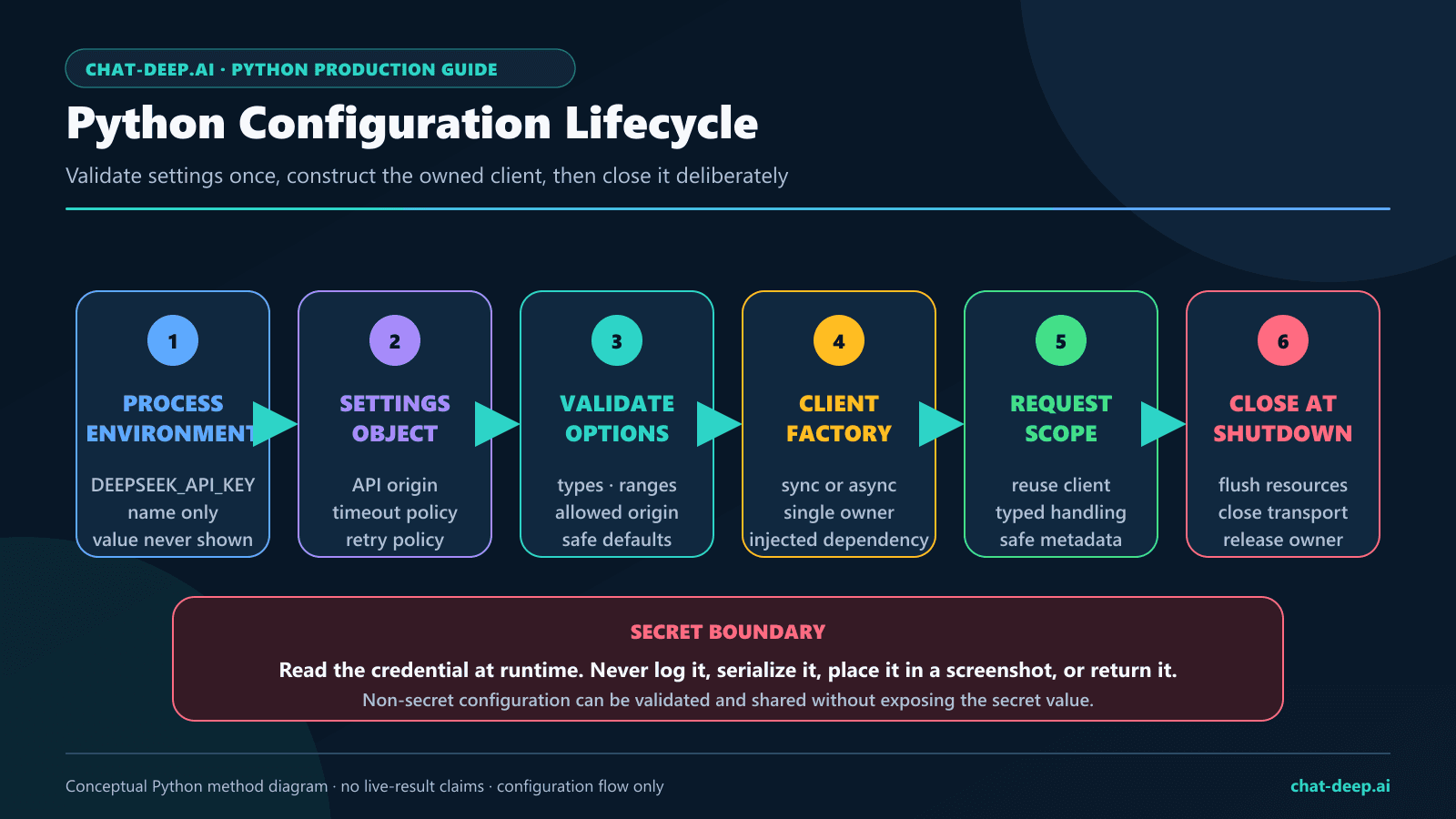
Secure configuration and a reusable client factory
Keep DEEPSEEK_API_KEY in protected runtime storage. Never put a live key in a Python file, notebook output, command history, browser bundle, WordPress block, screenshot, public repository, or test fixture. Reading the key with os.environ["DEEPSEEK_API_KEY"] fails immediately when configuration is missing instead of silently sending an empty credential.
import os
from dataclasses import dataclass

from openai import OpenAI


@dataclass(frozen=True)
class DeepSeekSettings:
    base_url: str = "https://api.deepseek.com"
    timeout_seconds: float = 30.0
    max_retries: int = 2


def create_deepseek_client(
    settings: DeepSeekSettings = DeepSeekSettings(),
) -> OpenAI:
    return OpenAI(
        api_key=os.environ["DEEPSEEK_API_KEY"],
        base_url=settings.base_url,
        timeout=settings.timeout_seconds,
        max_retries=settings.max_retries,
    )
Keeping configuration in one factory prevents a staging worker from using a different origin, timeout, or retry policy than the web process. It also gives tests one replacement point. The max_retries value above is an explicit production starting policy, not a universal recommendation; side effects and live experiments need stricter controls.
First synchronous DeepSeek completion
This complete script uses a context manager so the underlying HTTP resources are closed even if parsing raises an exception. It explicitly disables thinking for a short direct response, sets an output cap, checks the finish state, and rejects empty final content.
from openai import OpenAI

from deepseek_client import create_deepseek_client


def main() -> None:
    with create_deepseek_client() as client:
        response = client.chat.completions.create(
            model="deepseek-v4-flash",
            messages=[
                {
                    "role": "system",
                    "content": "You are a concise Python assistant.",
                },
                {
                    "role": "user",
                    "content": "Give three checks for a safe API migration.",
                },
            ],
            max_tokens=256,
            stream=False,
            extra_body={"thinking": {"type": "disabled"}},
        )

        choice = response.choices[0]
        if choice.finish_reason != "stop":
            raise RuntimeError(
                f"Completion was not complete: {choice.finish_reason}"
            )

        text = choice.message.content
        if not text:
            raise RuntimeError("DeepSeek returned no final content.")

        print(text)


if __name__ == "__main__":
    main()
A production application may accept other terminal states intentionally, but it should never ignore them. A length finish can mean the output cap ended generation before the application received a complete answer or JSON object.
Client lifecycle and connection reuse
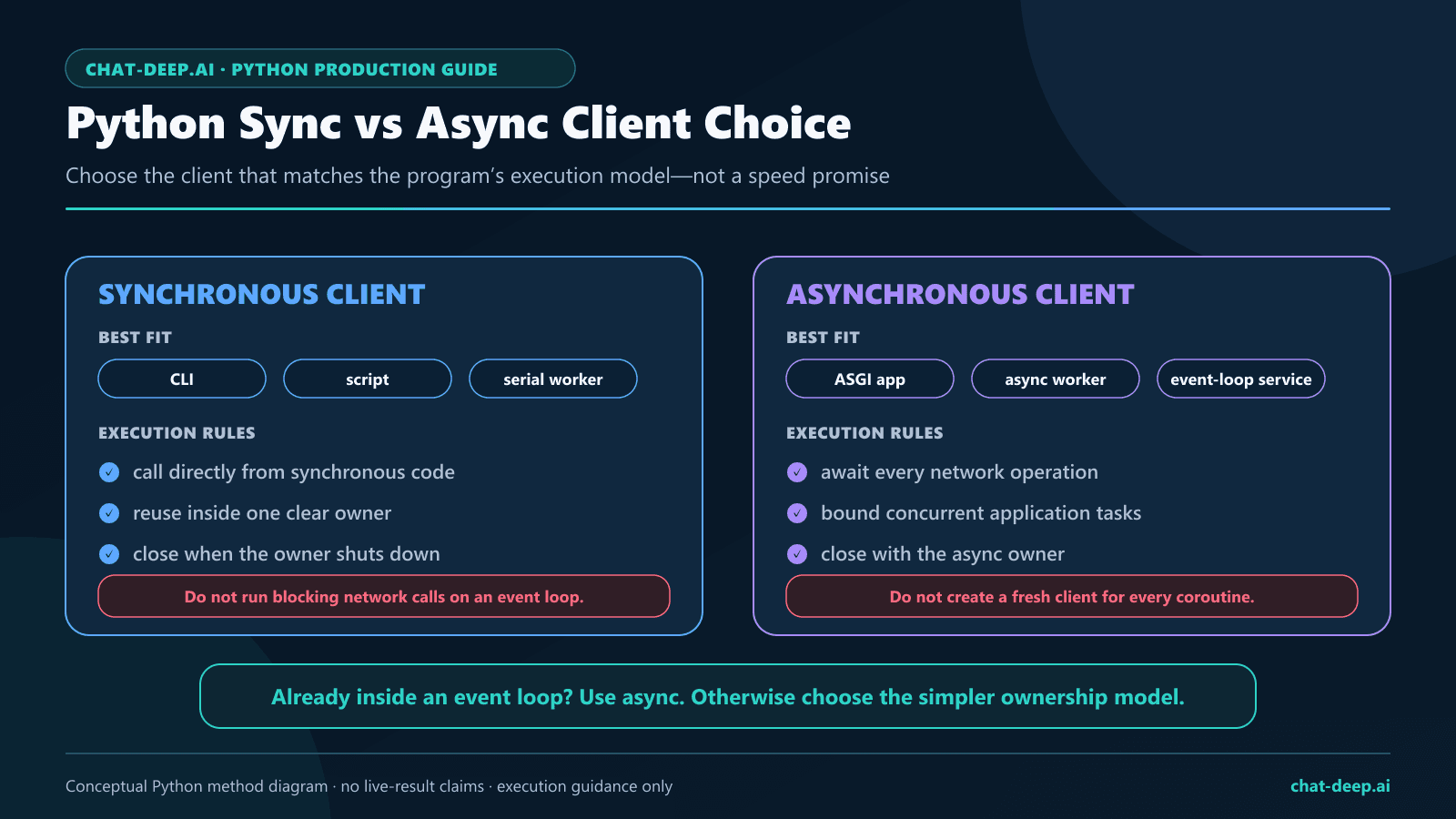
The OpenAI Python client uses an HTTP connection pool. Creating a new client for every request discards reuse and makes shutdown harder to reason about. Choose the lifecycle that matches the application:
- Short script: use
with OpenAI(...) as client. - Web service or worker: create one client during process startup, inject it into services, and call
client.close()during graceful shutdown. - Async service: create one
AsyncOpenAIclient and close it withawait client.close(), or useasync withfor a bounded job. - Test: inject a client backed by a local mock transport rather than patching global networking.
The official SDK documentation notes that garbage collection may eventually close resources, but deterministic cleanup is safer. Do not depend on process exit or garbage collection to release sockets in tests, notebooks, scheduled jobs, or long-running workers.
Async DeepSeek usage with AsyncOpenAI
Use the async client when the surrounding application already runs on asyncio. The official Python SDK provides AsyncOpenAI with an otherwise similar interface. Async code improves cooperative I/O; it does not remove provider concurrency limits or justify unbounded task creation.
import asyncio
import os

from openai import AsyncOpenAI


async def main() -> None:
    async with AsyncOpenAI(
        api_key=os.environ["DEEPSEEK_API_KEY"],
        base_url="https://api.deepseek.com",
        timeout=30.0,
        max_retries=2,
    ) as client:
        response = await client.chat.completions.create(
            model="deepseek-v4-flash",
            messages=[
                {
                    "role": "user",
                    "content": "Give a compact Python code-review checklist.",
                }
            ],
            max_tokens=256,
            extra_body={"thinking": {"type": "disabled"}},
        )

        choice = response.choices[0]
        if choice.finish_reason != "stop" or not choice.message.content:
            raise RuntimeError("Incomplete async completion.")

        print(choice.message.content)


if __name__ == "__main__":
    asyncio.run(main())
For multiple independent requests, put a bounded semaphore around calls and define cancellation behavior. Do not use an unbounded asyncio.gather() over user-controlled input. Decide whether a cancelled task may safely be retried, particularly when a tool or downstream action can create a side effect.
Pass DeepSeek thinking fields through extra_body
DeepSeek’s official Thinking Mode guide documents thinking as enabled by default. With the OpenAI Python client, place the provider-specific thinking object inside extra_body. Thinking-enabled calls can also send the documented reasoning_effort.
response = client.chat.completions.create(
    model="deepseek-v4-pro",
    messages=[
        {
            "role": "user",
            "content": "Review this retry design and identify its main risks.",
        }
    ],
    max_tokens=1024,
    reasoning_effort="high",
    extra_body={"thinking": {"type": "enabled"}},
)

message = response.choices[0].message
final_text = message.content
reasoning_was_returned = bool(
    getattr(message, "reasoning_content", None)
)

if not final_text:
    raise RuntimeError("No final answer was returned.")
Use {"thinking":{"type":"disabled"}} for a deliberate non-thinking request. Do not rely on temperature, top_p, presence_penalty, or frequency_penalty to control thinking-mode behavior; DeepSeek’s current guide says they do not take effect in that mode. Keep reasoning metadata separate from final content and do not expose hidden reasoning in interfaces or logs.
The DeepSeek Thinking Mode guide owns advanced effort selection, multi-turn state, streaming reasoning fields, and tool-call replay. This Python page owns only the Python serialization and response-handling boundary.
For Chat Completions, choose the direct reasoning_effort values low, high, or max. Compatibility values medium and xhigh are accepted and both map to high. The mapping is identical for Flash and Pro.
| Chat Completions request | Actual effort on Flash and Pro |
|---|---|
low | low |
medium (compatibility) | high |
high | high |
xhigh (compatibility) | high |
max | max |
deepseek-v4-flash and deepseek-v4-pro.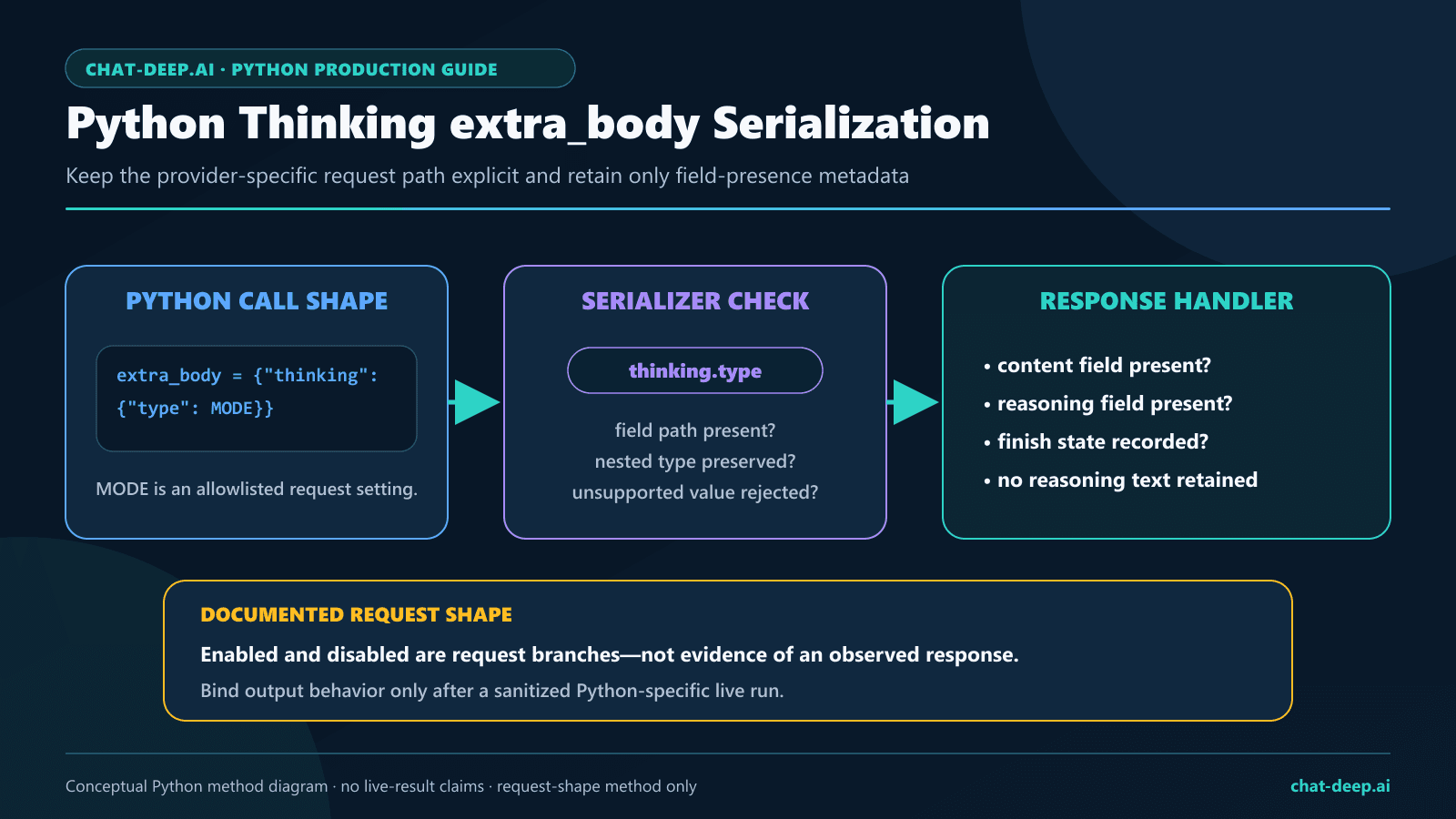
extra_body; the application verifies the outgoing field path and records only whether permitted response fields are present.Stream DeepSeek responses safely in Python
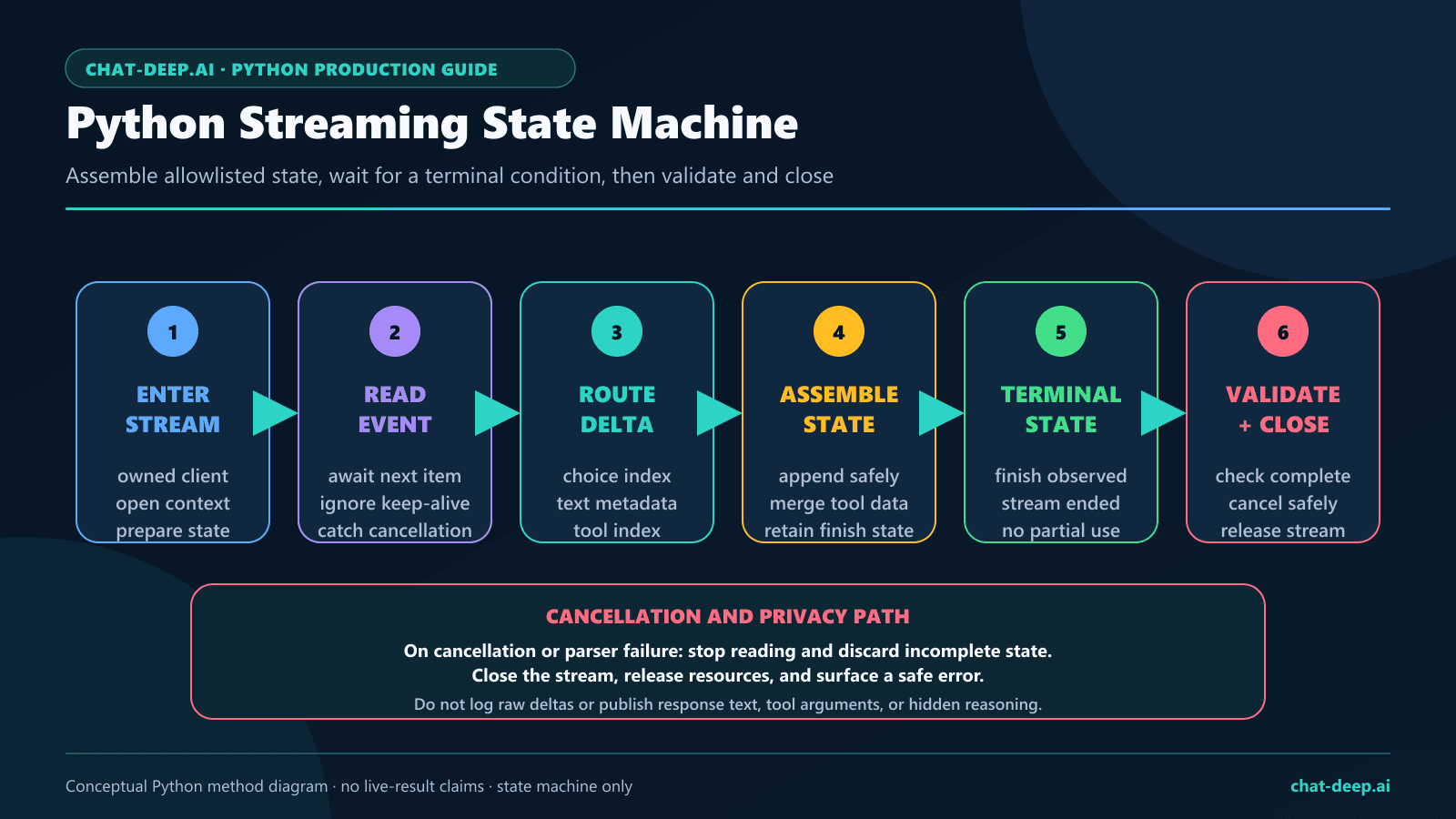
DeepSeek’s Chat Completions reference documents server-sent streaming and an optional usage chunk. When usage is requested, a chunk can have an empty choices array. A robust iterator treats fields as optional, assembles content, records the terminal finish state, and refuses to present a truncated result as complete.
from typing import Any


def stream_final_text(client: Any, prompt: str) -> str:
    stream = client.chat.completions.create(
        model="deepseek-v4-flash",
        messages=[{"role": "user", "content": prompt}],
        max_tokens=512,
        stream=True,
        stream_options={"include_usage": True},
        extra_body={"thinking": {"type": "disabled"}},
    )

    content_parts: list[str] = []
    finish_reason: str | None = None
    usage = None

    for chunk in stream:
        if getattr(chunk, "usage", None) is not None:
            usage = chunk.usage

        for choice in getattr(chunk, "choices", []):
            delta = getattr(choice, "delta", None)
            text = getattr(delta, "content", None)
            if isinstance(text, str):
                content_parts.append(text)

            if choice.finish_reason is not None:
                finish_reason = choice.finish_reason

    if finish_reason != "stop":
        raise RuntimeError(f"Incomplete stream: {finish_reason}")

    final_text = "".join(content_parts)
    if not final_text:
        raise RuntimeError("The stream contained no final text.")

    # Record only approved usage fields if your privacy policy permits it.
    _ = usage
    return final_text
Thinking streams can also contain reasoning_content deltas. Track their presence only when needed, keep them out of the final-text buffer, and follow the dedicated thinking-mode rules for any multi-turn or tool workflow. Tool-call arguments may arrive across multiple deltas; assemble the complete argument string before parsing it.
Call the DeepSeek Responses API in Python
DeepSeek added native Responses API support on July 31, 2026, later extended the documented surface to V4 Pro, and documented the experimental Vision Exp model on August 21. The current Models & Pricing page lists deepseek-v4-flash, deepseek-v4-pro, and deepseek-v4-flash-vision-exp for Responses. The call uses the same configured OpenAI client, but its input, output, state, and streaming rules are different from Chat Completions.
Responses reasoning uses a separate field and mapping: set reasoning.effort to none to disable thinking; minimal/low map to low, medium/high/xhigh map to high, and max maps to max. Do not send the Chat Completions reasoning_effort field to this endpoint.
response = client.responses.create(
    model="deepseek-v4-flash",
    instructions="Answer concisely.",
    input="Give one safe API retry rule.",
)

if response.status != "completed" or not response.output_text:
    raise RuntimeError(
        f"Responses request ended with {response.status}"
    )

print(response.output_text)
The DeepSeek Responses API is stateless. It does not support previous_response_id, conversation, or store, so resend the required prior input items yourself. Flash and Pro remain text only. The experimental Vision Exp model accepts an input_image by external URL, Base64 data URL, or image file_id. Generic input_file items remain unsupported; an image uploaded through the Files API and referenced by file_id is not generic file input. Function and server-side web-search tools are supported within the documented limits, while many other tools and parameters are ignored.
Send image input to Vision Exp with Python
Use deepseek-v4-flash-vision-exp only when the request contains an image. DeepSeek documents JPEG, PNG, GIF, and WebP input. Responses uses an input_image item: set image_url to a public URL or Base64 data URL, or set file_id to an image previously uploaded through the Files API. Choose one source form per image.
import base64
from pathlib import Path


def image_from_url(url):
    return {"type": "input_image", "image_url": url}


def image_from_path(path, mime_type):
    encoded = base64.b64encode(path.read_bytes()).decode("ascii")
    return {
        "type": "input_image",
        "image_url": f"data:{mime_type};base64,{encoded}",
    }


def image_from_file_id(file_id):
    return {"type": "input_image", "file_id": file_id}


# Choose one documented image source.
image_part = image_from_url(
    "https://example.com/path/to/chart.png"
)
# image_part = image_from_path(Path("chart.png"), "image/png")
#
# with Path("chart.png").open("rb") as image_file:
#     uploaded = client.files.create(
#         file=image_file,
#         purpose="user_data",
#     )
# image_part = image_from_file_id(uploaded.id)

response = client.responses.create(
    model="deepseek-v4-flash-vision-exp",
    input=[
        {
            "role": "user",
            "content": [
                {
                    "type": "input_text",
                    "text": "Describe the chart and state any uncertainty.",
                },
                image_part,
            ],
        }
    ],
)

if response.status != "completed" or not response.output_text:
    raise RuntimeError(
        f"Vision request ended with {response.status}"
    )

print(response.output_text)
Replace the example URL with a publicly retrievable image and generate Base64 from real image bytes. Validate MIME type, byte size, source allowlists, and privacy before sending user media. The Files API itself is documented as free, but inference and image input tokens remain billable. See the dedicated Vision Exp guide for formats, resizing, token accounting, and endpoint-specific payloads.
stream = client.responses.create(
    model="deepseek-v4-flash",
    instructions="Answer concisely.",
    input="Give one safe API retry rule.",
    stream=True,
)

terminal = None
for event in stream:
    if event.type == "response.output_text.delta":
        print(event.delta, end="")
    elif event.type in {
        "response.completed",
        "response.incomplete",
        "response.failed",
    }:
        terminal = event.type

if terminal != "response.completed":
    raise RuntimeError(f"Responses stream ended with {terminal}")
Responses streams use numbered semantic events and do not send data: [DONE]. Treat response.incomplete and response.failed as non-success terminal states. Unsupported parameters may be silently ignored, so validate observable behavior instead of equating HTTP success with feature support.
Evidence boundary: the Responses and Vision material above is source-reviewed through August 21, 2026. It is documentation-based and was not added to the measured run. The page’s July 27 Python live evidence remains a 14-request Chat Completions study; it did not exercise Responses or Vision Exp, and every historical count below is unchanged.
Handle JSON Output defensively
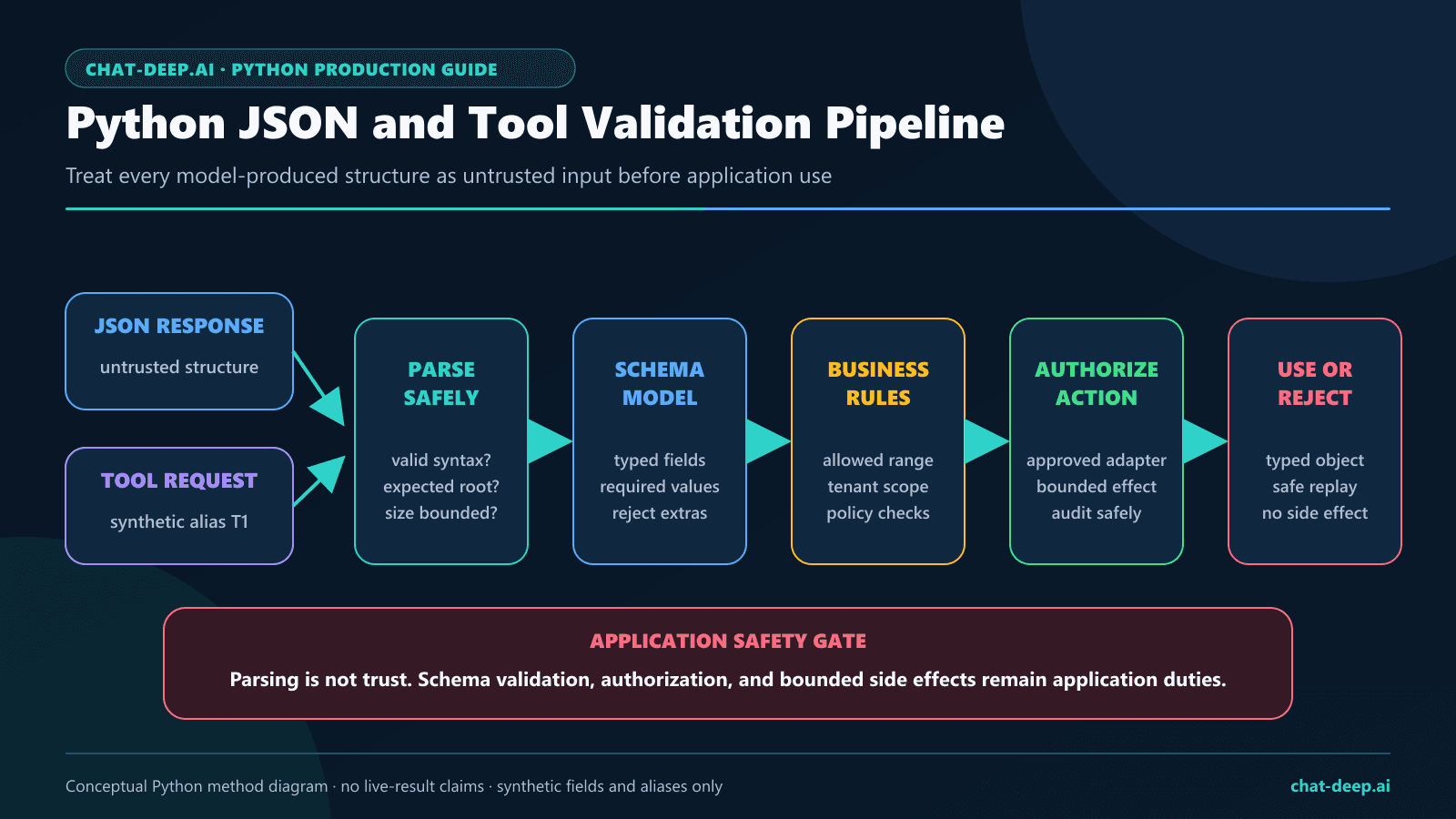
The official DeepSeek JSON Output guide requires response_format={"type":"json_object"}, an instruction containing the word “json,” an example of the desired shape, and a reasonable output cap. Valid JSON syntax still does not prove that required fields, types, values, or business rules are correct.
import json
from typing import TypedDict


class TaskRecord(TypedDict):
    task: str
    priority: str


def parse_task_record(raw: str) -> TaskRecord:
    value = json.loads(raw)
    if not isinstance(value, dict):
        raise ValueError("Expected a JSON object.")
    if set(value) != {"task", "priority"}:
        raise ValueError("Unexpected JSON fields.")
    if not isinstance(value["task"], str) or not value["task"]:
        raise ValueError("Invalid task.")
    if value["priority"] not in {"low", "medium", "high"}:
        raise ValueError("Invalid priority.")
    return value


response = client.chat.completions.create(
    model="deepseek-v4-flash",
    messages=[
        {
            "role": "system",
            "content": (
                "Return only JSON like "
                '{"task":"Review API logs","priority":"high"}.'
            ),
        },
        {
            "role": "user",
            "content": "Review the API logs today. It is urgent.",
        },
    ],
    response_format={"type": "json_object"},
    max_tokens=256,
    extra_body={"thinking": {"type": "disabled"}},
)

choice = response.choices[0]
raw = choice.message.content
if choice.finish_reason != "stop" or not raw:
    raise RuntimeError("JSON output was empty or incomplete.")

record = parse_task_record(raw)
Do not silently convert empty content to {}. That hides a provider or prompt failure behind a plausible application value. The dedicated DeepSeek JSON Output guide owns prompt comparisons, empty-output behavior, truncation, and broader validation tests.
Validate tool calls before execution
DeepSeek’s official Tool Calls guide shows the application-controlled loop: send function definitions, receive a model-proposed call, execute the function in application code, append a matching tool result, and ask for the final answer. The model does not execute Python functions itself.
import json
from typing import Any


def validate_city_tool_call(message: Any) -> tuple[Any, str]:
    calls = message.tool_calls or []
    if len(calls) != 1:
        raise ValueError("Expected exactly one tool call.")

    call = calls[0]
    if call.function.name != "get_temperature":
        raise ValueError("Tool is not allowlisted.")

    try:
        arguments = json.loads(call.function.arguments)
    except json.JSONDecodeError as exc:
        raise ValueError("Tool arguments were not valid JSON.") from exc

    if (
        not isinstance(arguments, dict)
        or set(arguments) != {"city"}
        or not isinstance(arguments["city"], str)
        or not arguments["city"]
    ):
        raise ValueError("Invalid tool arguments.")

    return call, arguments["city"]
Only after that gate should the application execute an approved adapter. Preserve the complete assistant message, append a role: "tool" message whose tool_call_id matches the validated call, and request the final completion. Check finish_reason and validate every call before any side effect. The DeepSeek Tool Calls guide owns complete round trips, multiple calls, strict mode, thinking replay, and security controls.
Configure timeouts and retries explicitly
At the July 27 source review, the official OpenAI Python README documented a ten-minute default timeout and two automatic retries for selected connection errors, 408, 409, 429, and server errors. Those defaults can change with the installed SDK, and they are too consequential to leave implicit in many production systems.
import httpx
from openai import OpenAI

client = OpenAI(
    api_key=os.environ["DEEPSEEK_API_KEY"],
    base_url="https://api.deepseek.com",
    timeout=httpx.Timeout(
        60.0,
        connect=5.0,
        read=30.0,
        write=10.0,
    ),
    max_retries=2,
)
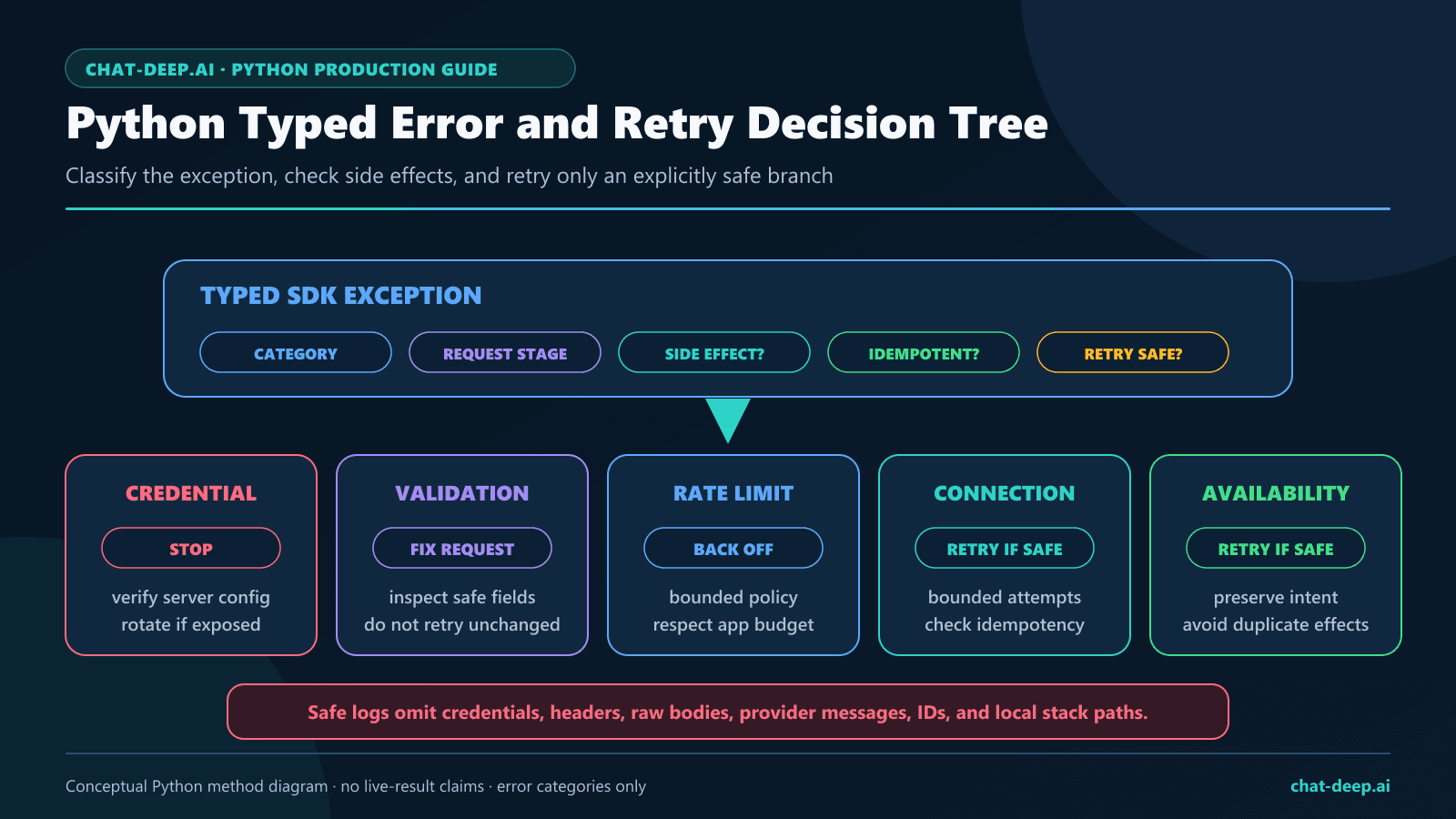
Use client.with_options(timeout=..., max_retries=...) when one operation needs a narrower policy. Set max_retries=0 in a counted compatibility test so one logical case cannot become several hidden HTTP requests. In production, retry only explicitly transient failures, apply bounded backoff, and make side-effecting operations idempotent or confirmation-gated.
Handle typed exceptions without leaking data
The official Python SDK documents APIConnectionError for connection failures and APIStatusError for non-success HTTP responses, plus subclasses such as BadRequestError, AuthenticationError, UnprocessableEntityError, RateLimitError, and InternalServerError. DeepSeek separately documents common provider statuses including 400, 401, 402, 422, 429, 500, and 503. Do not assume every provider status has a dedicated SDK subclass without testing the pinned version.
import logging
import openai

logger = logging.getLogger(__name__)

try:
    response = client.chat.completions.create(
        model="deepseek-v4-flash",
        messages=[{"role": "user", "content": "Reply briefly."}],
        max_tokens=128,
        extra_body={"thinking": {"type": "disabled"}},
    )
except openai.APITimeoutError:
    logger.warning("DeepSeek request timed out")
    raise
except openai.RateLimitError:
    logger.warning("DeepSeek request was rate limited")
    raise
except openai.APIConnectionError as exc:
    logger.warning(
        "DeepSeek connection failed: %s",
        type(exc.__cause__).__name__,
    )
    raise
except openai.APIStatusError as exc:
    logger.error(
        "DeepSeek returned status=%s class=%s",
        exc.status_code,
        type(exc).__name__,
    )
    raise
Do not log exc.response, Authorization headers, raw prompts, generated content, hidden reasoning, tool arguments, balances, or account data by default. Use internal operation aliases, status categories, exception classes, approved timings, and retry counts. The DeepSeek Error Codes guide owns the complete recovery matrix; DeepSeek’s first-party categories are on its official Error Codes page.
Test Python request shapes without provider calls
A useful test pyramid separates deterministic client behavior from provider behavior. Unit tests validate application functions. Local contract tests inspect the HTTP request produced by the SDK and return controlled fixtures. Live integration tests use a separate authorized key, a fixed request budget, zero hidden retries, redacted evidence, and an explicit opt-in guard.
| Layer | Network | What it proves |
|---|---|---|
| Unit | None | JSON validation, tool allowlists, retry classification, and service logic |
| Local SDK contract | Loopback or mock transport only | Path, headers policy, extra_body merge, fixture parsing, and typed synthetic errors |
| Live integration | DeepSeek, explicitly authorized | One dated provider observation for the exact pinned request |
import json
import httpx
from openai import DefaultHttpxClient, OpenAI


def handler(request: httpx.Request) -> httpx.Response:
    assert request.url.path == "/chat/completions"
    payload = json.loads(request.content)
    assert payload["thinking"] == {"type": "disabled"}

    return httpx.Response(
        200,
        json={
            "id": "synthetic-completion",
            "object": "chat.completion",
            "created": 0,
            "model": "deepseek-v4-flash",
            "choices": [
                {
                    "index": 0,
                    "finish_reason": "stop",
                    "message": {
                        "role": "assistant",
                        "content": "synthetic-ok",
                    },
                }
            ],
        },
    )


transport = httpx.MockTransport(handler)
http_client = DefaultHttpxClient(transport=transport)

with OpenAI(
    api_key="test-only-not-a-provider-key",
    base_url="http://test.local",
    max_retries=0,
    http_client=http_client,
) as test_client:
    result = test_client.chat.completions.create(
        model="deepseek-v4-flash",
        messages=[{"role": "user", "content": "Synthetic test"}],
        extra_body={"thinking": {"type": "disabled"}},
    )
    assert result.choices[0].message.content == "synthetic-ok"
This test does not prove that DeepSeek accepts the request. It proves that the pinned client serialized the intended field and parsed a controlled Chat Completions fixture. Keep live tests separate, skip them unless an explicit environment flag is present, and never store a real key in the repository.
A small production service pattern
Wrap the SDK behind an application-owned interface. Callers should not choose arbitrary origins, models, tools, retries, or output modes. Centralizing those decisions makes validation, logging, fallback, and tests easier.
from openai import OpenAI


class DeepSeekTextService:
    def __init__(self, client: OpenAI) -> None:
        self._client = client

    def summarize(self, source_text: str) -> str:
        if not source_text or len(source_text) > 20_000:
            raise ValueError("Invalid source text.")

        response = self._client.chat.completions.create(
            model="deepseek-v4-flash",
            messages=[
                {
                    "role": "system",
                    "content": "Return a concise factual summary.",
                },
                {"role": "user", "content": source_text},
            ],
            max_tokens=512,
            extra_body={"thinking": {"type": "disabled"}},
        )

        choice = response.choices[0]
        if choice.finish_reason != "stop" or not choice.message.content:
            raise RuntimeError("Summary was incomplete.")
        return choice.message.content


client = create_deepseek_client()
service = DeepSeekTextService(client)

# Register client.close() with the application shutdown hook.
Real services should add input classification, privacy rules, tenant authorization, bounded concurrency, approved metrics, fallback behavior, and output validation appropriate to the feature. Keep provider-specific code in the adapter so the rest of the application is not coupled to SDK response objects.
Original Python live findings
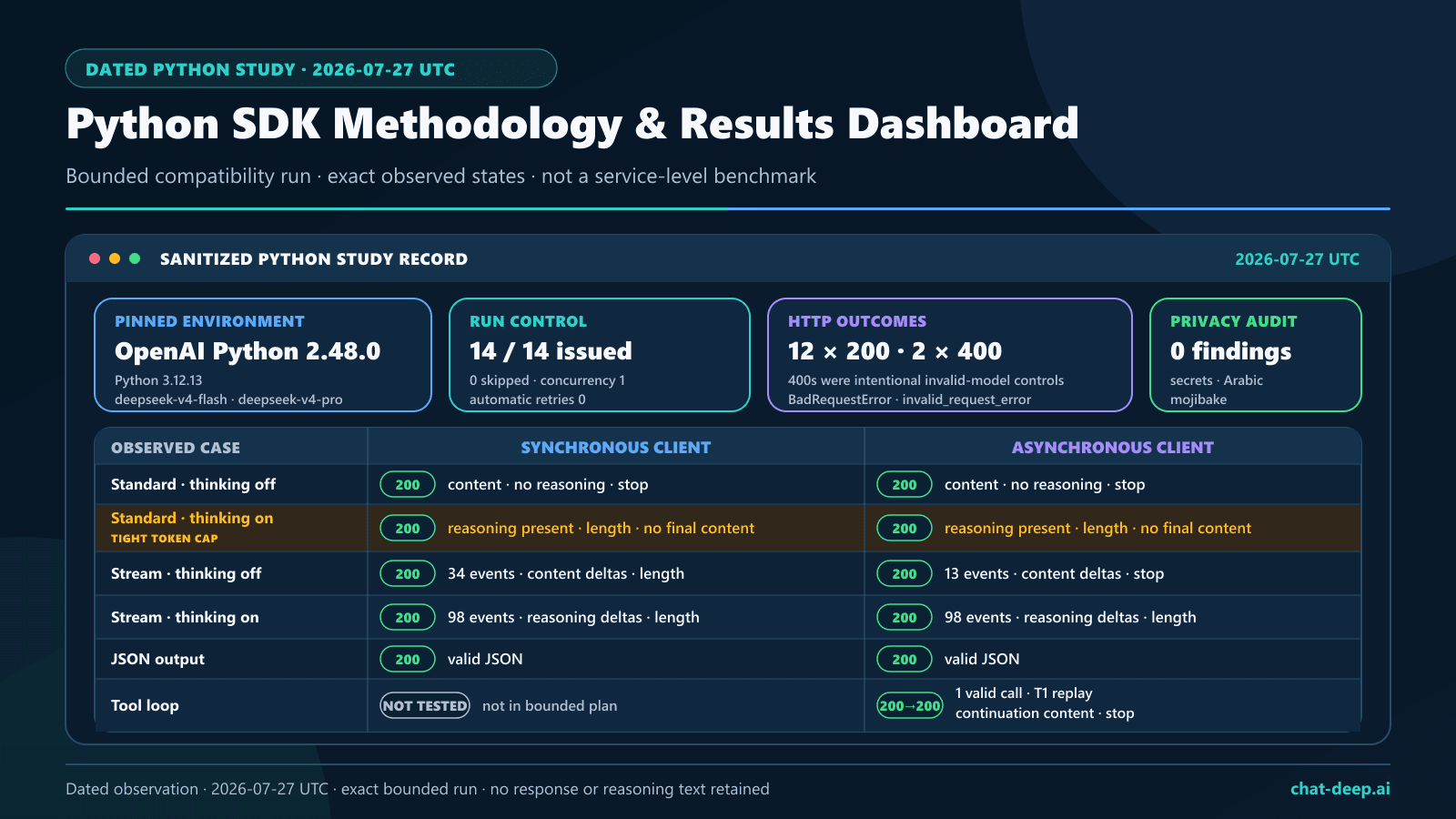
A bounded live suite ran on July 27, 2026, against DeepSeek Chat Completions using Python 3.12.13 and OpenAI Python 2.48.0. It issued all 14 preregistered requests with concurrency fixed at one, automatic retries disabled, and a 30-second request timeout. Twelve requests returned HTTP 200; the two intentional invalid-model cases returned the expected HTTP 400 typed errors. The table reports structural outcomes only.
| Evidence field | Measured observation |
|---|---|
| UTC test date | July 27, 2026 |
| OpenAI Python version | 2.48.0 |
| Python runtime | 3.12.13 |
| Request accounting | 14 of 14 planned requests issued; 12 returned HTTP 200 and two intentional invalid-model requests returned HTTP 400. |
| Synchronous completion | With thinking disabled, the response contained final content, no reasoning field, and finish_reason="stop". With thinking enabled, reasoning was exposed, but the configured token cap was reached: finish_reason="length" and no final content was returned. |
| Asynchronous completion | With thinking disabled, the response contained final content, no reasoning field, and finish_reason="stop". The thinking-enabled case exposed reasoning but reached the token cap with finish_reason="length" and no final content. |
| Thinking serialization | Passing the provider-specific thinking object through extra_body produced reasoning fields in both synchronous and asynchronous thinking-enabled cases; the corresponding disabled cases contained no reasoning field. |
| Streaming | The non-thinking synchronous stream produced content deltas across 34 events and ended with length; the non-thinking asynchronous stream produced content deltas across 13 events and ended with stop. Both thinking streams produced reasoning deltas across 98 events, no final-content delta, and ended with length. |
| JSON Output | Both synchronous and asynchronous JSON cases returned HTTP 200 with nonempty content that parsed as valid JSON. |
| Tool round trip | The asynchronous initial response returned one structurally valid tool call with finish_reason="tool_calls". After the sanitized tool result was supplied, the continuation returned nonempty content with finish_reason="stop". |
| Typed errors | The synchronous and asynchronous invalid-model probes each returned HTTP 400 and were surfaced by the SDK as BadRequestError with error code invalid_request_error. |
| Execution controls | Provider request cap 14; requests issued 14; requests skipped zero; concurrency one; automatic retries zero; request timeout 30 seconds. |
| Privacy and secret scan | A post-run scan of 26 text files found zero secret findings. Published artifacts exclude raw prompts, generated outputs, reasoning text, credentials, provider identifiers, request identifiers, and tool-call identifiers. Separate language/encoding checks found zero Arabic characters and zero mojibake matches; those checks are not privacy controls. |
How to interpret the thinking results: the thinking-enabled requests exhausted the suite’s configured token cap while reasoning was still being generated. A length finish state with no final content is therefore a truncation result for this bounded configuration, not evidence that thinking mode cannot produce a final answer with a larger suitable budget. These cases verify Python request serialization, reasoning-field exposure, and streaming separation; they do not establish answer quality.
This suite was designed for compatibility and validation, not benchmarking. Concurrency was deliberately one, the sample size was small, and network and service conditions were not controlled. The recorded durations are therefore excluded, and no latency, throughput, reliability, or general performance conclusion should be drawn. Review the sanitized methodology and result summaries to reproduce the same request shapes.
Production checklist
- Use a supported Python runtime and pin the tested
openaiversion. - Load
DEEPSEEK_API_KEYfrom protected server-side storage. - Set
base_url="https://api.deepseek.com"in one client factory. - Route by modality: Flash and Pro are text only; image requests use the experimental Vision Exp model.
- Test URL, Base64 data URL, and image
file_idserialization without treating genericinput_fileas supported. - Reuse the client and close it during deterministic shutdown.
- Choose sync or async according to the surrounding application, not fashion.
- Bound async concurrency and define cancellation behavior.
- Set thinking mode explicitly through
extra_body. - Check finish state and reject empty or truncated output.
- Validate JSON and tool arguments against application-owned rules.
- Set explicit timeout and retry policies; disable retries in counted tests.
- Catch typed exceptions without logging raw provider bodies.
- Run local SDK contract tests before an opt-in live test.
- Keep Chat Completions and Responses API claims separate; use Responses only with a currently supported model and validate its stateless contract.
- Rerun the bounded suite after an SDK, model, or provider-contract change.
Limitations
- The live evidence is a dated, bounded compatibility run, not a latency, throughput, reliability, quality, or cost benchmark.
- The thinking-enabled cases reached their configured token cap; they test field handling and truncation, not completion quality under a larger budget.
- Code examples illustrate bounded patterns; applications need domain-specific authorization, privacy, observability, and validation.
- SDK defaults and provider behavior can change after the documentation review date.
- JSON validity is not semantic correctness.
- Async I/O is not a guarantee of higher permitted provider concurrency.
- The July 27 live evidence covers Chat Completions only. The later source-reviewed Responses and Vision examples do not add a live Responses or Vision result, change the 14-request count, or establish support for any other OpenAI SDK resource.
FAQ
Is there a separate official DeepSeek Python package?
For direct REST API calls, the current official DeepSeek Python sample uses the official OpenAI Python package configured with DeepSeek’s API origin, so start with pip install openai. Separately, DeepSeek’s official Harness project publishes deepseek-harness-sdk (import deepseek_harness) for automating the Harness runtime. It is a Developer Preview Harness client, not a general REST SDK for api.deepseek.com and not a replacement for the openai-based examples in this guide.
What Python version does the current OpenAI SDK require?
At the July 27, 2026 source review, the official repository stated Python 3.10 or newer. Check the package metadata for the version you install.
What is the DeepSeek base_url in Python?
For the OpenAI-format API covered here, DeepSeek’s official sample uses base_url="https://api.deepseek.com".
Can Python send images to DeepSeek?
Yes, with the experimental deepseek-v4-flash-vision-exp model. Flash and Pro remain text only. In Responses, send input_image with a public URL, Base64 data URL, or image file_id; generic input_file remains unsupported. The examples are based on DeepSeek’s August 21 documentation and were not part of the July 27 live run.
Should I use OpenAI or AsyncOpenAI?
Use OpenAI in synchronous scripts and services. Use AsyncOpenAI when the application already uses asyncio and can benefit from cooperative I/O. Both clients still need deterministic cleanup and bounded concurrency.
How do I disable DeepSeek thinking in Python?
Pass extra_body={"thinking":{"type":"disabled"}} to client.chat.completions.create(). Use the corresponding enabled value when thinking is intentional.
Why can a streaming chunk have no choices?
DeepSeek’s reference documents an additional usage-bearing chunk when usage is requested; that chunk has an empty choices array. Iterate with getattr(chunk, "choices", []) or an equivalent guard.
Does valid JSON mean the output is safe?
No. Reject empty or truncated content, parse the complete string, enforce exact keys and types, and apply application-specific authorization and business rules.
Does the Python SDK retry requests automatically?
The current official SDK documentation describes automatic retries for selected failures. Inspect the installed version and set max_retries deliberately. Use zero retries for an exact request-counting experiment.
Official sources and public evidence
- DeepSeek Change Log
- DeepSeek Responses API
- DeepSeek V4 Flash Vision Exp release note, August 21, 2026
- DeepSeek Vision guide
- DeepSeek Files API guide
- DeepSeek Models & Pricing
- Chat-Deep.ai Vision Exp guide
- DeepSeek Python OpenAI SDK sample
- DeepSeek Create Chat Completion reference
- DeepSeek Thinking Mode guide
- DeepSeek JSON Output guide
- DeepSeek Tool Calls guide
- DeepSeek Error Codes
- Official OpenAI Python SDK repository
- OpenAI Python package metadata
- Official DeepSeek Harness Python SDK README
- Official DeepSeek Harness Python SDK guide
- Sanitized Python SDK methodology and result summaries