

To use DeepSeek in Node.js, install the openai package, give it a DeepSeek API key, and set baseURL to https://api.deepseek.com. You can then call the API from JavaScript or TypeScript, stream answers to an application, and add JSON output or function calls as you need them.
Start with a small server-side script that returns a complete answer. Once that works, keep the same client configuration as you add features. This guide follows that path, with particular attention to the places where DeepSeek’s request fields and streaming behavior differ from examples written for OpenAI.
Table of Contents
Which Node.js package should you use?
DeepSeek’s official quick start uses OpenAI’s JavaScript and TypeScript client. The npm package is named openai, but the configured client sends your requests to DeepSeek and uses your DeepSeek account. An OpenAI API key will not authenticate those requests.
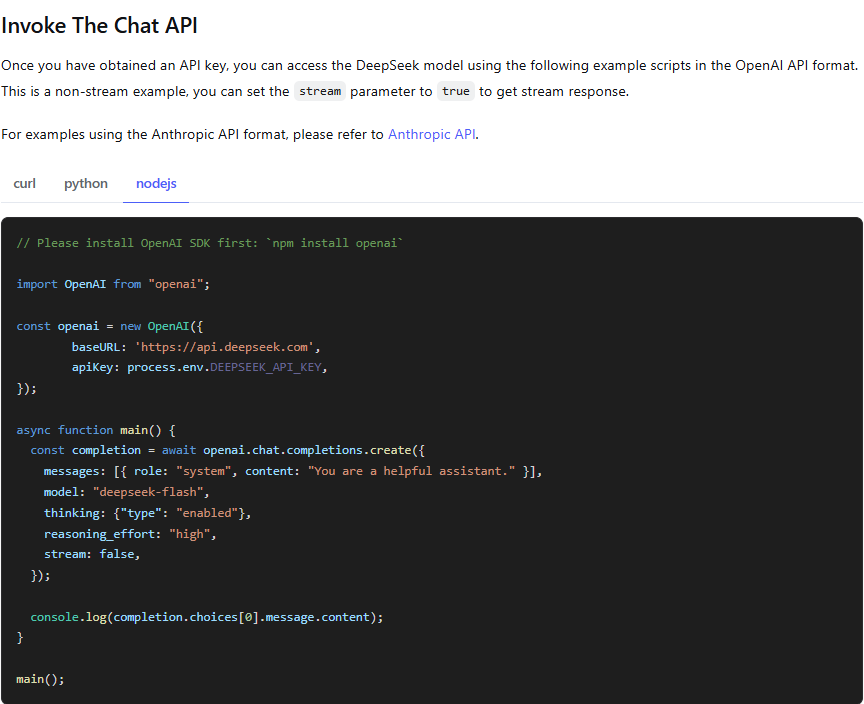
You do not need a community package named “DeepSeek SDK” to follow this guide. If your project already uses Vercel’s AI SDK, its DeepSeek provider is another integration route. Keep the conventions of whichever client you choose: its option names and stream objects are not interchangeable with the examples below.
Install the client and keep your key on the server
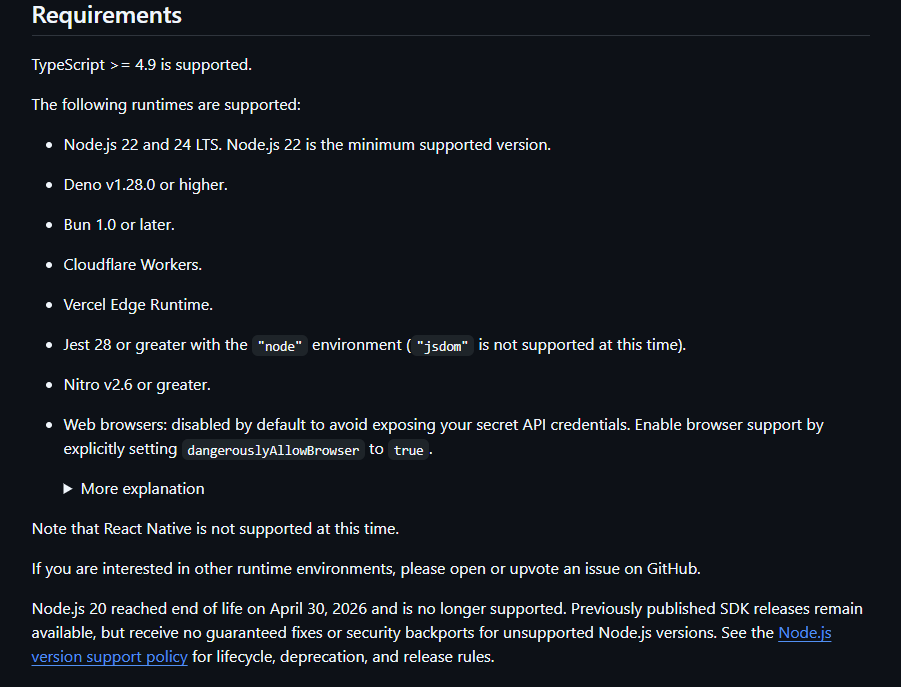
Use a supported Node.js release. The OpenAI Node repository currently lists Node.js 22 and 24 LTS, with 22 as its minimum, and supports TypeScript 4.9 or later. For a new project, run the following commands in an empty working directory. In an existing project, install the package without replacing your package configuration.
npm init -y
npm install openai
npm pkg set type=module
Create a .env file in that directory and add your own key. The value below is a placeholder. Get the real credential from the DeepSeek Platform; the API key guide covers creation and replacement. API usage is billed separately from using the consumer chat app.
DEEPSEEK_API_KEY=replace_with_your_deepseek_keyAdd .env to .gitignore before committing. On a deployed application, put the credential in the hosting provider’s server-side secret settings. Never put it in a public environment variable, a React component, or a browser bundle.
Save this reusable client as client.mjs:
import OpenAI from "openai";

const apiKey = process.env.DEEPSEEK_API_KEY;
if (!apiKey) throw new Error("Set DEEPSEEK_API_KEY before running.");

export const client = new OpenAI({
  apiKey,
  baseURL: "https://api.deepseek.com",
});
JavaScript uses apiKey and baseURL, with that capitalization. Python’s api_key and base_url are different constructor options. The client adds the resource path, so do not put /chat/completions in baseURL.
Make your first DeepSeek request
Save the following as chat.mjs, beside client.mjs. It asks for one short explanation and explicitly disables thinking, so you can confirm the connection before working with reasoning output.
import { client } from "./client.mjs";

const completion = await client.chat.completions.create({
  model: "deepseek-flash",
  messages: [
    { role: "system", content: "Explain programming ideas plainly." },
    { role: "user", content: "Explain a JavaScript Promise in two sentences." },
  ],
  thinking: { type: "disabled" },
  max_tokens: 512,
  stream: false,
});

const choice = completion.choices[0];
if (choice?.finish_reason !== "stop" || !choice.message.content) {
  throw new Error(`No complete answer: ${choice?.finish_reason ?? "missing choice"}`);
}
console.log(choice.message.content);
Run it with Node’s environment-file option:
node --env-file=.env chat.mjsA successful run prints the generated explanation in your terminal. The wording can vary. If you get a missing-key message, check the file location and variable name; if the provider returns an HTTP error, use the troubleshooting section below. These examples make billable API requests when you run them.
The completion check is deliberate. A successful HTTP request can still produce truncated or interrupted output. For this simple text task, stop plus nonempty content is the expected result. A request involving tools has a different intermediate state, which we handle later.
Use DeepSeek-specific fields in TypeScript
The same client works in TypeScript. The extra work is describing provider-specific fields such as thinking and reasoning_content, which may not appear in the OpenAI client’s declared types. The SDK passes extra request fields through and retains extra response properties; TypeScript still needs an accurate description of them.
For the standalone project above, install the compiler and Node types, then save a copy of client.mjs as client.ts. The client code itself does not need changing.
npm install -D typescript @types/nodeCreate tsconfig.json:
{
  "compilerOptions": {
    "target": "ES2022",
    "module": "NodeNext",
    "moduleResolution": "NodeNext",
    "strict": true,
    "types": ["node"],
    "skipLibCheck": true,
    "outDir": "dist"
  },
  "include": ["*.ts"]
}
Save these small extensions as deepseek-types.ts. Separate streaming and non-streaming request types let the client select the correct return type, without a broad any cast.
import type OpenAI from "openai";

type DeepSeekFields = {
  thinking?: { type: "enabled" | "disabled" };
  user_id?: string;
};

export type DeepSeekRequest =
  OpenAI.ChatCompletionCreateParamsNonStreaming & DeepSeekFields;

export type DeepSeekStreamRequest =
  OpenAI.ChatCompletionCreateParamsStreaming & DeepSeekFields;

export type DeepSeekMessage = OpenAI.ChatCompletionMessage & {
  reasoning_content?: string | null;
};

export type DeepSeekUsage = NonNullable<OpenAI.ChatCompletion["usage"]> & {
  prompt_cache_hit_tokens?: number;
  prompt_cache_miss_tokens?: number;
};
Now create chat.ts. The imports end in .js because the compiler will emit JavaScript files into dist. Keep the earlier "type": "module" package setting for this setup.
import { client } from "./client.js";
import type { DeepSeekRequest } from "./deepseek-types.js";

const request: DeepSeekRequest = {
  model: "deepseek-flash",
  messages: [{ role: "user", content: "Explain async/await in two sentences." }],
  thinking: { type: "disabled" },
  max_tokens: 512,
  stream: false,
};

const completion = await client.chat.completions.create(request);
const choice = completion.choices[0];
if (choice?.finish_reason !== "stop" || !choice.message.content) {
  throw new Error("The answer is missing or incomplete.");
}
console.log(choice.message.content);
npx tsc
node --env-file=.env dist/chat.jsThe remaining TypeScript examples use client.ts and deepseek-types.ts from this section. Save each in its own named file, compile again, then run its matching file in dist. Do not copy Python’s extra_body wrapper into a Node request: put thinking directly in the first argument, as shown.
Choose the model and output limit
The current model table lists deepseek-flash and deepseek-v4-pro. Flash accepts text and images; Pro is text-only. Both support thinking, JSON output, and tool calls. Start with Flash for the examples here, then compare suitability on your own application’s tasks before choosing a different model.
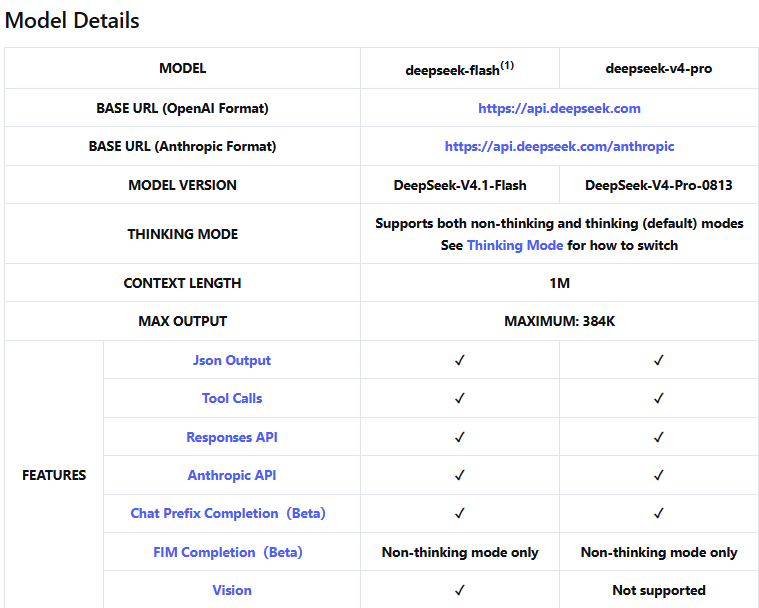
DeepSeek identifies deepseek-flash as DeepSeek-V4.1-Flash. The older names deepseek-v4-flash and deepseek-v4-flash-vision-exp are still accepted, but route to the current Flash model. Use the current ID in new code rather than treating those names as separate products.
Set max_tokens for the answer your application needs. In thinking mode, that budget includes reasoning as well as final text; a very small limit can leave no room for the answer. The examples use illustrative caps, not recommended limits for every task. If a response ends at length, examine the requested output and budget before simply asking the model to continue. Our context and output guide explains the wider limits.
Enable thinking and keep conversation history
Thinking is enabled by default. Use thinking: { type: "disabled" } for a direct response, or enable it and select reasoning_effort for a reasoning task. The direct effort levels are low, high, and max; the default is high. The API reference also accepts reasoning_effort: "none" to disable thinking. Avoid sending contradictory controls.
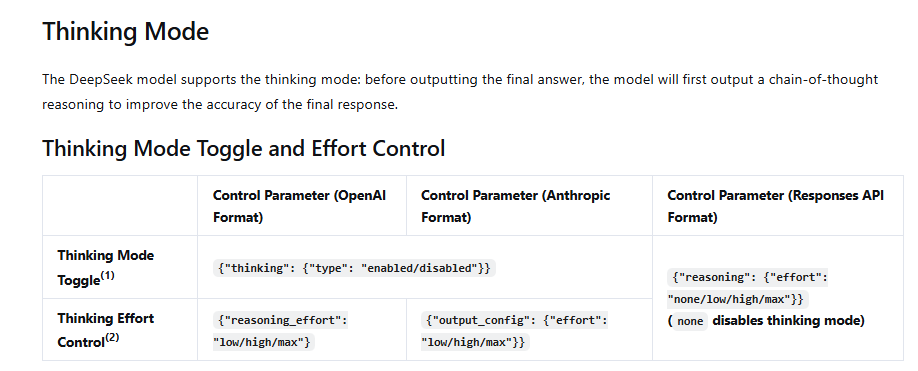
For example, save this as thinking.ts:
import { client } from "./client.js";
import type { DeepSeekRequest, DeepSeekMessage } from "./deepseek-types.js";

const request: DeepSeekRequest = {
  model: "deepseek-v4-pro",
  messages: [{
    role: "user",
    content: "Compare a queue and a scheduled job for sending daily reports.",
  }],
  thinking: { type: "enabled" },
  reasoning_effort: "high",
  max_tokens: 8192,
  stream: false,
};

const result = await client.chat.completions.create(request);
const choice = result.choices[0];
if (choice?.finish_reason !== "stop" || !choice.message.content) {
  throw new Error("Thinking ended without a complete answer.");
}
const message = choice.message as DeepSeekMessage;
console.log(message.content);
The final answer is in message.content. The separate reasoning_content property contains reasoning output when returned. Keep these separate so your application does not accidentally display reasoning as the finished answer.
According to the Thinking Mode guide, temperature has no effect while thinking. top_p works only in thinking mode, with an effective range of 0.95–1; in non-thinking mode it stays at 1 regardless of the value supplied. An accepted parameter is therefore not proof that it changed generation.
Continue a conversation with the right messages
Chat Completions is stateless: send the relevant prior user and assistant messages with the next request. Keep each user’s history separate, and budget for the previous turns because they become input again. Without tools, you can retain the final assistant text; previous reasoning is ignored by the API.
When a request carries tools, the rule changes: DeepSeek requires prior reasoning_content to be passed back, including earlier assistant turns that did not call a tool. Preserve the returned assistant messages in the tool workflow rather than reducing each one to a role and final text. Dropping those fields can cause a 400 error. The tool example below retains them.
Stream an answer and handle cancellation
Streaming lets a user begin reading while the response is being generated. In the OpenAI Node client, await the request and consume its async iterable with for await...of. Read text from delta.content; if thinking is enabled, reasoning arrives separately as delta.reasoning_content.
Save the following as stream.ts. Pressing Ctrl+C aborts this terminal example. In a web application, connect the abort signal to your route’s cancellation or disconnect handling instead.
import { client } from "./client.js";
import type { DeepSeekStreamRequest, DeepSeekUsage } from "./deepseek-types.js";

const controller = new AbortController();
const cancel = () => controller.abort();
process.once("SIGINT", cancel);

const request: DeepSeekStreamRequest = {
  model: "deepseek-flash",
  messages: [{ role: "user", content: "Explain promises, then give one short example." }],
  thinking: { type: "disabled" },
  max_tokens: 1024,
  stream: true,
};

let finishReason: string | undefined;
let usage: DeepSeekUsage | undefined;
let text = "";

try {
  const stream = await client.chat.completions.create(request, {
    signal: controller.signal,
    maxRetries: 0,
  });

  for await (const chunk of stream) {
    if (chunk.usage) usage = chunk.usage as DeepSeekUsage;
    const choice = chunk.choices[0];
    if (!choice) continue;
    const token = choice.delta.content ?? "";
    text += token;
    process.stdout.write(token);
    if (choice.finish_reason) finishReason = choice.finish_reason;
  }

  if (finishReason !== "stop" || !text) {
    throw new Error(`Incomplete stream: ${finishReason ?? "no terminal state"}`);
  }
  console.log("\nTokens:", usage?.total_tokens ?? "unavailable");
} catch (error) {
  if (controller.signal.aborted) {
    console.error("\nRequest cancelled; any displayed text is partial.");
  } else {
    throw error;
  }
} finally {
  process.removeListener("SIGINT", cancel);
}
DeepSeek’s current Chat Completions reference puts usage on the final chunk before [DONE], alongside one choice with a non-null finish reason and no new content. It does not document a separate usage-only chunk with empty choices. Usage is supplied on that final chunk whether or not you set stream_options.include_usage; enabling the option adds a null usage field to earlier chunks.
The example still checks for a missing choice defensively. Read usage before that check, and do not mark a stream complete just because the connection closed. Text already shown before an interruption is partial. A replacement request produces a new generation, so it should not be silently appended to the unfinished answer.
Request JSON, then validate the result
For extraction or routing, JSON is easier to consume than prose. In Chat Completions, use response_format: { type: "json_object" } and explicitly ask for JSON with an example shape. The official JSON guide also warns about empty content and an output limit that cuts a result short.
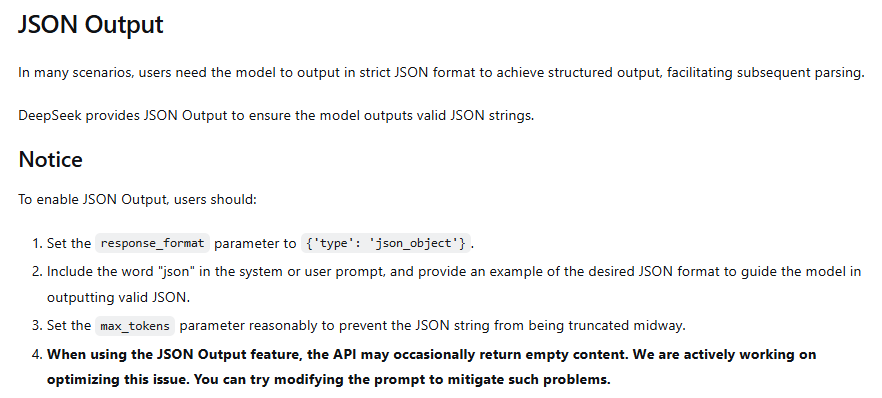
TypeScript cannot validate data received over the network. This json.ts example uses a fictional support ticket and checks the parsed object before treating it as an application value.
import { client } from "./client.js";
import type { DeepSeekRequest } from "./deepseek-types.js";

type Route = { queue: "billing" | "technical" | "account" };
function isRoute(value: unknown): value is Route {
  if (!value || typeof value !== "object" || Array.isArray(value)) return false;
  const item = value as Record<string, unknown>;
  return Object.keys(item).length === 1 &&
    typeof item.queue === "string" &&
    ["billing", "technical", "account"].includes(item.queue);
}

const request: DeepSeekRequest = {
  model: "deepseek-flash",
  messages: [
    { role: "system", content:
      'Return JSON with exactly one queue: billing, technical, or account. Example: {"queue":"account"}.' },
    { role: "user", content: "Fictional ticket: I cannot reset my password." },
  ],
  response_format: { type: "json_object" },
  thinking: { type: "disabled" },
  max_tokens: 512,
  stream: false,
};

const result = await client.chat.completions.create(request);
const choice = result.choices[0];
if (choice?.finish_reason !== "stop" || !choice.message.content) {
  throw new Error("JSON is missing or incomplete.");
}
const parsed: unknown = JSON.parse(choice.message.content);
if (!isRoute(parsed)) throw new Error("Unexpected JSON shape.");
console.log(parsed.queue);
A malformed response will fail parsing; an unexpected object will fail the shape check. Neither should silently become an accepted result. In a larger application, use your existing validation library and add the business rules that matter for the task. See the JSON output guide for more on schema requirements and troubleshooting.
Complete a tool call, including the follow-up request
A tool definition tells the model which functions your application offers. It does not run the function. Your code receives the requested name and arguments, validates them, performs the allowed operation, and sends the result back with the matching tool_call_id. The next API request lets the model use that result in its answer.
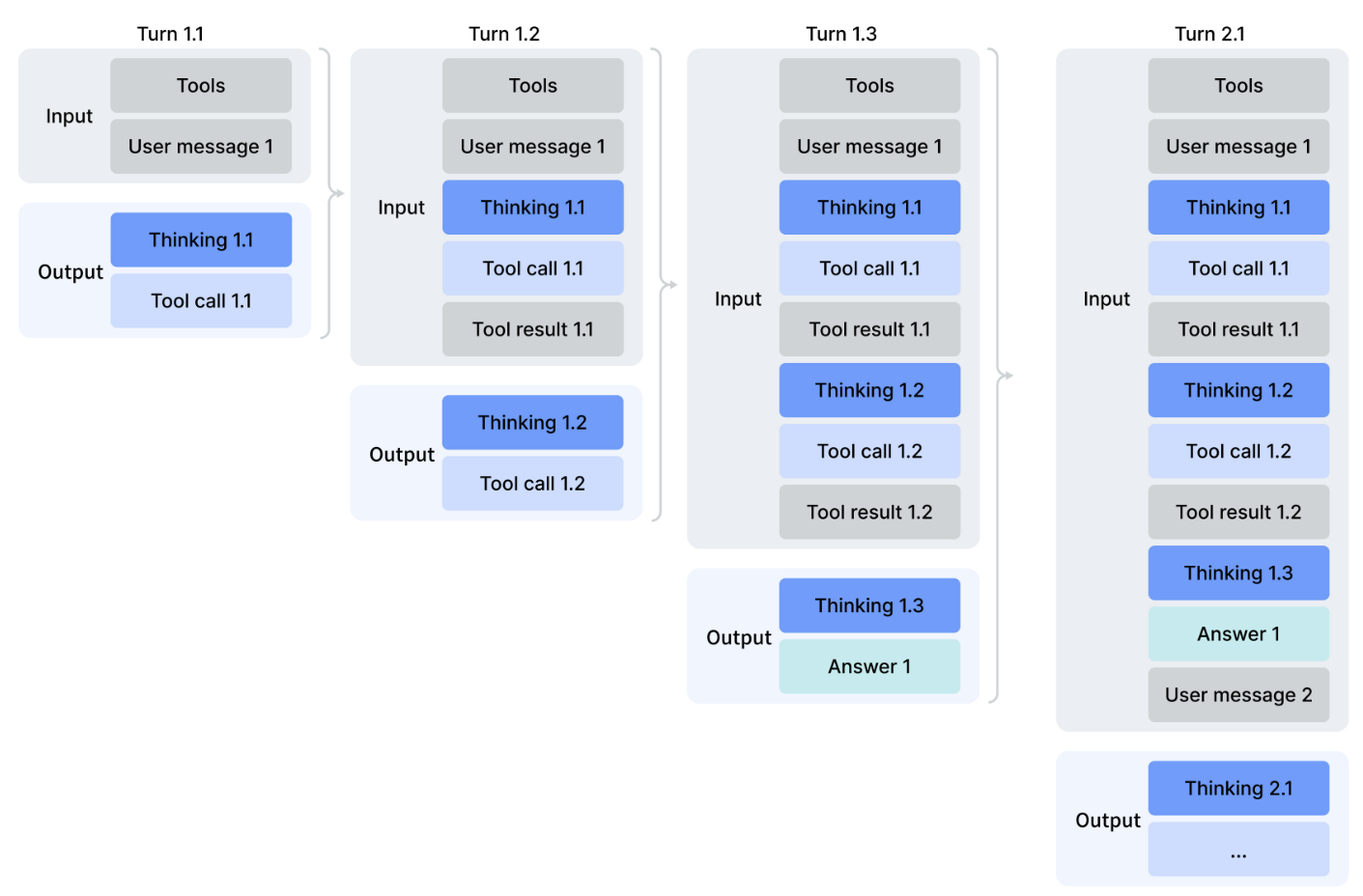
This tools.ts example uses fictional store hours held in the script. It enables thinking and preserves the returned assistant message, including reasoning, on every turn. The four-request cap is an example application limit to prevent an endless loop.
import type OpenAI from "openai";
import { client } from "./client.js";
import type { DeepSeekRequest, DeepSeekMessage } from "./deepseek-types.js";

const messages: OpenAI.ChatCompletionMessageParam[] = [
  { role: "user", content: "What time does the fictional Downtown store close?" },
];
const tools: OpenAI.ChatCompletionTool[] = [{
  type: "function",
  function: {
    name: "get_store_hours",
    description: "Look up the hours of a fictional example store.",
    parameters: {
      type: "object",
      properties: { store: { type: "string", enum: ["downtown"] } },
      required: ["store"],
      additionalProperties: false,
    },
  },
}];

let finished = false;
for (let turn = 0; turn < 4; turn++) {
  const request: DeepSeekRequest = {
    model: "deepseek-flash", messages, tools,
    thinking: { type: "enabled" },
    reasoning_effort: "high",
    max_tokens: 4096,
    stream: false,
  };
  const result = await client.chat.completions.create(request);
  const choice = result.choices[0];
  if (!choice) throw new Error("Missing choice.");
  const message = choice.message as DeepSeekMessage;
  messages.push(message);

  if (choice.finish_reason === "stop" && message.content) {
    console.log(message.content);
    finished = true;
    break;
  }
  if (choice.finish_reason !== "tool_calls" || !message.tool_calls?.length) {
    throw new Error(`Unfinished tool workflow: ${choice.finish_reason}`);
  }

  for (const call of message.tool_calls) {
    if (call.type !== "function" || call.function.name !== "get_store_hours") {
      throw new Error("Unknown tool.");
    }
    const args: unknown = JSON.parse(call.function.arguments);
    if (!args || typeof args !== "object" || Array.isArray(args) ||
        Object.keys(args).length !== 1 || !("store" in args) ||
        args.store !== "downtown") {
      throw new Error("Invalid store argument.");
    }
    const hours = { store: "downtown", closes: "18:00", fictional: true };
    messages.push({
      role: "tool",
      tool_call_id: call.id,
      content: JSON.stringify(hours),
    });
  }
}
if (!finished) throw new Error("Tool workflow reached its request limit.");
In a real integration, replace the local lookup with a function your application controls. Check the caller’s permission before retrieving private data or making a change. Do not execute arbitrary code or treat a model-supplied function name as authorization. If an operation may already have changed something before it failed, check its actual outcome before retrying it.
The API reference does not allow a forced named tool or tool_choice: "required" while thinking is enabled. Disable thinking if your request needs that behavior. DeepSeek also documents a beta strict mode with its own endpoint and schema rules; ordinary function definitions should not be described as strict validation guarantees.
Send an image from Node.js
Use deepseek-flash for images. Its Chat Completions input can combine a text instruction with an image_url content part containing either an accessible image URL or a base64 data URL. Pro does not accept image input.
For a small local PNG, place diagram.png beside your project files and save this as vision.ts. Run the compiled file from the project directory so the relative image path resolves correctly.
import { readFile } from "node:fs/promises";
import { client } from "./client.js";
import type { DeepSeekRequest } from "./deepseek-types.js";

const image = await readFile("diagram.png");
const request: DeepSeekRequest = {
  model: "deepseek-flash",
  messages: [{ role: "user", content: [
    { type: "text", text: "Explain the main relationship shown in this diagram." },
    { type: "image_url", image_url: {
      url: `data:image/png;base64,${image.toString("base64")}`,
    } },
  ] }],
  thinking: { type: "disabled" },
  max_tokens: 1024,
  stream: false,
};
const result = await client.chat.completions.create(request);
const choice = result.choices[0];
if (choice?.finish_reason !== "stop" || !choice.message.content) {
  throw new Error("No complete image answer.");
}
console.log(choice.message.content);
The vision documentation lists JPEG, PNG, GIF, and WebP. Match the MIME type to the actual file; changing a filename does not convert an image. Inline images have a 32 MiB per-image limit, and the overall request body has a 48 MiB limit. Base64 expands the data, so a file that meets the image limit can still make the request too large. For reusable or larger supported images, use the file-upload route below.
Use the Responses API when your application expects it
You can also call client.responses.create() through the same configured client. It uses input rather than messages, max_output_tokens rather than max_tokens, and reasoning.effort for the effort setting. This responses.ts example requests a direct text answer:
import { client } from "./client.js";

const response = await client.responses.create({
  model: "deepseek-flash",
  instructions: "Explain technical ideas plainly.",
  input: "Explain what an HTTP status code tells a developer.",
  reasoning: { effort: "none" },
  max_output_tokens: 1024,
});
if (response.status !== "completed" || !response.output_text) {
  throw new Error(`No complete response: ${response.status}`);
}
console.log(response.output_text);
DeepSeek’s Responses compatibility guide defines what works. Do not assume every OpenAI feature is available because the SDK accepts its options. In particular, server-side conversation continuation through previous_response_id is unsupported; send the relevant history yourself. Built-in tool definitions such as web search and file search are ignored rather than providing those services.
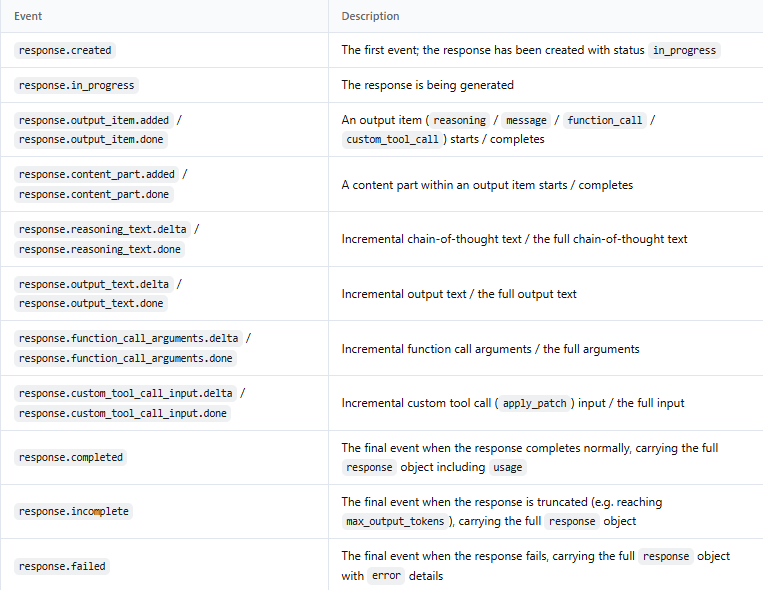
Responses streaming also uses a different event format: text appears in response.output_text.delta events, followed by a completed, incomplete, or failed terminal event. It does not use the Chat Completions choices[0].delta structure or [DONE] marker. Choose one endpoint’s event handling throughout a request.
Upload an image and reference its file ID
The Files API accepts supported images up to 64 MiB per file. It is not a general PDF or Word-document reader. In Responses input, reference the upload with type: "input_image" and file_id. This uploaded-image.ts example removes its own temporary upload afterwards; retain the file instead if your application needs to reuse it.
import { createReadStream } from "node:fs";
import { client } from "./client.js";

const file = await client.files.create({
  file: createReadStream("diagram.png"),
  purpose: "user_data",
});
try {
  const response = await client.responses.create({
    model: "deepseek-flash",
    input: [{ role: "user", content: [
      { type: "input_text", text: "Explain this diagram." },
      { type: "input_image", file_id: file.id, detail: "auto" },
    ] }],
    reasoning: { effort: "none" },
    max_output_tokens: 1024,
  });
  if (response.status !== "completed" || !response.output_text) {
    throw new Error("No complete image response.");
  }
  console.log(response.output_text);
} finally {
  await client.files.delete(file.id);
}
Chat Completions uses a different uploaded-image part: { type: "file", file_id: file.id }. DeepSeek places file_id directly on that object, so do not substitute a nested OpenAI-style file object. Follow the file-upload guide when adding reuse, expiration, or deletion to a larger workflow.
Put a server route between the browser and DeepSeek
Your browser should send the user’s message to your application. Your server then validates the request and calls DeepSeek with its private key. This gives you one place to control access, spending, and the data sent to the model.
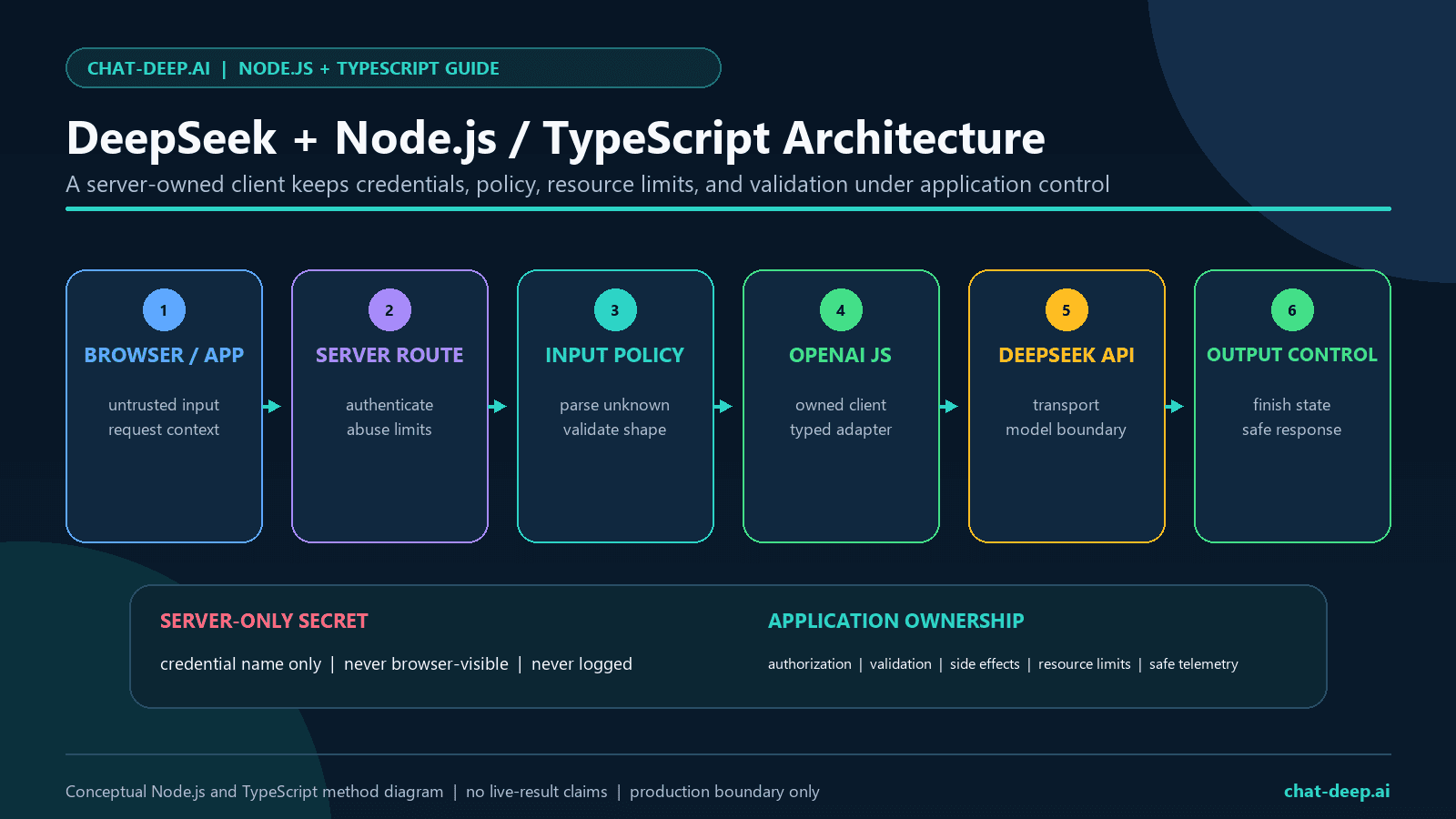
For an existing Next.js App Router project, copy the earlier client and type files into app/lib/client.ts and app/lib/deepseek-types.ts. Put DEEPSEEK_API_KEY in the project’s .env.local; do not add the NEXT_PUBLIC_ prefix. Next.js explains this separation in its environment-variable documentation. Keep your Next.js project’s own TypeScript configuration.
Save the following as app/api/chat/route.ts. It is a local integration example using a POST Route Handler. Before exposing it publicly, connect your application’s authentication and per-user request limits, and enforce a request-body size limit at your server or hosting layer.
import { client } from "../../lib/client.js";
import type { DeepSeekRequest } from "../../lib/deepseek-types.js";

export const runtime = "nodejs";

export async function POST(req: Request) {
  let body: unknown;
  try { body = await req.json(); }
  catch { return Response.json({ error: "Send valid JSON." }, { status: 400 }); }

  if (!body || typeof body !== "object" || !("message" in body) ||
      typeof body.message !== "string" || !body.message.trim() ||
      body.message.length > 4000) {
    return Response.json({ error: "Send a message of 1–4000 characters." }, { status: 400 });
  }

  const request: DeepSeekRequest = {
    model: "deepseek-flash",
    messages: [{ role: "user", content: body.message.trim() }],
    thinking: { type: "disabled" },
    max_tokens: 1024,
    stream: false,
  };
  try {
    const result = await client.chat.completions.create(request, {
      signal: req.signal, timeout: 60_000, maxRetries: 0,
    });
    const choice = result.choices[0];
    if (choice?.finish_reason !== "stop" || !choice.message.content) {
      return Response.json({ error: "The answer was incomplete." }, { status: 502 });
    }
    return Response.json({ answer: choice.message.content });
  } catch {
    return Response.json({ error: "The AI request could not be completed." }, { status: 502 });
  }
}
With your development server running, send a JSON body such as {"message":"Explain async/await simply."} to /api/chat using a POST request. The expected success response contains an answer string. Handle non-2xx responses in the UI instead of displaying an empty answer. Keep useful status and timing diagnostics on the server without logging the key or private user content.
The character cap and 60-second timeout are example application choices. A longer reasoning task may need a different deadline, and the hosting platform can impose its own limit. If you add streaming, replace the JSON response with a properly consumed stream, respect downstream backpressure, and propagate cancellation; do not just return the SDK stream object as JSON.
Fix errors at the layer that failed
Distinguish a local JavaScript problem from a provider response. If Node cannot load your file or find the key, changing the model will not help. If DeepSeek returns a status code, use that code to decide whether to fix the request, account, or retry policy. The official error table gives the following starting points:
| Status | What to check | Next action |
|---|---|---|
| 400 or 422 | Request format, parameters, model capabilities, tool history | Correct the request. Check missing reasoning history when tools are present. |
| 401 | Missing or invalid DeepSeek key | Check the variable and account credential; do not substitute an OpenAI key. |
| 402 | Insufficient API balance | Check the DeepSeek account balance and billing. |
| 429 | Too many concurrent requests or another applicable limit | Reduce parallel work and retry after a delay. |
| 500 or 503 | Provider error or overload | Use bounded retries if the operation can be retried safely. |
The SDK’s error classes expose HTTP failures through OpenAI.APIError and its status property. A connection error may have no HTTP status. Handle user cancellation separately from a timeout, and do not retry after the user has explicitly cancelled the request.
By default, the OpenAI client retries twice for connection failures, 408, 409, 429, and server errors. Its default timeout is ten minutes, and timeouts can be retried. Set a policy suited to your application: the route above disables SDK retries and sets a shorter timeout, so an interactive request does not silently make several attempts. If you add an application retry loop, account for any SDK retries still enabled.
Use a growing delay with some variation between retries and a finite attempt or time budget. Repeatedly sending a malformed request or invalid key cannot fix it. For tool workflows, a retry also needs to account for work your application may already have done, such as sending a message or updating a record. The DeepSeek error guide covers these distinctions in more detail.
Limit parallel requests, rather than launching everything at once
DeepSeek’s rate-limit documentation currently lists account-level concurrency ceilings of 2,500 for Flash and 500 for Pro. These are simultaneous unfinished requests per model, not requests per minute, and multiple keys do not multiply the account limit. Your application will usually choose a much smaller concurrency cap based on its latency and spending needs.
For batches, use a bounded worker queue rather than an unbounded Promise.all() over every item. Keep the limit around the entire request, including consuming a stream, because an unfinished stream is still active. If you need capacity beyond the documented ceiling, follow the provider’s capacity-request process instead of rotating keys.
Resolve common Node.js and TypeScript mistakes
| Symptom | Likely fix |
|---|---|
| Cannot use import outside a module | Use .mjs, or keep "type": "module" for the TypeScript setup shown here. |
| DEEPSEEK_API_KEY is missing | Run the standalone script with --env-file=.env from the correct directory, or configure the deployed server secret. |
| TypeScript rejects thinking | Use the provider-specific request type above; do not hide every mismatch with any. |
| Streaming return type is ambiguous | Use the streaming request type with stream: true; avoid widening it to an arbitrary boolean. |
| HTTP 200 but no final answer | Inspect the finish reason and output budget, especially with thinking enabled. |
| An image request fails | Use Flash, a supported image format, the correct content-part shape, and an acceptable request size. |
Read token usage before estimating cost
A non-streaming Chat Completion returns usage with the response; the streaming example keeps it from the final chunk. The provider-specific usage type above lets you read DeepSeek’s cache fields. Add this after completion is returned in chat.ts, and include DeepSeekUsage in that file’s type import:
const usage = completion.usage as DeepSeekUsage | undefined;
if (usage) {
  console.log({
    input: usage.prompt_tokens,
    output: usage.completion_tokens,
    cacheHit: usage.prompt_cache_hit_tokens ?? "not reported",
    cacheMiss: usage.prompt_cache_miss_tokens ?? "not reported",
    total: usage.total_tokens,
  });
}
Reasoning tokens are part of completion usage, not another amount to add to the output total. Cache hits and misses describe the input split. Treat an absent field as unreported rather than assuming zero, especially if you introduce a gateway or a different client.
DeepSeek’s context cache works automatically and on a best-effort basis. Keeping shared instructions and history stable can help reuse, but a repeated piece of text anywhere in a prompt does not guarantee a hit. Check the returned fields instead of promising savings from your prompt layout alone.
Estimate USD cost using the current official rates for the model and the reported input and output categories. Include each request in a tool loop and the history you resend; one user action can generate several API requests. The DeepSeek pricing guide explains the billing units, while the usage-field guide explains the response values.
Frequently asked questions
Is there an official DeepSeek Node.js SDK?
DeepSeek’s official quick start uses the openai JavaScript and TypeScript package configured for DeepSeek. This guide follows that documented route. A community package with DeepSeek in its name should be evaluated separately; its name alone does not establish who maintains it.
Can I call DeepSeek directly from React?
Keep a private API key out of browser code. Let React call your own server route, and let that server call DeepSeek. A public environment-variable prefix or browser SDK option does not make a secret safe to distribute.
Do I have to use the OpenAI package?
No. You can make the documented HTTP requests with another client or use a framework provider. The OpenAI package is convenient because it provides typed request methods, streaming iteration, and error handling. If you use another client, retain DeepSeek’s endpoint, authentication, and request contract rather than copying options between libraries.
Does a TypeScript type guarantee valid JSON output?
No. Type annotations describe what your code expects; they do not verify a generated response. Check completion, parse the JSON, and validate its shape and business rules before using it.
Can I enable built-in web search by adding a Responses tool?
DeepSeek’s Responses guide currently lists built-in web-search tools as ignored. If your application needs search, implement an approved search service through function calling and return the results, or follow another explicitly documented integration. Merely accepting the request does not mean a search ran.
Take the working script into your application
Start by getting the first text request to return a complete answer from your server. Then add the feature your application actually needs: streaming for an interactive interface, validated JSON for structured data, or tools for an operation your code performs. Keep the same checks for incomplete output as the workflow grows.
Before connecting real users, put access controls, request limits, cancellation, and useful error messages around that working path. You will have an integration you can explain and maintain, with each added feature tied to a clear job rather than a larger example to copy blindly.