
Last verified: July 27, 2026. A current DeepSeek LlamaIndex integration uses the Python package llama-index-llms-deepseek and the class DeepSeek. Keep DEEPSEEK_API_KEY on the server, use a current DeepSeek V4 model ID, set thinking mode explicitly, set the documented context window deliberately, and configure a separate embedding model for retrieval.
This guide is specifically about LlamaIndex: standalone LLM calls, document ingestion, indexing, retrieval, query engines, response synthesis, and source review. If your route needs only a direct model call, use the DeepSeek Python SDK guide. For LangChain runnables and agents, use the DeepSeek LangChain integration guide.
Evidence status: package names, constructor behavior, inherited methods, metadata defaults, and framework architecture below come from current official LlamaIndex documentation and source. Provider model and feature statements come from current official DeepSeek documentation. A 22-check localhost suite passed. We then completed a preregistered 16-request provider study on July 27, 2026 with concurrency one, zero automatic retries, and a passing publication privacy audit. Dated observations are separated from documented contracts, and the evidence contains no prompts, outputs, reasoning text, credentials, account data, or provider identifiers.
- Install
llama-index-coreandllama-index-llms-deepseek. - Use
deepseek-v4-flashordeepseek-v4-profor new work, subject to your own evaluation. - Set
context_window=1_000_000because the reviewed wrapper falls back to 64,000 for model names absent from its legacy lookup table. - Disable thinking explicitly for ordinary RAG and schema-controlled flows; enable it deliberately for reasoning tasks.
- Configure embeddings separately. DeepSeek supplies generation in this architecture, not the vectors used by the example index.
- Test retrieval before testing the answer, and validate source nodes before showing citations.
- Pin versions, bound retries and concurrency, and keep prompts, retrieved text, reasoning, credentials, and identifiers out of logs.
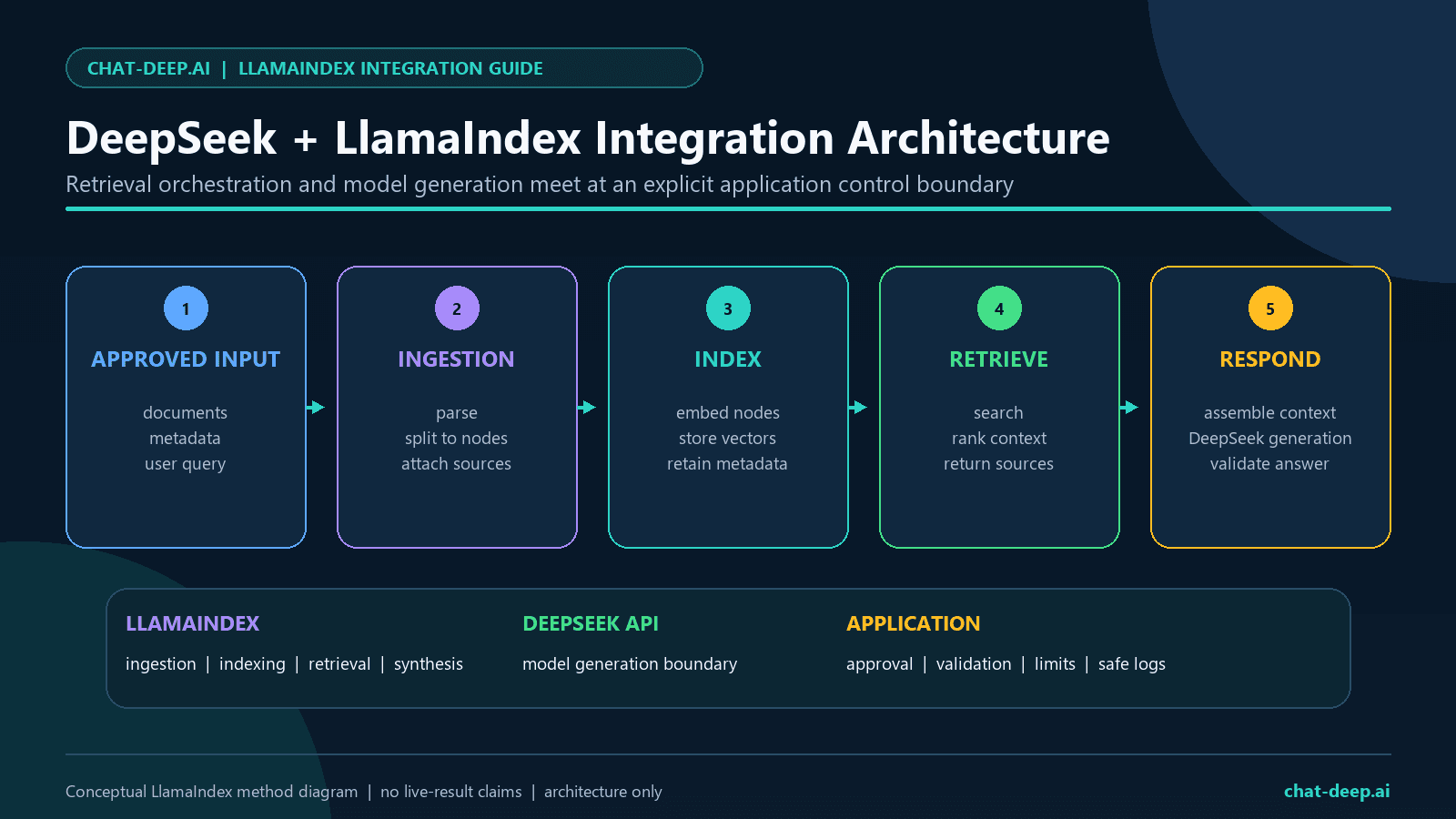
What DeepSeek plus LlamaIndex actually means
DeepSeek is the model provider. LlamaIndex is the data and orchestration framework. The dedicated adapter converts LlamaIndex chat or completion inputs into an OpenAI-compatible request sent to the DeepSeek API, then converts the response into LlamaIndex response objects. The adapter inherits its transport behavior from LlamaIndex’s OpenAILike and OpenAI integrations.
| Layer | What it owns | What it does not guarantee |
|---|---|---|
| DeepSeek API | Model IDs, provider request fields, generated output, errors, usage, billing, and account limits | Correct retrieval, application authorization, or safe use of an answer |
DeepSeek LlamaIndex adapter | Credential lookup, API origin, request conversion, response conversion, sync and async methods, and metadata | That every new provider field is modeled correctly by the installed wrapper |
| LlamaIndex | Documents, nodes, embeddings interfaces, indexes, retrievers, query engines, response synthesis, tools, and instrumentation | That the retrieved chunks are relevant, current, approved, or resistant to injection |
| Your application | Data approval, configuration, validation, tenancy, authorization, retries, logging policy, and user experience | Nothing: this is the final control boundary |
Use this stack when document grounding is central to the application. It is a good fit for knowledge-base search, policy Q&A, support material, research collections, and source-aware synthesis. It is usually unnecessary for a single prompt with no retrieval. A framework adds useful boundaries, but it also adds dependencies and another compatibility surface.
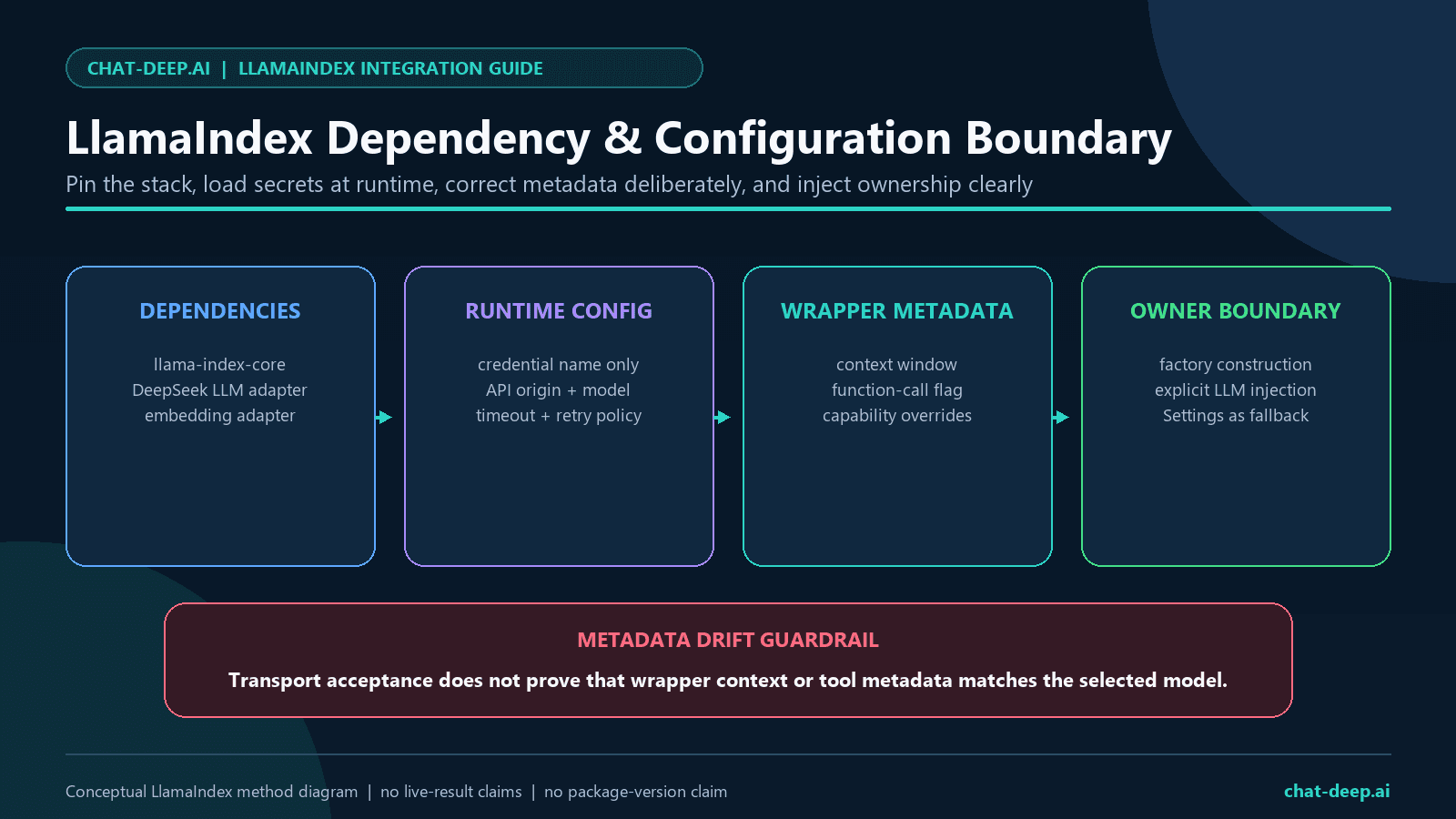
Current package, model IDs, and wrapper metadata drift
The dated audit environment used Python 3.12.13, llama-index-core 0.14.23, llama-index-llms-deepseek 0.3.0, llama-index-llms-openai-like 0.5.3, llama-index-llms-openai 0.6.26, openai 2.48.0, and pydantic 2.13.4. These are reproducibility facts for this review, not a permanent recommendation to install the newest release without testing.
| Item | Official source says | Implementation consequence |
|---|---|---|
| Package and import | llama-index-llms-deepseek and from llama_index.llms.deepseek import DeepSeek | Use the provider-specific adapter rather than a generic wrapper by default |
| Current model IDs | DeepSeek lists deepseek-v4-flash and deepseek-v4-pro | Use current IDs in new examples and evaluate both on your workload |
| Provider context length | DeepSeek lists 1M for both current V4 models | Set context_window=1_000_000 in this wrapper version |
| Wrapper context lookup | The source contains only the two older aliases and otherwise returns 64,000 | Do not mistake adapter metadata for the provider’s documented limit |
| Provider tool support | DeepSeek lists Tool Calls for both current V4 models | Provider capability still needs wrapper-specific verification |
| Wrapper function metadata | The source marks only deepseek-chat as function-calling by default | A current-ID tool test must opt in deliberately and validate the result |
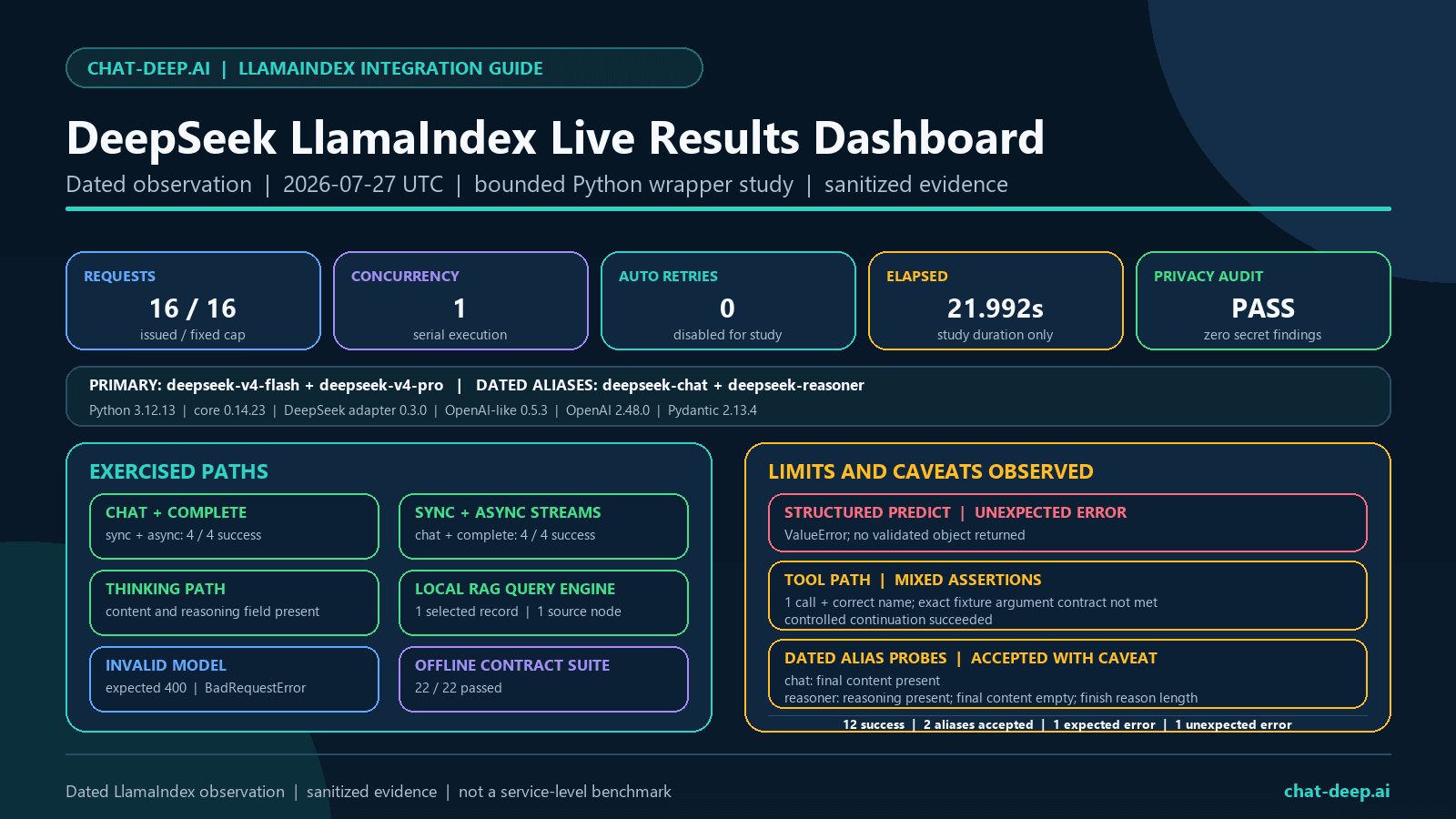
The official LlamaIndex integration page still shows deepseek-chat and deepseek-reasoner. DeepSeek assigned those aliases a retirement deadline of July 24, 2026, which has passed. Both aliases returned HTTP 200 in our July 27 probes, but this does not restore them to the recommended model set or guarantee future routing. deepseek-chat returned non-empty final content and a stop finish. deepseek-reasoner exposed non-empty reasoning, but its final content was empty and it ended with length at the test’s output cap.
DeepSeek’s official model table also includes pricing, but prices are intentionally not copied here. Consult the official table or the site’s DeepSeek pricing page at decision time. Package versions, model routing, prices, and feature combinations can change independently.
Configure and test one direct provider request with the DeepSeek API guide before adding the LlamaIndex layer.
Install the integration and protect the API key
Create an isolated environment and install explicit dependencies. A lockfile should hold the exact versions released to production. The commands below are convenient for a fresh development environment; they are not a substitute for a reviewed dependency update.
python -m venv .venv

# macOS or Linux
source .venv/bin/activate

# Windows PowerShell
.\.venv\Scripts\Activate.ps1

python -m pip install -U llama-index-core llama-index-llms-deepseek pydantic
Set DEEPSEEK_API_KEY in a protected server environment or secrets manager. Never place a real value in source code, a browser bundle, a mobile app, a notebook output, a screenshot, a Git commit, a trace, or an exception message. The DeepSeek API Key guide owns creation, rotation, revocation, and secret-storage details.
# Variable name only. Store the real value outside the repository.
DEEPSEEK_API_KEY=replace_in_your_secret_store
The adapter reads this variable when no key is passed directly. Its reviewed source also defaults api_base to https://api.deepseek.com. Set that origin explicitly in production configuration so a code review can see which provider receives retrieved content.
Build an explicit DeepSeek factory
Current DeepSeek documentation says thinking is enabled by default. It also says temperature, top_p, presence_penalty, and frequency_penalty do not affect thinking mode. Select the mode first. The inherited LlamaIndex wrapper merges additional_kwargs into OpenAI-client call parameters. In the pinned stack, the DeepSeek thinking object must be nested under the client’s extra_body parameter so it is merged into the top-level HTTP body.
import os
from typing import Literal

from llama_index.llms.deepseek import DeepSeek


def build_deepseek_llm(
    model_id: Literal[
        "deepseek-v4-flash",
        "deepseek-v4-pro",
    ] = "deepseek-v4-flash",
    *,
    thinking: bool = False,
    max_retries: int = 2,
) -> DeepSeek:
    if not os.getenv("DEEPSEEK_API_KEY"):
        raise RuntimeError("DEEPSEEK_API_KEY is not configured")

    provider_fields = {
        "extra_body": {
            "thinking": {
                "type": "enabled" if thinking else "disabled"
            }
        }
    }
    if thinking:
        provider_fields["reasoning_effort"] = "high"

    return DeepSeek(
        model=model_id,
        api_base="https://api.deepseek.com",
        context_window=1_000_000,
        api_key=os.environ["DEEPSEEK_API_KEY"],
        additional_kwargs=provider_fields,
        temperature=0.0,
        max_tokens=1_200,
        timeout=30.0,
        max_retries=max_retries,
        reuse_client=True,
    )
The 1M value is provider documentation, not proof that every request can or should approach that size. Reserve room for output, account for the text LlamaIndex adds during response synthesis, and test realistic document sets. Large prompts can increase cost, delay, truncation risk, and the amount of sensitive material sent to the provider.
Serialization trap: do not place thinking directly beside model in additional_kwargs for this pinned stack. The underlying OpenAI client rejects that unknown direct keyword with TypeError. A local request-capture fixture confirmed that additional_kwargs={"extra_body":{"thinking":...}} produces a top-level thinking field in the outgoing JSON body. This is a localhost wrapper-contract result, not a provider-support result.
The example accepts only two model IDs so a misspelling fails locally. If your organization uses a configuration service, validate the same allowlist at startup. Choose Flash or Pro through a task-specific evaluation rather than a generic quality label. The DeepSeek models page owns the broader comparison.
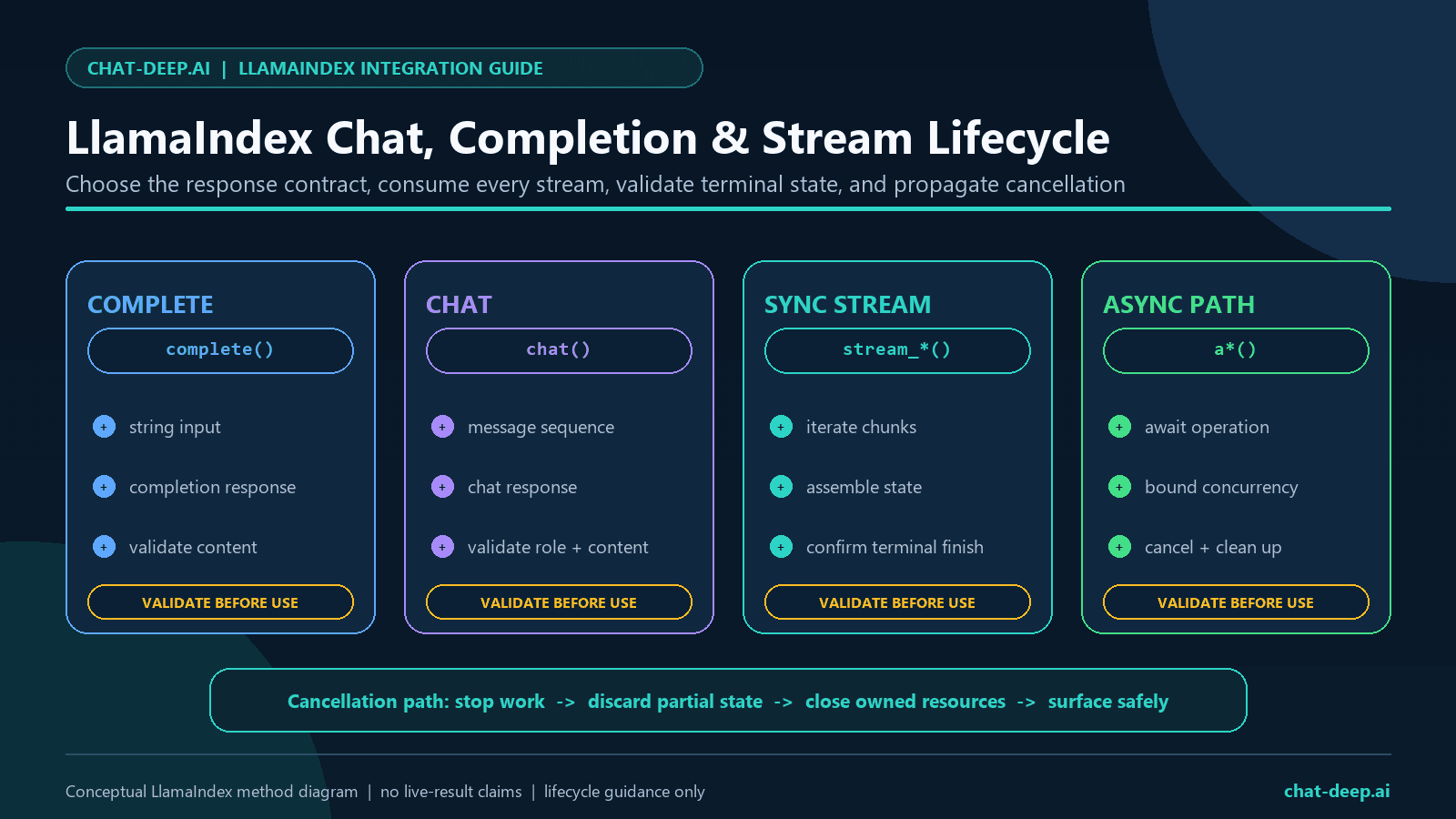
Completion, chat, streaming, and async methods
The adapter exposes completion and chat interfaces because it inherits from OpenAILike. For a chat model, complete is still adapted through chat-completion behavior; it is useful for a single prompt but should not be confused with a separate provider text-completions product.
Synchronous completion and chat
from llama_index.core.llms import ChatMessage

llm = build_deepseek_llm(thinking=False)

completion = llm.complete(
    "Define retrieval-augmented generation in two sentences."
)
if not str(completion).strip():
    raise RuntimeError("Empty completion")

messages = [
    ChatMessage(
        role="system",
        content="Answer only from approved context.",
    ),
    ChatMessage(
        role="user",
        content="List three checks for retrieved evidence.",
    ),
]
chat_response = llm.chat(messages)
if not str(chat_response).strip():
    raise RuntimeError("Empty chat response")
Do not print the full response in production. A raw response may include generated text, usage data, reasoning blocks, tool payloads, and provider identifiers. Validate only the fields the route needs and record a redacted summary.
Synchronous streaming
parts: list[str] = []

for event in llm.stream_chat(messages):
    if event.delta:
        parts.append(event.delta)

final_text = "".join(parts).strip()
if not final_text:
    raise RuntimeError("Stream ended without final text")
Streaming improves perceived responsiveness; it does not reduce the need for a timeout, a cancellation path, terminal-state checks, or final validation. Do not persist each raw chunk. If the application must moderate or validate the complete answer, buffer it server-side before releasing a consequential result.
Asynchronous chat and streaming
async def run_async_examples() -> tuple[str, str]:
    chat_response = await llm.achat(messages)
    chat_text = str(chat_response).strip()
    if not chat_text:
        raise RuntimeError("Empty async chat response")

    stream = await llm.astream_chat(messages)
    chunks: list[str] = []
    async for event in stream:
        if event.delta:
            chunks.append(event.delta)

    stream_text = "".join(chunks).strip()
    if not stream_text:
        raise RuntimeError("Async stream ended without final text")

    return chat_text, stream_text
Use a semaphore or worker pool to bound concurrent async calls. Cancellation should propagate through the task; do not catch a cancellation exception and turn it into an automatic retry. If several layers each retry, one user action can multiply into many provider requests.
Settings versus explicit dependency injection
LlamaIndex documents Settings as a singleton bundle of defaults. A component uses it when an LLM, embedding model, splitter, or other resource is not passed locally. This is concise in a notebook:
from llama_index.core import Settings

Settings.llm = build_deepseek_llm(thinking=False)
Global state can surprise tests, multi-tenant services, notebooks, and workers. One test may leave a model or embedding behind for the next. Prefer passing llm=... and embed_model=... directly at construction boundaries when different routes or tenants need different behavior. If you use Settings, initialize it once at process startup and prohibit request-level mutation.
A reproducible DeepSeek LlamaIndex RAG pipeline
RAG has two model roles. An embedding model converts documents and queries into vectors for retrieval. DeepSeek then reads selected text and generates the answer. The following is a smoke-test fixture, not a production semantic-search recipe: MockEmbedding keeps the indexing path local and deterministic enough to exercise the framework boundary, while similarity_top_k=1 and a one-record corpus make the expected source explicit.
from llama_index.core import Document, VectorStoreIndex
from llama_index.core.embeddings import MockEmbedding

documents = [
    Document(
        text=(
            "Project Atlas requires human approval before any "
            "production database change."
        ),
        metadata={
            "record_id": "policy-001",
            "title": "Project Atlas change policy",
        },
    )
]

embed_model = MockEmbedding(embed_dim=32)
llm = build_deepseek_llm(thinking=False, max_retries=0)

index = VectorStoreIndex.from_documents(
    documents,
    embed_model=embed_model,
)

retriever = index.as_retriever(similarity_top_k=1)
nodes = retriever.retrieve(
    "What approval is required for a production database change?"
)

if len(nodes) != 1:
    raise RuntimeError("Unexpected retrieval count")
if nodes[0].node.metadata.get("record_id") != "policy-001":
    raise RuntimeError("Unexpected source selected")

query_engine = index.as_query_engine(
    llm=llm,
    similarity_top_k=1,
)
response = query_engine.query(
    "What approval is required for a production database change? "
    "Answer only from the indexed policy and name its record ID."
)

source_ids = {
    node.node.metadata.get("record_id")
    for node in response.source_nodes
}
if "policy-001" not in source_ids:
    raise RuntimeError("Expected source node is missing")
Replace MockEmbedding in production with an approved embedding integration selected for your language, domain, privacy constraints, and retrieval evaluation. Do not use the smoke fixture to claim semantic quality. LlamaIndex’s VectorStoreIndex uses in-memory storage by default; choose a persistent vector store, access controls, deletion workflow, and backup policy for a real system.
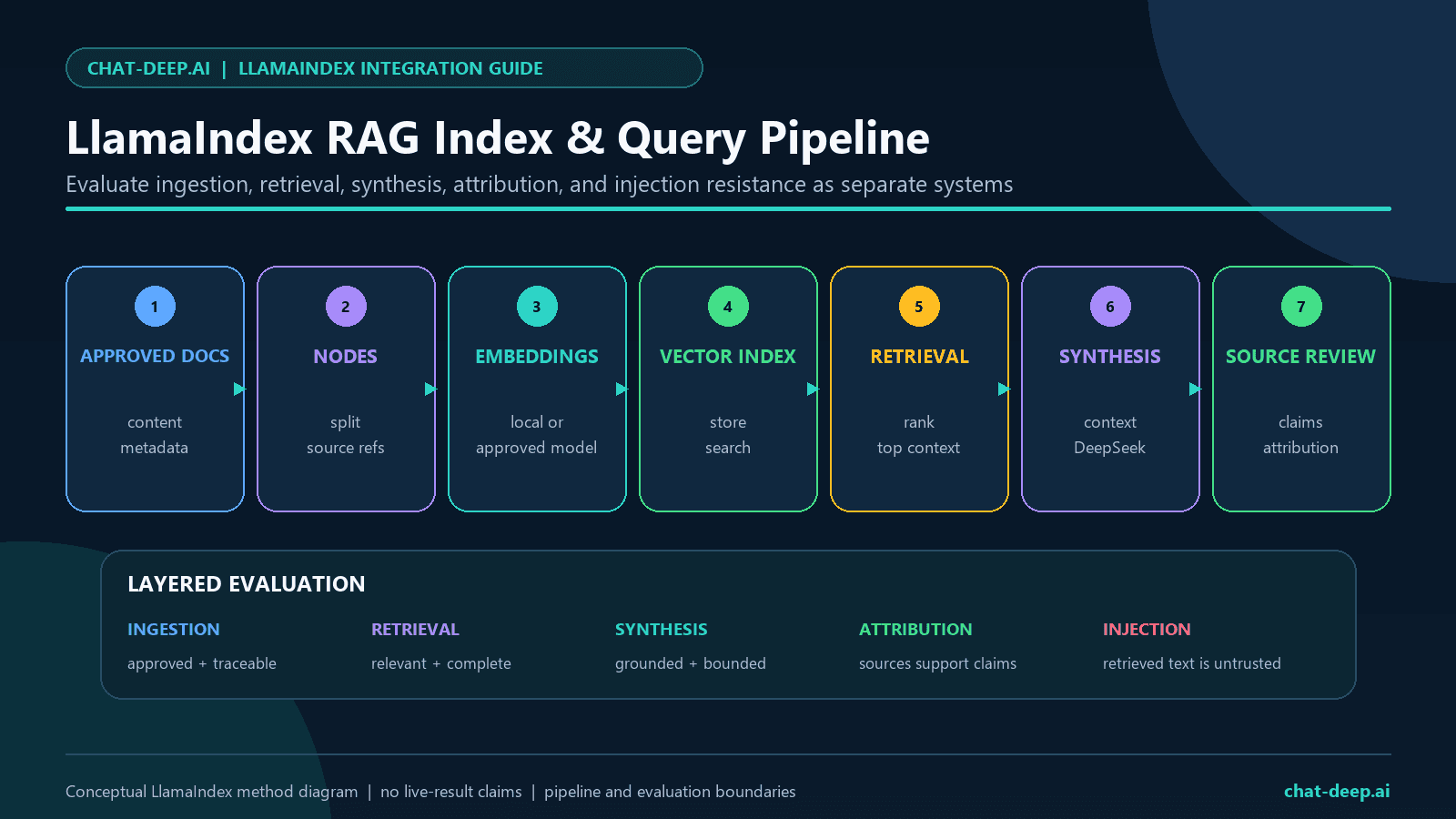
Evaluate retrieval before evaluating the answer
A fluent answer can hide a retrieval failure. Build a labelled question set with expected record IDs, relevant passages, and acceptable abstentions. Measure whether the retriever found the right source before asking whether the generator wrote a good answer.
| Checkpoint | What to inspect | Typical failure |
|---|---|---|
| Data approval | Ownership, retention, sensitivity, and provider permission | Unapproved private text reaches the generation API |
| Parsing and chunking | Headings, tables, boundaries, overlap, and metadata | The evidence is split away from its qualifier |
| Embedding | Domain and language fit | Related wording receives a weak similarity score |
| Retrieval | Recall, precision, top-k, filters, and source IDs | An irrelevant but similar chunk wins |
| Context assembly | Ordering, delimiters, duplicates, and token budget | Instructions inside a document are treated as application commands |
| Generation | Grounding, abstention, completeness, and contradictions | The answer extends beyond the supplied evidence |
| Attribution | Whether displayed sources actually support each claim | A retrieved source is shown even though it does not support the sentence |
Treat retrieved documents as untrusted data. Delimit them, instruct the model not to follow commands found inside them, filter by authorization before retrieval, and never let a retrieved chunk change tool permissions. Source metadata is useful for attribution, but it is not proof that the answer is supported. The DeepSeek evaluation framework owns the larger test and release-gate design.
Thinking mode and reasoning-field boundaries
Use explicit non-thinking mode for ordinary retrieval answers, extraction, and schema-controlled routes when that configuration meets your quality target. Use thinking mode for tasks that genuinely benefit from additional reasoning, then allow enough output budget for both reasoning and final content. A low output cap can end before final text appears.
non_thinking_llm = build_deepseek_llm(
    "deepseek-v4-flash",
    thinking=False,
)

thinking_llm = build_deepseek_llm(
    "deepseek-v4-pro",
    thinking=True,
)
The inherited current OpenAI wrapper contains logic for reasoning content and converts it into LlamaIndex thinking blocks. In the dated V4 Pro thinking case, the request returned HTTP 200 with non-empty final content, a stop finish, and a present, non-empty reasoning field. The audit recorded only structural booleans and did not retain or publish the reasoning text.
For ordinary multi-turn thinking conversations, DeepSeek says prior reasoning is ignored by the API. Tool-call turns are different: the provider says the relevant reasoning_content must be replayed in subsequent requests or a 400 error can result. Do not build a thinking tool loop until the exact installed wrapper preserves the required fields. See the DeepSeek Thinking Mode guide for the full protocol.
Structured output requires application validation
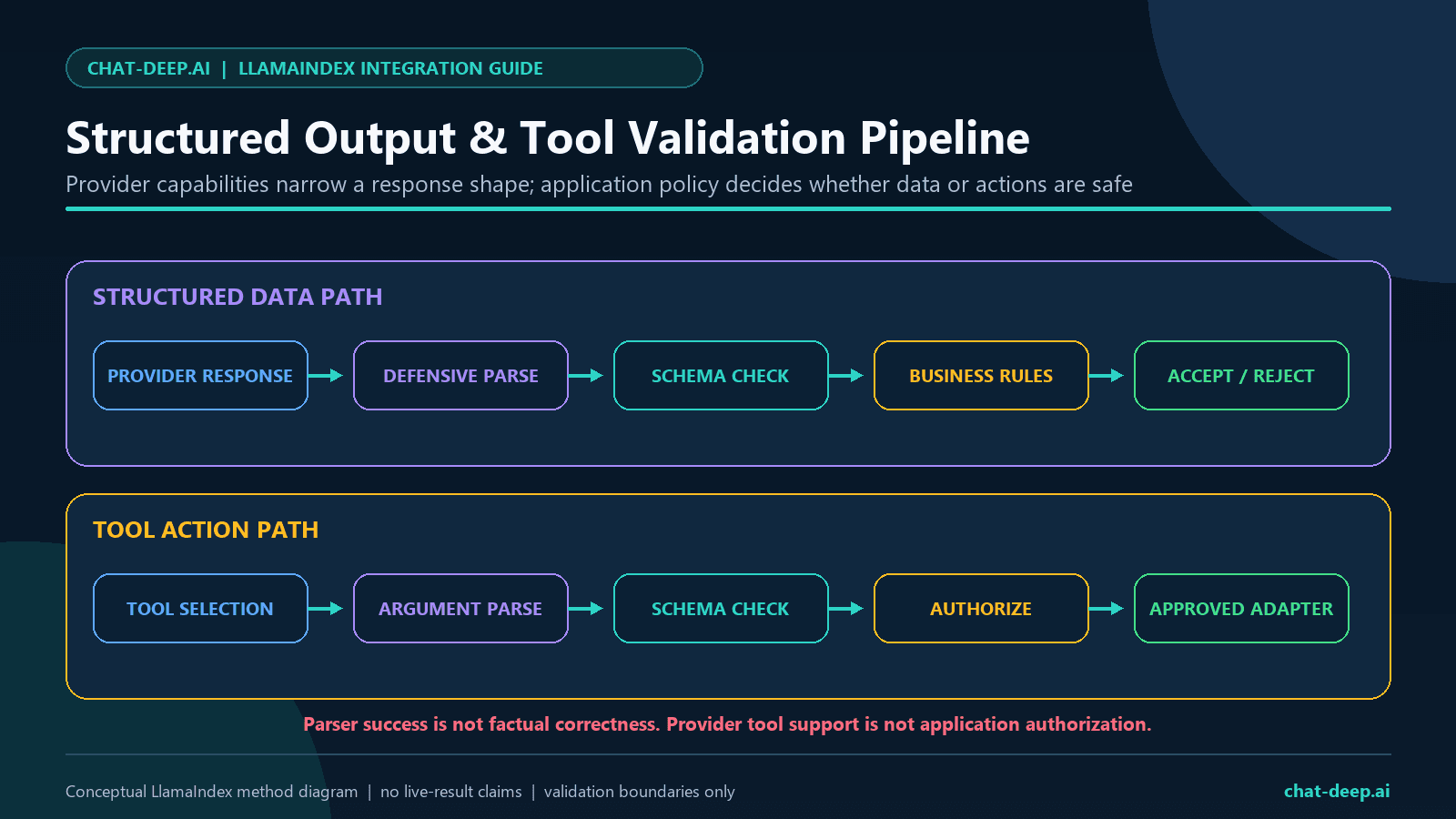
LlamaIndex offers structured prediction and Pydantic-based abstractions. DeepSeek separately offers JSON Output. These layers solve different problems: a request can ask for JSON, a parser can create an object, Pydantic can validate types, and business rules can reject an otherwise valid object. None proves that the fields are factually correct.
from typing import Literal

from llama_index.core.prompts import PromptTemplate
from pydantic import BaseModel, ConfigDict, Field


class PolicyAnswer(BaseModel):
    model_config = ConfigDict(extra="forbid")

    record_id: str = Field(min_length=1)
    approval_required: Literal["yes", "no", "unclear"]


json_llm = DeepSeek(
    model="deepseek-v4-flash",
    api_base="https://api.deepseek.com",
    context_window=1_000_000,
    additional_kwargs={
        "extra_body": {
            "thinking": {"type": "disabled"},
        },
        "response_format": {"type": "json_object"},
    },
    timeout=30.0,
    max_retries=0,
)

prompt = PromptTemplate(
    "Return valid json matching this example: "
    '{{"record_id":"policy-001","approval_required":"yes"}}. '
    "Use only this source text: {source_text}"
)

result = json_llm.structured_predict(
    PolicyAnswer,
    prompt,
    source_text=documents[0].text,
)

if result.record_id != "policy-001":
    raise RuntimeError("Unexpected source attribution")
DeepSeek’s JSON guide requires the prompt to mention JSON and recommends showing the desired shape. It also warns that JSON mode can return empty content and that insufficient output budget can truncate the object. In our pinned live structured_predict case, a provider request was issued, but the wrapper path ended with ValueError, recorded no HTTP status in the sanitized result, and produced no validated Pydantic object. Do not treat that result as a provider-wide JSON failure: it is an exact-version LlamaIndex structured-prediction observation. Catch validation failures, retain a safe error category, and use the DeepSeek JSON Output guide when evaluating a direct JSON fallback.
Tool calling: provider support is not wrapper readiness
DeepSeek documents Tool Calls for both V4 models. The reviewed LlamaIndex adapter’s function-calling set, however, contains only deepseek-chat. For a current ID, LlamaIndex therefore does not advertise function calling by default. The constructor accepts an explicit is_function_calling_model override, but enabling metadata is not proof that the whole request and continuation path works.
tool_llm = DeepSeek(
    model="deepseek-v4-flash",
    api_base="https://api.deepseek.com",
    context_window=1_000_000,
    is_function_calling_model=True,
    additional_kwargs={
        "extra_body": {
            "thinking": {"type": "disabled"},
        },
    },
    timeout=30.0,
    max_retries=0,
)
Our initial V4 Flash tool request returned HTTP 200 with exactly one call and the expected tool name, but the returned arguments did not meet the test fixture’s exact argument contract. This is a narrow fixture assertion, not a claim that the arguments were broadly schema-invalid. The continuation case replayed the matching identifier in memory, returned HTTP 200, and produced non-empty content. Even with that successful continuation, the application must enforce an allowlisted tool name, schema validation, tenant authorization, side-effect policy, timeouts, and output validation.
- The model proposes a call; it does not execute the function.
- Reject unknown names and extra arguments.
- Authorize the operation against the current user and resource.
- Keep financial, destructive, security-sensitive, and external-message actions behind human approval.
- Make retries safe for any operation that could be repeated.
- Store only sanitized aliases in public evidence, never provider tool-call IDs.
- Preserve required reasoning fields when thinking-mode tools are used.
Errors, retries, cancellation, concurrency, and observability
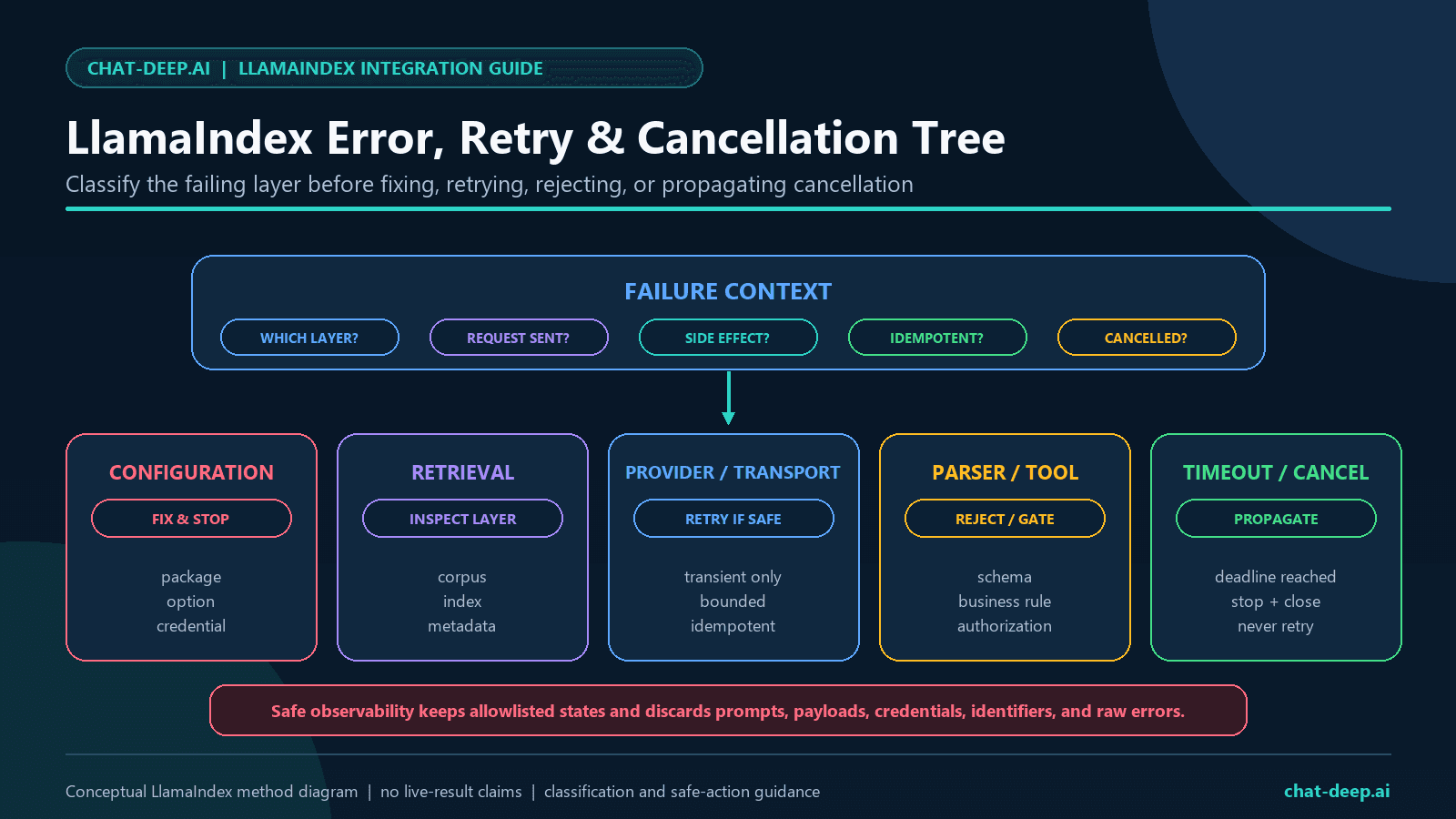
The inherited wrapper defaults to three retries. That may be reasonable for some transient, idempotent reads, but it is not a universal production policy. The examples use zero retries in the live harness so request accounting is exact. In an application, choose one retry owner, cap attempts and elapsed time, add jitter, and never retry deterministic configuration, schema, authentication, permission, or invalid-model failures without a change.
| Failure layer | Examples | Safe first action |
|---|---|---|
| Configuration | Missing key, invalid model allowlist, wrong context metadata | Fail before issuing a request |
| Ingestion | Unreadable file, parser error, missing metadata | Quarantine the document and report its sanitized record ID |
| Retrieval | No nodes, wrong source, access-filter failure | Abstain; do not ask the model to invent missing evidence |
| Provider | Authentication, balance, invalid request, server, or capacity error | Classify the status and follow a bounded policy |
| Parser | Empty JSON, truncation, Pydantic failure | Reject the object; optionally use one controlled repair path |
| Tool | Unknown name, invalid arguments, unauthorized resource | Do not execute; return a safe application error |
| Cancellation | User disconnect, deadline, shutdown | Propagate cancellation and stop issuing work |
Use bounded concurrency even when provider limits are higher. Account-level capacity is shared with other services, and a burst of expensive RAG prompts can affect latency and budget. The DeepSeek API Rate Limits guide owns provider-level capacity behavior; the DeepSeek Error Codes guide owns the full status catalog.
LlamaIndex instrumentation can expose events and spans across the stack. Official examples show that events may contain messages, model settings, deltas, full responses, timestamps, and identifiers. Do not attach a generic serializer to production traces. Create an allowlist that keeps operation name, sanitized model alias, status category, duration bucket, token counts when trustworthy, retrieval count, and validation booleans. Drop prompts, retrieved text, output, reasoning, headers, keys, tool data, document contents, account data, and provider identifiers. The DeepSeek Observability guide owns the complete telemetry policy.
Test the integration in layers
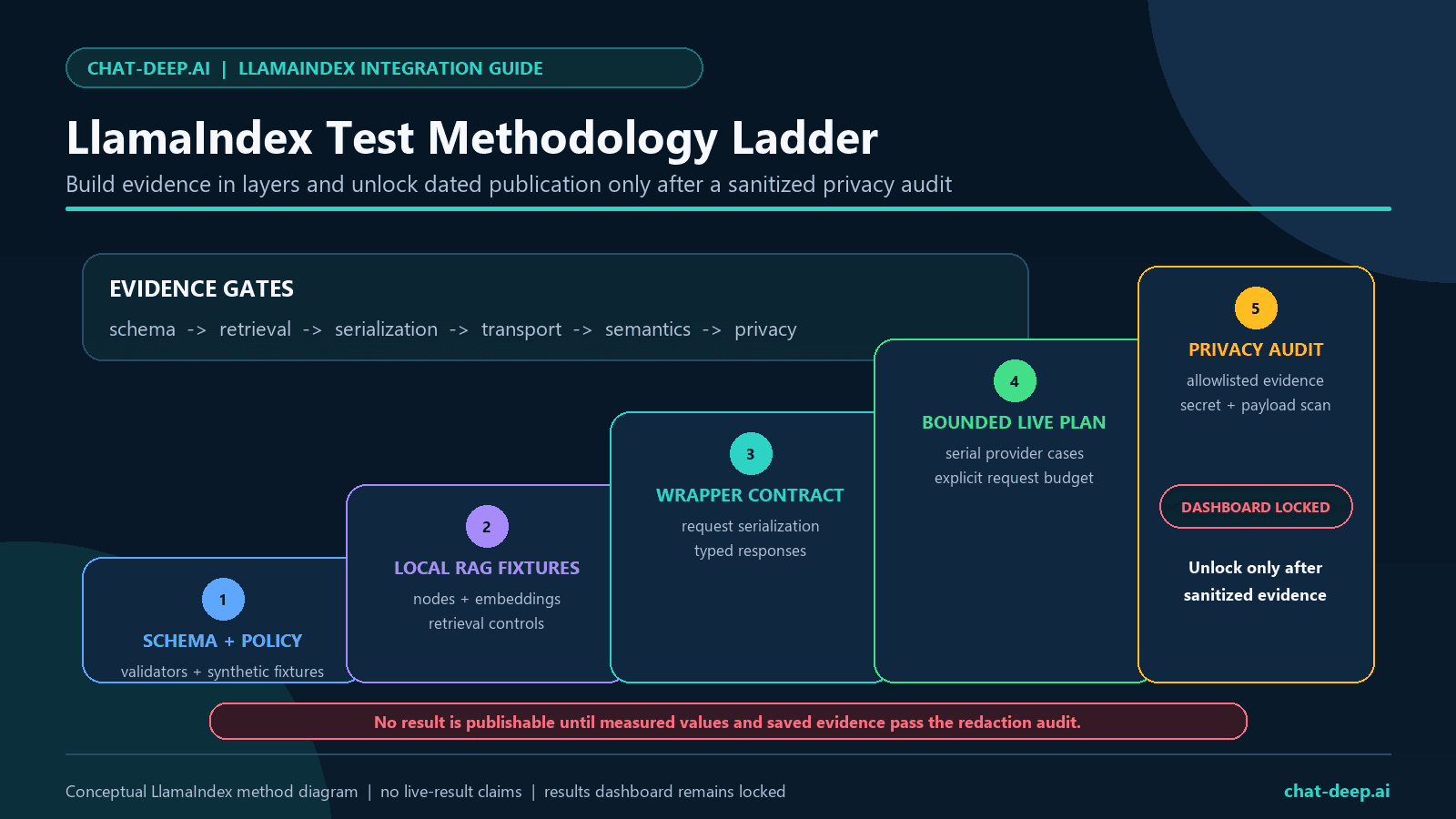
Most LlamaIndex behavior can be tested without spending provider requests. Use synthetic documents, a deterministic embedding fixture, fake LLM responses, Pydantic unit tests, tool authorization tests, and local request-capture fixtures. Reserve live calls for the small compatibility surface that a local double cannot prove.
- Schema tests: valid, missing, extra, and wrong-type fields.
- Ingestion tests: expected nodes, metadata, chunk boundaries, and deletion behavior.
- Retrieval tests: labelled questions, expected source IDs, access filters, recall, and abstention.
- Adapter tests: API origin, model, context metadata, thinking body, retry count, timeout, and secret redaction.
- Stream tests: delta aggregation, empty chunks, terminal state, cancellation, and cleanup.
- Tool tests: allowlist, schema, authorization, matching identifier, side-effect guard, and stop bound.
- Bounded live tests: only the preregistered cases, with serial execution and zero automatic retries.
- Publication audit: allowlisted structural fields only, followed by secret, raw-output, identifier, non-ASCII, and mojibake scans.
The frozen plan, localhost tests, sanitized live summaries, privacy audit, and image sources are available in the DeepSeek LlamaIndex reproducibility package on GitHub. The repository contains no API key, prompts, generated text, hidden reasoning, account data, or provider identifiers.
Live LlamaIndex evidence: July 27, 2026
Method: the preregistered study issued all 16 planned provider requests, stayed within its 16-request cap, ran serially with concurrency one, disabled automatic retries, and used a 30-second default timeout. The suite used synthetic English inputs and low output caps. Its 21.992-second total elapsed time is a study-level reproducibility fact, not a latency benchmark or service-level result.
| Case ID | Dated sanitized observation |
|---|---|
py-chat-sync-v4-flash | Success; HTTP 200; ChatResponse; non-empty content; stop. |
py-chat-async-v4-flash | Success; HTTP 200; ChatResponse; non-empty content; stop. |
py-complete-sync-v4-flash | Success; HTTP 200; CompletionResponse; non-empty content; stop. |
py-complete-async-v4-flash | Success; HTTP 200; CompletionResponse; non-empty content; stop. |
py-chat-stream-sync-v4-flash | Success; HTTP 200; 19 chunks; content deltas observed; terminal finish stop. |
py-chat-stream-async-v4-flash | Success; HTTP 200; 23 chunks; content deltas observed; terminal finish stop. |
py-complete-stream-sync-v4-flash | Success; HTTP 200; 16 chunks; content deltas observed; terminal finish stop. |
py-complete-stream-async-v4-flash | Success; HTTP 200; 17 chunks; content deltas observed; terminal finish stop. |
py-chat-v4-pro-thinking | Success; HTTP 200; ChatResponse; non-empty final content; stop; reasoning field present and non-empty. |
py-structured-predict-v4-flash | Unexpected error after a request was issued; ValueError; HTTP status not recorded; no validated Pydantic object. |
py-tool-call-initial-v4-flash | Success; HTTP 200; exactly one tool call; expected tool name; the exact fixture argument contract was not met. |
py-tool-call-continuation-v4-flash | Success; HTTP 200; matching identifier replayed in memory; non-empty final content. |
py-local-rag-query-engine-v4-flash | Success; HTTP 200; deterministic local mock embedding; one selected record; one source node; non-empty final content. |
py-alias-deepseek-chat-probe | Alias accepted; HTTP 200; ChatResponse; non-empty content; stop; no reasoning field. |
py-alias-deepseek-reasoner-probe | Alias accepted; HTTP 200; ChatResponse; final content empty; length; reasoning field present and non-empty. |
py-invalid-model-error | Expected provider error; HTTP 400; BadRequestError; code invalid_request_error. |
Run summary: tested July 27, 2026 at 17:57 UTC; 16 of 16 requests issued; 12 successful cases, two accepted dated-alias probes, one expected provider error, and one unexpected structured-prediction error; 22 of 22 offline checks passed. The privacy audit passed with all 16 results in plan order, zero forbidden result fields, zero secret findings, zero non-ASCII characters, and zero mojibake matches.
Production checklist
- Pin Python, LlamaIndex core, the DeepSeek integration, OpenAI-compatible dependencies, and Pydantic.
- Keep
DEEPSEEK_API_KEYin a server-side secret store and test rotation. - Allowlist model IDs and set the API origin explicitly.
- Set the documented context window deliberately; do not rely on the current wrapper’s legacy fallback.
- Select thinking mode explicitly and budget enough output for the chosen mode.
- Configure a separate, approved embedding model and persistent vector store.
- Apply tenant and document authorization before retrieval.
- Evaluate chunking, retrieval, answer grounding, abstention, and attribution independently.
- Validate empty responses, finish reasons, streams, JSON, source nodes, and tool arguments.
- Opt into function-calling metadata only after an exact-version test.
- Use one bounded retry layer, bounded concurrency, timeouts, cancellation, and idempotency controls.
- Redact prompts, documents, output, reasoning, keys, tool payloads, and provider identifiers from telemetry.
- Run offline tests on every change and a small opt-in live suite before a release.
- Recheck official DeepSeek and LlamaIndex sources when upgrading or changing model IDs.
Limitations of this guide and its tests
The smoke-test corpus is synthetic and tiny. It proves neither semantic retrieval quality nor production scalability. The completed live study tested one pinned environment, one account, low output caps, serial requests, and a small set of prompts. It did not measure uptime, comparative model quality, maximum context, sustained throughput, enterprise privacy, or every LlamaIndex component.
A successful provider response does not prove that the answer is correct. Schema validity does not prove factual accuracy. A tool-call object does not authorize execution. A source node does not prove that a displayed claim is supported. A successful alias probe would be a dated observation only, not a recommendation or availability guarantee.
The wrapper and provider can change on different schedules. Re-run the same bounded integration suite after dependency upgrades, model migrations, material prompt changes, retrieval changes, or provider documentation changes. Keep direct DeepSeek SDK access as an architectural option when a required provider feature cannot be represented safely by the installed LlamaIndex adapter.
Frequently asked questions
Can I use DeepSeek with LlamaIndex?
Yes. LlamaIndex publishes the Python package llama-index-llms-deepseek and the DeepSeek class. It can serve as the generation model in standalone calls, query engines, and RAG workflows.
What should I install?
Install llama-index-core, llama-index-llms-deepseek, and the separate integration required by your chosen embedding model or vector store. Pin the exact versions you test.
Does DeepSeek create embeddings for this RAG example?
No. DeepSeek is the generation model in this architecture. The example uses a local mock embedding only to exercise the pipeline. A production system needs a separately approved embedding model selected through retrieval evaluation.
Should I use Settings.llm?
It is convenient for a notebook or one-model process. It is global singleton state, so explicit injection is clearer for tests, multi-tenant services, and applications with several model configurations.
Why set context_window=1_000_000?
DeepSeek currently documents a 1M context length for both V4 models, while the reviewed LlamaIndex wrapper returns a 64,000 fallback for names absent from its older lookup table. Setting it explicitly aligns framework metadata with the provider documentation. It is not advice to send million-token prompts.
Does tool calling work with the current V4 model IDs?
DeepSeek documents tool support, but the reviewed LlamaIndex wrapper does not mark the V4 IDs as function-calling models by default. With an explicit metadata override, our V4 Flash initial request returned one call with the expected name, although its arguments did not meet the fixture’s exact contract. The controlled continuation succeeded. Treat those as dated observations for the pinned stack and keep application-side validation mandatory.
Can LlamaIndex guarantee valid JSON?
No. Use the provider request field, a prompt that clearly requests JSON and shows the shape, defensive parsing, Pydantic validation, business validation, empty-content handling, and a safe failure path.
Should I use deepseek-chat or deepseek-reasoner?
Use the current V4 IDs for new work. The older names appear in current LlamaIndex examples, but their published DeepSeek retirement deadline has passed. Any live response from an alias is only a dated compatibility observation.
Where should I check current pricing?
Check DeepSeek’s official Models & Pricing page at decision time. This integration guide intentionally avoids static prices.
Official sources
- LlamaIndex DeepSeek integration guide
- LlamaIndex DeepSeek API reference
- Official LlamaIndex DeepSeek integration source
- LlamaIndex OpenAILike API reference
- LlamaIndex Settings guide
- LlamaIndex VectorStoreIndex guide
- LlamaIndex structured outputs guide
- LlamaIndex instrumentation guide
- DeepSeek Models & Pricing
- DeepSeek Thinking Mode
- DeepSeek JSON Output
- DeepSeek Tool Calls
- DeepSeek Error Codes
- DeepSeek Rate Limit & Isolation
Chat-Deep.ai is an independent guide and is not affiliated with DeepSeek or LlamaIndex. Verify sensitive, regulated, or high-impact uses against your organization’s security, legal, privacy, and compliance requirements before sending documents or acting on generated output.