DeepSeek’s two current hosted model IDs—deepseek-flash and deepseek-v4-pro—each list a 1,000,000-token context length and a 384,000-token maximum output. Prompt and generated completion share that single context envelope.
Official sources reviewed: September 23, 2026 (context and output limits rechecked September 24, 2026). Scope: the first-party hosted DeepSeek Chat Completions API using deepseek-flash or deepseek-v4-pro. The examples were syntax-checked and tested in plan-only mode; no live DeepSeek request was sent.
Quick answer: how many tokens can DeepSeek V4 accept and generate?
DeepSeek documents a 1,000,000-token total context window and a 384,000-token maximum output for both current hosted model IDs. The practical generation cap is the smallest of the output requested through max_tokens, the 384,000-token model ceiling, and the context space left after the prompt.
effective_output_cap =
  min(
    requested_max_tokens,
    384000,
    1000000 - estimated_prompt_tokens - safety_margin
  )
The safety margin is an application allowance, not a DeepSeek limit. The 384,000-token figure is also a ceiling—not a default, guaranteed response length, or extra capacity outside the 1,000,000-token window. DeepSeek’s public English documentation does not publish a numeric V4 default or minimum for max_tokens, so set it explicitly.
Contents
- V4 context and output specifications
- Context, prompt, and completion tokens
- The token-planning formula
- Worked planning scenarios
- What counts as input
- Thinking-mode token planning
- Multi-turn and tool-call growth
- How to set max_tokens
- Node.js planner
- Python planner
- Usage fields and finish reasons
- Preventing truncated output
- Context caching and capacity
- Estimating tokens before a request
- FIM and provider-specific limits
- Frequently asked questions
- Official sources
DeepSeek V4 context and output specifications
| Item | deepseek-flash | deepseek-v4-pro | Planning meaning |
|---|---|---|---|
| Context length | 1,000,000 | 1,000,000 | Prompt and generated completion share this total envelope |
| Maximum output | 384,000 | 384,000 | Upper generation ceiling when enough context remains |
| Thinking mode | Supported; default enabled | Supported; default enabled | Reasoning and final content share completion capacity |
| Non-thinking mode | Supported | Supported | Avoids reasoning output when the task does not require it |
| Chat output field | max_tokens | max_tokens | Sets a requested upper bound, not a promised length |
| FIM | Non-thinking only | Non-thinking only | Uses a separate beta contract and 4K maximum |
DeepSeek’s official Models & Pricing table labels the limits as “1M” and “Maximum: 384K.” DeepSeek’s public integration configuration writes those values as contextWindow: 1000000 and maxTokens: 384000, so this guide uses the decimal integers rather than silently interpreting K or M as binary units.
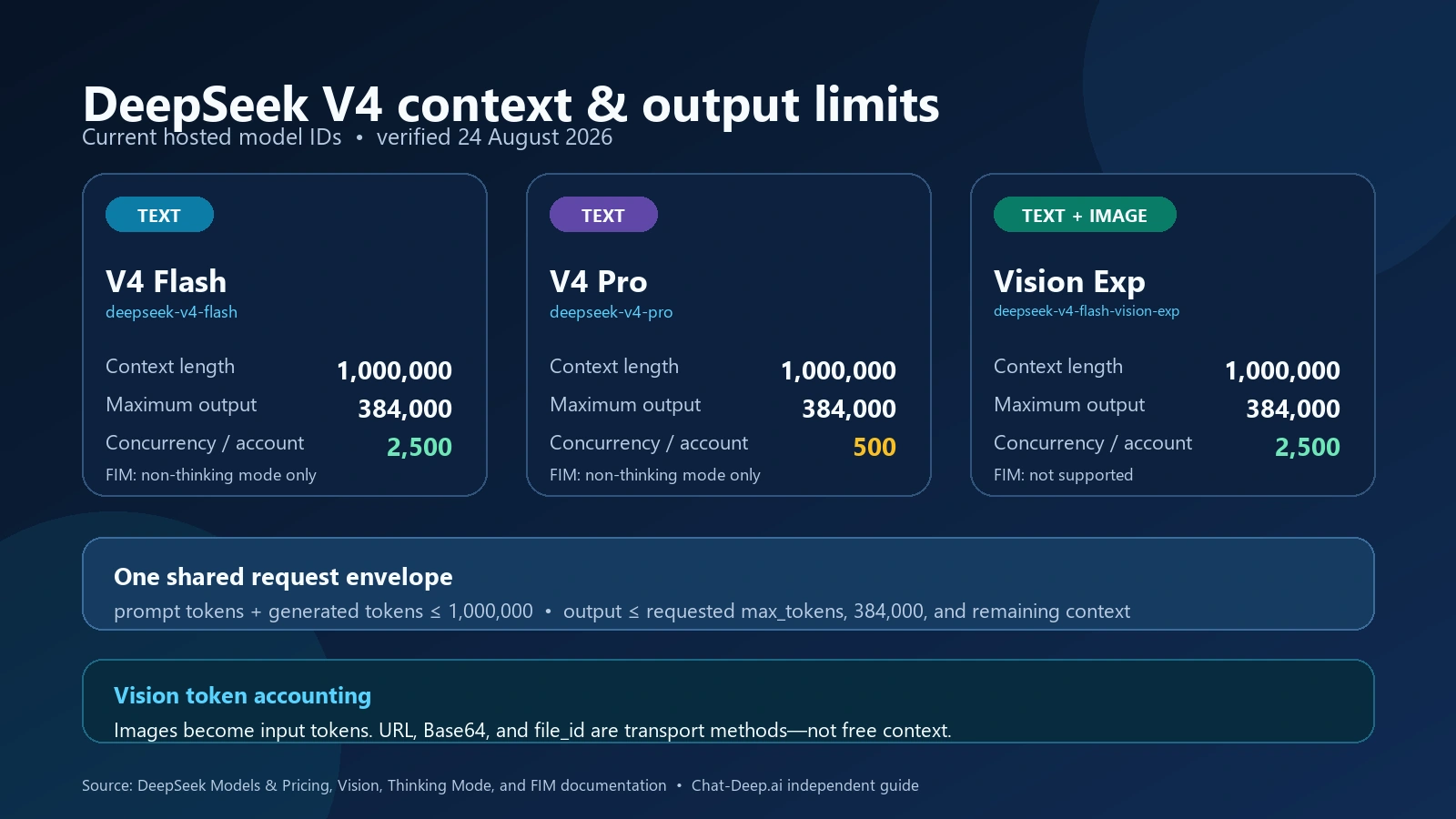
deepseek-flash count as input tokens. Verified September 24, 2026.Use the DeepSeek V4 Pro and Flash guide for text-model architecture and benchmarks, and the Vision Exp guide for image-input boundaries; the capacity rules below apply when sizing individual API requests.
Context length, prompt tokens, and completion tokens are different
Context length
The context length is the total token envelope available for one model request. It is not an input-only quota. A simplified capacity rule is:
prompt_tokens + completion_tokens <= 1,000,000This is why 1,000,000 and 384,000 must not be added to claim a 1,384,000-token request. If the prompt consumes 700,000 tokens, only 300,000 tokens remain before any application safety margin—less than the model’s published output ceiling.
Capacity does not establish usable accuracy: our independent long-context accuracy benchmark tests matched V4 Flash (since retired) and Pro prompts at 32K, 128K, 512K, and approximately 950K tokens.
Prompt tokens
Prompt tokens represent the serialized input the model receives: instructions, user content, retained conversation history, tool definitions, tool results, documents, examples, and formatting requirements. Raw character count can provide a rough estimate, but the API’s returned prompt_tokens value is the authoritative measurement after a request.
Completion and reasoning tokens
completion_tokens measures generated completion usage. When thinking is enabled, the response can contain reasoning in reasoning_content and a final answer in content. The field completion_tokens_details.reasoning_tokens is a breakdown inside completion_tokens. Do not add it again when calculating total usage.
Use a safe DeepSeek V4 token-planning formula
Calculate the output allowance before building the API body:
remaining_context =
  1,000,000 - estimated_prompt_tokens - safety_margin

effective_max_tokens =
min(requested_max_tokens, 384,000, remaining_context)- Requested cap: the amount your application considers sufficient for the task.
- Model ceiling: DeepSeek’s published 384,000 maximum generated tokens.
- Context remainder: the capacity left after the complete prompt and the application’s margin.
If the result is zero or negative, do not send the oversized plan. Reduce the prompt, retrieve fewer passages, remove unnecessary history, or split the task. If the result is positive but too small for the required answer, trimming the input is still preferable to hoping the service will exceed its envelope.
The margin absorbs estimation differences, message-template overhead, and content added between estimation and execution. Choose it from observed workload behavior. A fixed 10,000-token or 20,000-token reserve can illustrate the method, but neither number is a DeepSeek requirement.
Worked token-planning scenarios
| Estimated prompt | Requested output | Margin | Effective cap | Why |
|---|---|---|---|---|
| 100,000 | 20,000 | 10,000 | 20,000 | The application request is the smallest constraint |
| 600,000 | 64,000 | 20,000 | 64,000 | 380,000 remain after the margin, so the requested cap fits |
| 700,000 | 384,000 | 20,000 | 280,000 | Remaining context is below the model ceiling |
| 900,000 | 200,000 | 30,000 | 70,000 | The large prompt leaves a limited response budget |
| 980,000 | 32,000 | 10,000 | 10,000 | The request is operating close to the context boundary |
| 50,000 | 500,000 | 10,000 | 384,000 | The model’s published maximum becomes the constraint |
Reserving the full 384,000-token output leaves at most 616,000 tokens for the prompt before a margin. With a 16,000-token margin, the prompt budget becomes 600,000. This does not mean every workload should request the maximum; short caps are usually easier to validate, stream, store, and pay for.
What counts toward the next prompt
- System instructions and all user messages included in
messages. - Assistant replies retained to preserve conversation state.
- Tool definitions, JSON Schemas, tool-call arguments, and tool-result messages.
- Retrieved documents, code, database results, examples, and output schemas.
- Images sent to
deepseek-flashafter conversion into input tokens, plus thinking-modereasoning_contentwhenever the request carriestools, even when no tool call occurred in that turn. - Message serialization and template tokens measured by the provider.
- For
deepseek-flashimage input, images are converted into tokens according to their dimensions and counted and billed as input tokens together with text. URL, Base64, and Files APIfile_idare transport methods; they do not make visual input free of context or token accounting.
DeepSeek’s multi-round guide describes Chat Completions as stateless. The server does not retain the conversation for the next request; your application resends the required history. A ten-turn chat therefore does not have ten isolated budgets. Each later call contains an expanded prompt unless the application trims or summarizes it.
For RAG, count only the passages inserted into the prompt, but do not assume embeddings or a vector-store ID consume the same space as retrieved text. Measure the actual message body sent to the model. For long code repositories, retrieve relevant files and preserve source identifiers instead of attaching the entire repository to every turn.
Thinking mode shares the generated-token budget
V4 supports thinking and non-thinking modes; the official schema documents thinking as enabled by default. In thinking mode, reasoning is generated before or around the final answer and is included in completion accounting. The safest capacity rule is to treat reasoning and final content as sharing max_tokens and the 384,000-token output ceiling. DeepSeek does not publish a separate additional V4 chain-of-thought allowance.
If completion_tokens is 12,000 and reasoning_tokens is 8,000, generated usage remains 12,000—not 20,000. For a simple response without tool output, roughly 4,000 generated tokens remain outside the reasoning breakdown. Tool-call responses can contain other generated structures, so do not treat that subtraction as a universal visible-answer formula.
Non-thinking mode can preserve more of a chosen generation budget for user-facing content in extraction, classification, formatting, or routine transformation tasks. Thinking can still be worthwhile for difficult coding or reasoning. Use the dedicated DeepSeek Thinking Mode guide for toggle, effort, response, and tool-call details.
Recalculate after every agent subrequest
An agent loop can make several independent API requests:
- Send messages and tool definitions.
- Receive reasoning plus either final content or a tool call.
- If a tool call exists, execute it safely and append the complete assistant message and matching tool result.
- If the request included
tools, replay the complete returnedreasoning_contentin the next user-interaction request—even when no tool call occurred. - Repeat only while tool calls continue; otherwise accept and validate the final content.
Each subrequest must fit independently. Tool results may be far larger than expected, so the first turn’s estimate is not sufficient for later calls. If a request includes tools, preserve and replay the complete returned reasoning_content in later user-interaction requests even when that response contained no tool call; omitting it can cause HTTP 400. If the request does not include tools, prior reasoning_content is unnecessary and ignored if supplied.
A workflow may generate more than 384,000 tokens across several separate calls. That cumulative number does not mean one completion exceeded the per-response ceiling. Track both per-request capacity and whole-workflow cost.
How max_tokens works
DeepSeek’s official Create Chat Completion reference defines max_tokens as the maximum number of tokens that can be generated. It also states that input tokens plus generated tokens are limited by context length.
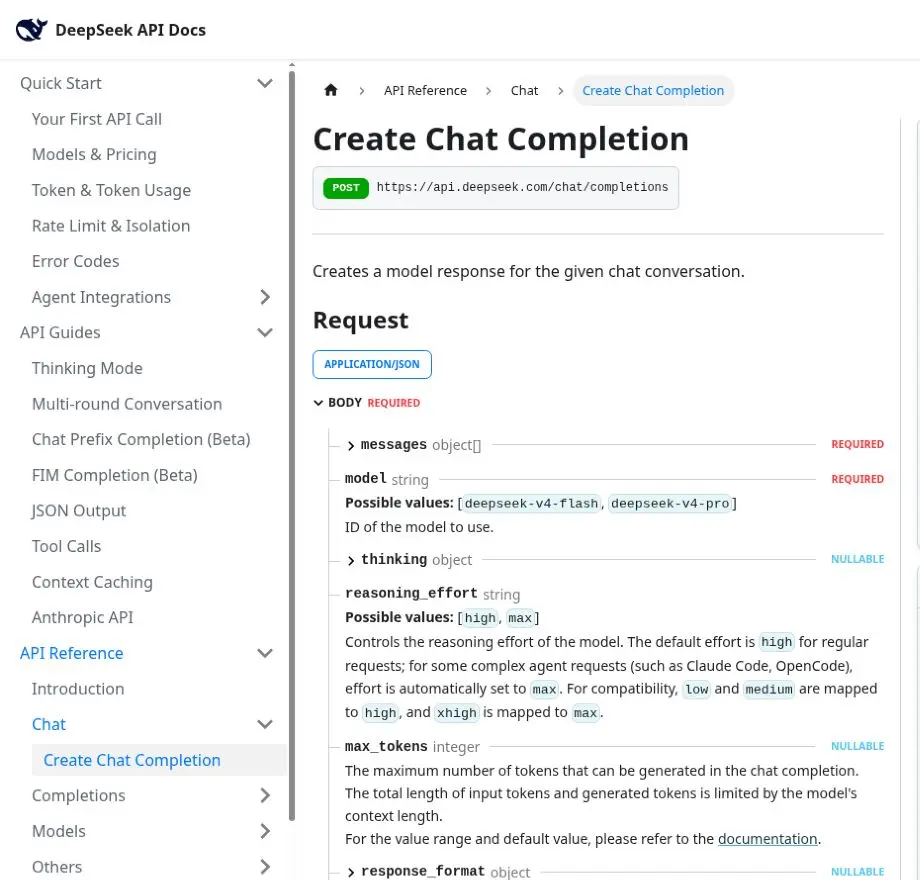
max_tokens as a generation cap and explicitly says input plus generated tokens must fit within the context length. max_tokens does not reserve a second window, force the model to fill the cap, or control prompt size. The API example contains max_tokens: 4096, but an example value is not a documented default. The linked V4 pricing table publishes the 384,000 maximum without publishing a numeric default or minimum.
| Workload | Planning approach |
|---|---|
| Classification or routing | Use a small explicit cap and a constrained format |
| Structured extraction | Leave room for the complete schema, escaping, and long field values |
| Summarization | Base output on desired summary length, not source length |
| Coding | Budget separately for code, tests, and explanation if all are required |
| Thinking task | Reserve capacity for reasoning and the final answer |
| Tool agent | Recalculate before every model call as history grows |
| Long report | Prefer bounded sections or staged generation when completion matters |
Use the DeepSeek API guide guide for the complete request schema. For legacy model names, follow the focused guide to migrate legacy aliases to V4 instead of copying old 64K or 8K limits into a direct V4 request.
Node.js: calculate a safe cap and inspect usage
This dependency-free pattern calculates the cap before a request. The prompt estimate must cover the complete serialized input, not only the last user message.
const CONTEXT_LIMIT = 1_000_000;
const OUTPUT_LIMIT = 384_000;

function planMaxTokens({
  estimatedPromptTokens,
  requestedMaxTokens,
  safetyMargin,
}) {
  const remaining =
    CONTEXT_LIMIT - estimatedPromptTokens - safetyMargin;

  if (!Number.isSafeInteger(remaining) || remaining <= 0) {
    throw new Error("Reduce the prompt: no safe output budget remains.");
  }

  return Math.min(
    requestedMaxTokens,
    OUTPUT_LIMIT,
    remaining,
  );
}

const maxTokens = planMaxTokens({
  estimatedPromptTokens: 700_000,
  requestedMaxTokens: 384_000,
  safetyMargin: 20_000,
});

const response = await fetch(
  "https://api.deepseek.com/chat/completions",
  {
    method: "POST",
    headers: {
      Authorization: `Bearer ${process.env.DEEPSEEK_API_KEY}`,
      "Content-Type": "application/json",
    },
    body: JSON.stringify({
      model: "deepseek-v4-pro",
      messages: [{ role: "user", content: prompt }],
      thinking: { type: "enabled" },
      reasoning_effort: "high",
      max_tokens: maxTokens,
      stream: false,
    }),
  },
);

const data = await response.json();
const usage = data.usage;

console.log({
  finish_reason: data.choices?.[0]?.finish_reason,
  prompt_tokens: usage?.prompt_tokens,
  completion_tokens: usage?.completion_tokens,
  reasoning_tokens:
    usage?.completion_tokens_details?.reasoning_tokens,
  total_tokens: usage?.total_tokens,
});
The calculated cap in this example is 280,000. This excerpt demonstrates the planning calculation, not a complete production CLI. Before adding live requests, validate every numeric input, reject a missing API key, check HTTP status and finish reason, handle timeouts, and reconcile any returned token accounting.
Python: plan before the API call
The same calculation can be separated from the provider call so unit tests do not need network access:
CONTEXT_LIMIT = 1_000_000
OUTPUT_LIMIT = 384_000

def plan_max_tokens(
    estimated_prompt_tokens: int,
    requested_max_tokens: int,
    safety_margin: int,
) -> int:
    remaining = (
        CONTEXT_LIMIT
        - estimated_prompt_tokens
        - safety_margin
    )

    if remaining <= 0:
        raise ValueError(
            "Reduce the prompt: no safe output budget remains."
        )

    return min(
        requested_max_tokens,
        OUTPUT_LIMIT,
        remaining,
    )

max_tokens = plan_max_tokens(
    estimated_prompt_tokens=900_000,
    requested_max_tokens=200_000,
    safety_margin=30_000,
)

print(max_tokens)  # 70000
The Python excerpt illustrates the request and accounting pattern. A complete CLI also needs input validation, an explicit plan-only versus send choice, UTF-8 file handling, and error handling. A 600-second application timeout, where used, is a local guardrail rather than a DeepSeek service limit.
Read usage and finish_reason together
The response gives the measurements needed to calibrate future budgets:
prompt_tokens =
  prompt_cache_hit_tokens + prompt_cache_miss_tokens

total_tokens =
  prompt_tokens + completion_tokens

reasoning_tokens is already inside completion_tokens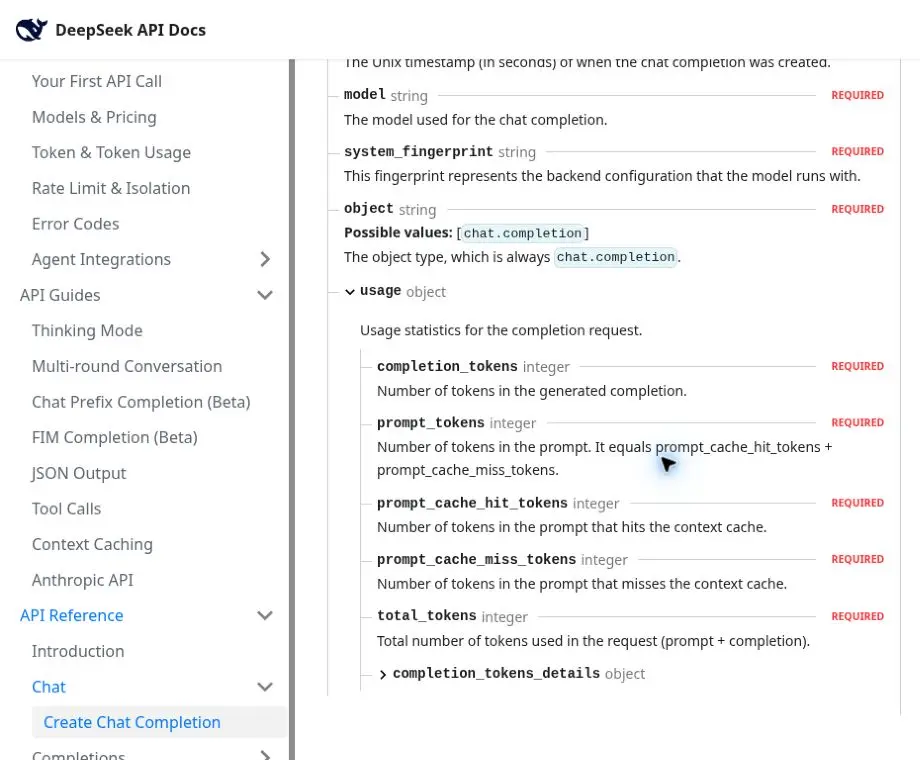
finish_reason | Meaning | Application response |
|---|---|---|
stop | Natural stop or a supplied stop sequence | Validate required fields and accept when complete |
length | max_tokens or the context boundary was reached | Treat the output as potentially incomplete |
tool_calls | The model produced a tool call | Execute safely, append the result, and replan the next call |
content_filter | Content was omitted by filtering | Do not present partial content as a complete answer |
insufficient_system_resource | Inference was interrupted by resource availability | Handle as a service interruption, not context overflow |
A length result does not prove the model tried to generate 384,000 tokens. It can occur at a much smaller application cap or when a large prompt leaves too little context. Compare the reason with requested max_tokens, prompt_tokens, and completion_tokens. The DeepSeek token usage fields guide covers the response object in greater depth.
Streaming does not increase the context or output limit. When usage is required in a stream, set stream_options.include_usage: true and consume the final usage chunk before [DONE]. Long generations also need deliberate connection behavior; see DeepSeek API keep-alive, timeouts, and long requests.
Prevent and recover from truncated output
- Inspect
finish_reasonbefore accepting the response. - Record prompt, completion, reasoning, and total usage.
- Check whether the requested cap was reached.
- Calculate the context space that remained for the request.
- Increase
max_tokensonly when safe headroom exists. - Otherwise reduce the prompt, retrieved material, tool result, or history.
- Generate bounded report sections separately when one response is fragile.
- Validate JSON, code fences, arrays, citations, and required headings.
A request can end with an incomplete sentence, missing JSON bracket, partial array, unfinished code fence, or omitted report section. DeepSeek’s reference specifically warns that JSON content may be cut when finish_reason="length". Reject incomplete structured output and retry with a smaller prompt, a larger safe cap, or a more compact schema. The DeepSeek JSON Output guide provides the complete validation workflow.
Blindly sending “continue” is unreliable when the earlier output was cut mid-structure. Preserve a stable continuation anchor, restate the required schema or section boundary, ensure the expanded history fits, and merge only after validation.
Context caching does not expand the window
DeepSeek Context Caching can reuse matching prompt prefixes and apply cache-hit input pricing, but cached tokens remain prompt tokens. A 700,000-token document does not become zero context usage because it matched the cache.
This follows directly from the response accounting: prompt_tokens equals cache-hit tokens plus cache-miss tokens, and input plus generated output remains context-limited. Use caching for repeated-prefix economics and processing reuse; use the complete prompt length for capacity planning. See DeepSeek context caching for prefix persistence and hit behavior.
Estimate tokens before sending the request
DeepSeek’s official Token & Token Usage guide provides rough character ratios: one English character is approximately 0.3 token, and one Chinese character is approximately 0.6 token. It also warns that tokenization varies and points to a downloadable offline tokenizer.
Use character ratios only for an early estimate. Code, JSON, punctuation, numbers, whitespace, and mixed languages can behave differently. A practical calibration loop is:
- Estimate the complete request before sending.
- Keep a margin based on the workflow’s uncertainty.
- Record returned
prompt_tokens. - Calculate the difference between the estimate and actual use.
- Group the error by workload type—prose, code, JSON, tools, or multilingual text.
- Refine the estimator and margin using representative samples.
Do not convert tokens to a guaranteed number of words, pages, or code lines. Tokenization and document density vary too much for a fixed equivalence.
FIM and provider-specific limits are separate
The 384,000-token figure belongs to hosted V4 Chat Completions. DeepSeek’s beta Fill-In-the-Middle guide documents a separate 4K maximum and uses the beta base URL. FIM is supported only by Flash and Pro in non-thinking mode; do not apply the Chat ceiling to FIM code infilling.
A self-hosted runtime or managed cloud provider can configure a smaller context length, output cap, memory profile, or request schema. Verify that provider’s model card and endpoint instead of assuming the first-party api.deepseek.com limits transfer. Use the local DeepSeek API documentation for the official endpoint boundary and DeepSeek API pricing for cost planning.
Production checklist
- Use an explicitly approved current model ID:
deepseek-flashordeepseek-v4-pro. Route image inputs only todeepseek-flash;deepseek-v4-prois text-only. - Estimate the complete prompt, including history, tools, and retrieved text.
- Reserve an application-owned safety margin.
- Calculate the cap from the requested output, model ceiling, and remaining context.
- Set
max_tokensexplicitly. - Decide whether thinking is needed for the task.
- Recalculate after each agent subrequest or history update.
- Log
usageandfinish_reason. - Do not double-count
reasoning_tokens. - Treat cache-hit tokens as prompt capacity.
- Validate JSON, code, and required sections after generation.
- Split oversized work instead of operating at the boundary without margin.
Frequently asked questions
Is the DeepSeek V4 output limit 384K tokens?
Yes. DeepSeek lists a maximum output of 384,000 tokens for both current hosted model IDs. The prompt and generated completion must also fit inside the 1,000,000-token context.
Can I send one million input tokens and still request output?
Not under the combined-envelope rule. A prompt consuming the full context leaves no capacity for generation. Reserve space for the response and an estimation margin.
Does max_tokens: 384000 guarantee a 384K response?
No. It is an upper bound. The model can finish naturally, hit a stop sequence, produce tool calls, encounter filtering, or have less context space than requested.
What is the default V4 max_tokens?
The public English DeepSeek pages checked on August 24, 2026 do not publish a numeric V4 default or minimum. Set the field explicitly when predictable bounds matter.
Are reasoning tokens separate from the output limit?
They are separately reported as a detail, but they remain part of completion_tokens and share the generated-output budget. Do not add them a second time.
Does disabling thinking increase the published maximum?
No. The documented ceiling remains 384,000. Disabling thinking may leave a larger share of a smaller chosen cap for final content because reasoning is not generated first.
Does a cache hit remove tokens from context?
No. Cache hits change prefix reuse and input pricing classification. They remain part of prompt_tokens and consume context capacity.
Why did a response stop far below 384K?
Check finish_reason, requested max_tokens, prompt size, stop sequences, filtering, and whether the answer ended naturally. The provider ceiling is not a target length.
Final planning rule
Treat DeepSeek V4’s limits as one shared envelope, not two independent allowances. Both current hosted model IDs have a 1,000,000-token context and a 384,000-token maximum output, but usable generation space shrinks as the prompt grows.
For every request, estimate the complete prompt, reserve a sensible application margin, set max_tokens explicitly, and inspect usage plus the termination reason. Apply the calculation again after each tool round or history change. This produces a safer plan than designing around the 384K headline figure alone.