DeepSeek Context Caching is a built-in API feature that automatically reuses repeated prompt prefixes across requests. It does not store memory or conversations. Instead, it reduces input cost and latency when you resend the same front-loaded context.
Last verified: April 5, 2026
Current official state (last verified on April 5, 2026)
- Current hosted API version: DeepSeek-V3.2
deepseek-chat: DeepSeek-V3.2 non-thinking modedeepseek-reasoner: DeepSeek-V3.2 thinking mode- Context length: 128K
- Input price (cache hit): $0.028 / 1M tokens
- Input price (cache miss): $0.28 / 1M tokens
- Output price: $0.42 / 1M tokens
- Context Caching: enabled by default
- Cache unit: 64-token storage unit
- Reliability model: best-effort, not guaranteed
This summary reflects the current public DeepSeek docs: both API aliases map to DeepSeek-V3.2 with a 128K context limit, the API version may differ from App/Web, caching is enabled by default, and the cache uses 64-token storage units on a best-effort basis.
Many developers notice the cheaper cache-hit rate and assume DeepSeek must be keeping conversation state for them. That is not what the docs say. DeepSeek’s For current official rates, see our pricing page and cost calculator. This guide focuses on how cache reuse works in practice. existing pricing page and cost calculator already cover rates and budget modeling, so this page should explain how cache reuse actually works and how to shape prompts so it helps.
Independent guide: This page is an unofficial DeepSeek guide. It is not affiliated with or endorsed by DeepSeek.
What is DeepSeek Context Caching?
DeepSeek Context Caching is a backend reuse mechanism for repeated prompt prefixes. The official guide says each request constructs a hard-disk cache, and if a later request overlaps at the front, that repeated prefix can be fetched from cache and counted as a cache hit.
What it does not do is turn the API into memory. DeepSeek’s multi-round conversation guide says the /chat/completions API is stateless and requires you to concatenate prior history and resend it with each request. Caching only makes those repeated prefixes cheaper and often faster when you resend them.
That distinction matters for architecture. If your app needs continuity, you still manage message history yourself. If your app also repeats a stable system prompt, a large reference document, or a growing conversation history, then part of that repeated prefix may be billed at the cheaper cache-hit rate.
How cache hits actually work in DeepSeek
The most useful mental model is stable prefix + changing suffix. DeepSeek’s caching docs say only the repeated prefix can trigger a cache hit. The original launch post makes that stricter: duplicate detection starts from the 0th token, and partial overlap in the middle of the prompt does not count. So a prompt can share a large middle section and still get little or no cache benefit if the opening tokens change first.
The official examples all follow the same shape. In long-text Q&A, the repeated part is the system prompt plus the shared document text while the question changes at the end. In multi-turn chat, the repeated part is the earlier conversation history while the latest user turn is appended. In few-shot prompting, the repeated part is the fixed examples and only the final task changes.
DeepSeek also says the cache only affects the input prefix. The output is still generated fresh and can vary because inference settings such as temperature still apply.
A few operational details matter too: the cache uses 64-token storage units, content under 64 tokens is not cached, cache construction takes seconds, the system is best-effort rather than guaranteed, and unused entries are usually cleared within a few hours to a few days.
Current pricing and why cache hits matter
On the current hosted API, DeepSeek lists the same public rates for both deepseek-chat and deepseek-reasoner: $0.028 / 1M input tokens (cache hit), $0.28 / 1M input tokens (cache miss), and $0.42 / 1M output tokens. The same page says both aliases currently map to DeepSeek-V3.2 with a 128K context limit, and that the API version can differ from App/Web.
Note: API behavior (including caching) may differ from the DeepSeek web app or mobile apps.
That 10x difference between cache-hit and cache-miss input is why the feature matters. If your workload keeps resending a large stable prefix, effective input cost can fall sharply even when output cost stays unchanged.
Historically, the August 2024 launch post announced lower launch-era prices and highlighted large savings and latency gains. But that same post includes a warning that pricing was updated and points readers back to the current Models & Pricing page. So use the launch post as historical context, not as today’s price sheet.
This is also why the page should not duplicate your pricing content. Chat-Deep.ai’s pricing page already explains the three billing lines, and the API cost calculator already models spend using current V3.2 rates and a cache-hit-rate input. This page should explain why hit rate changes in real workloads.
How to measure cache hits in the API response
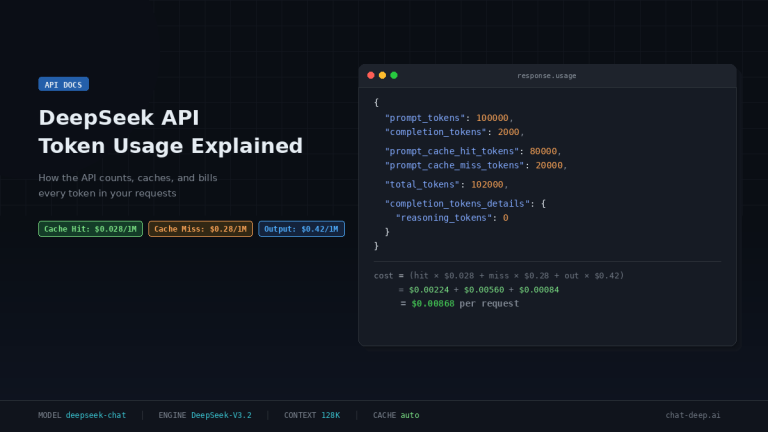
DeepSeek exposes cache performance directly in the usage object. The current chat-completions schema defines prompt_tokens, prompt_cache_hit_tokens, prompt_cache_miss_tokens, total_tokens, and completion_tokens_details.reasoning_tokens when relevant. It also states explicitly that prompt_tokens = prompt_cache_hit_tokens + prompt_cache_miss_tokens.
That gives you the production metrics that matter most:
cache_miss_rate = prompt_cache_miss_tokens / prompt_tokens

effective_input_cost =
(prompt_cache_hit_tokens / 1_000_000 * 0.028) +
(prompt_cache_miss_tokens / 1_000_000 * 0.28)

total_request_cost =
effective_input_cost +
(completion_tokens / 1_000_000 * 0.42)
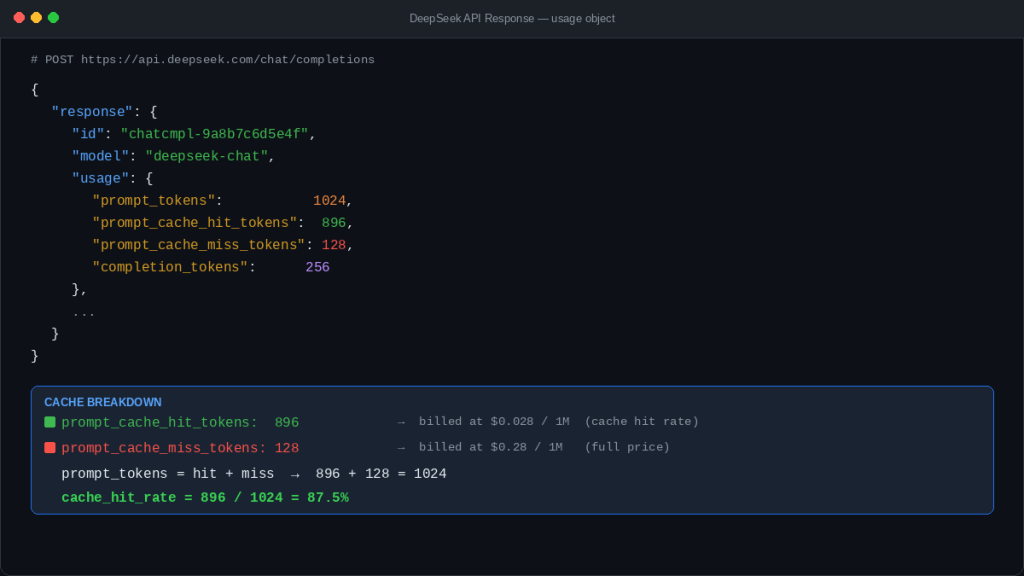
If you run a support bot, document workflow, or agent system, these fields belong in your logs and dashboards. A rising miss rate after a prompt edit is usually a signal that your “stable” prefix is no longer as stable as you thought. That is why Chat-Deep.ai’s API guide already highlights the cache-hit fields, and why the cost calculator lets you model spend by hit rate.
DeepSeek is stateless, so what is caching actually doing?
Stateless means the server does not automatically remember your conversation and reconstruct it later. Caching means DeepSeek may reuse repeated prefix computation after you send that repeated prefix again. Those two ideas work together rather than conflict.
That is why multi-turn chat can benefit from caching without becoming server-side memory. You still append prior turns on your side and resend them. When those earlier turns reappear at the front of the next request, DeepSeek may serve part of that repeated prefix from cache.
So the right architecture is not “DeepSeek remembers my chat.” It is “DeepSeek may make repeated front-loaded context cheaper and faster when I resend it.”
Context Caching vs Memory vs App/Web History
These terms are often confused, but they are not the same thing. DeepSeek’s /chat/completions API is stateless, and context caching only helps when you resend repeated prompt prefixes. That is different from persistent memory, and it is also different from the saved chat history you may see in an app or web product.
| Concept | What it means | Who manages it | Does the API remember it for you? | Why it matters |
|---|---|---|---|---|
| Context Caching | Backend reuse of repeated prompt prefixes after you send them again | DeepSeek’s cache layer | No | It can reduce input cost and may reduce latency |
| Memory | Remembered facts, preferences, or state across turns or sessions | Your app or product layer | Not by default | This is what you need for durable personalization or continuity |
| App/Web History | Saved chats or visible conversation history in a web or mobile product | The app/web product | Not the same thing as API caching | User-visible history does not equal API-side cache behavior |
The key distinction is simple: context caching helps with repeated prefixes that you resend, while memory or app history is about saved state.
Cache-friendly prompt design patterns
This is where most real gains happen. DeepSeek’s rules reward prompts that keep reusable material at the front and keep it stable across requests. The goal is not to freeze the whole prompt forever. The goal is to maximize the repeated prefix before the request starts to diverge.
A good default pattern is:
[stable system prompt]
[stable reusable context]
[stable few-shot examples, fixed order]
[volatile user-specific question or task]
That pattern matches the official examples: repeated instructions, repeated document content, or repeated few-shot examples appear first, while the changing question comes last.
| Cache-friendly pattern | Cache-hostile pattern | Why it matters |
|---|---|---|
| Keep the system prompt identical | Rewrite the system prompt each turn | Front changes break prefix matching early |
| Put large reusable documents near the front | Put changing metadata before the document | DeepSeek only helps if repeated content starts from token 0 |
| Keep few-shot examples in fixed order | Shuffle or rewrite examples | Reordering creates a different prefix |
| Append user-specific details later | Insert changing IDs, dates, or session tags at the top | Early volatility reduces hit tokens |
| Use deterministic templates | Vary wrappers, headings, or formatting randomly | Small front changes can reduce reuse |
| Think in “stable prefix + changing suffix” | Treat every request as fully bespoke | You lose the economics of repeated context |
The practical rule is simple: if a block is meant to be reused, make it stable, keep it early, and avoid editing it casually.
Security and privacy note
DeepSeek’s context caching is not a shared cross-user memory layer. According to DeepSeek, each user’s cache is logically isolated from other users, and unused cache entries are automatically cleared after a period. In practice, cache hits are about repeated prefixes within your own request patterns, not other people’s prompts or conversations.
High-value use cases for DeepSeek Context Caching
DeepSeek’s own guide and launch notes point to a few obvious winners: long text Q&A, multi-turn chat, few-shot prompting, repeated data-analysis requests on the same files, and code analysis with repeated repository context.
That also makes this topic relevant to your existing support-bot content. Chat-Deep.ai’s production support chatbot guide already frames DeepSeek chat as stateless and emphasizes grounded, repeated business content. Context caching becomes especially useful when that approved business context is stable and front-loaded in the request.
In all of these cases, the common pattern is not “the same whole prompt.” It is “the same beginning, new ending.”
When context caching will not help much
It will not help much on one-off short requests. It will not help on prompts under 64 tokens. It will not help much when the front of the prompt changes every time, even if a large block later in the prompt looks identical. It will not help much when every request is structurally different. And it should never be treated as a guaranteed business invariant, because DeepSeek documents the system as best-effort rather than guaranteed.
Practical cost estimation with examples
Using the current public rates, here are three simple examples with the same 2,000-token output and a 100,000-token prompt. The math below is derived from the current DeepSeek pricing page.
Example 1: No caching
- Cache hit tokens: 0
- Cache miss tokens: 100,000
- Output tokens: 2,000
- Total cost:
$0.02884
Example 2: Moderate reuse
- Cache hit tokens: 60,000
- Cache miss tokens: 40,000
- Output tokens: 2,000
- Total cost:
$0.01372
Example 3: High reuse
- Cache hit tokens: 90,000
- Cache miss tokens: 10,000
- Output tokens: 2,000
- Total cost:
$0.00616
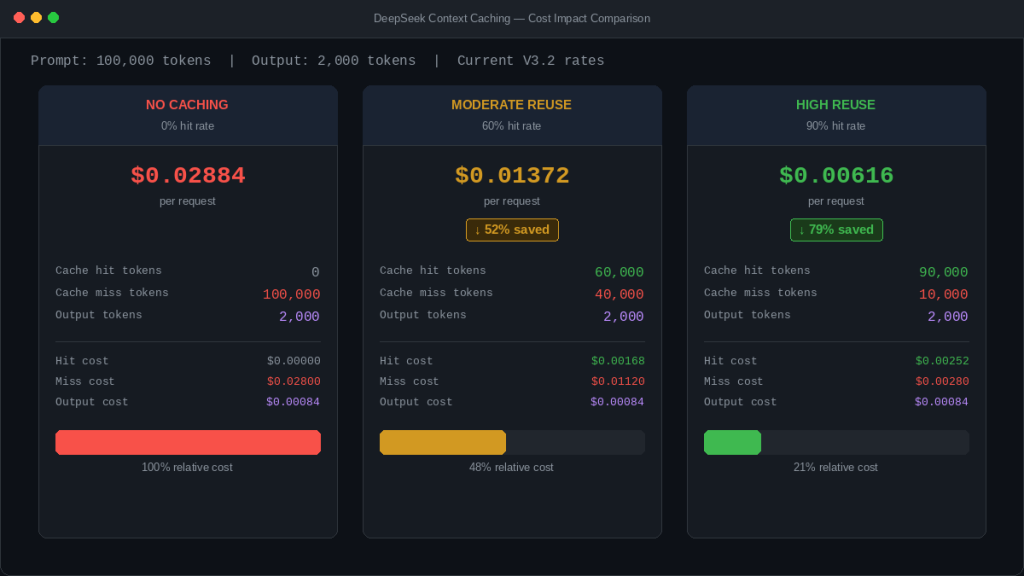
The point is not that your workload will land on those exact numbers. The point is that input cost moves a lot when repeated prefixes are large. For production budgeting, use observed hit/miss ratios from the API response and then plug them into Chat-Deep.ai’s API cost calculator instead of forecasting from theory alone.
A simple implementation example
The example below sends two requests with the same stable prefix and different user suffixes, then reads the hit/miss fields from the second response. Because DeepSeek documents caching as best-effort, the goal is to measure reuse, not assume it.
from openai import OpenAI

client = OpenAI(
    api_key="YOUR_DEEPSEEK_API_KEY",
    base_url="https://api.deepseek.com",
)

stable_messages = [
    {
        "role": "system",
        "content": (
            "You are a careful financial analyst. Use the report text below "
            "as the primary evidence source."
        ),
    },
    {
        "role": "user",
        "content": (
            "<REPORT_TEXT>\n\n"
            "Use the report above for all follow-up questions in this session."
        ),
    },
]

messages_1 = stable_messages + [
    {"role": "user", "content": "Summarize the main risks in the report."}
]

resp_1 = client.chat.completions.create(
    model="deepseek-chat",
    messages=messages_1,
)

messages_2 = stable_messages + [
    {"role": "user", "content": "Now identify the main profitability trends."}
]

resp_2 = client.chat.completions.create(
    model="deepseek-chat",
    messages=messages_2,
)

usage = resp_2.usage
prompt_tokens = usage.prompt_tokens
hit_tokens = getattr(usage, "prompt_cache_hit_tokens", 0)
miss_tokens = getattr(usage, "prompt_cache_miss_tokens", 0)

hit_rate = (hit_tokens / prompt_tokens * 100) if prompt_tokens else 0

print("prompt_tokens:", prompt_tokens)
print("prompt_cache_hit_tokens:", hit_tokens)
print("prompt_cache_miss_tokens:", miss_tokens)
print(f"cache_hit_rate: {hit_rate:.2f}%")
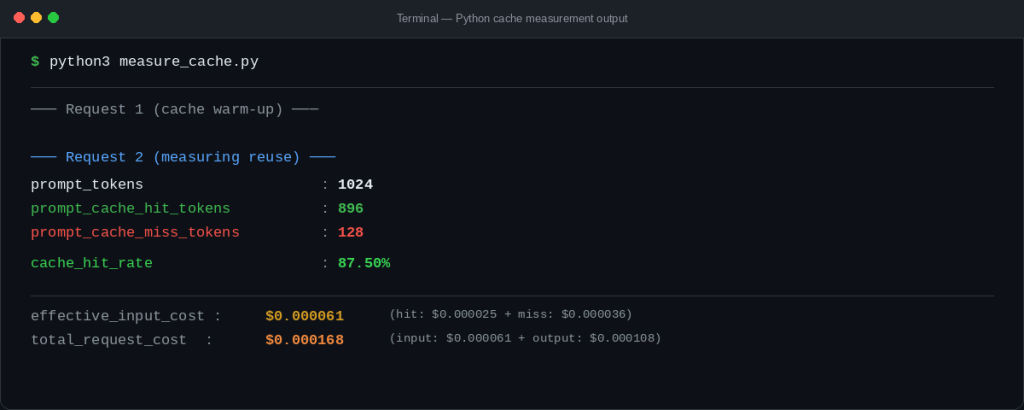
Note: Cache hits are not guaranteed. DeepSeek caching is best-effort, so identical requests may still result in cache misses.
If you want better monitoring, log those three fields for every request and chart them over time. A sudden drop in hit rate after a prompt rollout often means someone changed the front of the template.
Common mistakes and debugging
The most common mistakes are predictable: expecting middle-only overlap to count, changing the front of the prompt every turn, confusing prompt caching with output reuse, treating launch-post pricing as current pricing, failing to monitor hit/miss fields in production, reordering few-shot examples without noticing the cost impact, and over-optimizing for cache while hurting answer quality.
The fastest debugging question is usually: “What changed near the beginning of the prompt?” If the answer is “a lot,” your miss rate probably went up for a reason.
Production best practices
Track cache hit rate over time, not just per request. Version your stable prompt prefix so large edits are intentional. Keep reusable context modular and front-loaded. Put unstable metadata later when possible. Budget from observed hit/miss ratios, not from perfect-case assumptions. And evaluate cache efficiency together with answer quality, because the cheapest prompt shape is not always the best one.
Use this guide to improve your cache hit rate, but use our current DeepSeek pricing page to verify the actual rate card behind those gains. Caching changes how much of your input is billed as cache hit vs. cache miss, so the pricing guide is the right companion when you turn prompt-design choices into budget forecasts.
FAQ
What is DeepSeek Context Caching?
It is DeepSeek’s automatic backend reuse of repeated prompt prefixes across requests. It can reduce input cost and often reduce latency, but it does not turn the API into persistent conversation memory.
Is DeepSeek Context Caching automatic?
Yes. DeepSeek’s official guide says it is enabled by default for all users and does not require code changes.
What counts as a DeepSeek cache hit?
Only the repeated prefix portion of the prompt counts. DeepSeek says matching starts from the beginning of the input; middle-only overlap does not trigger a hit.
What does repeated prefix mean?
It means the front part of a later request is the same as the front part of an earlier request. Shared content in the middle is not enough if the opening tokens changed first.
What are prompt_cache_hit_tokens and prompt_cache_miss_tokens?
They are usage fields that show how many prompt tokens were served from cache versus recomputed, and DeepSeek’s schema says prompt_tokens equals their sum.
Does context caching mean the API remembers my conversation?
No. The official multi-round guide says the API is stateless and you must resend prior history yourself.
Why am I getting fewer cache hits than expected?
Common reasons include changing the front of the prompt, reordering few-shot examples, sending prompts shorter than 64 tokens, or assuming middle-only overlap counts. The system is also documented as best-effort, not guaranteed.
How much can cache hits reduce cost?
That depends on how large the repeated prefix is and how often it repeats. The current pricing page makes cache-hit input 10x cheaper than cache-miss input.
How should I design prompts to improve cache effectiveness?
Keep reusable instructions and reusable context stable, put them at the front, keep few-shot examples in a fixed order, and append volatile details later.
Does DeepSeek Context Caching reduce latency?
Yes, in many cases. When a cache hit occurs, DeepSeek can reuse previously computed prefix representations, which may reduce processing time.
However, this is not guaranteed. The system is best-effort, and latency improvements depend on workload, cache availability, and request patterns.
Does DeepSeek Context Caching work with deepseek-reasoner?
Yes. According to current documentation, both deepseek-chat and deepseek-reasoner support context caching.
Is context caching guaranteed?
No. DeepSeek documents caching as best-effort, meaning hits are not guaranteed even with identical prompts.
Is cached data visible to other users?
No. DeepSeek says each user’s cache is isolated and logically invisible to others. The docs also say unused cache entries are automatically cleared after a period. Context caching should be understood as short-lived backend reuse for your own repeated prefixes, not shared cross-user memory.
Next step: Estimate your real production cost using the DeepSeek API cost calculator, based on your actual cache hit rate and workload pattern.