Quick answer: DeepSeek Tool Calls let the model request external functions during a chat workflow, but your application executes them. As of April 5, 2026, both deepseek-chat and deepseek-reasoner support Tool Calls on DeepSeek-V3.2 with a 128K context window.
In practice, Tool Calls are the bridge between a language model and real-world systems. Instead of only generating text, the model can decide when to call your APIs, query databases, or trigger workflows — while your backend remains the execution layer.
This is where many guides fall short. DeepSeek uses both “Tool Calls” and “Function Calling” terminology across its documentation, and recent updates (V3.1 → V3.2) changed how tool usage works, especially with thinking mode and strict schema validation. As a result, many existing tutorials are either incomplete or outdated.
This guide is designed as an implementation-first reference. It consolidates the current DeepSeek API behavior, clarifies how Tool Calls actually work in production, and shows when to use them instead of simpler alternatives like JSON Output.
Last verified: April 5, 2026. This is an independent guide based on the current public DeepSeek API documentation. This guide covers the current hosted DeepSeek API. It focuses on the current V3.2-era API behavior for deepseek-chat and deepseek-reasoner. It does not cover local open-weight deployments, self-hosted inference stacks, or older pre-V3.2 documentation behavior.
Note on doc drift: Some older DeepSeek pages still describe deepseek-reasoner as not supporting Function Calling. Current V3.2-era sources — Thinking Mode, Tool Calls, Models & Pricing, the V3.2 release note, and the Change Log — indicate that tool use is supported in thinking mode on the current hosted API. This guide follows the newer V3.2 documentation as the source of truth for current behavior. Some older DeepSeek pages still describe deepseek-reasoner as not supporting Function Calling. Current V3.2-era sources — Thinking Mode, Tool Calls, Models & Pricing, the V3.2 release note, and the Change Log — indicate that tool use is supported in thinking mode on the current hosted API. This guide follows the newer V3.2 documentation as the source of truth for current behavior.
Use this page when
Use this page when you want to understand how DeepSeek Tool Calls work, how to define tools, how tool_choice behaves, what strict mode does, and how tool use changes in thinking mode.
- Read the API Guide if you want a broader overview of the DeepSeek API and model behavior.
- Read the Chat Completions guide if you want the full request/response schema and a more general completion workflow.
- Read the Thinking Mode guide if you specifically need to understand
reasoning_content, tool loops, and multi-step reasoning behavior.
What are DeepSeek Tool Calls?
DeepSeek Tool Calls are the feature that lets the model decide when it should request an external function instead of answering directly. The model can generate the tool request, but your application still has to execute the function and send the result back. DeepSeek’s own Tool Calls and Function Calling guides describe exactly that pattern.
That second sentence is the one many developers miss. Tool Calls are proposal-based, not execution-based.
This means your backend is the real execution layer. The model never has direct access to your APIs, databases, or internal services. This separation is a core security boundary in production systems.
The model can ask for get_weather or lookup_invoice, but it does not actually hit your API, database, or internal service.
The standard loop looks like this:
- Define tools in the
toolsarray. - Send the request.
- Inspect
message.tool_calls. - Execute the chosen function in your app.
- Append a
toolmessage with the matchingtool_call_id. - Send the updated history back.
- Read the final answer.
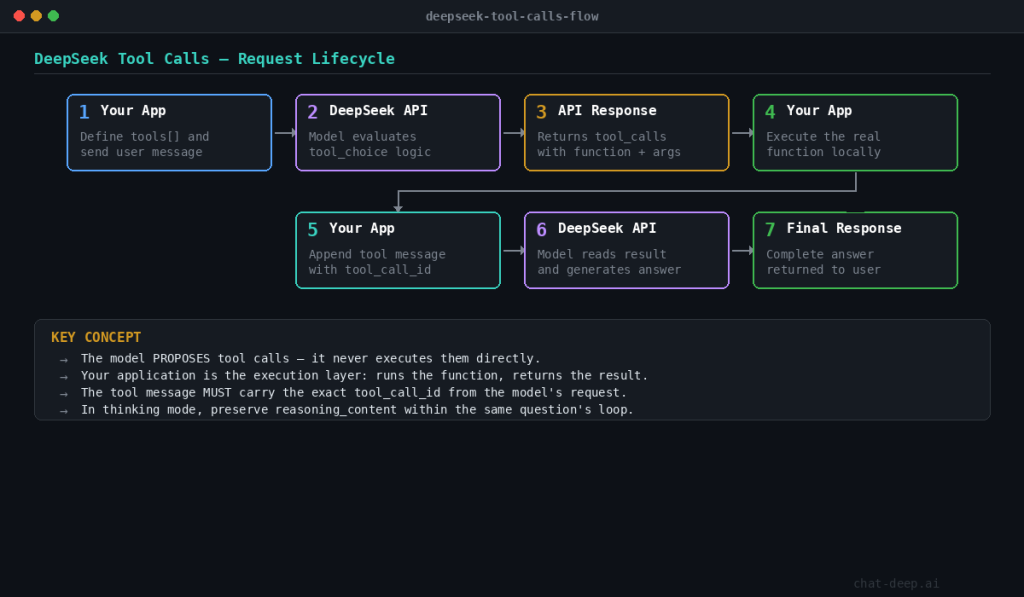
That flow is the same one DeepSeek shows in its official examples and schema docs.
Tool Calls vs Function Calling in DeepSeek
In DeepSeek’s current documentation, “Tool Calls” and “Function Calling” refer to the same core capability: the model can invoke external functions or tools as part of a chat-completions workflow.
Across recent guides and the current API structure, DeepSeek uses “Tool Calls” as the broader term. “Function Calling” still appears in some pages and examples, especially in earlier documentation or in contexts familiar to developers coming from OpenAI-style APIs.
In practice, there is no meaningful difference in how you implement them. You define tools using a function-like schema, the model decides when to call them (or you control it with tool_choice), and your application executes the tool and returns the result back to the model.
If you see both terms used in different places, treat them as interchangeable within the current hosted DeepSeek API.
Tool Calls vs JSON Output vs Agents
If you only need structured data in the model response, start with JSON Output: DeepSeek can return a valid JSON string directly, without the extra tool-execution loop. Use Tool Calls when the model needs to request a real external action, such as reading from an API, querying a database, or triggering a workflow; the model proposes the call, but your application still executes it. If your workflow needs multi-step orchestration across tools or sub-agents, handoffs, and guardrails, you have moved beyond raw Tool Calls into agent design. In short: JSON Output is for structured answers, Tool Calls are for controlled external actions, and Agents are the orchestration layer built on top.
Which DeepSeek models support Tool Calls right now?
On the current hosted API, both official aliases support Tool Calls.
| Surface | How to enable it | Tool Calls support | Notes |
|---|---|---|---|
deepseek-chat | model="deepseek-chat" | Yes | Maps to DeepSeek-V3.2 non-thinking mode, 128K context |
deepseek-chat + thinking | model="deepseek-chat" + extra_body={"thinking":{"type":"enabled"}} | Yes | Tool use in thinking mode is supported from V3.2 |
deepseek-reasoner | model="deepseek-reasoner" | Yes | Maps to DeepSeek-V3.2 thinking mode, 128K context |
| Strict mode (Beta) | Beta base URL + strict: true on every function | Yes | Works in thinking and non-thinking mode when the schema fits DeepSeek’s subset |
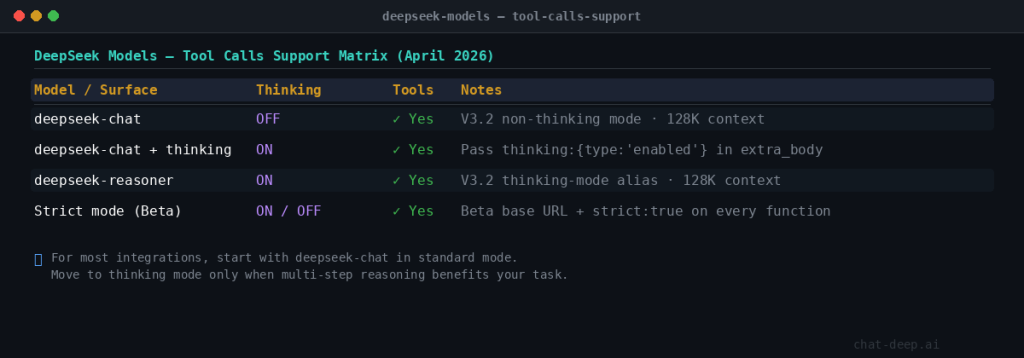
This matrix reflects the current Models & Pricing page, the Thinking Mode guide, and the V3.2 release note. If you use the OpenAI SDK and want thinking mode on deepseek-chat, DeepSeek says to pass the thinking object inside extra_body.
One historical note is still useful: DeepSeek-V3.2-Speciale was documented as API-only and had no tool calls. That is historical context, not a current production choice.
For most integrations, start with deepseek-chat in standard mode. Move to deepseek-reasoner, or enable thinking on deepseek-chat, only when the task truly benefits from multi-step reasoning before or between tool calls. That advice follows the current support model rather than the old “chat model vs separate reasoning family” framing.
How the basic Tool Calls flow works
The standard non-thinking flow is the best starting point. You define the functions the model may propose, send the user request, and inspect whether the response includes tool_calls. If it does, your application runs the tool and sends the result back with the matching tool_call_id.
import json
from openai import OpenAI

client = OpenAI(
    api_key="YOUR_DEEPSEEK_API_KEY",
    base_url="https://api.deepseek.com",
)

def lookup_fx_rate(pair: str) -> dict:
    return {
        "pair": pair,
        "rate": 1.08,
        "source": "internal-pricing-service"
    }

tools = [
    {
        "type": "function",
        "function": {
            "name": "lookup_fx_rate",
            "description": "Get the latest FX rate for a currency pair like EUR/USD.",
            "parameters": {
                "type": "object",
                "properties": {
                    "pair": {
                        "type": "string",
                        "description": "Currency pair in BASE/QUOTE format, e.g. EUR/USD"
                    }
                },
                "required": ["pair"]
            }
        }
    }
]

messages = [
    {"role": "user", "content": "What is the latest EUR/USD rate?"}
]

response = client.chat.completions.create(
    model="deepseek-chat",
    messages=messages,
    tools=tools,
    tool_choice="auto",
)

assistant_message = response.choices[0].message
messages.append(assistant_message)

# 👇 handle both cases safely
if assistant_message.tool_calls:
    call = assistant_message.tool_calls[0]

    try:
        args = json.loads(call.function.arguments)
    except json.JSONDecodeError:
        args = {}

    pair = args.get("pair")

    if pair:
        tool_result = lookup_fx_rate(pair)

        messages.append({
            "role": "tool",
            "tool_call_id": call.id,
            "content": json.dumps(tool_result),
        })

        final = client.chat.completions.create(
            model="deepseek-chat",
            messages=messages,
            tools=tools,
        )

        print(final.choices[0].message.content)
    else:
        print("❌ Model did not return valid 'pair'")
else:
    # 👇 important fallback (missing in your version)
    print(assistant_message.content)
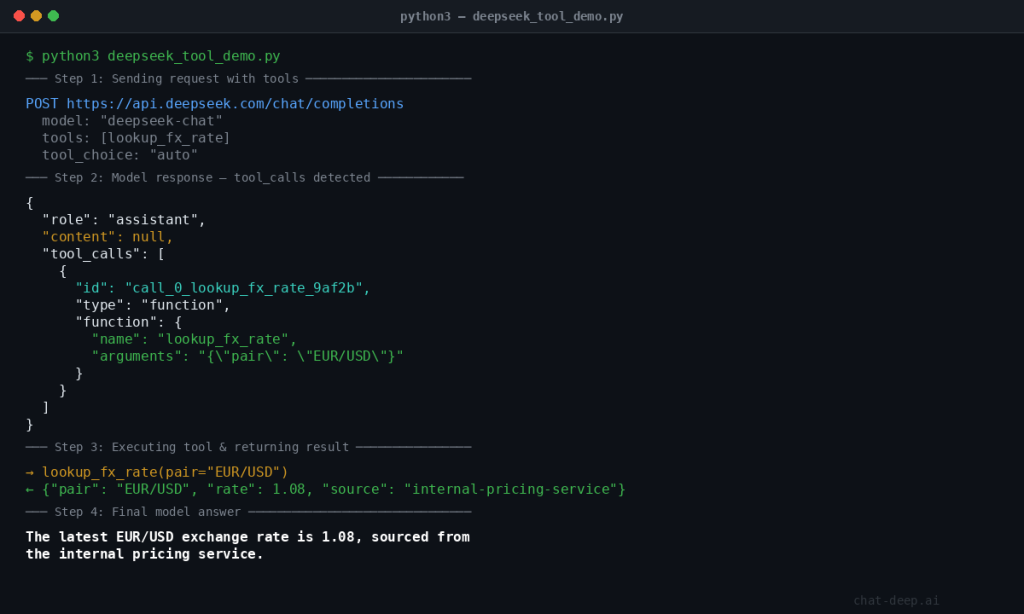
This example is adapted from the official DeepSeek flow: model proposes, application executes, application returns a tool message tied to the original tool_call_id, then the model finishes the answer.
The two details that matter most are simple: the model does not execute the function for you, and the tool message must carry the exact tool_call_id from the model’s request.
How to define tools correctly
DeepSeek’s schema is strict about the shape of tool definitions even before you enable strict mode. At the top level, tools is an array, and currently the only supported tool type is function. The chat-completions reference also says you can provide at most 128 functions.
Inside each function, the key fields are:
function.namedescriptionparameters- optional
strict
The docs also define a few hard limits:
- only
functiontools are supported - at most 128 functions
- function names may use letters, numbers, underscores, and dashes
- function names are limited to 64 characters
- omitting
parametersdefines a no-argument function
For production use, the description and parameter schema are part of the control surface. Narrow descriptions and tight schemas reduce hallucinated arguments, ambiguous routing, and accidental tool use.
tool_choice explained
tool_choice controls how much freedom the model has.
none: never call a toolauto: choose between a normal answer and one or more toolsrequired: the model must call one or more tools- named-function object: force a specific function by name
DeepSeek’s current docs also define the defaults clearly: if no tools are present, the behavior is effectively none; if tools are present, the default becomes auto.
A practical rule:
- use
autofor most assistants - use
requiredwhen the workflow must start from a trusted external read - use
nonefor testing or temporary safety fallbacks - force a named tool only when the orchestration layer already knows which step must happen next
DeepSeek strict mode (Beta)
Strict mode is the right upgrade when malformed arguments are hurting reliability. In DeepSeek’s Beta API, strict mode makes the model adhere much more closely to your function’s JSON Schema. It works in both thinking and non-thinking mode.
To use it correctly, you must:
- call the Beta base URL:
https://api.deepseek.com/beta - set
strict: trueon every function - provide a schema that fits DeepSeek’s supported strict-mode subset
DeepSeek also says the server validates your schema. If the schema does not conform, or uses unsupported JSON Schema types, the request fails before strict mode can help you.
import json
from openai import OpenAI

client = OpenAI(
    api_key="YOUR_DEEPSEEK_API_KEY",
    base_url="https://api.deepseek.com/beta",
)

tools = [
    {
        "type": "function",
        "function": {
            "name": "create_invoice_draft",
            "strict": True,
            "description": "Create an invoice draft for a customer.",
            "parameters": {
                "type": "object",
                "properties": {
                    "customer_id": {
                        "type": "string",
                        "description": "Internal CRM customer ID"
                    },
                    "amount_usd": {
                        "type": "number",
                        "description": "Invoice amount in USD",
                        "minimum": 0
                    }
                },
                "required": ["customer_id", "amount_usd"],
                "additionalProperties": False
            }
        }
    }
]
The currently supported strict-mode types include object, string, number, integer, boolean, array, enum, and anyOf. DeepSeek also imposes some important limits: every object property must be in required, additionalProperties must be false, and string pattern / format are supported while minLength and maxLength are not.
The most common strict-mode failures are predictable: wrong base URL, missing strict: true, unsupported schema keywords, missing required fields, or forgetting additionalProperties: false. Those are exactly the kinds of issues DeepSeek says the server validates before returning an error.
Tool Calls in DeepSeek thinking mode
Thinking-mode tool calls are where the DeepSeek workflow becomes meaningfully different from standard chat. The current docs say tool use in thinking mode is supported from DeepSeek-V3.2, and the V3.2 release describes it as DeepSeek’s first model to integrate thinking directly into tool use.
You can reach thinking mode in two ways:
- call
deepseek-reasoner - call
deepseek-chatand enablethinkinginextra_body
The key implementation rule is about reasoning_content. During the same user question, if the model is still reasoning and issuing tool calls, you need to send reasoning_content back so the model can continue its chain of reasoning. But when a brand-new user question starts, DeepSeek recommends removing old reasoning_content from prior turns. The docs also warn that if your code does not correctly pass back reasoning_content during the active thinking + tool loop, the API returns a 400 error.
while True:
    response = client.chat.completions.create(
        model="deepseek-chat",
        messages=messages,
        tools=tools,
        extra_body={"thinking": {"type": "enabled"}},
    )

    assistant_message = response.choices[0].message
    messages.append(assistant_message)

    if assistant_message.tool_calls is None:
        print(assistant_message.content)
        break

    for call in assistant_message.tool_calls:
        result = run_tool(call.function.name, call.function.arguments)
        messages.append({
            "role": "tool",
            "tool_call_id": call.id,
            "content": result,
        })
The safest pattern is to append response.choices[0].message directly inside the same loop, because the official sample notes that this assistant message already carries the fields the next sub-turn may need, including content, reasoning_content, and tool_calls. Then, when a new user question starts, clear old reasoning content from history.
Common mistakes and debugging
1. Treating tool calls as execution.
The model proposes the function call; your application executes it. If your code assumes the model already ran the tool, the state breaks immediately.
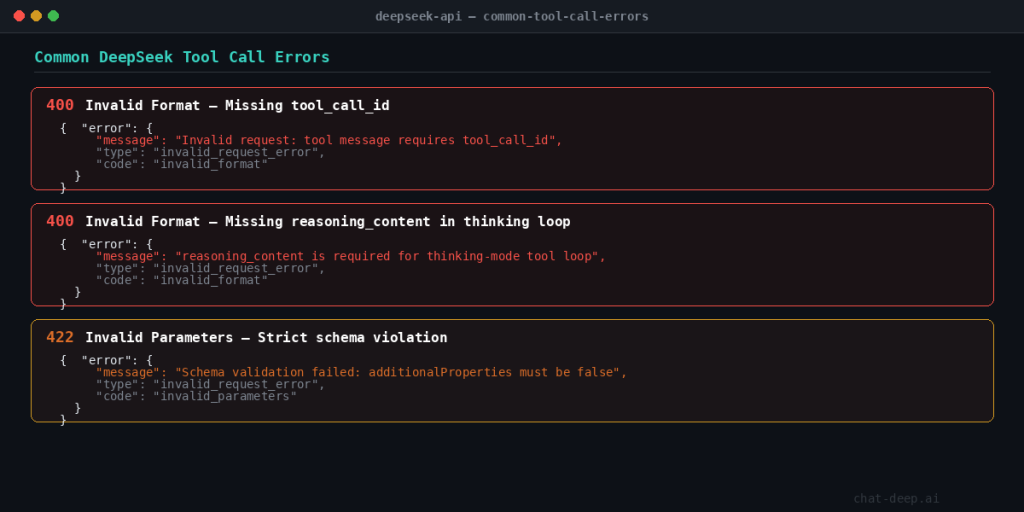
2. Confusing 400 with 422.
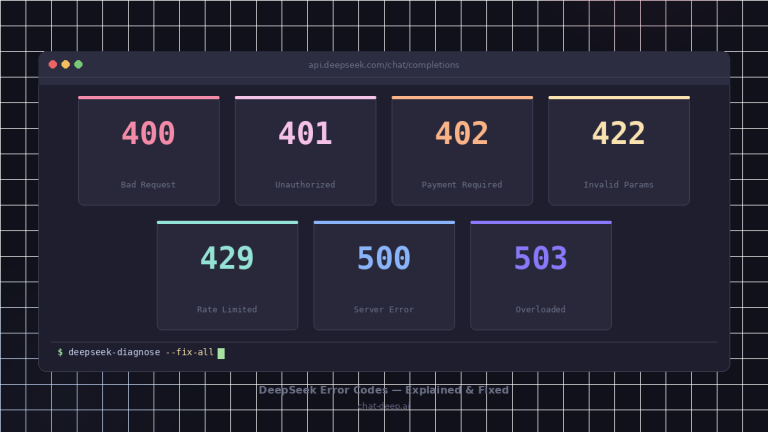
DeepSeek error docs say 400 Invalid Format is about an invalid request body format, while 422 Invalid Parameters means the request contains invalid parameters. A good rule of thumb is that malformed bodies often show up as 400, while bad parameter combinations or invalid tool-related settings often surface as 422. That last distinction is an implementation inference, but it lines up well with DeepSeek’s official error categories.
3. Trusting tool arguments blindly.
Even in non-strict mode, tool arguments are model output. Parse them, validate them, and reject anything your backend should not accept.
4. Mishandling reasoning_content.
Inside the same thinking + tool loop, keep it. For a fresh user question, remove old reasoning content. Mixing those cases is one of the fastest ways to create 400-level failures.
5. Using Tool Calls when JSON Output is enough
If your goal is to return structured data only, DeepSeek’s JSON Output mode is usually the simpler and more reliable choice. It avoids the full tool-calling loop and reduces implementation complexity. To use JSON Output, set response_format={“type”:”json_object”} explicitly mention “json” in your prompt, and ensure max_tokens is large enough to prevent truncation. The model will then return a valid JSON object directly in the response. Use Tool Calls when the model needs to trigger real external actions, such as calling APIs, querying databases, or executing workflows. In contrast, JSON Output is better suited for formatting, extraction, and schema-based responses that do not require side effects.
Production best practices
Validate all parsed arguments before execution. Even strict mode should not replace business-rule validation.
Keep tool descriptions short and operational. Tell the model when to use the tool, not the history of the service behind it.
Log three things for every tool step: raw assistant message, parsed arguments, and tool result. Those logs are usually enough to explain most failures.
Set timeouts and fallback rules for every callable tool. Decide in advance whether the assistant should retry, answer partially, or fail closed.
Whitelist callable tools. Do not expose sensitive actions just because they are technically easy to schema-encode.
Use deepseek-chat as the default and move to thinking mode only when you genuinely need multi-step reasoning or tool planning. That aligns better with the current support model and keeps the request flow simpler when you do not need reasoning sub-turns.
Prefer JSON Output over Tool Calls when the job is formatting, extraction, or schema-shaped text rather than external action.
Tool-enabled workflows usually cost more than a single plain completion because they can add extra turns, larger schemas, and follow-up calls after each tool result. Before you ship this pattern, review our DeepSeek pricing page so you budget for the full tool loop rather than only the first model response.
Never pass user-controlled arguments directly into sensitive tools (payments, database writes, system actions) without validation and authorization checks.
FAQ
What are DeepSeek Tool Calls?
They let the model propose external function calls as structured output. Your application then executes the function and feeds the result back into the chat loop.
Is DeepSeek Function Calling the same thing?
Effectively yes. DeepSeek still has a Function Calling guide, but the current platform also uses the term Tool Calls for the same workflow.
Which DeepSeek model supports Tool Calls right now?
On the current hosted API, both deepseek-chat and deepseek-reasoner support Tool Calls and map to DeepSeek-V3.2 with a 128K context window.
Does deepseek-reasoner support Tool Calls now?
Yes. On the current hosted API, deepseek-reasoner is the V3.2 thinking-mode alias and supports Tool Calls.
What does tool_choice do?
It controls whether the model may call a tool, must call a tool, or is forced to use a named function.
What is DeepSeek strict mode?
It is a Beta mode for Tool Calls that uses the Beta API base URL and strict: true on every function so the model follows your JSON Schema more closely.
Does the model execute the function by itself?
No. The model proposes the call, but your application executes the real function and returns the result.
When should I use Tool Calls instead of JSON Output?
Use Tool Calls when the model needs to trigger a real external action. Use JSON Output when you only need structured data in the response.
Tool Calls vs Agents?
Tool Calls are a low-level primitive: the model proposes structured function calls, and your application executes them.
Agent frameworks (like LangChain or LlamaIndex) build orchestration layers on top of this pattern, handling retries, planning, and tool routing automatically.
DeepSeek Tool Calls themselves do not provide orchestration. They provide the building block.
Can DeepSeek Tool Calls run multiple tools in one response?
Yes. The model can return multiple tool_calls in a single message, and your application should execute each one and return results before the model completes its answer.