
Last verified: July 23, 2026.
A DeepSeek cloud deployment is not a single product. The official DeepSeek API, Microsoft Foundry, Amazon Bedrock, Google Cloud MaaS, and a self-hosted endpoint can expose different model versions, features, regions, privacy terms, and billing units. An OpenAI-compatible endpoint does not make those services equivalent.
Quick answer: choose the official DeepSeek API when direct access to DeepSeek-V4-Flash or DeepSeek-V4-Pro and their documented features matters most. Consider Azure when you need V4 under Azure billing, identity, governance, and private connectivity, but confirm its feature and deployment limits. Choose Amazon Bedrock only when its available V3.2, V3.1, or R1 model is acceptable—AWS does not list DeepSeek V4. Do not start a long-lived application on Google Cloud’s managed DeepSeek MaaS endpoints: Google deprecated all of them on July 21, 2026 and plans to retire them on October 21, 2026. Choose self-hosting when control over the runtime and data path justifies the GPU capacity and operational work.
Independent review and test notice: Chat-Deep.ai is an independent site and is not DeepSeek, Microsoft, Amazon, or Google. We checked the providers’ official model catalogs, capability pages, pricing references, privacy documentation, and lifecycle notices on July 23, 2026. We did not create paid deployments because no reader cloud account, billing subscription, or production test data was available. Region availability, quotas, prices, and model access can differ by account, so verify the final deployment screen and run a non-sensitive test before production.
DeepSeek cloud deployment options at a glance
| Route | Models verified July 23, 2026 | Operating model | Best fit | Main limitation |
|---|---|---|---|---|
| Official DeepSeek API | deepseek-v4-flash, deepseek-v4-pro | Public API operated by DeepSeek | Direct V4 access, low setup effort, DeepSeek’s documented API features | No private cloud endpoint documented; apply DeepSeek’s own privacy and service terms |
| Microsoft Foundry: Direct from Azure | DeepSeek-V4-Flash, DeepSeek-V4-Pro, plus selected V3.2 releases | Azure-managed model endpoint | Azure billing, Entra ID, RBAC, Private Link, enterprise governance | V4 tool calling is not documented; public Microsoft pages disagree on lifecycle and maximum output |
| Amazon Bedrock | DeepSeek V3.2, V3.1, R1 | Serverless Bedrock Runtime or Mantle, depending on model | Existing AWS workloads, IAM, PrivateLink, selected in-Region inference | No DeepSeek V4; model IDs, regions, APIs, and tool support differ |
| Google Cloud DeepSeek MaaS | V3.2, V3.1, R1-0528, OCR during migration window | Managed Google API | Existing workloads that need time to migrate | All DeepSeek MaaS endpoints are deprecated and scheduled to retire October 21, 2026 |
| Google Cloud self-deployment | Depends on the Model Garden template or imported weights | Dedicated endpoint and compute in your project | Google Cloud teams that need a longer-lived controlled endpoint | You manage quota, GPU capacity, scaling, serving software, and updates |
| Self-hosting on your own infrastructure | Weights and quantizations you validate | You operate the model server and surrounding stack | Maximum runtime control, private networks, custom serving and evaluation | Large models require substantial hardware and continuous operations |
Before choosing a provider, separate three questions: which model version do you need, who operates the inference service, and where can processing occur? A cloud marketplace listing may package an older open-weight release rather than proxying DeepSeek’s official hosted API.
A practical decision sequence
- Lock the required model and features. Record the exact model ID, context requirement, output requirement, JSON behavior, tool-calling requirement, and whether the workload needs images or only text.
- Set the data boundary. Decide whether global or US multi-region processing is acceptable, whether one named Region is required, and whether the service must be reachable without public internet.
- Choose the operating model. Compare a public API, a serverless managed model, and a dedicated endpoint you operate. These carry different responsibilities even when the model family has the same name.
- Calculate the full cost. Include input, cached input, output, private endpoints, logging, storage, network transfer, endpoint uptime, and the staff time required to operate self-hosted serving.
- Test the exact deployment. Send representative non-sensitive requests and verify context behavior, structured output, tool calls, streaming, latency, error handling, and logs. Do not infer support from the upstream model alone.
If you are deciding specifically between a hosted endpoint and your own runtime, start with our DeepSeek local vs API decision guide. The rest of this page compares the deployment paths rather than repeating the complete API or local installation tutorials.
Option 1: the official DeepSeek API
The official API is the shortest path to the DeepSeek-hosted V4 service. DeepSeek documents two model IDs: deepseek-v4-flash and deepseek-v4-pro. Both use https://api.deepseek.com for the OpenAI-compatible format or https://api.deepseek.com/anthropic for the Anthropic-compatible format.
| Official API field | V4 Flash | V4 Pro |
|---|---|---|
| Model ID | deepseek-v4-flash | deepseek-v4-pro |
| Context length | 1 million tokens | 1 million tokens |
| Maximum documented output | 384K tokens | 384K tokens |
| JSON output | Supported | Supported |
| Tool calls | Supported | Supported |
| Cache-hit input per 1M tokens | $0.0028 | $0.003625 |
| Cache-miss input per 1M tokens | $0.14 | $0.435 |
| Output per 1M tokens | $0.28 | $0.87 |
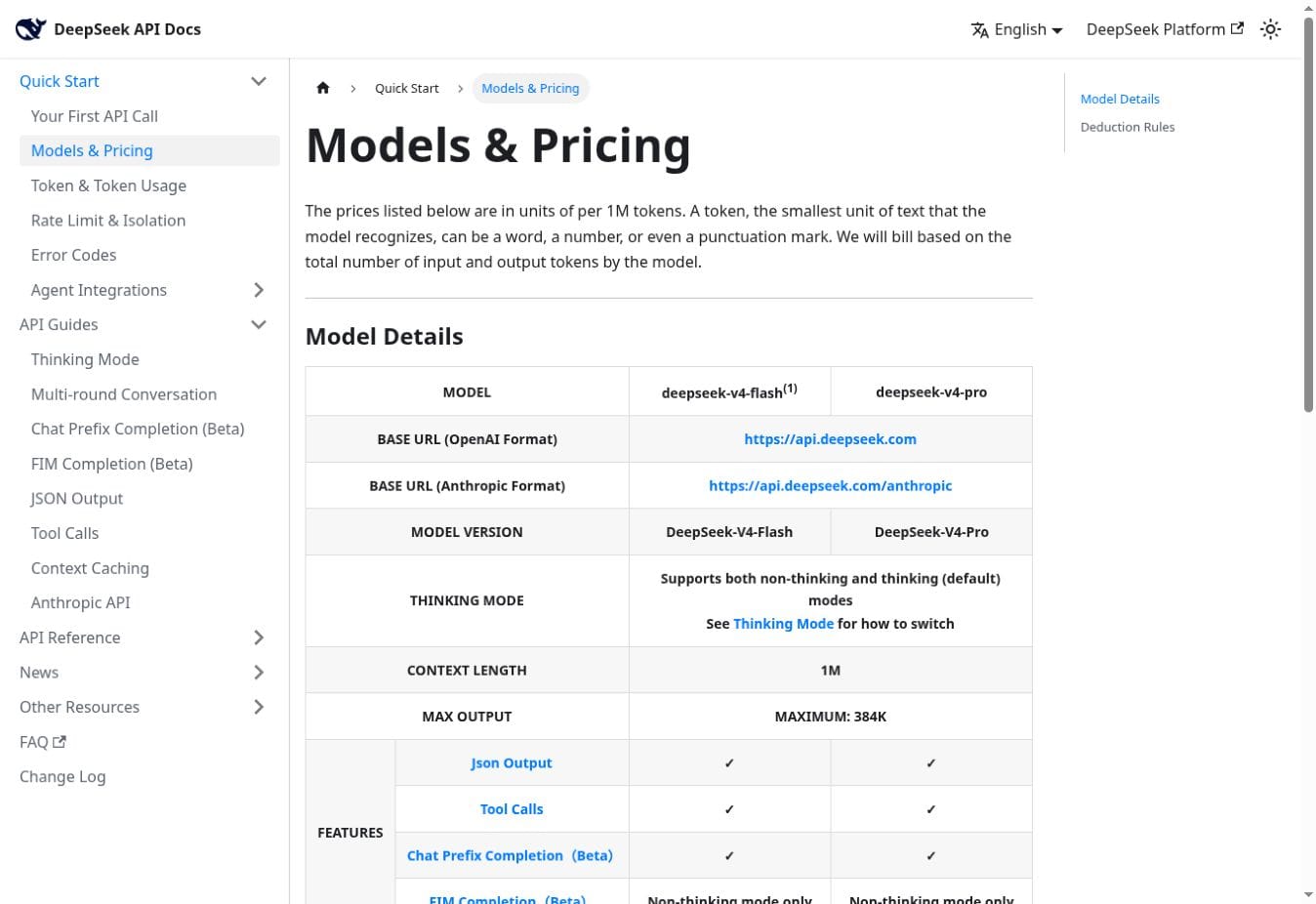
DeepSeek schedules the legacy names deepseek-chat and deepseek-reasoner for deprecation on July 24, 2026 at 15:59 UTC. Do not build a new deployment around those aliases. Use the explicit V4 model ID and review the complete request format in our DeepSeek API guide.
Minimal Node.js verification request
import OpenAI from "openai";

const client = new OpenAI({
  apiKey: process.env.DEEPSEEK_API_KEY,
  baseURL: "https://api.deepseek.com",
});

const response = await client.chat.completions.create({
  model: "deepseek-v4-flash",
  messages: [
    { role: "user", content: "Reply with exactly: deployment verified" },
  ],
  stream: false,
});

console.log(response.choices[0].message.content);
This request verifies authentication, the base URL, and the selected model; it does not test your production controls. Store the key in a secret manager, keep it out of client-side code, set request timeouts, and record token usage without logging sensitive prompt bodies. DeepSeek’s official first-call documentation provides the provider-maintained examples.
When the official API is the right choice
- You need DeepSeek’s own V4 model IDs rather than an older cloud catalog release.
- You need the V4 tool-calling behavior documented by DeepSeek.
- A public outbound HTTPS API is acceptable.
- Usage is variable enough that per-token billing is preferable to operating GPUs.
- Your legal and privacy review accepts DeepSeek as the service operator.
When to choose another path
Choose another route when the application must use a cloud-native private endpoint, must keep processing within a specified cloud geography, or must place the model runtime under your operational control. DeepSeek’s published privacy policy says personal data it collects may be processed and stored in the People’s Republic of China. A business API deployment should be reviewed against the applicable account terms, contract, and data classification—not a consumer privacy summary alone.
Use the DeepSeek API cost calculator for workload estimates, and confirm any changed rates against the official table before approval.
Option 2: DeepSeek V4 through Microsoft Azure
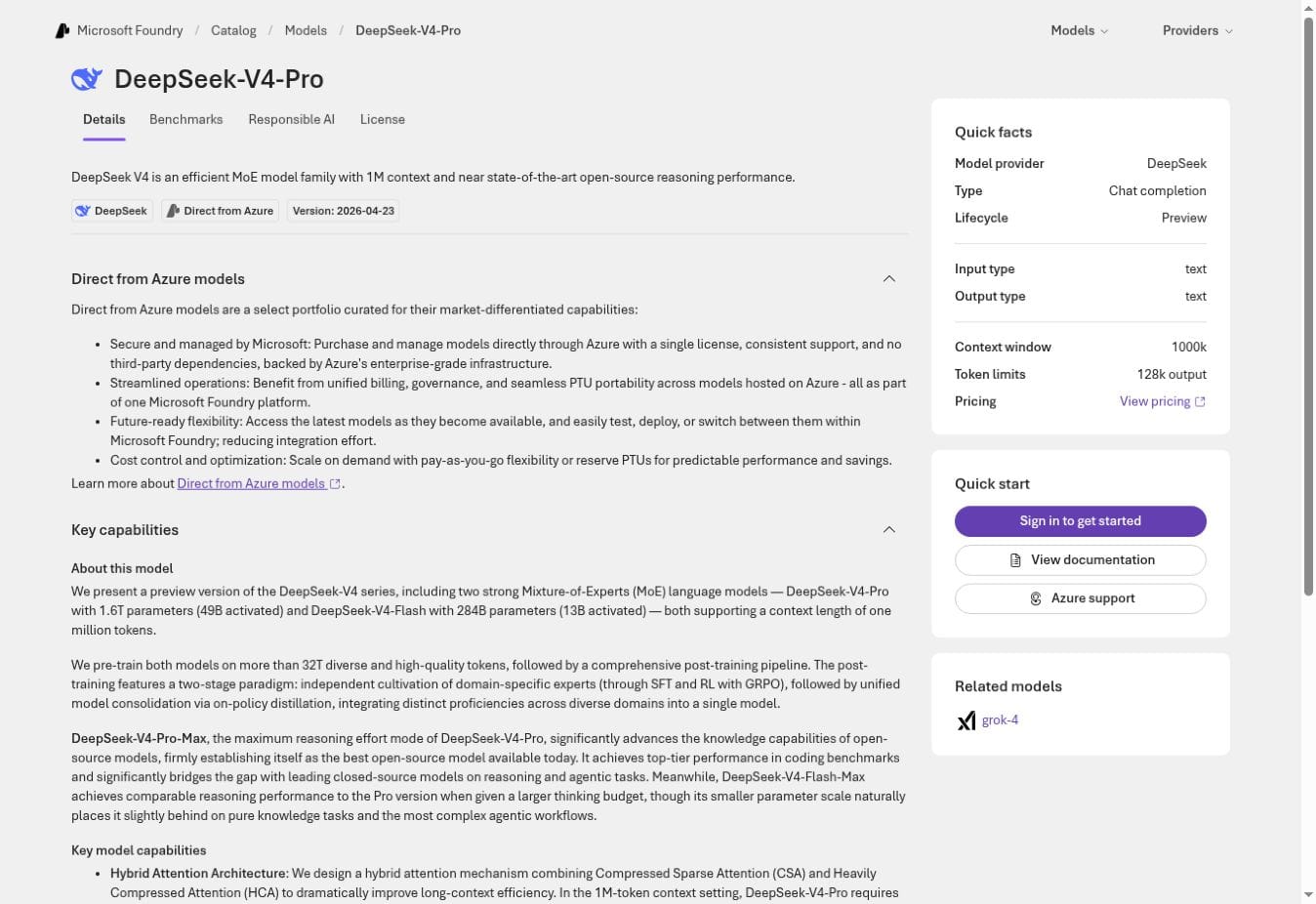
Microsoft Foundry lists DeepSeek-V4-Pro and DeepSeek-V4-Flash as Direct from Azure models. In this route, Microsoft hosts and operates the endpoint inside Azure; the request is not forwarded to a DeepSeek-operated API. This distinction affects procurement, identity, networking, data handling, and feature parity.
Azure V4 capabilities that are safe to rely on
- DeepSeek-V4-Pro and DeepSeek-V4-Flash version
2026-04-23. - Chat-completion models with text input and text output.
- A documented one-million-token context window.
- Text and JSON response formats.
- OpenAI-compatible v1 endpoints that receive the Azure deployment name in the
modelfield. - No tool or function calling documented for the Direct from Azure V4 cards.
Microsoft documentation mismatch: the public V4 model card labels the lifecycle as Preview and shows a 128K output limit, while Microsoft’s lifecycle schedule lists V4 as GA and another capability table documents output up to 384K. Treat the deployment dialog and a test response in your Azure subscription as the final source for lifecycle, quota, and output limits. Do not design a 384K-output workflow from a marketing table alone.
Microsoft documents two compatible v1 base URL patterns, including https://<resource>.openai.azure.com/openai/v1/ and https://<resource>.services.ai.azure.com/openai/v1/. The Foundry endpoint guide should be used instead of copying an endpoint from another Azure resource. Prefer Microsoft Entra ID for production authentication where your environment supports it.
Azure regions and data zones
The July 23 verification found V4 in Global Standard and in a US Data Zone offering. Global Standard can process a request in any Azure region where the model is available; placing the resource in one region does not by itself force inference into that same region. A Data Zone confines processing to the documented geography, not necessarily one physical region. The Azure model availability matrix did not show a Europe Data Zone or a single-region Standard V4 deployment during this review.
Microsoft’s deployment-type definitions are therefore as important as the resource location. Write the required processing geography into the design before choosing Global Standard, Data Zone Standard, or a different route.
Azure privacy, logging, and private connectivity
For Direct from Azure models, Microsoft says prompts and outputs are not made available to DeepSeek or other customers and are not used to train foundation models without permission. Base inference is stateless, but optional stateful features, customer-configured logs, and abuse-monitoring workflows can create additional storage paths. Review the exact qualifications and exceptions in Microsoft’s data, privacy, and security documentation.
Azure Private Link can disable public network access and connect the Foundry resource to a VNet through a private endpoint, Private DNS, VPN, or ExpressRoute. It secures the network path; it does not turn Global Standard into single-region inference. Follow the official Private Link configuration guide and choose the deployment type separately.
Direct from Azure is not the same as Fireworks in Foundry
Foundry also lists partner-served DeepSeek models with IDs such as FW-DeepSeek-V4-Pro. Those are Fireworks offerings, not Direct from Azure endpoints. They have different data-sharing, availability, compliance, and provisioning conditions. Microsoft states that the Fireworks route is outside the EU Data Boundary commitment and is unavailable in Azure Government. Keep it as a separate architecture decision and consult the Fireworks-on-Foundry documentation.
Azure prices vary by deployment type, agreement, region, and currency. Use the Azure DeepSeek pricing page and the estimate displayed in your subscription, then add Private Link, monitoring, storage, and content-safety costs.
Option 3: DeepSeek on Amazon Bedrock and AWS
Model-version warning: AWS’s DeepSeek catalog lists V3.2, V3.1, and R1. It does not list DeepSeek V4. Amazon Bedrock is therefore not an AWS-routed version of the official DeepSeek V4 API.
Amazon Bedrock packages specific DeepSeek open-weight releases under AWS model IDs, AWS APIs, regional routing, and AWS billing. Check the AWS DeepSeek model catalog before writing code because support differs by model and endpoint family.
| Bedrock model | Model ID | Context window / maximum output | Important API facts |
|---|---|---|---|
| DeepSeek V3.2 | deepseek.v3.2 | 164K / 8K | Runtime and Mantle; text only; Converse, Invoke, and OpenAI-compatible Chat Completions; no server-side tool calling |
| DeepSeek V3.1 | Runtime: deepseek.v3-v1:0Mantle: deepseek.v3.1 | 128K / 8K | Runtime and Mantle; text only; client-side tool calling documented; no server-side tools |
| DeepSeek R1 | Base model: deepseek.r1-v1:0US geo inference profile: us.deepseek.r1-v1:0 | 128K / 8K | Bedrock Runtime only; Invoke and Converse; no Mantle or OpenAI-compatible Chat Completions |
Bedrock Runtime, Mantle, and Marketplace are different routes
- Bedrock Runtime provides the native InvokeModel and Converse interfaces.
- Bedrock Mantle provides OpenAI-compatible endpoints for supported models. R1 is not available through Mantle.
- Bedrock Marketplace or SageMaker JumpStart deploys model containers to SageMaker-managed compute. It is not the same serverless, per-token service as the standard Bedrock catalog.
A supported OpenAI-compatible surface does not guarantee the Responses API, server-side tools, or parity with DeepSeek V4. AWS’s endpoint comparison documents which API families apply to Runtime and Mantle.
AWS regions and private networking
The V3.2 and V3.1 cards list in-Region inference in selected US, European, Asia-Pacific, and South American regions. R1 is different: AWS documents the base model ID and a US geo inference profile. The geo profile can route among N. Virginia, Ohio, and Oregon, so it provides a US boundary rather than guaranteed processing in one Region.
AWS PrivateLink supports interface endpoints for Bedrock Runtime and Mantle so applications can call them without an internet gateway, NAT device, or public IP. PrivateLink controls the network path; it does not override a model’s cross-Region routing profile. Use the exact service names from the Bedrock VPC endpoint documentation.
AWS data handling and logging
AWS states that Bedrock inputs and outputs are not shared with model providers and are not used to train or improve base foundation models. AWS also documents encryption in transit and at rest in its Bedrock data-protection guidance.
Do not translate that into “nothing is stored.” Model-invocation logging is disabled by default for Bedrock Runtime, but when you enable it, request and response bodies can be delivered to your CloudWatch Logs or S3 destination and retained under your settings. Confirm the scope and endpoint coverage in the model-invocation logging documentation.
When AWS is the right choice
- Your application already uses AWS identity, networking, monitoring, and procurement.
- V3.2, V3.1, or R1 meets the evaluated quality and feature requirements.
- You need PrivateLink or a supported in-Region V3.2/V3.1 endpoint.
- You accept that Bedrock model behavior, context, tool support, and pricing are not the official V4 service.
Check the selected Region and tier on the Amazon Bedrock pricing page. If you choose Marketplace or JumpStart, calculate instance hours and endpoint storage instead of treating it as per-token Bedrock serverless pricing.
Option 4: DeepSeek on Google Cloud
Google Cloud lifecycle alert—verified July 23, 2026: Google deprecated every managed DeepSeek MaaS endpoint on July 21, 2026 and plans to retire them on October 21, 2026. Existing workloads may continue during the migration window, but new access can be restricted and calls will fail after retirement. Do not select this MaaS route for a new long-lived deployment.
| Retiring Google-managed model | Model ID | Endpoint location | Scheduled retirement |
|---|---|---|---|
| DeepSeek-V3.2 | deepseek-v3.2-maas | global | October 21, 2026 |
| DeepSeek-V3.1 | deepseek-v3.1-maas | us-central1 | October 21, 2026 |
| DeepSeek-R1-0528 | deepseek-r1-0528-maas | us-central1 | October 21, 2026 |
| DeepSeek-OCR | deepseek-ocr-maas | us-central1 | October 21, 2026 |
The authoritative migration dates are in Google’s open-model deprecation schedule. Existing users should inventory every project, model ID, region, quota, client, and fallback before the retirement date.
What to use on GCP instead
For a longer-lived Google Cloud design, evaluate Model Garden self-deployment or move the workload to another managed endpoint. A self-deployed Vertex AI endpoint can place dedicated serving resources in your project and can use controls such as Private Service Connect and VPC Service Controls when supported. It also makes you responsible for GPU quota, endpoint uptime, autoscaling, model weights, containers, serving software, updates, observability, and cost while idle.
Google’s custom-weights support table lists DeepSeek-R1, V3, and V3.1, while the deprecation schedule separately links Model Garden self-deployment alternatives for V3.2 and OCR. V4 is not listed in those official Google deployment references. Use the provider-linked template for the exact model rather than assuming that a Hugging Face model name guarantees a supported one-click deployment.
Google data location and logging during migration
The retiring DeepSeek MaaS cards identify US multi-region processing. Google’s global endpoint does not satisfy a requirement for processing in one specified Google Cloud region because the exact processing region cannot be selected. Assess broader US multi-region residency requirements separately against Google’s location documentation, which distinguishes the endpoint name, data at rest, and ML processing location.
Google documents prompt logging and request-response logging as disabled by default for the relevant open-model service. Enabling request-response logging can write data to BigQuery, so a Zero Data Retention design must leave it disabled and avoid storage in the surrounding application. Review Google’s Zero Data Retention requirements rather than assuming the default covers every component.
The listed MaaS rates are migration-period prices, not self-deployment prices. Use Google’s generative AI pricing page for the retiring service and a cloud calculator for the VM, GPU, storage, network, and endpoint resources of self-deployment.
Option 5: self-host DeepSeek
Self-hosting means that you choose the weights, inference engine, compute, network, storage, logs, scaling policy, and update process. It may run in your own data center or on GPU instances in AWS, Azure, GCP, or another provider. It is an operating model, not a synonym for running a small model on one laptop.
DeepSeek’s official V4 model cards describe V4-Flash as a 284B-parameter mixture-of-experts model and V4-Pro as a 1.6T-parameter model, both with one-million-token context. The official DeepSeek-V4-Flash model card includes vLLM, SGLang, and Docker examples and identifies the published weights as MIT-licensed. Production capacity depends on precision, quantization, context, concurrency, output length, engine, and accelerator topology.
Self-hosting is a good fit when
- You must control the model runtime and the surrounding storage and logging path.
- You need a dedicated private endpoint in an approved network and region.
- You need to pin a weight revision, quantization, or serving engine.
- Utilization is high and stable enough to justify dedicated capacity.
- Your team can monitor latency, memory, queueing, failures, quality regressions, and security updates.
Self-hosting is a poor fit when
- The workload is small or highly bursty.
- You cannot reserve the required accelerator capacity.
- No team owns patching, scaling, evaluation, incident response, and cost control.
- You need a managed V4 API quickly and a public HTTPS dependency is acceptable.
Use our DeepSeek local installation hub for model and hardware selection, and the DeepSeek production serving guide for Docker, vLLM, Kubernetes, gateways, monitoring, and scaling.
Privacy warning: self-hosting does not automatically make a workload private. Prompts can still appear in an API gateway, ingress proxy, tracing system, container log, crash dump, object store, vector database, backup, analytics platform, or support ticket. Map every component and apply the guidance in what not to paste into DeepSeek.
Feature and residency comparison
| Requirement | Strongest candidate from this review | Why |
|---|---|---|
| DeepSeek-hosted V4 with documented tool calls | Official DeepSeek API | DeepSeek documents V4 Pro/Flash and tool calls on its own endpoint. |
| V4 under Azure governance | Azure Direct | V4 Pro/Flash are hosted by Azure with Azure identity, billing, and Private Link options. |
| Selected DeepSeek model in one supported AWS Region | Bedrock V3.2 or V3.1 | Their model cards list in-Region inference; R1 uses US cross-Region routing. |
| New managed DeepSeek endpoint on GCP | Do not use the retiring MaaS route | All managed DeepSeek MaaS model IDs are scheduled to retire October 21, 2026. |
| Maximum runtime and logging control | Self-hosting | You control the serving stack, but must also operate and secure it. |
| One-million-token V4 context | Official API or Azure Direct V4 | Both publish a one-million-token context; validate usable output and quota separately. |
If residency is the deciding factor, use our separate DeepSeek data residency guide to document the difference between resource location, endpoint location, processing geography, storage, logs, and backups.
How to estimate total deployment cost
Do not compare only the headline input-token price. Use the same workload and quality target for each candidate:
Monthly managed-service cost =
  cache-miss input tokens
  + cache-hit input tokens
  + output and reasoning tokens
  + provisioned throughput, if selected
  + private endpoint and network charges
  + logs, traces, storage, and retrieval
  + data transfer
  + safety, evaluation, and gateway services

Monthly self-hosted cost =
  GPU or accelerator hours × replicas
  + CPU, memory, storage, and network
  + idle and failover capacity
  + monitoring and backups
  + engineering and on-call operations
Model quality is part of cost. A lower per-token model can become more expensive if it needs longer prompts, more retries, larger outputs, or additional validation. Benchmark the same tasks, calculate successful-task cost, and keep managed and self-hosted estimates separate.
Production deployment checklist
- Model identity: record the exact provider, model ID, model version, lifecycle status, and retirement date.
- Capabilities: test text, JSON, structured output, streaming, reasoning, tool calls, context, and output limits.
- Processing location: distinguish a resource region from the actual inference geography.
- Network path: decide whether public HTTPS is allowed or Private Link, PrivateLink, or Private Service Connect is required.
- Authentication: use workload identity or short-lived credentials where available; never ship an API key in a browser or mobile app.
- Data minimization: redact unnecessary personal, financial, health, credential, and confidential information before inference.
- Logging: verify every request, response, trace, error, cache, gateway, and analytics destination.
- Retention: set deletion periods for customer-controlled logs, databases, object stores, and backups.
- Reliability: configure timeouts, retries with backoff, idempotency where appropriate, circuit breakers, quotas, and fallbacks.
- Evaluation: run a fixed regression set before changing provider, model version, quantization, context, or system prompt.
- Budget controls: alert on token volume, output length, cache behavior, endpoint uptime, and idle GPU capacity.
- Exit plan: document how the application will migrate if a provider retires a model or changes its limits.
Recommended route by scenario
| Scenario | Recommended first evaluation | Reason |
|---|---|---|
| Small team that needs V4 quickly | Official DeepSeek API | Lowest setup burden and direct access to DeepSeek’s V4 service. |
| Microsoft-centered enterprise without a tool-calling requirement | Azure Direct V4 | Azure procurement, identity, governance, and private connectivity; verify geography and output limits. |
| AWS-centered application where V3.2 or R1 is acceptable | Amazon Bedrock | AWS IAM, PrivateLink, monitoring, and managed inference without operating GPUs. |
| New Google Cloud application | Self-deployed Model Garden endpoint or another managed provider | Managed DeepSeek MaaS is already in its retirement window. |
| Regulated single-region workload | Validated self-hosting or a model with documented in-Region inference | Global and cross-Region services do not meet a strict single-region rule. |
| High, predictable utilization with an experienced platform team | Self-hosted benchmark | Dedicated capacity may be justified, but only after measuring throughput and operations. |
Frequently asked questions
Is DeepSeek V4 available on Amazon Bedrock?
No. AWS’s catalog listed DeepSeek V3.2, V3.1, and R1 on July 23, 2026. Do not use a V4 model ID from DeepSeek or Azure in Bedrock code.
Is DeepSeek V4 available through Microsoft Azure?
Yes. Microsoft Foundry lists DeepSeek-V4-Pro and DeepSeek-V4-Flash as Direct from Azure models. The public card documents text input and output, JSON responses, and a one-million-token context, but not tool calling. Verify lifecycle, output limit, deployment type, and price in your subscription because Microsoft’s public pages contain conflicting values.
Can I start a new DeepSeek MaaS deployment on Google Cloud?
It is not a sound long-term choice. Google deprecated all managed DeepSeek MaaS model IDs on July 21, 2026 and scheduled retirement for October 21, 2026. Evaluate self-deployment or another managed service for a new workload.
Does Private Link guarantee data residency?
No. A private endpoint protects the connection path. The service’s deployment type, inference profile, or processing-location rules determine where model execution can occur.
Does OpenAI compatibility mean every provider supports the same features?
No. It usually describes a request and response shape. Model IDs, authentication, tool calls, reasoning fields, structured output, context limits, streaming, and error behavior can differ.
Is self-hosted DeepSeek automatically private?
No. Privacy depends on the entire runtime: network, API gateway, logs, tracing, caches, databases, object storage, backups, plugins, access controls, and operational practices.
Final recommendation
Start with the exact model and data boundary, not the cloud logo. The official API is the clearest route to DeepSeek’s own V4 feature set. Azure offers V4 under Azure operations but requires careful checks for tool support, lifecycle, output limits, and processing geography. Amazon Bedrock can be a strong AWS-native route when V3.2, V3.1, or R1 meets the requirement, but it is not V4. Google Cloud’s managed DeepSeek MaaS service is already in a retirement window, so new GCP designs should evaluate self-deployment or another managed provider. Choose self-hosting only when its control is worth the capacity, security, evaluation, and on-call responsibility.