Business intelligence dashboards are no longer just static charts waiting for someone to interpret them. With large language models, dashboards can now answer questions in plain English, generate executive summaries automatically, and flag anomalies before anyone notices. DeepSeek, an open-weight LLM platform, makes this transformation remarkably affordable — delivering frontier-level SQL generation, data narrative, and analytical reasoning at a fraction of what competing APIs charge.
This guide walks you through exactly how to integrate DeepSeek into Power BI, Tableau, and custom BI pipelines — with production-ready code, real pricing comparisons, prompt templates, and a clear-eyed look at privacy considerations. Whether you are a data analyst building your first LLM integration or a technical lead evaluating options for your team, everything here is verified as of April 2026 and ready to implement.
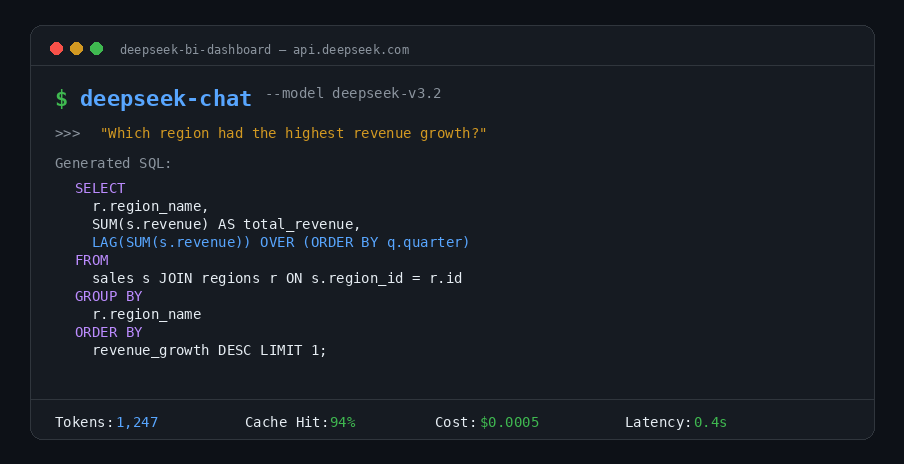
Why DeepSeek Is the Most Cost-Effective LLM for Business Intelligence
BI workloads have a distinctive pattern: high-volume, repetitive queries against the same database schemas. You send thousands of natural-language questions per day, but the underlying table structures, column definitions, and business rules rarely change. This pattern plays directly into DeepSeek V3.2’s strengths — powerful SQL and code generation combined with automatic context caching that slashes costs by up to 90%.
DeepSeek V3.2 (model ID: deepseek-chat) runs on a 671-billion-parameter → 685-billion-parameter (671B main model + 14B MTP module), but only activates 37 billion parameters per token. That engineering choice delivers GPT-5-class reasoning at dramatically lower inference costs. It supports a 128K token context window, is fully compatible with the OpenAI SDK (just change the base_url), and supports tool calls for querying external data — making it a drop-in replacement for most existing LLM integrations.
DeepSeek V3.2 vs GPT-5.4, Claude Opus 4.6, and Gemini 3.1 Pro
The pricing gap is not subtle. Here is how DeepSeek V3.2 compares to the leading proprietary and open-weight alternatives available in April 2026. You can also explore the full breakdown on our DeepSeek API pricing page.
| Model | Provider | Input / M tokens | Output / M tokens | Context | Open Source |
|---|---|---|---|---|---|
| DeepSeek V3.2 | DeepSeek | $0.28 (miss) / $0.028 (hit) | $0.42 | 128K | Open-weight |
| GPT-5.4 | OpenAI | $2.50 | $15.00 | 1M | No |
| Claude Opus 4.6 | Anthropic | $5.00 | $25.00 | 1M | No |
| Claude Sonnet 4.6 | Anthropic | $3.00 | $15.00 | 1M | No |
| Gemini 3.1 Pro | $2.00 | $12.00 | 1M | No | |
| Llama 4 Maverick | Meta | ~$0.19–0.49 (via providers) | Blended | 1M | Open-weight |
| Llama 4 Scout | Meta | Self-host only | Self-host only | 10M | Open-weight |
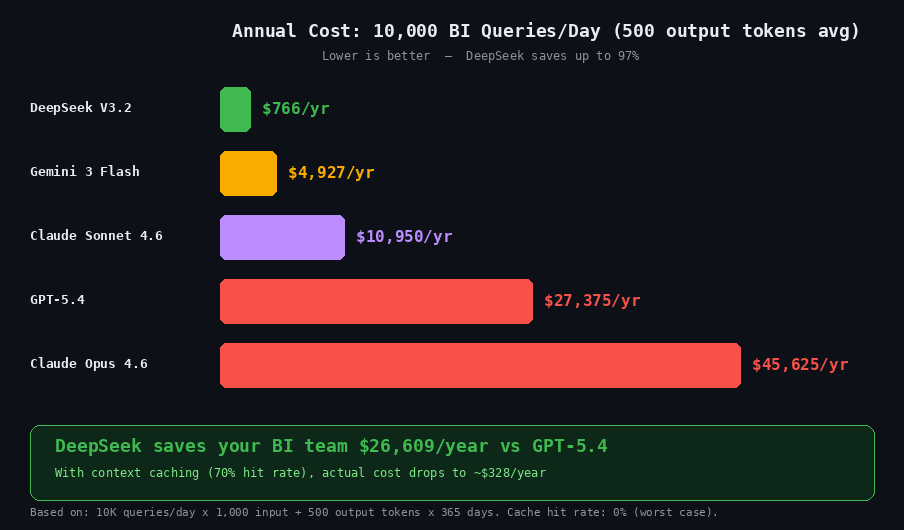
DeepSeek V3.2 output tokens cost $0.42 per million compared to $15.00 for GPT-5.4 — a 35× difference. For a BI team running 10,000 text-to-SQL queries per day averaging 500 output tokens each, that translates to roughly $2.10 per day with DeepSeek versus $75 per day with GPT-5.4. Over a year, that is approximately $766 compared to $27,375. Use our DeepSeek API cost calculator to model your own workload.
To be fair, DeepSeek V3.2 has a 128K context window while GPT-5.4, Claude Opus 4.6, and Gemini 3.1 Pro all offer 1M tokens or more. For BI use cases that require ingesting extremely long documents or entire data dumps in a single prompt, those larger windows may matter. DeepSeek V3 scored 49.10% on the BIRD text-to-SQL benchmark in zero-shot mode — a result from the earlier V3, not V3.2, which has not yet been independently evaluated on BIRD. By comparison, OpenAI’s O1-Preview scored 78.08% on the same benchmark. The gap narrows significantly with few-shot prompting and schema-aware system prompts: when you provide DDL definitions and 2–3 worked examples, DeepSeek V3.2 produces accurate SQL for the vast majority of practical BI queries. For most real-world workloads — where schema context is always included — the difference in output quality is negligible relative to the 35× cost savings. For a detailed model-by-model breakdown, see our DeepSeek vs ChatGPT comparison and the complete DeepSeek models page.
How Context Caching Slashes BI Query Costs by 90%
DeepSeek’s automatic context caching is the single most important feature for BI workloads. It is enabled by default for every API user — no code changes needed. Here is how it works and why it matters.
When you send a prompt, DeepSeek caches the key-value pairs for the input on disk (enabled by the Multi-head Latent Attention architecture that compresses KV cache size). On subsequent requests, any repeated prefix — starting from token zero — triggers a cache hit. Cached tokens cost just $0.028 per million versus $0.28 for cache misses, a 10× reduction. Latency also drops dramatically: a 128K prompt with a high cache-hit ratio sees first-token latency fall from around 13 seconds to roughly 500 milliseconds.
The BI optimization strategy is straightforward: place your database schema DDL, column descriptions, business rules, and few-shot SQL examples at the beginning of every prompt. Keep this prefix identical across all queries. Only vary the final user question. Because the cache matches from token zero forward, this ensures your entire schema context is served from cache at 90% savings. The API response includes prompt_cache_hit_tokens and prompt_cache_miss_tokens fields so you can track efficiency in real time. Learn more about how this works in our DeepSeek context caching guide, and monitor your API token consumption to fine-tune costs.
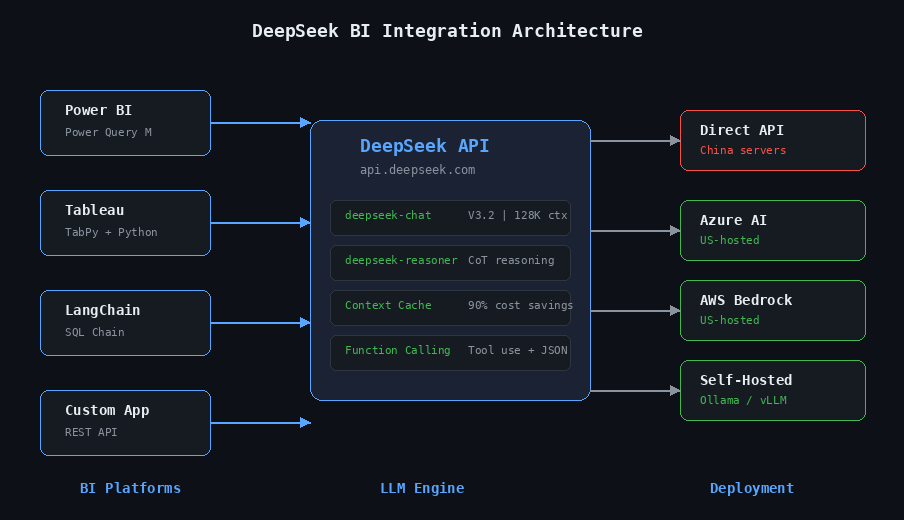
How to Connect DeepSeek to Power BI with Power Query
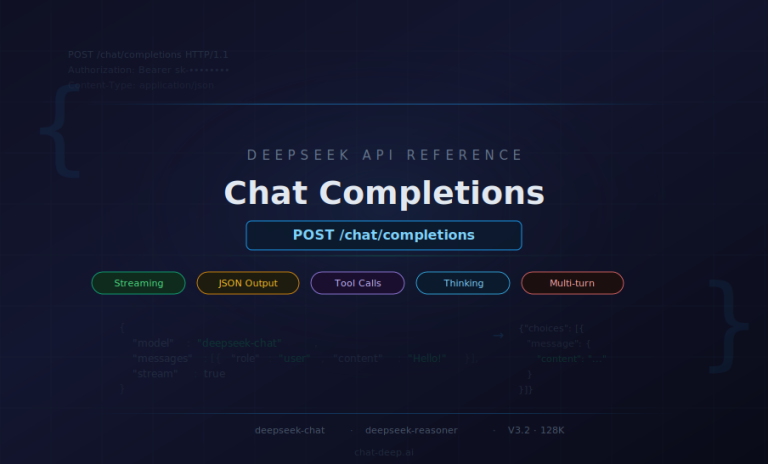
Power BI’s Power Query engine can call external REST APIs directly, making DeepSeek integration straightforward. The approach works by sending each row’s question (or data) to the DeepSeek API and parsing the response into a new column. Before diving into Power Query, here is the basic API pattern that all integrations use. DeepSeek’s API is fully OpenAI-compatible — the chat completions endpoint accepts the same request format, so any tool built for OpenAI works with DeepSeek by changing one URL.
from openai import OpenAI

client = OpenAI(
    api_key="sk-your-deepseek-key",
    base_url="https://api.deepseek.com"
)

response = client.chat.completions.create(
    model="deepseek-chat",
    messages=[
        {"role": "system", "content": "You are a SQL expert."},
        {"role": "user", "content": "Write a query to find top 10 customers by revenue"},
    ],
    stream=False
)
print(response.choices[0].message.content)
The endpoint is https://api.deepseek.com/chat/completions (also available at /v1/chat/completions for OpenAI compatibility — the “v1” is a compatibility alias, not a model version). Authentication uses a Bearer token in the Authorization header. For full setup details, see our DeepSeek API integration guide.
Step-by-Step Power Query M Code for DeepSeek API
The following Power Query M code adds an AI-generated column to any table in Power BI. It sends each row’s “Question” field to DeepSeek and returns the model’s response. This pattern was adapted from the Microsoft Fabric Community and has been verified against the current DeepSeek API.
let
    Source = YourTable,
    CallAPI = Table.AddColumn(Source, "AI_Answer", each
        let
            apiUrl = "https://api.deepseek.com/v1/chat/completions",
            apiKey = "sk-your-api-key",
            body = Json.FromValue([
                model = "deepseek-chat",
                messages = {[role = "user", content = [Question]]}
            ]),
            response = Web.Contents(apiUrl, [
                Headers = [
                    #"Content-Type" = "application/json",
                    #"Authorization" = "Bearer " & apiKey
                ],
                Content = body
            ]),
            json = Json.Document(response),
            answer = json[choices]{0}[message][content]
        in
            answer
    )
in
    CallAPI
Important notes for production use: Each Power BI data refresh re-calls the API for every row, so test with small datasets first. Add a system message for consistent output formatting (for example, “Respond with ONLY one word: Positive, Negative, or Neutral” for classification tasks). The Power BI service may block Web.Contents calls to external APIs — you may need a Power BI Gateway or Dataflow Gen2 for scheduled refreshes. For regulated environments, consider using Azure AI Foundry endpoints (which host DeepSeek in US data centers) instead of calling the direct API.
Tableau Integration Using TabPy and the DeepSeek API
Tableau does not natively call external APIs from calculated fields, but its TabPy integration (Tableau’s Python extension) bridges the gap cleanly. You deploy a Python function that calls DeepSeek to your TabPy server, then invoke it from Tableau using SCRIPT_STR. Because DeepSeek uses the OpenAI SDK format, the pattern is identical to any OpenAI-Tableau integration — just with a different base_url.
First, deploy a function to your TabPy server:
# tabpy_deepseek.py — deploy to your TabPy server
from openai import OpenAI

def deepseek_analyze(input_text_list):
    client = OpenAI(
        api_key="sk-your-deepseek-key",
        base_url="https://api.deepseek.com"
    )
    results = []
    for text in input_text_list:
        response = client.chat.completions.create(
            model="deepseek-chat",
            messages=[{"role": "user", "content": text}],
            temperature=0
        )
        results.append(response.choices[0].message.content)
    return results

# Deploy to TabPy
import tabpy_client
connection = tabpy_client.Client('http://localhost:9004/')
connection.deploy('deepseek_analyze', deepseek_analyze,
                  'Analyzes text using DeepSeek API')
Then create a calculated field in Tableau:
SCRIPT_STR("return tabpy.query('deepseek_analyze', _arg1)['response']",
    ATTR([Your Text Field]))
Requirements: pip install openai tabpy-client, a TabPy server running on port 9004, and Tableau Desktop connected to TabPy via Help → Settings and Performance → Manage Analytics Extension Connection. This enables use cases like a “Why?” button on any chart — when clicked, it passes the chart’s data context to DeepSeek and displays an explanation of the pattern directly on the dashboard.
Building a Text-to-SQL Pipeline with DeepSeek and LangChain
For teams building custom BI tools or internal data assistants, LangChain provides a mature framework for connecting DeepSeek to your databases. There are two integration approaches — a native DeepSeek package and an OpenAI-compatibility path that works with existing code.
# Approach 1 — Native LangChain DeepSeek package
# pip install langchain-deepseek
from langchain_deepseek import ChatDeepSeek

llm = ChatDeepSeek(
    model="deepseek-chat",
    temperature=0,
    max_tokens=None,
)

# Approach 2 — Via OpenAI compatibility (works with existing OpenAI code)
from langchain_openai import ChatOpenAI

llm = ChatOpenAI(
    model="deepseek-chat",
    openai_api_key="sk-your-deepseek-key",
    openai_api_base="https://api.deepseek.com",
    temperature=0
)
With either approach, LangChain’s create_sql_query_chain handles the heavy lifting of connecting to your database, reading the schema, and generating SQL from natural language:
from langchain_openai import ChatOpenAI
from langchain.chains import create_sql_query_chain
from langchain_community.utilities import SQLDatabase

# Connect to your database
db = SQLDatabase.from_uri("sqlite:///your_database.db")

# Initialize DeepSeek
llm = ChatOpenAI(
    model="deepseek-chat",
    openai_api_key="sk-your-deepseek-key",
    openai_api_base="https://api.deepseek.com",
    temperature=0
)

# Create the chain and query
chain = create_sql_query_chain(llm, db)
response = chain.invoke({
    "question": "What are the top 10 customers by total order value this quarter?"
})
print(response)
For a complete working example with a Streamlit frontend, see the tutorial by Ajay Joshua that uses DeepSeek Coder via Ollama for a fully local text-to-SQL application — no data leaves your machine. You can find more integration patterns in our guides on how to integrate DeepSeek into your web application and build your own DeepSeek-powered app.
Natural Language to SQL Prompt Templates That Work
The quality of your text-to-SQL output depends heavily on prompt design. After testing extensively, the following system prompt delivers the most consistent results with DeepSeek V3.2:
System prompt:
You are an expert SQL assistant. Convert natural language questions into valid SQL queries.

Rules:
1. Use ONLY PostgreSQL syntax.
2. Output ONLY the SQL query — no explanations, no markdown.
3. Use table and column names EXACTLY as provided in the schema.
4. Always use explicit JOIN syntax (never implicit joins).
5. Use aliases for readability in complex queries.
6. If the question is ambiguous, make reasonable assumptions noted as SQL comments.

User prompt template:
### Database Schema:
CREATE TABLE orders (
    order_id INT PRIMARY KEY,
    customer_id INT,
    order_date DATE,
    total_amount DECIMAL(10,2),
    status VARCHAR(20)
);
CREATE TABLE customers (
    customer_id INT PRIMARY KEY,
    company_name VARCHAR(100),
    segment VARCHAR(50),
    region VARCHAR(50)
);

### Question:
{user_natural_language_question}

### SQL Query:
Best practices: DDL format (CREATE TABLE) outperforms simple column lists for schema representation. Adding 2–3 few-shot examples significantly improves JOIN accuracy. Always set temperature=0 (DeepSeek recommends this for coding tasks). For production systems, implement a self-correction loop: run the generated SQL, catch any errors, and feed the error message back to the model for a retry. For more prompt patterns, visit our data analysis prompts for DeepSeek collection.
Four High-Value BI Use Cases with Ready-to-Use Prompts
Beyond text-to-SQL, DeepSeek can automate several high-value BI workflows. Both deepseek-chat and deepseek-reasoner support OpenAI-compatible function calling, enabling the model to query databases, run calculations, and fetch live data within a single conversation. Here are four production-ready use cases with tested prompt templates.
Dashboard Narrative Generation
Instead of manually writing executive summaries for your dashboards, feed the KPI data to DeepSeek and get a polished narrative in seconds. Use this system prompt: “You are a senior business analyst. Transform raw KPI data into clear executive narratives. Lead with the most significant finding. Use specific numbers — never vague language. Compare to targets and prior periods. Flag items requiring immediate attention. Keep the narrative under 250 words. Professional, confident tone for C-suite audience.”
Then pass your actual dashboard data as the user message — revenue figures, MRR, churn rate, NPS, support tickets — and ask for a headline, key wins, areas of concern, and recommended actions. The model generates what would typically take an analyst 30–60 minutes to write, and the output updates automatically every time your data refreshes.
Anomaly Detection and Explanation
When a metric spikes or drops unexpectedly, DeepSeek can identify the anomaly and explain potential causes. Send your time-series data (for example, 30 days of daily revenue) and ask the model to identify anomalies with confidence scores, classify them as point, contextual, or collective anomalies, explain its reasoning, and suggest possible business causes. The output works well as a markdown table that you can display directly on your dashboard or pipe into an alerting system.
KPI Summary Reports
Automate your weekly or monthly KPI reports by sending structured data along with prior-period comparisons and targets. Ask DeepSeek to generate an executive summary (3–4 sentences, most important finding first), a performance scorecard table, highlights where targets were exceeded, concerns where targets were missed by more than 5%, and specific recommended actions. This turns what was a half-day reporting task into a prompt that runs in seconds and produces consistent, data-driven output every cycle.
Data Classification and Enrichment
For datasets with unstructured text fields — customer feedback, support tickets, survey responses — DeepSeek can classify, tag, and enrich data at scale. The Power BI integration shown earlier is perfect for this: add a system message like “Classify the following customer feedback as Positive, Negative, or Neutral. Respond with ONLY one word.” and let the API process each row. At $0.42 per million output tokens, classifying 10,000 records costs less than a penny.
Privacy, Compliance, and Self-Hosting for Enterprise BI Teams
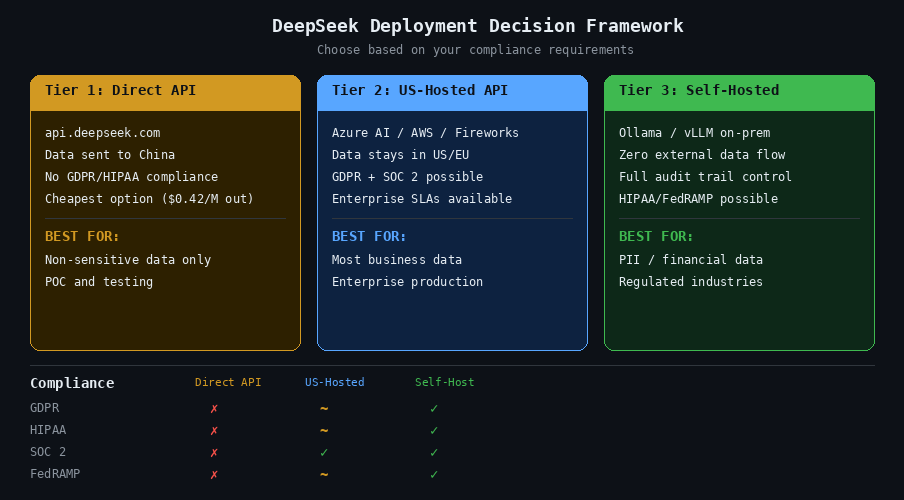
Integrating an LLM with enterprise dashboards raises legitimate questions about data privacy and regulatory compliance. This section gives you the facts and the solutions — no FUD, just a clear framework for making the right deployment choice. For a comprehensive analysis, see our guide on DeepSeek safety and privacy for enterprise use.
Where DeepSeek Stores Your Data (and Why It Matters)
DeepSeek’s privacy policy (last updated February 10, 2026) explicitly states that personal data is directly collected, processed, and stored in the People’s Republic of China. The data controller is Hangzhou DeepSeek Artificial Intelligence Co., Ltd. Data collected via the API includes account information, payment data, API call content (both prompts and outputs), IP addresses, and device identifiers.
For regulated industries — finance, healthcare, government — sending business data to servers in China is typically a compliance blocker under GDPR, HIPAA, and various national security frameworks. Multiple governments have already restricted DeepSeek usage: Italy imposed a complete ban in January 2025, Australia banned it from all government systems, and US agencies including NASA, the US Navy, and the Pentagon have prohibited its use on government devices. Several US states including Texas, New York, and Virginia have enacted similar restrictions.
However — and this is critical — DeepSeek’s open-weight licensing means the data privacy problem has clear solutions.
US-Hosted Alternatives: Azure AI, AWS Bedrock, Together AI
You can use DeepSeek models without sending data to China by using US-hosted API providers. Azure AI Foundry hosts DeepSeek V3.2 and R1 with the same security controls as Azure OpenAI — unified access management, audit logs, and content filtering. AWS Bedrock offers DeepSeek-R1 via the Bedrock Marketplace and SageMaker JumpStart, with HIPAA, SOC, ISO, GDPR, and FedRAMP High certifications (on GovCloud). Together AI provides the fastest R1 inference at 281.9 tokens per second. Fireworks AI hosts DeepSeek R1, V3.2, and Coder models with 50% cached-input pricing and $1 in free credits to start.
Running DeepSeek Locally with Ollama or vLLM
For maximum data sovereignty, self-hosting eliminates all external data flows. The hardware requirements depend on model size:
| Model Size | VRAM Needed (Q4) | Recommended GPU | Performance |
|---|---|---|---|
| 7B | ~5 GB | RTX 3060 (8 GB) | 15–30 tokens/sec |
| 14B | ~9 GB | RTX 3060 Ti (8 GB)+ | 25–35 tokens/sec |
| 32B | ~20 GB | RTX 4090 (24 GB) | 28–45 tokens/sec |
| 70B | ~40 GB | 2× RTX 3090 (48 GB) | 8–15 tokens/sec |
| Full 671B (R1) | ~404 GB | 8× H200 | 1–4 tokens/sec (consumer) |
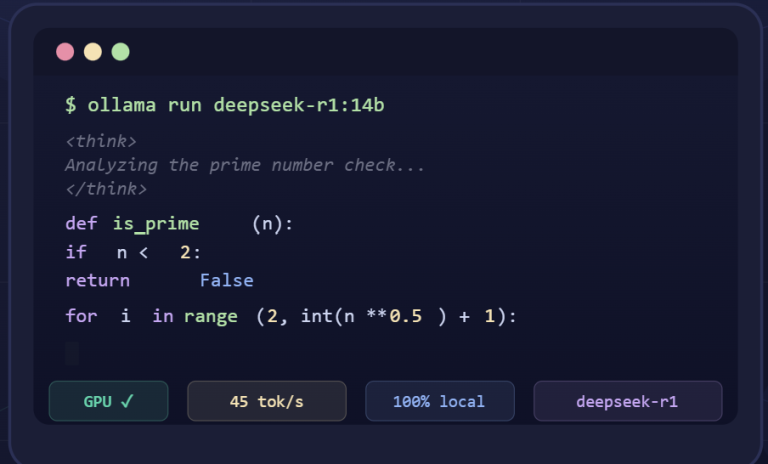
Setup with Ollama is a single command: ollama run deepseek-r1:32b. Ollama auto-detects your GPU and handles partial offloading. For production serving, vLLM offers higher throughput: vllm serve deepseek-ai/DeepSeek-R1 --tensor-parallel-size 8 --enable-expert-parallel --trust-remote-code.
Our recommendation for most BI teams: the 32B distilled model on a single RTX 4090 (approximately $1,600) offers the best balance of quality, speed, and data sovereignty. It handles text-to-SQL well, runs entirely on-premises, and eliminates all compliance concerns. For detailed setup instructions, see our guides on how to install DeepSeek locally for data privacy and deploy DeepSeek with vLLM for production workloads.
Getting Started: Your First DeepSeek BI Integration in 15 Minutes
Ready to try it? Here is the fastest path from zero to a working DeepSeek BI query.
Step 1: Sign up at platform.deepseek.com. You get 5 million free tokens — no credit card required.
Step 2: Install the OpenAI Python SDK: pip install openai
Step 3: Run your first BI query with context caching in action:
from openai import OpenAI

client = OpenAI(
    api_key="sk-your-key",
    base_url="https://api.deepseek.com"
)

# Define your schema once (this gets cached automatically)
schema = """
CREATE TABLE sales (sale_id INT, product_id INT, quantity INT,
    revenue DECIMAL(10,2), sale_date DATE, region VARCHAR(50));
CREATE TABLE products (product_id INT, name VARCHAR(100),
    category VARCHAR(50), unit_price DECIMAL(10,2));
"""

system_prompt = f"""You are a SQL expert. Convert questions to PostgreSQL.
Output ONLY the SQL query. Schema:\n{schema}"""

response = client.chat.completions.create(
    model="deepseek-chat",
    messages=[
        {"role": "system", "content": system_prompt},
        {"role": "user", "content": "Which product category had the highest revenue growth last quarter compared to the prior quarter?"}
    ],
    temperature=0
)

print(response.choices[0].message.content)

# Check cache efficiency
usage = response.usage
print(f"Cache hit: {usage.prompt_cache_hit_tokens} tokens")
print(f"Cache miss: {usage.prompt_cache_miss_tokens} tokens")
Step 4: Run a second query with the same schema prefix and watch the cache-hit count jump — that is your 90% cost saving in action.
From here, you can expand into any of the integrations covered in this guide: plug the API into Power BI via Power Query, connect it to Tableau through TabPy, or build a full text-to-SQL pipeline with LangChain. The DeepSeek API guide covers every endpoint and parameter, and you can estimate your API costs before scaling to production.
DeepSeek transforms BI dashboards from static displays into conversational, AI-powered decision tools — at a cost that makes it practical for teams of any size. The code is here, the prompts are tested, and the free tier gives you 5 million tokens to prove the value before committing a dollar.
Frequently Asked Questions
Can DeepSeek generate SQL queries from natural language for BI dashboards?
Yes. DeepSeek V3.2 (deepseek-chat) can convert natural language questions into valid SQL queries. You provide your database schema as context in the system prompt, then ask questions in plain English. DeepSeek supports PostgreSQL, MySQL, and other SQL dialects. On the BIRD text-to-SQL benchmark, DeepSeek V3 scored 49.10% zero-shot, and accuracy improves significantly when you add few-shot examples and schema definitions using the DDL format shown in this guide. For best results, set temperature=0 and use the prompt templates provided above.
How much does it cost to use DeepSeek for business intelligence queries?
DeepSeek V3.2 costs $0.28 per million input tokens (cache miss) and $0.42 per million output tokens. With automatic context caching — which is enabled by default — repeated schema prefixes cost just $0.028 per million tokens, a 90% reduction. For a BI team running 10,000 queries per day, the annual cost is approximately $766, compared to $27,375 for GPT-5.4 and $45,625 for Claude Opus 4.6. Use the DeepSeek API cost calculator to model your specific workload.
Is it safe to send business data to the DeepSeek API?
DeepSeek’s privacy policy states that data is stored in the People’s Republic of China, which makes the direct API unsuitable for regulated industries under GDPR, HIPAA, or government security frameworks. However, DeepSeek’s open-weight models can be used safely through US-hosted providers like Azure AI Foundry, AWS Bedrock, or Together AI — where data stays in US or EU data centers. For maximum security, you can self-host DeepSeek on your own hardware using Ollama or vLLM, eliminating all external data flows. See our full analysis on DeepSeek safety and privacy.
Can I integrate DeepSeek with Power BI?
Yes. Power BI’s Power Query engine can call the DeepSeek API directly using the Web.Contents function. You create a custom column that sends each row’s data to DeepSeek and returns the AI-generated response — whether that is a SQL query, a sentiment classification, or a narrative summary. The M code example in this guide is adapted from the Microsoft Fabric Community and works with the current DeepSeek API. For production deployments, consider using Azure AI Foundry endpoints for US-hosted DeepSeek access with enterprise security controls.
How does DeepSeek compare to GPT-5 and Claude for BI use cases?
DeepSeek V3.2 output tokens cost $0.42 per million versus $15.00 for GPT-5.4 — a 35× cost difference. GPT-5.4 and Claude Opus 4.6 offer larger context windows and score slightly higher on zero-shot SQL benchmarks. However, for most practical BI queries where you provide schema context, the quality difference is negligible while the cost savings are substantial. DeepSeek also has the advantage of being open-weight, meaning you can self-host it for complete data privacy — something neither GPT-5 nor Claude support. See our DeepSeek vs ChatGPT comparison for a detailed breakdown.
What hardware do I need to run DeepSeek locally for BI?
For most BI teams, the 32B distilled model running on a single NVIDIA RTX 4090 (24 GB VRAM, approximately $1,600) offers the best balance of quality, speed, and data sovereignty. It delivers 28–45 tokens per second, handles text-to-SQL well, and runs entirely on-premises. Smaller models (7B, 14B) run on consumer GPUs like the RTX 3060 but with lower accuracy on complex queries. The full 671B R1 model requires 8× H200 GPUs. Setup is a single command: ollama run deepseek-r1:32b. For step-by-step instructions, see our guide on how to install DeepSeek locally.
What is DeepSeek context caching and why does it matter for BI?
Context caching is an automatic feature that stores the key-value pairs from your prompt on disk. When you send another request with the same prefix (such as the same database schema), DeepSeek serves those tokens from cache at $0.028 per million instead of $0.28 — a 10× cost reduction. For BI workloads, where every query starts with the same schema definition and business rules, this means 70–90% of your input tokens hit the cache. Latency also improves: a 128K cached prompt returns its first token in roughly 500 milliseconds instead of 13 seconds. No code changes are needed — caching is enabled by default. Learn more in our DeepSeek context caching guide.
Last verified: April 2026. This article tracks the latest DeepSeek model releases.